length CHRYSLER VOYAGER 1996 Service Manual
[x] Cancel search | Manufacturer: CHRYSLER, Model Year: 1996, Model line: VOYAGER, Model: CHRYSLER VOYAGER 1996Pages: 1938, PDF Size: 55.84 MB
Page 25 of 1938
boxes behind the front wheels and forward of the
rear wheels inboard of the rocker panel weld seam.
TOWINGÐFRONT WHEEL LIFT
Chrysler Corporation recommends that a vehicle be
towed with the front end lifted, whenever possible. A
90 cm (36 in.) length of 4x4 wood beam can be placed
between the wheel lift device and the bottom of the
fascia to prevent damage to vehicle during the lifting
operation. The beam can removed after lifting the
front of the vehicle.
TOWINGÐREAR WHEEL LIFT
If a vehicle cannot be towed with the front wheels
lifted, the rear wheels can be lifted provided the fol-
lowing guide lines are observed.
CAUTION: Do not use steering column lock to
secure steering wheel during towing operation.
²On AWD vehicles, all four wheels must be free to
rotate. Use towing dollies at unlifted end of vehicle.
²Unlock steering column and secure steering
wheel in straight ahead position with a clamp device
designed for towing.
²3-speed automatic transaxle vehicles can be flat
towed at speeds not to exceed 40 km/h (25 mph) for
not more than 25 km (15 miles). The steering column
must be unlocked and gear selector in neutral.
²4-speed electronic automatic transaxle vehicles
can be flat towed at speeds not to exceed 72 km/h (44
mph) for not more than 160 km (100 miles). The
steering column must be unlocked and gear selector
in neutral.
HOISTING RECOMMENDATIONS
Refer to Owner's Manual provided with vehicle for
proper emergency jacking procedures.
WARNING: THE HOISTING AND JACK LIFTING
POINTS PROVIDED ARE FOR A COMPLETE VEHI-
CLE. WHEN THE ENGINE OR REAR SUSPENSION
IS REMOVED FROM A VEHICLE, THE CENTER OF
GRAVITY IS ALTERED MAKING SOME HOISTING
CONDITIONS UNSTABLE. PROPERLY SUPPORT ORSECURE VEHICLE TO HOISTING DEVICE WHEN
THESE CONDITIONS EXIST.
CAUTION: Do not position hoisting device on sus-
pension components or front crossmember, dam-
age to vehicle can result.
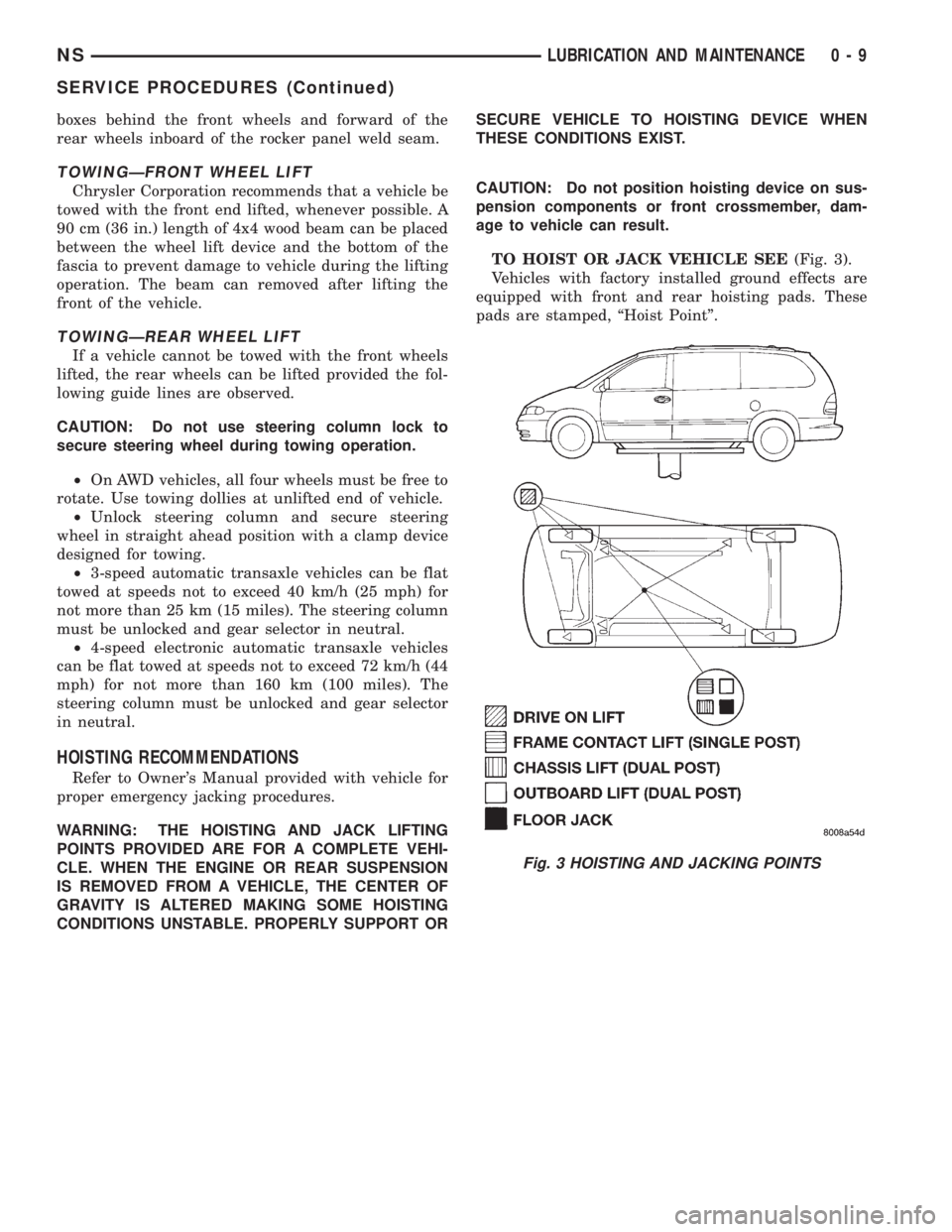
TO HOIST OR JACK VEHICLE SEE(Fig. 3).
Vehicles with factory installed ground effects are
equipped with front and rear hoisting pads. These
pads are stamped, ªHoist Pointº.
Fig. 3 HOISTING AND JACKING POINTS
NSLUBRICATION AND MAINTENANCE 0 - 9
SERVICE PROCEDURES (Continued)
Page 32 of 1938
NS vehicles can be tied to a flat bed device using
the reinforced loops located under the front and rear
bumpers on the drivers side of the vehicle. There are
also four reinforced elongated holes for T or R-hooks
located on the bottom of the front frame rail torque
boxes behind the front wheels and forward of the
rear wheels inboard of the rocker panel weld seam.
TOWINGÐFRONT WHEEL LIFT
Chrysler International recommends that a vehicle
be towed with the front end lifted, whenever possible.
A 90 cm (36 in.) length of 4x4 wood beam can be
placed between the wheel lift device and the bottom
of the fascia to prevent damage to vehicle during the
lifting operation. The beam can removed after lifting
the front of the vehicle.
TOWINGÐREAR WHEEL LIFT
If a vehicle cannot be towed with the front wheels
lifted, the rear wheels can be lifted provided the fol-
lowing guide lines are observed.
CAUTION: Do not use steering column lock to
secure steering wheel during towing operation.
²On AWD vehicles, all four wheels must be free to
rotate. Use towing dollies at unlifted end of vehicle.
²Unlock steering column and secure steering
wheel in straight ahead position with a clamp device
designed for towing.
²4-speed electronic automatic transaxle vehicles
can be flat towed at speeds not to exceed 72 km/h (44
mph) for not more than 160 km (100 miles). The
steering column must be unlocked and gear selector
in neutral.
TOWINGÐTOW HOOKS
WARNING: Do not use the tow hook to lift the vehi-
cle off the ground.
A tow-hook bolt, located in the rear interior trim
storage compartment (with jack), is provided with
your vehicle. The tow hook is used for towing the
vehicle with all four wheels on the ground only. It
can be attached to the vehicle through an opening in
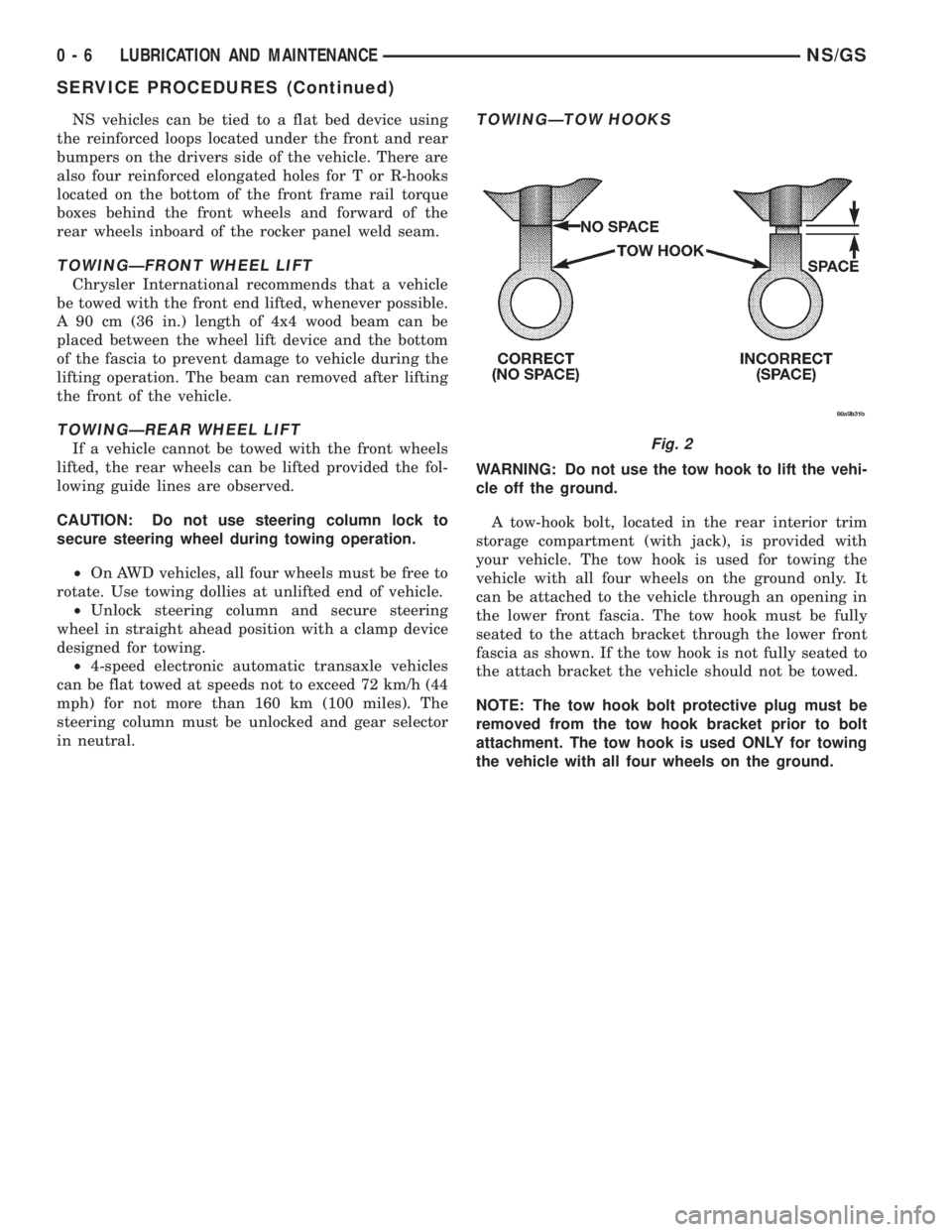
the lower front fascia. The tow hook must be fully
seated to the attach bracket through the lower front
fascia as shown. If the tow hook is not fully seated to
the attach bracket the vehicle should not be towed.
NOTE: The tow hook bolt protective plug must be
removed from the tow hook bracket prior to bolt
attachment. The tow hook is used ONLY for towing
the vehicle with all four wheels on the ground.
Fig. 2
0 - 6 LUBRICATION AND MAINTENANCENS/GS
SERVICE PROCEDURES (Continued)
Page 64 of 1938
²Inspect jounce bumper for cracks and signs of
deterioration.
(13) Replace any components of the strut assembly
found to be worn or defective during the inspection,
before re-assembling the strut.
ASSEMBLY
(1) Clamp strut in vise, with strut in vertical posi-
tion.Do not clamp strut in vise by body of strut,
only by the clevis bracket (Fig. 68).
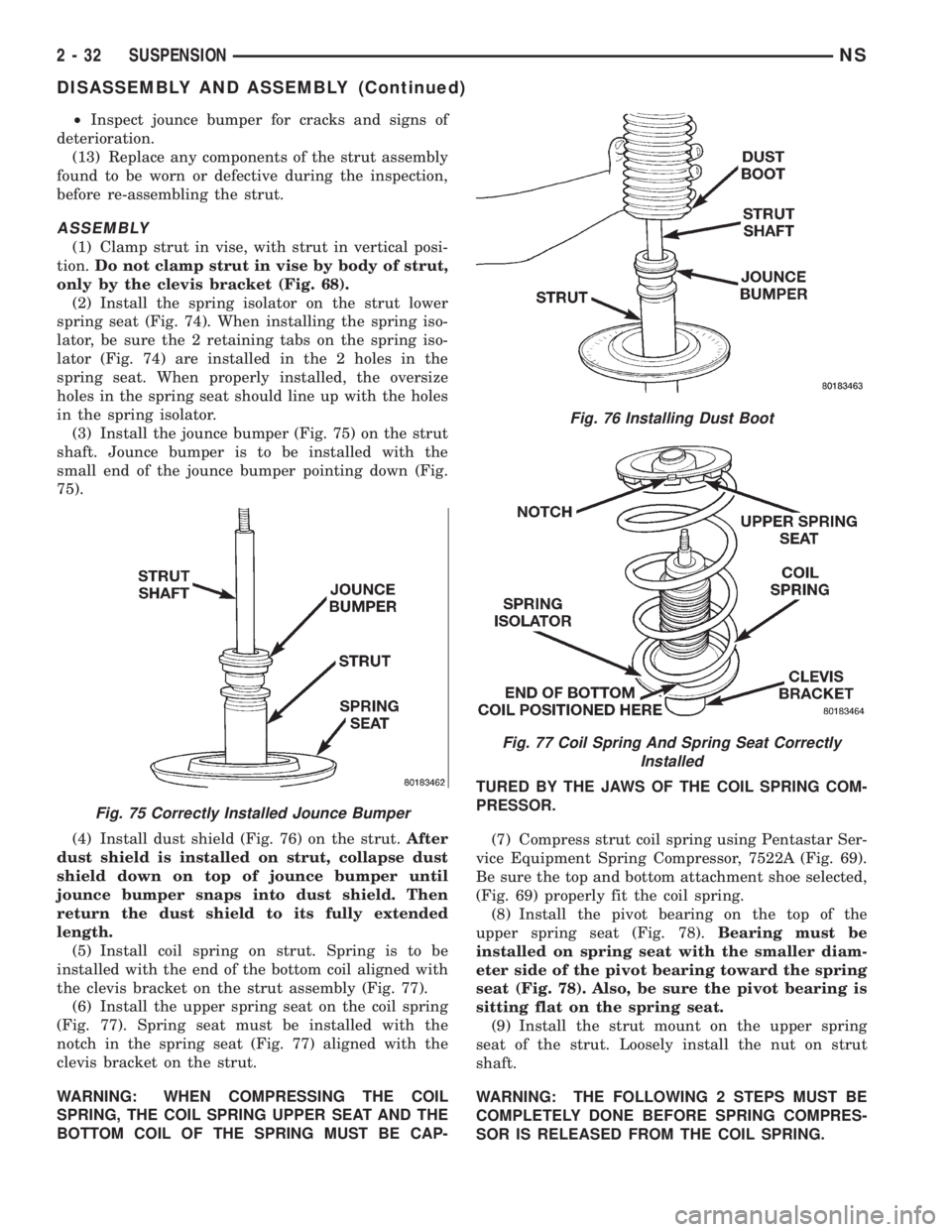
(2) Install the spring isolator on the strut lower
spring seat (Fig. 74). When installing the spring iso-
lator, be sure the 2 retaining tabs on the spring iso-
lator (Fig. 74) are installed in the 2 holes in the
spring seat. When properly installed, the oversize
holes in the spring seat should line up with the holes
in the spring isolator.
(3) Install the jounce bumper (Fig. 75) on the strut
shaft. Jounce bumper is to be installed with the
small end of the jounce bumper pointing down (Fig.
75).
(4) Install dust shield (Fig. 76) on the strut.After
dust shield is installed on strut, collapse dust
shield down on top of jounce bumper until
jounce bumper snaps into dust shield. Then
return the dust shield to its fully extended
length.
(5) Install coil spring on strut. Spring is to be
installed with the end of the bottom coil aligned with
the clevis bracket on the strut assembly (Fig. 77).
(6) Install the upper spring seat on the coil spring
(Fig. 77). Spring seat must be installed with the
notch in the spring seat (Fig. 77) aligned with the
clevis bracket on the strut.
WARNING: WHEN COMPRESSING THE COIL
SPRING, THE COIL SPRING UPPER SEAT AND THE
BOTTOM COIL OF THE SPRING MUST BE CAP-TURED BY THE JAWS OF THE COIL SPRING COM-
PRESSOR.
(7) Compress strut coil spring using Pentastar Ser-
vice Equipment Spring Compressor, 7522A (Fig. 69).
Be sure the top and bottom attachment shoe selected,
(Fig. 69) properly fit the coil spring.
(8) Install the pivot bearing on the top of the
upper spring seat (Fig. 78).Bearing must be
installed on spring seat with the smaller diam-
eter side of the pivot bearing toward the spring
seat (Fig. 78). Also, be sure the pivot bearing is
sitting flat on the spring seat.
(9) Install the strut mount on the upper spring
seat of the strut. Loosely install the nut on strut
shaft.
WARNING: THE FOLLOWING 2 STEPS MUST BE
COMPLETELY DONE BEFORE SPRING COMPRES-
SOR IS RELEASED FROM THE COIL SPRING.
Fig. 75 Correctly Installed Jounce Bumper
Fig. 76 Installing Dust Boot
Fig. 77 Coil Spring And Spring Seat Correctly
Installed
2 - 32 SUSPENSIONNS
DISASSEMBLY AND ASSEMBLY (Continued)
Page 67 of 1938
the Nut, Special Tool 6908±3 (Fig. 84). This will pull
the front bushing into the lower control arm.
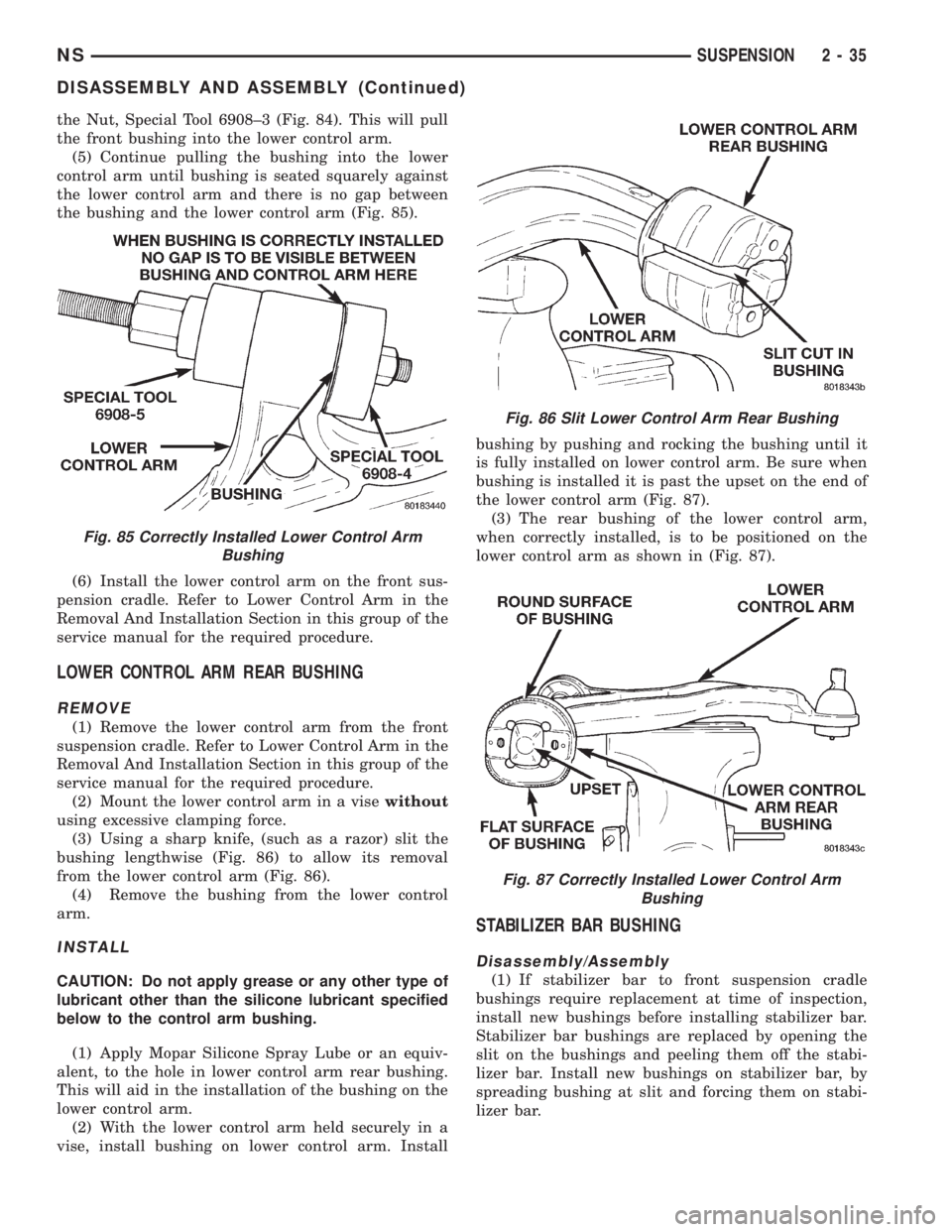
(5) Continue pulling the bushing into the lower
control arm until bushing is seated squarely against
the lower control arm and there is no gap between
the bushing and the lower control arm (Fig. 85).
(6) Install the lower control arm on the front sus-
pension cradle. Refer to Lower Control Arm in the
Removal And Installation Section in this group of the
service manual for the required procedure.
LOWER CONTROL ARM REAR BUSHING
REMOVE
(1) Remove the lower control arm from the front
suspension cradle. Refer to Lower Control Arm in the
Removal And Installation Section in this group of the
service manual for the required procedure.
(2) Mount the lower control arm in a visewithout
using excessive clamping force.
(3) Using a sharp knife, (such as a razor) slit the
bushing lengthwise (Fig. 86) to allow its removal
from the lower control arm (Fig. 86).
(4) Remove the bushing from the lower control
arm.
INSTALL
CAUTION: Do not apply grease or any other type of
lubricant other than the silicone lubricant specified
below to the control arm bushing.
(1) Apply Mopar Silicone Spray Lube or an equiv-
alent, to the hole in lower control arm rear bushing.
This will aid in the installation of the bushing on the
lower control arm.
(2) With the lower control arm held securely in a
vise, install bushing on lower control arm. Installbushing by pushing and rocking the bushing until it
is fully installed on lower control arm. Be sure when
bushing is installed it is past the upset on the end of
the lower control arm (Fig. 87).
(3) The rear bushing of the lower control arm,
when correctly installed, is to be positioned on the
lower control arm as shown in (Fig. 87).
STABILIZER BAR BUSHING
Disassembly/Assembly
(1) If stabilizer bar to front suspension cradle
bushings require replacement at time of inspection,
install new bushings before installing stabilizer bar.
Stabilizer bar bushings are replaced by opening the
slit on the bushings and peeling them off the stabi-
lizer bar. Install new bushings on stabilizer bar, by
spreading bushing at slit and forcing them on stabi-
lizer bar.
Fig. 85 Correctly Installed Lower Control Arm
Bushing
Fig. 86 Slit Lower Control Arm Rear Bushing
Fig. 87 Correctly Installed Lower Control Arm
Bushing
NSSUSPENSION 2 - 35
DISASSEMBLY AND ASSEMBLY (Continued)
Page 154 of 1938
Check the guide pin dust boots to determine if they
are in good condition. Replace if they are damaged,
dry, or found to be brittle. Refer to Guide Pin Bush-
ing Service in Disc Brake Caliper Service in this sec-
tion of the service manual.
CALIPER GUIDE PIN BUSHING SERVICE
The double pin caliper uses a sealed for life bush-
ing and sleeve assembly. If required this assembly
can be serviced using the following procedure.
REMOVING CALIPER GUIDE PIN BUSHINGS
(1) Remove caliper from brake rotor (See Brake
Shoe Removal). Hang caliper assembly on a wire
hook away from the brake rotor.
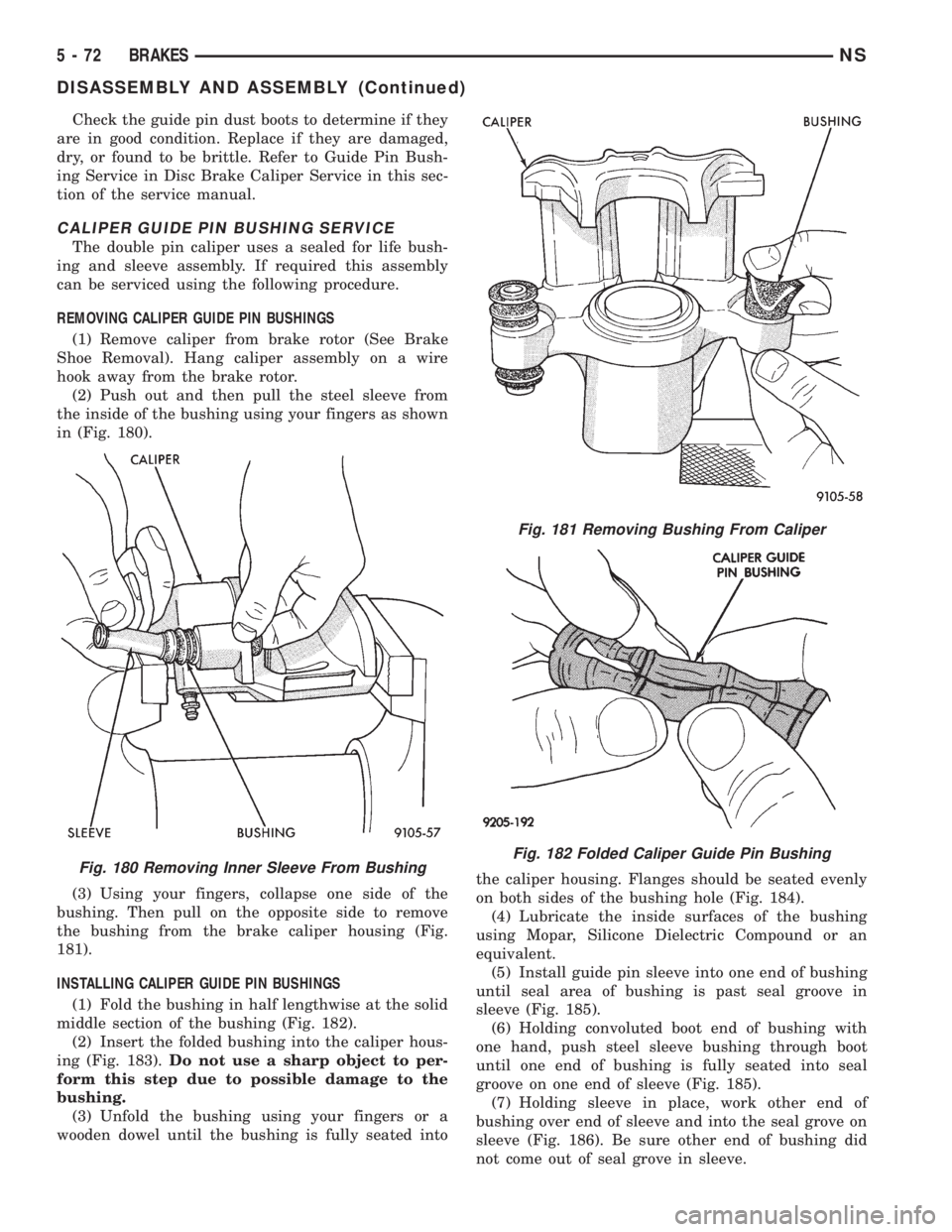
(2) Push out and then pull the steel sleeve from
the inside of the bushing using your fingers as shown
in (Fig. 180).
(3) Using your fingers, collapse one side of the
bushing. Then pull on the opposite side to remove
the bushing from the brake caliper housing (Fig.
181).
INSTALLING CALIPER GUIDE PIN BUSHINGS
(1) Fold the bushing in half lengthwise at the solid
middle section of the bushing (Fig. 182).
(2) Insert the folded bushing into the caliper hous-
ing (Fig. 183).Do not use a sharp object to per-
form this step due to possible damage to the
bushing.
(3) Unfold the bushing using your fingers or a
wooden dowel until the bushing is fully seated intothe caliper housing. Flanges should be seated evenly
on both sides of the bushing hole (Fig. 184).
(4) Lubricate the inside surfaces of the bushing
using Mopar, Silicone Dielectric Compound or an
equivalent.
(5) Install guide pin sleeve into one end of bushing
until seal area of bushing is past seal groove in
sleeve (Fig. 185).
(6) Holding convoluted boot end of bushing with
one hand, push steel sleeve bushing through boot
until one end of bushing is fully seated into seal
groove on one end of sleeve (Fig. 185).
(7) Holding sleeve in place, work other end of
bushing over end of sleeve and into the seal grove on
sleeve (Fig. 186). Be sure other end of bushing did
not come out of seal grove in sleeve.
Fig. 180 Removing Inner Sleeve From Bushing
Fig. 181 Removing Bushing From Caliper
Fig. 182 Folded Caliper Guide Pin Bushing
5 - 72 BRAKESNS
DISASSEMBLY AND ASSEMBLY (Continued)
Page 262 of 1938
SPECIFICATIONS
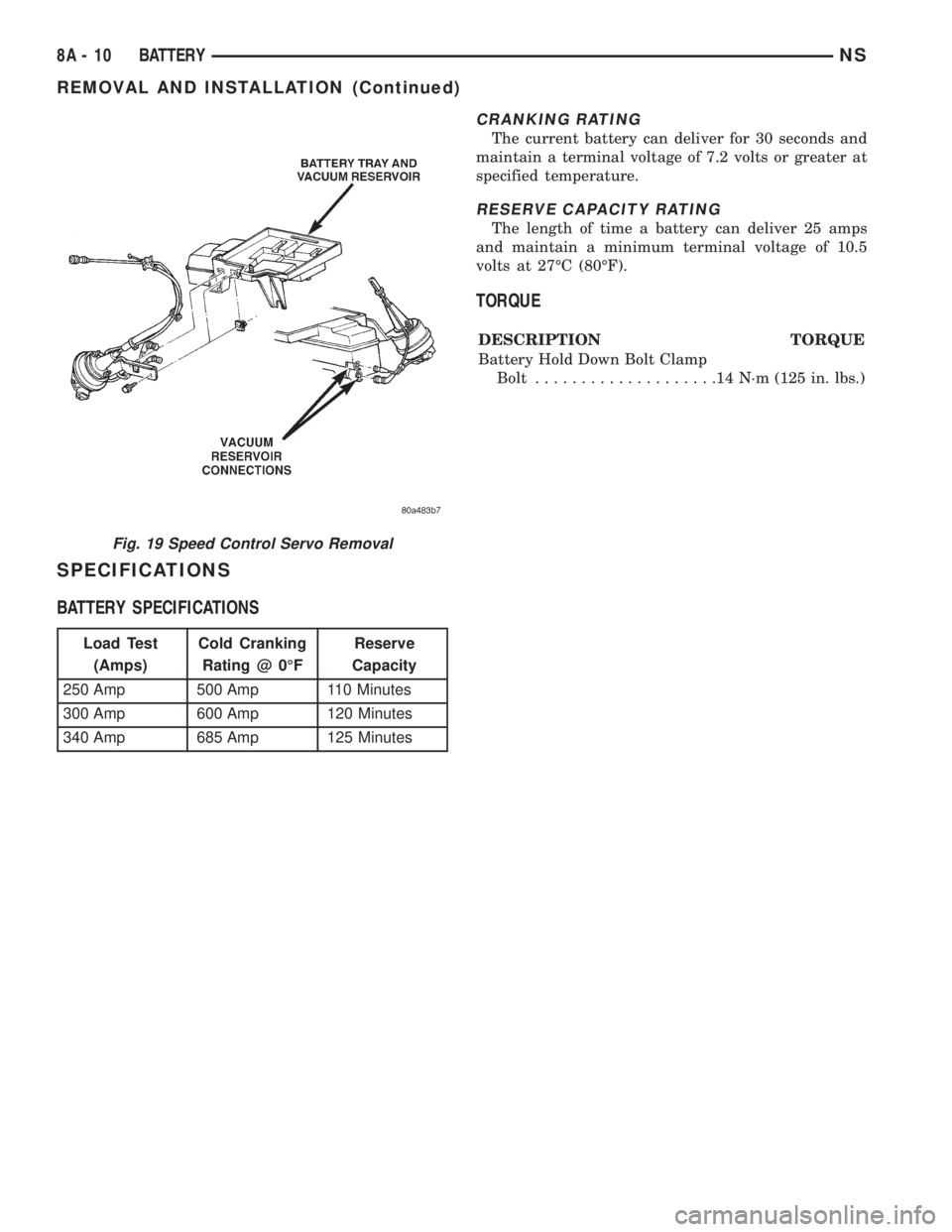
BATTERY SPECIFICATIONS
CRANKING RATING
The current battery can deliver for 30 seconds and
maintain a terminal voltage of 7.2 volts or greater at
specified temperature.
RESERVE CAPACITY RATING
The length of time a battery can deliver 25 amps
and maintain a minimum terminal voltage of 10.5
volts at 27ÉC (80ÉF).
TORQUE
DESCRIPTION TORQUE
Battery Hold Down Bolt Clamp
Bolt....................14N´m(125 in. lbs.)
Fig. 19 Speed Control Servo Removal
Load Test
(Amps)Cold Cranking
Rating @ 0ÉFReserve
Capacity
250 Amp 500 Amp 110 Minutes
300 Amp 600 Amp 120 Minutes
340 Amp 685 Amp 125 Minutes
8A - 10 BATTERYNS
REMOVAL AND INSTALLATION (Continued)
Page 403 of 1938

AUDIO SYSTEMS
CONTENTS
page page
GENERAL INFORMATION
INTRODUCTION......................... 1
DESCRIPTION AND OPERATION
ANTENNA.............................. 1
CHOKEÐINFINITY SPEAKERS.............. 2
INTERFERENCE ELIMINATION.............. 1
NAME BRAND SPEAKER RELAY............ 3
RADIO IGNITION INTERFERENCE........... 2
RADIOS................................ 1
REMOTE RADIO SWITCHES................ 3
DIAGNOSIS AND TESTING
ANTENNA.............................. 3AUDIO SYSTEM......................... 4
RADIO................................. 4
REMOTE RADIO SWITCHES................ 6
REMOVAL AND INSTALLATION
ANTENNA EXTENSION CABLE.............. 7
ANTENNA MAST AND CABLE LEAD......... 7
D±PILLAR SPEAKER.................... 10
FRONT DOOR SPEAKER................... 9
INSTRUMENT PANEL SPEAKER............. 8
QUARTER PANEL SPEAKER............... 10
RADIO/TAPE/CD PLAYER.................. 8
REMOTE RADIO SWITCHES................ 9
GENERAL INFORMATION
INTRODUCTION
Operating instructions for the factory installed
audio systems can be found in the Owner's Manual
provided with the vehicle.
NS vehicles are equipped with an Ignition Off
Draw (IOD) fuse in the power distribution center
located in the engine compartment. After the IOD
fuse or battery has been disconnected, the radio sta-
tion sets and clock will require resetting.
DESCRIPTION AND OPERATION
ANTENNA
All models use a fixed-length stainless steel rod-
type antenna mast, installed at the right front fender
of the vehicle. The antenna mast is connected to the
center wire of the coaxial antenna cable, and is not
grounded to any part of the vehicle.
To eliminate static, the antenna base must have a
good ground. The coaxial antenna cable shield (the
outer wire mesh of the cable) is grounded to the
antenna base and the radio chassis.
The antenna coaxial cable has an additional dis-
connect, located near the right end of the instrument
panel. This additional disconnect allows the instru-
ment panel assembly to be removed and installed
without removing the radio.
The factory-installed Electronically Tuned Radios
(ETRs) automatically compensate for radio antenna
trim. Therefore, no antenna trimmer adjustment isrequired or possible when replacing the receiver or
the antenna.
INTERFERENCE ELIMINATION
Some components used on the vehicles are
equipped with a capacitor to suppress radio fre-
quency interference/static.
Capacitors are mounted in various locations inter-
nal to the generator, instrument cluster and wind-
shield wiper motor.
To eliminate radio interference, ground straps are
used in different areas of the vehicle. These ground
circuits should be securely tightened to assure good
metal to metal contact. The ground straps conduct
very small high frequency electrical signals to ground
and require clean surface contact area. The radio
ground is supplied from the instrument panel har-
ness and is attached to the rear of the radio. Some
engines have other ground straps to eliminate fur-
ther radio interference:
²Radio chassis to instrument panel structure
²Engine to dash panel
²Engine to chassis
²A/C h valve to dash panel
Radio resistance type spark plug cables in the high
tension circuit of the ignition system complete the
interference suppression. Faulty or deteriorated
spark plug wires should be replaced.
RADIOS
Available factory-installed radio receivers for this
model include an AM/FM/cassette (RAS sales code),
an AM/FM/cassette/5-band graphic equalizer with CD
changer control feature (RBN sales code), an AM/FM/
NSAUDIO SYSTEMS 8F - 1
Page 419 of 1938

STEP IS NOT DONE A DIAGONSTIC TROUBLE
CODE (DTC) MAY BE SET.
VACUUM RESERVOIR
The reservoir contains a one-way check valve to
trap engine vacuum in the reservoir. When engine
vacuum drops, as in climbing a grade while driving,
the reservoir supplies the vacuum needed to main-
tain proper speed control operation. The vacuum res-
ervoir cannot be repaired and must be replaced if
faulty.
VEHICLE SPEED AND DISTANCE
The 4 speed automatic Transmission Control Mod-
ule (TCM) supplies the speed input to the PCM. The
PCM determines acceleration rates. The speed con-
trol software in the PCM uses vehicle speed and
acceleration to control to the set speed.
Vehicles with a 3 speed automatic or manual trans-
mission have a vehicle speed sensor (VSS) mounted
to an adapter near the transmission output shaft.
The sensor is driven through the adapter by a speed-
ometer pinion gear. The VSS pulse signal is moni-
tored by the PCM to determine vehicle speed and to
maintain speed control set speed. Refer to the appro-
priate Powertrain Diagnostic Procedures manual for
diagnosis and testing of this component. Refer to
group 14, Fuel System for Removal/Installation
DIAGNOSIS AND TESTING
ROAD TEST
Perform a vehicle road test to verify reports of
speed control system malfunction. The road test
should include attention to the speedometer. Speed-
ometer operation should be smooth and without flut-
ter at all speeds.
Flutter in the speedometer indicates a problem
which might cause surging in the speed control sys-
tem. The cause of any speedometer problems should
be corrected before proceeding. Refer to Group 8E,
Instrument Panel and Gauges for speedometer diag-
nosis.
If a road test verifies a surge following a set and
the speedometer operates properly see ªOvershoot/
Undershoot on speed control setº.
If a road test verifies an inoperative system, and
the speedometer operates properly, check for:
²A Diagnostic Trouble Code (DTC). If a DTC
exists, conduct tests per the Powertrain Diagnostic
Procedures service manual.
²A misadjusted brake (stop) lamp switch. This
could also cause an intermittent problem.
²Loose or corroded electrical connections at the
servo. Corrosion should be removed from electricalterminals and a light coating of Mopar Multipurpose
Grease, or equivalent, applied.
²Leaking vacuum reservoir.
²Loose or leaking vacuum hoses or connections.
²Defective one-way vacuum check valve.
²Secure attachment at both ends of the speed
control servo cable.
²Smooth operation of throttle linkage and throttle
body air valve.
²Conduct electrical test at PCM.
²Failed speed control servo. Do the servo vacuum
test.
CAUTION: When test probing for voltage or conti-
nuity at electrical connectors, care must be taken
not to damage connector, terminals or seals. If
these components are damaged, intermittent or
complete system failure may occur.
OVERSHOOT/UNDERSHOOT FOLLOWING SPEED
CONTROL SET
If the operator repeatedly presses and releases the
set button with their foot off of the accelerator (a ªlift
foot setº to begin speed control operation), the vehicle
may accelerate and exceed the desired set speed by
up to 5 MPH (8 km/h) and then decelerate to less
than the desired set speed before finally achieving
the desired set speed.
The Speed Control has an adaptive strategy that
compensates for vehicle-to-vehicle variations in speed
control cable lengths. When the speed control is set
with the vehicle operators foot off of the accelerator
pedal, the speed control thinks there is excessive
speed control cable slack and adapts. If the lift foot
sets are continually used, the speed control over-
shoot/undershoot condition will develop.
To ªunlearnº the overshoot/undershoot condition,
the vehicle operator has to press and release the set
button while maintaining the desired set speed with
the accelerator pedal (not decelerating or accelerat-
ing), and then turn the cruise control switch to the
OFF position (or press the CANCEL button if
equipped) after waiting 10 seconds. This procedure
must be performed approximately 10±15 times to
completely unlearn the overshoot/undershoot condi-
tion.
CHECKING FOR DIAGNOSTIC CODES
When trying to verify a speed control system elec-
tronic malfunction: Connect a DRB scan tool if avail-
able to the data link connector. The connector is
located at left side of the steering column, and at
lower edge of the panel.
(1) A speed control malfunction may occur without
a diagnostic code being indicated.
NSVEHICLE SPEED CONTROL SYSTEM 8H - 3
DESCRIPTION AND OPERATION (Continued)
Page 537 of 1938

coming from the module, replace the Memory Seat/
Mirror Module.
²If P9 low current battery is present at (cavity 5)
referenced to ground Z1 (cavity 1) of the seat switch,
verify the presence of the P9 voltage at the switch
outputs. If there is no output voltage from the
switch, replace the switch.
²If P9 voltage is present at the output of the
switch, but there is no reaction from the memory
seat/mirror module, verify that the P9 voltage is
present at the appropriate 21-way connector pins
into the module. If the P9 voltage is not present at
the 21-way connector, repair or replace the seat wir-
ing harness. If the verification check of the seat wir-
ing harness is correct, replace the control module.
(2) If the control module does not respond with a
relay click to a specific seat switch when actuated,
verify the continuity of the particular circuit between
the seat switch and the Memory Seat/Mirror Module.
If the P9 voltage is present at the correct input of the
21-way connector of the module when the switch is
actuated, but there is no response by the module,
replace the Memory Seat/Mirror Module.
(3) If the Memory Seat/Mirror Module responds
with a relay click when a seat switch is actuated for
a given direction, but there is no reaction from a seat
or recliner motor relating to that switch input, dis-
connect the 10-way connector from the control mod-
ule. Jumper the battery and ground from cavities 8
and 7 of the seat harness 10-way connector to the
proper cavities for the seat or recliner motor in ques-
tion and direction of travel desired. If the motor oper-
ates, replace the control module. If the motor does
not operate, verify continuity of the wiring into the
motor 2-way connector. Repair or replace the wiring
as necessary. If the wiring has continuity, and the
motor will not operate when fed directly, replace the
track assembly, since the motor/transmission combi-
nations are not designed to be serviced on an individ-
ual basis.
SEAT AND RECLINER POSITION SENSING
Seat and recliner position sense ground reference
circuit P28 BR/RD feed is from the memory seat/mir-
ror module (cavity 10) 21-way connector to each of
the position sense connectors.
Seat and recliner position sense +5 volt feed circuit
P29 BR/WT feed is from the memory seat/mirror
module (cavity 20) 21-way connector to each of the
position sense connectors.
To test for the presence of a sense voltage, a volt
meter must be used as follows:
²Connect the negative probe to the P28 circuit
(cavity 10) of the 21-way connector.
²Connect the positive probe to the P29 circuit
(cavity 20) of the 21-way connector and verify a volt-age reading between 3.5 and 5 volts when a seat or
recliner switch is activated.An internal timer in
the Memory Seat/Mirror Module (MSM Module)
regulates the length of time this voltage stays
active i.e., 3 seconds from the time that the
switch was activated, unless the switch is held
or while the transmission is out of PARK.If the
voltage is less than 3.5, there is a fault in the system
that is drawing it down. To troubleshoot this circuit,
disconnect the 25-way connector from the MSM Mod-
ule (this removes all of the vehicle mirror circuitry).
If the voltage is still less than 3.5, disconnect each of
the position sense connectors from each of the
motors. If the voltage remains less than 3.5, replace
the MSM Module. If the voltage increases when a
motor is disconnected from the system, determine if
the fault is in the wiring or the motor assembly.
Repair or replace the wire harness assembly as
needed. If the fault is in the motor position sensing
potentiometer, replace the track assembly.
²The potentiometers built onto the motor end-bell
provide voltages to the MSM Module through the
21-way connector, which change as follows, corre-
sponding to the given seat actuations. Refer to Seat
Actuations Table.
SERVICE PROCEDURES
REMOTE KEYLESS ENTRY (RKE) DATA LINK
The memory seat/mirror module interfaces with
the RKE via a serial data link (single wire). The pro-
gramming sequence to relate an RKE transmitter to
the chosen seat, recliner and side view mirror posi-
tions consists of the following steps:
(1) Adjust the seat, recliner and side view mirrors
to the desired position.
(2) Press momentarily and release memory switch
S.
(3) Press momentarily and release memory switch
1or2.
(4) Press momentarily and release a LOCK button
on an RKE transmitter.
(5) To program the second driver's position, follow
the previous sequence with a second transmitter.
(6) To recall either of the programmed positions
with an RKE transmitter, press momentarily and
release an UNLOCK button on one of the pro-
grammed RKE transmitters.An unprogrammed
RKE transmitter will have no effect on the sys-
tem.
(7) The RKE receiver uses the serial data link to
notify the module of a request from a programmed
transmitter, that an UNLOCK button has been
pressed. This UNLOCK request (from a transmitter
associated with either switch 1 or 2) will activate the
NSPOWER SEATS 8R - 9
DIAGNOSIS AND TESTING (Continued)
Page 555 of 1938
Removing magnetic interfering objects will usually
restore normal compass operation. If the compass
display remains blank while the CAL label is illumi-
nated, then the roof panel requires demagnetizing. To
demagnetize use Special Tool 6029 for demagnetizing
the roof panel. The demagnetizing procedure will
demagnetize the roof and mounting screws in the
overhead console. It is important that you follow the
instructions below exactly. The mounting screws and
the mounting brackets around the compass area are
steel, and therefore aid in the demagnetizing of the
roof panel.
(1) Be sure the ignition switch is in the OFF posi-
tion before you begin the demagnetize procedure.
(2) Plug the demagnetizing tool into a standard
110/115 volt AC outlet, keeping the demagnetizing
tool at least 12 inches away from the compass area
when plugging it in.
(3) Slowly approach and contact the console
mounting screw with the plastic coated tip of the tool
for at least two seconds.
(4) With the demagnetizing tool still energized,
slowly back it away from the screw until the tip is at
least 12 inches from the screw head.
(5) Repeat the last step with all the console
mounting screws.
(6) After you have pulled at least 12 inches from
the last screw, remove the demagnetizing tool from
inside vehicle and disconnect it from the electrical
outlet.
(7) Place an 8 1/2 X 11 inch piece of paper length-
wise on the roof of vehicle directly above compass.
The purpose of the paper is to protect the roof panel
from scratches and define the area to be demagne-
tized.
(8) Plug in the demagnetizing tool, keeping it at
least two feet away from the compass unit.
(9) Slowly approach the center of the roof panel at
the windshield with the demagnetizing tool plugged
in.
(10) Contact the roof panel with the tip of the tool.
Using slow sweeping motions of 1/2 inch between
sweeps. Move the tool approximately four inches
either side of the center line and at least 11 inches
back from the windshield.
(11) With the demagnetizing tool still energized,
slowly back away from the roof panel until the tip is
at least two feet from the roof before unplugging the
tool.
(12) Recalibrate compass, refer to the compass cal-
ibration procedure in this section.
UNIVERSAL TRANSMITTER
TRAINING
(1) Turn off the engine.(2) Erase the factory test codes by pressing the
two outside buttons. Release the buttons when the
red light begins to flash (about 20 seconds).
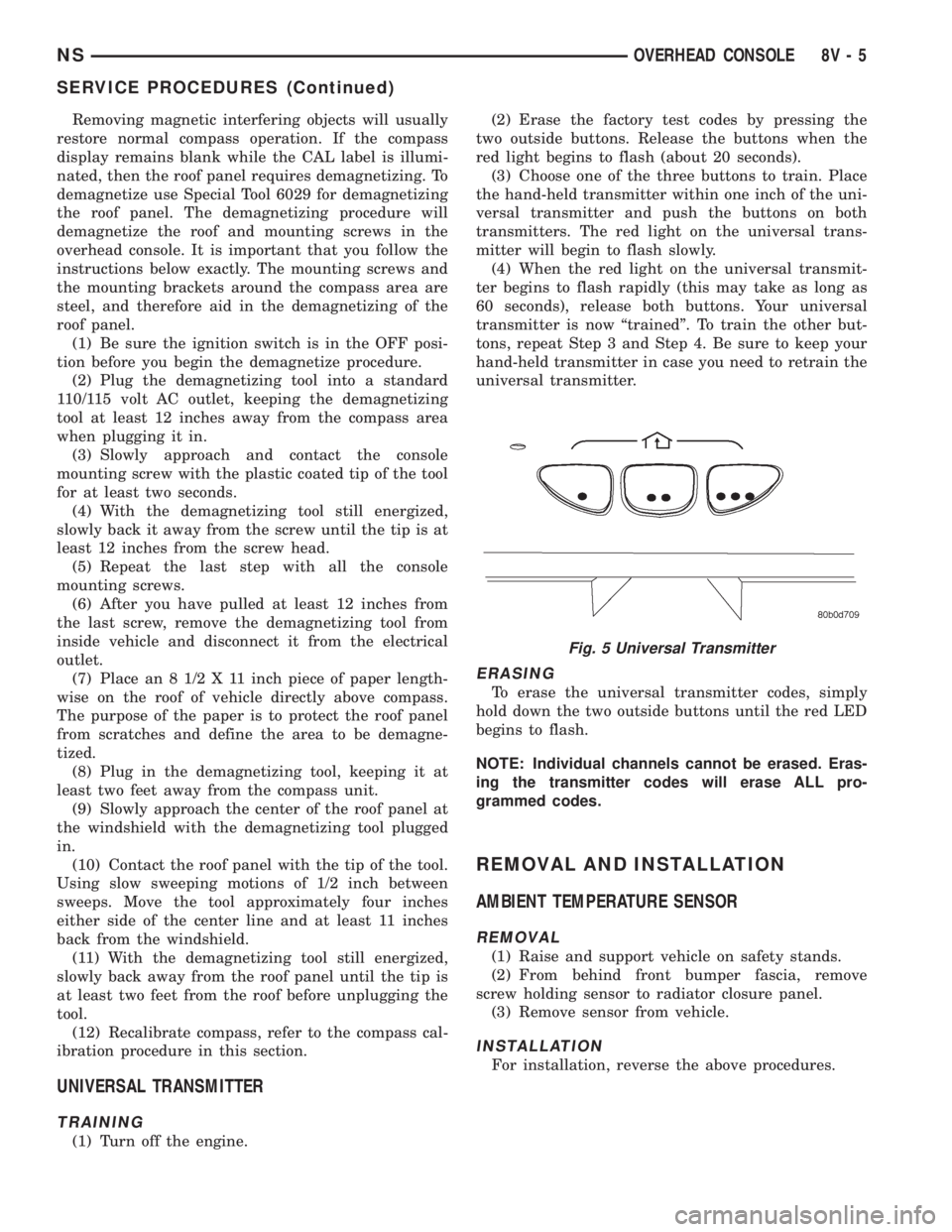
(3) Choose one of the three buttons to train. Place
the hand-held transmitter within one inch of the uni-
versal transmitter and push the buttons on both
transmitters. The red light on the universal trans-
mitter will begin to flash slowly.
(4) When the red light on the universal transmit-
ter begins to flash rapidly (this may take as long as
60 seconds), release both buttons. Your universal
transmitter is now ªtrainedº. To train the other but-
tons, repeat Step 3 and Step 4. Be sure to keep your
hand-held transmitter in case you need to retrain the
universal transmitter.
ERASING
To erase the universal transmitter codes, simply
hold down the two outside buttons until the red LED
begins to flash.
NOTE: Individual channels cannot be erased. Eras-
ing the transmitter codes will erase ALL pro-
grammed codes.
REMOVAL AND INSTALLATION
AMBIENT TEMPERATURE SENSOR
REMOVAL
(1) Raise and support vehicle on safety stands.
(2) From behind front bumper fascia, remove
screw holding sensor to radiator closure panel.
(3) Remove sensor from vehicle.
INSTALLATION
For installation, reverse the above procedures.
Fig. 5 Universal Transmitter
NSOVERHEAD CONSOLE 8V - 5
SERVICE PROCEDURES (Continued)