remote control CHRYSLER VOYAGER 2001 Owner's Manual
[x] Cancel search | Manufacturer: CHRYSLER, Model Year: 2001, Model line: VOYAGER, Model: CHRYSLER VOYAGER 2001Pages: 4284, PDF Size: 83.53 MB
Page 274 of 4284
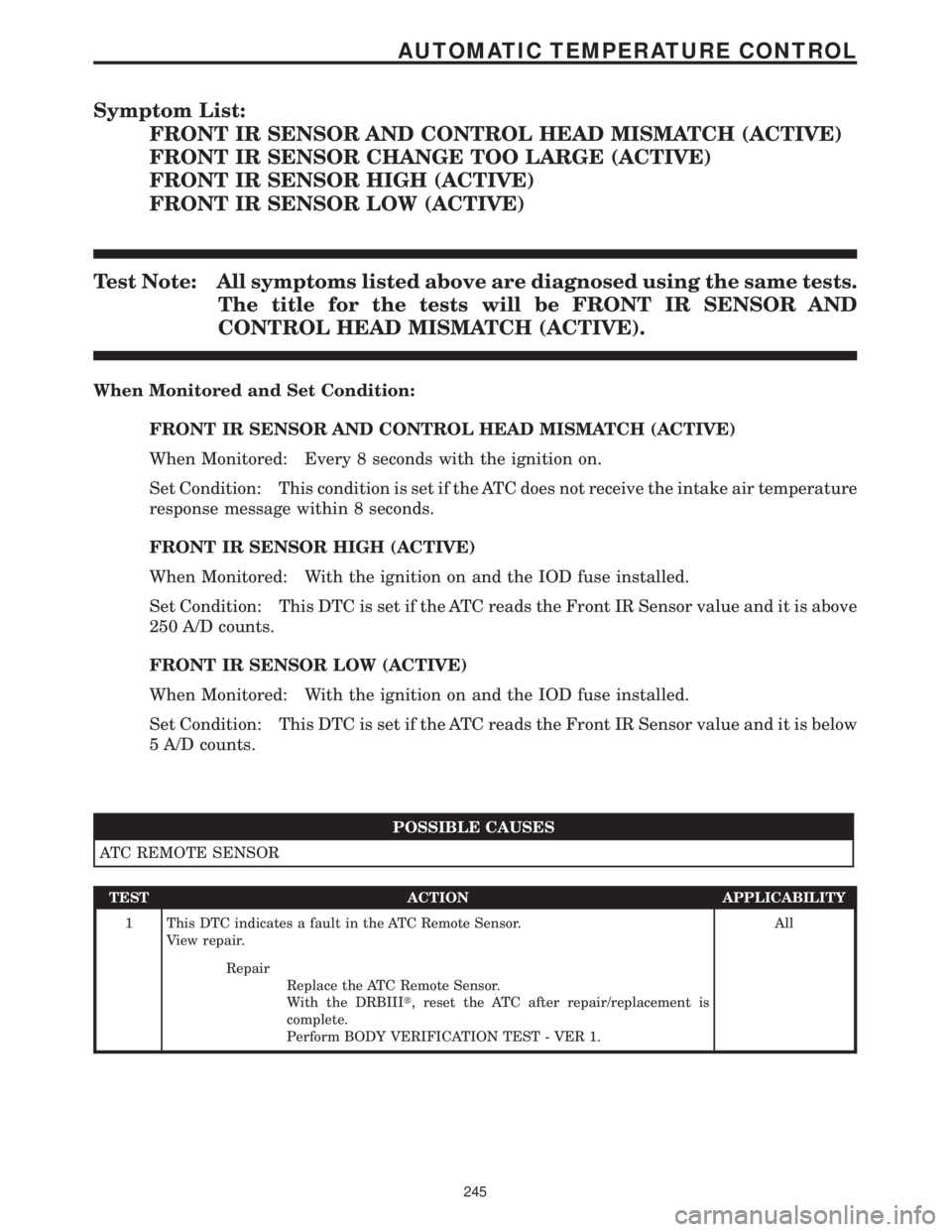
Symptom List:
FRONT IR SENSOR AND CONTROL HEAD MISMATCH (ACTIVE)
FRONT IR SENSOR CHANGE TOO LARGE (ACTIVE)
FRONT IR SENSOR HIGH (ACTIVE)
FRONT IR SENSOR LOW (ACTIVE)
Test Note: All symptoms listed above are diagnosed using the same tests.
The title for the tests will be FRONT IR SENSOR AND
CONTROL HEAD MISMATCH (ACTIVE).
When Monitored and Set Condition:
FRONT IR SENSOR AND CONTROL HEAD MISMATCH (ACTIVE)
When Monitored: Every 8 seconds with the ignition on.
Set Condition: This condition is set if the ATC does not receive the intake air temperature
response message within 8 seconds.
FRONT IR SENSOR HIGH (ACTIVE)
When Monitored: With the ignition on and the IOD fuse installed.
Set Condition: This DTC is set if the ATC reads the Front IR Sensor value and it is above
250 A/D counts.
FRONT IR SENSOR LOW (ACTIVE)
When Monitored: With the ignition on and the IOD fuse installed.
Set Condition: This DTC is set if the ATC reads the Front IR Sensor value and it is below
5 A/D counts.
POSSIBLE CAUSES
ATC REMOTE SENSOR
TEST ACTION APPLICABILITY
1 This DTC indicates a fault in the ATC Remote Sensor.
View repair.All
Repair
Replace the ATC Remote Sensor.
With the DRBIIIt, reset the ATC after repair/replacement is
complete.
Perform BODY VERIFICATION TEST - VER 1.
245
AUTOMATIC TEMPERATURE CONTROL
Page 275 of 4284

Symptom List:
FRONT IR SENSOR NOT CALIBRATED (ACTIVE)
FRONT KEYBOARD FAULT (ACTIVE)
Test Note: All symptoms listed above are diagnosed using the same tests.
The title for the tests will be FRONT IR SENSOR NOT
CALIBRATED (ACTIVE).
When Monitored and Set Condition:
FRONT IR SENSOR NOT CALIBRATED (ACTIVE)
When Monitored: With the ignition on and the IOD fuse installed.
Set Condition: This DTC is set if the ATC cannot read the IR sensor values or the IR
sensor values are not within a defined range of the HVAC air door motor counts.
POSSIBLE CAUSES
ATC - PROTECTED IGNITION CIRCUIT FAULT
KDB 2 CLOCK CIRCUIT SHORTED TO VOLTAGE
KDB 2 DATA CIRCUIT SHORTED TO GROUND
KDB 2 DATA CIRCUIT SHORTED TO VOLTAGE
PROTECTED IGNITION CIRCUIT OPEN
SENSOR RETURN CIRCUIT OPEN
KDB 2 CLOCK CIRCUIT SHORTED TO GROUND
KDB 2 DATA CIRCUIT OPEN
ATC - KDB 2 DATA CIRCUIT FAULT
ATC - SENSOR RETURN CIRCUIT FAULT
KDB 2 CLOCK CIRCUIT OPEN
ATC - KDB 2 CLOCK CIRCUIT FAULT
ATC REMOTE SENSOR
TEST ACTION APPLICABILITY
1 Turn the ignition off.
Disconnect the ATC Remote Sensor harness connector.
Turn the ignition on.
Measure the voltage of the Protected Ignition circuit.
Is the voltage above 10.0 volts?All
Ye s®Go To 2
No®Go To 16
246
AUTOMATIC TEMPERATURE CONTROL
Page 276 of 4284

TEST ACTION APPLICABILITY
2 Turn the ignition off.
Disconnect the ATC Remote Sensor harness connector.
Turn the ignition on.
Measure the voltage of the KDB 2 Data circuit.
Is the voltage above 10.0 volts?All
Ye s®Go To 3
No®Go To 13
3 Turn the ignition off.
Disconnect the ATC Remote Sensor harness connector.
Disconnect the ATC C3 harness connector.
Turn the ignition on.
Measure the voltage of the KDB 2 Data circuit.
Is the voltage above 1.0 volt?All
Ye s®Repair the KDB 2 Data circuit for a short to voltage.
With the DRBIIIt, reset the ATC after repair/replacement is
complete.
Perform BODY VERIFICATION TEST - VER 1.
No®Go To 4
4 Turn the ignition off.
Disconnect the ATC Remote Sensor harness connector.
Use Scope input cable CH7058, Cable to Probe adapter CH7062, and the red and
black test probes.
Connect the scope input cable to the channel one connector on the DRB. Attach the
red and black leads and the cable to probe adapter to the scope input cable.
Select Lab Scope.
Select Live.
Select 12 volt square wave.
Press F2 for Scope.
Press F2 and use the arrows to set the voltage range to 20 volts, the Offset to 4.0, and
the Probe to x10. Press F2 again and set the divisions to 40ms/Div, then press F2
again when complete.
Connect the Black lead to the chassis ground. Connect the Red lead to the KDB 2
Clock circuit in the ATC Remote Sensor harness connector.
Turn the ignition on.
Observe the voltage display on the DRB Lab Scope.
NOTE: The lab scope pattern should look similar to the example given in the
support material and cycle from approximately 0 volts to 8.0 volts.
Did the lab scope pattern and voltage react as noted above?All
Ye s®Go To 5
No®Go To 9
5 Turn the ignition off.
Disconnect the ATC Remote Sensor harness connector.
Measure the resistance between ground and the Sensor Return circuit.
Is the resistance below 10 ohms?All
Ye s®Go To 6
No®Go To 7
247
AUTOMATIC TEMPERATURE CONTROL
FRONT IR SENSOR NOT CALIBRATED (ACTIVE) ÐContinued
Page 277 of 4284

TEST ACTION APPLICABILITY
6 If there are no possible causes remaining, view repair. All
Repair
Replace the ATC Remote Sensor.
With the DRBIIIt, reset the ATC after repair/replacement is
complete.
Perform BODY VERIFICATION TEST - VER 1.
7 Turn the ignition off.
Disconnect the ATC Remote Sensor harness connector.
Measure the resistance of the Sensor Return circuit.
Is the resistance below 5.0 ohms?All
Ye s®Go To 8
No®Repair the Sensor Return circuit for an open.
With the DRBIIIt, reset the ATC after repair/replacement is
complete.
Perform BODY VERIFICATION TEST - VER 1.
8 If there are no possible causes remaining, view repair. All
Repair
Replace the ATC.
With the DRBIIIt, reset the ATC after repair/replacement is
complete.
Perform BODY VERIFICATION TEST - VER 1.
9 Turn the ignition off.
Disconnect the ATC Remote Sensor harness connector.
Disconnect the ATC C3 harness connector.
Turn the ignition on.
Measure the voltage of the KDB 2 Clock circuit.
Is the voltage above 1.0 volt?All
Ye s®Repair the KDB 2 Clock circuit for a short to voltage.
With the DRBIIIt, reset the ATC after repair/replacement is
complete.
Perform BODY VERIFICATION TEST - VER 1.
No®Go To 10
10 Turn the ignition off.
Disconnect the ATC Remote Sensor harness connector.
Disconnect the ATC C3 harness connector.
Measure the resistance between ground and the KDB 2 Clock circuit.
Is the resistance above 100k ohms?All
Ye s®Go To 11
No®Repair the KDB 2 Clock circuit for a short to ground.
With the DRBIIIt, reset the ATC after repair/replacement is
complete.
Perform BODY VERIFICATION TEST - VER 1.
248
AUTOMATIC TEMPERATURE CONTROL
FRONT IR SENSOR NOT CALIBRATED (ACTIVE) ÐContinued
Page 278 of 4284

TEST ACTION APPLICABILITY
11 Turn the ignition off.
Disconnect the ATC Remote Sensor harness connector.
Disconnect the ATC C3 harness connector.
Measure the resistance of the KDB 2 Clock circuit.
Is the resistance below 5.0 ohms?All
Ye s®Go To 12
No®Repair the KDB 2 Clock circuit for an open.
With the DRBIIIt, reset the ATC after repair/replacement is
complete.
Perform BODY VERIFICATION TEST - VER 1.
12 If there are no possible causes remaining, view repair. All
Repair
Replace the ATC.
With the DRBIIIt, reset the ATC after repair/replacement is
complete.
Perform BODY VERIFICATION TEST - VER 1.
13 Turn the ignition off.
Disconnect the ATC Remote Sensor harness connector.
Disconnect the ATC C3 harness connector.
Measure the resistance between ground and the KDB 2 Data circuit.
Is the resistance above 100k ohms?All
Ye s®Go To 14
No®Repair the KDB 2 Data circuit for a short to ground.
With the DRBIIIt, reset the ATC after repair/replacement is
complete.
Perform BODY VERIFICATION TEST - VER 1.
14 Turn the ignition off.
Disconnect the ATC Remote Sensor harness connector.
Disconnect the ATC C3 harness connector.
Measure the resistance of the KDB 2 Data circuit.
Is the resistance below 5.0 ohms?All
Ye s®Go To 15
No®Repair the KDB 2 Data circuit for an open.
With the DRBIIIt, reset the ATC after repair/replacement is
complete.
Perform BODY VERIFICATION TEST - VER 1.
15 If there are no possible causes remaining, view repair. All
Repair
Replace the ATC.
With the DRBIIIt, reset the ATC after repair/replacement is
complete.
Perform BODY VERIFICATION TEST - VER 1.
249
AUTOMATIC TEMPERATURE CONTROL
FRONT IR SENSOR NOT CALIBRATED (ACTIVE) ÐContinued
Page 279 of 4284
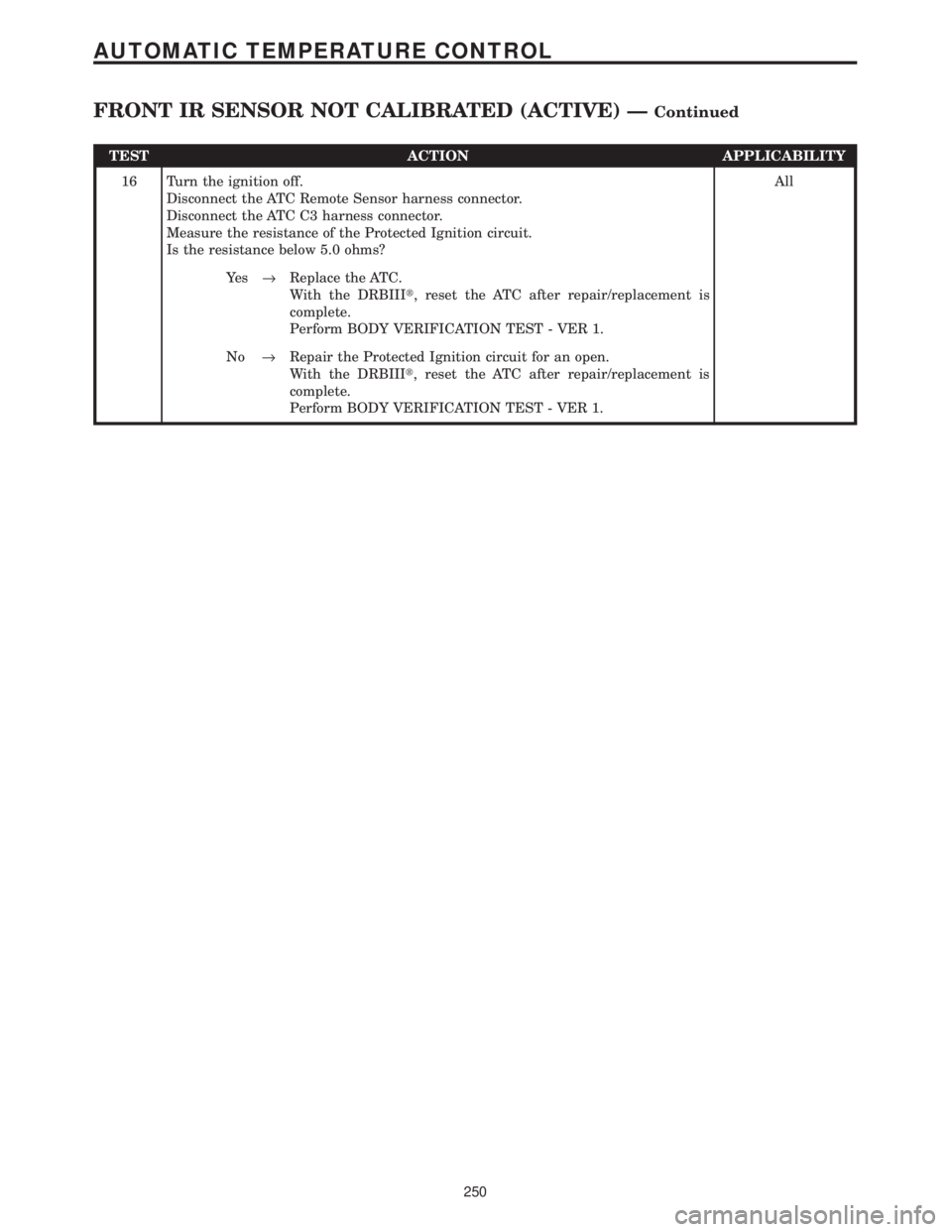
TEST ACTION APPLICABILITY
16 Turn the ignition off.
Disconnect the ATC Remote Sensor harness connector.
Disconnect the ATC C3 harness connector.
Measure the resistance of the Protected Ignition circuit.
Is the resistance below 5.0 ohms?All
Ye s®Replace the ATC.
With the DRBIIIt, reset the ATC after repair/replacement is
complete.
Perform BODY VERIFICATION TEST - VER 1.
No®Repair the Protected Ignition circuit for an open.
With the DRBIIIt, reset the ATC after repair/replacement is
complete.
Perform BODY VERIFICATION TEST - VER 1.
250
AUTOMATIC TEMPERATURE CONTROL
FRONT IR SENSOR NOT CALIBRATED (ACTIVE) ÐContinued
Page 790 of 4284
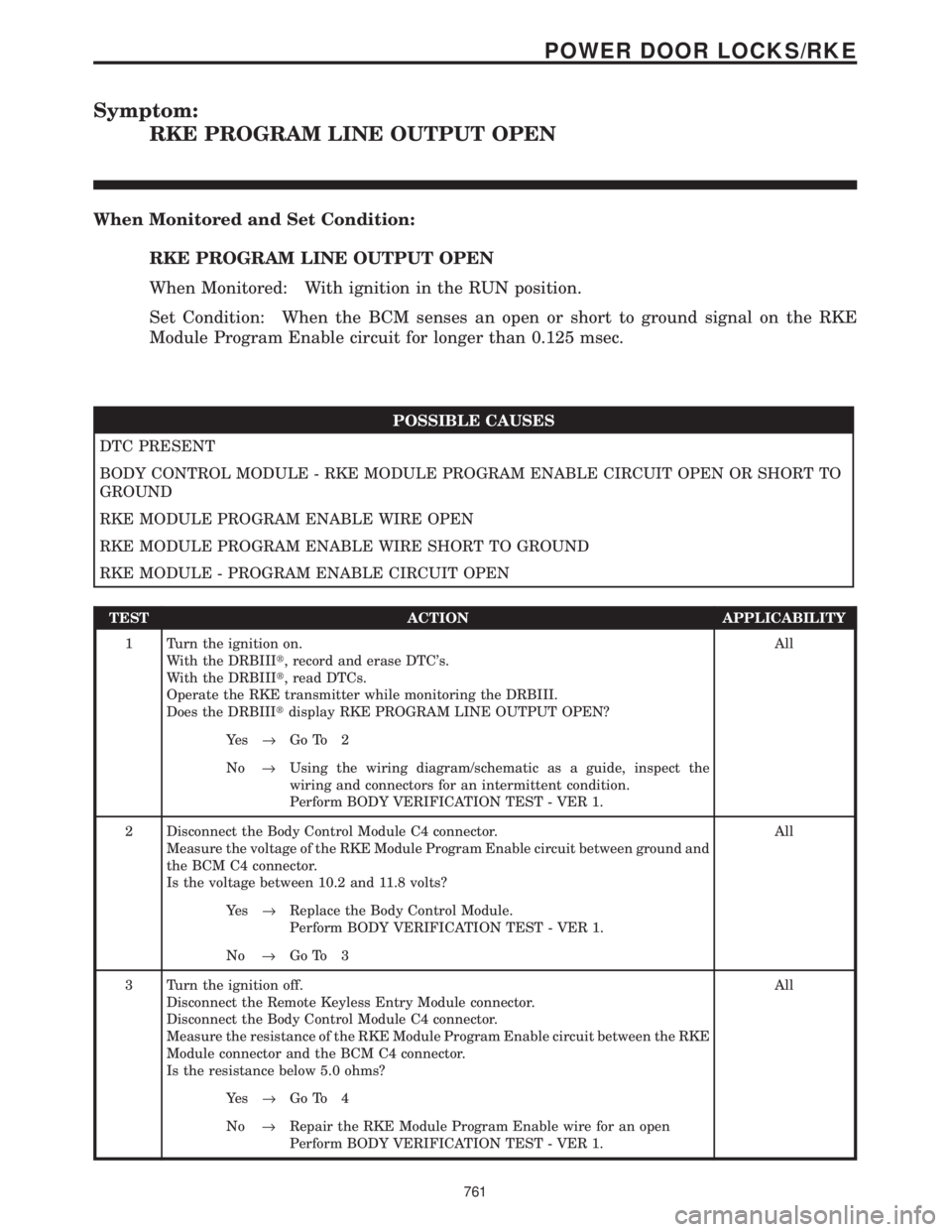
Symptom:
RKE PROGRAM LINE OUTPUT OPEN
When Monitored and Set Condition:
RKE PROGRAM LINE OUTPUT OPEN
When Monitored: With ignition in the RUN position.
Set Condition: When the BCM senses an open or short to ground signal on the RKE
Module Program Enable circuit for longer than 0.125 msec.
POSSIBLE CAUSES
DTC PRESENT
BODY CONTROL MODULE - RKE MODULE PROGRAM ENABLE CIRCUIT OPEN OR SHORT TO
GROUND
RKE MODULE PROGRAM ENABLE WIRE OPEN
RKE MODULE PROGRAM ENABLE WIRE SHORT TO GROUND
RKE MODULE - PROGRAM ENABLE CIRCUIT OPEN
TEST ACTION APPLICABILITY
1 Turn the ignition on.
With the DRBIIIt, record and erase DTC's.
With the DRBIIIt, read DTCs.
Operate the RKE transmitter while monitoring the DRBIII.
Does the DRBIIItdisplay RKE PROGRAM LINE OUTPUT OPEN?All
Ye s®Go To 2
No®Using the wiring diagram/schematic as a guide, inspect the
wiring and connectors for an intermittent condition.
Perform BODY VERIFICATION TEST - VER 1.
2 Disconnect the Body Control Module C4 connector.
Measure the voltage of the RKE Module Program Enable circuit between ground and
the BCM C4 connector.
Is the voltage between 10.2 and 11.8 volts?All
Ye s®Replace the Body Control Module.
Perform BODY VERIFICATION TEST - VER 1.
No®Go To 3
3 Turn the ignition off.
Disconnect the Remote Keyless Entry Module connector.
Disconnect the Body Control Module C4 connector.
Measure the resistance of the RKE Module Program Enable circuit between the RKE
Module connector and the BCM C4 connector.
Is the resistance below 5.0 ohms?All
Ye s®Go To 4
No®Repair the RKE Module Program Enable wire for an open
Perform BODY VERIFICATION TEST - VER 1.
761
POWER DOOR LOCKS/RKE
Page 791 of 4284
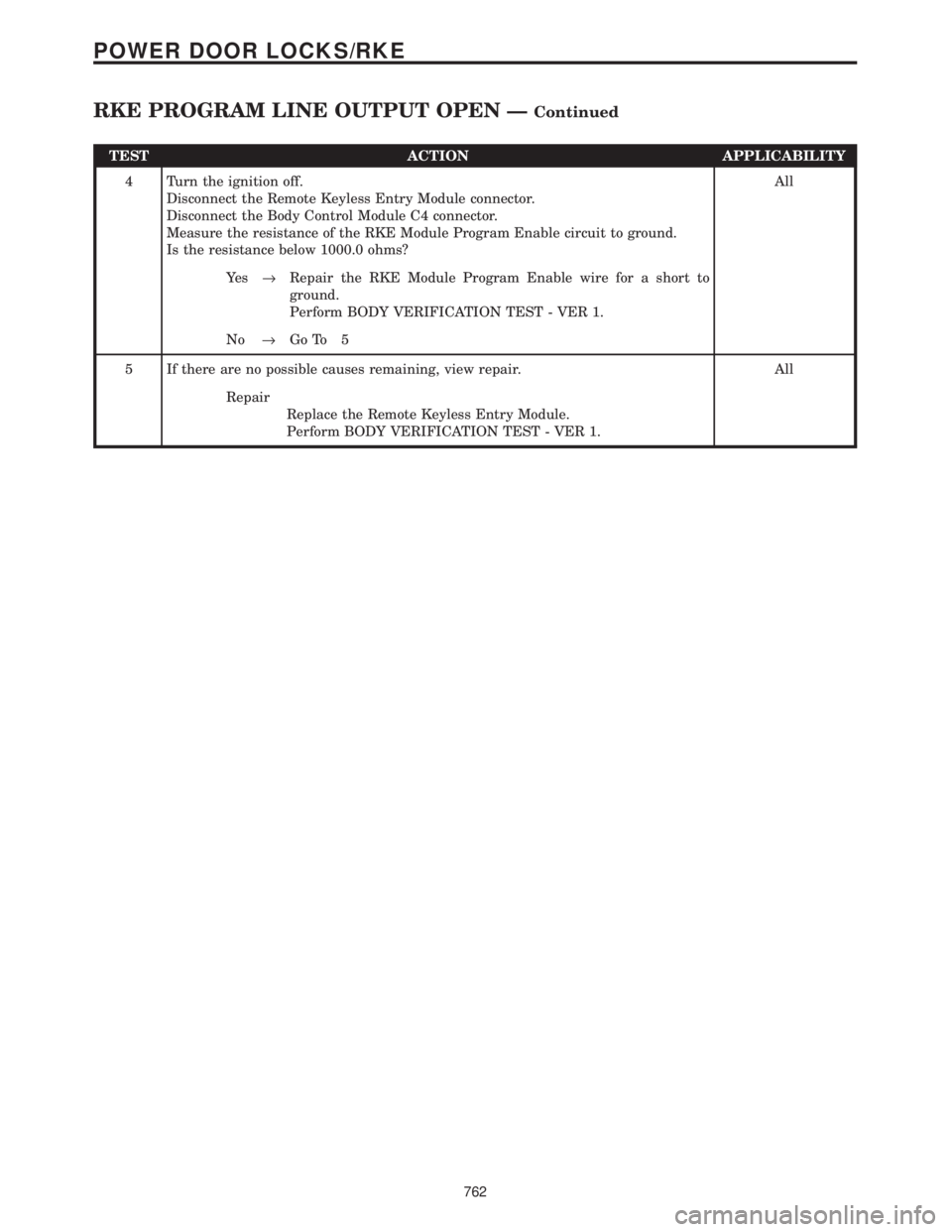
TEST ACTION APPLICABILITY
4 Turn the ignition off.
Disconnect the Remote Keyless Entry Module connector.
Disconnect the Body Control Module C4 connector.
Measure the resistance of the RKE Module Program Enable circuit to ground.
Is the resistance below 1000.0 ohms?All
Ye s®Repair the RKE Module Program Enable wire for a short to
ground.
Perform BODY VERIFICATION TEST - VER 1.
No®Go To 5
5 If there are no possible causes remaining, view repair. All
Repair
Replace the Remote Keyless Entry Module.
Perform BODY VERIFICATION TEST - VER 1.
762
POWER DOOR LOCKS/RKE
RKE PROGRAM LINE OUTPUT OPEN ÐContinued
Page 792 of 4284
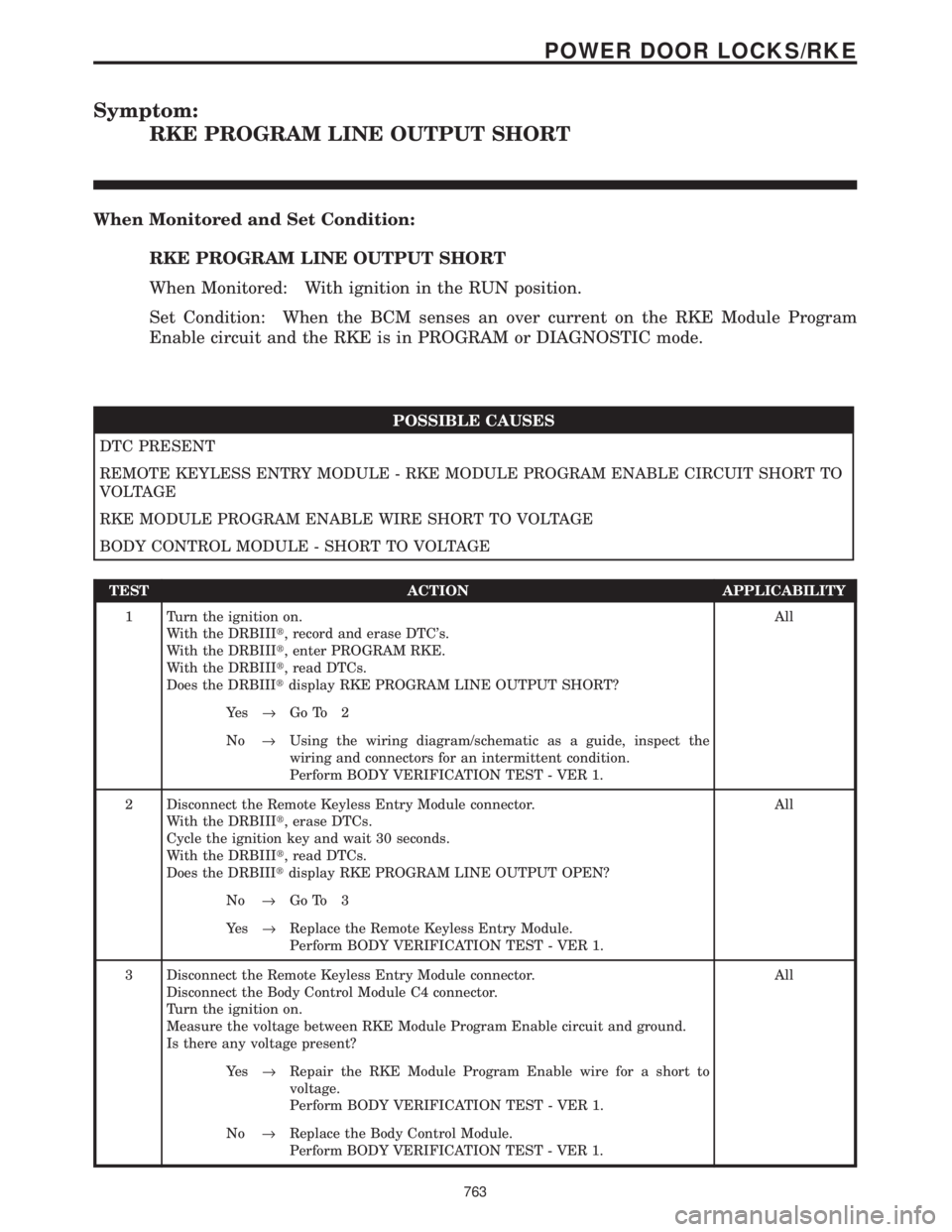
Symptom:
RKE PROGRAM LINE OUTPUT SHORT
When Monitored and Set Condition:
RKE PROGRAM LINE OUTPUT SHORT
When Monitored: With ignition in the RUN position.
Set Condition: When the BCM senses an over current on the RKE Module Program
Enable circuit and the RKE is in PROGRAM or DIAGNOSTIC mode.
POSSIBLE CAUSES
DTC PRESENT
REMOTE KEYLESS ENTRY MODULE - RKE MODULE PROGRAM ENABLE CIRCUIT SHORT TO
VOLTAGE
RKE MODULE PROGRAM ENABLE WIRE SHORT TO VOLTAGE
BODY CONTROL MODULE - SHORT TO VOLTAGE
TEST ACTION APPLICABILITY
1 Turn the ignition on.
With the DRBIIIt, record and erase DTC's.
With the DRBIIIt, enter PROGRAM RKE.
With the DRBIIIt, read DTCs.
Does the DRBIIItdisplay RKE PROGRAM LINE OUTPUT SHORT?All
Ye s®Go To 2
No®Using the wiring diagram/schematic as a guide, inspect the
wiring and connectors for an intermittent condition.
Perform BODY VERIFICATION TEST - VER 1.
2 Disconnect the Remote Keyless Entry Module connector.
With the DRBIIIt, erase DTCs.
Cycle the ignition key and wait 30 seconds.
With the DRBIIIt, read DTCs.
Does the DRBIIItdisplay RKE PROGRAM LINE OUTPUT OPEN?All
No®Go To 3
Ye s®Replace the Remote Keyless Entry Module.
Perform BODY VERIFICATION TEST - VER 1.
3 Disconnect the Remote Keyless Entry Module connector.
Disconnect the Body Control Module C4 connector.
Turn the ignition on.
Measure the voltage between RKE Module Program Enable circuit and ground.
Is there any voltage present?All
Ye s®Repair the RKE Module Program Enable wire for a short to
voltage.
Perform BODY VERIFICATION TEST - VER 1.
No®Replace the Body Control Module.
Perform BODY VERIFICATION TEST - VER 1.
763
POWER DOOR LOCKS/RKE
Page 1041 of 4284
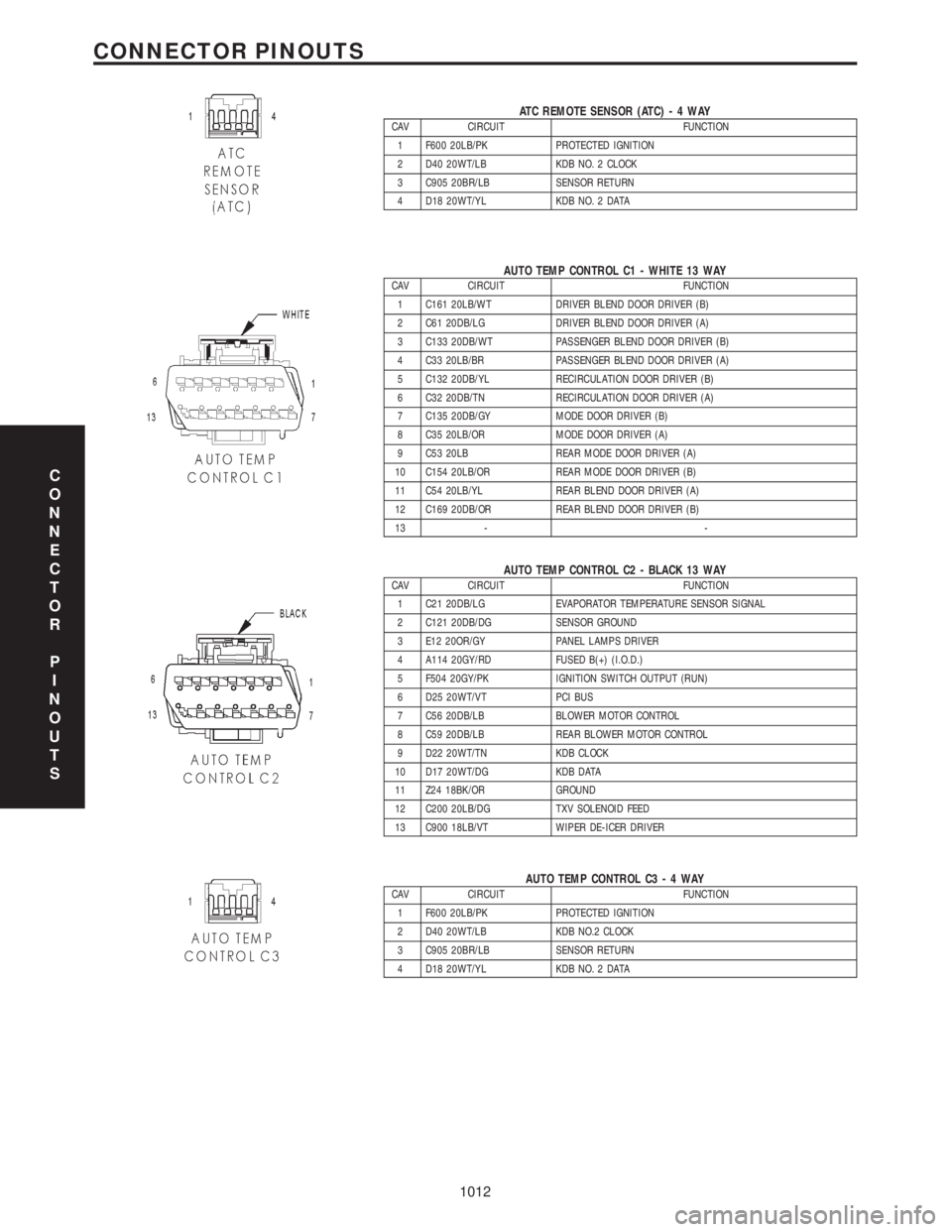
ATC REMOTE SENSOR (ATC)-4WAYCAV CIRCUIT FUNCTION
1 F600 20LB/PK PROTECTED IGNITION
2 D40 20WT/LB KDB NO. 2 CLOCK
3 C905 20BR/LB SENSOR RETURN
4 D18 20WT/YL KDB NO. 2 DATA
AUTO TEMP CONTROL C1 - WHITE 13 WAYCAV CIRCUIT FUNCTION
1 C161 20LB/WT DRIVER BLEND DOOR DRIVER (B)
2 C61 20DB/LG DRIVER BLEND DOOR DRIVER (A)
3 C133 20DB/WT PASSENGER BLEND DOOR DRIVER (B)
4 C33 20LB/BR PASSENGER BLEND DOOR DRIVER (A)
5 C132 20DB/YL RECIRCULATION DOOR DRIVER (B)
6 C32 20DB/TN RECIRCULATION DOOR DRIVER (A)
7 C135 20DB/GY MODE DOOR DRIVER (B)
8 C35 20LB/OR MODE DOOR DRIVER (A)
9 C53 20LB REAR MODE DOOR DRIVER (A)
10 C154 20LB/OR REAR MODE DOOR DRIVER (B)
11 C54 20LB/YL REAR BLEND DOOR DRIVER (A)
12 C169 20DB/OR REAR BLEND DOOR DRIVER (B)
13 - -
AUTO TEMP CONTROL C2 - BLACK 13 WAYCAV CIRCUIT FUNCTION
1 C21 20DB/LG EVAPORATOR TEMPERATURE SENSOR SIGNAL
2 C121 20DB/DG SENSOR GROUND
3 E12 20OR/GY PANEL LAMPS DRIVER
4 A114 20GY/RD FUSED B(+) (I.O.D.)
5 F504 20GY/PK IGNITION SWITCH OUTPUT (RUN)
6 D25 20WT/VT PCI BUS
7 C56 20DB/LB BLOWER MOTOR CONTROL
8 C59 20DB/LB REAR BLOWER MOTOR CONTROL
9 D22 20WT/TN KDB CLOCK
10 D17 20WT/DG KDB DATA
11 Z24 18BK/OR GROUND
12 C200 20LB/DG TXV SOLENOID FEED
13 C900 18LB/VT WIPER DE-ICER DRIVER
AUTO TEMP CONTROL C3-4WAYCAV CIRCUIT FUNCTION
1 F600 20LB/PK PROTECTED IGNITION
2 D40 20WT/LB KDB NO.2 CLOCK
3 C905 20BR/LB SENSOR RETURN
4 D18 20WT/YL KDB NO. 2 DATA
C
O
N
N
E
C
T
O
R
P
I
N
O
U
T
S
1012
CONNECTOR PINOUTS