battery CHRYSLER VOYAGER 2001 Service Manual
[x] Cancel search | Manufacturer: CHRYSLER, Model Year: 2001, Model line: VOYAGER, Model: CHRYSLER VOYAGER 2001Pages: 4284, PDF Size: 83.53 MB
Page 2068 of 4284
(3) Install screws for the switch.
(4) Repeat for the other switch.
(5) Install the air bag, refer to the restraint section
for more information.
(6) Install the negative battery cable.
VACUUM RESERVOIR
DESCRIPTION
The vacuum reservoir is located in the engine com-
partment. It is made of plastic.
OPERATION
The reservoir stores engine vacuum. When engine
vacuum drops, as in climbing a grade while driving,
the reservoir supplies the vacuum needed to main-
tain proper speed control operation. The vacuum res-
ervoir cannot be repaired and must be replaced if
faulty.
REMOVAL
(1) Release hood latch and open hood.
(2) Disconnect the negative battery cable.
(3) Disconnect the vacuum line to the battery tray/
vacuum reservoir.
(4) Remove battery tray/vacuum reservoir, refer to
the Battery section for more information.
INSTALLATION
(1) Install battery tray/vacuum reservoir, refer to
the Battery section for more information.
(2) Connect vacuum line that leads to the battery
tray/vacuum reservoir.
(3) Connect the negative battery cable.
8P - 6 SPEED CONTROLRS
SWITCH (Continued)
Page 2070 of 4284
NOTE: The VTSS will not arm by pushing down the
door lock mechanism. This will manually override
the system.
For Door Cylinder Lock Switch Removal and
Installation, refer to Electrical, Power Locks, Door
Cylinder Lock Switch.
If the VTSS is triggered, the horn will pulse, head-
lamps/marker lamps will flash, and the VTSS warn-
ing lamp will flash. If BCM determines the threat to
be false and the VTSS is not triggered again, the sys-
tem will shut down and rearm itself after three min-
utes. If a trigger is still active, the alarm will
continue for an additional 15 minutes without the
horn. The VTSS monitoring portion of the system is
split into two sections. The engine compartment sec-
tion and the passenger compartment section. If a
malfunction occurs in the engine compartment sec-
tion, the passenger compartment section would still
arm and function normally.
NOTE: If hood is not secure during the arming
sequence, the lamp will stay lit and not flash. The
system will arm with hood not secured (hood ajar
switch closed) and the liftgate open (liftgate ajar
switch closed). System will not arm if passenger
compartment is not secure (all switches closed)
ARMING THE VTSS - METHOD A
(1) With the key removed from the ignition lock
and any door open (excluding liftgate), actuate one of
the following:
²Power door lock button to LOCK,
²Key fob LOCK button
²Door lock key cylinder to locked position.
(2) Close all opened doors. Liftgate can remain
open.
(3) After the last door is closed, an arming time-
out period of sixteen seconds will start, then the
VTSS will become armed.
ARMING THE VTSS - METHOD B
Actuating the key fob transmitter LOCK button,
key locking the front doors or liftgate with the doors
closed and the ignition locked will begin the arming
time-out period. If method A, 16 second time-out
sequence was in process when method B was actu-
ated, the 16 second time-out will restart from the
time of the second actuation.
If the security lamp does not illuminate at all upon
final door closure, it indicates that the system is not
arming.
The current VTSS status armed or disarmed shall
be maintained in memory to prevent battery discon-
nects from disarming the system.
TRIGGERING THE VTSS
After the VTSS is armed, the following actions will
trigger the alarm:
²Opening any door.
²Opening the hood
²Turning the ignition to the ON, ACC, or
UNLOCK position.
²Opening liftgate without first receiving a RKE
input or liftgate key input.
CAUTION: The VTSS indicator LED will trigger and
engine will continue to run if the vehicle is
equipped with SKIS and the proper key is used to
start the vehicle. This condition will occur if the
VTSS has been triggered. If valid key is used, VTSS
will disarm
SENTRY KEY IMMOBILIZER SYSTEM
The SKIS includes keys from the factory which are
pre-programmed. Each SKIM will recognize a maxi-
mum of eight Sentry Keys. If the customer would
like to own additional keys other than those provided
with the vehicle, they can be purchased from any
authorized dealer. These keys must be programmed
to the SKIM on the vehicle in order for the system to
recognize them as valid keys. This can be done by
the dealer with a DRB IIItscan tool or by a cus-
tomer if this feature is available in their market and
they have two (2) valid keys already available to
them. Refer to the Service Procedures portion of this
system for additional details. The SKIS performs a
self-test each time the ignition switch is turned to
the ON position and will store Diagnostic Trouble
Codes (DTC's) if a system malfunction is detected.
The SKIS can be diagnosed and any stored DTC's
can be retrieved using a DRB IIItscan tool as
described in the appropriate Body Diagnostic Proce-
dures manual.
DIAGNOSIS AND TESTING - SENTRY KEY
IMMOBILIZER SYSTEM
WARNING: ON VEHICLES EQUIPPED WITH AIR-
BAGS, REFER TO ELECTRICAL, RESTRAINTS,
WARNINGS, BEFORE ATTEMPTING COMPONENT
DIAGNOSIS OR SERVICE. FAILURE TO TAKE THE
PROPER PRECAUTIONS COULD RESULT IN ACCI-
DENTAL AIRBAG DEPLOYMENT AND POSSIBLE
PERSONAL INJURY.
8Q - 2 VEHICLE THEFT SECURITYRS
VEHICLE THEFT SECURITY (Continued)
Page 2071 of 4284

NOTE: The following tests may not prove conclu-
sive in the diagnosis of this system. The most reli-
able, efficient, and accurate means to diagnose the
Sentry Key Immobilizer System involves the use of
a DRB IIITscan tool. Refer to the proper Body Diag-
nostic Procedures Manual.
The Sentry Key Immobilizer System (SKIS) and
the Programmable Communication Interface (PCI)
bus network should be diagnosed using a DRB IIIt
scan tool. The DRB IIItwill allow confirmation that
the PCI bus is functional, that the Sentry Key Immo-
bilizer Module (SKIM) is placing the proper messages
on the PCI bus, and that the Powertrain Control
Module (PCM) is receiving the PCI bus messages.
Refer to the proper Body Diagnostic Procedures man-
ual, and Wiring Diagrams for complete circuit
descriptions and diagrams.
(1) Check the fuses in the Integrated Power Mod-
ule (IPM). If OK, go to Step 2. If not OK, repair the
shorted circuit or component as required and replace
the faulty fuse.
(2) Disconnect and isolate the battery negative
remote cable from the remote terminal. Unplug the
wire harness connector at the SKIM. Check for con-
tinuity between the ground circuit cavity of the
SKIM wire harness connector and a good ground.
There should be continuity. If OK, go to Step 3. If not
OK, repair the open circuit to ground as required.
(3) Connect the battery negative cable. Check for
battery voltage at the fused B(+) circuit cavity of the
SKIM wire harness connector. If OK, go to Step 4. If
not OK, repair the open circuit to the fuse in the
IPM as required.
(4) Turn the ignition switch to the ON position.
Check for battery voltage at the fused ignition switch
output (run/start) circuit cavity of the SKIM wire
harness connector. If OK, use a DRB IIItscan tool
and the proper Body Diagnostic Procedures manual
to complete the diagnosis of the SKIS. If not OK,
repair the open circuit to the fuse in the IPM as
required.
DIAGNOSIS AND TESTING - VEHICLE THEFT
SECURITY SYSTEM
Refer to the appropriate wiring information. The
wiring information includes wiring diagrams, proper
wire and connector repair procedures, further details
on wire harness routing and retention, as well as
pin-out and location views for the various wire har-
ness connectors, splices and grounds. Using a DRB
IIItscan tool. Refer to the proper Body Diagnostic
Procedures Manual for test procedures.
HOOD AJAR SWITCH
REMOVAL
(1) Disconnect and isolate the battery negative
cable.
(2) Using a small flat blade screwdriver, pry trig-
ger switch from the bracket on the left fender well.
(3) Disconnect the hood ajar switch from the wire
connector and remove from vehicle.
INSTALLATION
(1) Connect the hood ajar switch to the wire conec-
tor.
(2) Press the hood ajar switch into position on the
bracket located on the left inner fender well.
(3) Reconnect the battery negative cable.
(4) Close the hood and check for proper operation.
TRANSPONDER KEY
DESCRIPTION
The Sentry Key Immobilizer System (SKIS) uses a
transponder chip that is integral to each ignition key
(Fig. 1) to communicate with the Sentry Key Immo-
bilizer Module (SKIM). Ignition keys are supplied
with the vehicle when it is shipped from the factory.
The transponder chip is undermolded within the
head of the key. This undermold is hidden beneath
an overmolded rubber cap.
Fig. 1 TRANSPONDER KEY - TYPICAL
1 - MOLDED CAP
2 - TRANSPONDER
3 - MOLDED CAP REMOVED
4 - SENTRY KEY
RSVEHICLE THEFT SECURITY8Q-3
VEHICLE THEFT SECURITY (Continued)
Page 2077 of 4284
²LOW SPEED- Wipers operate at low speed.
²HIGH SPEED- Wipers operate at high speed.
²PULSE WIPE- Wipers will not operate.
²WIPE AFTER WASH- Wipers operate at low
speed in any mode setting. Wipers operate only whilewash button is depressed with switch in OFF mode,
wipers stop in mid-cycle when button is released.
The windshield wiper park switch and circuit is
monitored by the BCM. The park switch and circuit
can be tested using the table.
WIPER SYSTEM DIAGNOSIS
CONDITION POSSIBLE CAUSES CORRECTION
WIPER BLADES DO NOT
PARK PROPERLY1. WIPER ARMS IMPROPERLY
PARKED.
2. WIPER ARMS ARE LOOSE ON
PIVOT SHAFT.
3. MOTOR CRANK LOOSE AT
OUTPUT SHAFT.1. REMOVE WIPER ARMS AND REPARK.
REFER TO WIPER ARM REMOVAL AND
INSTALLATION.
2. REMOVE WIPER ARM AND REPARK.
REFER TO WIPER ARM REMOVAL AND
INSTALLATION.
3. REMOVE WIPER ARM, RUN WIPER
MOTOR TO PARK POSITION AND
REMOVE THE MODULE. WITHOUT
ROTATING THE MOTOR OUTPUT SHAFT,
REMOVE THE CRANK AND CLEAN ANY
FOREIGN MATTER FROM THE MOTOR
SHAFT. INSTALL THE MOTOR CRANK IN
ITS ORIGINAL POSITION.
MOTOR STOPS IN ANY
POSITION WHEN THE
SWITCH IS TURNED OFF1. OPEN PARK CIRCUIT. 1. CHECK PARK SWITCH BY
DISCONNECTING THE WIRE
CONNECTOR AND APPLY BATTERY
VOLTAGE TO PIN 4. PLACE A JUMPER
WIRE FROM PIN 2 TO PIN 3 AND THEN
TO AN EXTERNAL GROUND. REPLACE
MOTOR IF IT DOES NOT PARK.
MOTOR WILL NOT STOP
WHEN THE SWITCH IS
TURNED OFF1. FAULTY SWITCH.
2. LACK OF DYNAMIC BRAKE ON
WET GLASS.1. CHECK SWITCH IN LOW, HIGH AND
INTERMITTENT POSITION.
2. ENSURE PARK SWITCH HAS CLEAN
GROUND.
WIPER BLADES SLAP
AGAINST COWL SCREEN
OR WINDOW MOLDINGS.1. WIPER ARMS ARE PARKED
INCORRECTLY.1. PARK WIPER ARMS. REFER TO
WIPER ARM ADJUSTMENT.
BLADES CHATTER 1. FOREIGN SUBSTANCE SUCH
AS POLISH ON GLASS OR
BLADES.
2. ARMS TWISTED, BLADE AT
WRONG ANGLE ON GLASS.
3. BLADE STRUCTURE BENT.
4. BLADE ELEMENT HAS
PERMANENT SET.1. CLEAN GLASS AND BLADE ELEMENT
WITH NON-ABRASIVE CLEANER.
2. REPLACE ARM.
3. REPLACE BLADE.
4. REPLACE BLADE ELEMENT.
WIPER KNOCK AT
REVERSAL1. LINKAGE BUSHINGS WORN.
2. ARMATURE ENDPLAY IN
MOTOR.1. REPLACE WORN LINK. REFER TO
WIPER LINKAGE REMOVAL AND
INSTALLATION.
2. REPLACE WIPER MOTOR. REFER TO
WIPER MOTOR REMOVAL AND
INSTALLATION.
RSWIPERS/WASHERS8R-3
WIPERS/WASHERS (Continued)
Page 2079 of 4284

must be twisted in the proper direction to allow the
wiper element to roll over when the direction
reverses.
(2) Place two small adjustable wrenches placed 50
mm (2 in.) apart on the wiper arm extension rod.
(3) Twist the extension rod slightly in the opposite
direction that the element is laying on the wind-
shield while holding the wrench closest to the pivot
stationary.
(4) Repeat step Step 1, and align as necessary
until wiper stops chattering and wipes the wind-
shield clear.
FRONT WIPER MOTOR
REMOVAL
(1) Remove wiper unit from vehicle. (Refer to 8 -
ELECTRICAL/WIPERS/WASHERS/WIPER MOD-
ULE - REMOVAL).
(2) Remove wiper linkage and motor mount plate
from wiper unit.
(3) Disconnect wire connectors from back of wiper
motor (Fig. 18).
(4) Remove wiper linkage from motor crank. Do
NOT remove crank from motor.
(5) Remove bolts holding wiper motor to mount
plate and remove motor (Fig. 4) and (Fig. 5).
INSTALLATION
(1) Place wiper unit on a suitable work surface.
(2) Place wiper motor in position on mount plate.
(3) Install bolts to hold wiper motor to mount
plate.(4) Install wiper linkage and motor mount plate
into wiper unit.
(5) Connect wire connectors to wiper motor (Fig.
18).
(6) Place the wiper unit into engine compartment
and connect wiper unit wire connector to engine wire
harness (Fig. 6).
(7) Operate wiper motor and verify that the wiper
motor parks when wiper switch is turned OFF.
FRONT WIPER UNIT
REMOVAL
(1) Disconnect and isolate the negative battery
cable.
(2) Remove the wiper arms.
(3) Remove the cowl cover (Refer to 23 - BODY/
EXTERIOR/COWL GRILLE - REMOVAL).
(4) Release the hood latch and open hood.
(5) Disconnect the positive lock on the wiper unit
wire connector (Fig. 6).
(6) Disconnect the wiper unit wire connector from
the engine compartment wire harness.
(7) Disconnect the windshield washer hose from
coupling inside unit.
(8) Disconnect the drain tubes from nipples on bot-
tom of the wiper unit.
(9) Remove nuts holding wiper unit to lower wind-
shield fence.
(10) Remove bolts holding the wiper unit to the
dash panel (Fig. 7).
Fig. 4 WIPER MOTOR CRANK
1 - WIPER MOTOR
2 - MOTOR MOUNT PLATE
3 - CRANK
4 - LINKAGE
5 - MOUNTING BOLTS
Fig. 5 WIPER MOTOR
1 - MOTOR MOUNT PLATE
2 - WIPER MOTOR
RSWIPERS/WASHERS8R-5
FRONT WIPER ARMS (Continued)
Page 2080 of 4284
(11) Lift wiper unit from weld-studs on lower
windshield fence.
CAUTION: Do not allow wiper unit to rest on brake
master cylinder reservoir, damage to brake system
can result.
(12) Remove wiper unit.
INSTALLATION
(1) Position the wiper unit into the cowl.
(2) Install the nuts that retain the wiper unit.
(3) Install the bolts that secure the wiper unit to
the dash (Fig. 7).
(4) Connect the drain tubes to the nipples on the
wiper unit.
(5) Connect the windshield washer tube.
(6) Connect the wire harness connector to the
wiper unit (Fig. 7).
(7) Disconnect the positive lock on the wiper unit
wire connector (Fig. 6).
CAUTION: Do not allow wiper unit to rest on brake
master cylinder reservoir, damage to brake system
can result.
(8) Close the hood.
(9) Install the cowl cover (Refer to 23 - BODY/EX-
TERIOR/COWL GRILLE - INSTALLATION).
(10) Install the wiper arms and blades.
(11) Connect the battery negative cable.
REAR WIPER ARM
REMOVAL
(1) Lift and hold wiper blade away from rear win-
dow.
(2) Lift lock holding wiper arm to wiper pivot
upward.
(3) Allow wiper arm to rest against lock.
(4) Pull wiper from pivot (Fig. 8).
Fig. 6 WIPER UNIT WIRE CONNECTOR
1 - WIPER SYSTEM WIRE CONNECTOR
2 - LOCK TAB
3 - POSITIVE LOCK
4 - WIPER UNIT
Fig. 7 WIPER UNIT
1 - BOLT
2 - NUTS
3 - BOLT
4 - WIPER UNIT
5 - WINDSHIELD
Fig. 8 REAR WIPER ARM
1 - LOCK
2 - WIPER BLADE
3 - REAR WIPER ARM
8R - 6 WIPERS/WASHERSRS
FRONT WIPER UNIT (Continued)
Page 2081 of 4284
INSTALLATION
(1) Position arm on pivot.
(2) Pull up on arm and release lock
(3) Allow wiper arm to rest on rear window.
REAR WIPER MOTOR
REMOVAL
(1) Disconnect and isolate the negative battery
cable.
(2) Remove rear wiper arm. (Refer to 8 - ELEC-
TRICAL/WIPERS/WASHERS/WIPER ARMS -
REMOVAL) in this section.
(3) Open liftgate.
(4) Remove liftgate trim panel. (Refer to 23 -
BODY/DECKLID/HATCH/LIFTGATE/TAILGATE/
TRIM PANEL - REMOVAL).
(5) Disconnect wire connector from rear wiper
motor.
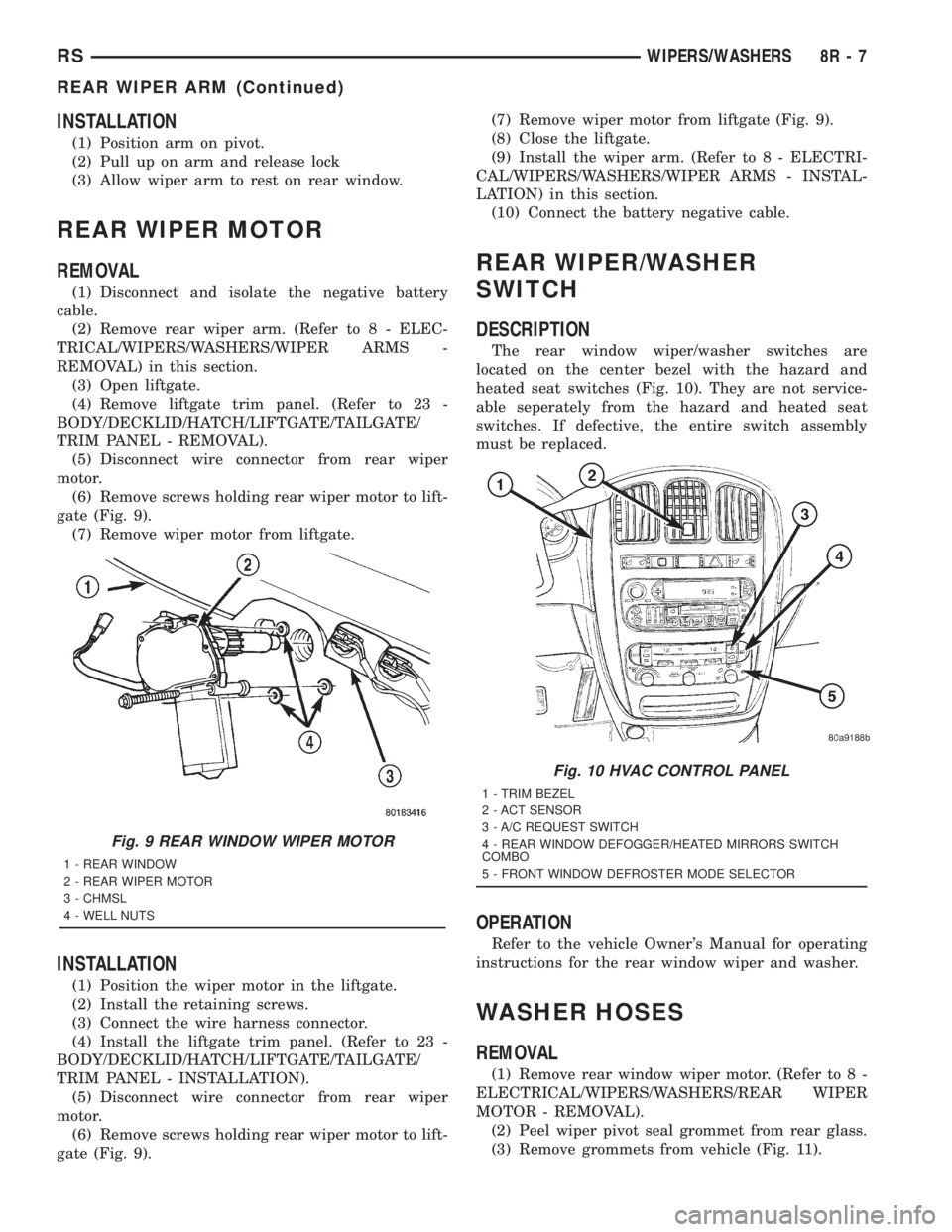
(6) Remove screws holding rear wiper motor to lift-
gate (Fig. 9).
(7) Remove wiper motor from liftgate.
INSTALLATION
(1) Position the wiper motor in the liftgate.
(2) Install the retaining screws.
(3) Connect the wire harness connector.
(4) Install the liftgate trim panel. (Refer to 23 -
BODY/DECKLID/HATCH/LIFTGATE/TAILGATE/
TRIM PANEL - INSTALLATION).
(5) Disconnect wire connector from rear wiper
motor.
(6) Remove screws holding rear wiper motor to lift-
gate (Fig. 9).(7) Remove wiper motor from liftgate (Fig. 9).
(8) Close the liftgate.
(9) Install the wiper arm. (Refer to 8 - ELECTRI-
CAL/WIPERS/WASHERS/WIPER ARMS - INSTAL-
LATION) in this section.
(10) Connect the battery negative cable.
REAR WIPER/WASHER
SWITCH
DESCRIPTION
The rear window wiper/washer switches are
located on the center bezel with the hazard and
heated seat switches (Fig. 10). They are not service-
able seperately from the hazard and heated seat
switches. If defective, the entire switch assembly
must be replaced.
OPERATION
Refer to the vehicle Owner's Manual for operating
instructions for the rear window wiper and washer.
WASHER HOSES
REMOVAL
(1) Remove rear window wiper motor. (Refer to 8 -
ELECTRICAL/WIPERS/WASHERS/REAR WIPER
MOTOR - REMOVAL).
(2) Peel wiper pivot seal grommet from rear glass.
(3) Remove grommets from vehicle (Fig. 11).
Fig. 9 REAR WINDOW WIPER MOTOR
1 - REAR WINDOW
2 - REAR WIPER MOTOR
3 - CHMSL
4 - WELL NUTS
Fig. 10 HVAC CONTROL PANEL
1 - TRIM BEZEL
2 - ACT SENSOR
3 - A/C REQUEST SWITCH
4 - REAR WINDOW DEFOGGER/HEATED MIRRORS SWITCH
COMBO
5 - FRONT WINDOW DEFROSTER MODE SELECTOR
RSWIPERS/WASHERS8R-7
REAR WIPER ARM (Continued)
Page 2082 of 4284

INSTALLATION
(1) Install rear window wiper motor. (Refer to 8 -
ELECTRICAL/WIPERS/WASHERS/REAR WIPER
MOTOR - INSTALLATION).
(2) Peel wiper pivot seal grommet from rear glass.
(3) Install grommets from (Fig. 11).
WASHER RESERVOIR
REMOVAL
(1) Disconnect and isolate the negative battery
cable.
(2) Hoist and support vehicle on safety stands.
(3) Remove the right front wheel (Refer to 22 -
TIRES/WHEELS - REMOVAL).
(4) Remove front wheelhouse splash shield.
(5) Disconnect connectors from the front wind-
shield and rear window washer pumps, the fluid
level sensor, and the rear washer hose (Fig. 12).
(6) If washer bottle has fluid in it place a suitable
drain pan under the hose connections.
(7) Disconnect the front washer hose at the front
wiper unit in the engine compartment (Fig. 13). The
front hose will be removed with the bottle.
(8) Allow the washer bottle to drain.
(9) Remove the screws holding the washer bottle to
the front fender support and remove the bottle.
INSTALLATION
(1) Place the washer bottle in position and attach
to the front fender support using proper screws.
(2) Connect the front washer hose at the front
wiper unit in the engine compartment (Fig. 13).
(3) Connect the front windshield and the rear win-
dow washer pumps, fluid level sensor and the rear
washer hose (Fig. 12).
(4) Install the front wheelhouse splashshield.
(5) Install the right front wheel (Refer to 22 -
TIRES/WHEELS - INSTALLATION).
(6) Lower the vehicle.
Fig. 11 REAR GLASS RUBBER GROMMET
1 - WIPER MOTOR PIVOT GROMMET
Fig. 12 WINDSHIELD WASHER BOTTLE - TYPICAL
1 - INNER FENDER
2 - FRONT FASCIA
3 - REAR PUMP
4 - FRONT PUMP
5 - WINDSHIELD AND REAR WINDOW WASHER BOTTLE
Fig. 13 (TYPICAL) Front Washer Hose
1 - WINDSHIELD WASHER BOTTLE
2 - FRONT WINDSHIELD WASHER HOSE
8R - 8 WIPERS/WASHERSRS
WASHER HOSES (Continued)
Page 2091 of 4284

TERMINOLOGY
This is a list of terms and definitions used in the
wiring diagrams.
LHD .................Left Hand Drive Vehicles
RHD................Right Hand Drive Vehicles
ATX . . Automatic Transmissions-Front Wheel Drive
MTX....Manual Transmissions-Front Wheel Drive
AT ....Automatic Transmissions-Rear Wheel Drive
MT .....Manual Transmissions-Rear Wheel Drive
SOHC...........Single Over Head Cam Engine
DOHC..........Double Over Head Cam Engine
Built-Up-Export.......... Vehicles Built For Sale
In Markets Other Than North America
Except-Built-Up-Export.... Vehicles Built For Sale
In North America
WARNINGS - GENERAL
WARNINGSprovide information to prevent per-
sonal injury and vehicle damage. Below is a list of
general warnings that should be followed any time a
vehicle is being serviced.
WARNING:: ALWAYS WEAR SAFETY GLASSES FOR
EYE PROTECTION.
WARNING: USE SAFETY STANDS ANYTIME A PRO-
CEDURE REQUIRES BEING UNDER A VEHICLE.
WARNING: BE SURE THAT THE IGNITION SWITCH
ALWAYS IS IN THE OFF POSITION, UNLESS THE
PROCEDURE REQUIRES IT TO BE ON.
WARNING: SET THE PARKING BRAKE WHEN
WORKING ON ANY VEHICLE. AN AUTOMATIC
TRANSMISSION SHOULD BE IN PARK. A MANUAL
TRANSMISSION SHOULD BE IN NEUTRAL.
WARNING: OPERATE THE ENGINE ONLY IN A
WELL-VENTILATED AREA.
WARNING: KEEP AWAY FROM MOVING PARTS
WHEN THE ENGINE IS RUNNING, ESPECIALLY THE
FAN AND BELTS.
WARNING: TO PREVENT SERIOUS BURNS, AVOID
CONTACT WITH HOT PARTS SUCH AS THE RADIA-
TOR, EXHAUST MANIFOLD(S), TAIL PIPE, CATA-
LYTIC CONVERTER AND MUFFLER.WARNING: DO NOT ALLOW FLAME OR SPARKS
NEAR THE BATTERY. GASES ARE ALWAYS
PRESENT IN AND AROUND THE BATTERY.
WARNING: ALWAYS REMOVE RINGS, WATCHES,
LOOSE HANGING JEWELRY AND LOOSE CLOTH-
ING.
DIAGNOSIS AND TESTING - WIRING HARNESS
TROUBLESHOOTING TOOLS
When diagnosing a problem in an electrical circuit
there are several common tools necessary. These tools
are listed and explained below.
²Jumper Wire - This is a test wire used to con-
nect two points of a circuit. It can be used to bypass
an open in a circuit.
WARNING: NEVER USE A JUMPER WIRE ACROSS
A LOAD, SUCH AS A MOTOR, CONNECTED
BETWEEN A BATTERY FEED AND GROUND.
²Voltmeter - Used to check for voltage on a cir-
cuit. Always connect the black lead to a known good
ground and the red lead to the positive side of the
circuit.
CAUTION: Most of the electrical components used
in today's vehicles are Solid State. When checking
voltages in these circuits, use a meter with a 10 -
megohm or greater impedance rating.
²Ohmmeter - Used to check the resistance
between two points of a circuit. Low or no resistance
in a circuit means good continuity.
CAUTION: Most of the electrical components used
in today's vehicles are Solid State. When checking
resistance in these circuits use a meter with a 10 -
megohm or greater impedance rating. In addition,
make sure the power is disconnected from the cir-
cuit. Circuits that are powered up by the vehicle's
electrical system can cause damage to the equip-
ment and provide false readings.
²Probing Tools - These tools are used for probing
terminals in connectors (Fig. 4)Select the proper size
tool from Special Tool Package 6807, and insert it
into the terminal being tested. Use the other end of
the tool to insert the meter probe.
RG8W-01 WIRING DIAGRAM INFORMATION8Wa-01-5
WIRING DIAGRAM INFORMATION (Continued)
Page 2092 of 4284
INTERMITTENT AND POOR CONNECTIONS
Most intermittent electrical problems are caused
by faulty electrical connections or wiring. It is also
possible for a sticking component or relay to cause a
problem. Before condemning a component or wiring
assembly, check the following items.
²Connectors are fully seated
²Spread terminals, or terminal push out
²Terminals in the wiring assembly are fully
seated into the connector/component and locked into
position
²Dirt or corrosion on the terminals. Any amount
of corrosion or dirt could cause an intermittent prob-
lem
²Damaged connector/component casing exposing
the item to dirt or moisture
²Wire insulation that has rubbed through causing
a short to ground
²Some or all of the wiring strands broken inside
of the insulation
²Wiring broken inside of the insulation
TROUBLESHOOTING WIRING PROBLEMS
When troubleshooting wiring problems there are
six steps which can aid in the procedure. The steps
are listed and explained below. Always check for non-
factory items added to the vehicle before doing any
diagnosis. If the vehicle is equipped with these items,
disconnect them to verify these add-on items are not
the cause of the problem.
(1) Verify the problem.
(2) Verify any related symptoms. Do this by per-
forming operational checks on components that are
in the same circuit. Refer to the wiring diagrams.
(3) Analyze the symptoms. Use the wiring dia-
grams to determine what the circuit is doing, where
the problem most likely is occurring and where the
diagnosis will continue.
(4) Isolate the problem area.
(5) Repair the problem area.(6) Verify the proper operation. For this step,
check for proper operation of all items on the
repaired circuit. Refer to the wiring diagrams.
STANDARD PROCEDURE - TESTING FOR
VOLTAGE POTENTIAL
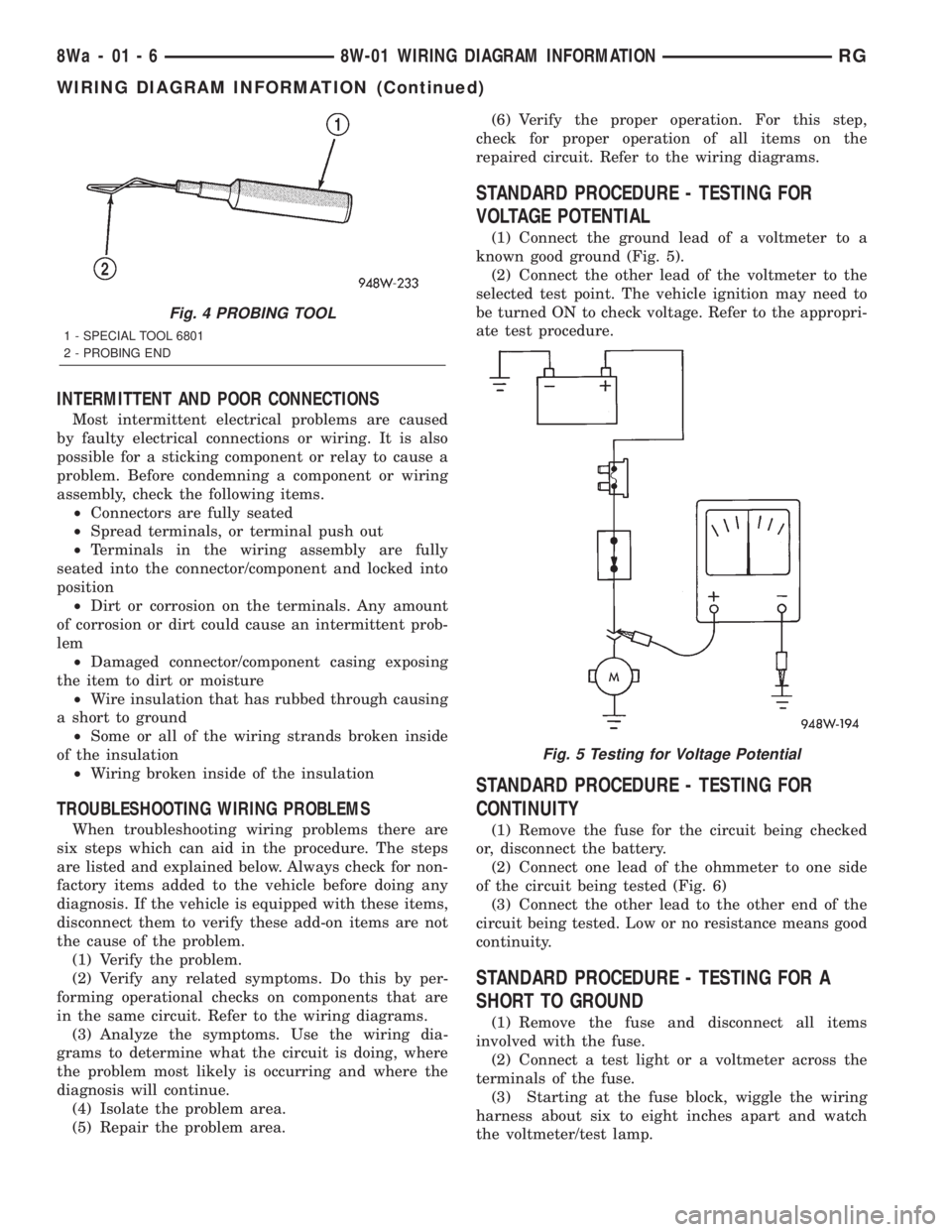
(1) Connect the ground lead of a voltmeter to a
known good ground (Fig. 5).
(2) Connect the other lead of the voltmeter to the
selected test point. The vehicle ignition may need to
be turned ON to check voltage. Refer to the appropri-
ate test procedure.
STANDARD PROCEDURE - TESTING FOR
CONTINUITY
(1) Remove the fuse for the circuit being checked
or, disconnect the battery.
(2) Connect one lead of the ohmmeter to one side
of the circuit being tested (Fig. 6)
(3) Connect the other lead to the other end of the
circuit being tested. Low or no resistance means good
continuity.
STANDARD PROCEDURE - TESTING FOR A
SHORT TO GROUND
(1) Remove the fuse and disconnect all items
involved with the fuse.
(2) Connect a test light or a voltmeter across the
terminals of the fuse.
(3) Starting at the fuse block, wiggle the wiring
harness about six to eight inches apart and watch
the voltmeter/test lamp.
Fig. 4 PROBING TOOL
1 - SPECIAL TOOL 6801
2 - PROBING END
Fig. 5 Testing for Voltage Potential
8Wa - 01 - 6 8W-01 WIRING DIAGRAM INFORMATIONRG
WIRING DIAGRAM INFORMATION (Continued)