instrument panel CHRYSLER VOYAGER 2004 Owner's Manual
[x] Cancel search | Manufacturer: CHRYSLER, Model Year: 2004, Model line: VOYAGER, Model: CHRYSLER VOYAGER 2004Pages: 2585, PDF Size: 62.54 MB
Page 330 of 2585
INSTALLATION
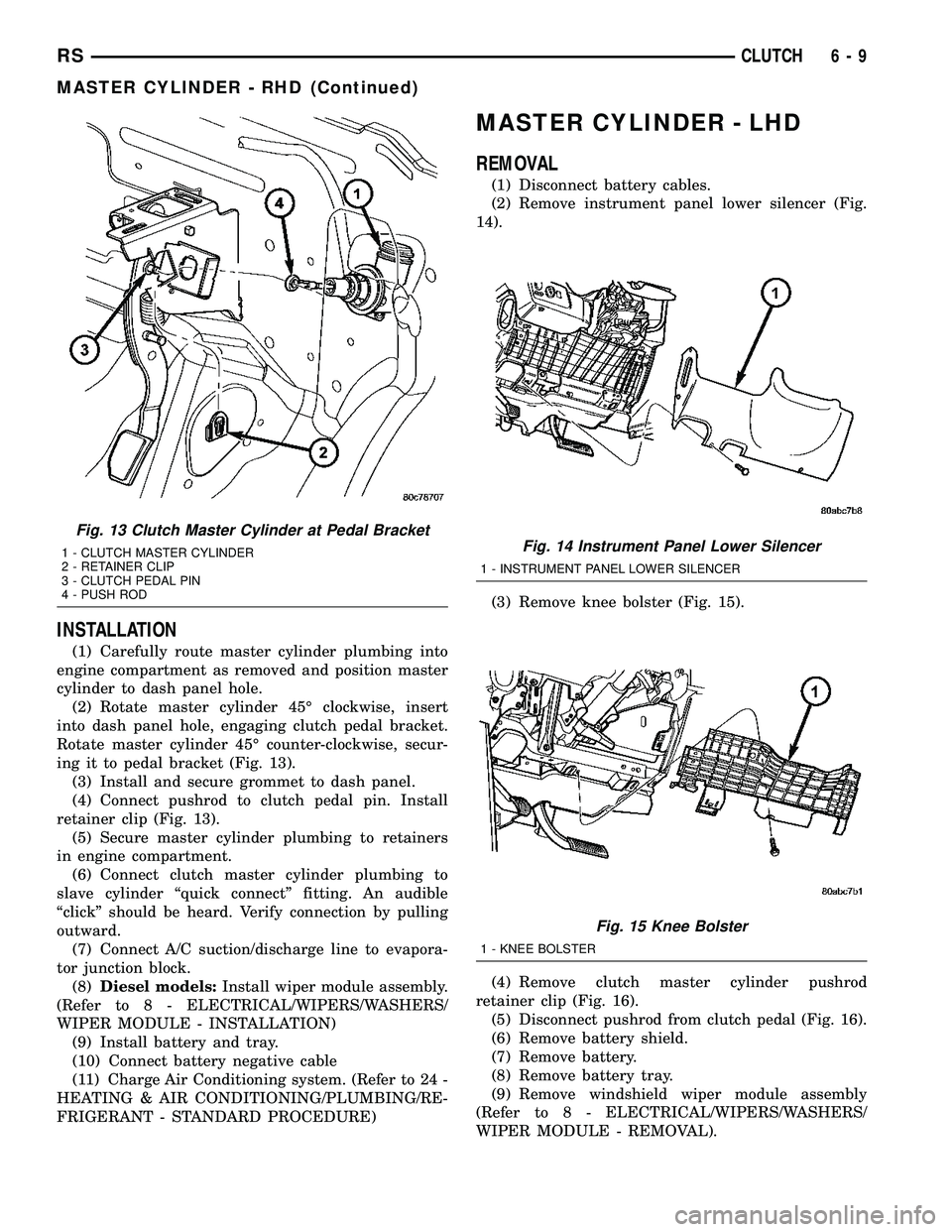
(1) Carefully route master cylinder plumbing into
engine compartment as removed and position master
cylinder to dash panel hole.
(2) Rotate master cylinder 45É clockwise, insert
into dash panel hole, engaging clutch pedal bracket.
Rotate master cylinder 45É counter-clockwise, secur-
ing it to pedal bracket (Fig. 13).
(3) Install and secure grommet to dash panel.
(4) Connect pushrod to clutch pedal pin. Install
retainer clip (Fig. 13).
(5) Secure master cylinder plumbing to retainers
in engine compartment.
(6) Connect clutch master cylinder plumbing to
slave cylinder ªquick connectº fitting. An audible
ªclickº should be heard. Verify connection by pulling
outward.
(7) Connect A/C suction/discharge line to evapora-
tor junction block.
(8)Diesel models:Install wiper module assembly.
(Refer to 8 - ELECTRICAL/WIPERS/WASHERS/
WIPER MODULE - INSTALLATION)
(9) Install battery and tray.
(10) Connect battery negative cable
(11) Charge Air Conditioning system. (Refer to 24 -
HEATING & AIR CONDITIONING/PLUMBING/RE-
FRIGERANT - STANDARD PROCEDURE)
MASTER CYLINDER - LHD
REMOVAL
(1) Disconnect battery cables.
(2) Remove instrument panel lower silencer (Fig.
14).
(3) Remove knee bolster (Fig. 15).
(4) Remove clutch master cylinder pushrod
retainer clip (Fig. 16).
(5) Disconnect pushrod from clutch pedal (Fig. 16).
(6) Remove battery shield.
(7) Remove battery.
(8) Remove battery tray.
(9) Remove windshield wiper module assembly
(Refer to 8 - ELECTRICAL/WIPERS/WASHERS/
WIPER MODULE - REMOVAL).
Fig. 13 Clutch Master Cylinder at Pedal Bracket
1 - CLUTCH MASTER CYLINDER
2 - RETAINER CLIP
3 - CLUTCH PEDAL PIN
4 - PUSH RODFig. 14 Instrument Panel Lower Silencer
1 - INSTRUMENT PANEL LOWER SILENCER
Fig. 15 Knee Bolster
1 - KNEE BOLSTER
RSCLUTCH6-9
MASTER CYLINDER - RHD (Continued)
Page 331 of 2585

(10) Using Tool 6638A, disconnect clutch master
cylinder ªquick connectº fitting (Fig. 17). Disengage
plumbing retainer from body stud.
(11) Remove master cylinder reservoir-to-strut
tower nuts (Fig. 18). Reposition reservoir off to side.
(12) Remove clutch master cylinder from dash
panel by rotating clockwise 45É and removing from
dash panel (Fig. 18).(13) Remove master cylinder and plumbing from
engine compartment. Use care not to bend or kink
plumbing. Note plumbing routing to aid in installa-
tion.
INSTALLATION
(1) Install master cylinder into position, while
routing plumbing as originally installed.
(2) Insert master cylinder pushrod through dash
panel (Fig. 18) and rotate 45É counter-clockwise to
secure.
(3) Connect master cylinder plumbing quick-con-
nect fitting. An audible ªclickº should be heard. Ver-
ify connection by pulling outward.
(4) Install master cylinder reservoir onto strut
tower. Install and tighten two (2) master cylinder
reservoir-to-strut tower nuts to 11 N´m (100 in. lbs.)
(Fig. 18).
(5) Install windshield wiper module assembly
(Refer to 8 - ELECTRICAL/WIPERS/WASHERS/
WIPER MODULE - INSTALLATION).
(6) Install battery tray.
(7) Install battery.
(8) Install battery shield.
(9) Connect master cylinder pushrod to clutch
pedal lever (Fig. 16). Install retainer clip.
(10) Install knee bolster and instrument panel
lower silencer (Fig. 15) (Fig. 14).
(11) Connect battery cables.
Fig. 16 Master Cylinder Pushrod at Pedal
1 - MASTER CYLINDER PUSHROD
2 - CLUTCH/BRAKE PEDAL ASSEMBLY
3 - PUSHROD RETAINER
Fig. 17 Disconnect Quick-Connect Using Tool 6638A
1 - QUICK CONNECT FITTING
2 - TOOL 6638A
Fig. 18 Clutch Master Cylinder Removal/Installation
1 - CLUTCH MASTER CYLINDER
2 - RESERVOIR
3 - NUT (2)
6 - 10 CLUTCHRS
MASTER CYLINDER - LHD (Continued)
Page 334 of 2585

CLUTCH PEDAL INTERLOCK
SWITCH
REMOVAL
LHD
(1) Disconnect battery negative cable.
(2) Remove instrument panel lower silencer (Fig.
23).
(3) Remove knee bolster (Fig. 24).
(4) Disconnect interlock switch connector (Fig. 25).
(5) Remove interlock switch by depressing four (4)
plastic wing tabs, and sliding switch through mount-
ing bracket (Fig. 25). If difficulty is encountered gain-
ing access to and removing interlock switch,
removing the upstop switch/bracket assembly (Fig.25) allows for over-travel of the pedal, giving more
room for interlock switch access.
(6) Remove interlock switch harness from pedal
bracket at retainer. Remove switch.
RHD
(1) Disconnect battery negative cable.
(2) Remove instrument panel lower silencer (Fig.
23).
(3) Remove knee bolster (Fig. 24).
(4) Remove master cylinder to clutch pedal pin
retainer clip (Fig. 26). Disengage pushrod from clutch
pedal pin.
(5) Disconnect interlock and upstop switch connec-
tors.
(6) Disengage master cylinder grommet from dash
panel.
(7) Remove clutch master cylinder tubing from
retainers in engine compartment.
(8) Remove clutch master cylinder from dash pan-
el/clutch pedal bracket by rotating 45É clockwise and
pulling outward towards engine (Fig. 26).
(9) Remove clutch pedal bracket assembly (Fig.
27).
(10) Remove interlock switch harness from pedal
bracket at retainer. Remove switch (Fig. 28).
Fig. 23 Instrument Panel Lower SilencerÐLHD
Shown
1 - INSTRUMENT PANEL LOWER SILENCER
Fig. 24 Knee BolsterÐLHD Shown
1 - KNEE BOLSTER
Fig. 25 Interlock/Upstop Switch Location
1 - INTERLOCK SWITCH
2 - UPSTOP SWITCH
3 - RETAINER - UPSTOP BRACKET
4 - CONNECTORS
RSCLUTCH6-13
Page 335 of 2585
INSTALLATION
LHD
(1) Install interlock switch into pedal bracket hole,
and secure harness with retainer as shown in (Fig.
28). Make sure switch wing tabs are fully expanded.
(2) Connect interlock switch connector.
(3) Install knee bolster (Fig. 24).
(4) Install instrument panel lower silencer (Fig.
23).
(5) Connect battery negative cable.
(6) Verify function of starter interlock switch.
Switch must actuate when pedal is depressed.
RHD
(1) Install interlock switch to pedal bracket assem-
bly as shown in (Fig. 28). Secure connector with
retainer to hole in bracket.
(2) Install clutch pedal bracket assembly into posi-
tion. Install pedal bracket mounting nuts and torque
to 28 N´m (250 in. lbs.).
(3) Connect interlock and upstop switch connec-
tors.
(4) Install clutch master cylinder into position and
rotate 45É counter-clockwise to secure to pedal
bracket (Fig. 26). Secure dash panel grommet and
secure hydraulic pluming into dash panel retainers.
(5) Connect master cylinder pushrod to clutch
pedal pin and secure with retainer clip (Fig. 26).
(6) Install knee bolster (Fig. 24).
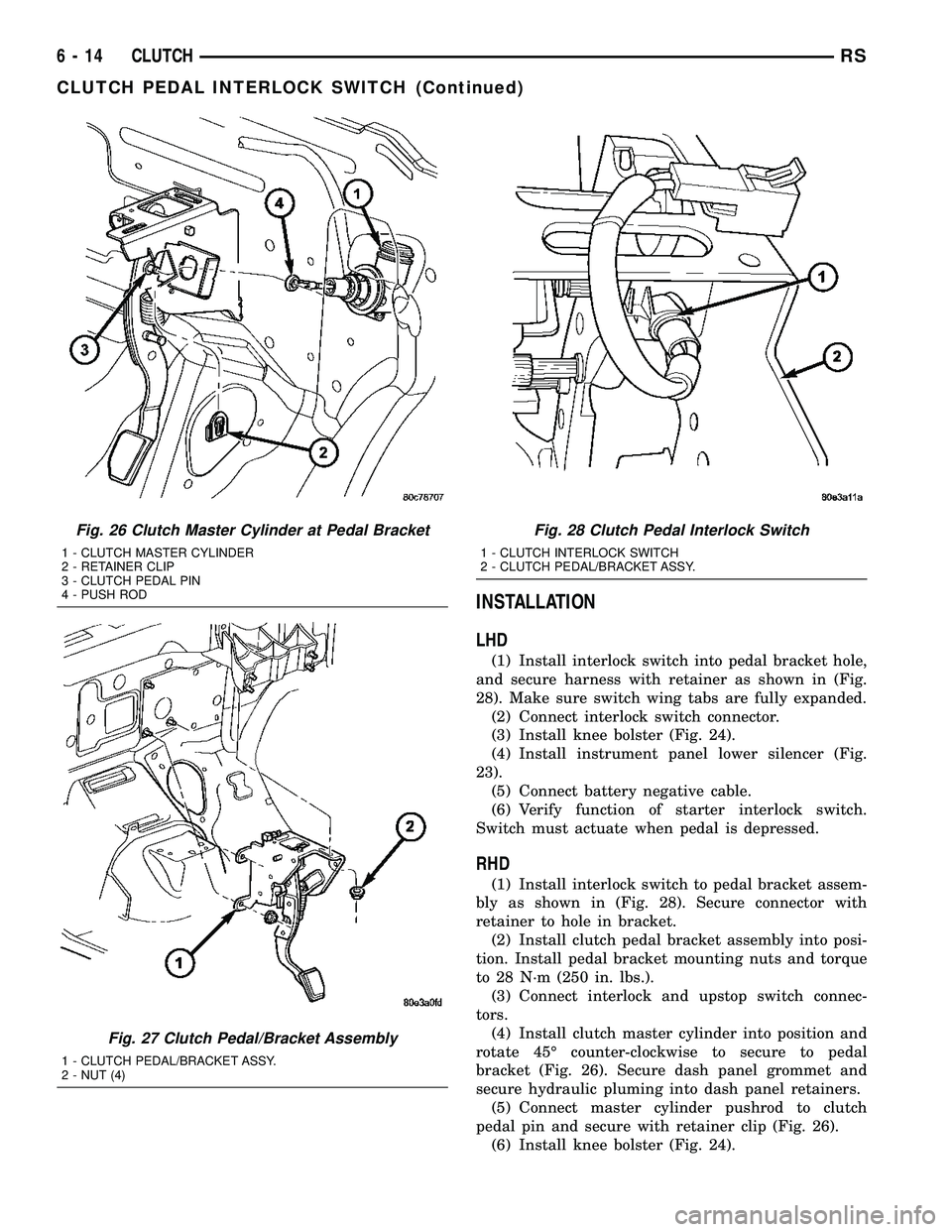
Fig. 26 Clutch Master Cylinder at Pedal Bracket
1 - CLUTCH MASTER CYLINDER
2 - RETAINER CLIP
3 - CLUTCH PEDAL PIN
4 - PUSH ROD
Fig. 27 Clutch Pedal/Bracket Assembly
1 - CLUTCH PEDAL/BRACKET ASSY.
2 - NUT (4)
Fig. 28 Clutch Pedal Interlock Switch
1 - CLUTCH INTERLOCK SWITCH
2 - CLUTCH PEDAL/BRACKET ASSY.
6 - 14 CLUTCHRS
CLUTCH PEDAL INTERLOCK SWITCH (Continued)
Page 336 of 2585

(7) Install instrument panel lower silencer (Fig.
23).
(8) Connect battery negative cable.
(9) Verify function of starter interlock switch.
Switch must actuate when pedal is depressed.
CLUTCH PEDAL UPSTOP
SWITCH
REMOVAL
LHD
(1) Disconnect battery negative cable.
(2) Remove instrument panel lower silencer (Fig.
29).(3) Remove knee bolster (Fig. 30).
(4) Remove upstop switch by depressing four (4)
plastic wing tabs, and sliding switch through mount-
ing bracket. If necessary, remove mounting bracket
and remove switch (Fig. 31).
Fig. 29 Instrument Panel Lower SilencerÐLHD
Shown
1 - INSTRUMENT PANEL LOWER SILENCER
Fig. 30 Knee BolsterÐLHD Shown
1 - KNEE BOLSTER
Fig. 31 Interlock/Upstop Switch Location
1 - INTERLOCK SWITCH
2 - UPSTOP SWITCH
3 - RETAINER - UPSTOP BRACKET
4 - CONNECTORS
RSCLUTCH6-15
CLUTCH PEDAL INTERLOCK SWITCH (Continued)
Page 337 of 2585
RHD
(1) Disconnect battery negative cable.
(2) Remove instrument panel lower silencer (Fig.
29).
(3) Remove knee bolster (Fig. 30).
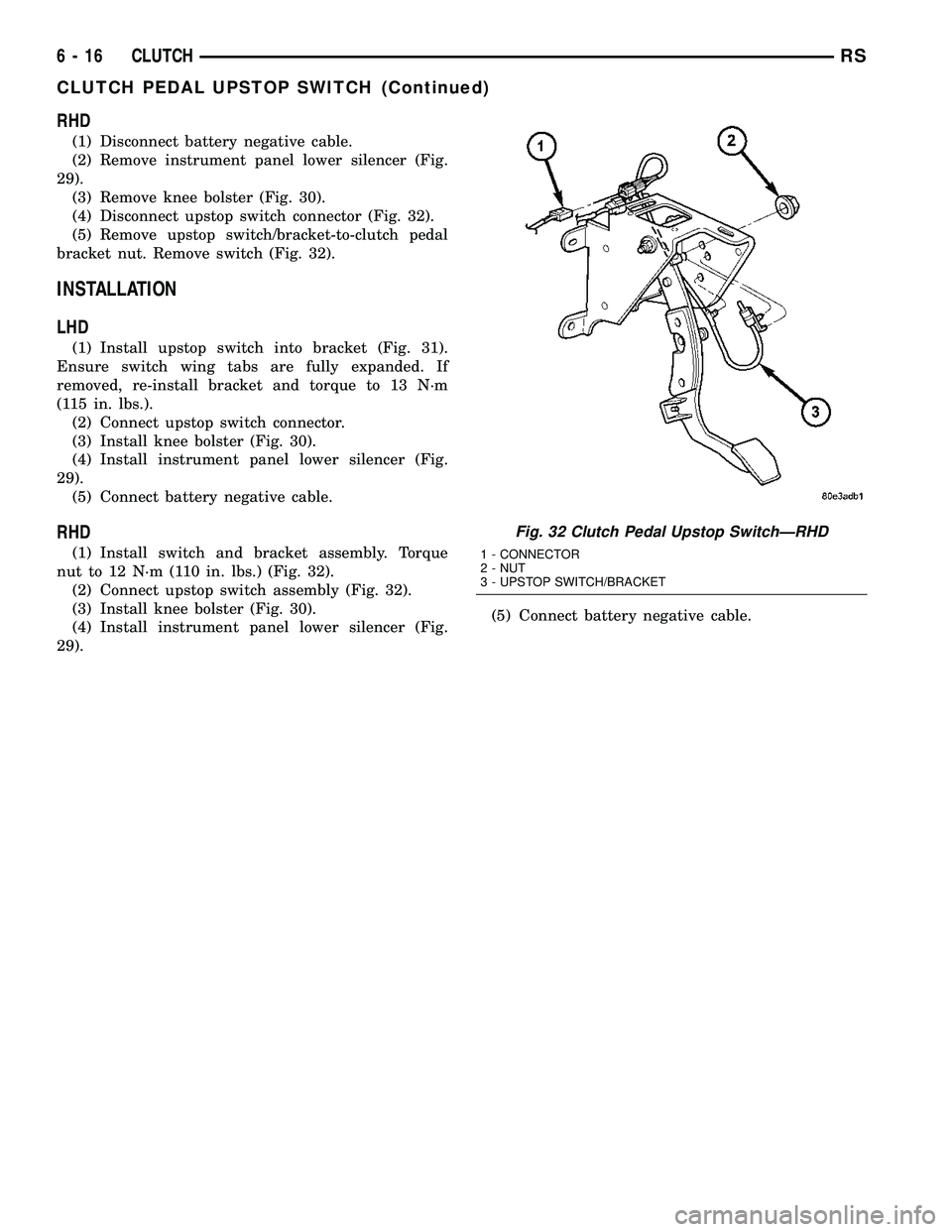
(4) Disconnect upstop switch connector (Fig. 32).
(5) Remove upstop switch/bracket-to-clutch pedal
bracket nut. Remove switch (Fig. 32).
INSTALLATION
LHD
(1) Install upstop switch into bracket (Fig. 31).
Ensure switch wing tabs are fully expanded. If
removed, re-install bracket and torque to 13 N´m
(115 in. lbs.).
(2) Connect upstop switch connector.
(3) Install knee bolster (Fig. 30).
(4) Install instrument panel lower silencer (Fig.
29).
(5) Connect battery negative cable.
RHD
(1) Install switch and bracket assembly. Torque
nut to 12 N´m (110 in. lbs.) (Fig. 32).
(2) Connect upstop switch assembly (Fig. 32).
(3) Install knee bolster (Fig. 30).
(4) Install instrument panel lower silencer (Fig.
29).(5) Connect battery negative cable.
Fig. 32 Clutch Pedal Upstop SwitchÐRHD
1 - CONNECTOR
2 - NUT
3 - UPSTOP SWITCH/BRACKET
6 - 16 CLUTCHRS
CLUTCH PEDAL UPSTOP SWITCH (Continued)
Page 376 of 2585

AUDIO
TABLE OF CONTENTS
page page
AUDIO/VIDEO
DESCRIPTION..........................1
OPERATION............................2
DIAGNOSIS AND TESTING - AUDIO..........2
ANTENNA BODY AND CABLE
DESCRIPTION..........................4
OPERATION............................4
DIAGNOSIS AND TESTING - ANTENNA BODY
AND CABLE..........................4
REMOVAL.............................5
INSTALLATION..........................6
ANTENNA MODULE - EXPORT
DESCRIPTION..........................6
OPERATION............................6
DIAGNOSIS AND TESTING - ANTENNA
MODULE - EXPORT....................7
REMOVAL.............................7
INSTALLATION..........................7
CD CHANGER
DESCRIPTION..........................7
OPERATION............................7
REMOVAL.............................8
INSTALLATION..........................8
DVD PLAYER
DESCRIPTION..........................8
OPERATION............................8
REMOVAL.............................8
INSTALLATION..........................8
INSTRUMENT PANEL ANTENNA CABLE
REMOVAL.............................8
INSTALLATION..........................9QUARTER GLASS INTEGRAL ANTENNA -
EXPORT
DESCRIPTION..........................9
OPERATION............................9
DIAGNOSIS AND TESTING - QUARTER
GLASS INTEGRAL ANTENNA - EXPORT.....9
RADIO
DESCRIPTION.........................10
OPERATION...........................10
DIAGNOSIS AND TESTING - RADIO.........10
REMOVAL.............................11
INSTALLATION.........................11
RADIO NOISE SUPPRESSION COMPONENTS
DESCRIPTION.........................11
OPERATION...........................12
REMOTE SWITCHES
DESCRIPTION.........................12
OPERATION...........................12
DIAGNOSIS AND TESTING - REMOTE
SWITCHES..........................12
REMOVAL.............................13
INSTALLATION.........................14
SPEAKER
DIAGNOSIS AND TESTING - SPEAKER......14
REMOVAL.............................14
INSTALLATION.........................15
VIDEO SCREEN
DESCRIPTION.........................16
OPERATION...........................16
REMOVAL.............................16
INSTALLATION.........................16
AUDIO/VIDEO
DESCRIPTION
An audio system is standard factory-installed
equipment on this model. A rear seat video system is
an available option. Several combinations of radio
receivers are offered on this model. The audio/video
system uses an ignition switched source of battery
current so that the system will only operate when
the ignition switch is in the RUN or ACCESSORY/
ACCESSORY DELAY positions.
The audio system includes the following compo-
nents:
²Antenna
²CD changer (if equipped)
²DVD player (if equipped)²Radio noise suppression components
²Radio receiver
²Speakers
²Video screen (if equipped)
Certain functions and features of the audio/video
system rely upon resources shared with other elec-
tronic modules in the vehicle over the Programmable
Communication Interface (PCI) bus network. The
data bus network allows the sharing of sensor infor-
mation. For diagnosis of these electronic modules or
of the data bus network, the use of a DRB IIItscan
tool and the proper Diagnostic Procedures manual
are recommended.
Refer to the appropriate wiring information in this
service manual for complete standard and premium
audio system circuit diagrams. The wiring informa-
tion includes proper wire and connector repair proce-
RSAUDIO8A-1
Page 377 of 2585

dures, further details on wire harness routing and
retention, as well as pin-out and location views for
the various wire harness connectors, splices, and
grounds.
OPERATION
Operating instructions for the factory installed
audio systems can be found in the Owner's Manual
provided with this vehicle.
DIAGNOSIS AND TESTING - AUDIO
Any diagnosis of the Audio system should
begin with the use of the DRB IIItdiagnostic
tool. For information on the use of the DRB
IIIt, refer to the appropriate Diagnostic Service
Manual.Refer to the appropriate wiring information. The
wiring information includes wiring diagrams, proper
wire and connector repair procedures, details of wire
harness routing and retention, connector pin-out
information and location views for the various wire
harness connectors, splices and grounds.
WARNING: ON VEHICLES EQUIPPED WITH AIR-
BAGS, REFER TO ELECTRICAL, RESTRAINTS
BEFORE ATTEMPTING ANY STEERING WHEEL,
STEERING COLUMN, OR INSTRUMENT PANEL
COMPONENT DIAGNOSIS OR SERVICE. FAILURE
TO TAKE THE PROPER PRECAUTIONS COULD
RESULT IN ACCIDENTAL AIRBAG DEPLOYMENT
AND POSSIBLE PERSONAL INJURY.
AUDIO SYSTEM DIAGNOSIS
CONDITION POSSIBLE CAUSE CORRECTION
NO AUDIO. 1. FUSE FAULTY. 1. CHECK RADIO FUSES IN FUSE BLOCK MODULE.
REPLACE FUSES, IF REQUIRED.
2. RADIO CONNECTOR
FAULTY.2. CHECK FOR LOOSE OR CORRODED RADIO CONNECTOR.
REPAIR, IF REQUIRED.
3. WIRING FAULTY. 3. CHECK FOR BATTERY VOLTAGE AT RADIO CONNECTOR.
REPAIR WIRING, IF REQUIRED.
4. GROUND FAULTY. 4. CHECK FOR CONTINUITY BETWEEN RADIO CHASSIS AND
A KNOWN GOOD GROUND. THERE SHOULD BE
CONTINUITY. REPAIR GROUND, IF REQUIRED.
5. RADIO FAULTY. 5. EXCHANGE OR REPLACE RADIO, IF REQUIRED.
6. SPEAKERS FAULTY. 6. SEE SPEAKER DIAGNOSIS, IN THIS GROUP.
NO DISPLAY. 1. FUSE FAULTY. 1. CHECK RADIO FUSES IN FUSE BLOCK MODULE.
REPLACE FUSES, IF REQUIRED.
2. RADIO CONNECTOR
FAULTY.2. CHECK FOR LOOSE OR CORRODED RADIO CONNECTOR.
REPAIR, IF REQUIRED.
3. WIRING FAULTY. 3. CHECK FOR BATTERY VOLTAGE AT RADIO CONNECTOR.
REPAIR WIRING, IF REQUIRED.
4. GROUND FAULTY. 4. CHECK FOR CONTINUITY BETWEEN RADIO CHASSIS AND
A KNOWN GOOD GROUND. THERE SHOULD BE
CONTINUITY. REPAIR GROUND, IF REQUIRED.
5. RADIO FAULTY. 5. EXCHANGE OR REPLACE RADIO, IF REQUIRED.
8A - 2 AUDIORS
AUDIO/VIDEO (Continued)
Page 379 of 2585

CONDITION POSSIBLE CAUSE CORRECTION
HEADPHONES
WILL NOT HOLD
A CHANNEL OR
HAVE STATIC1. WEAK BATTERIES IN
THE HEADPHONES.1. REPLACE BATTERIES.
2. CLOSENESS TO
RADIO TRANSMITTER
SUCH AS A RADIO
TOWER, AIRPORT
TRANSMITTER OR
SOME MOBILE
RADIOS.2. MOVE TO AN AREA AWAY FREE FROM THESE
CONDITIONS.
REMOTE
CONTROL
INOPERATIVE1. WEAK BATTERIES IN
THE REMOTE
CONTROL.1. REPLACE BATTERIES.
2. OPERATION
CONSTRAINT OF
SYSTEM2. MAKE SURE THAT REAR AUDIO IS IN A DIFFERENT MODE
THAN FRONT SPEAKERS. REMOTE CONTROL WILL NOT
WORK WHEN BOTH ARE IN THE SAME MODE.
ANTENNA BODY AND CABLE
DESCRIPTION
All models use a fixed-length stainless steel rod-
type antenna mast, installed at the right front fender
of the vehicle. The antenna mast is connected to the
center wire of the coaxial antenna cable, and is not
grounded to any part of the vehicle.
OPERATION
To minimize static, the antenna base must have a
good ground. The coaxial antenna cable shield (the
outer wire mesh of the cable) is grounded to the
antenna base and the radio chassis.
The antenna coaxial cable has an additional dis-
connect, located near the right end of the instrument
panel. This additional disconnect allows the instru-
ment panel assembly to be removed and installed
without removing the radio.
DIAGNOSIS AND TESTING - ANTENNA BODY
AND CABLE
WARNING: ON VEHICLES EQUIPPED WITH AIR-
BAGS, REFER TO ELECTRICAL, RESTRAINTS
BEFORE ATTEMPTING ANY STEERING WHEEL,
STEERING COLUMN, OR INSTRUMENT PANEL
COMPONENT DIAGNOSIS OR SERVICE. FAILURE
TO TAKE THE PROPER PRECAUTIONS COULD
RESULT IN ACCIDENTAL AIRBAG DEPLOYMENT
AND POSSIBLE PERSONAL INJURY.
The ohmmeter test lead connections for each test
are shown in (Fig. 1).
TEST 1
Test 1 determines of the antenna mast is insulated
from the base. Proceed as follows:
(1) Unplug the antenna coaxial cable from the
radio chassis and isolate. Remove the antenna mast.
(2) Connect an ohmmeter test lead to the inside
center of the antenna base. Connect the other test
lead to a metallic portion on the outside of the
antenna base. Check for continuity.
(3) There should be no continuity. If continuity is
found, replace the faulty or damaged antenna base
and cable assembly.
Fig. 1 Antenna Test Points
8A - 4 AUDIORS
AUDIO/VIDEO (Continued)
Page 380 of 2585
TEST 2
Test 2 checks the antenna for an open circuit as
follows:
(1) Unplug the antenna coaxial cable connector
from the radio chassis. Remove the antenna mast.
(2) Connect an ohmmeter test lead to the inside
center of the antenna base. Connect the other test
lead to the center pin of the antenna coaxial cable
connector.
(3) Continuity should exist (the ohmmeter should
only register a fraction of an ohm). High or infinite
resistance indicates damage to the base and cable
assembly. Replace the faulty base and cable if
required.
TEST 3
Test 3 checks the condition of the ground between
the antenna base and the vehicle body as follows:
(1) Connect one ohmmeter test lead to the fender
on an exposed metal area. Connect the other test
lead to the outer crimp on the antenna coaxial cable
connector.(2) The resistance should be less than (1) ohm.
(3) If the resistance is more than (1) ohm, clean
and/or tighten the antenna base to the fender mount-
ing hardware.
REMOVAL
(1) Disconnect and isolate the battery negative
cable.
(2) Remove glove box from instrument panel,
(Refer to 23 - BODY/INSTRUMENT PANEL/GLOVE
BOX - REMOVAL).
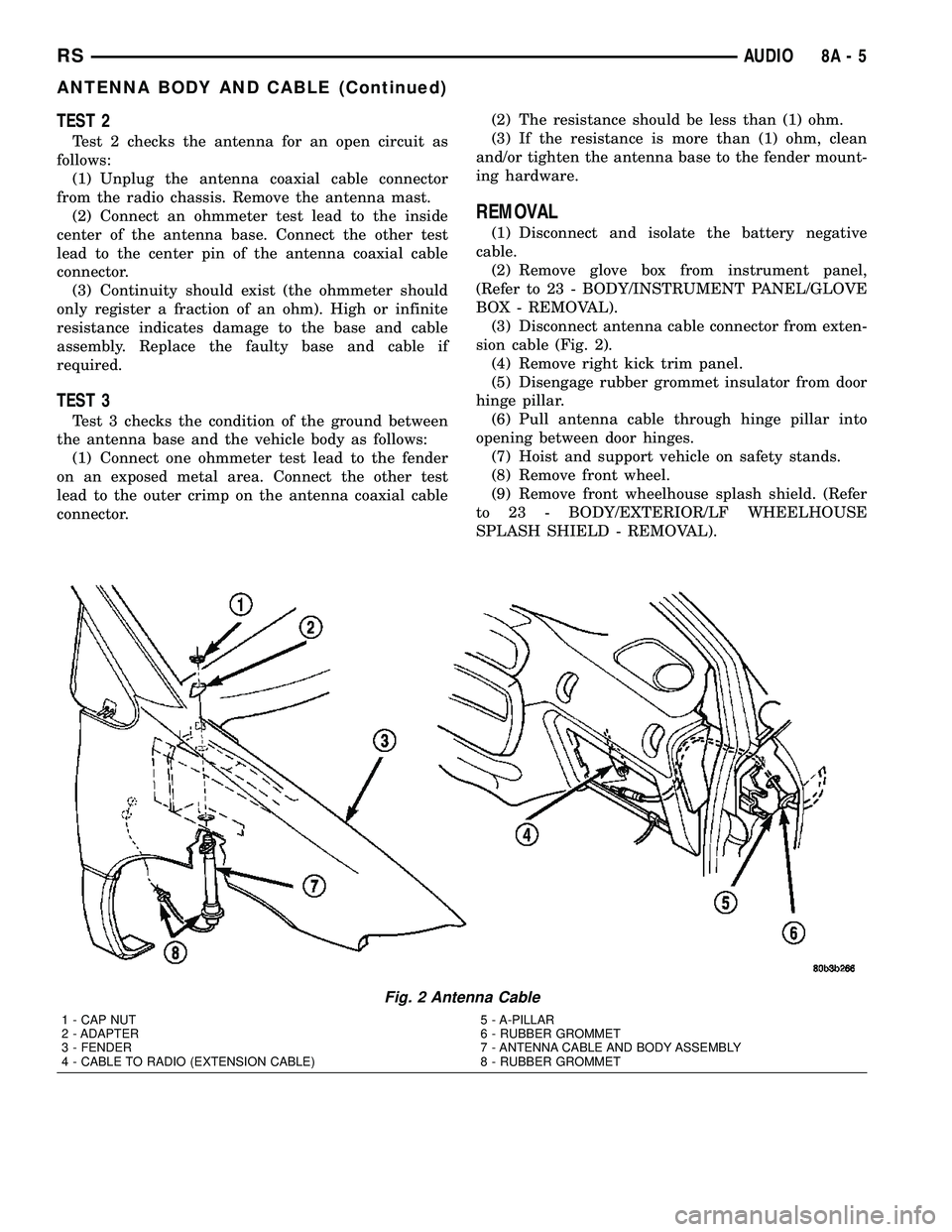
(3) Disconnect antenna cable connector from exten-
sion cable (Fig. 2).
(4) Remove right kick trim panel.
(5) Disengage rubber grommet insulator from door
hinge pillar.
(6) Pull antenna cable through hinge pillar into
opening between door hinges.
(7) Hoist and support vehicle on safety stands.
(8) Remove front wheel.
(9) Remove front wheelhouse splash shield. (Refer
to 23 - BODY/EXTERIOR/LF WHEELHOUSE
SPLASH SHIELD - REMOVAL).
Fig. 2 Antenna Cable
1 - CAP NUT
2 - ADAPTER
3 - FENDER
4 - CABLE TO RADIO (EXTENSION CABLE)5 - A-PILLAR
6 - RUBBER GROMMET
7 - ANTENNA CABLE AND BODY ASSEMBLY
8 - RUBBER GROMMET
RSAUDIO8A-5
ANTENNA BODY AND CABLE (Continued)