warning CHRYSLER VOYAGER 2023 Owner's Manual
[x] Cancel search | Manufacturer: CHRYSLER, Model Year: 2023, Model line: VOYAGER, Model: CHRYSLER VOYAGER 2023Pages: 256, PDF Size: 13.97 MB
Page 33 of 256
GETTING TO KNOW YOUR VEHICLE31
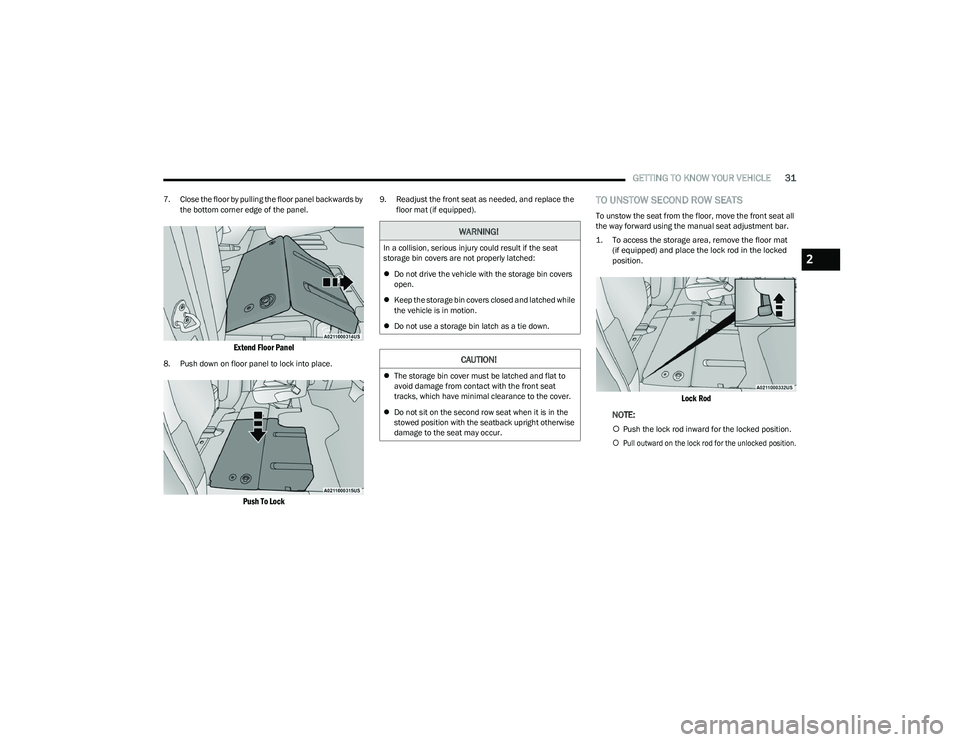
7. Close the floor by pulling the floor panel backwards by
the bottom corner edge of the panel.
Extend Floor Panel
8. Push down on floor panel to lock into place.
Push To Lock
9. Readjust the front seat as needed, and replace the floor mat (if equipped).TO UNSTOW SECOND ROW SEATS
To unstow the seat from the floor, move the front seat all
the way forward using the manual seat adjustment bar.
1. To access the storage area, remove the floor mat(if equipped) and place the lock rod in the locked
position.
Lock Rod
NOTE:
Push the lock rod inward for the locked position.
Pull outward on the lock rod for the unlocked position.
WARNING!
In a collision, serious injury could result if the seat
storage bin covers are not properly latched:
Do not drive the vehicle with the storage bin covers
open.
Keep the storage bin covers closed and latched while
the vehicle is in motion.
Do not use a storage bin latch as a tie down.
CAUTION!
The storage bin cover must be latched and flat to
avoid damage from contact with the front seat
tracks, which have minimal clearance to the cover.
Do not sit on the second row seat when it is in the
stowed position with the seatback upright otherwise
damage to the seat may occur.
2
23_RUV_OM_EN_US_t.book Page 31
Page 35 of 256
GETTING TO KNOW YOUR VEHICLE33
(Continued)
POWER ADJUSTMENT (FRONT SEATS) —
I
F EQUIPPED
Some models may be equipped with an eight-way power
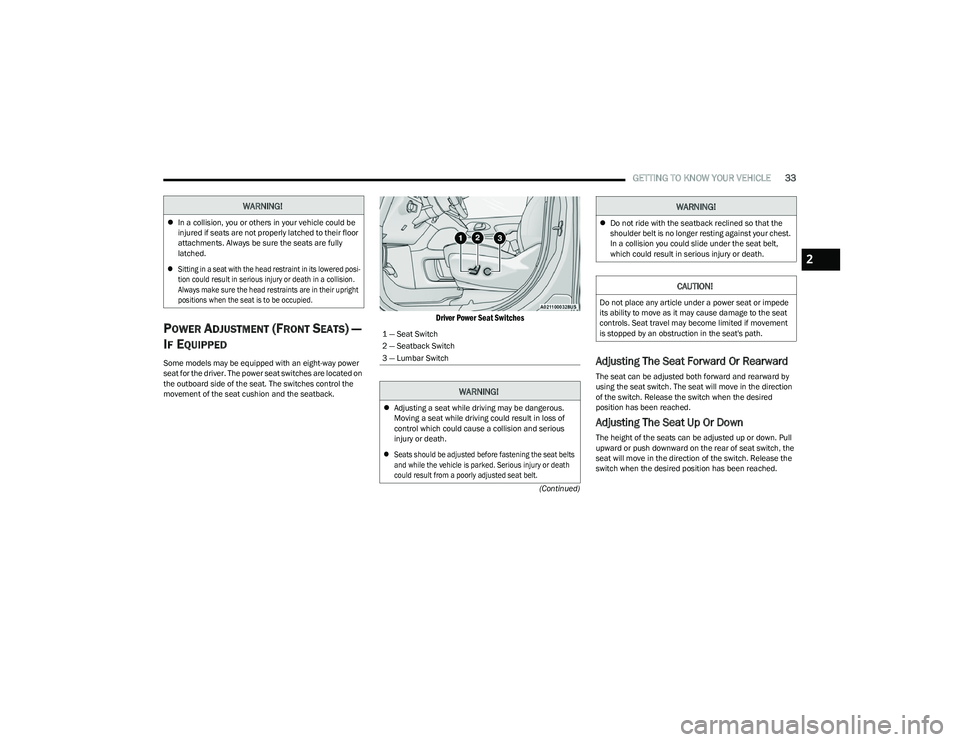
seat for the driver. The power seat switches are located on
the outboard side of the seat. The switches control the
movement of the seat cushion and the seatback.
Driver Power Seat Switches
Adjusting The Seat Forward Or Rearward
The seat can be adjusted both forward and rearward by
using the seat switch. The seat will move in the direction
of the switch. Release the switch when the desired
position has been reached.
Adjusting The Seat Up Or Down
The height of the seats can be adjusted up or down. Pull
upward or push downward on the rear of seat switch, the
seat will move in the direction of the switch. Release the
switch when the desired position has been reached.
WARNING!
In a collision, you or others in your vehicle could be
injured if seats are not properly latched to their floor
attachments. Always be sure the seats are fully
latched.
Sitting in a seat with the head restraint in its lowered posi -
tion could result in serious injury or death in a collision.
Always make sure the head restraints are in their upright
positions when the seat is to be occupied.
1 — Seat Switch
2 — Seatback Switch
3 — Lumbar Switch
WARNING!
Adjusting a seat while driving may be dangerous.
Moving a seat while driving could result in loss of
control which could cause a collision and serious
injury or death.
Seats should be adjusted before fastening the seat belts
and while the vehicle is parked. Serious injury or death
could result from a poorly adjusted seat belt.
Do not ride with the seatback reclined so that the
shoulder belt is no longer resting against your chest.
In a collision you could slide under the seat belt,
which could result in serious injury or death.
CAUTION!
Do not place any article under a power seat or impede
its ability to move as it may cause damage to the seat
controls. Seat travel may become limited if movement
is stopped by an obstruction in the seat's path.
WARNING!
2
23_RUV_OM_EN_US_t.book Page 33
Page 36 of 256

34GETTING TO KNOW YOUR VEHICLE
Tilting The Seat Up Or Down
The angle of the seat cushion can be adjusted in two
directions. Pull upward or push downward on the front of
the seat switch, the front of the seat cushion will move in
the direction of the switch. Release the switch when the
desired position has been reached.
Reclining The Seatback
The angle of the seatback can be adjusted forward or
rearward. Push the seatback switch forward or rearward,
the seat will move in the direction of the switch. Release
the switch when the desired position is reached.
Power Lumbar — If Equipped
Power Lumbar Switch Location
The front driver’s seat may be equipped with a four-way
lumbar adjustment. The power lumbar switch is located on
the outboard side of the equipped power seat. Push the
switch forward or rearward to increase or decrease the
lumbar support. Push the switch upward or downward to
raise or lower the lumbar support.
HEATED SEATS
Front Heated Seats — If Equipped
The front heated seats control buttons are
located in the touchscreen.
You can choose from HI, LO or off heat settings.
The indicator lights in each switch indicate the level of
heat in use. Two indicator lights will illuminate for HI, one
for LO and none for off.
Press the heated seat button once to turn the HI setting on.
Press the heated seat button a second time to turn the
LO setting on.
Press the heated seat button a third time to turn the
heating elements off.
The level of heat selected will stay on until the operator
changes it.
NOTE:
Once a heat setting is selected, heat will be felt within
two to five minutes.
The engine must be running for the heated seats to
operate.
For information on use with the Remote Start system, see
Úpage 15.
WARNING!
Adjusting a seat while driving may be dangerous.
Moving a seat while driving could result in loss of
control which could cause a collision and serious
injury or death.
Seats should be adjusted before fastening the seat belts
and while the vehicle is parked. Serious injury or death
could result from a poorly adjusted seat belt.
Do not ride with the seatback reclined so that the
shoulder belt is no longer resting against your chest.
In a collision you could slide under the seat belt,
which could result in serious injury or death.
CAUTION!
Do not place any article under a power seat or impede
its ability to move as it may cause damage to the seat
controls. Seat travel may become limited if movement
is stopped by an obstruction in the seat's path.
WARNING!
Persons who are unable to feel pain to the skin
because of advanced age, chronic illness, diabetes,
spinal cord injury, medication, alcohol use, exhaus -
tion or other physical condition must exercise care
when using the seat heater. It may cause burns even
at low temperatures, especially if used for long
periods of time.
Do not place anything on the seat or seatback that
insulates against heat, such as a blanket or cushion.
This may cause the seat heater to overheat. Sitting in
a seat that has been overheated could cause serious
burns due to the increased surface temperature of
the seat.
23_RUV_OM_EN_US_t.book Page 34
Page 37 of 256
GETTING TO KNOW YOUR VEHICLE35
HEAD RESTRAINTS
Head restraints are designed to reduce the risk of injury by
restricting head movement in the event of a rear impact.
Head restraints should be adjusted so that the top of the
head restraint is located above the top of your ear.
Head Restraints — Front Seats
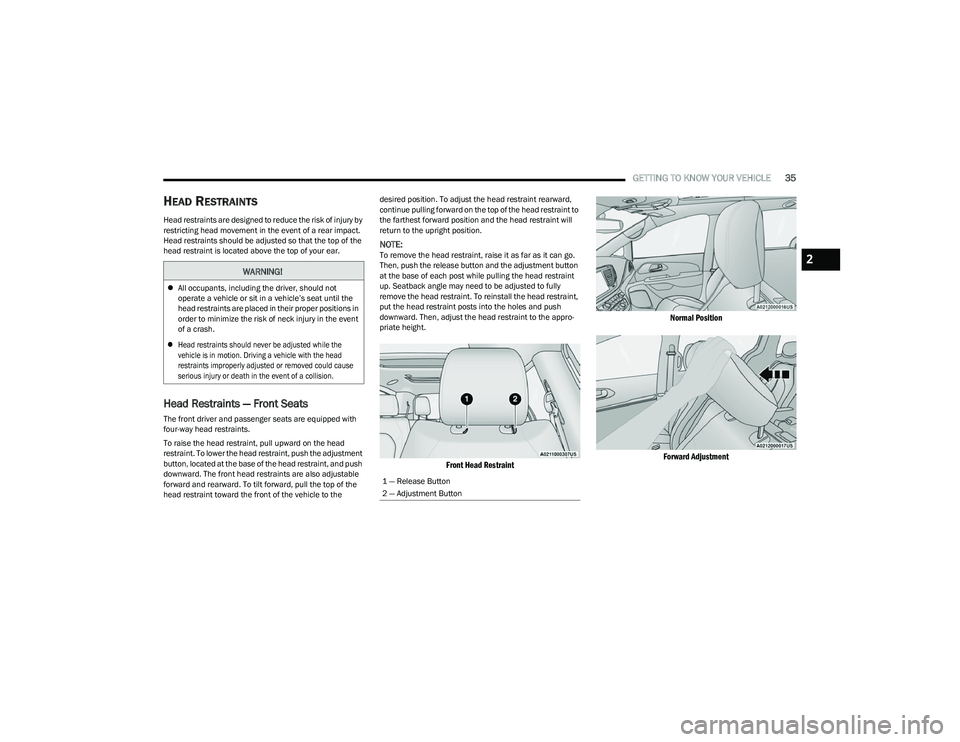
The front driver and passenger seats are equipped with
four-way head restraints.
To raise the head restraint, pull upward on the head
restraint. To lower the head restraint, push the adjustment
button, located at the base of the head restraint, and push
downward. The front head restraints are also adjustable
forward and rearward. To tilt forward, pull the top of the
head restraint toward the front of the vehicle to the desired position. To adjust the head restraint rearward,
continue pulling forward on the top of the head restraint to
the farthest forward position and the head restraint will
return to the upright position.
NOTE:To remove the head restraint, raise it as far as it can go.
Then, push the release button and the adjustment button
at the base of each post while pulling the head restraint
up. Seatback angle may need to be adjusted to fully
remove the head restraint. To reinstall the head restraint,
put the head restraint posts into the holes and push
downward. Then, adjust the head restraint to the appro
-
priate height.
Front Head Restraint Normal Position
Forward Adjustment
WARNING!
All occupants, including the driver, should not
operate a vehicle or sit in a vehicle’s seat until the
head restraints are placed in their proper positions in
order to minimize the risk of neck injury in the event
of a crash.
Head restraints should never be adjusted while the
vehicle is in motion. Driving a vehicle with the head
restraints improperly adjusted or removed could cause
serious injury or death in the event of a collision.
1 — Release Button
2 — Adjustment Button
2
23_RUV_OM_EN_US_t.book Page 35
Page 38 of 256
36GETTING TO KNOW YOUR VEHICLE
Head Restraints — Second Row Quad
Seats
The second row outboard head restraints, as well as the
removable 8th passenger seat (if equipped), may have
adjustable head restraints.
NOTE:If equipped with Stow ‘n Go seating, the head restraints
are non-adjustable and non-removable. Do not pull on
non-adjustable head restraints when folding the seat.
To raise the head restraint, pull upward on the head
restraint. To lower the head restraint, push the adjustment
button, located at the base of the head restraint, and push
downward.
To remove the head restraint, raise it as far as it can go.
Then, push the release button and the adjustment button
at the base of each post while pulling the head restraint
up. Seatback angle may need to be adjusted to fully remove the head restraint. To reinstall the head restraint,
put the head restraint posts into the holes and push
downward. Then, adjust the head restraint to the
appropriate height.
Head Restraints — Third Row
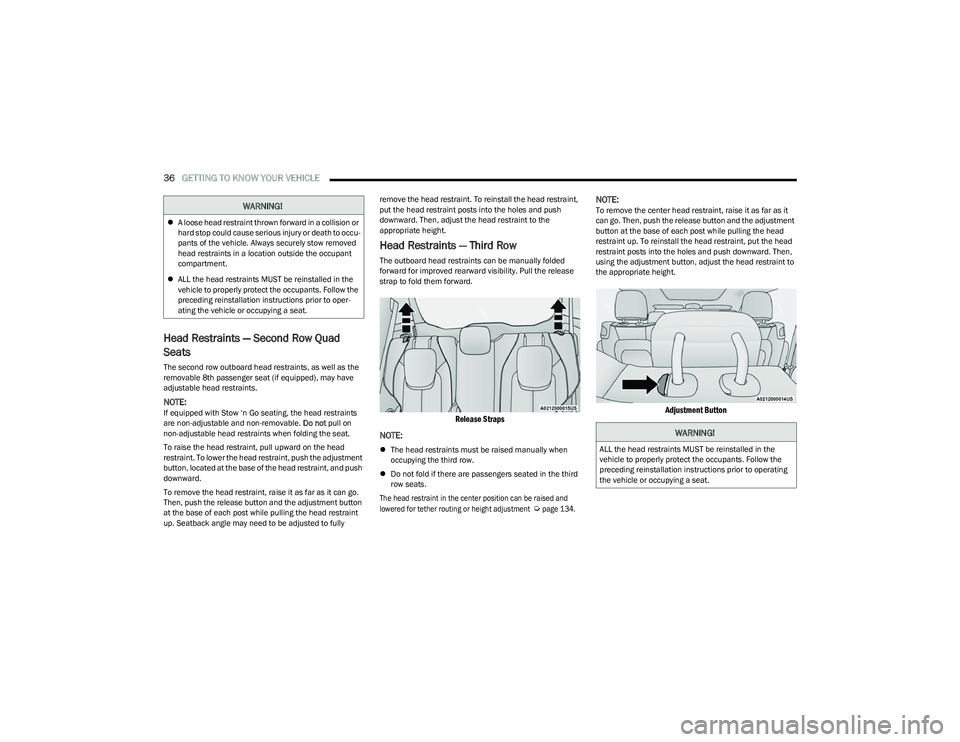
The outboard head restraints can be manually folded
forward for improved rearward visibility. Pull the release
strap to fold them forward.
Release Straps
NOTE:
The head restraints must be raised manually when
occupying the third row.
Do not fold if there are passengers seated in the third
row seats.
The head restraint in the center position can be raised and
lowered for tether routing or height adjustment
Ú
page 134.
NOTE:To remove the center head restraint, raise it as far as it
can go. Then, push the release button and the adjustment
button at the base of each post while pulling the head
restraint up. To reinstall the head restraint, put the head
restraint posts into the holes and push downward. Then,
using the adjustment button, adjust the head restraint to
the appropriate height.
Adjustment Button
WARNING!
A loose head restraint thrown forward in a collision or
hard stop could cause serious injury or death to occu -
pants of the vehicle. Always securely stow removed
head restraints in a location outside the occupant
compartment.
ALL the head restraints MUST be reinstalled in the
vehicle to properly protect the occupants. Follow the
preceding reinstallation instructions prior to oper -
ating the vehicle or occupying a seat.
WARNING!
ALL the head restraints MUST be reinstalled in the
vehicle to properly protect the occupants. Follow the
preceding reinstallation instructions prior to operating
the vehicle or occupying a seat.
23_RUV_OM_EN_US_t.book Page 36
Page 40 of 256
38GETTING TO KNOW YOUR VEHICLE
MIRRORS
INSIDE REARVIEW MIRROR
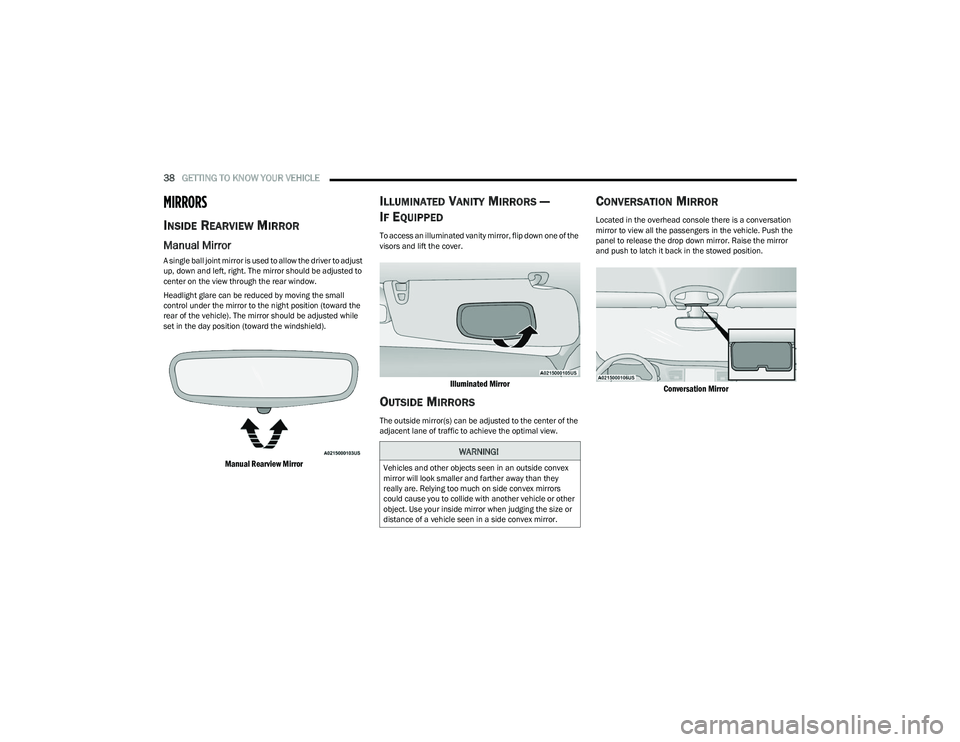
Manual Mirror
A single ball joint mirror is used to allow the driver to adjust
up, down and left, right. The mirror should be adjusted to
center on the view through the rear window.
Headlight glare can be reduced by moving the small
control under the mirror to the night position (toward the
rear of the vehicle). The mirror should be adjusted while
set in the day position (toward the windshield).
Manual Rearview Mirror
ILLUMINATED VANITY MIRRORS —
I
F EQUIPPED
To access an illuminated vanity mirror, flip down one of the
visors and lift the cover.
Illuminated Mirror
OUTSIDE MIRRORS
The outside mirror(s) can be adjusted to the center of the
adjacent lane of traffic to achieve the optimal view.
CONVERSATION MIRROR
Located in the overhead console there is a conversation
mirror to view all the passengers in the vehicle. Push the
panel to release the drop down mirror. Raise the mirror
and push to latch it back in the stowed position.
Conversation Mirror
WARNING!
Vehicles and other objects seen in an outside convex
mirror will look smaller and farther away than they
really are. Relying too much on side convex mirrors
could cause you to collide with another vehicle or other
object. Use your inside mirror when judging the size or
distance of a vehicle seen in a side convex mirror.
23_RUV_OM_EN_US_t.book Page 38
Page 42 of 256
40GETTING TO KNOW YOUR VEHICLE
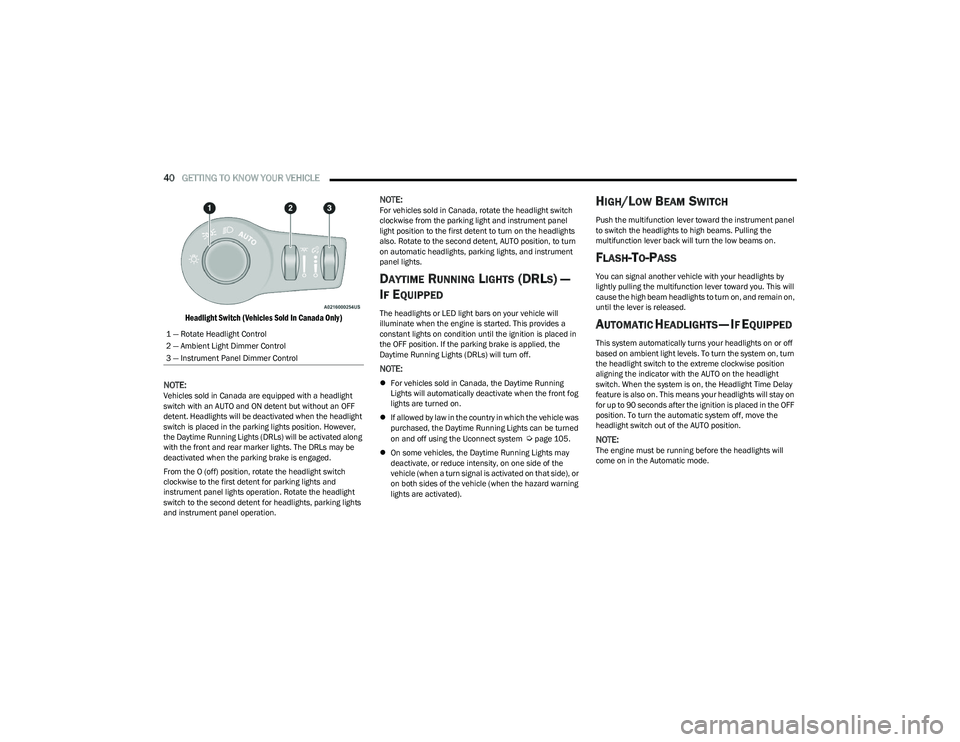
Headlight Switch (Vehicles Sold In Canada Only)
NOTE:
Vehicles sold in Canada are equipped with a headlight
switch with an AUTO and ON detent but without an OFF
detent. Headlights will be deactivated when the headlight
switch is placed in the parking lights position. However,
the Daytime Running Lights (DRLs) will be activated along
with the front and rear marker lights. The DRLs may be
deactivated when the parking brake is engaged.
From the O (off) position, rotate the headlight switch
clockwise to the first detent for parking lights and
instrument panel lights operation. Rotate the headlight
switch to the second detent for headlights, parking lights
and instrument panel operation.
NOTE:For vehicles sold in Canada, rotate the headlight switch
clockwise from the parking light and instrument panel
light position to the first detent to turn on the headlights
also. Rotate to the second detent, AUTO position, to turn
on automatic headlights, parking lights, and instrument
panel lights.
DAYTIME RUNNING LIGHTS (DRLS) —
I
F EQUIPPED
The headlights or LED light bars on your vehicle will
illuminate when the engine is started. This provides a
constant lights on condition until the ignition is placed in
the OFF position. If the parking brake is applied, the
Daytime Running Lights (DRLs) will turn off.
NOTE:
For vehicles sold in Canada, the Daytime Running
Lights will automatically deactivate when the front fog
lights are turned on.
If allowed by law in the country in which the vehicle was
purchased, the Daytime Running Lights can be turned
on and off using the Uconnect system
Úpage 105.
On some vehicles, the Daytime Running Lights may
deactivate, or reduce intensity, on one side of the
vehicle (when a turn signal is activated on that side), or
on both sides of the vehicle (when the hazard warning
lights are activated).
HIGH/LOW BEAM SWITCH
Push the multifunction lever toward the instrument panel
to switch the headlights to high beams. Pulling the
multifunction lever back will turn the low beams on.
FLASH-TO-PASS
You can signal another vehicle with your headlights by
lightly pulling the multifunction lever toward you. This will
cause the high beam headlights to turn on, and remain on,
until the lever is released.
AUTOMATIC HEADLIGHTS — IF EQUIPPED
This system automatically turns your headlights on or off
based on ambient light levels. To turn the system on, turn
the headlight switch to the extreme clockwise position
aligning the indicator with the AUTO on the headlight
switch. When the system is on, the Headlight Time Delay
feature is also on. This means your headlights will stay on
for up to 90 seconds after the ignition is placed in the OFF
position. To turn the automatic system off, move the
headlight switch out of the AUTO position.
NOTE:The engine must be running before the headlights will
come on in the Automatic mode.
1 — Rotate Headlight Control
2 — Ambient Light Dimmer Control
3 — Instrument Panel Dimmer Control
23_RUV_OM_EN_US_t.book Page 40
Page 43 of 256
GETTING TO KNOW YOUR VEHICLE41
HEADLIGHT TIME DELAY — IF EQUIPPED
This feature provides the safety of headlight illumination
for up to 90 seconds after exiting your vehicle.
To activate the delay feature, place the ignition in the OFF
position while the headlights are still on. The 90 second
delay interval begins when headlight switch is turned off.
If the headlights or parking lights are turned back on or the
ignition is placed in the ON position, the delay will be
canceled.
When exiting the vehicle the driver can choose to have the
headlights remain on for 30, 60, or 90 seconds or not
remain on. You can change the timer setting through the
Uconnect system
Úpage 105.
If the headlights are turned off before the ignition, they will
turn off in the normal manner.
NOTE:The headlights must be turned off within 45 seconds of
placing the ignition in the OFF position to activate this
feature.
LIGHTS-ON REMINDER
If the headlights or the parking lights are left on after the
ignition is placed in the OFF position, the vehicle will chime
when the driver's door is opened.
TURN SIGNALS
Move the multifunction lever up or down to activate the
turn signals. The arrows on each side of the instrument
cluster flash to show proper operation.
NOTE:If either light remains on and does not flash, or there is a
very fast flash rate, check for a defective outside light
bulb.
Turn Signal Warning
If the vehicle electronics sense that the vehicle has
traveled for about 1 mile (1.6 km) with a turn signal on, a
chime will sound and a message will display in the cluster
to alert the driver.
LANE CHANGE ASSIST — IF EQUIPPED
Tap the multifunction lever up or down once, without
moving beyond the detent, and the turn signal (right or
left) will flash three times then automatically turn off.
BATTERY PROTECTION
This feature provides battery protection to avoid wearing down
the battery if the headlights or parking lights are left on for
extended periods of time when the ignition is in the OFF
position. After eight minutes of the ignition being in the OFF
position and the headlight switch in any position other than OFF
or AUTO, the lights will turn off automatically until the next cycle
of the ignition or headlight switch.
The battery protection feature will be disabled if the
ignition is placed in any position other than OFF during the
eight minute delay.
INTERIOR LIGHTS
INTERIOR COURTESY LIGHTS
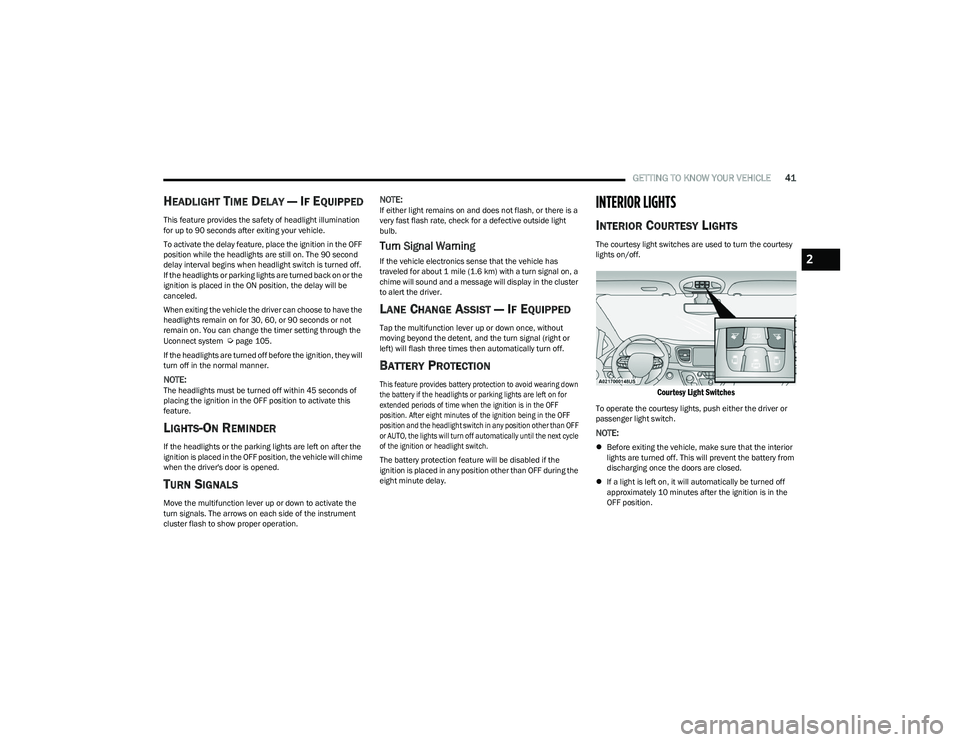
The courtesy light switches are used to turn the courtesy
lights on/off.
Courtesy Light Switches
To operate the courtesy lights, push either the driver or
passenger light switch.
NOTE:
Before exiting the vehicle, make sure that the interior
lights are turned off. This will prevent the battery from
discharging once the doors are closed.
If a light is left on, it will automatically be turned off
approximately 10 minutes after the ignition is in the
OFF position.
2
23_RUV_OM_EN_US_t.book Page 41
Page 45 of 256
GETTING TO KNOW YOUR VEHICLE43
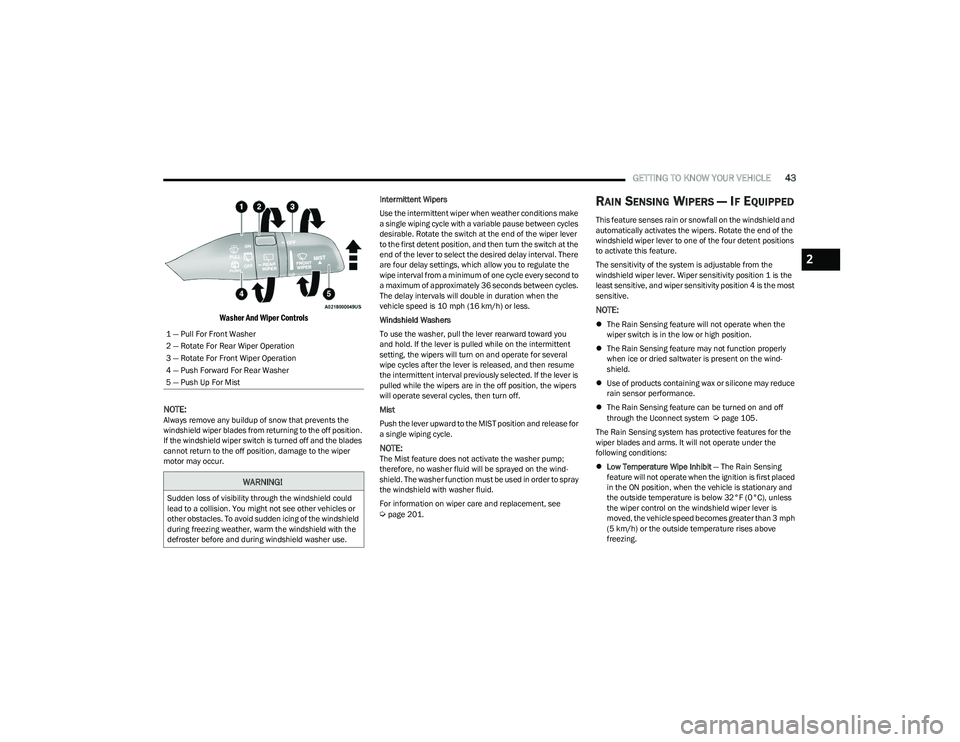
Washer And Wiper Controls
NOTE:
Always remove any buildup of snow that prevents the
windshield wiper blades from returning to the off position.
If the windshield wiper switch is turned off and the blades
cannot return to the off position, damage to the wiper
motor may occur. Intermittent Wipers
Use the intermittent wiper when weather conditions make
a single wiping cycle with a variable pause between cycles
desirable. Rotate the switch at the end of the wiper lever
to the first detent position, and then turn the switch at the
end of the lever to select the desired delay interval. There
are four delay settings, which allow you to regulate the
wipe interval from a minimum of one cycle every second to
a maximum of approximately 36 seconds between cycles.
The delay intervals will double in duration when the
vehicle speed is 10 mph (16 km/h) or less.
Windshield Washers
To use the washer, pull the lever rearward toward you
and hold. If the lever is pulled while on the intermittent
setting, the wipers will turn on and operate for several
wipe cycles after the lever is released, and then resume
the intermittent interval previously selected. If the lever is
pulled while the wipers are in the off position, the wipers
will operate several cycles, then turn off.
Mist
Push the lever upward to the MIST position and release for
a single wiping cycle.
NOTE:The Mist feature does not activate the washer pump;
therefore, no washer fluid will be sprayed on the wind
-
shield. The washer function must be used in order to spray
the windshield with washer fluid.
For information on wiper care and replacement, see
Úpage 201.
RAIN SENSING WIPERS — IF EQUIPPED
This feature senses rain or snowfall on the windshield and
automatically activates the wipers. Rotate the end of the
windshield wiper lever to one of the four detent positions
to activate this feature.
The sensitivity of the system is adjustable from the
windshield wiper lever. Wiper sensitivity position 1 is the
least sensitive, and wiper sensitivity position 4 is the most
sensitive.
NOTE:
The Rain Sensing feature will not operate when the
wiper switch is in the low or high position.
The Rain Sensing feature may not function properly
when ice or dried saltwater is present on the wind -
shield.
Use of products containing wax or silicone may reduce
rain sensor performance.
The Rain Sensing feature can be turned on and off
through the Uconnect system
Úpage 105.
The Rain Sensing system has protective features for the
wiper blades and arms. It will not operate under the
following conditions:
Low Temperature Wipe Inhibit — The Rain Sensing
feature will not operate when the ignition is first placed
in the ON position, when the vehicle is stationary and
the outside temperature is below 32°F (0°C), unless
the wiper control on the windshield wiper lever is
moved, the vehicle speed becomes greater than 3 mph
(5 km/h) or the outside temperature rises above
freezing.
1 — Pull For Front Washer
2 — Rotate For Rear Wiper Operation
3 — Rotate For Front Wiper Operation
4 — Push Forward For Rear Washer
5 — Push Up For Mist
WARNING!
Sudden loss of visibility through the windshield could
lead to a collision. You might not see other vehicles or
other obstacles. To avoid sudden icing of the windshield
during freezing weather, warm the windshield with the
defroster before and during windshield washer use.
2
23_RUV_OM_EN_US_t.book Page 43
Page 51 of 256
GETTING TO KNOW YOUR VEHICLE49
Outside Air Intake
Make sure the air intake, located directly in front of the
windshield, is free of obstructions, such as leaves. Leaves
collected in the air intake may reduce airflow, and if they
enter the air distribution box, they could plug the water
drains. In Winter months, make sure the air intake is clear
of ice, slush, and snow.
Cabin Air Filter
The Climate Control system filters out dust and pollen
from the air. Contact an authorized dealer to service your
cabin air filter, and to have it replaced when needed.
Stop/Start System — If Equipped
While in an Autostop, the Climate Control system may
automatically adjust airflow to maintain cabin comfort.
Customer settings will be maintained upon return to an
engine running condition.
Operating Tips Chart
INTERIOR STORAGE AND EQUIPMENT
STORAGE
Glove Compartment
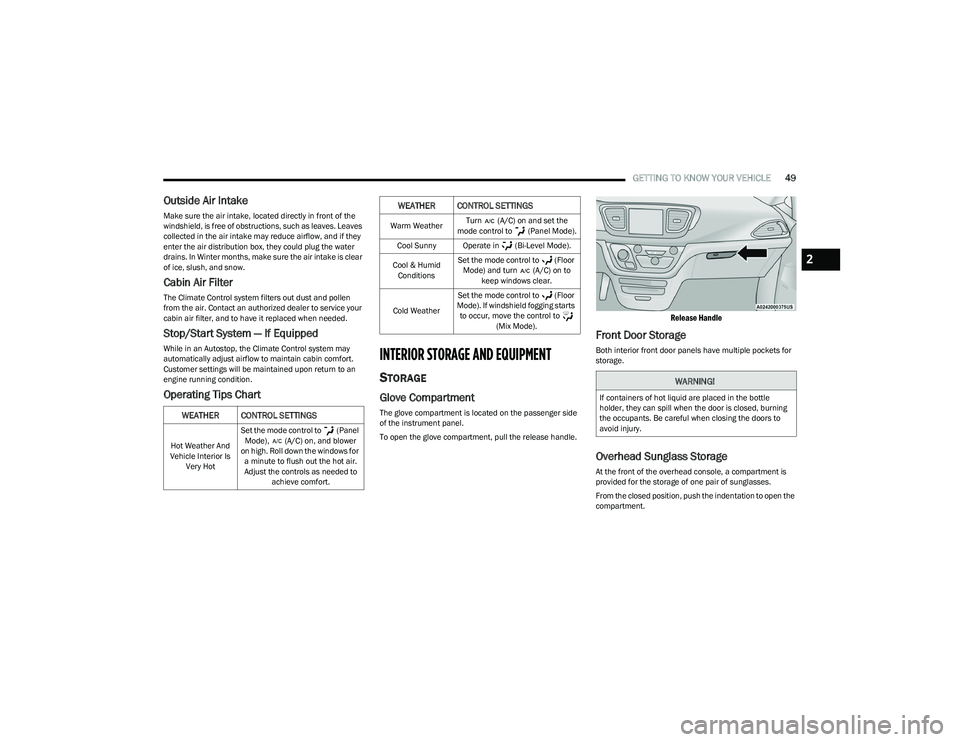
The glove compartment is located on the passenger side
of the instrument panel.
To open the glove compartment, pull the release handle.
Release Handle
Front Door Storage
Both interior front door panels have multiple pockets for
storage.
Overhead Sunglass Storage
At the front of the overhead console, a compartment is
provided for the storage of one pair of sunglasses.
From the closed position, push the indentation to open the
compartment.
WEATHER CONTROL SETTINGS
Hot Weather And
Vehicle Interior Is Very Hot Set the mode control to (Panel
Mode), (A/C) on, and blower
on high. Roll down the windows for a minute to flush out the hot air.
Adjust the controls as needed to achieve comfort.
Warm Weather Turn (A/C) on and set the
mode control to (Panel Mode).
Cool Sunny Operate in (Bi-Level Mode).
Cool & Humid Conditions Set the mode control to (Floor
Mode) and turn (A/C) on to keep windows clear.
Cold Weather Set the mode control to (Floor
Mode). If windshield fogging starts to occur, move the control to (Mix Mode).
WEATHER CONTROL SETTINGS
WARNING!
If containers of hot liquid are placed in the bottle
holder, they can spill when the door is closed, burning
the occupants. Be careful when closing the doors to
avoid injury.
2
23_RUV_OM_EN_US_t.book Page 49