200 CITROEN BERLINGO 2023 Owners Manual
[x] Cancel search | Manufacturer: CITROEN, Model Year: 2023, Model line: BERLINGO, Model: CITROEN BERLINGO 2023Pages: 324, PDF Size: 9.41 MB
Page 3 of 324
Welcome
Thank you for choosing a Citroën Berlingo/ë-Berlingo or a Citroën Berlingo
V an/ë-Berlingo Van.
This document contains the key information and recommendations you
will need to be able to explore your vehicle in complete safety. We strongly
recommend familiarising yourself with it, as well as the Maintenance and
Warranty Guide.
003C
00470052004600580050004800510057
country in which it was sold.
The descriptions and illustrations are for guidance only.
0024005800570052005000520045004C004F004800560003
004800540058004C00530050004800510057
If ownership of your vehicle is transferred, please ensure this Han is
passed on to the new owner.
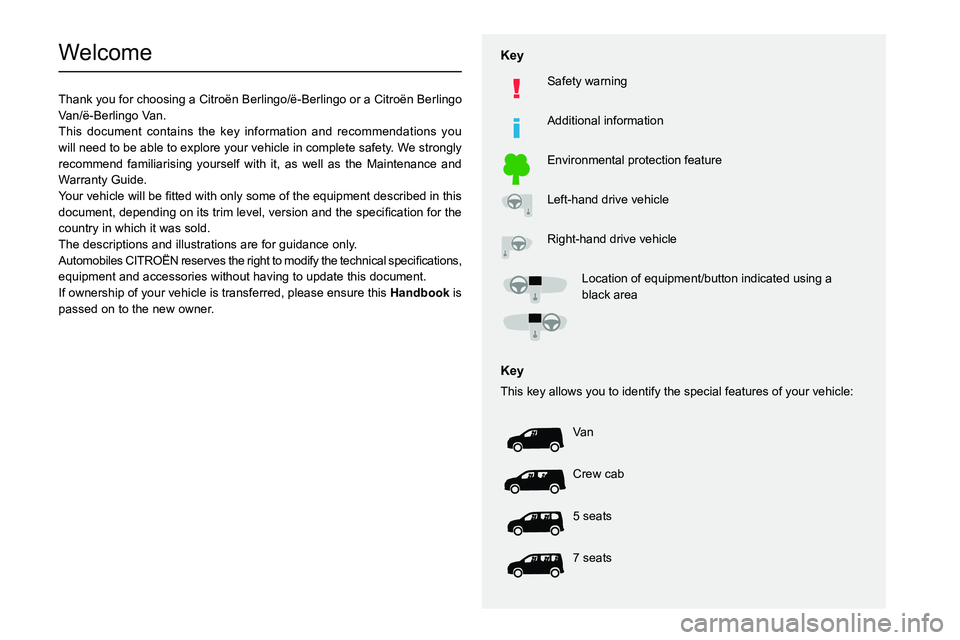
Key
Safety warning
Additional information
Environmental protection feature
Left-hand drive vehicle
Right-hand drive vehicle
002F0052004600440057004C005200510003005200490003004800540058004C0053005000480051005700120045005800570057005200510003004C00510047004C00460044005700480047000300580056004C0051004A000300440003
black area
Key
This key allows you to identify the special features of your vehicle:
Va n
Crew cab
5 seats
7 seats
Page 5 of 324
3
Contents
Distraction detection 160
Parking sensors 161
Reversing Camera 163
Surround Rear Vision 164
Top Rear Vision 166
Park Assist 169
7Practical informationCompatibility of fuels 174
Refuelling 174
Misfuel prevention (Diesel) 175
Charging system (Electric) 176
Charging the traction battery (Electric) 183
Energy economy mode 187
Snow chains 188
Very cold climate screen 188
Towing device 189
Overload indicator 190
Roof bars / Roof rack 191
Bonnet 192
Engine compartment 192
Checking levels 193
Checks 195
AdBlue® (BlueHDi) 197
Free-wheeling 199
Advice on care and maintenance 200
8In the event of a breakdownRunning out of fuel (Diesel) 202
Tool kit 202
Temporary puncture repair kit 204
Spare wheel 206
Changing a bulb 209
Fuses 214
12
V battery
/ Accessory battery 214
Towing 218
9Technical dataDimensions 221
Engine technical data and towed loads 227
Petrol engine 228
Diesel engine 229
Electric motor 235
Identification markings 236
10Touch screen BLUETOOTH audio systemFirst steps 237
Steering mounted controls 237
Menus 238
Radio 239
DAB (Digital Audio Broadcasting) radio 240
Media 241
Telephone 242
Settings 244
Frequently asked questions 244
11CITROËN Connect RadioFirst steps 247
Steering mounted controls 248
Menus 249
Applications 250
Radio 250
DAB (Digital Audio Broadcasting) radio 252
Media 252
Telephone 253
Settings 256
Frequently asked questions 258
12CITROËN Connect NavFirst steps 260
Steering mounted controls 261
Menus 261
Voice commands 263
Navigation 266
Connected navigation 269
Applications 271
Radio 274
DAB (Digital Audio Broadcasting) radio 275
Media 275
Telephone 277
Settings 279
Frequently asked questions 281
13Event data recorders
■
Alphabetical index
http://q-r.to/bagGl9
Access to additional videos
Page 94 of 324

92
Safety
General safety
recommendations
Do not remove the labels attached in
different places on your vehicle. They
include safety warnings as well as
identification information for the vehicle.
For all work on your vehicle, use a
qualified workshop that has the technical
information, skills and equipment required, all
of which a CITROËN dealer is able to
provide.
Depending on country regulations,
certain safety equipment may be
mandatory: high visibility safety vests,
warning triangles, breathalysers, spare bulbs,
spare fuses, fire extinguisher, first aid kit, mud
flaps at the rear of the vehicle, etc.
Installing electrical accessories:
– The fitting of electrical equipment or
accessories not approved by CITROËN may
cause excessive current consumption and
faults and failures with the electrical system
of your vehicle. Contact a CITROËN dealer
for information on the range of approved
accessories.
– As a safety measure, access to the
diagnostic socket, used for the vehicle's
electronic systems, is reserved strictly for
CITROËN dealers or qualified workshops,
equipped with the special tools required (risk
of malfunctions of the vehicle's electronic
systems that could cause breakdowns or
serious accidents).
The Manufacturer cannot
be held responsible if this advice is not
followed.
–
Any modification or adaptation not intended
or authorised by CITROËN or carried out
without meeting the technical requirements
defined by the Manufacturer will result in the
suspension of the commercial warranty
.
Installation of accessory radio
communication transmitters
Before installing a radio communication
transmitter with an external aerial, you must
without fail contact a CITROËN dealer for
the specification of transmitters which can
be fitted (frequency, maximum power, aerial
position, specific installation requirements),
in line with the Vehicle Electromagnetic
Compatibility Directive (2004/104/EC).
Declarations of conformity for radio
equipment
The relevant certificates are available on the
http://service.citroen.com/ACddb/ website.
Emergency or assistance
call
1. eCall (SOS)
2. ASSISTANCE
eCall (SOS)
Your vehicle may be fitted with the eCall (SOS)
system either as standard or as an option.
The eCall (SOS) system provides direct access
to the emergency services and is built directly
into the vehicle.
According to the country of sale, the eCall
(SOS)
system
corresponds to the systems PE112,
ERAGLONASS, 999, etc.
Page 95 of 324

93
Safety
5The eCall (SOS) system is activated by default.
► In an emergency , press button 1 for more
than 2 seconds.
The lit indicator lamp and a voice message
confirm that the call has been made to the
emergency services*.
The eCall
(SOS) system immediately locates
your vehicle and puts you in contact with the
appropriate emergency services**.
►
Pressing again immediately cancels the
request.
The indicator lamp flashes while the vehicle
data is being sent, and then remains lit when
communication is established.
If an impact is detected by the airbag
control unit, an emergency call is made
automatically, irrespective of the deployment
of any airbags.
This system is a public service and is free of charge.
Operation of the system
– Upon switching on the ignition, the indicator
lamp lights up red, then green, and then goes
out: the system is operating correctly
.
* In accordance with the general conditions of use of the service, available from dealers an\
d subject to technological and technical limitations.
** Depend ing on the geographic coverage of the "eCall (SOS)" and "ASSISTANCE" systems.
The list of countries covered and the telematic services provided is ava\
ilable from dealers or on the website for your country.
– The indicator lamp flashes red: replace the
back-up battery .
–
The indicator lamp is fixed red: system
malfunction.
The emergency and assistance call
services may not work.
–
If the indicator lamp does not come on when
the ignition is switched on, this also means that
there is a system malfunction.
If the problem persists, contact a qualified
workshop as soon as possible.
A system fault does not prevent the vehicle from being driven.
Data processing
All processing of personal data by
the eCall (SOS) function complies with
the framework for protection of personal
information established by Regulation
2016/679 (General Data Protection
Regulation - GDPR) and Directive 2002/58/
EC of the European Parliament and the
Council, and in particular, seeks to protect
the vital interests of the data subject, in
accordance with Article 6 (1) d) GDPR.
The processing of personal data is strictly
limited to the purpose of handling the eCall
(SOS) function used with the “112” single
European emergency call number.
The eCall (SOS) function is only able to
collect and process the following data
relating to the vehicle: vehicle identification
number, vehicle type (passenger vehicle or
light commercial vehicle), fuel type or power
source, three most recent locations and
direction of travel, number of passengers
and a timestamped log file of the automatic
activation of the system and its timestamp.
The recipients of the processed data are the
emergency call handling centres designated
by the relevant national authorities in the
territory in which they are located, enabling
priority routing and handling of calls to the
“112” emergency number.
Data storage
Data contained in the system’s memory
is not accessible from outside the system until
a call is made. The system is not traceable
and is not continuously monitored in its
normal operating mode.
The data in the system's internal memory is
automatically and continuously erased. Only
the vehicle’s three most recent locations,
necessary for the normal functioning of the
system, are stored.
When an emergency call is triggered, the data
log is stored for no more than 13 hours.
Page 202 of 324

200
Practical information
With an automatic gearbox
and electric parking brake
/
To release them
► With the engine running and while depressing
the brake pedal, set the gear selector to N
.
►
While depressing the brake pedal, switch off
the engine.
►
Release the brake pedal, then switch on the
ignition again.
►
While depressing the brake pedal, press the
control lever to release the parking brake.
►
Release the brake pedal, then switch off the
ignition.
Reverting to normal operation
► While depressing the brake pedal, restart the
engine and select mode P .
With drive selector and
electric parking brake
/
Release procedure
► With the vehicle stationary and the engine
running, depress the brake pedal and select
mode
N.
Within 5
seconds:
► Depress and hold the brake pedal, then
observe this order: switch off the engine and
move the push selector forwards or backwards.
►
Release the brake pedal, then switch on the
ignition.
►
Place your foot on the brake and press the
electric parking brake control to release it.
►
Release the brake pedal, then switch off the
ignition.
A message is displayed on the instrument panel to confirm the unlocking
of the wheels for 15
minutes.
When the vehicle is free-wheeling, the
audio system cannot be updated (message
displayed on the instrument panel).
After 15 minutes or reverting to normal
operation
► While depressing the brake pedal, restart the
engine and select mode P .
Advice on care and maintenance
General recommendations
Observe the following recommendations to avoid
damaging the vehicle.
Exterior
Never use a high-pressure jet wash in
the engine compartment - risk of
damaging the electrical components!
Do not wash the vehicle in bright sunshine or
extremely cold conditions.
When washing the vehicle in an
automatic roller-brush car wash, be sure
to lock the doors and, depending on version,
move the electronic key away.
When using a pressure washer, keep the jet
nozzle at a minimum distance of 30 cm from
the vehicle (particularly when cleaning areas
containing chipped paint, sensors or seals).
Promptly clean up any stains containing
chemicals liable to damage the vehicle's
paintwork (including tree resin, bird
droppings, insect secretions, pollen and tar).
Depending on the environment, clean the
vehicle frequently to remove salty deposits
(in coastal areas), soot (in industrial areas)
and mud/salts (in wet or cold areas). These
substances can be highly corrosive.
Contact a CITROËN dealer or a qualified
workshop for advice on removing stubborn
stains requiring special products (such as tar
or insect removers).
Preferably, have paint touch-ups performed
by a CITROËN dealer or a qualified
workshop.
Page 206 of 324
204
In the event of a breakdown
All of these tools are specific to your vehicle and may vary depending on
equipment.
Do not use them for any other purposes.
The jack must only be used to change a wheel with a damaged or punctured tyre.
The jack does not require any maintenance.
The jack meets European standards, as
defined in the Machinery Directive 2006/42/
EC.
Some parts of the jack such as the
screws and hinges could cause injury:
avoid touching them.
Carefully remove any traces of grease.
Temporary puncture repair kit
Scan the QR Code on page 3 to view
explanatory videos.
Made up of a compressor and a sealant
cartridge,
it allows you to carry out a temporary
repair of the tyre so that you can drive to the
nearest garage.
It is designed to repair most punctures located
on the tyre tread.
The vehicle's electric system allows the connection of the compressor to the 12 V
power supply for long enough to repair a tyre
after a puncture.
Only the 12 V socket located at the front
of the vehicle can be used to power the
compressor.
For more information on the Tool kit,
refer to the corresponding section.
Repair procedure
Do not remove any foreign body
(e.g. nail, screw) which has penetrated
the tyre.
►
Park the vehicle without obstructing traffic
and apply the parking brake.
►
Follow the safety instructions (hazard
warning lamps, warning triangle, high visibility
jacket, etc.) according to the legislation in force
in the country in which you are driving.
►
Switch the ignition off.
►
Remove the valve cap from the tyre to be
repaired, and place it in a clean place.
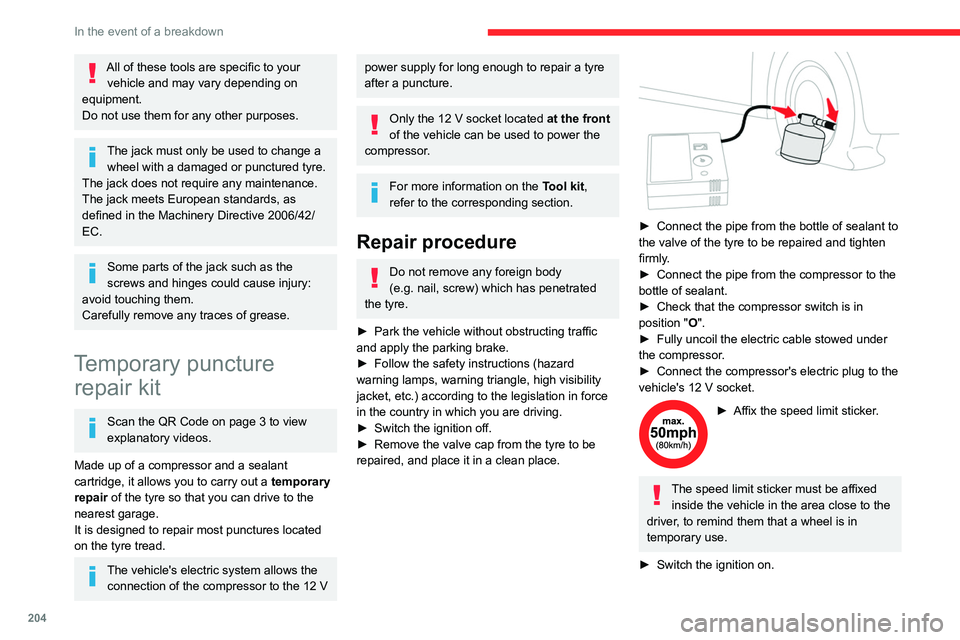
► Connect the pipe from the bottle of sealant to
the valve of the tyre to be repaired and tighten
firmly
.
►
Connect the pipe from the compressor to the
bottle of sealant.
►
Check that the compressor switch is in
position
"O".
►
Fully uncoil the electric cable stowed under
the compressor
.
►
Connect the compressor's electric plug to the
vehicle's 12
V socket.
► Affix the speed limit sticker .
The speed limit sticker must be affixed
inside the vehicle in the area close to the
driver, to remind them that a wheel is in
temporary use.
►
Switch the ignition on.
Page 226 of 324

224
Technical data
Vehicle length
M (L1) XL (L2)
M Clear opening height 1,072
N Interior load height
(varies depending on the angle of the floor and the curve
of the roof) 1,200 to 1,270 O
Loading sill height
Standard version 548 to 588X
Standard version with
increased payload 568 to 578
561 to 565
Worksite version 602 to 610605 to 610
P Clear opening width Max. 675
Min. 641
Q Loading sill heightStandard version 534 to 558
Standard version with
increased payload 551 to 558
543 to 552
Worksite version 574 to 581575 to 587
Page 230 of 324

228
Technical data
Engines and towed loads - PETROL EURO 6.3
EnginePureTech 110 S&S BVM6 PureTech 130 S&S EAT8
Gearbox Manual 6-speedAutomatic 8-speed
Code EB2ADT MB6 STTDEB2ADTS ATN8 STTD
Length M (L1)XL (L2) M (L1)XL (L2)
Model Code 5 seats
ERHNP2-A ERHNP2-C ERHNS3-A ERHNS3-C
7 seats
ERHNP2-B ERHNP2-D ERHNS3-B ERHNS3-D
Cubic capacity (cc) 1,1991,199
Max. power: EC standard (kW) 8196
Fuel UnleadedUnleaded
Braked trailer (within
the GTW limit) on a 12%
slope (kg) 5 seats
1,1501,1001,2001,150
7 seats 1,000900/950 1,0501,000/950
Unbraked trailer (kg) 5 seats 720/730750740/750 750
7 seats 750750750750
Maximum authorised
nose/towball weight (kg) 5 seats
74747474
7 seats 50/705070/50 50
Page 283 of 324
281
CITROËN Connect Nav
12Select "Setting the time-date".
Select "Date".
Press this button to set the date.
Press "OK" to confirm.
Select the display format for the date.
Time and date setting is only available if "GPS synchronisation" is deactivated.
Setting the time
Press Settings to display the main page.
Press the "OPTIONS " button to access the
secondary page.
Select "Setting the time-date".
Select "Time".
Press this button to set the time using the
virtual keypad.
Press "OK" to confirm.
Press this button to set the time zone.
Select the display format for the time
(12h/24h).
Activate or deactivate summer time (+1 hour).
Activate or deactivate GPS synchronisation (UTC).
Press "OK" to confirm.
The system may not automatically manage the change between winter and
summer time (depending on the country of
sale).
Colour schemes
Depending on equipment/Depending on version.
As a safety measure, the procedure for changing the colour scheme is only
possible when the vehicle is stationary.
Press Settings to display the main page.
Select "Color schemes ".
Select a colour scheme in the list then
press "OK" to confirm.
Whenever the colour scheme is
changed, the system restarts, temporarily
displaying a black screen.
Frequently asked
questions
The following information groups together the answers to the most frequently asked questions
concerning the system.
Navigation
I cannot enter the navigation address.
The address is not recognised.
►
Use the "intuitive method" by pressing
the "Search…" button at the bottom of the
"Navigation” page.
The route calculation is not successful.
The route settings may conflict with the current
location (for example, if toll roads are excluded
but the vehicle is on a toll road).
►
Check the route settings in the "Navigation"
menu.
I am not receiving "Danger zone" alerts.
Y
ou have not subscribed to the online services
option.
►
If you have subscribed to the option:
- a few days may elapse before the service is
activated,
- services may not be selected in the system
menu,
- online services are not active ("T
OMTOM
TRAFFIC" not shown on the map).
The POIs do not appear.
The POIs have not been selected.
►
Set the zoom level to 200 metres (656 ft), or
select POIs from the POI list.
The "Danger zone" audible warning feature is
not working.
The audible warning is not active or the volume
is too low
.
Page 290 of 324

288
Alphabetical index
A
ABS 95
Accelerated charging unit (Wallbox)
179
Accessories
92
Access to the 3rd row
58
Access to the spare wheel
206–207
Active Safety Brake
152–154
AdBlue®
197
AdBlue® tank
198
Additive, Diesel
195–196
Adjusting headlamps
88
Adjusting head restraints
59
Adjusting seat
51, 58
Adjusting the air distribution
75–76
Adjusting the air flow
75–76
Adjusting the date
258, 280
Adjusting the height and reach of
the steering wheel
53
Adjusting the lumbar support
51
Adjusting the temperature
75–76
Adjusting the time
244, 257, 281
Advanced Grip Control
97–98
Advice on care and maintenance
177, 200
Advice on driving
8, 117–118
Airbags
103, 105–107
Airbags, curtain
104–106
Airbags, front
104–105, 108
Airbags, lateral
104–105
Air conditioning
73, 76, 79
Air conditioning, digital
77
Air conditioning, dual-zone automatic
75–76
Air conditioning, electronic
(with display screen)
79
Air conditioning, manual
74–75
Air intake
75–76
Air vents
73
Alarm
45–46
Alarm, volumetric
46
Android Auto connection
272
Anti-lock braking system (ABS)
95
Antitheft / Immobiliser
33
Apple CarPlay connection
254, 271
Applications
272
Area, loading
34, 42, 67
Armrest
51
Armrest, front
60
Assistance call
92–93
Assistance, emergency braking
95, 154
Audible warning
95
Audio streaming (Bluetooth)
241, 253, 276
B
Battery, 12 V 187, 195, 214–217
Battery, ancillaries
214–215
Battery, charging
216–217
Battery, remote control
40, 81
Bench seat, one-piece, fixed
58
Blanking screen (snow shield)
188
Blind spot sensors
158
BlueHDi
195, 202
Bluetooth (hands-free)
242–243, 255, 277
Bluetooth (telephone) 242–243, 255–256,
277–278
Bluetooth touch screen audio system
28
Bodywork
201
Bonnet
192
Boot lid
37, 39
Bottle holder
60
Brake discs
196
Brake lamps
213
Brakes
196
Braking
133
Braking assistance system
95
Braking, automatic emergency
152–154
Braking, dynamic emergency
124–125
Brightness
244, 257
Bulbs
210
Bulbs (changing)
209–210
Bulbs (changing, type)
210
C
Cable, audio 275
Cable, Jack
275
Capacity, fuel tank
174–175
Cap, fuel filler
174–175
Care of the bodywork
201
CD
241
CD, MP3
241
Central locking
32, 37
Changing a bulb
209–210
Changing a fuse
214