wheel CITROEN C-CROSSER 2012 Handbook (in English)
[x] Cancel search | Manufacturer: CITROEN, Model Year: 2012, Model line: C-CROSSER, Model: CITROEN C-CROSSER 2012Pages: 244, PDF Size: 7.45 MB
Page 119 of 244

VII
11 7
"Normal" automatic mode
Select position D
.
"D"
appears in the instrument panel
screen.
The gearbox then operates in automatic
mode, without any action on the part of
the driver.
To optimise driving comfort and obtain the
most suitable gear, avoid sharp variations
in the pressure on the accelerator pedal.
"Temporary" manual mode
In automatic mode, you can take control
temporarily at any time using the steering
mounted controls.
The use of these controls permits man-
ual selection of the gears in situations
which require a faster change down than
that offered in automatic mode (arrival at
a roundabout, exit from a car park with a
steep gradient, overtaking...).
The gearbox engages the gear re-
quested if the engine speed permits it.
The gear engaged appears.
To return to the automatic mode, press
the back of the "+/OFF"
control for at
least 2 seconds.
"Sport" automatic mode
From automatic mode, you can engage
"Sport" mode.
With the vehicle moving or stationary,
push the thumb wheel A
forward.
"SPORT"
appears in the instrument
panel screen.
Switching off "Sport" automatic mode
You can return to "Normal" automatic
mode at any time:
Push the thumbwheel A
rearward
once.
Before switching off the engine, you
must engage position P
or N
to place
the gearbox in neutral.
You must apply the parking brake to im-
mobilise the vehicle.
The gear lever must be in position P
to
remove the ignition key.
Stopping the vehicle
Hill start assist
To assist you when starting on a gradi-
ent, your vehicle is fi tted with a system
which immobilises it briefl y (approxi-
mately 2 seconds), the time required to
move your foot from the brake pedal to
the accelerator pedal. This function is
only active when the vehicle has been
completely immobilised with your foot
on the brake pedal and on certain gra-
dients.
Do not get out of the vehicle during
the hill start assist temporary immo-
bilisation phase.
To immobilise the vehicle on a gradient
for a longer period, you must use the
parking brake, not the accelerator.
When starting on a gradient, accelerate
gradually while releasing the parking
brake.
Page 121 of 244

VII
DRIVING
119
FOUR WHEEL DRIVE SYSTEM
WITH ELECTRONIC CONTROL
4WD AUTO (position 1)
The vehicle operates with four wheel
drive and provides optimum traction re-
gardless of the level of grip.
This is the vehicle's normal and regular
operating mode, the distribution of the
torque between the front and rear axles
is controlled automatically.
The distribution favours the front wheels,
the transfer of torque to the rear wheels
is managed electronically by the control
unit in relation to the level of grip, so
providing optimum road holding.
Three transmission modes are available
and can be selected manually by the driv-
er in accordance with his requirements.
You can change transmission mode
when stationary or while driving at a
speed below 60 mph (100 km/h)
.
The transmission mode can be selected
by turning the control A
.
Display in the instrument panel
The transmission mode is displayed
in the form of an intermittent display in
the instrument panel screen when the
transmission mode is selected.
Selecting the transmissionmode
The selection of this mode is recom-
mended when the level of grip permits.
2WD (position 3)
The vehicle operates with front two
wheel drive.
This mode corresponds to use on a tar-
macked road on which the driver considers
that there is no risk of loss of grip (dry road).
4WD LOCK (position 2)
The vehicle operates with four wheel
drive in this mode also.
It is recommended when grip is particularly
poor or diffi cult (sand, mud, slopes, ...). System which permits the selection of
a transmission mode in relation to the
driving conditions.
Page 122 of 244

VII
!
DRIVING
120
Operating faults
If the selected transmission mode display
fl ashes, the vehicle switches automati-
cally to front "2WD"
transmission mode.
It is then no longer possible to select the
transmission mode using the control A
.
Do not subject the vehicle to excessive
conditions while driving.
As the engine torque is applied to
all four wheels, the condition of the
tyres has a considerable impact on
the performance of the vehicle.
Ensure that all four tyres are in good
condition.
Avoid driving the vehicle in sandy
or muddy areas or in other areas in
which the wheels could spin.
Spinning the wheels places the
transmission components under
pressure and could cause a serious
malfunction.
Do not drive the vehicle through
deep water.
Avoid driving over excessively un-
even terrain (risk of scraping under
the body or of grounding on crossing
a bridge).
Have your vehicle towed on a fl at-
bed.
The vehicle must not be towed with
the front or rear wheels on the ground
even if it is in front "2WD" (2 wheel
drive) mode.
If the message "SLOW DOWN" is dis-
played on the instrument panel, let the
transmission cool down then wait for the
display to clear before setting off again.
If "4WD" and "LOCK" are displayed
alternately and if "MAINTENANCE
REQUIRED" is displayed in the instru-
ment panel, the system has failed and
the safety system has been activated.
Contact a CITROËN dealer or a quali-
fi ed workshop without delay.
Page 123 of 244

VII
DRIVING
121
Programming
)
Press button 1
.
)
Set the programmed speed by ac-
celerating to the required speed,
then press button 2 "COAST SET"
.
CRUISE CONTROL
The controls of this system are grouped
together on the steering wheel.
1.
"ON/OFF"
button: activation / deac-
tivation of the cruise control mode.
2.
"COAST SET"
button: storing of a
driving speed and decreasing of the
cruising speed.
3.
"ACC RES"
button: increasing of
the cruising speed and recalling of
the stored speed.
4.
"CANCEL"
button: switching off of
the cruise control.
When you press button 1
, the "CRUISE"
indicator comes on in the instrument
panel.
Steering mounted controls Display on the instrument panel
The cruise control cannot, in any cir-
cumstances, take the place of the
need to comply with speed limits or
of the vigilance and responsibility of
the driver.
System which automatically maintains the
vehicle speed at the value programmed
by the driver, without any action on the
accelerator pedal.
The cruise control is switched on
man-
ually: the vehicle speed must be 25 mph
(40 km/h) minimum and second gear
must be engaged in the case of a man-
ual gearbox.
The cruise control is switched off
man-
ually, by an action on the brake or clutch
pedal or if the ASC system is triggered.
The programmed speed can be ex-
ceeded temporarily by pressing the ac-
celerator pedal.
To return to the programmed speed,
simply release the accelerator pedal.
Switching off the ignition cancels any
programmed speed value.
Page 134 of 244

IX
!
PRACTICAL INFORMATION
132
CHANGING A WHEEL
1.
Wheelbrace.
Used to remove the wheel trim and
the wheel fi xing bolts.
2.
Jack.
Used to raise the vehicle.
3.
Handle.
Used to extend the jack.
4.
Removable towing eye.
Refer to the "Towing" paragraph.
Other accessories
Wheel with trim
When removing the wheel
, remove
the trim fi rst using the handle 3
, pulling
at the notch.
When refi tting the wheel
, refi t the trim
starting by placing its notch F
(indicated
on the back of the trim) opposite the
valve G
and press on its outer edge
with the palm of your hand.
List of tools
When changing a wheel, ensure
that the four wheels are of identi-
cal specifi cation and brand. When storing, take care to secure
the tool bag D
fi rmly using the fi xing
band C
.
Access to the tools
The tools are stored in the storage
compartment in the boot right-hand trim.
To gain access to them:
)
open the boot,
)
turn button A
to the left,
)
remove the cover B
,
)
remove the fi xing band C
and take
out the tool bag D
containing the
tools,
)
take the jack E
in your hand and re-
move it from its fi xing position.
Page 135 of 244
IX
PRACTICAL INFORMATION
133
Fixing the "space-saver" spare
wheel
If your vehicle is fi tted with alloy
wheels, it is normal to notice that the
washers do not come into contact
with the "space-saver" spare wheel
when tightening the bolts on fi tting.
The wheel is retained by the conical
contact of each bolt.
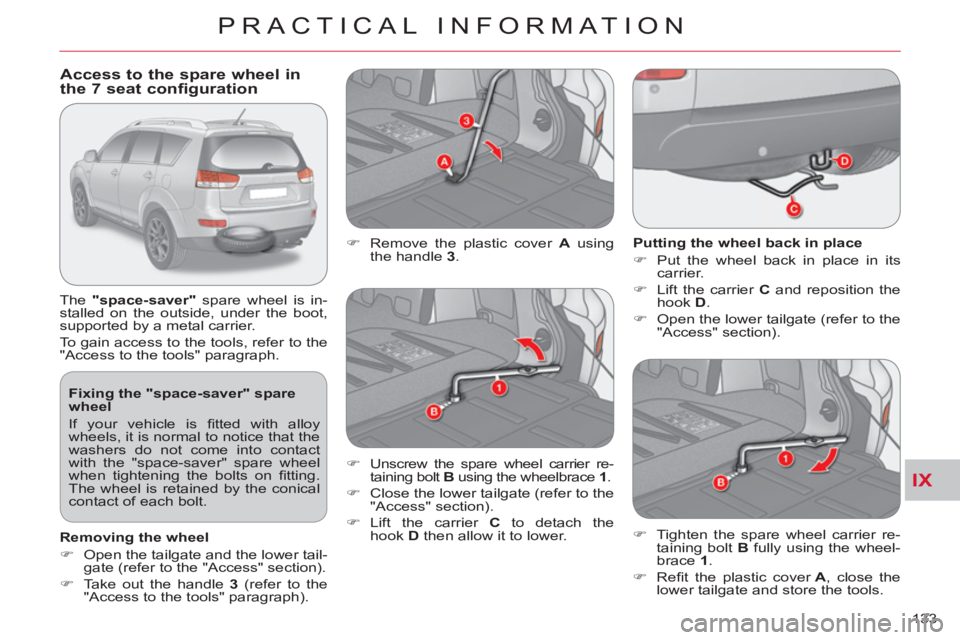
Access to the spare wheel in
the 7 seat configuration
The "space-saver"
spare wheel is in-
stalled on the outside, under the boot,
supported by a metal carrier.
To gain access to the tools, refer to the
"Access to the tools" paragraph.
Putting the wheel back in place
)
Put the wheel back in place in its
carrier.
)
Lift the carrier C
and reposition the
hook D
.
)
Open the lower tailgate (refer to the
"Access" section).
)
Remove the plastic cover A
using
the handle 3
.
)
Unscrew the spare wheel carrier re-
taining bolt B
using the wheelbrace 1
.
)
Close the lower tailgate (refer to the
"Access" section).
)
Lift the carrier C
to detach the
hook D
then allow it to lower.
)
Tighten the spare wheel carrier re-
taining bolt B
fully using the wheel-
brace 1
.
)
Refi t the plastic cover A
, close the
lower tailgate and store the tools.
Removing the wheel
)
Open the tailgate and the lower tail-
gate (refer to the "Access" section).
)
Take out the handle 3
(refer to the
"Access to the tools" paragraph).
Page 136 of 244

IX
PRACTICAL INFORMATION
134
Access to the spare wheel in
the 5 seat configuration
The pressed steel
spare wheel is installed
on the outside, under the boot, supported
by a winch and a plastic carrier.
To gain access to the tools, refer to the
"Access to the tools" paragraph.
Fixing the pressed steel spare
wheel
If your vehicle is fi tted with alloy
wheels, it is normal to notice that the
washers do not come into contact
with the pressed steel spare wheel
when tightening the bolts on fi tting.
The wheel is retained by the conical
contact of each bolt.
Removing the wheel
)
Open the tailgate and the lower tail-
gate (refer to the "Access" section).
)
Take out the handle 3
(refer to the
"Access to the tools" paragraph).
)
Remove the plastic cover A
using
the handle 3
.
Putting the wheel back in place
)
Put the wheel back in place in its
carrier.
)
Pass the hook C
into the chain.
)
Open the lower tailgate (refer to the
"Access" section).
)
Unscrew the retaining bolt B fully
using the wheelbrace 1
, to unwind
the winch cable.
)
Close the lower tailgate (refer to the
"Access" section).
)
Detach the hook C
from the chain.
Unwind the winch cable fully to make
unhooking of the chain easier.
)
Tighten the winch retaining bolt B
fully using the wheelbrace 1
.
)
Refi t the plastic cover A
, close the
lower tailgate and store the tools.
Page 137 of 244

IX
PRACTICAL INFORMATION
135
Parking the vehicle
Immobilise the vehicle where it does
not block traffi c: if possible, park the
vehicle on level, stable and non-slip-
pery ground.
Apply the parking brake, switch off
the ignition and engage fi rst gear to
lock the wheels.
If necessary, place a chock under
the wheel diagonally opposite the
wheel to be changed.
Never go underneath a vehicle
raised using a jack; use a stand.
Removing a wheel
List of operations
)
If your vehicle is equipped with secu-
rity wheel bolts (equipment available as an accessory) fi t the security socket 5
on the wheelbrace 1
to slacken the
security bolt.
)
Slacken the other bolts using the
wheelbrace 1
only.
)
Place the jack 2
in contact with one
of the two front A
or rear B
locations
provided on the underbody, which-
ever is closest to the wheel to be
changed.
)
Extend the jack 2
until its base plate
is in contact with the ground. Ensure
that the centreline of the jack base
plate is directly below the location A
or B
used.
)
Raise the vehicle until there is suffi -
cient space between the wheel and
the ground to admit the spare (not
punctured) wheel easily.
)
Remove the bolts and store them in
a clean place.
)
Remove the wheel.
Page 138 of 244

IX
PRACTICAL INFORMATION
136
After changing a wheel
When using the "space-saver" spare
wheel, do not exceed a speed of
50 mph (80 km/h).
Have the tightening of the bolts and
the pressure of the spare wheel
checked by a CITROËN dealer or a
qualifi ed workshop without delay.
Have the punctured wheel repaired
and replace it on the vehicle as soon
as possible.
Fitting a wheel
List of operations
)
Lower the vehicle fully.
)
Fold the jack 2
and detach it.
)
Tighten the security bolt using the
wheelbrace 1
fi tted with the security
socket 5
(if your vehicle is equipped
with security wheel bolts).
)
Tighten the other bolts using the
wheelbrace 1
only.
)
Store the tools (refer to the para-
graph "Access to the tools").
Fitting snow tyres
If you equip your vehicle with snow
tyres fi tted on steel wheel rims,
special bolts available from your
CITROËN dealer or a qualifi ed work-
shop must
be used.
)
Put the wheel in place on the hub.
)
Screw in the bolts fully by hand.
)
Pre-tighten the security bolt us-
ing the wheelbrace 1
fi tted with the
security socket 5 (if your vehicle is
equipped with security wheel bolts).
)
Pre-tighten the other bolts using the
wheelbrace 1
only.
Page 142 of 244

IX
PRACTICAL INFORMATION
140
Changing integrated direction
indicator side repeaters
Changing foglamp bulbs (5)
)
Push the repeater A
towards the
rear and detach it.
)
Unclip the repeater.
)
Disconnect the repeater connector
and change the repeater.
To r efi t, carry out these operations in
reverse order.
To obtain repeaters, contact a CITROËN
dealer or a qualifi ed workshop.
)
Turn the wheel fully out for easy
access to the fl ap A
located in the
wheelarch.
)
Using a screwdriver, remove the four
clips B
located in the wheelarch.