mirror Citroen C1 2015 1.G User Guide
[x] Cancel search | Manufacturer: CITROEN, Model Year: 2015, Model line: C1, Model: Citroen C1 2015 1.GPages: 271, PDF Size: 7.18 MB
Page 185 of 271
183
C1_en_Chap12a_Autoradio_Toyota_tactile-1_ed01-2015
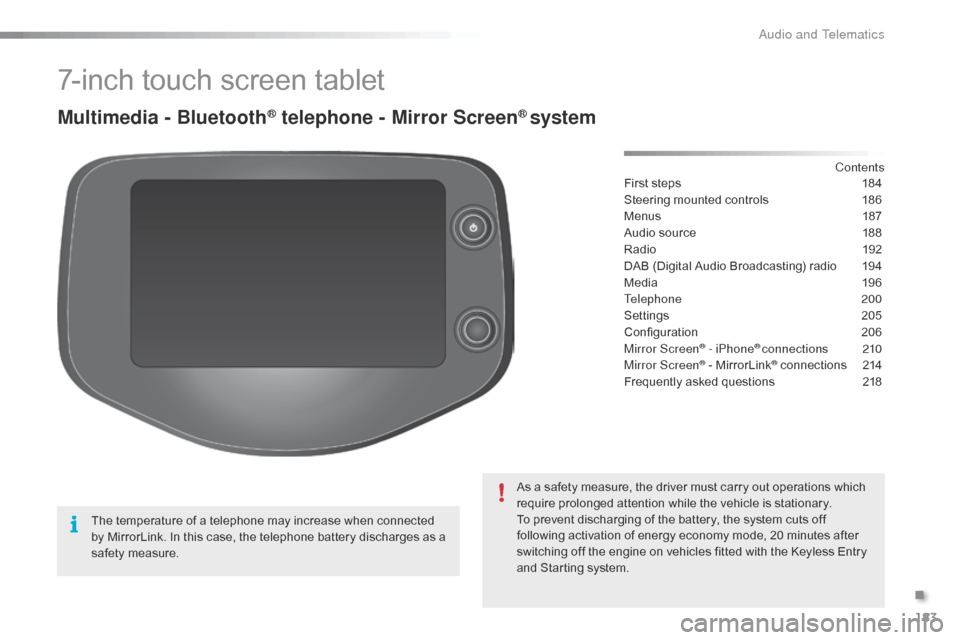
7-inch touch screen tablet
Multimedia - Bluetooth® telephone - Mirror Screen® system
First steps 184
Steering mounted controls
1
86
Menus
1
87
Audio source
1
88
Radio
19
2
DAB (Digital Audio Broadcasting) radio
1
94
Media
19
6
Telephone
200
Settings
2
05
Configuration
20
6
Mirror Screen
® - iPhone® connections 210
Mirror Screen® - MirrorLink® connections 2 14
Frequently asked questions
2
18
As a safety measure, the driver must carry out operations which
require prolonged attention while the vehicle is stationary.
To prevent discharging of the battery, the system cuts off
following activation of energy economy mode, 20 minutes after
switching off the engine on vehicles fitted with the Keyless Entry
and Starting system. Contents
The temperature of a telephone may increase when connected
by MirrorLink. In this case, the telephone battery discharges as a
safety measure.
.
Audio and Telematics
Page 187 of 271
185
C1_en_Chap12a_Autoradio_Toyota_tactile-1_ed01-2015
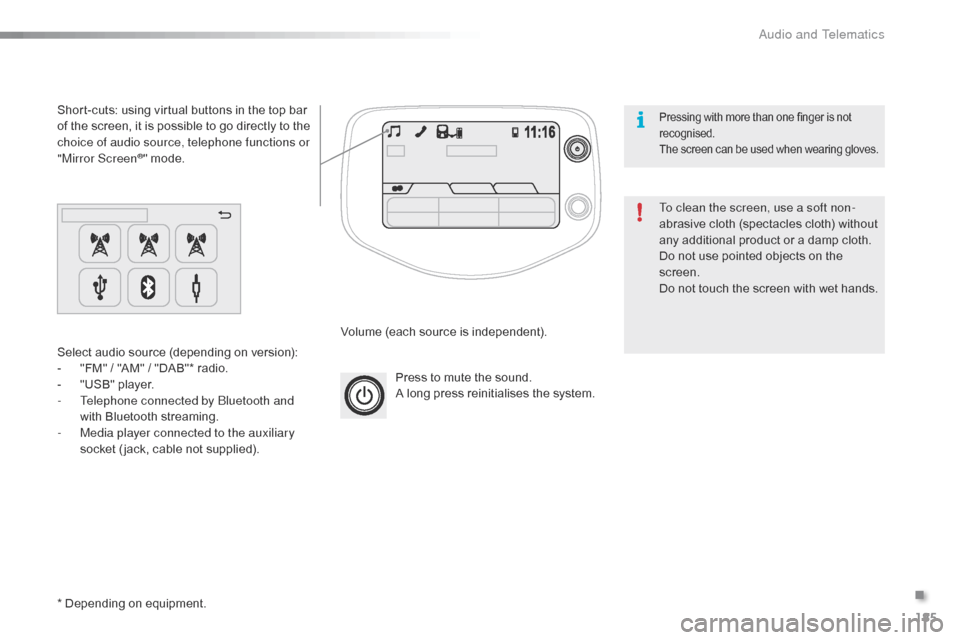
Press to mute the sound.
A long press reinitialises the system.
Volume (each source is independent).
Select audio source (depending on version):
-
"
FM" / "AM" / "DAB"* radio.
-
"
USB" player.
-
T
elephone connected by Bluetooth and
with Bluetooth streaming.
-
M
edia player connected to the auxiliary
socket ( jack, cable not supplied).
Short-cuts: using virtual buttons in the top bar
of the screen, it is possible to go directly to the
choice of audio source, telephone functions or
"Mirror Screen
®" mode.
* Depending on equipment. To clean the screen, use a soft non-
abrasive cloth (spectacles cloth) without
any additional product or a damp cloth.
Do not use pointed objects on the
screen.
Do not touch the screen with wet hands.
Pressing with more than one finger is not
recognised.
The screen can be used when wearing gloves.
.
Audio and Telematics
Page 212 of 271
210
C1_en_Chap12a_Autoradio_Toyota_tactile-1_ed01-2015
Mirror Screen® - iPhone® connections
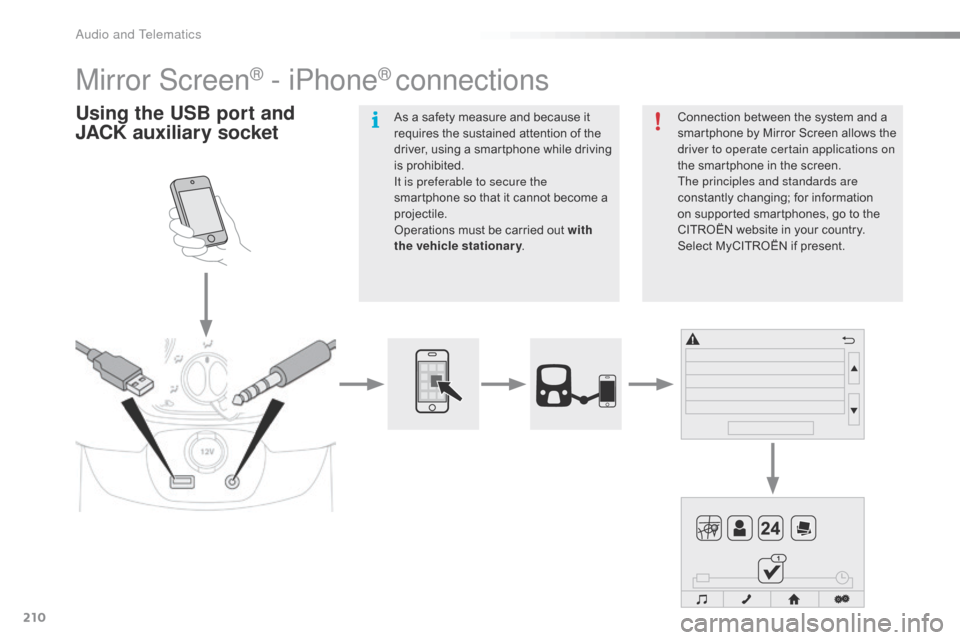
Using the USB port and
J ACK auxiliary socketConnection between the system and a
smartphone by Mirror Screen allows the
driver to operate certain applications on
the smartphone in the screen.
The principles and standards are
constantly changing; for information
on supported smartphones, go to the
CITROËN
website in your country.
Select MyCITROËN if present.
As a safety measure and because it
requires the sustained attention of the
driver, using a smartphone while driving
is prohibited.
It is preferable to secure the
smartphone so that it cannot become a
projectile.
Operations must be carried out with
the vehicle stationary
.
Audio and Telematics
Page 216 of 271
214
C1_en_Chap12a_Autoradio_Toyota_tactile-1_ed01-2015
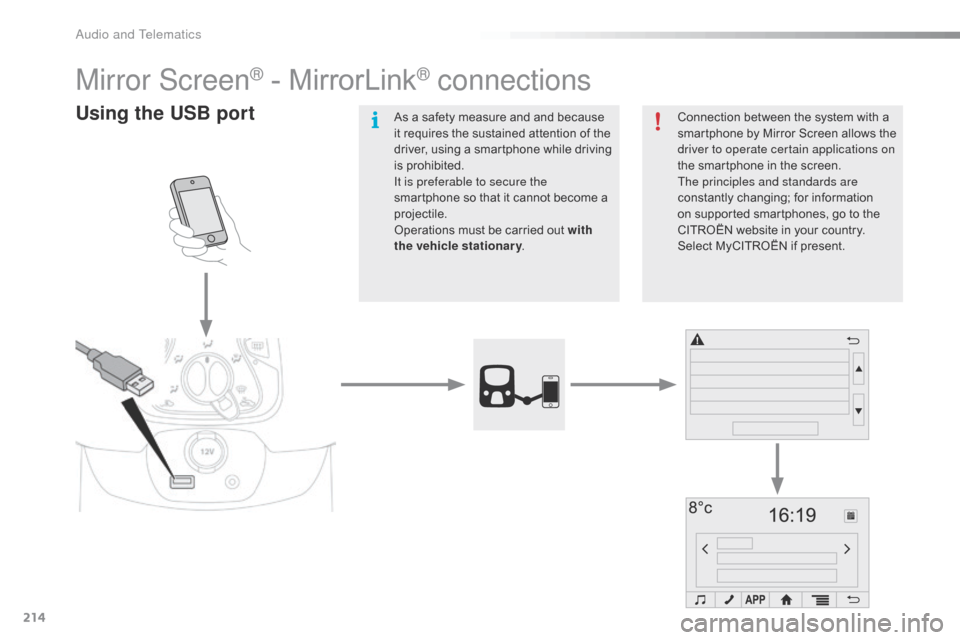
Mirror Screen® - MirrorLink® connections
Using the USB portConnection between the system with a
smartphone by Mirror Screen allows the
driver to operate certain applications on
the smartphone in the screen.
The principles and standards are
constantly changing; for information
on supported smartphones, go to the
CITROËN website in your country.
Select MyCITROËN if present.
As a safety measure and and because
it requires the sustained attention of the
driver, using a smartphone while driving
is prohibited.
It is preferable to secure the
smartphone so that it cannot become a
projectile.
Operations must be carried out with
the
vehicle stationary .
Audio and Telematics
Page 217 of 271
215
C1_en_Chap12a_Autoradio_Toyota_tactile-1_ed01-2015
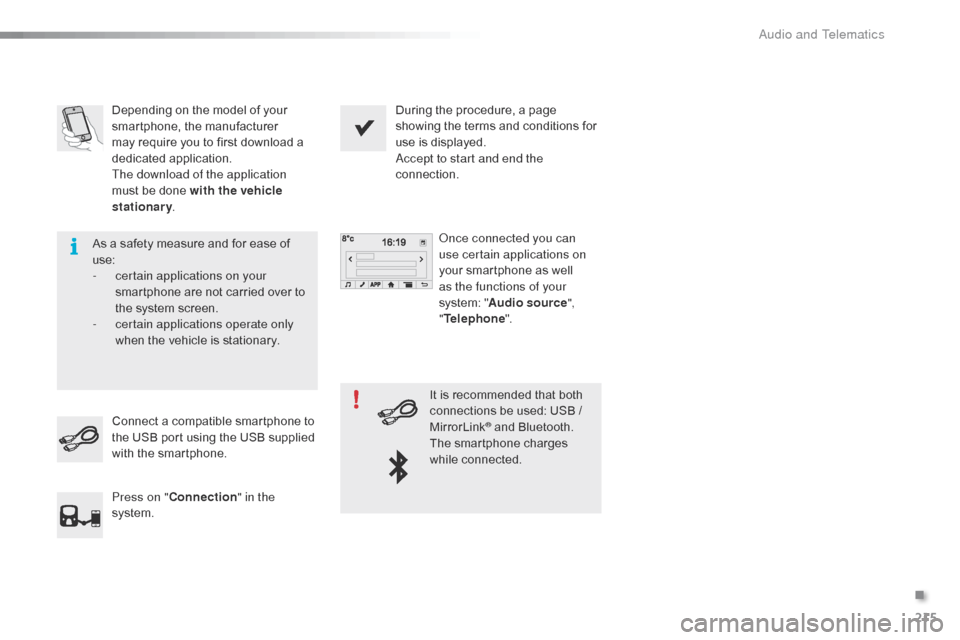
Depending on the model of your
smartphone, the manufacturer
may require you to first download a
dedicated application.
The download of the application
must be done with the vehicle
stationary. During the procedure, a page
showing the terms and conditions for
use is displayed.
Accept to start and end the
connection.
Once connected you can
use certain applications on
your smartphone as well
as the functions of your
system: " Audio source ",
" Telephone ".
Connect a compatible smartphone to
the USB port using the USB supplied
with the smartphone.
Press on " Connection " in the
system. It is recommended that both
connections be used: USB /
MirrorLink
® and Bluetooth.
The smartphone charges
while connected.
As a safety measure and for ease of
use:
-
c
ertain applications on your
smartphone are not carried over to
the system screen.
-
c
ertain applications operate only
when the vehicle is stationary.
.
Audio and Telematics
Page 219 of 271
217
C1_en_Chap12a_Autoradio_Toyota_tactile-1_ed01-2015
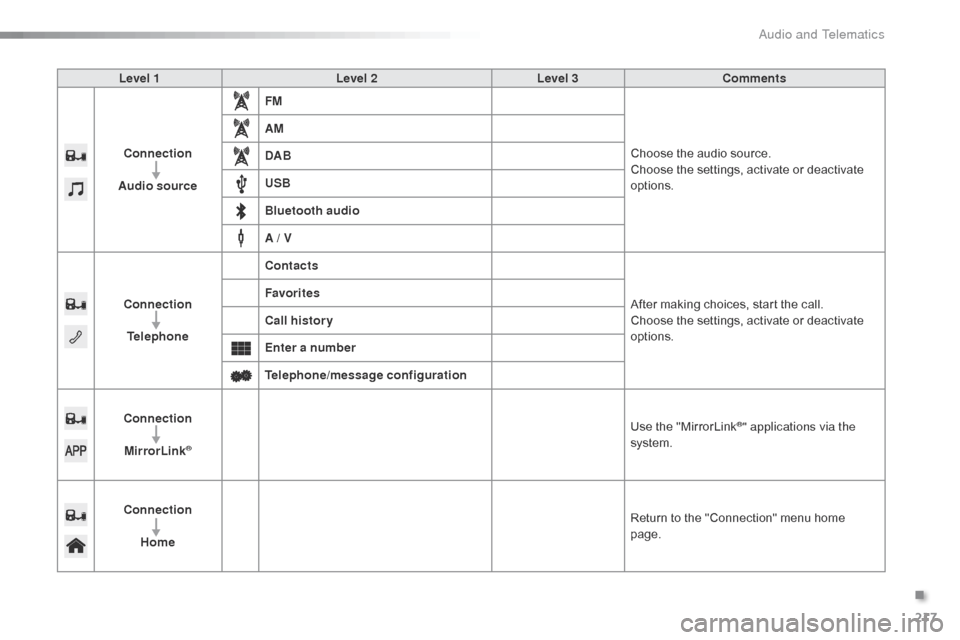
Level 1Level 2Level 3Comments
Connection
Audio source FM
Choose the audio source.
Choose the settings, activate or deactivate
options.
AM
DAB
USB
Bluetooth audio
A / V
Connection Telephone Contacts
After making choices, start the call.
Choose the settings, activate or deactivate
options.
Favorites
Call history
Enter a number
Telephone/message configuration
Connection MirrorLink
®
Use the "MirrorLink®" applications via the
system.
Connection Home Return to the "Connection" menu home
page.
.
Audio and Telematics
Page 245 of 271
243
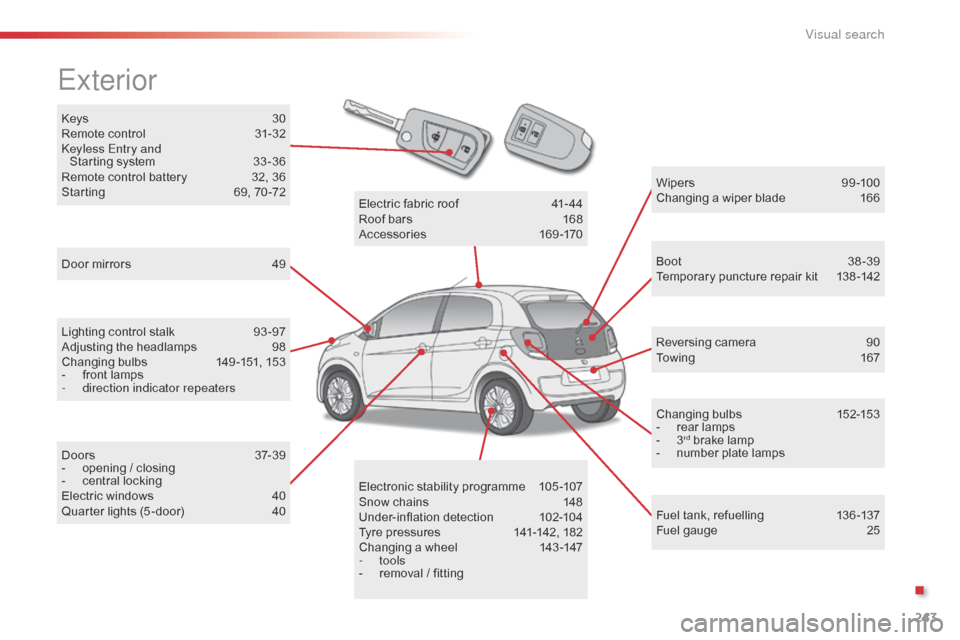
Keys 30
Remote control 3 1-32
Keyless Entry and Starting system
3
3 -36
Remote control battery
3
2, 36
Starting
6
9, 70 -72
Exterior
Door mirrors 4 9
Lighting control stalk
9
3 -97
Adjusting the headlamps
9
8
Changing bulbs
1
49 -151, 153
-
f
ront lamps
-
d
irection indicator repeaters
Doors
3
7-39
-
o
pening / closing
-
c
entral locking
Electric windows
4
0
Quarter lights (5 -door)
4
0 W ip e r s
9
9 -10 0
Changing a wiper blade
1
66
Boot 3 8-39
Temporary puncture repair kit 1 38 -142
Reversing camera
9
0
To w i n g
1
6 7
Changing bulbs
1
52-153
-
r
ear lamps
-
3rd brake lamp
-
n
umber plate lamps
Fuel tank, refuelling
1
36 -137
Fuel gauge
2
5
Electronic stability programme
1
05-107
Snow chains
1
48
Under-inflation detection
1
02-104
Tyre pressures
1
41-142, 182
Changing a wheel
1
43 -147
-
tools
-
r
emoval / fitting
Electric fabric roof
4
1-44
Roof bars
1
68
Accessories
1
69-170
.
Visual search
Page 247 of 271
245
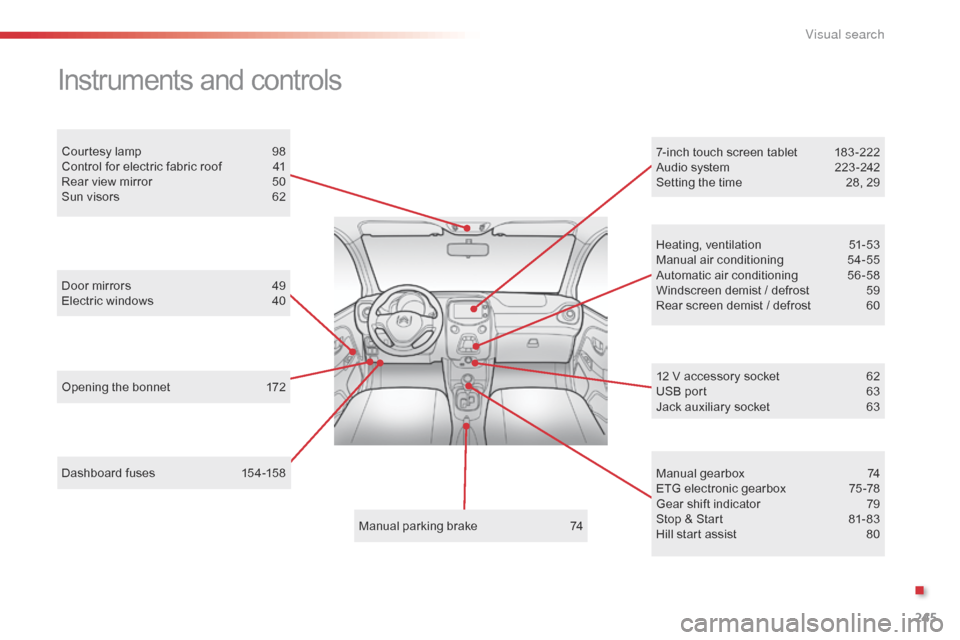
Dashboard fuses 154-158
Instruments and controls
Opening the bonnet 1 72
Door mirrors
4
9
Electric windows
4
0
Courtesy lamp
9
8
Control for electric fabric roof
4
1
Rear view mirror
5
0
Sun visors
6
2
Manual parking brake
7
4Heating, ventilation
5
1-53
Manual air conditioning
5
4-55
Automatic air conditioning
5
6 -58
Windscreen demist / defrost
5
9
Rear screen demist / defrost
6
0
7-inch touch screen tablet
1
83 -222
Audio system
2
23 -242
Setting the time
2
8, 29
Manual gearbox
7
4
ETG electronic gearbox
7
5 -78
Gear shift indicator
7
9
Stop & Start
8
1- 83
Hill start assist
8
0
12 V accessory socket
6 2
USB port 6 3
Jack auxiliary socket
6
3
.
V
Page 248 of 271
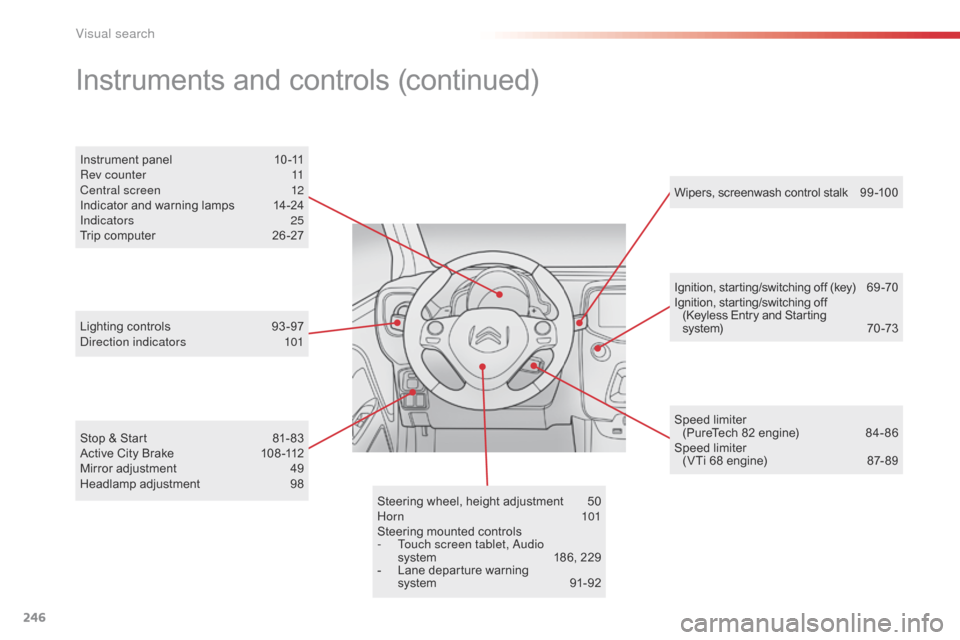
246
Steering wheel, height adjustment 50
Horn 101
Steering mounted controls
-
T
ouch screen tablet, Audio
system
1
86, 229
-
L
ane departure warning
system
9
1-92Ignition, starting/switching off (key)
6
9 -70
Ignition, starting/switching off (Keyless Entry and Starting
system)
7
0 -73
Instrument panel
1
0 -11
Rev counter
1
1
Central screen
1
2
Indicator and warning lamps
1
4-24
Indicators
25
T
rip computer
2
6 -27
Instruments and controls (continued)
Lighting controls 93
-97
Direction indicators 1 01
Stop & Start
8
1- 83
Active City Brake
1
08 -112
Mirror adjustment
4
9
Headlamp adjustment
9
8 Wipers, screenwash control stalk
9
9 -10 0
Speed limiter (PureTech 82 engine)
8
4- 86
Speed limiter (VTi 68 engine)
87
- 89
Visual search
Page 251 of 271
249
Easy mode (automatic mode) .........................75
E BA (Emergency braking
assistance)
.................................................. 10
5
EBFD
...............................
......................105, 10 6
Eco-driving
...............................
........................ 8
Economy mode
...............................
..............166
Electronic brake force distribution (EBFD)
............................. 10
5, 10 6
Electronic engine immobiliser .........................73
Emergency warning lamps
........................... 10
2
Energy economy mode
.................................16
6
Engine compartment
.................................... 17
3
Engine compartment
fusebox
..............................
.........................159
Engine, petrol
................................ 1
37, 173, 179
Environment
..... 8
, 32, 46, 52, 60, 103, 165, 176 Halogen headlamps
......................................14
9
Hands-free kit
..............................
.........202, 235
Hazard warning lamps
.................................. 10
2
Headlamps
...............................
.....................150
Head restraints, rear
.......................................48
H
eating
................
............................... 53, 54, 56
Hill start assist
.................................................80
H
ooks
...............................
...............................67
F
H
Filling with fuel ...................................... 13 6, 137
Fitting a wheel ............................... ................146
Fittings, boot
................................................... 66
F
lashing indicators
................ 1
01, 150, 152, 153
Folding/unfolding the door mirrors
.................49
F
requency (radio)
..........................1
92, 193, 230
Front seats
..............................
........................45
Fuel .............................................. 8, 25, 136, 137
Fuel consumption
................................8
, 25, 136
Fuel gauge
...................................................... 25
F
uel tank........................................................ 13 6
Fusebox, dashboard
..................................... 15
6
Fuses
................
............................................. 15 4 Interior lamp
...............................
.....................
98
iPhone connection
...............................
..
210 -212
ISOFIX
...............
....................................
13 0 -13 3
ISOFIX mountings ................................. 13 0, 13 3
E
Gearbox - ETG ............................... ..... 8, 75, 178
Gearbox, manual .......................... 8 , 74, 81, 177
Gear efficiency indicator
................................. 79
G
ear lever
..............................
........................... 8
Gear lever, manual gearbox
...........................74
G
ear selector
.................................................. 75
G
lossary, audio system
................................2
24
Glove box
.................................................. 6
1, 62Jack
........
.......................................................143
Jack cable
.............................................1
96, 233
JACK socket
..............................
61, 63, 196, 233
J
Keeping children
safe ............... ........................ 115, 117, 121-135
Key
.......
........................................................... 30
Key, electronic
........................................... 33
-36
Key in ignition warning
....................................70
K
eyless Entry and Starting
................. 3
3 -36, 70
K
G
Identification.................................................. 182
Indicators, direction ...................................... 10
1
Inflating accessories (using the kit)
..............1
41
Inflating tyres
..............................
.............. 8, 182
Instrument panel
...............................
........1 0 , 11
Instrument panel screen
.................................12
I
nterior fittings
........................................... 6
1, 62
I
Lamps, front .......................................... 149, 150
Lamps, rear ............................... ....................152
Lamps, warning and indicator
...................14
-24
Lane Departure Warning System (LDWS)
.....91
L
evel, brake fluid
........................................... 17
5
L
.
Alphabetical index