lock Citroen C1 2016 1.G Owner's Guide
[x] Cancel search | Manufacturer: CITROEN, Model Year: 2016, Model line: C1, Model: Citroen C1 2016 1.GPages: 269, PDF Size: 7.63 MB
Page 55 of 269
53
C1_en_Chap03_ergonomie-confort_ed01-2016
Recommendations for use
If the interior temperature remains very high after a prolonged period parked in the sun, first ventilate the passenger compartment for a few minutes.
For
an even air distribution, make sure that you do not block the outside air inlet grille, the
v
ents, the air passages and the air outlets to the footwells.
Ensure
that the passenger compartment filter, located behind the glove box in the heater
u
nit, is in good condition. Have the filter elements replaced regularly. If you drive in dusty
c
onditions, change them twice as often.
Operate
the air conditioning system for 5 to 10 minutes, once or twice a month, to keep it in
p
er fect working order.
In
order to ensure that your air conditioning system continues to operate correctly, you are
a
dvised to have it checked regularly.
If
the system does not produce cold air, do not use it and contact a CITROËN dealer or a
q
ualified
w
orkshop.
The
air conditioning system does not contain chlorine and does not present any danger to
t
he ozone layer.
The
condensation created by the air conditioning results in a flow of water under the vehicle
w
hen stationary which is per fectly normal.
3
Ease of use and comfort
Page 73 of 269
71
C1_en_Chap04_conduite_ed01-2016
Starting - switching off the engine with the key
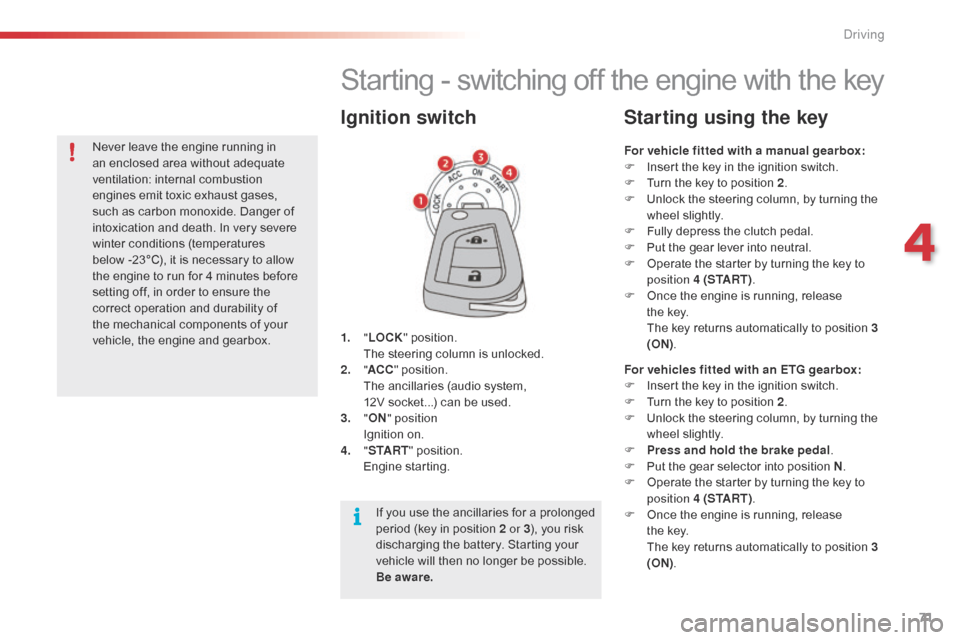
1. "LOCK " position. T
he steering column is unlocked.
2.
" AC
C"
position.
T
he ancillaries (audio system,
1
2V socket...) can be used.
3.
"ON " position
I
gnition on.
4.
" S
TA R T"
position.
E
ngine
s
tarting.
Ignition switch
For vehicle fitted with a manual gearbox:
F I nsert the key in the ignition switch.
F
T
urn the key to position 2.
F
U
nlock the steering column, by turning the
w
heel slightly.
F
F
ully depress the clutch pedal.
F
P
ut the gear lever into neutral.
F
O
perate the starter by turning the key to
p
osition 4 (S TA R T ) .
F
O
nce the engine is running, release
t
he key.
T
he key returns automatically to position 3
(ON) .
Starting using the key
For vehicles fitted with an ETG gearbox:
F
I nsert the key in the ignition switch.
F
T
urn the key to position 2.
F
U
nlock the steering column, by turning the
w
heel slightly.
F
P
ress and hold the brake pedal .
F
P
ut the gear selector into position N.
F
O
perate the starter by turning the key to
p
osition 4 (S TA R T ) .
F
O
nce the engine is running, release
t
he key.
T
he key returns automatically to position 3
(ON) .
If
you
use
the
ancillaries
for
a
prolonged
p
eriod
(key
in
position
2 or 3 ),
you
risk
d
ischarging
the
battery.
Starting
your
v
ehicle
will
then
no
longer
be
possible.
B
e aware.
Never
leave
the
engine
running
in
a
n
enclosed
area
without
adequate
v
entilation:
in
ternal
c
ombustion
e
ngines
emit
toxic
exhaust
gases,
s
uch
as
carbon
monoxide.
Danger
of
i
ntoxication
and
death.
In
very
severe
w
inter
conditions
(temperatures
b
elow -23°C),
it
is
necessary
to
allow
t
he
engine
to
run
for
4
minutes
before
s
etting
off,
in
order
to
ensure
the
c
orrect
operation
and
durability
of
t
he
mechanical
components
of
your
v
ehicle,
the
engine
and
gearbox.
4
Driving
Page 74 of 269
72
C1_en_Chap04_conduite_ed01-2016
If you use the ancillaries for a prolonged period, the vehicle will automatically
s
witch to " OFF"
mode after about
20
m
inutes.
Be aware
in order to avoid discharging
t
he battery.
Starting - switching off the engine
w ith the Keyless Entry and Starting
system
Changing the mode of the
vehicle
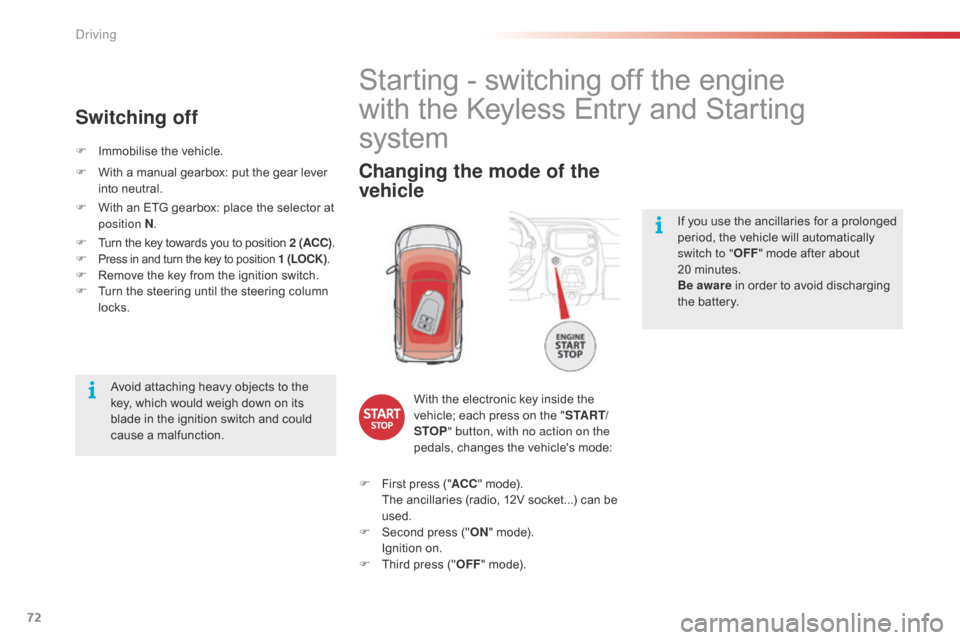
With the electronic key inside the v
ehicle; each press on the "S TA R T/
STOP " button, with no action on the
pedals,
changes the vehicle's mode:
F
F
irst
press ("ACC "
mode).
T
he
ancillaries (radio, 12V socket...) can be
u
sed.
F
S
econd press ("ON "
mode).
I
gnition on.
F
T
hird
press ("OFF "
mode).
Avoid
attaching
heavy
objects
to
the
k
ey,
which
would
weigh
down
on
its
b
lade
in
the
ignition
switch
and
could
c
ause
a
malfunction.
F
I
mmobilise
the
vehicle.
Switching off
F With
a manual gearbox: put the gear lever i
nto neutral.
F
W
ith an ETG gearbox: place the selector at
p
osition N .
F
T
urn the key towards you to position 2 (ACC).
F
Press in and turn the key to position 1 (LOCK) .F Remove the key from the ignition switch.
F T urn the steering until the steering column
l
ocks.
Driving
Page 75 of 269
73
C1_en_Chap04_conduite_ed01-2016
Starting using the
electronic key
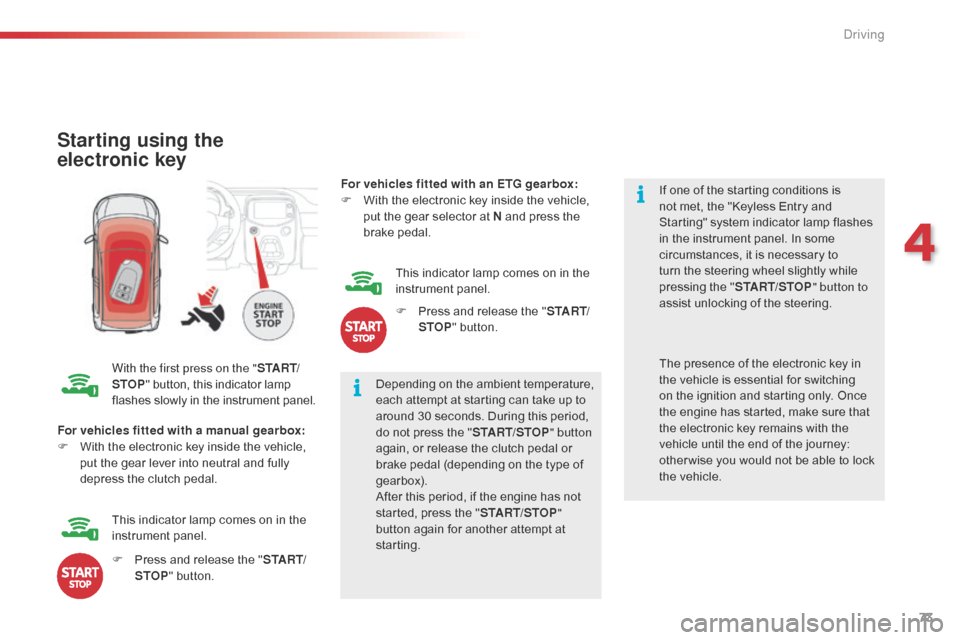
With the first press on the "S TA R T/
STOP "
button, this indicator lamp f
lashes slowly in the instrument panel.Depending
on the ambient temperature,
e
ach attempt at starting can take up to
a
round 30 seconds. During this period,
d
o not press the "START/STOP " button
again,
or release the clutch pedal or
b
rake pedal (depending on the type of
g
earbox).
After
this period, if the engine has not
s
tarted, press the "START/STOP "
button
again for another attempt at
s
tarting. If
one of the starting conditions is
n
ot met, the "Keyless Entry and
S
tarting" system indicator lamp flashes
i
n the instrument panel. In some
c
ircumstances, it is necessary to
t
urn the steering wheel slightly while
p
ressing the "
START/STOP " button to
assist unlocking of the steering.
For vehicles fitted with a manual gearbox:
F
W
ith
the electronic key inside the vehicle,
p
ut
the gear lever into neutral and fully
d
epress the clutch pedal. The
presence of the electronic key in t
he vehicle is essential for switching
o
n the ignition and starting only. Once
t
he engine has started, make sure that
t
he electronic key remains with the
v
ehicle until the end of the journey:
o
ther wise you would not be able to lock
t
he vehicle.
F
P
ress and release the "S TA R T/
STOP "
button.
This
indicator lamp comes on in the
in
strument
pan
el. For vehicles fitted with an ETG gearbox:
F
W
ith the electronic key inside the vehicle,
p
ut the gear selector at N and press the
b
rake
ped
al.
This indicator lamp comes on in the
in
strument
pan
el.
F
P
ress and release the "
S TA R T/
STOP " button.
4
Driving
Page 76 of 269
74
C1_en_Chap04_conduite_ed01-2016
There is an audible signal when the driver's door is opened and the vehicle is in "ACC "
mode.
If
the vehicle is not immobilised, the
e
ngine will not stop.
Switching off using the
electronic key
F Immobilise
the vehicle.
F W ith a manual gearbox: put the gear lever
i
nto neutral.
F
W
ith an ETG gearbox: place the gear
s
elector at N .
F
W
ith the electronic key inside
t
he vehicle, press the " S TA R T/
STOP "
button.
The
engine stops.
The
steering locks when a door is opened or on
l
ocking the vehicle.
F
P
ress the "START/STOP " button
again
to change to "OFF "
mode.
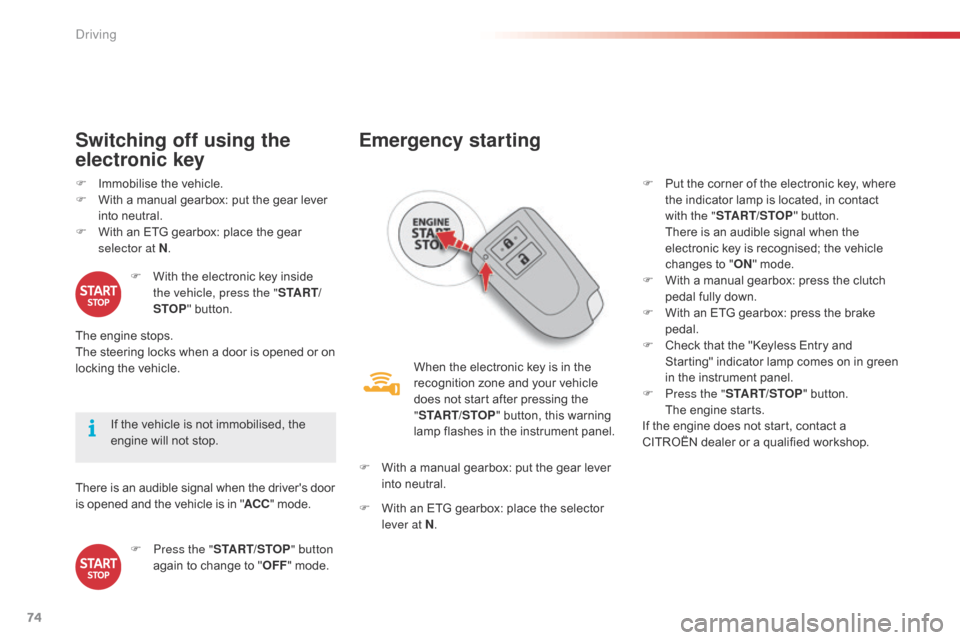
Emergency starting
When the electronic key is in the recognition zone and your vehicle
d
oes not start after pressing the
"ST
ART/STOP "
button, this warning
l
amp flashes in the instrument panel.
F
W
ith
a manual gearbox: put the gear lever
i
nto
neutral.
F
W
ith
an ETG gearbox: place the selector
l
ever at N . F
P
ut the corner of the electronic key, where
t
he indicator lamp is located, in contact
w
ith the "
START/STOP " button.
T
here is an audible signal when the
e
lectronic key is recognised; the vehicle
c
hanges to "
ON " mode.
F
W
ith a manual gearbox: press the clutch
p
edal fully down.
F
W
ith an ETG gearbox: press the brake
ped
al.
F
C
heck that the "Keyless Entry and S
tarting" indicator lamp comes on in green i
n the instrument panel.
F
P
ress the "START/STOP "
button.
T
he engine starts.
If
the engine does not start, contact a
C
ITROËN dealer or a qualified workshop.
Driving
Page 77 of 269
75
C1_en_Chap04_conduite_ed01-2016
Emergency switch-off
In the event of an emergency only, the engine can be switched of without conditions. To do
t
his, press for more than 2 seconds, or make
a
minimum of 3 successive presses on the
"ST
ART/STOP "
button.
In
this case the steering column locks as soon
a
s the vehicle stops.
Electronic key not
recognised
If the electronic key is no longer in the recognition zone when driving or when you
(
later) request switching off the engine, there is
a
n audible signal to warn you.
F
P
ress for more than 2 seconds,
o
r make a minimum of
3 s
uccessive presses on the
"ST
ART/STOP" button if you
want
to force switching off of the
e
ngine (note that restarting
will not be possible without
the
key).
Electronic e ngine
i
mmobiliser
This locks the engine management system as s
oon as the ignition has been switched off and
t
herefore prevents starting of the vehicle by
a
nyone who does not have the key.
The
ignition key has an electronic chip which
h
as a special code. When the ignition is
s
witched on, the code must be recognised for
s
tarting to be possible.
In
the event of a malfunction, your vehicle will
n
ot start.
Contact
a CITROËN dealer or a qualified
w
orkshop. Do
not make any modifications to the
e
lectronic immobiliser system.
4
Driving
Page 99 of 269
97
C1_en_Chap04_conduite_ed01-2016
The under-inflation alert can only be considered reliable if reinitialisation of
t
he system is done with the the four tyre
p
ressures correctly set.
Snow chains
The system does not have to be reinitialised after fitting or removing
sn
ow
c
hains.
Operating fault
The flashing and then fixed illumination of the under-inflation warning lamp i
ndicates a fault with the system.
In
this
case, under-inflation monitoring of the
t
yres
is
no longer assured.
Have
the
system checked by a CITROËN
d
ealer
or
a qualified workshop.
Before
doing anything to the system,
t
he
pressures of the four tyres must be
c
hecked and the system reinitialised.
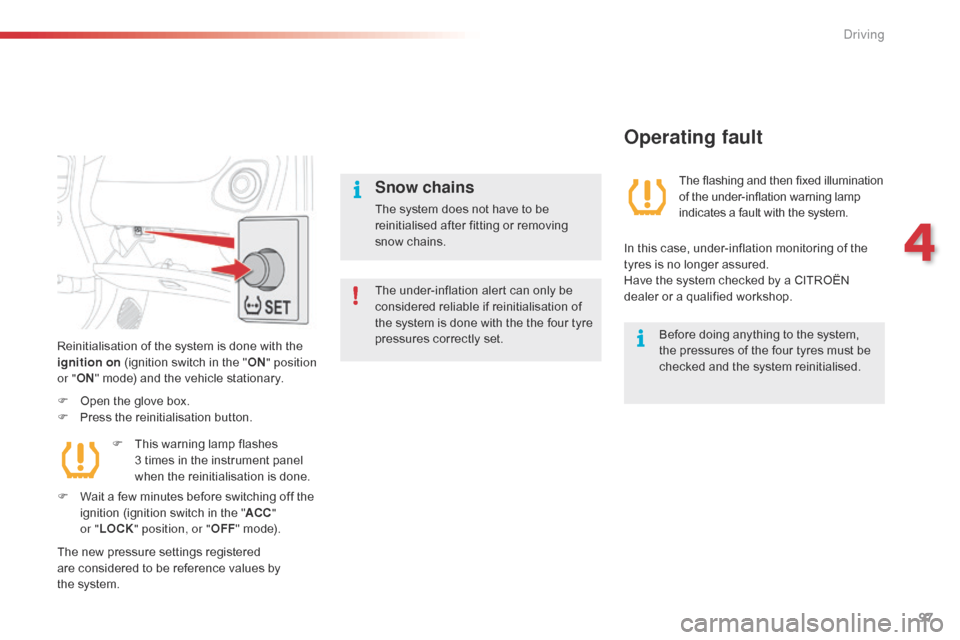
Reinitialisation
of
the
system
is
done
with
the
i
gnition on
(ignition
switch
in
the
" ON " position
or " ON"
mode)
and
the
vehicle
stationary.
F
O
pen
the
glove
box.
F
P
ress
the
reinitialisation
button.
The
new
pressure
settings
registered
a
re
considered
to
be
reference
values
by
t
he system. F
T
his
warning
lamp
flashes
3 t
imes
in
the
instrument
panel
w
hen
the
reinitialisation
is
done.
F
W
ait
a
few
minutes
before
switching
off
the
i
gnition
(ignition
switch
in
the
" ACC "
or " LOCK " position, or " OFF"
mode).
4
Driving
Page 109 of 269
107
C1_en_Chap06_securite_ed01-2016
Electronic Stability Control (ESC) incorporating the following systems:
-
a
nti-lock braking system (ABS) and the
e
lectronic brake force distribution (EBFD),
-
em
ergency
b
raking
a
ssistance,
-
t
raction control (TRC),
-
d
ynamic stability control (DSC).
Electronic stability control (ESC)
Definitions
Anti-lock braking system (ABS)
and electronic brake force
distribution (EBFD)
These systems improve the stability and manoeuvrability of your vehicle when braking
a
nd contribute towards better control in
c
orners, in particular on poor or slippery road
su
rfaces.
The
ABS prevents wheel lock in the event of
em
ergency
b
raking.
The
electronic brake force distribution system
m
anages the braking pressure wheel by wheel.
Emergency braking assistance
In an emergency, this system enables you to reach the optimum braking pressure more
q
uickly and therefore reduce the stopping
di
stance.
It
is triggered according to the speed at which
t
he brake pedal is pressed. This is felt by a
r
eduction in the resistance of the pedal and an
i
ncrease in the effectiveness of the braking.
Traction control (TRC)
This system optimises traction in order to limit wheel slip by acting on the brakes of the driving
w
heels and on the engine. It also improves
t
he directional stability of the vehicle on
a
cceleration.
Dynamic stability control (DSC)
If there is a difference between the path followed by the vehicle and that required by the
d
river, this system monitors each wheel and
a
utomatically acts on the brake of one or more
w
heels and on the engine to return the vehicle
t
o the required path, within the limits of the laws
o
f physics.
6
Safety
Page 110 of 269
108
C1_en_Chap06_securite_ed01-2016
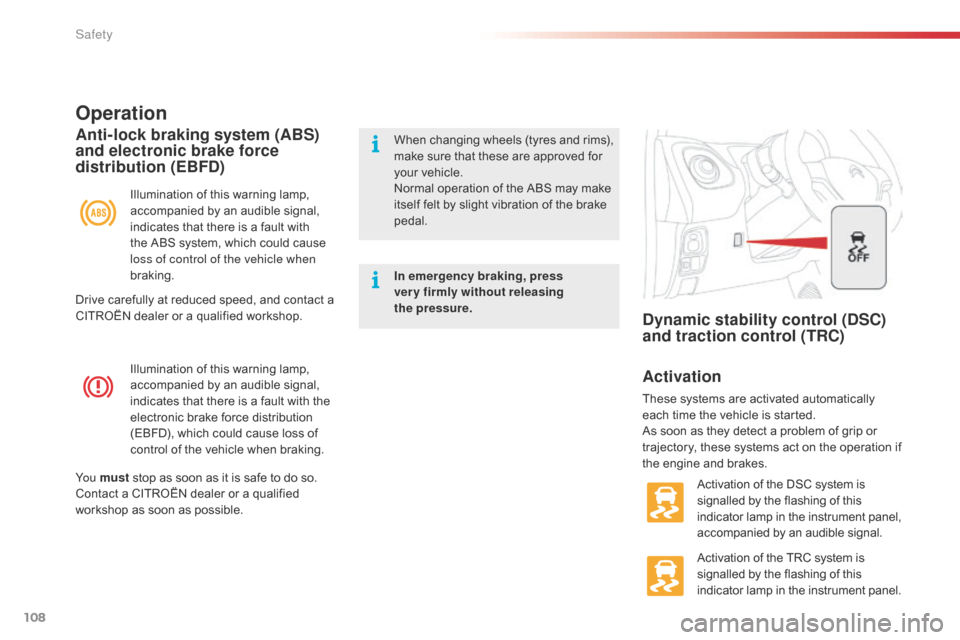
Illumination of this warning lamp, accompanied by an audible signal,
i
ndicates that there is a fault with the
e
lectronic brake force distribution
(
EBFD), which could cause loss of
c
ontrol of the vehicle when braking.
Operation
Illumination of this warning lamp, accompanied by an audible signal,
i
ndicates that there is a fault with
t
he ABS system, which could cause
l
oss of control of the vehicle when
braking.
Anti-lock braking system (ABS)
and electronic brake force
distribution (EBFD)When changing w heels ( tyres a nd r ims), m
ake sure that these are approved for
y
our vehicle.
Normal
operation of the ABS may make
i
tself felt by slight vibration of the brake
ped
al.
In emergency braking, press
very firmly without releasing
the
pressure.
Yo u must
stop
as
soon
as
it
is
safe
to
do
so.
Contact
a
CITROËN
dealer
or
a
qualified
w
orkshop
as
soon
as
possible.
Dynamic stability control (DSC)
and traction control (TRC)
Activation
These systems are activated automatically e ach time the vehicle is started.
As
soon as they detect a problem of grip or
t
rajectory, these systems act on the operation if
t
he engine and brakes.
Activation
of the DSC system is
s
ignalled by the flashing of this
i
ndicator lamp in the instrument panel,
a
ccompanied by an audible signal.
Activation
of the TRC system is
s
ignalled by the flashing of this
i
ndicator lamp in the instrument panel.
Drive
carefully
at
reduced
speed,
and
contact
a
C
ITROËN
dealer
or
a
qualified
workshop.
Safety
Page 138 of 269
136
C1_en_Chap06_securite_ed01-2016
The incorrect installation of a child seat in a vehicle compromises the child's protection in
t
he event of an accident.
Check
that there is no seat belt or seat belt
b
uckle under the child seat as this could
de
stabilise
i
t.
Remember
to fasten the seat belts or the
c
hild seat harnesses keeping the slack in
relation
to the child's body to a minimum,
even
for short journeys.
For
the installation of a child seat using a
s
eat belt, ensure that this is well tensioned
o
n the child seat and that it is holding the
c
hild seat firmly against the seat of your
v
ehicle. If your front passenger seat is
a
djustable, move it for ward if necessary.
At the rear seats, always leave sufficient
space
between the front seat and:
-
a
rear ward facing child seat,
-
t
he feet of a child seated in a for ward
f
acing child seat.
For
this, move the front seat for ward and if
n
ecessary straighten its backrest.
Recommendations on child seats
The chest part of the seat belt must be positioned on the child's shoulder without
t
ouching the neck.
Ensure that the lap part of the seat belt
passes
correctly over the child's thighs.
CITROËN
recommends the use of a booster
s
eat which has a back, fitted with a seat belt
g
uide at shoulder level.
As
a safety precaution, never leave:
-
o
ne or more children alone and
u
nsupervised in a vehicle,
-
a
child or an animal in a vehicle which
i
s exposed to the sun, with the windows
c
losed,
-
t
he keys within reach of children inside
t
he vehicle.
To
prevent accidental opening of the doors,
u
se the "Child lock".
Take
care not to open the rear windows by
m
ore than one third.
To
protect young children from the rays of
t
he sun, fit side blinds on the rear windows.
The
legislation
on
carrying
a
child
on
the
f
ront
passenger
seat
is
specific
to
each
c
ountry.
Refer
to
the
legislation
in
force
in
y
our
country.
Deactivate
the
passenger's
front
airbag
w
hen
a
rear ward
facing
child
seat
is
installed
o
n
the
front
seat.
Other wise,
the
child
would
r
isk
being
seriously
injured
or
killed
if
the
a
irbag
were
deployed.
For
o
ptimum
in
stallation
o
f
t
he
fo
rward
f
acing
c
hild
seat,
ensure
that
the
back
of
the
child
s
eat
is
as
close
as
possible
to
the
backrest
o
f
the
vehicle's
seat,
or
in
contact
if
possible.
The
head
restraint
must
be
removed
before
i
nstalling
a
child
seat
with
a
backrest
on
the
p
assenger
sea
t.
Ensure
that
the
head
restraint
is
stowed
or
a
ttached
securely
so
that
it
is
not
thrown
a
round
the
vehicle
in
the
event
of
sharp
b
raking.
Refit
the
head
restraint
as
soon
as
the
child
s
eat
is
removed.
Installing a booster
cushion
Children at the front
Safety