audio CITROEN C1 2018 Repair Manual
[x] Cancel search | Manufacturer: CITROEN, Model Year: 2018, Model line: C1, Model: CITROEN C1 2018Pages: 269, PDF Size: 7.63 MB
Page 236 of 269
234
C1_en_Chap10a_ Autoradio-Toyota-tactile-1_ed01-2016
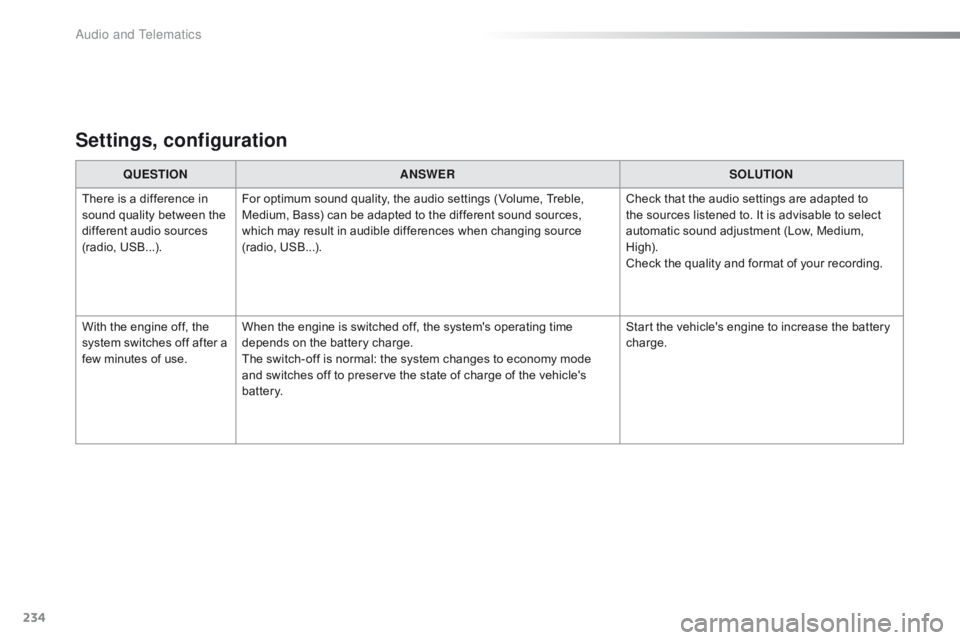
Settings, configuration
QUESTIONANSWER SOLUTION
There
is a difference in
s
ound
quality between the
d
ifferent audio sources
(
radio,
U
SB...). For
optimum sound quality, the audio settings (Volume, Treble,
M
edium, Bass) can be adapted to the different sound sources,
w
hich may result in audible differences when changing source
(
radio,
U
SB...). Check
that the audio settings are adapted to
t
he sources listened to. It is advisable to select
a
utomatic sound adjustment (Low, Medium,
Hig
h).
Check
the quality and format of your recording.
With
the engine off, the
s
ystem
switches off after a
f
ew
minutes of use. When
the engine is switched off, the system's operating time
d
epends on the battery charge.
The
switch-off is normal: the system changes to economy mode
a
nd switches off to preserve the state of charge of the vehicle's
b
attery. Start
the vehicle's engine to increase the battery
c
harge.
Audio and Telematics
Page 237 of 269
MODE
235
C1_en_Chap10b_ Autoradio-Toyota-2_ed01-2016
Audio system
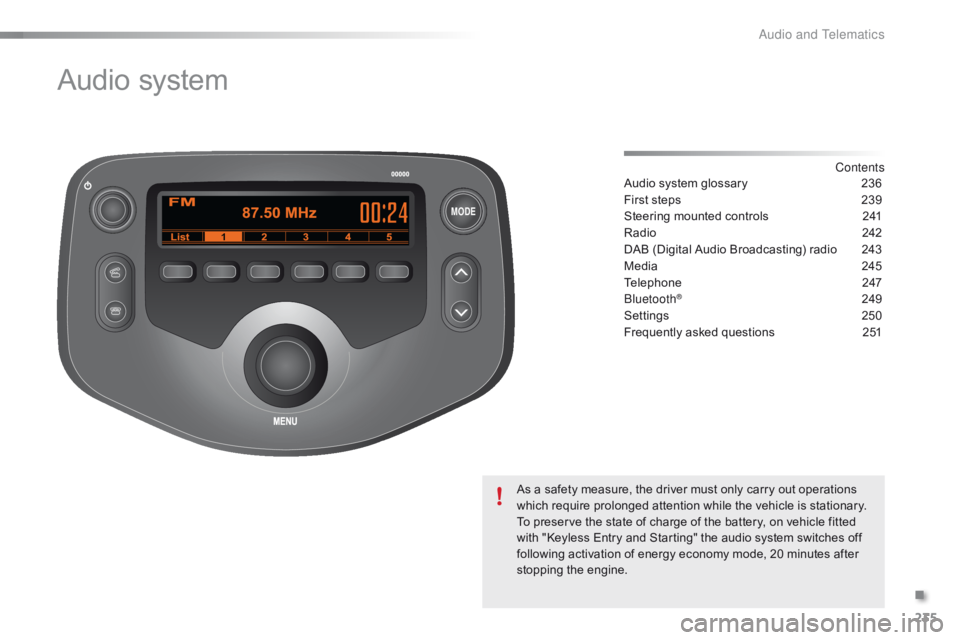
Contents
Audio
system
glossary
2 36
First
steps
2
39
Steering
mounted
controls
2
41
Radio
2
42
DAB
(Digital
Audio
Broadcasting)
radio
2
43
Media
2
45
Telephone
2
47
Bluetooth
® 24 9
Settings
2
50
Frequently
asked questions
2
51
As
a
safety
measure,
the
driver must only carry out operations
w
hich
require
prolonged
attention while the vehicle is stationary.
To
preserve
the
state
of
charge of the battery, on vehicle fitted
w
ith
"Keyless
Entry
and
Starting" the audio system switches off
f
ollowing
activation
of
energy
economy mode, 20 minutes after
s
topping
t
he
eng
ine.
.
Audio and Telematics
Page 238 of 269
236
C1_en_Chap10b_ Autoradio-Toyota-2_ed01-2016
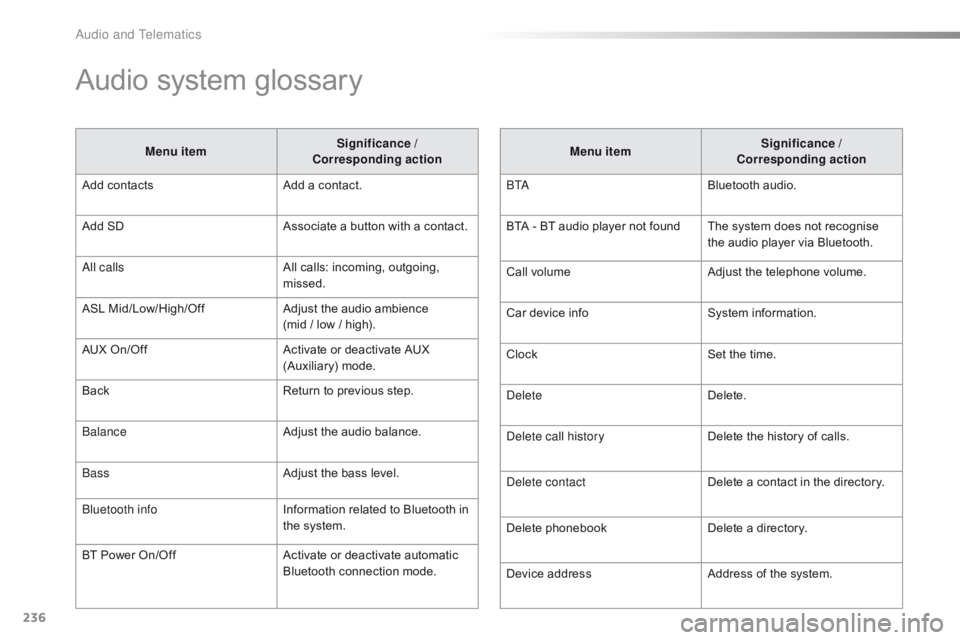
Audio system glossary
Menu itemSignificance /
Corresponding action
Add
contacts Add
a contact.
Add
SD Associate
a button with a contact.
All calls All
calls: incoming, outgoing,
m
issed.
ASL
M
id/Low/High/Off Adjust
the audio ambience
(mid
/ low / high).
AUX
On/Off Activate
or deactivate AUX
(
Auxiliary)
m
ode.
Back Return
to previous step.
Balance Adjust
the audio balance.
Bass Adjust
the bass level.
Bluetooth info Information
related to Bluetooth in
t
he system.
BT
Power
On/Off Activate
or deactivate automatic
B
luetooth connection mode.Menu item
Significance /
Corresponding action
B TA Bluetooth
audio.
BTA
- BT audio player not found The system does not recognise
t
he audio player via Bluetooth.
Call
volumeAdjust
the telephone volume.
Car
device infoSystem
i
nformation.
Clock Set
the time.
Delete Delete.
Delete call history Delete
the history of calls.
Delete contact Delete
a contact in the directory.
Delete
pho
nebookDelete
a directory.
Device
addressAddress
of the system.
Audio and Telematics
Page 239 of 269
237
C1_en_Chap10b_ Autoradio-Toyota-2_ed01-2016
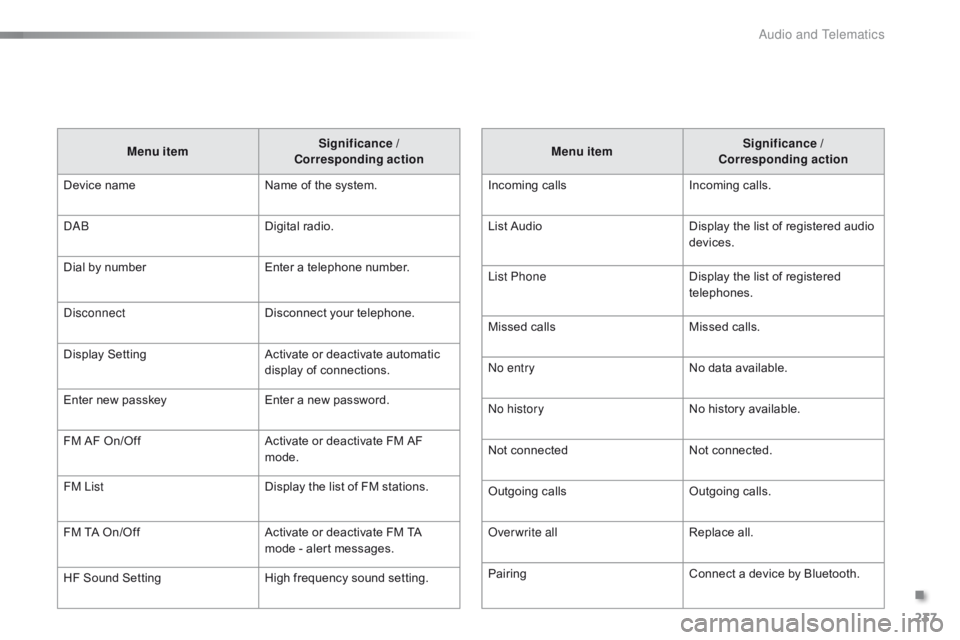
Menu itemSignificance /
Corresponding action
Incoming
c
alls Incoming
c
alls.
List
Audio Display
the list of registered audio
d
evices.
List Phone Display
the list of registered
t
elephones.
Missed
calls Missed
calls.
No entry No
data available.
No history No
history available.
Not
c
onnected Not
c
onnected.
Outgoing
calls Outgoing
calls.
Overwrite all Replace
all.
Pairing Connect
a device by Bluetooth.
Menu item
Significance /
Corresponding action
Device
n
ame Name
of
the
system.
DAB Digital
r
adio.
Dial
by
number Enter
a
telephone
number.
Disconnect Disconnect
your
telephone.
Display
S
etting Activate
or
deactivate
automatic
d
isplay
of
connections.
Enter
new
passkey Enter
a
new
password.
FM
AF
On/Off Activate
or
deactivate
FM
AF
m
ode.
FM List Display
the
list
of
FM
stations.
FM
TA
On/Off Activate
or
deactivate
FM
TA
m
ode
-
alert
messages.
HF
Sound
Setting High
frequency
sound
setting.
.
Audio and Telematics
Page 240 of 269
238
C1_en_Chap10b_ Autoradio-Toyota-2_ed01-2016
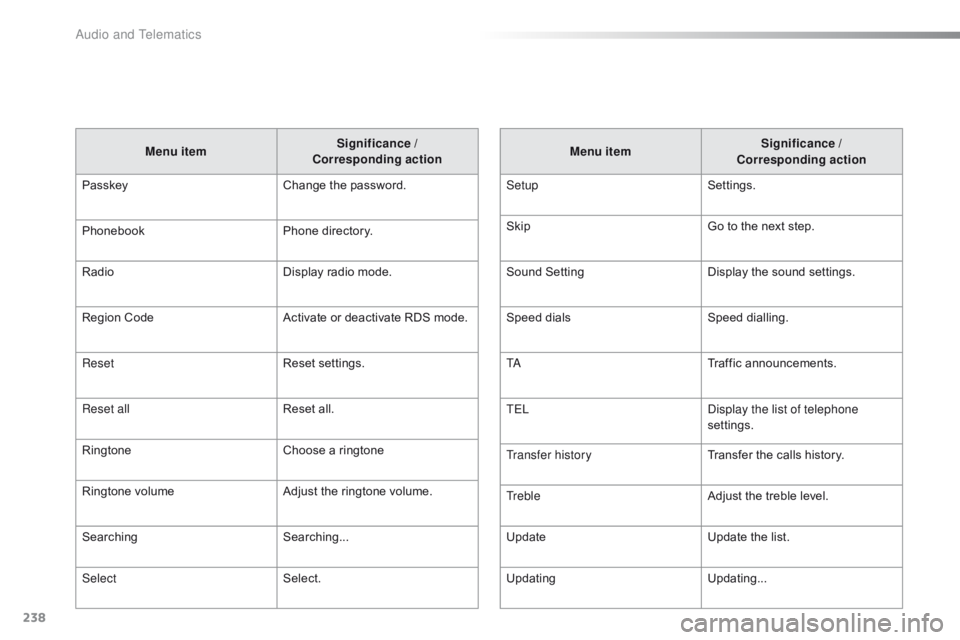
Menu itemSignificance /
Corresponding action
Passkey Change
the password.
Phonebook Phone
directory.
Radio Display
radio mode.
Region
Code Activate
or deactivate RDS mode.
Reset Reset
se
ttings.
Reset all Reset
all.
Ringtone Choose
a ringtone
Ringtone
volume Adjust
the ringtone volume.
Searching Searching...
Select Select. Menu item
Significance /
Corresponding action
Setup Settings.
Skip Go
to the next step.
Sound
S
ettingDisplay
t
he
s
ound
se
ttings.
Speed
d
ialsSpeed
d
ialling.
TA Traffic
a
nnouncements.
TEL Display the list of telephone
settings.
Transfer history Transfer
the calls history.
Treble Adjust
the treble level.
Update Update
the list.
Updating Updating...
Audio and Telematics
Page 241 of 269
MODE
239
C1_en_Chap10b_ Autoradio-Toyota-2_ed01-2016
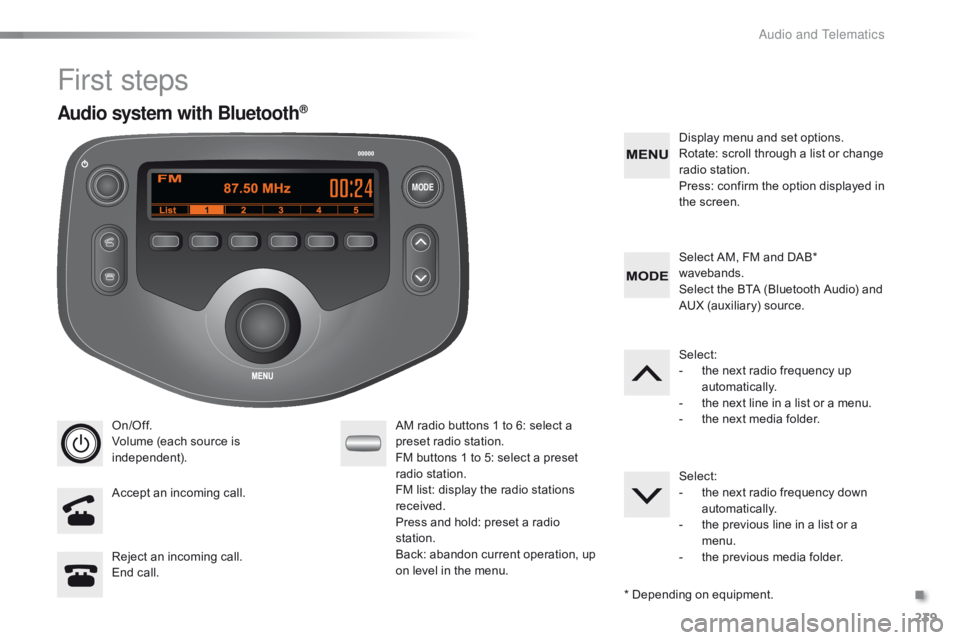
First steps
On/Off.
Volume (each source is
i
ndependent).
Accept
an incoming call. AM
radio buttons 1 to 6: select a p
reset radio station.
FM
buttons 1 to 5: select a preset
r
adio
s
tation.
FM
list: display the radio stations
r
eceived.
Press
and hold: preset a radio
s
tation.
Back:
abandon current operation, up
o
n level in the menu.Display
menu and set options.
Rotate: scroll through a list or change
r
adio
s
tation.
Press: confirm the option displayed in
t
he screen.
Reject an incoming call.
End
call. Select
AM, FM and DAB*
w
avebands.
Select the BTA (Bluetooth Audio) and
A
UX (auxiliary) source.
Select:
-
t
he next radio frequency up
au
tomatically.
-
t
he next line in a list or a menu.
- t he next media folder.
Select:
-
t
he next radio frequency down
au
tomatically.
-
t
he previous line in a list or a
m
enu.
-
t
he previous media folder.
*
Depending on equipment.
Audio system with Bluetooth®
.
Audio and Telematics
Page 242 of 269
MODE
240
C1_en_Chap10b_ Autoradio-Toyota-2_ed01-2016
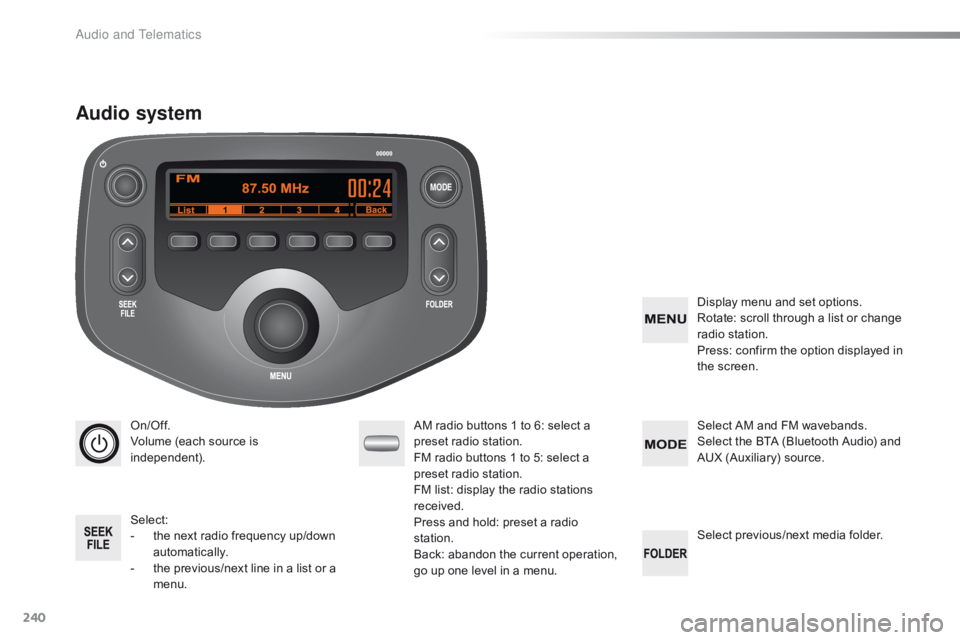
On/Off.
Volume (each source is
i
ndependent).
Select:
-
t
he next radio frequency up/down
au
tomatically.
-
t
he previous/next
l
ine in a list
o
r a
m
enu. AM
radio buttons 1 to 6: select a p
reset radio station.
FM
radio buttons 1 to 5: select a
p
reset radio station.
FM list:
display the radio stations
r
eceived.
Press
and hold: preset a radio
s
tation.
Back:
abandon the current operation,
g
o up one level in a menu.Display
menu and set options.
Rotate: scroll through a list or change
r
adio
s
tation.
Press: confirm the option displayed in
t
he screen.
Select AM and FM wavebands.
Select the BTA (Bluetooth Audio) and
A
UX (Auxiliary) source.
Select
previous/next media folder.
Audio system
Audio and Telematics
Page 243 of 269
241
C1_en_Chap10b_ Autoradio-Toyota-2_ed01-2016
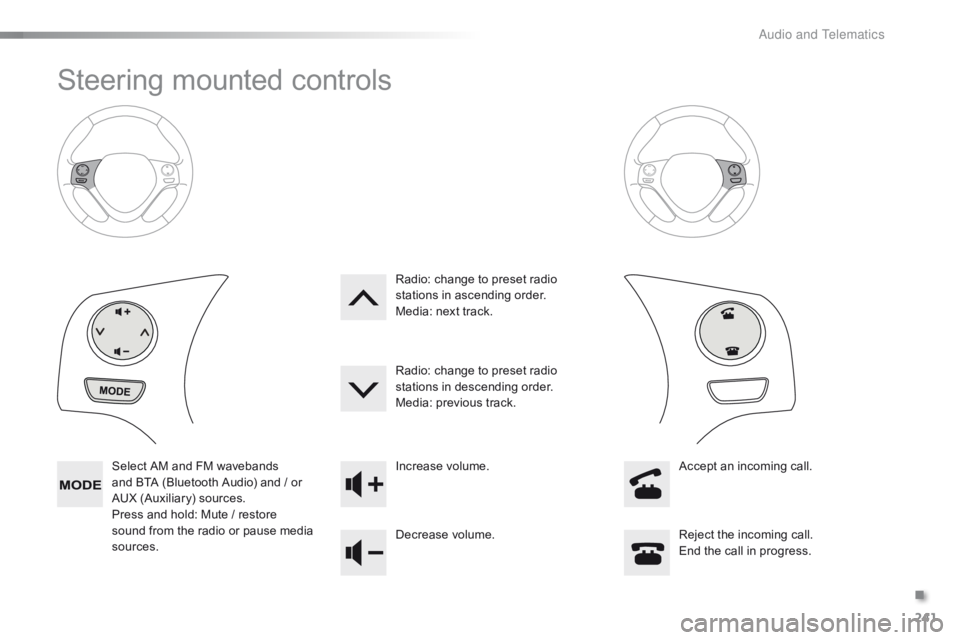
Steering mounted controls
Select AM and FM wavebands and BTA (Bluetooth Audio) and / or
A
UX (Auxiliary) sources.
Press
and hold: Mute / restore
s
ound from the radio or pause media
s
ources. Increase
volume.
Decrease volume.Reject
the incoming call.
End
the call in progress.
Radio:
change to preset radio
s
tations in ascending order.
Media: next track.
Radio: change to preset radio
s
tations in descending order.
Media: previous track.
Accept an incoming call.
.
A
Page 244 of 269
242
C1_en_Chap10b_ Autoradio-Toyota-2_ed01-2016
Radio
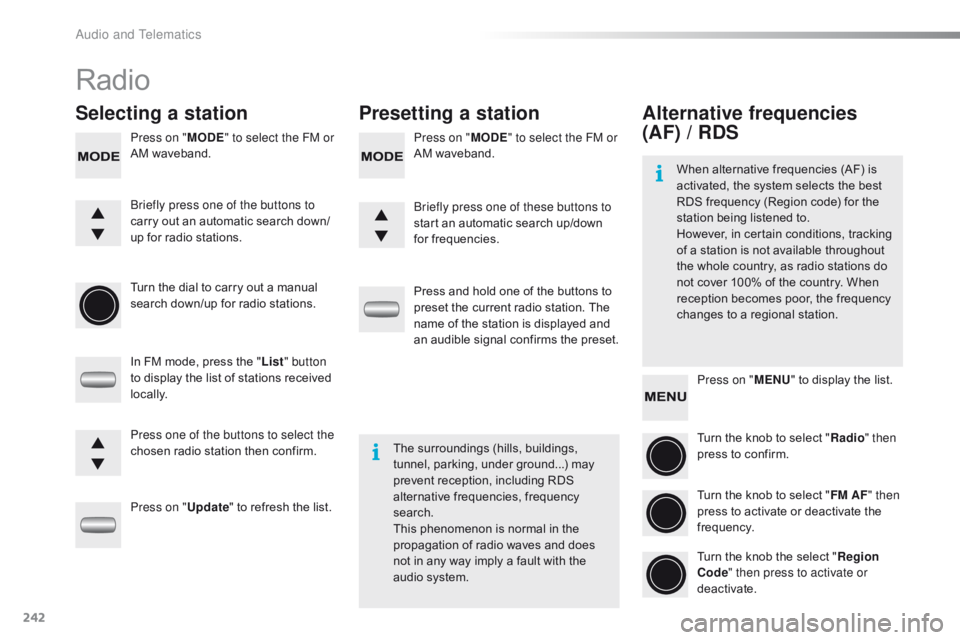
Selecting a stationPresetting a station
Press on "MODE" to select the FM or
AM waveband. Press on "
MODE" to select the FM or
AM waveband.
Turn
the dial to carry out a manual
s
earch down/up for radio stations.
In
FM mode, press the "List " button
to
display the list of stations received
l
ocally.
Press on " Update"
to refresh the list.Press
and hold one of the buttons to
p
reset the current radio station. The
n
ame of the station is displayed and
a
n audible signal confirms the preset.
Briefly press one of the buttons to
carry
out an automatic search down/
up
for radio stations. Briefly press one of these buttons to
start
an automatic search up/down
f
or frequencies.
Press one of the buttons to select the
chosen
radio station then confirm.The
surroundings (hills, buildings,
t
unnel, parking, under ground...) may
p
revent reception, including RDS
a
lternative frequencies, frequency
sea
rch.
This
phenomenon is normal in the
p
ropagation of radio waves and does
n
ot in any way imply a fault with the
a
udio system.
Alternative frequencies
(AF) / RDS
Press on "MENU" to display the list.
Turn the knob to select "Radio " then
press
to confirm.
Turn
the knob to select "FM AF " then
press
to activate or deactivate the
f
requency.
Turn
the knob the select "Region
Code " then press to activate or
deactivate.
When
alternative frequencies (AF) is
a
ctivated, the system selects the best
R
DS frequency (Region code) for the
s
tation being listened to.
However, in certain conditions, tracking
o
f
a
station is not available throughout
t
he
whole country, as radio stations do
n
ot
cover 100% of the country. When
r
eception becomes poor, the frequency
c
hanges to a regional station.
Audio and Telematics
Page 245 of 269
243
C1_en_Chap10b_ Autoradio-Toyota-2_ed01-2016
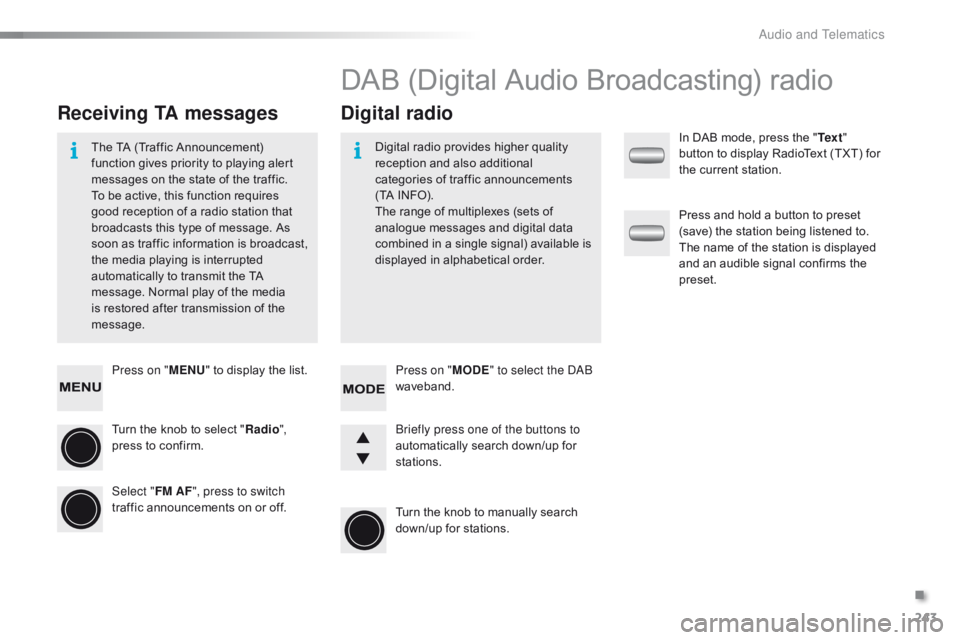
Press on "MENU" to display the list.
Turn the knob to select "Radio ",
press
to confirm.
Select " FM AF", press to switch
traffic
announcements on or off.
Receiving TA messages Digital radio
The TA (Traffic Announcement) f
unction gives priority to playing alert
m
essages on the state of the traffic.
T
o be active, this function requires
g
ood reception of a radio station that
b
roadcasts this type of message. As
s
oon as traffic information is broadcast,
t
he media playing is interrupted
a
utomatically to transmit the TA
m
essage. Normal play of the media
i
s restored after transmission of the
m
essage. Digital
radio provides higher quality r
eception and also additional
c
ategories of traffic announcements
(
TA INFO).
The
range of multiplexes (sets of
a
nalogue messages and digital data
c
ombined in a single signal) available is
d
isplayed in alphabetical order.
DAB (Digital Audio Broadcasting) radio
Press on "MODE" to select the DAB
waveband.
Turn
the knob to manually search
d
own/up for stations.
Briefly press one of the buttons to
automatically
search down/up for
s
tations. In
DAB mode, press the "
Te x t "
button to display RadioText (TXT) for
t
he current station.
Press and hold a button to preset
(
save) the station being listened to.
T
he name of the station is displayed
a
nd an audible signal confirms the
p
reset.
.
Audio and Telematics