USB Citroen C1 RHD 2016 1.G Owner's Manual
[x] Cancel search | Manufacturer: CITROEN, Model Year: 2016, Model line: C1 RHD, Model: Citroen C1 RHD 2016 1.GPages: 268, PDF Size: 7.09 MB
Page 8 of 268
6
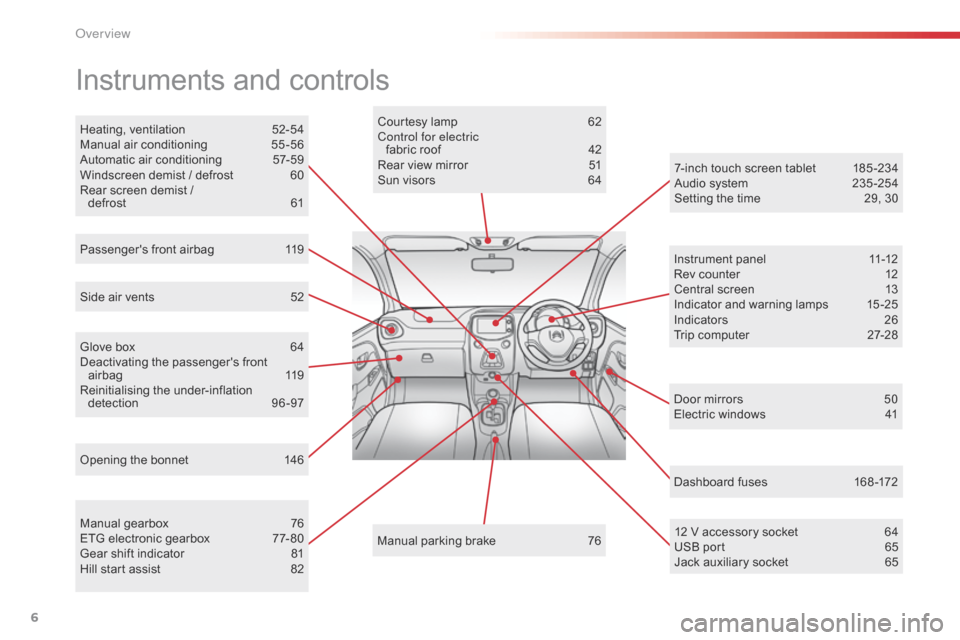
Instruments and controls
Opening the bonnet 146Courtesy lamp
6
2
Control for electric fabric
ro
of
4
2
Rear view mirror
5
1
Sun visors
6
4
Manual
par
king
b
rake
7
6
Heating,
v
entilation
5
2-54
Manual
a
ir
c
onditioning
5
5-56
Automatic air conditioning
5
7-59
Windscreen demist / defrost
6
0
Rear screen demist /
d
efrost
61
M
anual
g
earbox
7
6
ETG
electronic gearbox
7
7- 80
Gear
shift indicator
8
1
Hill
start assist
8
2
Side
air vents
5
2
Passenger's front airbag
1
19
Glove box
6
4
Deactivating
t
he
p
assenger's
f
ront
ai
rbag
1
19
Reinitialising
t
he
u
nder-inflation
d
etection
9
6-97
Dashboard fuses
1
68 -172
Door
mirrors
5
0
Electric windows
4
1
7-inch touch screen tablet
1
85 -234
Audio system
2
35 -254
Setting the time
2
9, 30
12 V accessory socket
6
4
USB
port
6
5
Jack
auxiliary socket
6
5
Instrument
panel
1
1-12
Rev counter
1
2
Central screen
1
3
Indicator and warning lamps
1
5 -25
Indicators
2
6
Trip computer
2
7-28
Over view
Page 67 of 268
65
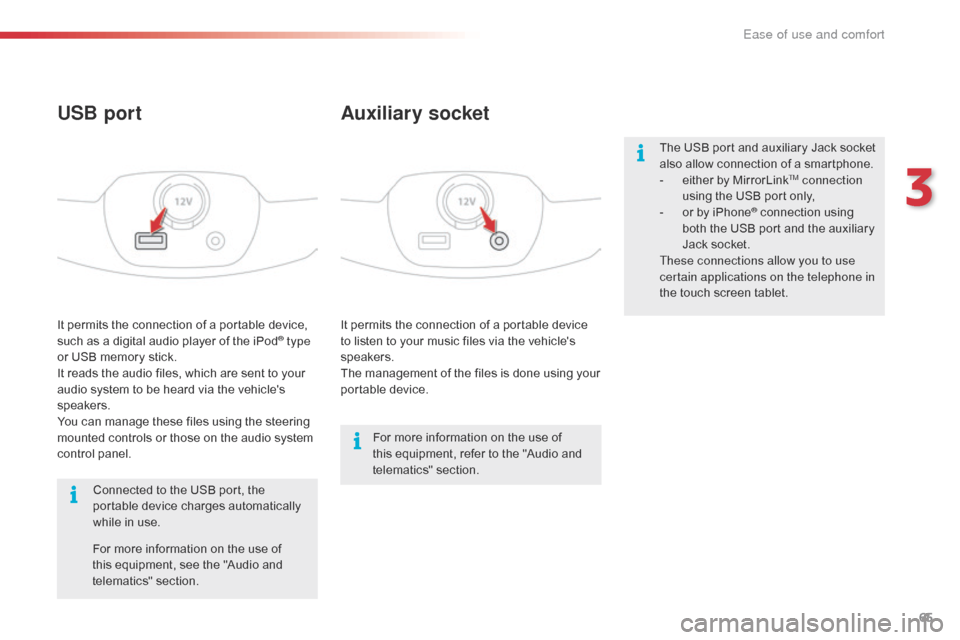
It permits the connection of a portable device to listen to your music files via the vehicle's
s
peakers.
The
management of the files is done using your
p
ortable
d
evice.
It
permits
the
connection
of
a
portable
device,
s
uch
as
a
digital
audio
player
of
the
iPod® type
or
USB
memory
stick.
It
reads
the
audio
files,
which
are
sent
to
your
a
udio
system
to
be
heard
via
the
vehicle's
s
peakers.
You
can
manage
these
files
using
the
steering
m
ounted
controls
or
those
on
the
audio
system
c
ontrol
panel.
Auxiliary socket
USB port
For more information on the use of t
his equipment, refer to the "Audio and
t
elematics"
se
ction.
For
more
information
on
the
use
of
t
his
equipment,
see
the
"Audio
and
t
elematics"
se
ction.
Connected
to
the
USB
port,
the
p
ortable
device
charges
automatically
w
hile
in
use. The
USB port and auxiliary Jack socket
a
lso allow connection of a smartphone.
-
e
ither by MirrorLink
TM connection
using
the
USB
port
only,
-
o
r
by
iPhone
® connection using b
oth
the
USB
port and the auxiliary
J
ack
socket.
These connections allow you to use
certain applications on the telephone in
the
touch
screen
tablet.
3
Ease of use and comfort
Page 189 of 268
187
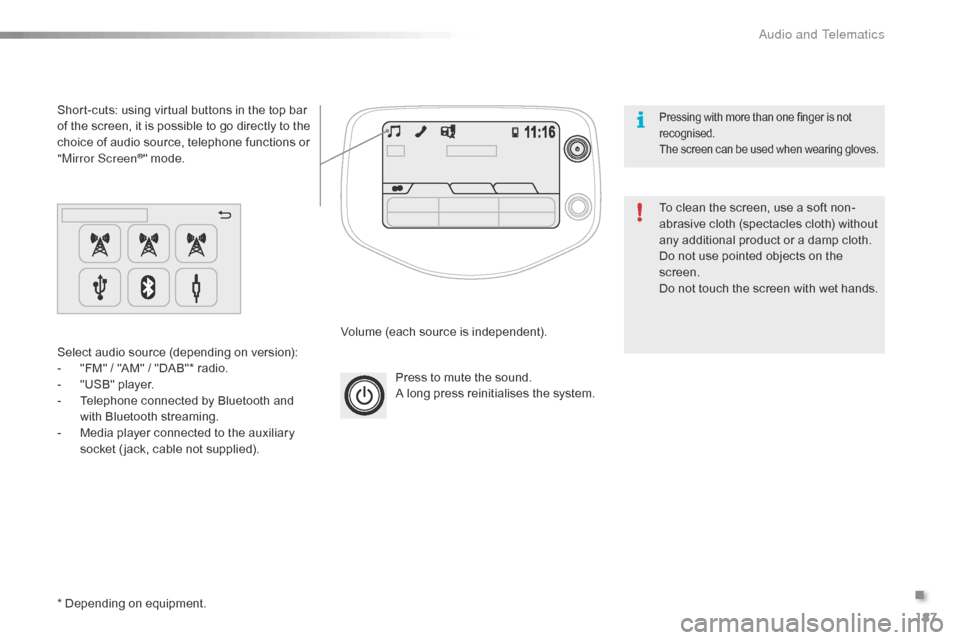
Press to mute the sound.
A long press reinitialises the system.
Volume
(each source is independent).
Select
audio
source
(depending
on
version):
-
"
FM"
/
"AM"
/
"DAB"*
radio.
-
"
USB"
player.
-
T
elephone
connected
by
Bluetooth
and
w
ith
Bluetooth
streaming.
-
M
edia
player
connected
to
the
auxiliary
s
ocket
( jack,
cable
not
supplied).
Short-cuts:
using
virtual
buttons
in
the
top
bar
o
f
the
screen,
it
is
possible
to
go
directly
to
the
c
hoice
of
audio
source,
telephone
functions
or
"
Mirror Screen
®" mode.
*
Depending
on
equipment. To
clean the screen, use a soft non-
abrasive
cloth (spectacles cloth) without
a
ny additional product or a damp cloth.
Do
not use pointed objects on the
sc
reen.
Do
not touch the screen with wet hands.
Pressing with more than one finger is not recognised.
The
s
creen
c
an
b
e
u
sed
w
hen
w
earing
g
loves.
.
Audio and Telematics
Page 195 of 268
193
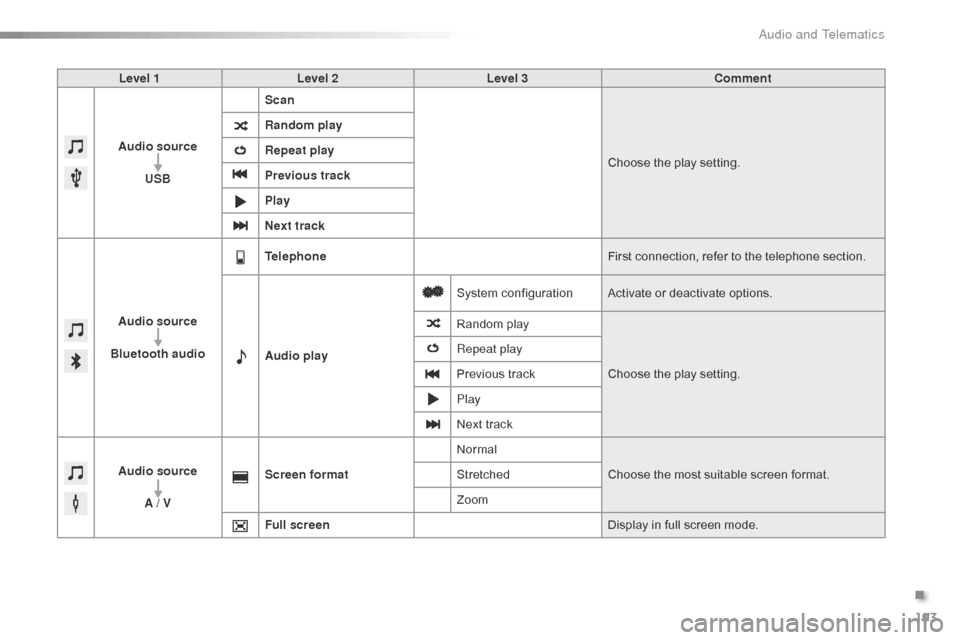
Level 1Level 2 Level 3 Comment
Audio source USB Scan
Choose
the play setting.
Random play
Repeat play
Previous track
Play
Next track
Audio source
Bluetooth audio Telephone
First
connection, refer to the telephone section.
Audio play System
c
onfigurationActivate
or deactivate options.
Random
p
layChoose
the play setting.
Repeat play
Previous
track
Play
Next
track
Audio source A / V Screen format
Normal
Choose
the most suitable screen format.
Stretched
Zoom
Full screen Display
in full screen mode.
.
Audio and Telematics
Page 200 of 268
198
Media
USB player
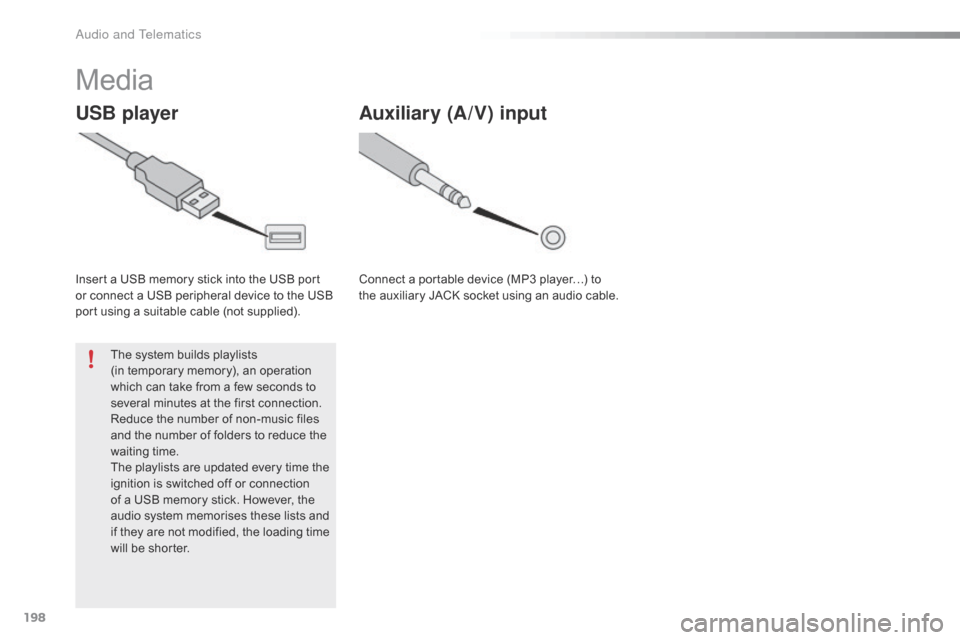
Insert a USB memory stick into the USB port or connect a USB peripheral device to the USB
p
ort using a suitable cable (not supplied).
The
system builds playlists
(in
temporary memory), an operation
w
hich can take from a few seconds to
s
everal minutes at the first connection.
Reduce
the number of non-music files
a
nd the number of folders to reduce the
w
aiting
t
ime.
The
playlists are updated every time the
i
gnition is switched off or connection
o
f a USB memory stick. However, the
a
udio system memorises these lists and
i
f they are not modified, the loading time
w
ill be shorter.
Auxiliary (A/V) input
Connect a portable device (MP3 player…) to the auxiliary JACK socket using an audio cable.
Audio and Telematics
Page 201 of 268
199
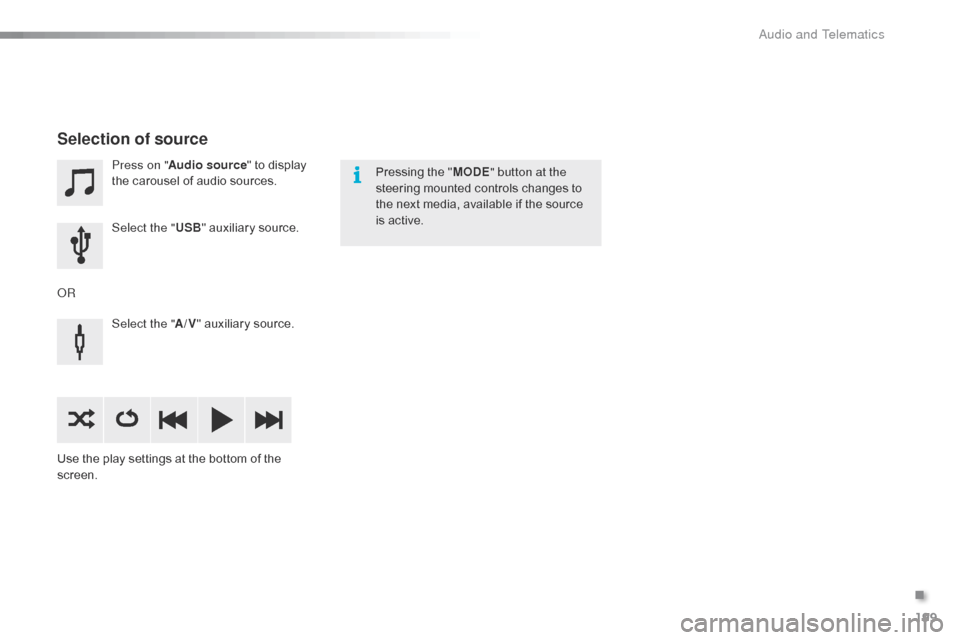
Press on "Audio source " to display t
he carousel of audio sources.
Select the " USB"
auxiliary source.
Select the " A/V"
auxiliary source.
Use
the
play settings at the bottom of the
sc
reen.
Selection of source
OR Pressing the "
MODE " button at the
steering mounted controls changes to
t
he next media, available if the source
i
s active.
.
Audio and Telematics
Page 202 of 268
200
Information and advice
The system accepts USB mass storage devices o r A pple® players via the
USB
ports.
The
adaptor cable is not
sup
plied.
Control
of
the
peripheral device is with
t
he
audio
system
controls.
Other
peripherals, not recognised on
c
onnection,
must
be connected to the
a
uxiliary
socket
using a Jack cable
(
not supplied).
It
is
advisable
to
restrict
file
names
to
2
0 characters,
without
using
of
special
c
haracters
(e.g.:
"
"
?
;
ù)
to
avoid
any
playing
a
nd
d
isplaying
pro
blems.
Use
only
USB
memory
sticks
formatted
FAT32
(
File
Allocation
Table).
The
audio
system
plays
files
with
the
extension:
".wma",
type
Ver7
and
Ver8
with
bit
rate
b
etween
48
and
192
Kbps
and
type
Ver9
with
b
it
rate
between
48
and
320
Kbps.
".aac",
with
bit
rate
between
16
and
320
Kbps.
".mp3
-
MPEG1"
with
bit
rate
between
32
and
3
20
Kbps
and
".mp3
-
MPEG2"
with
bit
rate
b
etween
8
and
160
Kbps.
The
sampling
rates
supported
are
11,
22,
44
a
nd
48
KHz. The
system
can
alternatively read files
v
ia the Bluetooth
® system and the USB po
rt.
It
is
recommended that the USB cable
f
or
the
portable
device is used.
Audio and Telematics
Page 203 of 268
201
Audio streaming
Once connected for streaming, the telephone is considered as a media
s
ource.
It
is recommended that "Repeat "
mode
b
e activated in the Bluetooth device.
Streaming
allows audio files on your
t
elephone to be played via the vehicle's
s
peakers.
Connect the telephone: see the "
Telephone "
section, then " Bluetooth".
Choose either " Connect all" or " Connect as
audio player "
pro
file.
If
play
does not start automatically, it may
b
e
necessary to start audio play from the
t
elephone.
Control is from the peripheral device or by
u
sing
the audio system controls.
Connecting Apple® players
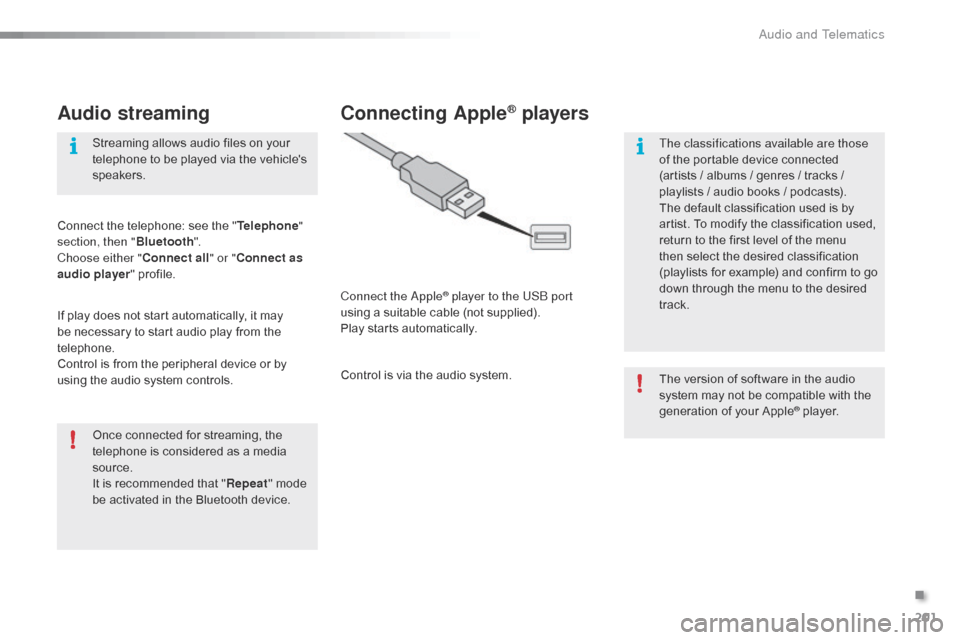
Connect the Apple® player to the USB port
using
a
suitable
cable (not supplied).
Play
starts
automatically.
Control
is
via
the
audio system. The
version of software in the audio
s
ystem may not be compatible with the
g
eneration of your Apple
® player.
T
he classifications available are those
of
the
portable
device
connected
(
artists
/
albums
/
genres
/ tracks /
p
laylists
/
a
udio
books /
podcasts).
The
default
classification
used is by
a
rtist.
To
modify
the
classification used,
r
eturn
to
the
first
level
of
the menu
t
hen
select
the
desired
classification
(
playlists
for
example)
and confirm to go
d
own
through
the
menu
to the desired
t
rack.
.
Audio and Telematics
Page 211 of 268
209
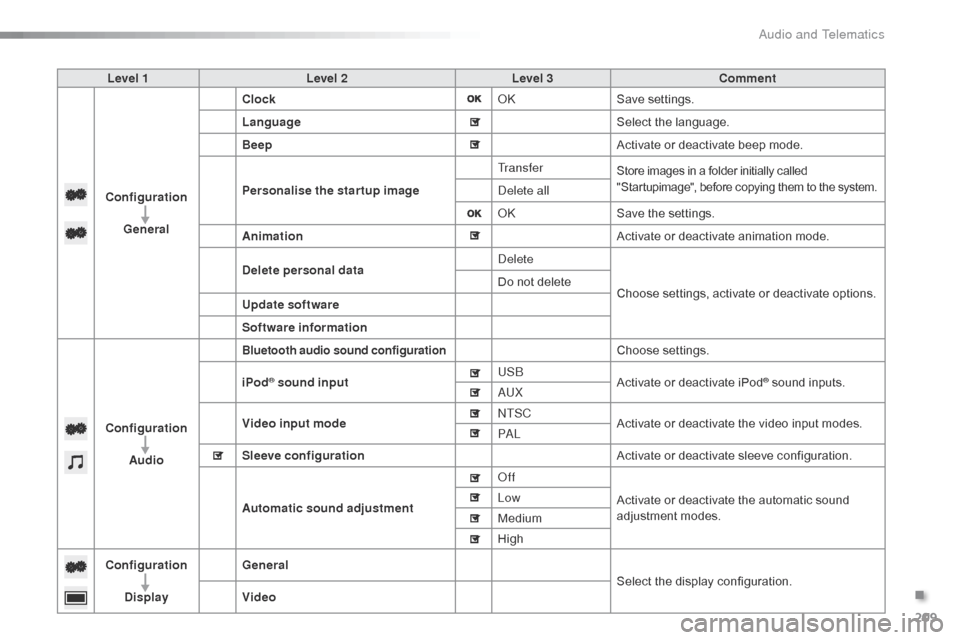
Level 1Level 2 Level 3 Comment
Configuration General Clock
OKSave
se
ttings.
Language Select
the language.
Beep Activate
or deactivate beep mode.
Personalise the star tup image Tr a n s f e r
Store images in a folder initially called "
Startupimage", before copying them to the system.
Delete all
OKSave
the settings.
Animation Activate
or deactivate animation mode.
Delete personal data Delete
Choose
settings, activate or deactivate options.
Do
not delete
Update software
Software information
Configuration Audio
Bluetooth audio sound configurationChoose settings.
iPod
® sound input USB
Activate or deactivate iPod® sound inputs.
AU
X
Video input mode NTSC
Activate
or
deactivate
the
video input modes.
PA L
Sleeve configuration Activate
or
deactivate
sleeve configuration.
Automatic sound adjustment Off
Activate
or
deactivate
the
automatic sound
a
djustment
modes.
Low
Medium
High
Configuration
Display General
Select
the
display
configuration.
Video
.
Audio and Telematics
Page 214 of 268
212
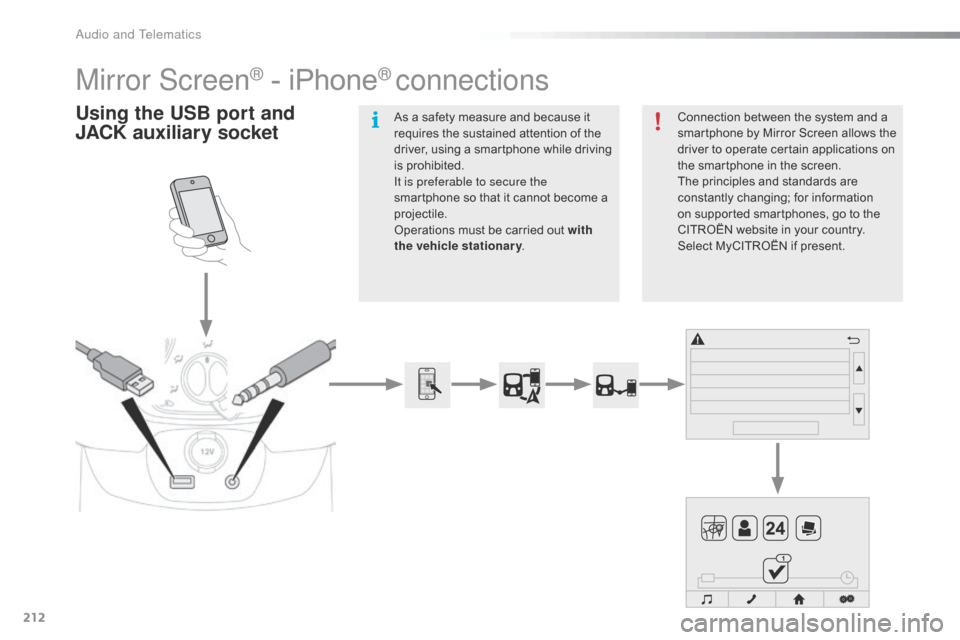
Mirror Screen® - iPhone® connections
Using the USB port and
J ACK auxiliary socketConnection between the system and a s
martphone by Mirror Screen allows the
d
river to operate certain applications on
t
he smartphone in the screen.
The
principles and standards are
c
onstantly
c
hanging;
fo
r
in
formation
o
n supported smartphones, go to the
C
ITROËN website in your country.
S
elect MyCITROËN if present.
As
a
safety
measure
and
because
it
r
equires
the
sustained
attention
of
the
d
river,
using
a
smartphone
while
driving
i
s
prohibited.
It is preferable to secure the
smartphone
so
that
it
cannot
become
a
pro
jectile.
Operations
must
be
carried
out
with
the vehicle stationary .
Audio and Telematics