ignition CITROEN C2 DAG 2007 User Guide
[x] Cancel search | Manufacturer: CITROEN, Model Year: 2007, Model line: C2 DAG, Model: CITROEN C2 DAG 2007Pages: 191, PDF Size: 6.22 MB
Page 25 of 191
B
29
II
I N S T R U M E N T P A N E L
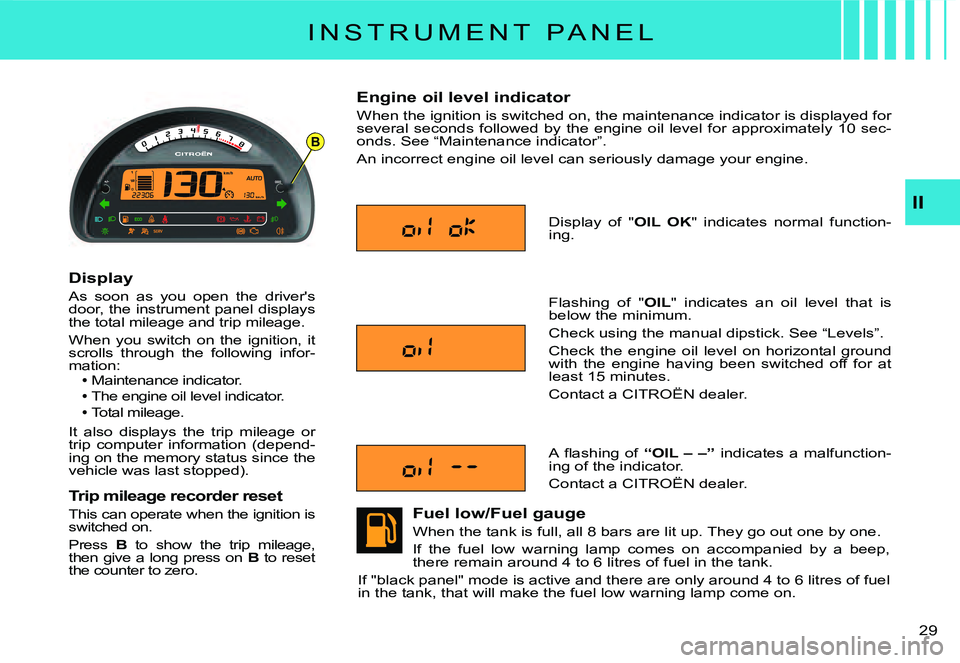
Display
As soon as you open the driver's door, the instrument panel displays the total mileage and trip mileage.
When you switch on the ignition, it scrolls through the following infor-mation:Maintenance indicator.
The engine oil level indicator.
Total mileage.
It also displays the trip mileage or trip computer information (depend-ing on the memory status since the vehicle was last stopped).
Trip mileage recorder reset
This can operate when the ignition is switched on.
Press B to show the trip mileage, then give a long press on B to reset the counter to zero.
Engine oil level indicator
When the ignition is switched on, the maintenance indicator is displayed for several seconds followed by the engine oil level for approximat ely 10 sec-onds. See “Maintenance indicator”.
An incorrect engine oil level can seriously damage your engine.
Fuel low/Fuel gauge
When the tank is full, all 8 bars are lit up. They go out one by one.
If the fuel low warning lamp comes on accompanied by a beep, there remain around 4 to 6 litres of fuel in the tank.
If "black panel" mode is active and there are only around 4 to 6 litres of fuel in the tank, that will make the fuel low warning lamp come on.
Flashing of "OIL" indicates an oil level that is below the minimum.
Check using the manual dipstick. See “Levels”.
Check the engine oil level on horizontal ground with the engine having been switched off for at least 15 minutes.
Contact a CITROËN dealer.
A fl ashing of “OIL – –” indicates a malfunction-ing of the indicator.
Contact a CITROËN dealer.
Display of "OIL OK" indicates normal function-ing.
Page 27 of 191
B
29
II
I N S T R U M E N T P A N E L
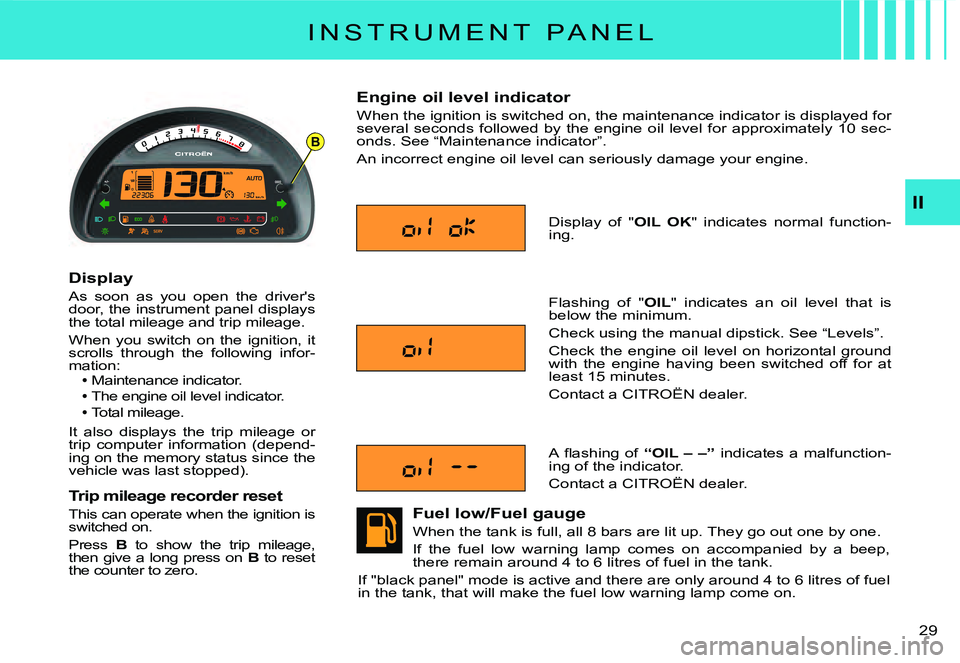
Display
As soon as you open the driver's door, the instrument panel displays the total mileage and trip mileage.
When you switch on the ignition, it scrolls through the following infor-mation:Maintenance indicator.
The engine oil level indicator.
Total mileage.
It also displays the trip mileage or trip computer information (depend-ing on the memory status since the vehicle was last stopped).
Trip mileage recorder reset
This can operate when the ignition is switched on.
Press B to show the trip mileage, then give a long press on B to reset the counter to zero.
Engine oil level indicator
When the ignition is switched on, the maintenance indicator is displayed for several seconds followed by the engine oil level for approximat ely 10 sec-onds. See “Maintenance indicator”.
An incorrect engine oil level can seriously damage your engine.
Fuel low/Fuel gauge
When the tank is full, all 8 bars are lit up. They go out one by one.
If the fuel low warning lamp comes on accompanied by a beep, there remain around 4 to 6 litres of fuel in the tank.
If "black panel" mode is active and there are only around 4 to 6 litres of fuel in the tank, that will make the fuel low warning lamp come on.
Flashing of "OIL" indicates an oil level that is below the minimum.
Check using the manual dipstick. See “Levels”.
Check the engine oil level on horizontal ground with the engine having been switched off for at least 15 minutes.
Contact a CITROËN dealer.
A fl ashing of “OIL – –” indicates a malfunction-ing of the indicator.
Contact a CITROËN dealer.
Display of "OIL OK" indicates normal function-ing.
Page 28 of 191
B
29
II
I N S T R U M E N T P A N E L
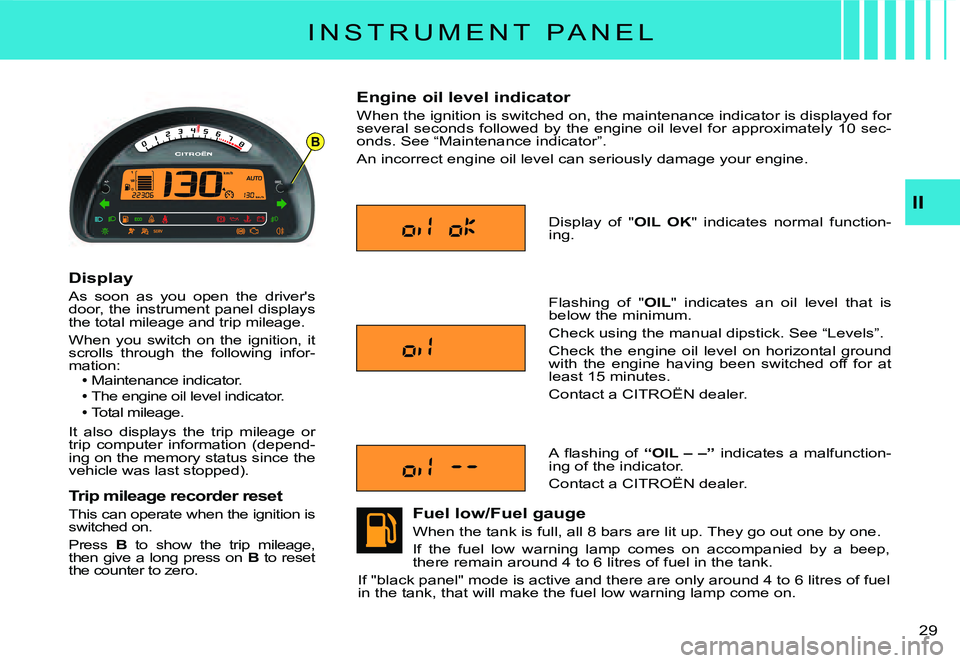
Display
As soon as you open the driver's door, the instrument panel displays the total mileage and trip mileage.
When you switch on the ignition, it scrolls through the following infor-mation:Maintenance indicator.
The engine oil level indicator.
Total mileage.
It also displays the trip mileage or trip computer information (depend-ing on the memory status since the vehicle was last stopped).
Trip mileage recorder reset
This can operate when the ignition is switched on.
Press B to show the trip mileage, then give a long press on B to reset the counter to zero.
Engine oil level indicator
When the ignition is switched on, the maintenance indicator is displayed for several seconds followed by the engine oil level for approximat ely 10 sec-onds. See “Maintenance indicator”.
An incorrect engine oil level can seriously damage your engine.
Fuel low/Fuel gauge
When the tank is full, all 8 bars are lit up. They go out one by one.
If the fuel low warning lamp comes on accompanied by a beep, there remain around 4 to 6 litres of fuel in the tank.
If "black panel" mode is active and there are only around 4 to 6 litres of fuel in the tank, that will make the fuel low warning lamp come on.
Flashing of "OIL" indicates an oil level that is below the minimum.
Check using the manual dipstick. See “Levels”.
Check the engine oil level on horizontal ground with the engine having been switched off for at least 15 minutes.
Contact a CITROËN dealer.
A fl ashing of “OIL – –” indicates a malfunction-ing of the indicator.
Contact a CITROËN dealer.
Display of "OIL OK" indicates normal function-ing.
Page 29 of 191
30
II
W A R N I N G L A M P S
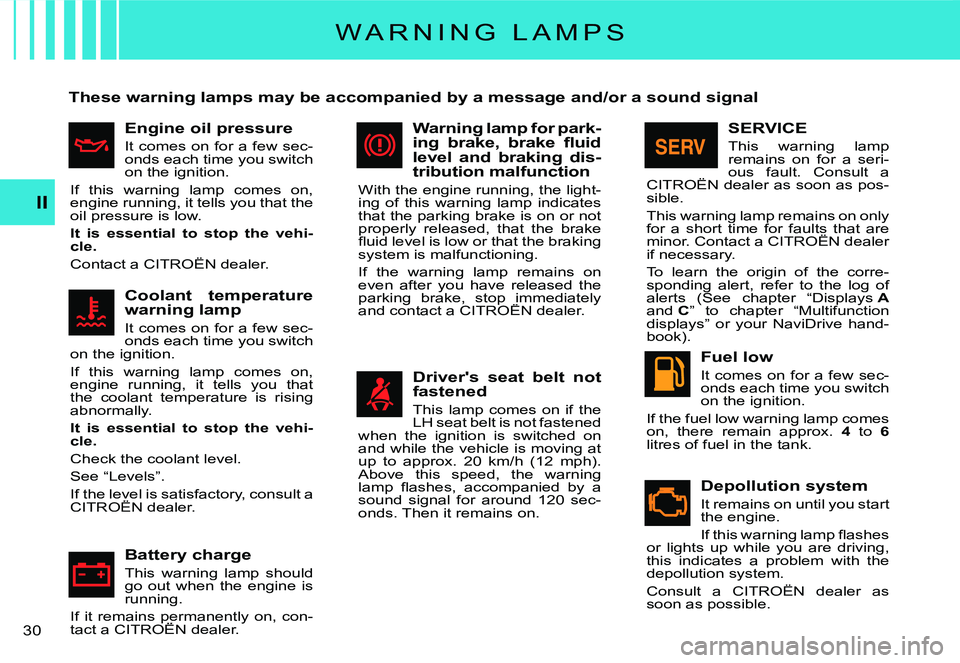
These warning lamps may be accompanied by a message and/or a sound signal
Engine oil pressure
It comes on for a few sec-onds each time you switch on the ignition.
If this warning lamp comes on, engine running, it tells you that the oil pressure is low.
It is essential to stop the vehi-cle.
Contact a CITROËN dealer.
Coolant temperature warning lamp
It comes on for a few sec-onds each time you switch on the ignition.
If this warning lamp comes on, engine running, it tells you that the coolant temperature is rising abnormally.
It is essential to stop the vehi-cle.
Check the coolant level.
See “Levels”.
If the level is satisfactory, consult a CITROËN dealer.If the level is satisfactorythe level
Battery charge
This warning lamp should go out when the engine is running.
If it remains permanently on, con-tact a CITROËN dealer.If it remains permanently remains permanently
Warning lamp for park-ing brake, brake fl uid level and braking dis-tribution malfunction
With the engine running, the light-ing of this warning lamp indicates that the parking brake is on or not properly released, that the brake fl uid level is low or that the braking system is malfunctioning.
If the warning lamp remains on even after you have released the parking brake, stop immediately and contact a CITROËN dealer.parking brake, stop immediately stop immediately
Driver's seat belt not fastened
This lamp comes on if the LH seat belt is not fastened when the ignition is switched on and while the vehicle is moving at up to approx. 20 km/h (12 mph). Above this speed, the warning lamp fl ashes, accompanied by a sound signal for around 120 sec-onds. Then it remains on.
SERVICE
This warning lamp remains on for a seri-ous fault. Consult a CITROËN dealer as soon as pos-sible.
This warning lamp remains on only for a short time for faults that are minor. Contact a CITROËN dealer if necessary.
To learn the origin of the corre-sponding alert, refer to the log of alerts (See chapter “Displays Aand C” to chapter “Multifunction displays” or your NaviDrive hand-book).
Fuel low
It comes on for a few sec-onds each time you switch on the ignition.
If the fuel low warning lamp comes on, there remain approx. 4 to 6litres of fuel in the tank.
Depollution system
It remains on until you start the engine.
If this warning lamp fl ashes or lights up while you are driving, this indicates a problem with the depollution system.
Consult a CITROËN dealer as soon as possible.
Page 30 of 191
31
II
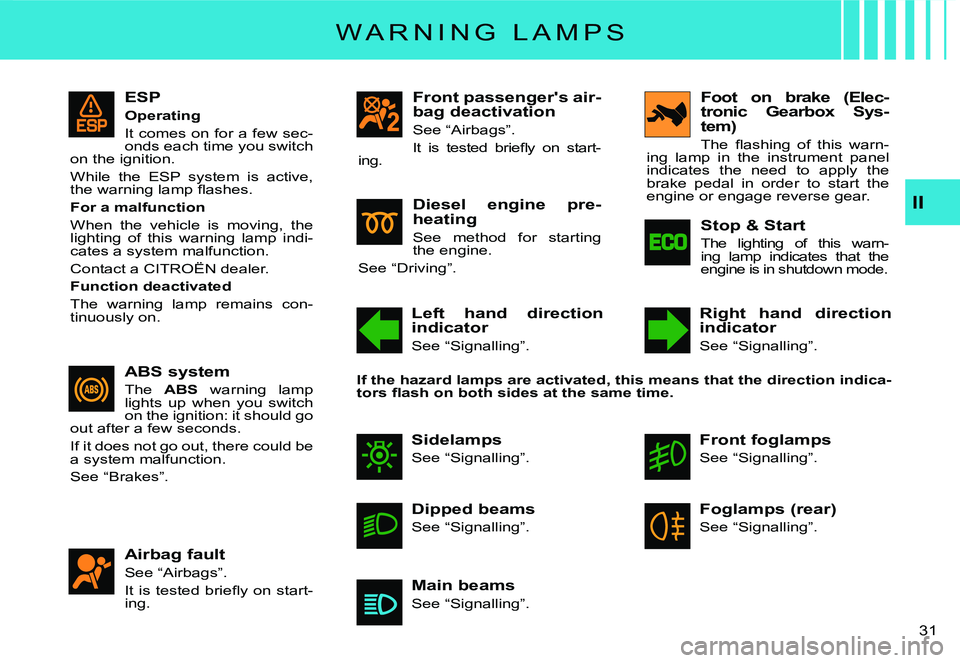
ESP
Operating
It comes on for a few sec-onds each time you switch on the ignition.
While the ESP system is active, the warning lamp fl ashes.
For a malfunction
When the vehicle is moving, the lighting of this warning lamp indi-cates a system malfunction.
Contact a CITROËN dealer.
Function deactivated
The warning lamp remains con-tinuously on.
Front passenger's air-bag deactivation
See “Airbags”.
It is tested briefl y on start-ing.
Airbag fault
See “Airbags”.
It is tested briefl y on start-ing.
W A R N I N G L A M P S
ABS system
The ABS warning lamp lights up when you switch on the ignition: it should go out after a few seconds.
If it does not go out, there could be a system malfunction.
See “Brakes”.
Diesel engine pre-heating
See method for starting the engine.
See “Driving”.
Left hand direction indicator
See “Signalling”.
Right hand direction indicator
See “Signalling”.
Foot on brake (Elec-tronic Gearbox Sys-tem)
The fl ashing of this warn-ing lamp in the instrument panel indicates the need to apply the brake pedal in order to start the engine or engage reverse gear.
Stop & Start
The lighting of this warn-ing lamp indicates that the engine is in shutdown mode.
Sidelamps
See “Signalling”.
Front foglamps
See “Signalling”.
Dipped beams
See “Signalling”.
Foglamps (rear)
See “Signalling”.
Main beams
See “Signalling”.
If the hazard lamps are activated, this means that the direction indica-tors fl ash on both sides at the same time.
Page 31 of 191
32
II
M A I N T E N A N C E I N D I C A T O R
It informs you when the next routine service is due in accordance with the vehicle servicing schedule in the Maintenance Guide. This information is dependent on two p arameters: the mileage covered, and the time elapsed since the last visit.
Operation
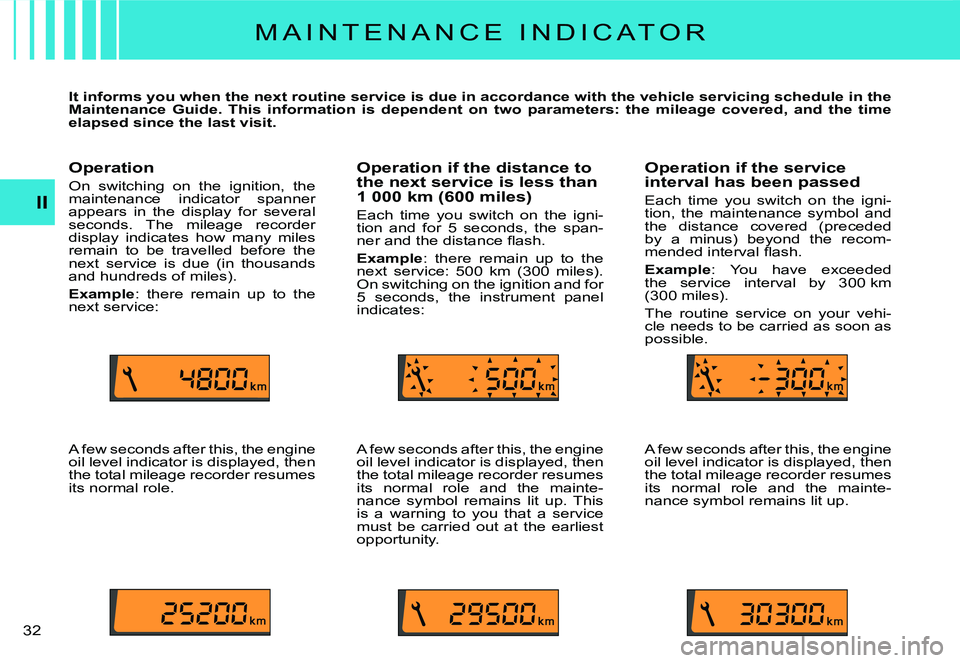
On switching on the ignition, the maintenance indicator spanner appears in the display for several seconds. The mileage recorder display indicates how many miles remain to be travelled before the next service is due (in thousands and hundreds of miles).
Example: there remain up to the next service:
A few seconds after this, the engine oil level indicator is displayed, then the total mileage recorder resumes its normal role.
Operation if the distance to the next service is less than 1 000 km (600 miles)
Each time you switch on the igni-tion and for 5 seconds, the span-ner and the distance fl ash.
Example: there remain up to the next service: 500 km (300 miles). On switching on the ignition and for 5 seconds, the instrument panel indicates:
A few seconds after this, the engine oil level indicator is displayed, then the total mileage recorder resumes its normal role and the mainte-nance symbol remains lit up. This is a warning to you that a service must be carried out at the earliest opportunity.
Operation if the service interval has been passed
Each time you switch on the igni-tion, the maintenance symbol and the distance covered (preceded by a minus) beyond the recom-mended interval fl ash.
Example: You have exceeded the service interval by 300 km (300 miles).
The routine service on your vehi-cle needs to be carried as soon as possible.
A few seconds after this, the engine oil level indicator is displayed, then the total mileage recorder resumes its normal role and the mainte-nance symbol remains lit up.
Page 35 of 191

D
23
A
C
B
E
EDCB
AE
1
36
II
M U L T I F U N C T I O N D I S P L A Y
D I S P L A Y A
Personalisation/Configura-tion
To activate/deactivate rear screen wipe on engaging reverse gear:Press button A.Select, using B, the sub-menu to personalise-confi gure your vehicle, then confi rm your choice with a press on C.
Select rear screen wipe, using B.
The system tells you the status (active or inactive) of the func-tion. Modify this status with a press on E.Then please wait for the display to disappear.Note: The activation/deactivation registers immediately.
To activate/deactivate the auto-matic guide-me-home lighting:Press button A.Select, using B, the sub-menu to personalise-confi gure your vehicle, then confi rm your choice with a press on C.
Select guide-me-home lighting, using B.
The system tells you the status (active or inactive) of the func-tion. Modify this status with a press on E.Then please wait for the display to disappear.
To activate/deactivate the auto-matic lighting of headlamps:Press button A.Select, using B, the sub-menu to personalise-confi gure your vehicle, then confi rm your choice with a press on C.
Select automatic lighting of headlamps using B.
The system tells you the status (active or inactive) of the func-tion. Modify this status with a press on E.Then please wait for the display to disappear.
Note: Activation of this function is immediate while deactivation requires the ignition to be switched off.
Page 38 of 191

39
II
M U L T I F U N C T I O N D I S P L A Y
D I S P L A Y C
Trip computer
To enter the distance to be trav-elled on the trip computer:Press button A.
Use B to select the icon “Trip computer”, then confi rm with a press on C.Select entry of distance using B. Confi rm your choice with a press on C.
To choose the distance, select the fi gure you wish to modify by using B, then confi rm with a press on C.
Use B to adjust the value, then validate by pressing C.Validate “OK” on the screen.
To access the trip computer's log of alerts:Press button A.
Use B to select the icon “Trip computer”, then confi rm with a press on C.Select the log of alerts.
When the list displays, use B to scroll through it.
Press D to return to the perma-nent display.
To access the status of functions: proceed in a similar manner.
Personalisation/Confi guration
To activate/deactivate rear screen wipe on engaging reverse gear:Press button A.
Use B to select the icon “Per-s o n a l i s a t i o n - C o n f i g u r a t i o n ” then confi rm your choice by pressing C.Then select the sub-menu for the vehicle parameters. Con-fi rm your choice with a press on C.
Use B to select parking assist-ance. Confi rm your choice with a press on C.
Then with a press on C, select/deselect rear screen wipe to activate or deactivate it.Validate “OK” on the screen.Note: The activation/deactivation registers immediately.
To activate/deactivate the auto-matic guide-me-home lighting:Press button A.
Use B to select the icon “Per-s o n a l i s a t i o n - C o n f i g u r a t i o n ” then confi rm your choice by pressing C.
Then select the sub-menu for the vehicle parameters. Con-fi rm your choice with a press on C.
Using B, select lighting and signalling. Confi rm your choice with a press on C.Then press C to select/deselect the guide-me-home lighting, to activate/ deactivate it. After activation, choose the duration: press C then use B to select the duration, then press C.
Validate “OK” on the screen.
To activate/deactivate the auto-matic lighting of headlamps:Press button A.
Use B to select the icon “Per-s o n a l i s a t i o n - C o n f i g u r a t i o n ” then confi rm your choice by pressing C.
Then select the sub-menu for the vehicle parameters. Con-fi rm your choice with a press on C.Using B, select lighting and signalling. Confi rm your choice with a press on C.
Next press on C to activate/deactivate automatic lighting of headlamps.Press button C.Note: Activation of this function is immediate while deactivation requires the ignition to be switched off.
Page 43 of 191
44
II
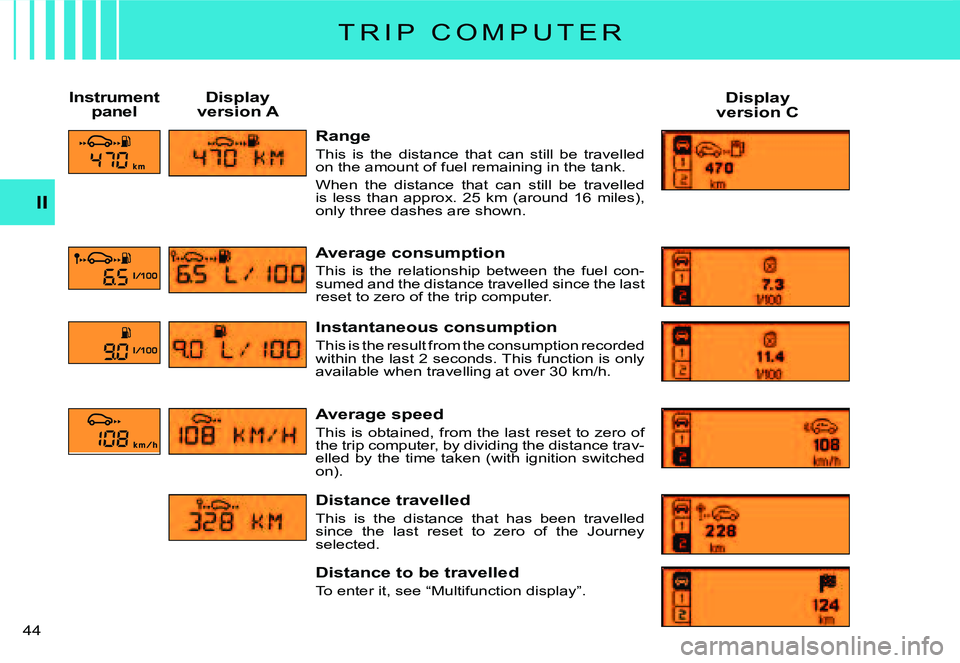
Range
This is the distance that can still be travelled on the amount of fuel remaining in the tank.
When the distance that can still be travelled is less than approx. 25 km (around 16 miles), only three dashes are shown.
Average consumption
This is the relationship between the fuel con-sumed and the distance travelled since the last reset to zero of the trip computer.
Instantaneous consumption
This is the result from the consumption recorded within the last 2 seconds. This function is only available when travelling at over 30 km/h.
Average speed
This is obtained, from the last reset to zero of the trip computer, by dividing the distance trav-elled by the time taken (with ignition switched on).
Distance travelled
This is the distance that has been travelled since the last reset to zero of the Journey selected.
Distance to be travelled
To enter it, see “Multifunction display”.
Instrument panelDisplay version ADisplay version C
T R I P C O M P U T E R
Page 44 of 191
45
II
T R I P C O M P U T E R
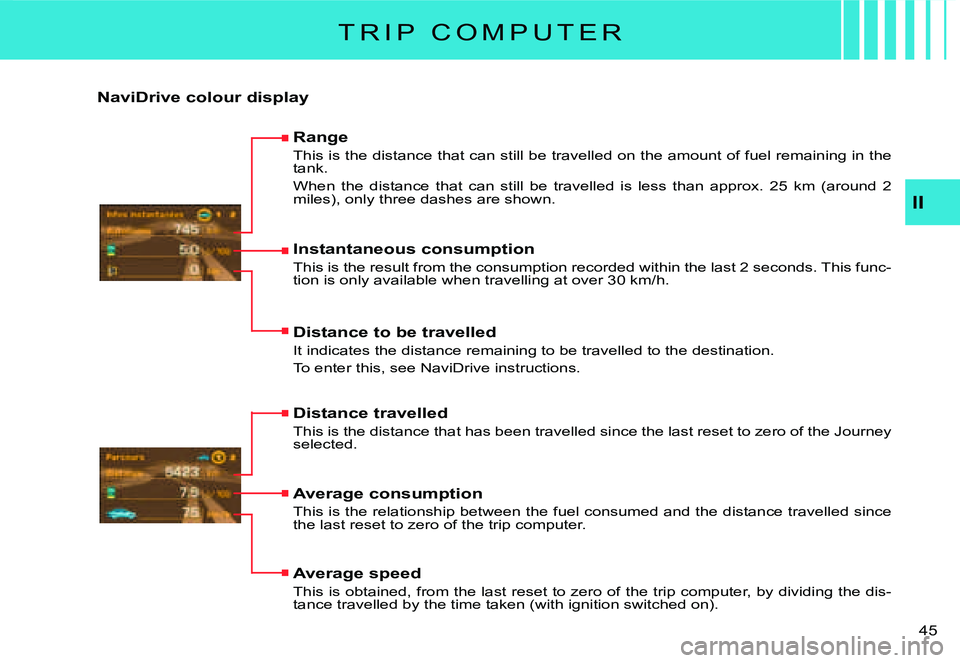
NaviDrive colour display
Range
This is the distance that can still be travelled on the amount of fuel remaining in the tank.
When the distance that can still be travelled is less than a pprox. 25 km (around 2 miles), only three dashes are shown.
Instantaneous consumption
This is the result from the consumption recorded within the last 2 seconds. This func-tion is only available when travelling at over 30 km/h.
Distance to be travelled
It indicates the distance remaining to be travelled to the destination.
To enter this, see NaviDrive instructions.
Distance travelled
This is the distance that has been travelled since the last re set to zero of the Journey selected.
Average consumption
This is the relationship between the fuel consumed and the distance travelled since the last reset to zero of the trip computer.
Average speed
This is obtained, from the last reset to zero of the trip compu ter, by dividing the dis-tance travelled by the time taken (with ignition switched on).