audio Citroen C3 2014 2.G User Guide
[x] Cancel search | Manufacturer: CITROEN, Model Year: 2014, Model line: C3, Model: Citroen C3 2014 2.GPages: 284, PDF Size: 9.01 MB
Page 180 of 284
178
C3_en_Chap11_Info-pratiques_ed01-2014
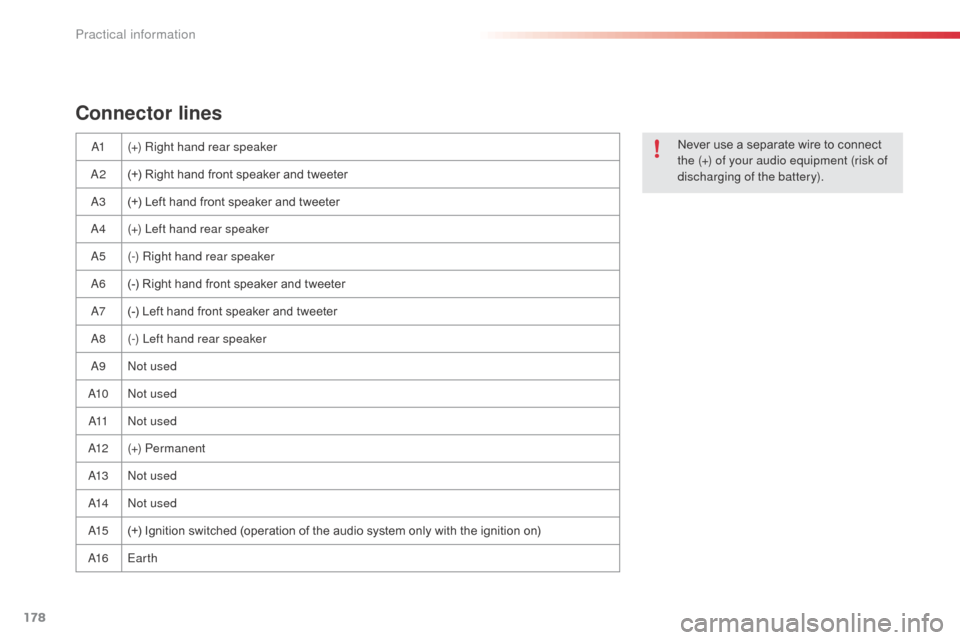
Connector lines
a1(+) Right hand rear speaker
a2(
+) Right hand front speaker and tweeter
a
3 (+) Left hand front speaker and tweeter
a
4 (+) Left hand rear speaker
a
5 (-) Right hand rear speaker
a
6 (-) Right hand front speaker and tweeter
a7 (
-) Left hand front speaker and tweeter
a
8 (-) Left hand rear speaker
a
9
no
t used
a
10
no
t used
a11no
t used
a
12 (+) Permanent
a
13
no
t used
a
14
no
t used
a
15 (+) Ignition switched (operation of the audio system only with the ignition on)
a
16 Earth Never use a separate wire to connect
the (+) of your audio equipment (risk of
discharging of the battery).
Practical information
Page 182 of 284
180
C3_en_Chap11_Info-pratiques_ed01-2014
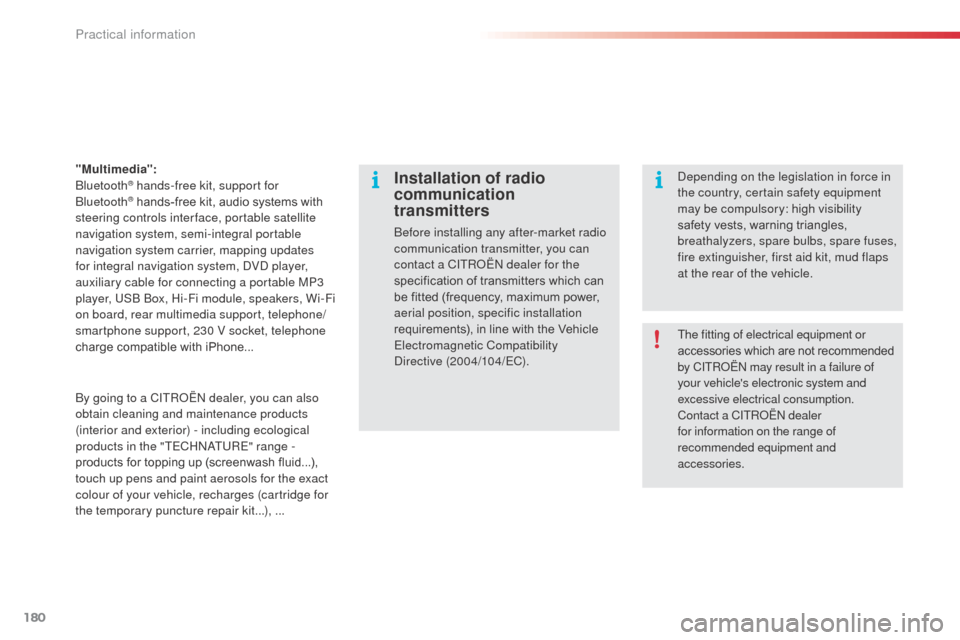
"Multimedia": b
luetooth® hands-free kit, support for b
luetooth® hands-free kit, audio systems with
steering controls inter face, portable satellite
navigation system, semi-integral portable
navigation system carrier, mapping updates
for integral navigation system,
d
Vd
player,
auxiliary cable for connecting a portable MP3
player, US
b
b
o
x, Hi-Fi module, speakers, Wi-Fi
on board, rear multimedia support, telephone/
smartphone support, 230 V socket, telephone
charge compatible with iPhone...
Installation of radio
communication
transmitters
before installing any after-market radio
communication transmitter, you can
contact a CITR
oËn
dealer for the
specification of transmitters which can
be fitted (frequency, maximum power,
aerial position, specific installation
requirements), in line with the Vehicle
Electromagnetic Compatibility
di
rective
(2004/104/EC).
de
pending on the legislation in force in
the country, certain safety equipment
may be compulsory: high visibility
safety vests, warning triangles,
breathalyzers, spare bulbs, spare fuses,
fire extinguisher, first aid kit, mud flaps
at the rear of the vehicle.
by g
oing to a CITR
oËn
dealer, you can also
obtain cleaning and maintenance products
(interior and exterior) - including ecological
products in the "TECH
n
a
T
URE" range
-
products for topping up (screenwash fluid...),
touch up pens and paint aerosols for the exact
colour of your vehicle, recharges (cartridge for
the temporary puncture repair kit...), ... The fitting of electrical equipment or
accessories which are not recommended
by CITR
oËn
may result in a failure of
your vehicle's electronic system and
excessive electrical consumption.
Contact a CITR
oËn
dealer
for information on the range of
recommended equipment and
accessories.
Practical information
Page 197 of 284
195
C3_en_Chap13b_RT6-2-8_ed01-2014
The system is protected in such a way that it will only
operate in your vehicle.
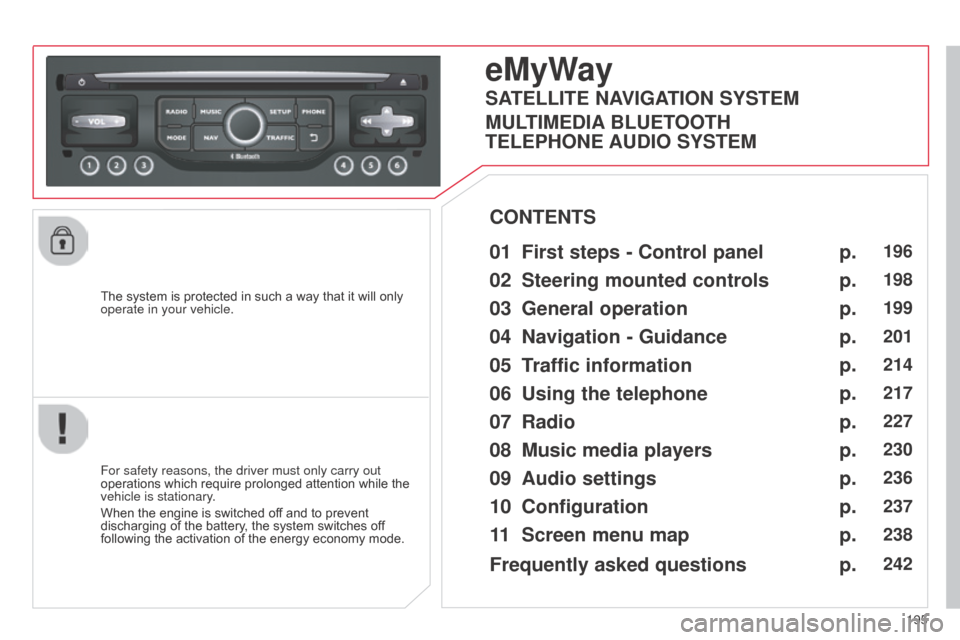
eMyWay
01 First steps - Control panel
For safety reasons, the driver must only carry out
operations which require prolonged attention while the
vehicle is stationary.
When the engine is switched off and to prevent
discharging of the battery, the system switches off
following the activation of the energy economy mode.
CONTENTS
02
Steering mounted
controls
03
General operation
04
Navigation
- Guidance
05
T
raffic information
06
Using
the telephone
07
Radio
08
Music media players
09
Audio
settings
10
Configuration
11
Screen menu
map p.
p.
p.
p.
p.
p.
p.
p.
p.
p.
p.
196
198
199
201
214
217
227
230
236
237
238
SATELLITE NAVIGATION SYSTEM
MULTIMEDIA BLUETOOTH
TELEPHONE AUDIO SYSTEM
Frequently asked questions p.
242
Page 198 of 284
01
196
C3_en_Chap13b_RT6-2-8_ed01-2014
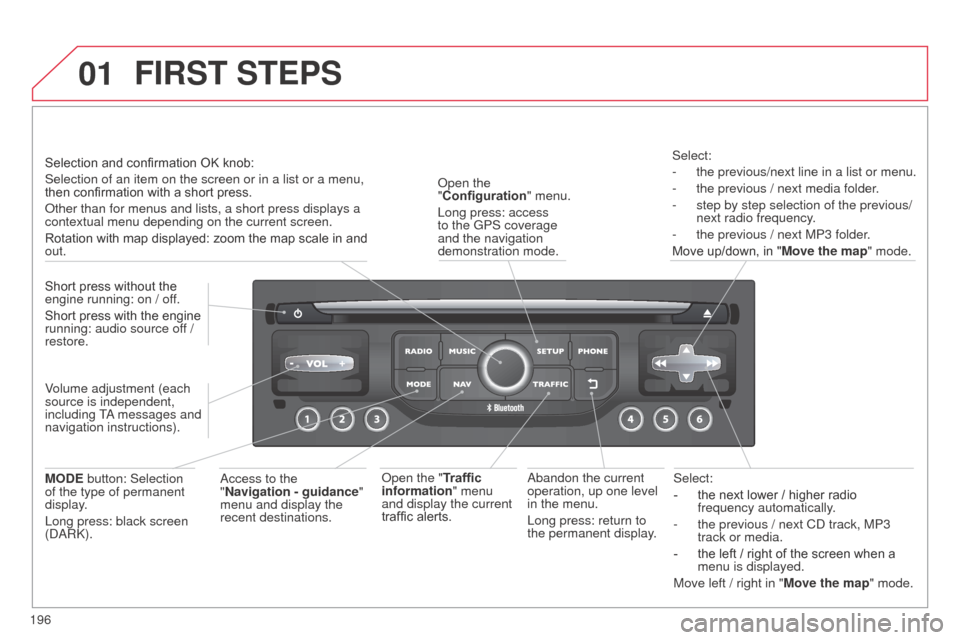
Select:
-
the next lower / higher radio
frequency automatically
.
-
the previous / next C
d track, MP3
track or media.
-
the left / right of the screen when a
menu is displayed.
Move left / right in "
Move the map" mode.a
bandon the current
operation, up one level
in the menu.
Long press: return to
the permanent display.
o
pen the
"Configuration " menu.
Long press: access
to the GPS coverage
and the navigation
demonstration mode.o
pen the "Traffic
information" menu
and display the current
traffic alerts. Select:
-
the previous/next line in a list or menu.
-
the previous / next media folder
.
-
step by step selection of the previous/
next radio frequency
.
-
the previous / next MP3 folder
.
Move up/down, in " Move the map" mode.
FIRST STEPS
access to the
" Navigation - guidance "
menu and display the
recent destinations.
Short press without the
engine running: on / off.
Short press with the engine
running: audio source off
/
restore.
MODE button: Selection
of the type of permanent
display.
Long press: black screen
(
da
R
k
).
Selection and confirmation OK knob:
Selection of an item on the screen or in a list or a menu,
then confirmation with a short press.
o
ther than for menus and lists, a short press displays a
contextual menu depending on the current screen.
Rotation with map displayed: zoom the map scale in and
out.
Volume adjustment (each
source is independent,
including T
a messages and
navigation instructions).
Page 199 of 284
01
197
C3_en_Chap13b_RT6-2-8_ed01-2014
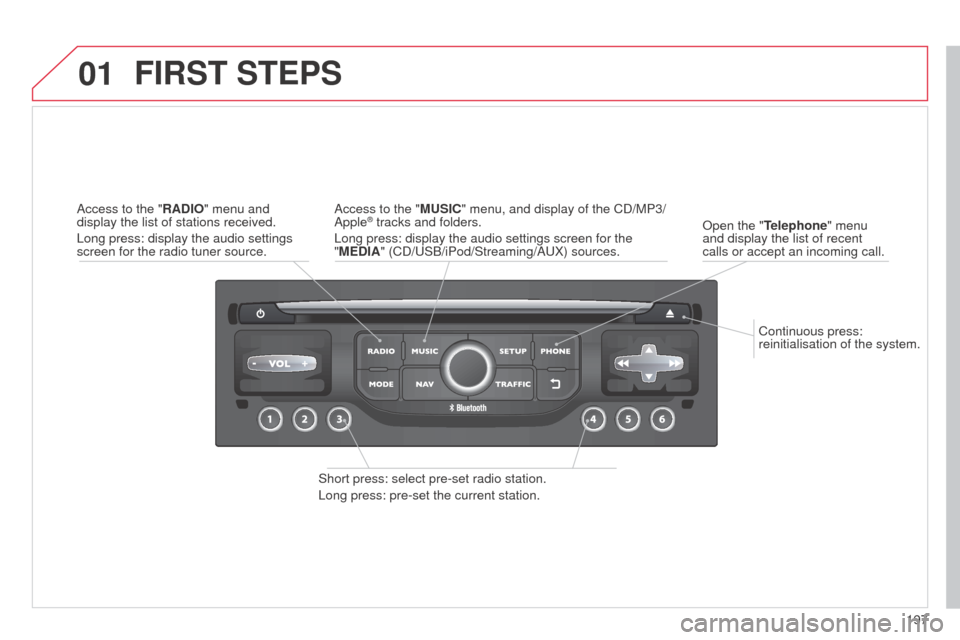
Continuous press:
reinitialisation of the system.
o
pen the "Telephone" menu
and display the list of recent
calls or accept an incoming call.
FIRST STEPS
Short press: select pre-set radio station.
Long press: pre-set the current station.
a
ccess to the "MUSIC" menu, and display of the C d /MP3/
a
pple
® tracks and folders.
Long press: display the audio settings screen for the
"MEDIA" (C
d /US b /iPod/Streaming/ a UX) sources.a
ccess to the "RADIO" menu and
display the list of stations received.
Long press: display the audio settings
screen for the radio tuner source.
Page 200 of 284
02
198
C3_en_Chap13b_RT6-2-8_ed01-2014
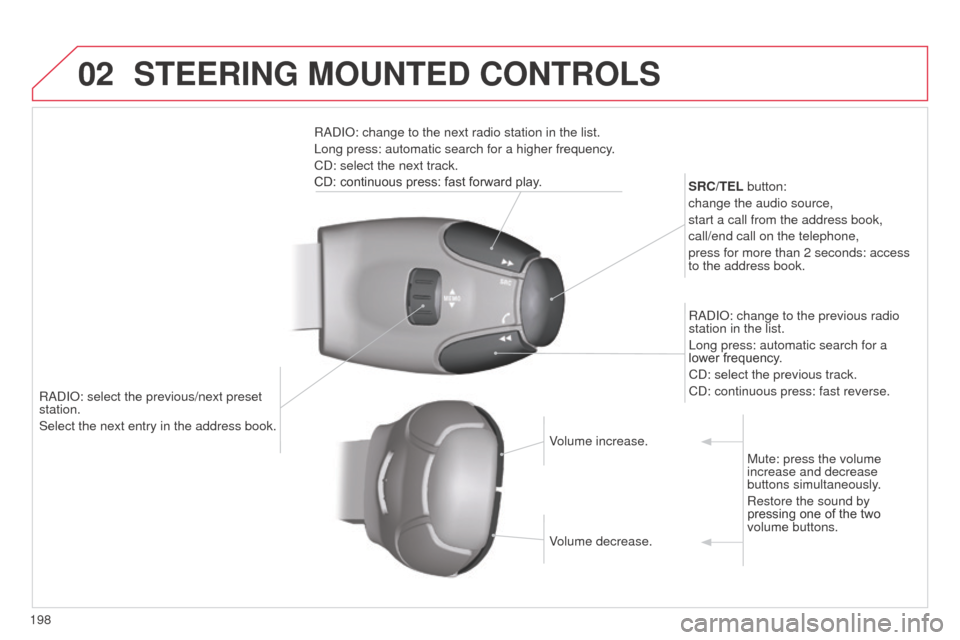
RadIo: select the previous/next preset
station.
Select the next entry in the address book. SRC/TEL
button:
change the audio source,
start a call from the address book,
call/end call on the telephone,
press for more than 2 seconds: access
to the address book.
R ad I o : change to the previous radio
station in the list.
Long press: automatic search for a
lower frequency.
C d : select the previous track.
C d : continuous press: fast reverse.
R ad I o : change to the next radio station in the list.
Long press: automatic search for a higher frequency.
C d : select the next track.
CD: continuous press: fast forward play.
Volume increase.
Volume decrease.Mute: press the volume
increase and decrease
buttons simultaneously.
Restore the sound by
pressing one of the two
volume buttons.
STEERING MOUNTED CONTROLS
Page 201 of 284
03
199
C3_en_Chap13b_RT6-2-8_ed01-2014
For the details of the menus, refer to the "Screen menu map"
section.
For cleaning the screen, the use of a soft, non-abrasive cloth
(spectacles cloth) is recommended, with no additional product.
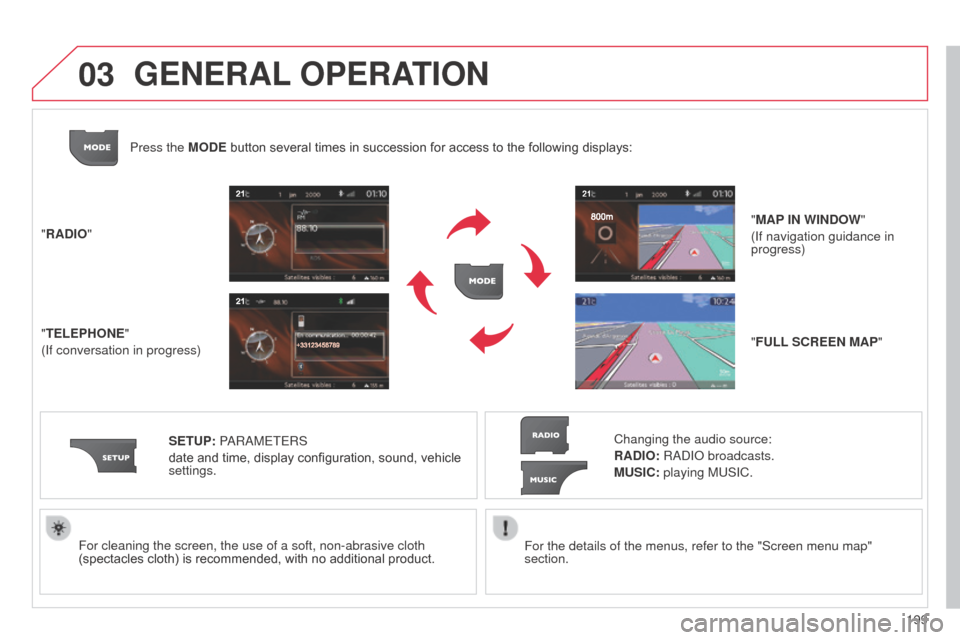
"RADIO"
"TELEPHONE"
(If conversation in progress)
SETUP: P
a
R
a
METERS
date and time, display configuration, sound, vehicle
settings. Changing the audio source:
RADIO: Rad I o broadcasts.
MUSIC: playing MUSIC.
Press the MODE button several times in succession for access to the following displays:
"FULL SCREEN MAP" "MAP IN WINDOW"
(If navigation guidance in
progress)
GENERAL OPERATION
Page 205 of 284

04
203
C3_en_Chap13b_RT6-2-8_ed01-2014
Towards a recent destinationPress N AV to display the
"Navigation - guidance " menu.
Select the desired destination and
confirm to start guidance. Towards a contact in the contacts directory
Select "Select destination" and
confirm, then Select "Directory " and
confirm.
Selection the desired destination from
your contacts and confirm "OK" to start
the guidance. Press N AV
to display the
"Navigation - guidance " menu.
Navigation towards a contact is only possible if it has an address
entered in the audio navigation system.
Delete recent destinations Press N AV to display the
"Navigation - guidance " menu.
Select "Options " and confirm and then
"Delete recent destinations" and
confirm.
NAVIGATION - GUIDANCE
Page 218 of 284
05
216
C3_en_Chap13b_RT6-2-8_ed01-2014
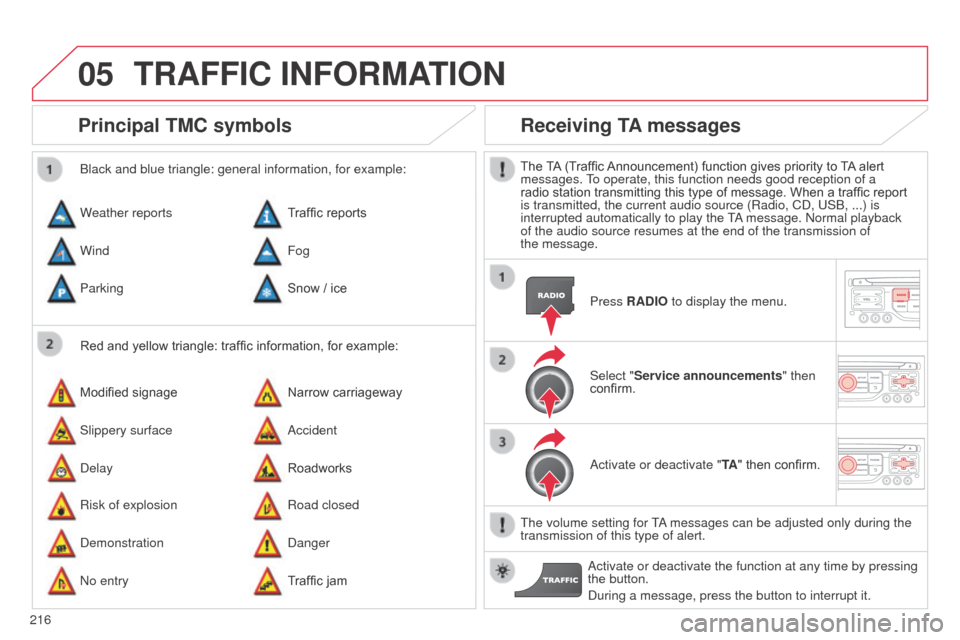
Principal TMC symbols
Red and yellow triangle: traffic information, for example:
b
lack and blue triangle: general information, for example:
Weather reports
Modified signage
Risk of explosion Traffic reports
Narrow carriageway
Road closed
Wind
Slippery surface
d
emonstration Fog
a
ccident
d
anger
Parking
d
elay
n
o entry Snow / ice
Roadworks
Traffic jam
Receiving TA messages
The TA (Traffic Announcement) function gives priority to TA alert
messages. To operate, this function needs good reception of a
radio station transmitting this type of message. When a traffic report
is transmitted, the current audio source (Radio, C
d , US b , ...) is
interrupted automatically to play the T
a message.
n ormal playback
of the audio source resumes at the end of the transmission of
the
message. Press RADIO to display the menu.
Select "Service announcements" then
confirm.
a
ctivate or deactivate "TA " then confirm.
The volume setting for T
a messages can be adjusted only during the
transmission of this type of alert.
a
ctivate or deactivate the function at any time by pressing
the button.
d
uring a message, press the button to interrupt it.
TRAFFIC INFORMATION
Page 220 of 284
06
218
C3_en_Chap13b_RT6-2-8_ed01-2014
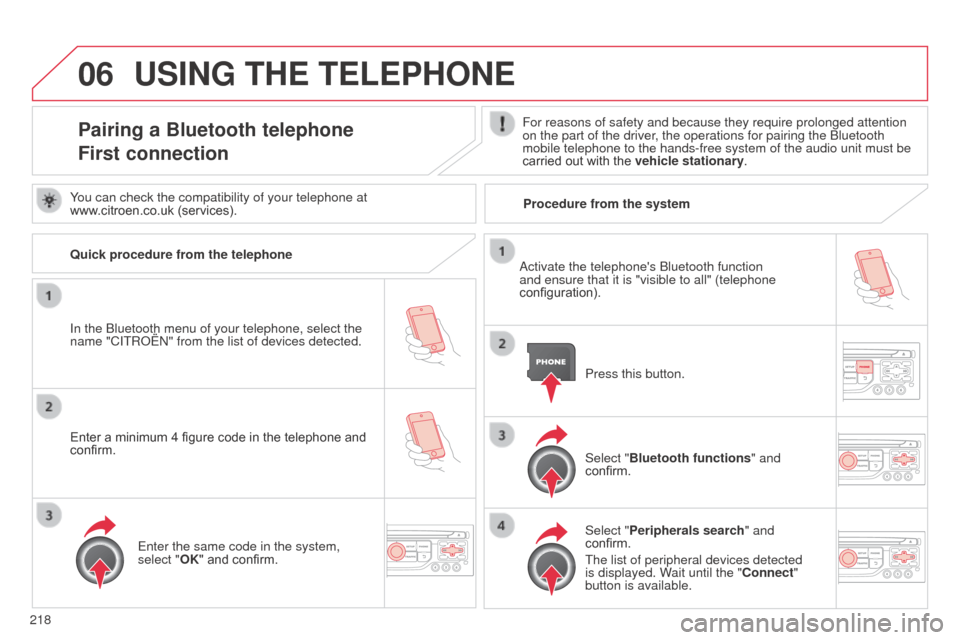
USING THE TELEPHONE
Pairing a Bluetooth telephone
First connectionFor reasons of safety and because they require prolonged attention
on the part of the driver, the operations for pairing the b luetooth
mobile telephone to the hands-free system of the audio unit must be
carried out with the vehicle stationary.
In the
b
luetooth menu of your telephone, select the
name "C
ITR
o
Ë
n" from the list of devices detected. Press this button.
Select "Bluetooth functions" and
confirm.
Select "Peripherals search " and
confirm.
The list of peripheral devices detected
is displayed. Wait until the "Connect"
button is available.
You can check the compatibility of your telephone at
www.citroen.co.uk (services).
a
ctivate the telephone's b luetooth function
and ensure that it is "visible to all" (telephone
configuration).
Quick procedure from the telephone
Enter a minimum 4 figure code in the telephone and
confirm.
Enter the same code in the system,
select "OK" and confirm. Procedure from the system