audio Citroen C3 2014 2.G Owner's Manual
[x] Cancel search | Manufacturer: CITROEN, Model Year: 2014, Model line: C3, Model: Citroen C3 2014 2.GPages: 284, PDF Size: 9.01 MB
Page 5 of 284
.
.
C3_en_Chap00a_sommaire_ed01-2014
C3_en_Chap00a_sommaire_ed01-2014
direction indicators 96
Hazard warning lamps
9
6
Horn
97
E
mergency or assistance call
9
7
Tyre under-inflation detection
9
8
br
aking assistance systems
1
02
Trajectory control systems
1
03
Front seat belts
1
04
air
bags
1
06
Safety
Parking brake 1 10
6-speed manual gearbox
1
10
Electronic gearbox
1
11
au
tomatic gearbox
1
15
Gear shift indicator
1
19
Stop & Start
1
20
Hill start assist
1
23
Speed limiter
1
24
Cruise control
1
26
Rear parking sensors
1
28
Reversing camera
1
30
driving
Emergency or assistance 1 93
eMyWay
19
5
au
dio system
2
49
audio and telematics
al
phabetical index
bonnet 132
Running out of fuel (
di
esel)
1
33
Petrol engines
1
34
di
esel engines
1
35
Checking levels
1
36
Chec ks
13 9
Checks
Temporary puncture repair kit 1 41
Changing a wheel
1
46
Snow chains
1
53
Changing a bulb
1
54
Changing a fuse
1
61
bat
tery
168
Energy economy mode
1
71
Changing a wiper blade
1
72
Towing the vehicle
1
73
Towing a trailer
1
75
a
udio pre-equipment
1
77
ac
cessories
179
Practical information Technical data
Petrol engines 1
81
Petrol weights
1
82
LPG engines
1
84
LPG weights
1
85
di
esel engines
1
86
Diesel weights
1
88
di
mensions
190
Identification markings
1
91
Visual search
Contents
Page 7 of 284
5
C3_en_Chap00b_vue-ensemble_ed01-2014
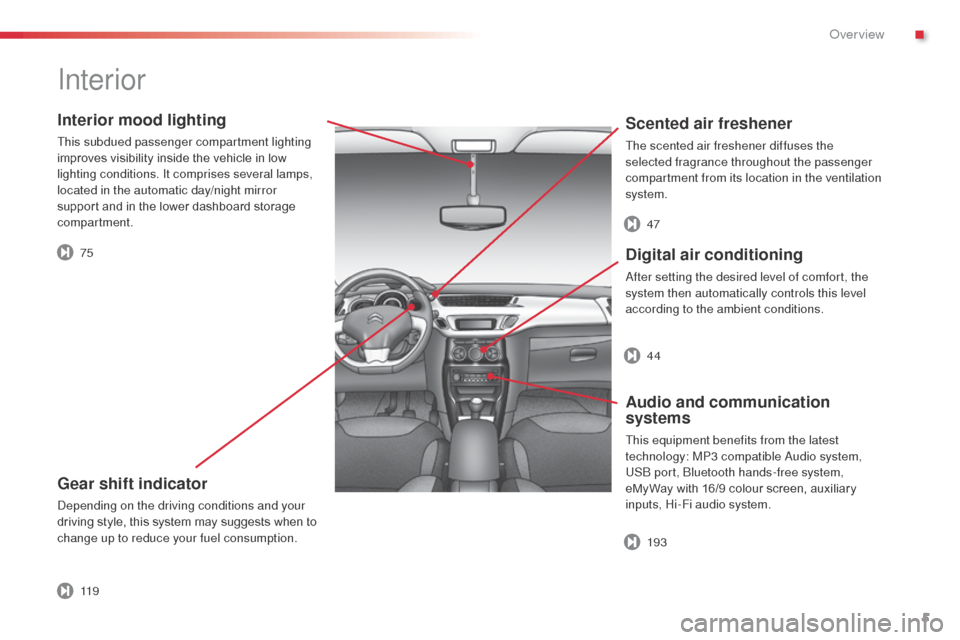
Interior mood lighting
This subdued passenger compartment lighting
improves visibility inside the vehicle in low
lighting conditions. It comprises several lamps,
located in the automatic day/night mirror
support and in the lower dashboard storage
compartment.
Gear shift indicator
depending on the driving conditions and your
driving style, this system may suggests when to
change up to reduce your fuel consumption.
Scented air freshener
The scented air freshener diffuses the
selected fragrance throughout the passenger
compartment from its location in the ventilation
system.
Digital air conditioning
after setting the desired level of comfort, the
system then automatically controls this level
according to the ambient conditions.
Audio and communication
systems
This equipment benefits from the latest
technology: MP3 compatible au dio system,
US
b
port, b
l
uetooth hands-free system,
eMyWay with 16/9 colour screen, auxiliary
inputs, Hi-Fi audio system.
Interior
75 47
193 44
11 9
.
over view
Page 9 of 284
7
C3_en_Chap00b_vue-ensemble_ed01-2014
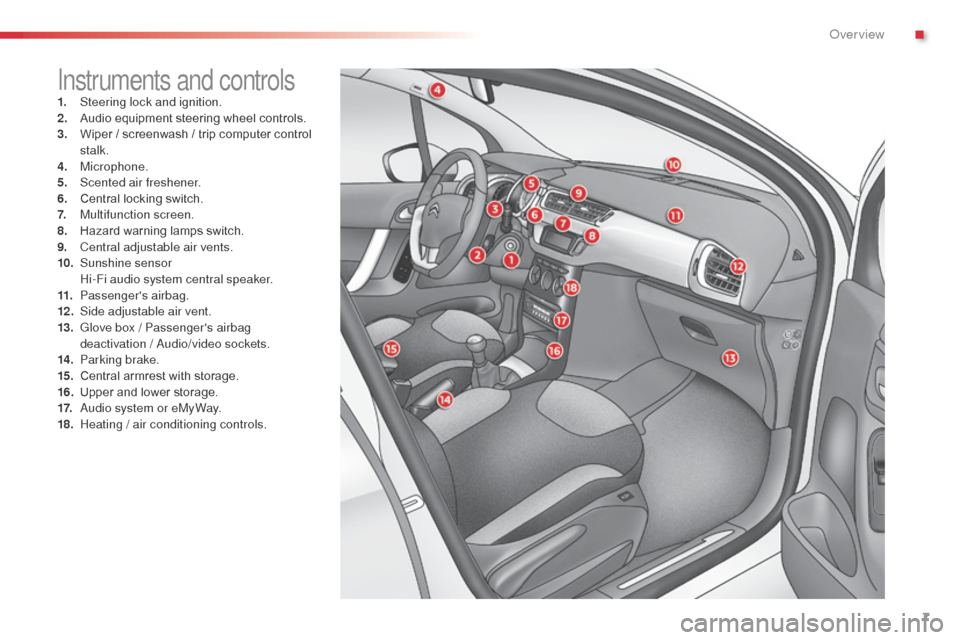
Instruments and controls1. Steering lock and ignition.
2. Audio equipment steering wheel controls.
3.
W
iper / screenwash / trip computer control
stalk.
4.
M
icrophone.
5.
S
cented air freshener.
6.
C
entral locking switch.
7.
M
ultifunction screen.
8.
H
azard warning lamps switch.
9.
C
entral adjustable air vents.
10.
S
unshine sensor
H
i-Fi audio system central speaker.
11.
P
assenger's airbag.
12 .
S
ide adjustable air vent.
13.
G
love box / Passenger's airbag
deactivation /
a
u
dio/video sockets.
14 .
P
arking brake.
15.
C
entral armrest with storage.
16.
U
pper and lower storage.
17.
a
u
dio system or eMyWay.
18.
H
eating / air conditioning controls.
.
over view
Page 32 of 284
30
C3_en_Chap02_Ecrans-multifonction_ed01-2014
Monochrome screen a
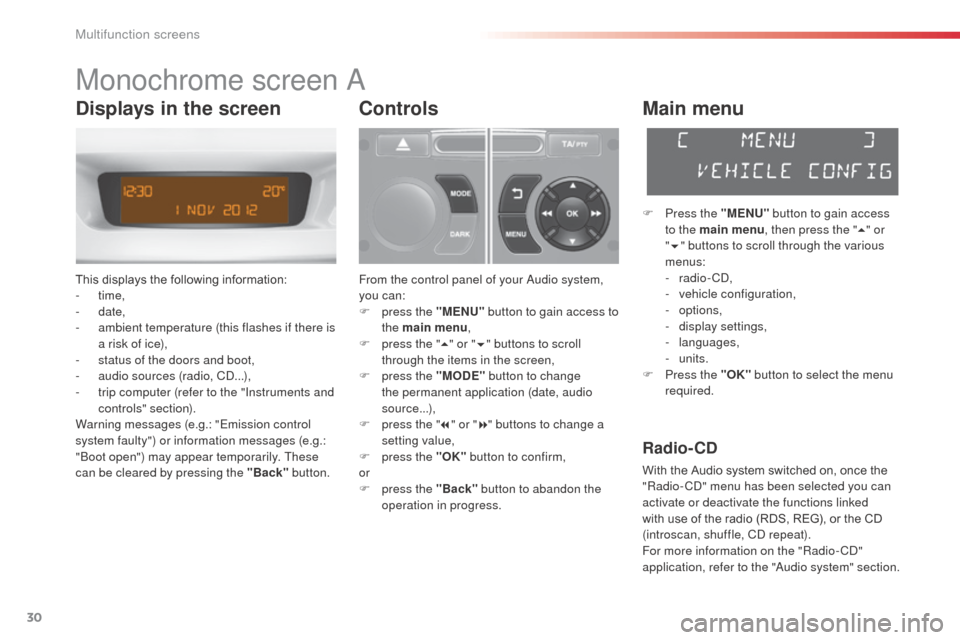
This displays the following information:
- time,
-
date,
-
a
mbient temperature (this flashes if there is
a risk of ice),
-
s
tatus of the doors and boot,
-
a
udio sources (radio, C
d.
..),
-
t
rip computer (refer to the "Instruments and
controls" section).
Warning messages (e.g.: "Emission control
system faulty") or information messages (e.g.:
"
bo
ot open") may appear temporarily. These
can be cleared by pressing the "Back" button.
Controls
From the control panel of your audio system,
you can:
F
p
ress the "MENU" button to gain access to
the main menu ,
F
p
ress the " 5" or " 6" buttons to scroll
through the items in the screen,
F
p
ress the "MODE" button to change
the permanent application (date, audio
source...),
F
p
ress the " 7" or " 8" buttons to change a
setting value,
F
p
ress the "OK" button to confirm,
or
F
p
ress the "Back" button to abandon the
operation in progress.
Main menu
F Press the "MENU" button to gain access
to the main menu , then press the "5" or
" 6 " buttons to scroll through the various
menus:
-
radio - C
d
,
-
v
ehicle configuration,
-
options,
-
d
isplay settings,
-
languages,
-
units.
F
P
ress the "OK" button to select the menu
required.
Radio- CD
With the Audio system switched on, once the
"Radio- Cd" m enu has been selected you can
activate or deactivate the functions linked
with use of the radio (RDS, REG), or the CD
(introscan, shuffle, C
d
repeat).
For more information on the "Radio-C
d"
application, refer to the "
au
dio system" section.
Displays in the screen
Multifunction screens
Page 35 of 284
33
C3_en_Chap02_Ecrans-multifonction_ed01-2014
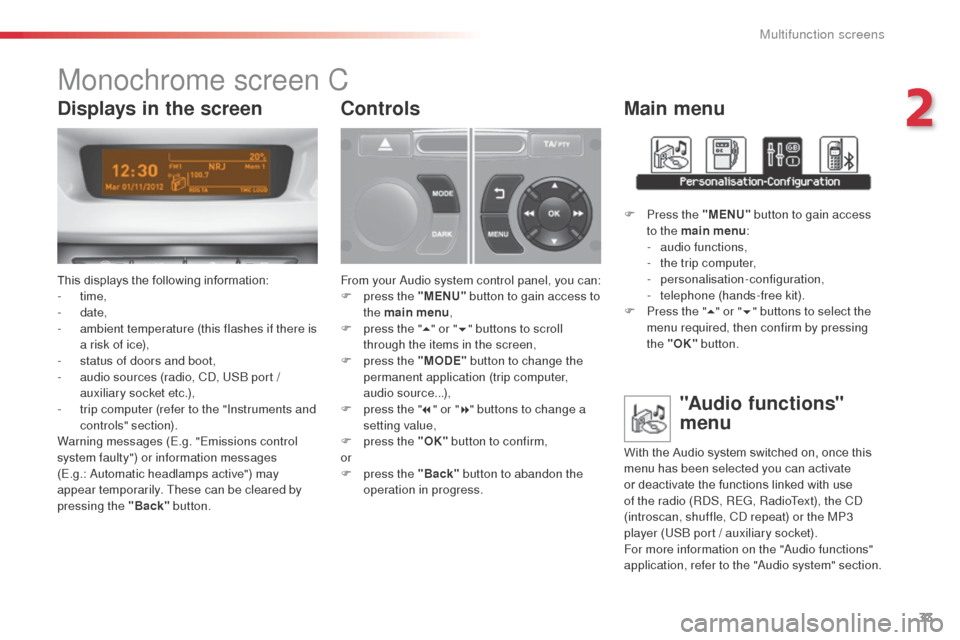
Monochrome screen C
This displays the following information:
- time,
-
date,
-
a
mbient temperature (this flashes if there is
a risk of ice),
-
s
tatus of doors and boot,
-
a
udio sources (radio, C
d, U
S
b
port /
auxiliary socket etc.),
-
t
rip computer (refer to the "Instruments and
controls" section).
Warning messages (E.g. "Emissions control
system faulty") or information messages
(E.g.:
a
u
tomatic headlamps active") may
appear temporarily. These can be cleared by
pressing the "Back" button.
Controls
From your audio system control panel, you can:
F p ress the "MENU" button to gain access to
the main menu ,
F
p
ress the " 5" or " 6" buttons to scroll
through the items in the screen,
F
p
ress the "MODE" button to change the
permanent application (trip computer,
audio source...),
F
p
ress the " 7" or " 8" buttons to change a
setting value,
F
p
ress the "OK" button to confirm,
or
F
p
ress the "Back" button to abandon the
operation in progress.
Main menu
F Press the "MENU" button to gain access
to the main menu :
-
a
udio functions,
-
t
he trip computer,
-
personalisation-configuration,
-
t
elephone (hands-free kit).
F
P
ress the " 5" or " 6" buttons to select the
menu required, then confirm by pressing
the "OK" button.
"Audio functions"
menu
With the Audio system switched on, once this
menu has been selected you can activate
or deactivate the functions linked with use
of the radio (R
dS
, REG, RadioText), the C
d
(introscan, shuffle, C
d
repeat) or the MP3
player (US
b
port / auxiliary socket).
For more information on the "
au
dio functions"
application, refer to the "
au
dio system" section.
Displays in the screen
2
Multifunction screens
Page 38 of 284
36
C3_en_Chap02_Ecrans-multifonction_ed01-2014
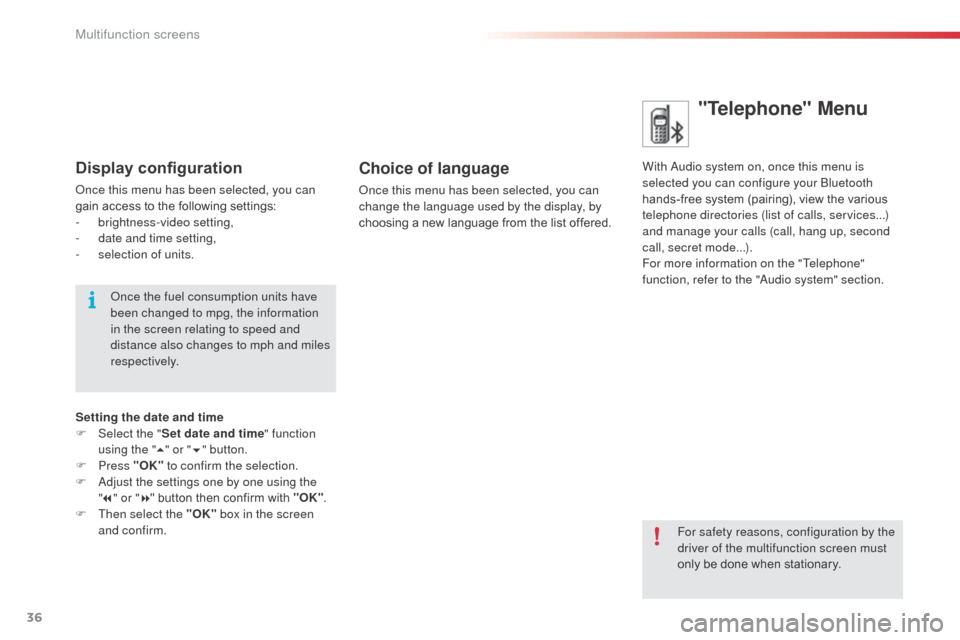
"Telephone" Menu
With audio system on, once this menu is
selected you can configure your bl uetooth
hands-free system (pairing), view the various
telephone directories (list of calls, services...)
and manage your calls (call, hang up, second
call, secret mode...).
For more information on the "Telephone"
function, refer to the "
au
dio system" section.Choice of language
once this menu has been selected, you can
change the language used by the display, by
choosing a new language from the list offered.
For safety reasons, configuration by the
driver of the multifunction screen must
only be done when stationary.
Display configuration
once this menu has been selected, you can
gain access to the following settings:
-
b
rightness-video setting,
-
d
ate and time setting,
-
s
election of units.
on
ce the fuel consumption units have
been changed to mpg, the information
in the screen relating to speed and
distance also changes to mph and miles
respectively.
Setting the date and time
F
Sel
ect the " Set date and time" function
using the " 5" or " 6" button.
F
Press "OK" to confirm the selection.
F
a
d
just the settings one by one using the
" 7 " or " 8" button then confirm with "OK" .
F
T
hen select the "OK" box in the screen
and confirm.
Multifunction screens
Page 81 of 284
79
C3_en_Chap06_amenagement_ed01-2014
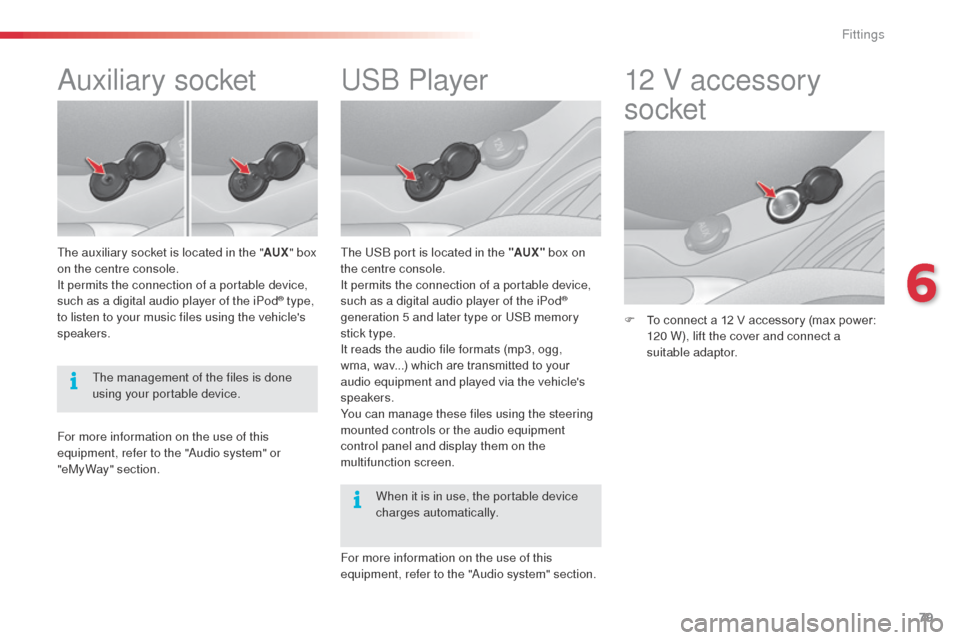
USb Player
The USb port is located in the "AUX " box on
the centre console.
It permits the connection of a portable device,
such as a digital audio player of the iPod
®
generation 5 and later type or USb
memory
stick type.
It reads the audio file formats (mp3, ogg,
wma, wav...) which are transmitted to your
audio equipment and played via the vehicle's
speakers.
You can manage these files using the steering
mounted controls or the audio equipment
control panel and display them on the
multifunction screen.
For more information on the use of this
equipment, refer to the "
au
dio system" section.
12 V accessory
socket
F To connect a 12 V accessory (max power: 120 W), lift the cover and connect a
suitable adaptor.
auxiliary socket
The auxiliary socket is located in the " AUX" box
on the centre console.
It permits the connection of a portable device,
such as a digital audio player of the iPod
® type,
to listen to your music files using the vehicle's
speakers.
For more information on the use of this
equipment, refer to the "
au
dio system" or
"eMyWay" section. The management of the files is done
using your portable device.
When it is in use, the portable device
charges automatically.
6
Fittings
Page 165 of 284
163
C3_en_Chap11_Info-pratiques_ed01-2014
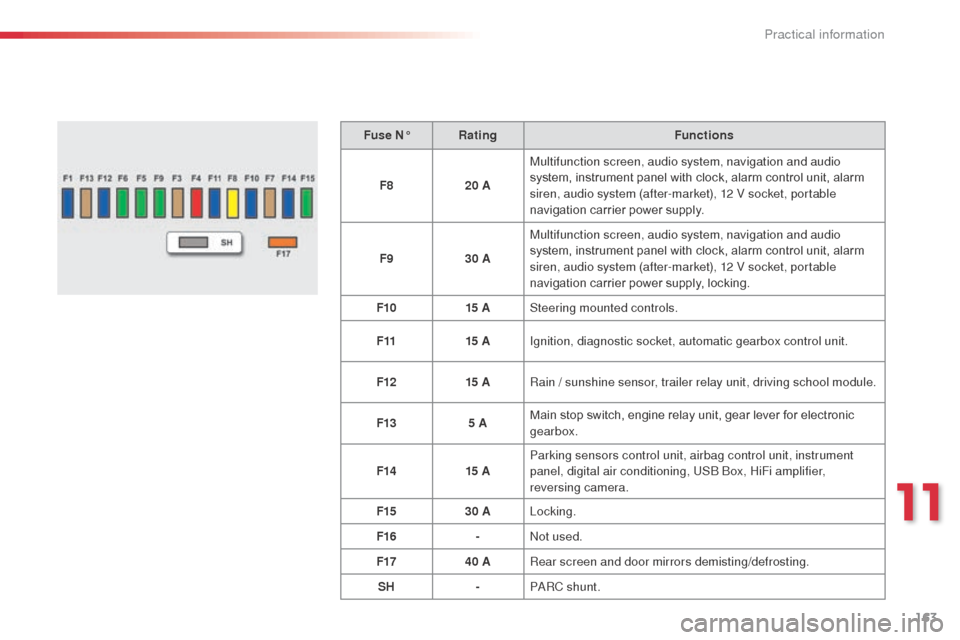
Fuse N°Rating Functions
F8 20 AMultifunction screen, audio system, navigation and audio
system, instrument panel with clock, alarm control unit, alarm
siren, audio system (after-market), 12 V socket, portable
navigation carrier power supply.
F9 30 AMultifunction screen, audio system, navigation and audio
system, instrument panel with clock, alarm control unit, alarm
siren, audio system (after-market), 12 V socket, portable
navigation carrier power supply, locking.
F10 15 ASteering mounted controls.
F11 15 AIgnition, diagnostic socket, automatic gearbox control unit.
F12 15 ARain
/ sunshine sensor, trailer relay unit, driving school module.
F13 5 AMain stop switch, engine relay unit, gear lever for electronic
gearbox.
F14 15 AParking sensors control unit, airbag control unit, instrument
panel, digital air conditioning, US
b
b
o
x, HiFi amplifier,
reversing camera.
F15 30 ALocking.
F16 -
no
t used.
F17 40 ARear screen and door mirrors demisting/defrosting.
SH -P
aR
C shunt.
11
Practical information
Page 173 of 284
171
C3_en_Chap11_Info-pratiques_ed01-2014
Energy economy mode
Exiting economy mode
These functions are reactivated automatically
the next time the vehicle is driven.
F
I
n order to resume the use of these
functions immediately, start the engine and
let it run for a few minutes.
The time available to you will then be double
the period for which the engine is left running.
However, this period will always be between
five and thirty minutes.
Switching to economy mode
once this period has elapsed, a message
appears on the multifunction screen indicating
that the vehicle has switched to economy mode
and the active functions are put on standby.
a
flat battery prevents the engine from
starting (refer to the corresponding
paragraph).
If the telephone is being used at the
same time on the eMyWay audio
navigation system, it will be interrupted
after 10 minutes.
System which manages the period of use of
certain functions to conserve a sufficient level
of charge in the battery.
af
ter the engine has stopped, you can
still use functions such as the audio
equipment, windscreen wipers, dipped
beam headlamps, courtesy lamps, etc. for a
maximum combined period of thirty minutes.
System which manages the use of certain
functions according to the level of charge
remaining in the battery.
When the vehicle is being driven, the load
reduction function temporarily deactivates
certain functions, such as the air conditioning,
the heated rear screen...
The deactivated functions are reactivated
automatically as soon as conditions permit.
Load reduction mode
This period may be greatly reduced if
the battery is not fully charged.
11
Practical information
Page 179 of 284
177
C3_en_Chap11_Info-pratiques_ed01-2014
audio pre-equipment
Your vehicle is equipped with certain factory-
fitted audio equipment:
-
a d
ual-function aerial at the rear of the roof,
-
a c
oaxial aerial cable,
-
b
asic interference suppression,
-
c
abling for speakers in the front doors and
tweeters in the dashboard,
-
c
abling for speakers in the rear doors
-
a 4
0 -way connector.
be
fore installing a radio unit or
speakers in your vehicle, you can
contact a CITROËN dealer who will
give you the part number for a suitable
wiring harness.Fitting an audio unit
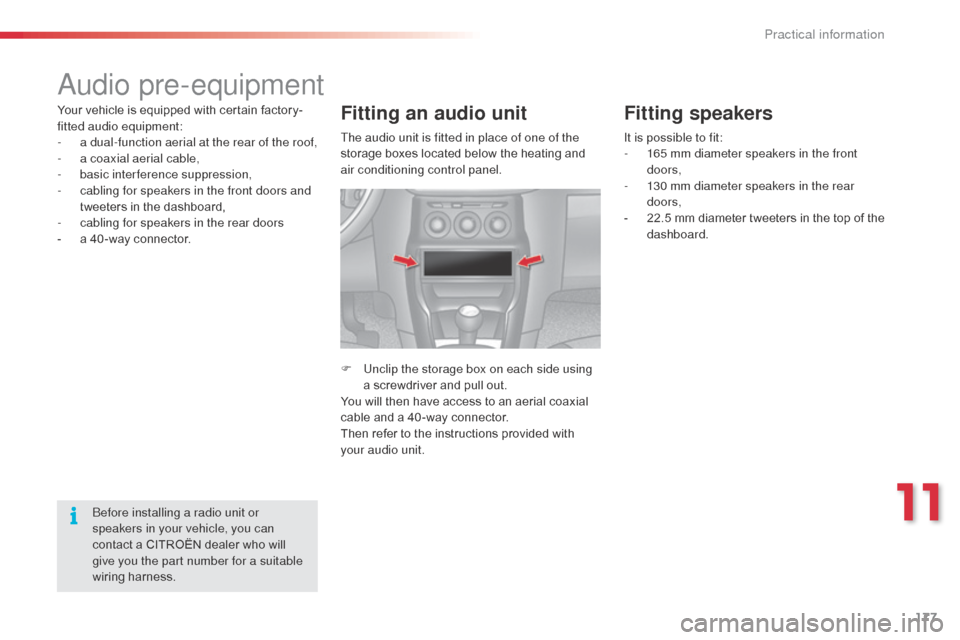
F Unclip the storage box on each side using a screwdriver and pull out.
You will then have access to an aerial coaxial
cable and a 40 -way connector.
Then refer to the instructions provided with
your audio unit.
Fitting speakers
It is possible to fit:
- 1 65 mm diameter speakers in the front
doors,
-
1
30 mm diameter speakers in the rear
doors,
-
2
2.5 mm diameter tweeters in the top of the
dashboard.
The audio unit is fitted in place of one of the
storage boxes located below the heating and
air conditioning control panel.
11
Practical information