audio Citroen C3 2014 2.G Owner's Guide
[x] Cancel search | Manufacturer: CITROEN, Model Year: 2014, Model line: C3, Model: Citroen C3 2014 2.GPages: 284, PDF Size: 9.01 MB
Page 221 of 284
06
219
C3_en_Chap13b_RT6-2-8_ed01-2014
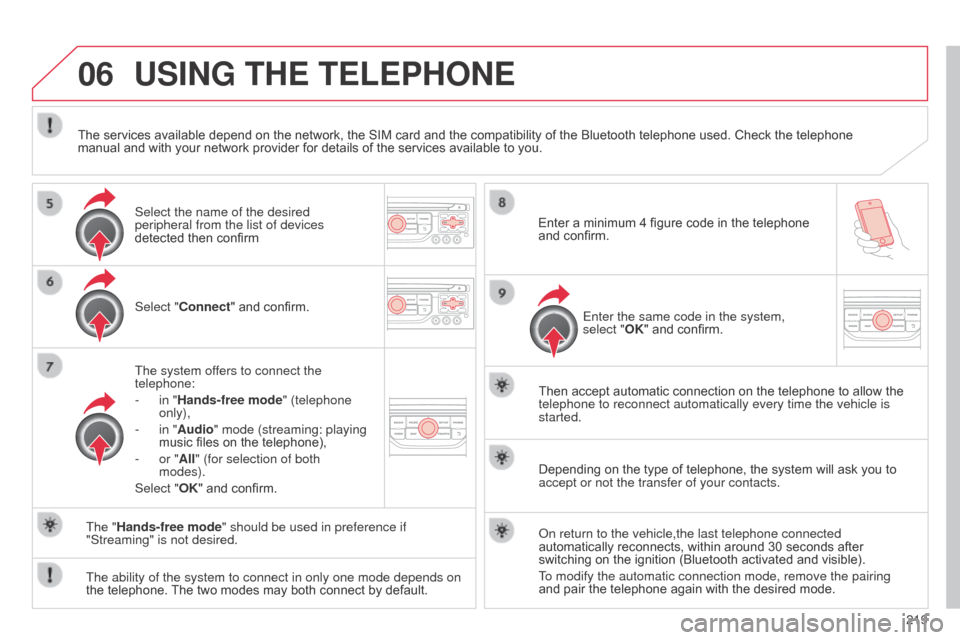
USING THE TELEPHONE
Select "Connect" and confirm.
The system offers to connect the
telephone:
-
in "
Hands-free mode" (telephone
only),
-
in "
Audio" mode (streaming: playing
music files on the telephone),
-
or "
All" (for selection of both
modes).
Select "OK" and confirm. Then accept automatic connection on the telephone to allow the
telephone to reconnect automatically every time the vehicle is
started.
The ability of the system to connect in only one mode depends on
the telephone. The two modes may both connect by default. The "Hands-free mode" should be used in preference if
"Streaming" is not desired.
The services available depend on the network, the SIM card and the compatibility of the Bluetooth telephone used. Check the telephone
manual and with your network provider for details of the services available to you.
Depending on the type of telephone, the system will ask you to
accept or not the transfer of your contacts.
o
n return to the vehicle,the last telephone connected
automatically reconnects, within around 30 seconds after
switching on the ignition (Bluetooth activated and visible).
To modify the automatic connection mode, remove the pairing
and pair the telephone again with the desired mode.
Enter a minimum 4 figure code in the telephone
and confirm.
Enter the same code in the system,
select "OK" and confirm.
Select the name of the desired
peripheral from the list of devices
detected then confirm
Page 229 of 284
07
227
C3_en_Chap13b_RT6-2-8_ed01-2014
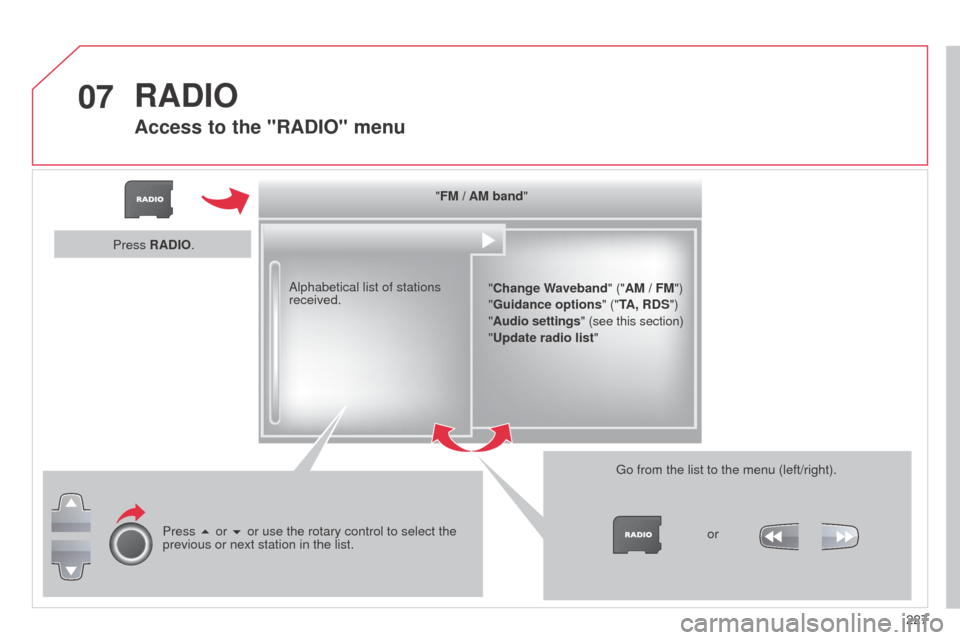
"FM / AM band""Change Waveband" ("AM / FM")
"Guidance options " ("TA, RDS")
" Audio settings" (see this section)
"Update radio list "
a
lphabetical list of stations
received.
Press 5 or 6 or use the rotary control to select the
previous or next station in the list. Go from the list to the menu (left/right).
or
Press RADIO.
RADIO
Access to the "RADIO" menu
Page 230 of 284
07
228
C3_en_Chap13b_RT6-2-8_ed01-2014
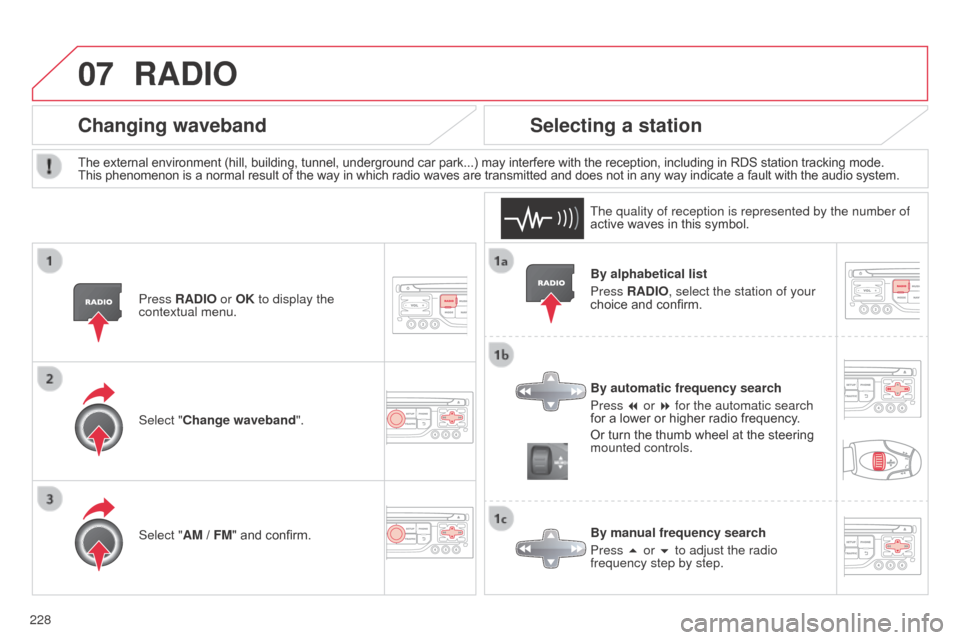
By alphabetical list
Press RADIO, select the station of your
choice and confirm.
By automatic frequency search
Press 7 or 8 for the automatic search
for a lower or higher radio frequency.
Or turn the thumb wheel at the steering
mounted controls.
By manual frequency search
Press 5 or 6 to adjust the radio
frequency step by step.
Selecting a station
The external environment (hill, building, tunnel, underground car park...) may interfere with the reception, including in RDS station tracking mode.
This phenomenon is a normal result of the way in which radio waves are transmitted and does not in any way indicate a fault with the audio system.
The quality of reception is represented by the number of
active waves in this symbol.
Press RADIO or OK to display the
contextual menu.
Changing waveband
Select "Change waveband".
Select "AM / FM" and confirm.
RADIO
Page 232 of 284
08
230
C3_en_Chap13b_RT6-2-8_ed01-2014
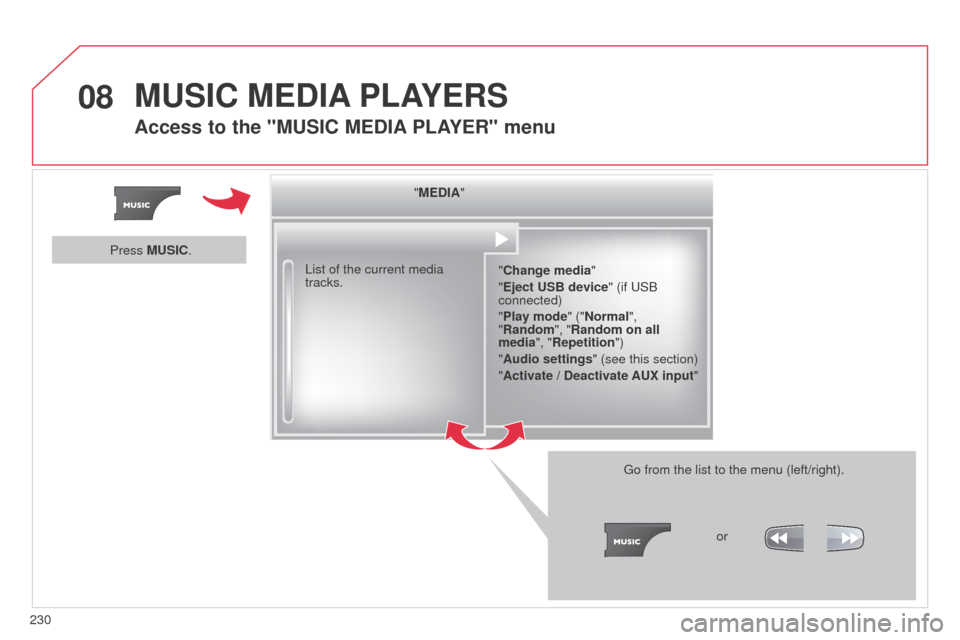
"MEDIA""Change media"
"Eject USB device" (if US
b
connected)
"Play mode" ("Normal",
"Random", "Random on all
media", "Repetition")
"Audio settings " (see this section)
"Activate / Deactivate AUX input "
List of the current media
tracks.
Go from the list to the menu (left/right).or
Press MUSIC.
MUSIC MEDIA
PLAYERS
Access to the "MUSIC MEDIA PLAYER " menu
Page 233 of 284
08
231
C3_en_Chap13b_RT6-2-8_ed01-2014
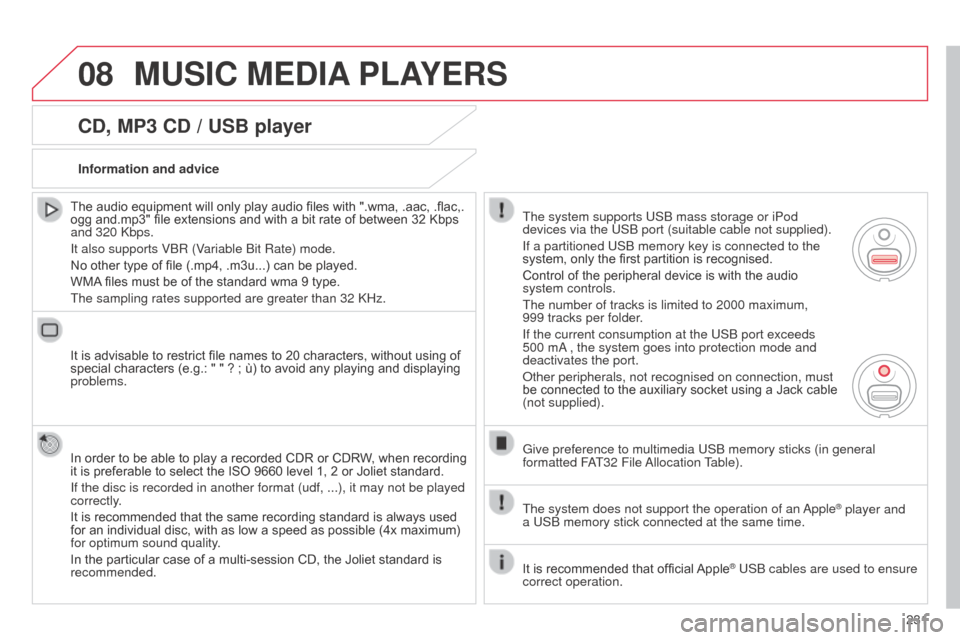
CD, MP3 CD / USB player
The audio equipment will only play audio files with ".wma, .aac, .flac,.
ogg and.mp3" file extensions and with a bit rate of between 32 Kbps
and 320 k bps.
It also supports V
b R (Variable b it Rate) mode.
No other type of file (.mp4, .m3u...) can be played.
WMA files must be of the standard wma 9 type.
The sampling rates supported are greater than 32
k Hz.
It is advisable to restrict file names to 20 characters, without using of
special characters (e.g.: " " ? ; ù) to avoid any playing and displaying
problems.
In order to be able to play a recorded CDR or CDRW, when recording
it is preferable to select the ISO 9660 level 1, 2 or Joliet standard.
If the disc is recorded in another format (udf, ...), it may not be pl\
ayed
correctly.
It is recommended that the same recording standard is always used
for an individual disc, with as low a speed as possible (4x maximum)
for optimum sound quality.
In the particular case of a multi-session CD, the Joliet standard is
recommended. Information and advice
The system supports US b mass storage or iPod
devices via the US
b port (suitable cable not supplied).
If a partitioned US
b memory key is connected to the
system, only the first partition is recognised.
Control of the peripheral device is with the audio
system controls.
The number of tracks is limited to 2000 maximum,
999
tracks per folder.
If the current consumption at the US
b port exceeds
500 m
a
, the system goes into protection mode and
deactivates the port.
o
ther peripherals, not recognised on connection, must
be connected to the auxiliary socket using a Jack cable
(not supplied).
Give preference to multimedia US
b memory sticks (in general
formatted F
aT32 File a
llocation Table).
The system does not support the operation of an
a
pple
® player and
a
US
b
memory stick connected at the same time.
It is recommended that official Apple
® USb cables are used to ensure
correct operation.
MUSIC MEDIA PLAYERS
Page 236 of 284
08
234
C3_en_Chap13b_RT6-2-8_ed01-2014
Audio streaming
Streaming allows audio files on your telephone to be played via the
vehicle's speakers.
Connect the telephone: see "USING THE TELEPHONE".
Select "Audio" or "All" profile.
If play does not start automatically, it may be necessary to start the
audio playback from the telephone.
Control is from the peripheral device or by using the audio system
buttons.
o
nce connected in streaming mode, the telephone is considered to be
a media source.
It is recommended that you activate "Repeat" on the
b luetooth
peripheral.
MUSIC MEDIA PLAYERS
Connecting APPLE® players
Connect the apple® player to the USb port using a suitable cable
(not
supplied).
Play starts automatically.
Control is via the audio system.
The classifications available are those of the portable device
connected (artists / albums / genres / playlists / audiobooks /
podcasts).
The default classification used is by artist. To modify the classification
used, return to the first level of the menu then select the desired
classification (playlists for example) and confirm to go down through
the menu to the desired track.
The "Shuffle tracks" mode on an iPod
® corresponds to the "Random"
mode on the audio system.
The "Shuffle albums" mode on an iPod
® corresponds to the "Random
all" on the audio system.
"Shuffle tracks" is restored by default on each connection.
The version of software in the audio system may not be compatible
with the generation of your Apple
® player.
Page 237 of 284
08
235
C3_en_Chap13b_RT6-2-8_ed01-2014
MUSIC MEDIA PLAYERS
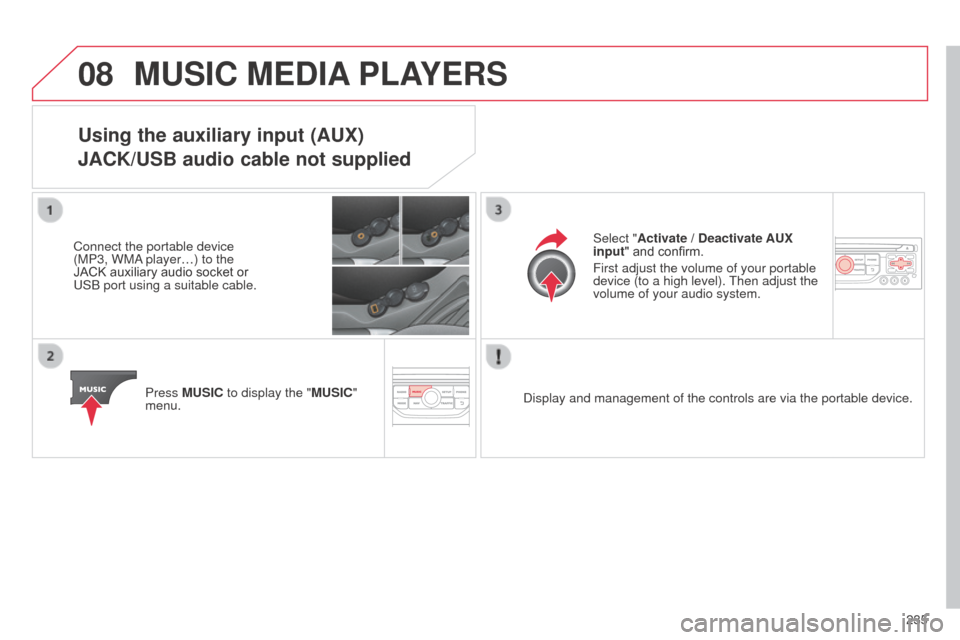
Using the auxiliary input (AUX)
JACK/USB audio cable not supplied
Connect the portable device
(MP3, WM
a player…) to the
JACK auxiliary audio socket or
US
b port using a suitable cable.
Press MUSIC to display the "MUSIC"
menu. Select "Activate / Deactivate AUX
input
" and confirm.
First adjust the volume of your portable
device (to a high level). Then adjust the
volume of your audio system.
d
isplay and management of the controls are via the portable device.
Page 238 of 284
09
236
C3_en_Chap13b_RT6-2-8_ed01-2014
AUDIO SETTINGS
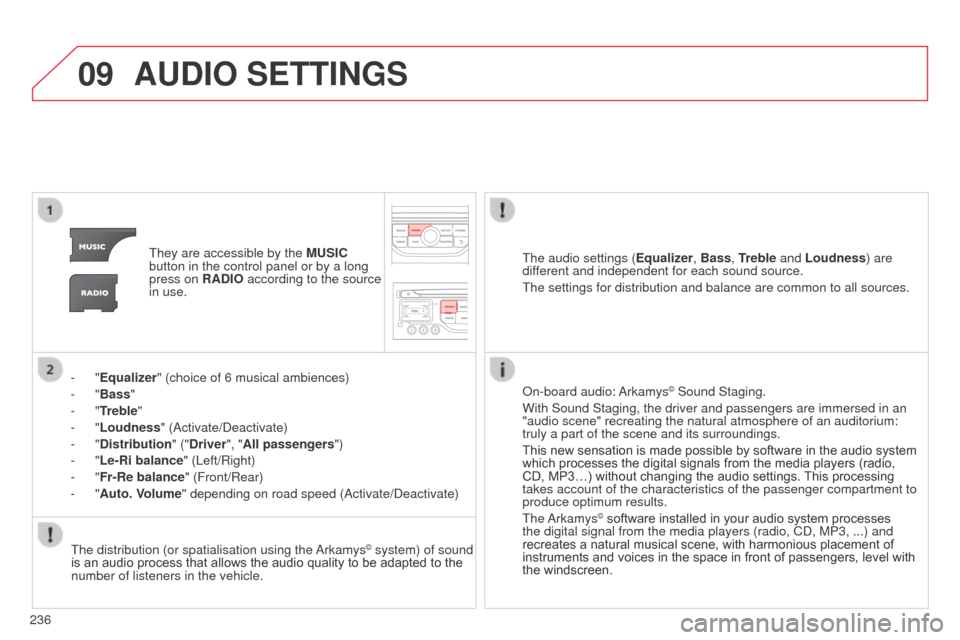
They are accessible by the MUSIC
button in the control panel or by a long
press on RADIO according to the source
in use.
-
"Equalizer" (choice of 6 musical ambiences)
-
"Bass "
-
"Treble"
-
"Loudness" ( a ctivate/ d eactivate)
-
"Distribution " ("Driver", "All passengers")
-
"Le-Ri balance" (Left/Right)
-
"Fr-Re balance" (Front/Rear)
-
"Auto. Volume" depending on road speed ( a ctivate/ d eactivate)The audio settings (
Equalizer, Bass, Treble and Loudness) are
different and independent for each sound source.
The settings for distribution and balance are common to all sources.
The distribution (or spatialisation using the
a
rkamys
© system) of sound
is an audio process that allows the audio quality to be adapted to the
number of listeners in the vehicle.
o
n-board audio: a rkamys
© Sound Staging.
With Sound Staging, the driver and passengers are immersed in an
"audio scene" recreating the natural atmosphere of an auditorium:
truly a part of the scene and its surroundings.
This new sensation is made possible by software in the audio system
which processes the digital signals from the media players (radio,
CD, MP3…) without changing the audio settings. This processing
takes account of the characteristics of the passenger compartment to
produce optimum results.
The
a
rkamys
© software installed in your audio system processes
the digital signal from the media players (radio, C d , MP3, ...) and
recreates a natural musical scene, with harmonious placement of
instruments and voices in the space in front of passengers, level with
the windscreen.
Page 242 of 284
11
240
C3_en_Chap13b_RT6-2-8_ed01-2014
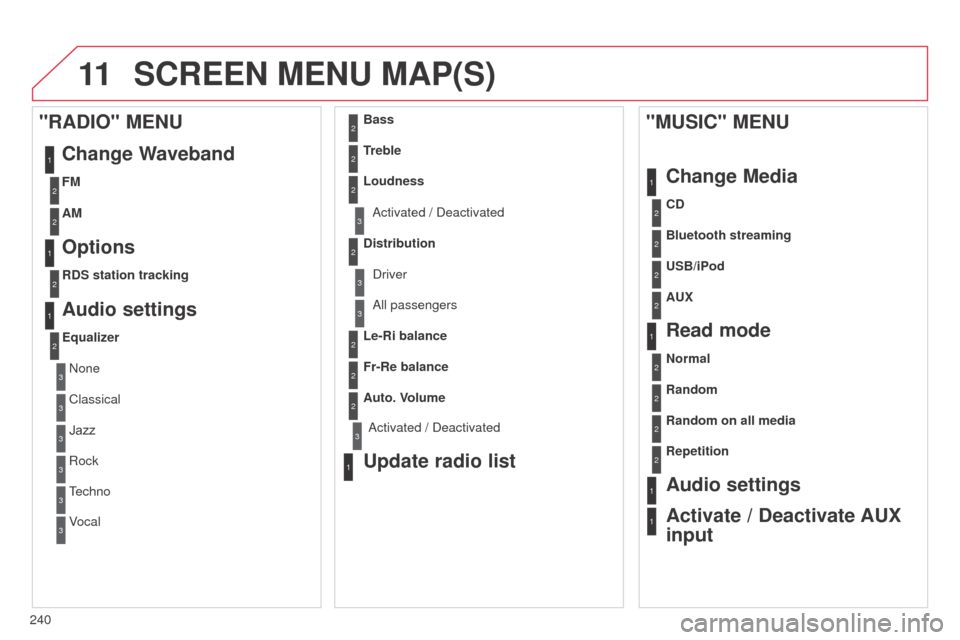
SCREEN MENU MAP(S)
1
1
2
1
1
2
2
2
2
2
2
2
3
3
2
2
2
1
Random on all media
Repetition
Audio settings
Activate / Deactivate AUX
input
"MUSIC" MENU
Change Media
Read mode
Normal
Random
a
ll passengers
Le-Ri balance
Fr-Re balance
Auto. Volume
Update radio list
Bass
Treble
Loudness
Distribution
d
river
1
2
1
1
3
3
3
3
3
3
2Equalizer
"RADIO" MENUChange Waveband
Options
RDS station tracking
Audio settings
none
Classical
Jazz
Rock
T
echno
Vocal
2
2
2
2
USB/iPod
AUX CD
Bluetooth streaming
2
2
FM
AM
3activated / deactivated
3activated / deactivated
Page 244 of 284
242
C3_en_Chap13b_RT6-2-8_ed01-2014
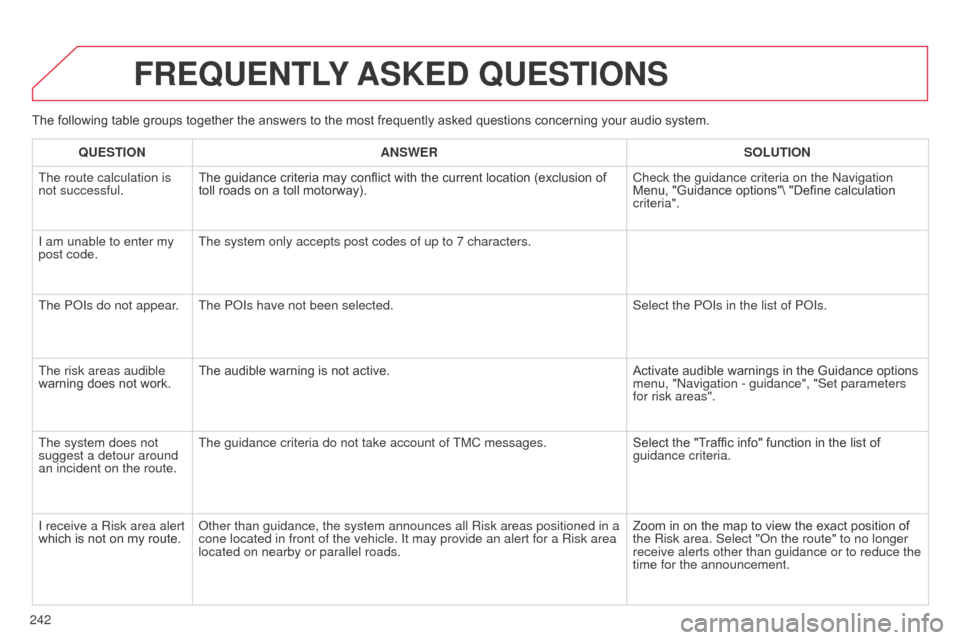
The following table groups together the answers to the most frequently asked questions concerning your audio system.
FREQUENTLY ASKED QUESTIONS
QUESTION ANSWER SOLUTION
The route calculation is
not successful. The guidance criteria may conflict with the current location (exclusion of
toll roads on a toll motorway). Check the guidance criteria on the
n avigation
Menu, "Guidance options"\ "Define calculation
criteria".
I am unable to enter my
post code. The system only accepts post codes of up to 7 characters.
The P
o Is do not appear. The P o Is have not been selected. Select the P
o Is in the list of P o Is.
The risk areas audible
warning does not work. The audible warning is not active.
Activate audible warnings in the Guidance options
menu, "
n avigation - guidance", "Set parameters
for risk areas".
The system does not
suggest a detour around
an incident on the route. The guidance criteria do not take account of TMC messages.
Select the "Traffic info" function in the list of
guidance criteria.
I receive a Risk area alert
which is not on my route.
o
ther than guidance, the system announces all Risk areas positioned in a \
cone located in front of the vehicle. It may provide an alert for a Risk\
area
located on nearby or parallel roads. Zoom in on the map to view the exact position of
the Risk area. Select "
o n the route" to no longer
receive alerts other than guidance or to reduce the
time for the announcement.