lighting CITROEN C3 AIRCROSS 2017 Owners Manual
[x] Cancel search | Manufacturer: CITROEN, Model Year: 2017, Model line: C3 AIRCROSS, Model: CITROEN C3 AIRCROSS 2017Pages: 308, PDF Size: 9.13 MB
Page 4 of 308
2
.
.
Instrument panels 8
I nstrument panel displays 1 0
Warning and indicator lamps
1
0
Indicators
25
Distance recorders
3
0
Equipment configuration for vehicles
without
screen
3
1
Monochrome screen C
3
2
Touch screen
3
3
Trip computer
3
7
Lighting dimmer
3
9
Date and time adjustment
3
9Remote control
4
1
K
eyless Entry and Starting
4
3
Back-up procedures
4
5
Doors 48
Boot
4
8
Central locking
49
A
larm
51
Panoramic opening sunroof
5
3
Anti-intrusion security
5
0
Electric windows
5
5
Front seats 5 7
Rear seats
6
0
Steering wheel adjustment
62
M
irrors 63
Ventilation
64
Recommendations for ventilation and air conditioning 65Heating/Manual air conditioning 66
Automatic air conditioning 6 7
Front demist – defrost
6
9
Recirculation of interior air
6
9
Heated windscreen
7
0
Rear screen demist – defrost
7
0
Boot lighting
7
0
Front fittings
7
1
Rear fittings
7
5
Boot fittings
7
6
Courtesy lamps
7
8
Interior mood lighting
7
9Main lighting
8
0
Lighting control
8
0
Direction indicators (flashing)
8
1
Automatic illumination of headlamps
8
2
Daytime running lamps/Sidelamps
8
2
Parking lamps
8
2
Guide-me-home lighting
8
3
Automatic headlamp dipping
8
3
Automatic exterior welcome lighting
8
3
Headlamp adjustment
8
5
Cornering lighting
8
5
Wiper control stalk
8
6
Automatic windscreen wipers
8
8
General safety recommendations
9
0
Hazard warning lamps
9
1
Horn
91
Emergency or assistance call
9
1
Electronic stability control (ESC)
9
3
Grip control
9
5
Hill Assist Descent 9 7
Seat belts 9 8
Airbags
1
02
Child seats
1
05
Deactivating the front passenger airbag
1
06
ISOFIX mountings and child seats
1
12
i-Size mountings and child seats
1
15
Child lock
1
17
Over view
Dashboard instruments Access
Ease of use and comfort Safety
Lighting and visibility
Eco-driving
Eco-driving 6
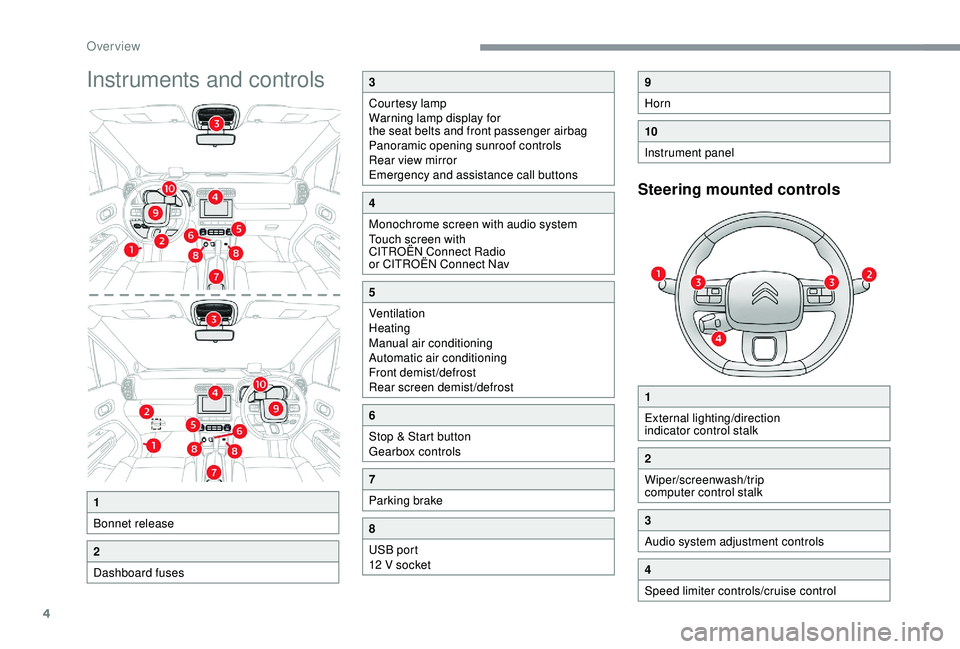
Instruments and controls
4
Contents
Page 6 of 308
4
Instruments and controls
Steering mounted controls
1
Bonnet release
2
Dashboard fuses
3
Courtesy lamp
Warning lamp display for
the seat belts and front passenger airbag
Panoramic opening sunroof controls
Rear view mirror
Emergency and assistance call buttons
4
Monochrome screen with audio system
Touch screen with
CITROËN Connect Radio
or CITROËN Connect Nav
5
Ventilation
Heating
Manual air conditioning
Automatic air conditioning
Front demist/defrost
Rear screen demist/defrost
6
Stop & Start button
Gearbox controls
7
Parking brake
8
USB port
12 V socket
9
Horn
10
Instrument panel
1
External lighting/direction
indicator control stalk
2
Wiper/screenwash/trip
computer control stalk
3
Audio system adjustment controls
4
Speed limiter controls/cruise control
Over view
Page 10 of 308
8
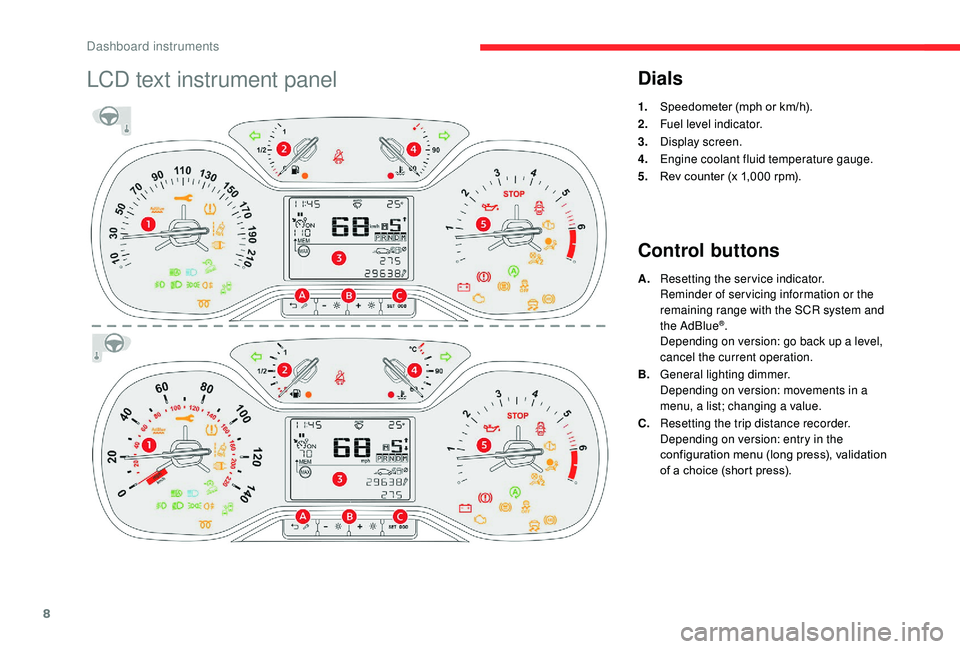
LCD text instrument panelDials
1.Speedometer (mph or km/h).
2. Fuel level indicator.
3. Display screen.
4. Engine coolant fluid temperature gauge.
5. Rev counter (x 1,000
rpm).
Control buttons
A.Resetting the service indicator.
Reminder of servicing information or the
remaining range with the SCR system and
the AdBlue
®.
Depending on version: go back up a level,
cancel the current operation.
B. General lighting dimmer.
Depending on version: movements in a
menu, a list; changing a value.
C. Resetting the trip distance recorder.
Depending on version: entry in the
configuration menu (long press), validation
of a choice (short press).
Dashboard instruments
Page 11 of 308
9
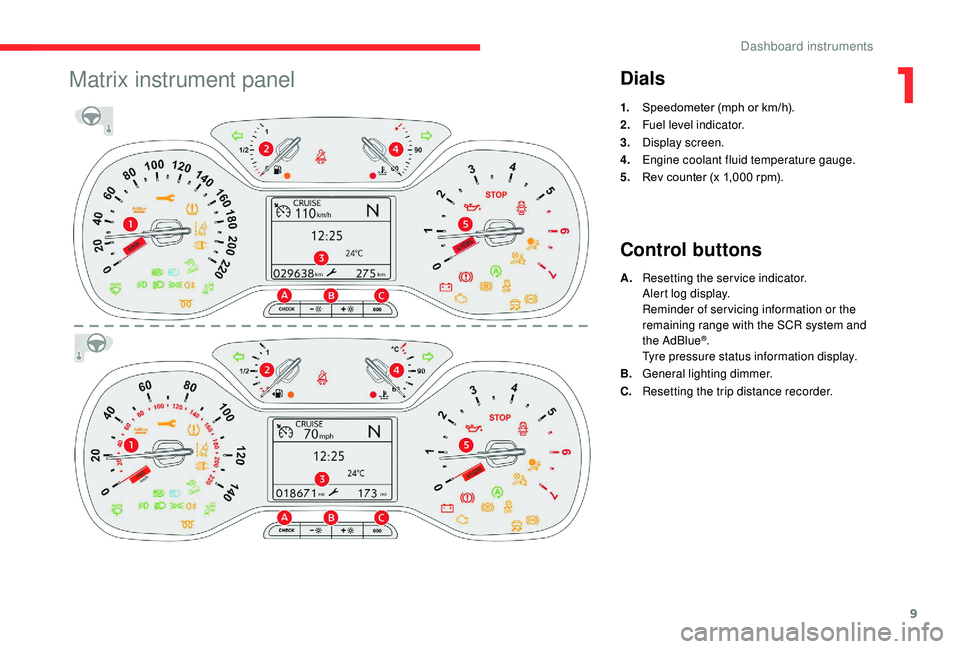
Matrix instrument panelDials
1.Speedometer (mph or km/h).
2. Fuel level indicator.
3. Display screen.
4. Engine coolant fluid temperature gauge.
5. Rev counter (x 1,000
rpm).
Control buttons
A.Resetting the service indicator.
Alert log display.
Reminder of servicing information or the
remaining range with the SCR system and
the AdBlue
®.
Tyre pressure status information display.
B. General lighting dimmer.
C. Resetting the trip distance recorder.
1
Dashboard instruments
Page 13 of 308
11
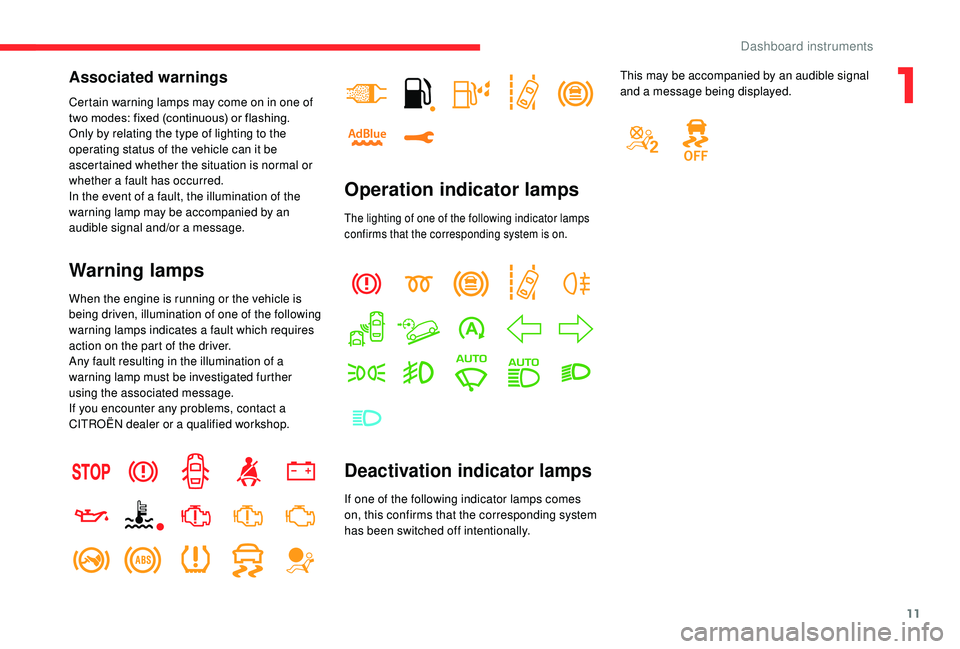
Associated warnings
Certain warning lamps may come on in one of
two modes: fixed (continuous) or flashing.
Only by relating the type of lighting to the
operating status of the vehicle can it be
ascertained whether the situation is normal or
whether a fault has occurred.
In the event of a fault, the illumination of the
warning lamp may be accompanied by an
audible signal and/or a message.
Warning lamps
When the engine is running or the vehicle is
being driven, illumination of one of the following
warning lamps indicates a fault which requires
action on the part of the driver.
Any fault resulting in the illumination of a
warning lamp must be investigated further
using the associated message.
If you encounter any problems, contact a
CITROËN dealer or a qualified workshop.
Operation indicator lamps
The lighting of one of the following indicator lamps
confirms that the corresponding system is on.
Deactivation indicator lamps
If one of the following indicator lamps comes
on, this confirms that the corresponding system
has been switched off intentionally.This may be accompanied by an audible signal
and a message being displayed.
1
Dashboard instruments
Page 23 of 308
21
Warning/indicator lampStateCause Action/Observations
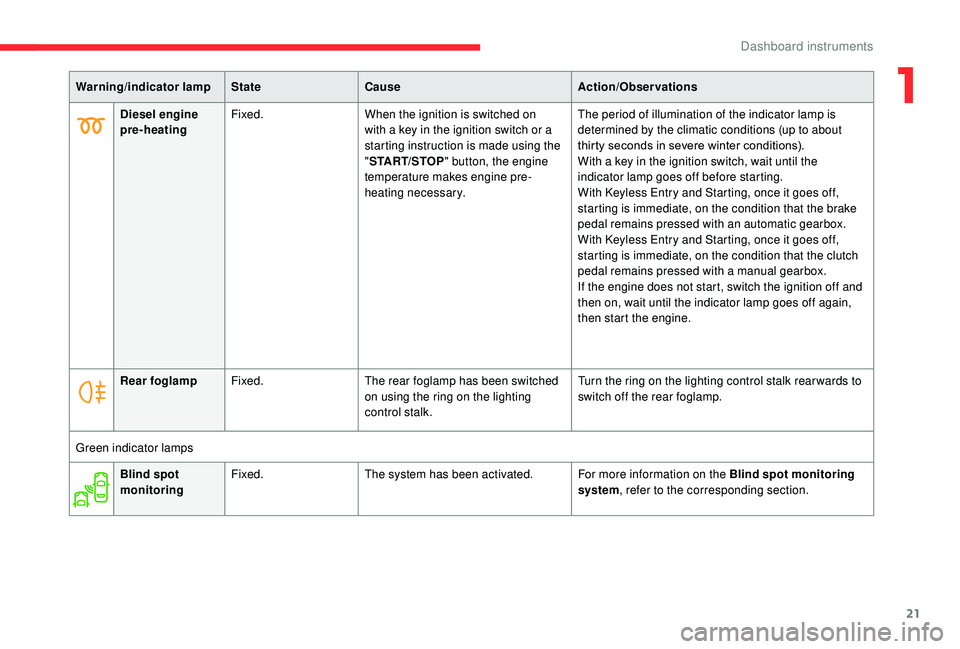
Diesel engine
pre-heating Fixed.
When the ignition is switched on
with a key in the ignition switch or a
starting instruction is made using the
"START/STOP " button, the engine
temperature makes engine pre-
heating necessary. The period of illumination of the indicator lamp is
determined by the climatic conditions (up to about
thirty seconds in severe winter conditions).
With a key in the ignition switch, wait until the
indicator lamp goes off before starting.
With
K
eyless Entry and Starting, once it goes off,
starting is immediate, on the condition that the brake
pedal remains pressed with an automatic gearbox.
With
K
eyless Entry and Starting, once it goes off,
starting is immediate, on the condition that the clutch
pedal remains pressed with a manual gearbox.
If the engine does not start, switch the ignition off and
then on, wait until the indicator lamp goes off again,
then start the engine.
Rear foglamp Fixed. The rear foglamp has been switched
on using the ring on the lighting
control stalk. Turn the ring on the lighting control stalk rear wards to
switch off the rear foglamp.
Green indicator lamps Blind spot
monitoring Fixed.
The system has been activated. For more information on the Blind spot monitoring
system, refer to the corresponding section.
1
Dashboard instruments
Page 24 of 308
22
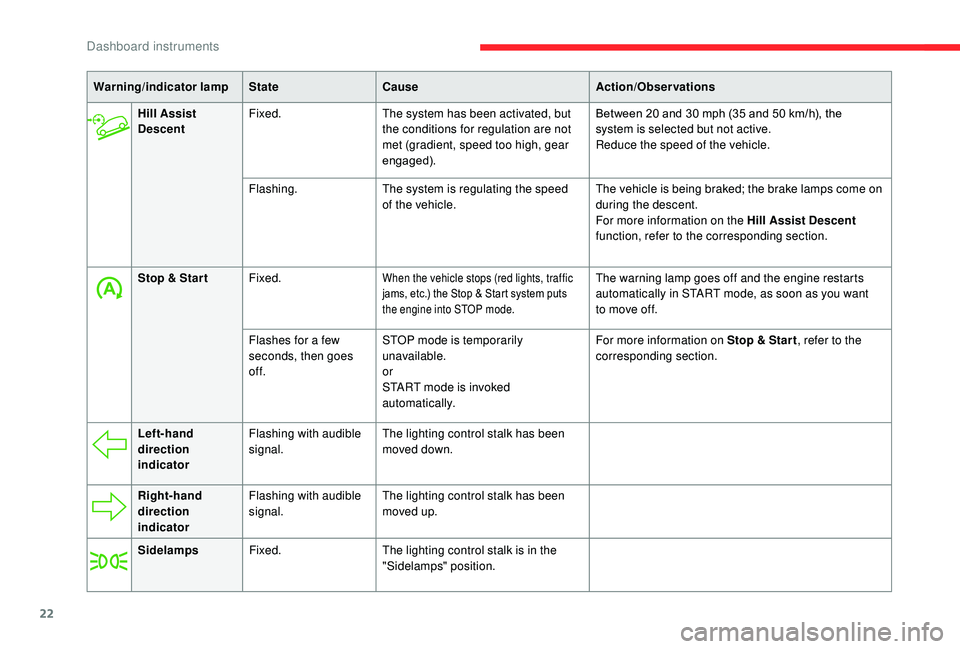
Hill Assist
DescentFixed.
The system has been activated, but
the conditions for regulation are not
met (gradient, speed too high, gear
engaged). Between 20 and 30
mph (35 and 50 km/h), the
system is selected but not active.
Reduce the speed of the vehicle.
Flashing. The system is regulating the speed
of the vehicle. The vehicle is being braked; the brake lamps come on
during the descent.
For more information on the Hill Assist Descent
function, refer to the corresponding section.
Stop & Star t Fixed.
When the vehicle stops (red lights, traffic
jams, etc.) the Stop & Start system puts
the engine into STOP mode.The warning lamp goes off and the engine restarts
automatically in START mode, as soon as you want
to move off.
Flashes for a few
seconds, then goes
of f. STOP mode is temporarily
unavailable.
or
START mode is invoked
automatically. For more information on Stop & Star t
, refer to the
corresponding section.
Warning/indicator lamp
StateCause Action/Observations
Left-hand
direction
indicator Flashing with audible
signal.
The lighting control stalk has been
moved down.
Right-hand
direction
indicator Flashing with audible
signal.
The lighting control stalk has been
moved up.
Sidelamps Fixed. The lighting control stalk is in the
"Sidelamps" position.
Dashboard instruments
Page 25 of 308
23
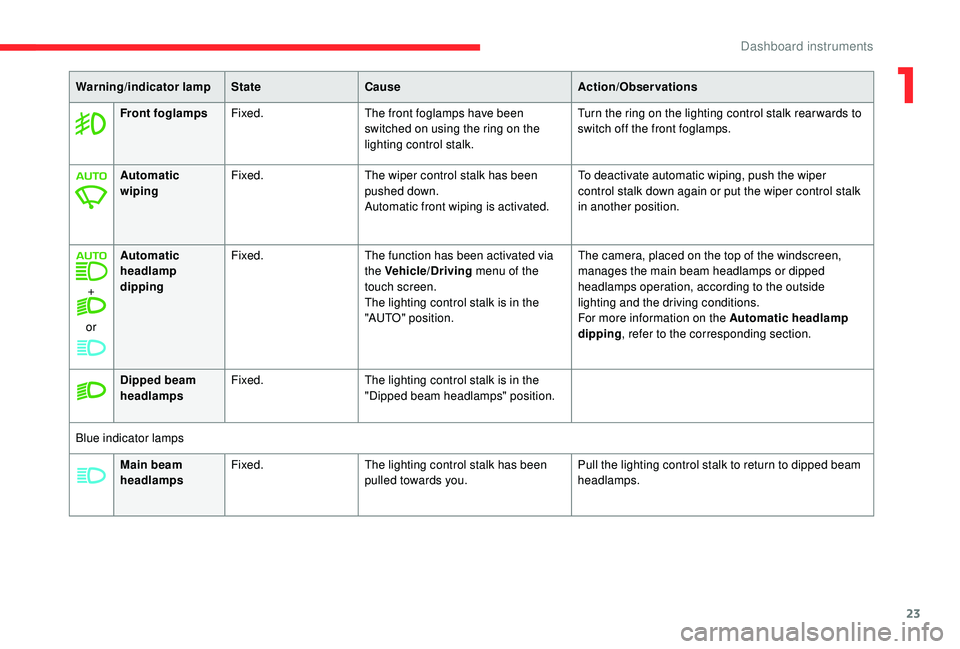
Main beam
headlampsFixed.
The lighting control stalk has been
pulled towards you. Pull the lighting control stalk to return to dipped beam
headlamps.
Warning/indicator lamp
StateCause Action/Observations
Front foglamps Fixed. The front foglamps have been
switched on using the ring on the
lighting control stalk. Turn the ring on the lighting control stalk rear wards to
switch off the front foglamps.
Automatic
wiping Fixed.
The wiper control stalk has been
pushed down.
Automatic front wiping is activated. To deactivate automatic wiping, push the wiper
control stalk down again or put the wiper control stalk
in another position.
+
or Automatic
headlamp
dipping
Fixed.
The function has been activated via
the Vehicle/Driving menu of the
touch screen.
The lighting control stalk is in the
"AUTO" position. The camera, placed on the top of the windscreen,
manages the main beam headlamps or dipped
headlamps operation, according to the outside
lighting and the driving conditions.
For more information on the Automatic headlamp
dipping
, refer to the corresponding section.
Dipped beam
headlamps Fixed.
The lighting control stalk is in the
"Dipped beam headlamps" position.
Blue indicator lamps
1
Dashboard instruments
Page 33 of 308
31
When travelling abroad, you may have to
change the units of distance: the display
of road speed must be in the official units
(miles or km) for the country.
The change of units is done via the screen
configuration menu, with the vehicle
stationary.
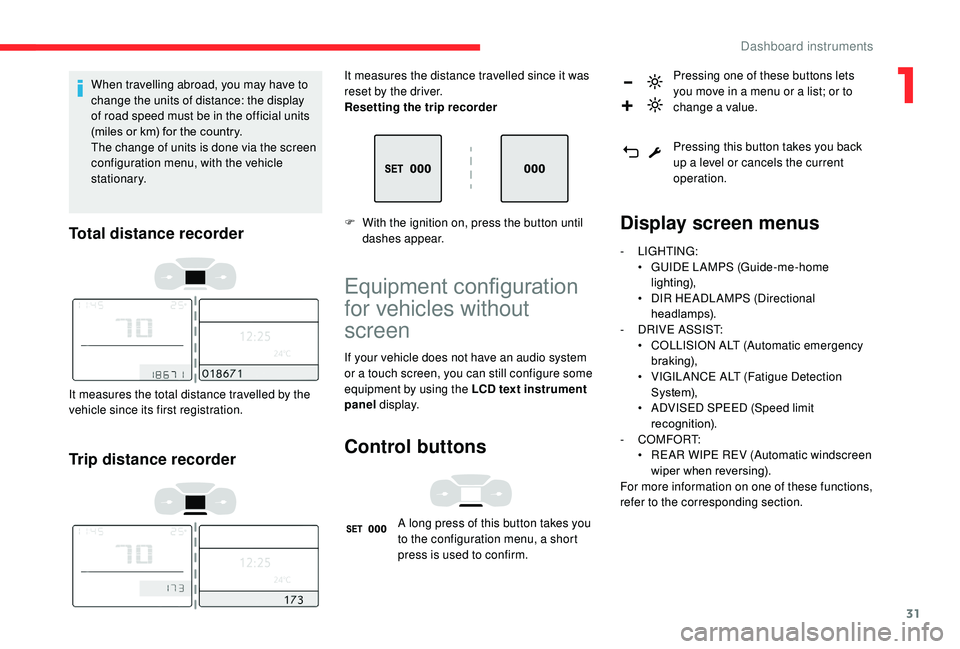
Total distance recorder
It measures the total distance travelled by the
vehicle since its first registration.
Trip distance recorder
It measures the distance travelled since it was
reset by the driver.
Resetting the trip recorder
F
W
ith the ignition on, press the button until
dashes appear.
Equipment configuration
for vehicles without
screen
If your vehicle does not have an audio system
or a touch screen, you can still configure some
equipment by using the LCD text instrument
panel display.
Control buttons
A long press of this button takes you
to the configuration menu, a short
press is used to confirm. Pressing one of these buttons lets
you move in a menu or a list; or to
change a value.
Pressing this button takes you back
up a level or cancels the current
operation.
Display screen menus
-
LIGHTING:
•
G UIDE LAMPS (Guide-me-home
lighting),
•
D
IR HEADLAMPS (Directional
headlamps).
-
D
RIVE ASSIST:
•
C
OLLISION ALT (Automatic emergency
b r ak ing),
•
V
IGILANCE ALT (Fatigue Detection
S yste m),
•
A
DVISED SPEED (Speed limit
recognition).
-
COMFORT:
•
R
EAR WIPE REV (Automatic windscreen
wiper when reversing).
For more information on one of these functions,
refer to the corresponding section.
1
Dashboard instruments
Page 35 of 308
33
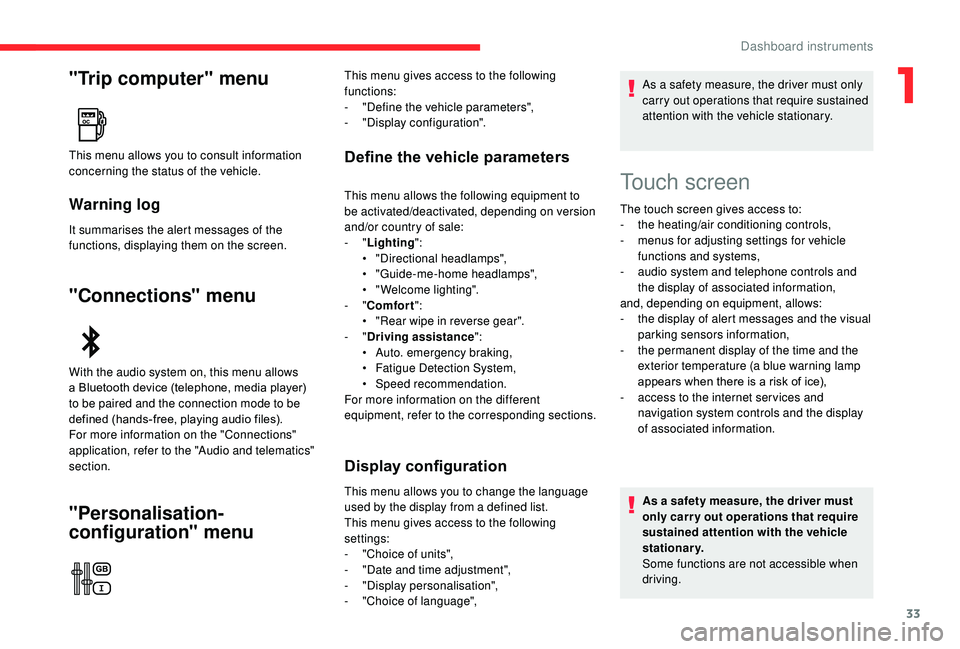
"Trip computer" menu
Warning log
It summarises the alert messages of the
functions, displaying them on the screen.
"Connections" menu
"Personalisation-
configuration" menu
Define the vehicle parametersThis menu allows you to consult information
concerning the status of the vehicle.
With the audio system on, this menu allows
a Bluetooth device (telephone, media player)
to be paired and the connection mode to be
defined (hands-free, playing audio files).
For more information on the "Connections"
application, refer to the "Audio and telematics"
section.This menu gives access to the following
functions:
-
"
Define the vehicle parameters",
-
"
Display configuration".
This menu allows the following equipment to
be activated/deactivated, depending on version
and/or country of sale:
-
"Lighting ":
•
"
Directional headlamps",
•
"
Guide-me-home headlamps",
•
"
Welcome lighting".
-
"Comfort ":
•
"
Rear wipe in reverse gear".
-
"Driving assistance ":
•
A
uto. emergency braking,
•
F
atigue Detection System,
•
Spe
ed recommendation.
For more information on the different
equipment, refer to the corresponding sections.
Display configuration
This menu allows you to change the language
used by the display from a defined list.
This menu gives access to the following
settings:
-
"
Choice of units",
-
"
Date and time adjustment",
-
"
Display personalisation",
-
"
Choice of language", As a safety measure, the driver must only
carry out operations that require sustained
attention with the vehicle stationary.
Touch screen
The touch screen gives access to:
- t
he heating/air conditioning controls,
-
m
enus for adjusting settings for vehicle
functions and systems,
-
a
udio system and telephone controls and
the display of associated information,
and, depending on equipment, allows:
-
t
he display of alert messages and the visual
parking sensors information,
-
t
he permanent display of the time and the
exterior temperature (a blue warning lamp
appears when there is a risk of ice),
-
a
ccess to the internet ser vices and
navigation system controls and the display
of associated information.
As a safety measure, the driver must
only carry out operations that require
sustained attention with the vehicle
stationary.
Some functions are not accessible when
driving.
1
Dashboard instruments