sunroof CITROEN C3 AIRCROSS 2021 Handbook (in English)
[x] Cancel search | Manufacturer: CITROEN, Model Year: 2021, Model line: C3 AIRCROSS, Model: CITROEN C3 AIRCROSS 2021Pages: 244, PDF Size: 6.29 MB
Page 163 of 244
161
Technical data
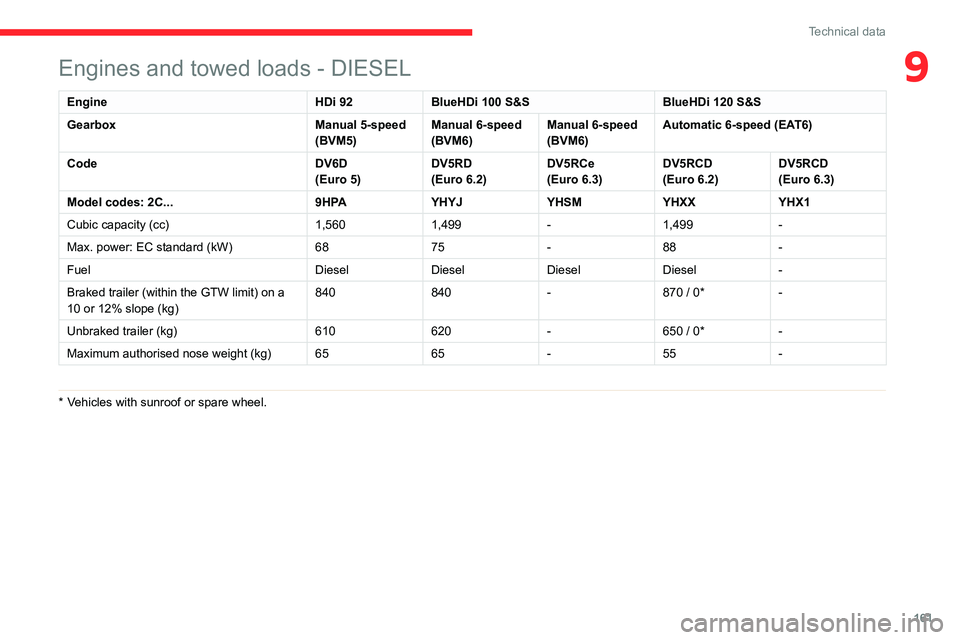
9Engines and towed loads - DIESEL
Engine HDi 92BlueHDi 100 S&S BlueHDi 120 S&S
Gearbox Manual 5-speed
(BVM5)Manual 6-speed
(BVM6)Manual 6-speed
(BVM6)Automatic 6-speed (EAT6)
Code DV6D
(Euro 5)DV5RD(Euro 6.2)DV5RCe(Euro 6.3)DV5RCD(Euro 6.2)DV5RCD(Euro 6.3)
Model codes: 2C...9HPAYHYJYHSMYHXXYHX1
Cubic capacity (cc) 1,5601,499-1,499-
Max. power: EC standard (kW) 6875-88-
Fuel DieselDieselDieselDiesel-
Braked trailer (within the GTW limit) on a
10 or 12% slope (kg) 840
840-
870 / 0*-
Unbraked trailer (kg) 610620-
650 / 0*-
Maximum authorised nose weight (kg) 6565-55-
* Vehicles with sunroof or spare wheel.
Page 195 of 244
193
CITROËN Connect Nav
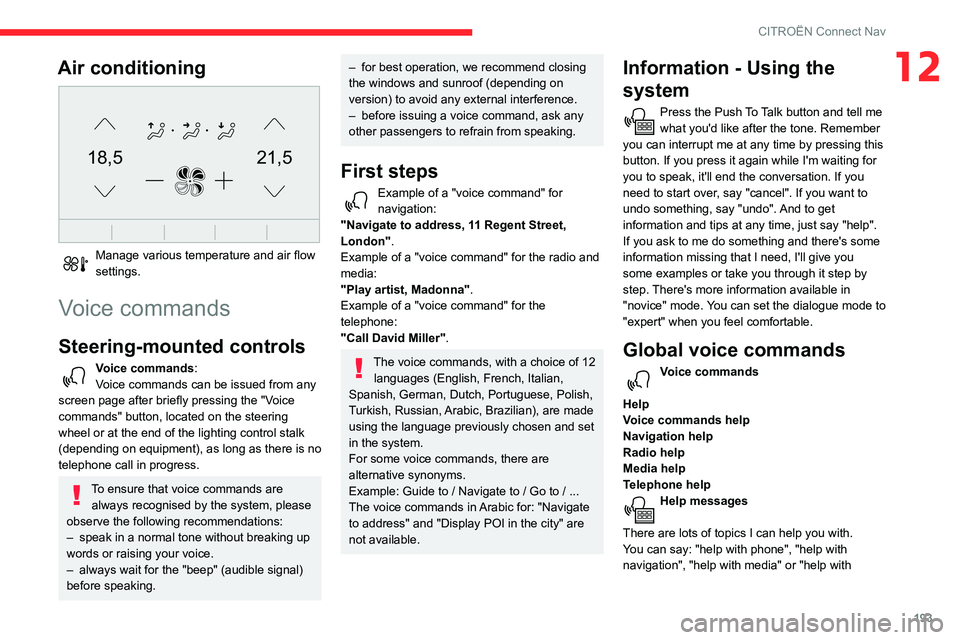
12Air conditioning
21,518,5
Manage various temperature and air flow settings.
Voice commands
Steering-mounted controls
Voice commands:
Voice commands can be issued from any
screen page after briefly pressing the "Voice
commands" button, located on the steering
wheel or at the end of the lighting control stalk
(depending on equipment), as long as there is no
telephone call in progress.
To ensure that voice commands are always recognised by the system, please
observe the following recommendations:
– speak in a normal tone without breaking up words or raising your voice.– always wait for the "beep" (audible signal) before speaking.
– for best operation, we recommend closing the windows and sunroof (depending on version) to avoid any external interference.– before issuing a voice command, ask any other passengers to refrain from speaking.
First steps
Example of a "voice command" for navigation:
"Navigate to address, 11 Regent Street,
London" .
Example of a "voice command" for the radio and
media:
"Play artist, Madonna".
Example of a "voice command" for the
telephone:
"Call David Miller".
The voice commands, with a choice of 12 languages (English, French, Italian,
Spanish, German, Dutch, Portuguese, Polish,
Turkish, Russian, Arabic, Brazilian), are made
using the language previously chosen and set
in the system.
For some voice commands, there are
alternative synonyms.
Example: Guide to / Navigate to / Go to / ...
The voice commands in Arabic for: "Navigate
to address" and "Display POI in the city" are
not available.
Information - Using the
system
Press the Push To Talk button and tell me what you'd like after the tone. Remember
you can interrupt me at any time by pressing this
button. If you press it again while I'm waiting for
you to speak, it'll end the conversation. If you
need to start over, say "cancel". If you want to
undo something, say "undo". And to get
information and tips at any time, just say "help".
If you ask to me do something and there's some
information missing that I need, I'll give you
some examples or take you through it step by
step. There's more information available in
"novice" mode. You can set the dialogue mode to
"expert" when you feel comfortable.
Global voice commands
Voice commands
Help
Voice commands help
Navigation help
Radio help
Media help
Telephone help
Help messages
There are lots of topics I can help you with.
You can say: "help with phone", "help with
navigation", "help with media" or "help with
Page 220 of 244
218
Alphabetical index
R
Radio 166–167, 179–180, 182, 202–204Radio, digital (Digital Audio Broadcasting - DAB) 167, 181, 203–204Range, AdBlue 14, 133RDS 180, 203Rear screen, demisting 46–47Recharging the battery 154
Recirculation, air 44Recovery 156Reduction of electrical load 128Regeneration of the particle filter 134Reinitialisation of the under-inflation detection system 98Reinitialising the remote control 28Reminder, key in ignition 88Reminder, lighting on 56Remote control 23–26Removing a wheel 143–145Removing the mat 50Replacing bulbs 146–148Replacing fuses 150–152Replacing the air filter 134Replacing the oil filter 134Replacing the passenger compartment filter 134Reservoir, screenwash 133Resetting the trip recorder 16Reversing camera 99, 116–118Roof bars 129Running out of fuel (Diesel) 139
S
Safety, children 74–81, 83Saturation of the particle filter (Diesel) 134Screen, instrument panel 20Screen menu map 183Screen, monochrome 17Screen, multifunction (with audio system) 165Screenwash 61
Screenwash, front 61Screenwash, rear 61SCR (Selective Catalytic Reduction) 15, 135Seat angle 37Seat belts 70–72, 78Seat belts, rear 71Seats, front 36–37Seats, heated 38Seats, rear 38–40, 76Sensors (warnings) 99Serial number, vehicle 162Service indicator 13Servicing 13, 133Settings, equipment 16–19Settings, system 186, 209Sidelamps 55–57, 147–148Snow chains 97, 124–125Socket, 12 V accessory 48Socket, auxiliary 169, 182, 204Socket, Jack 169, 204Sockets, audio 49Speed limiter 101, 103–106Speed limit recognition 101–103
Speedometer 99Stability control (ESC) 67–68Starting a Diesel engine 123Starting the engine 87Starting the vehicle 87–89Starting using another battery 90, 153Station, radio 166, 179–180, 202–203Stay, bonnet 130Steering mounted controls,
audio 165, 177, 191Steering wheel, adjustment 41Stickers, customising ~ Stickers, expressive 138Stopping the vehicle 87–89Stop & Start 21, 43, 46, 95–97,
123, 130, 134, 155
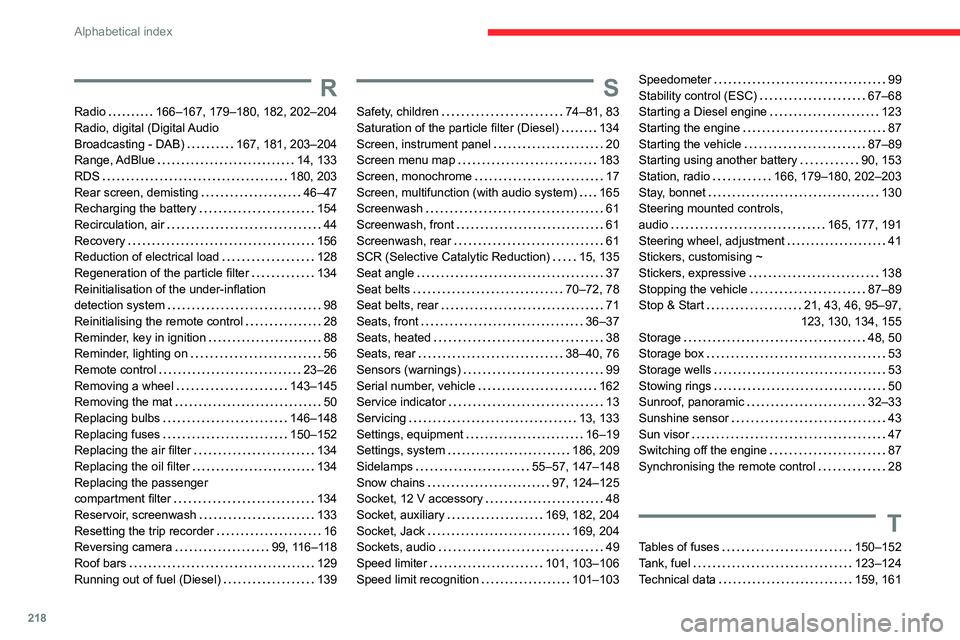
Storage 48, 50Storage box 53Storage wells 53Stowing rings 50Sunroof, panoramic 32–33Sunshine sensor 43Sun visor 47Switching off the engine 87Synchronising the remote control 28
T
Tables of fuses 150–152Tank, fuel 123–124Technical data 159, 161