heating CITROEN C3 AIRCROSS 2021 Handbook (in English)
[x] Cancel search | Manufacturer: CITROEN, Model Year: 2021, Model line: C3 AIRCROSS, Model: CITROEN C3 AIRCROSS 2021Pages: 244, PDF Size: 6.29 MB
Page 4 of 244
2
Contents
■
Overview
■
Eco-driving
1Instruments
Instrument panels 7
Warning and indicator lamps 8
Indicators 13
Distance recorders 16
Equipment configuration for vehicles
without screen
16
Monochrome screen C 17
Touch screen 18
Trip computer 19
Setting the date and time 21
2Access
Remote control 23
Keyless Entry and Starting 24
Emergency procedures 26
Doors 29
Boot 29
Central locking 30
Alarm 30
Panoramic sunroof 32
Electric windows 34
3Ease of use and comfort
Front seats 36
Rear seats 38
Steering wheel adjustment 41
Mirrors 41
Ventilation 42
Heating/Manual air conditioning 43
Automatic air conditioning 44
Front demist - defrost 46
Heated windscreen 46
Rear screen demist - defrost 46
Front fittings 47
Rear fittings 50
Boot fittings 51
Courtesy lamps 53
Interior ambient lighting 53
Boot lighting 54
4Lighting and visibility
Lighting control 55
Direction indicators (flashers) 56
Automatic illumination of headlamps 57
Daytime running lamps / Sidelamps 57
Automatic headlamp dipping 58
Headlamp beam height adjustment 59
Wiper control stalk 60
Changing a wiper blade 62
Automatic wipers 62
5Safety
General safety recommendations 64
Hazard warning lamps 64
Horn 65
Emergency or assistance call 65
Electronic stability control (ESC) 67
Grip control 68
Hill Assist Descent 69
Seat belts 70
Airbags 73
Child seats 75
Deactivating the front passenger airbag 77
ISOFIX child seats 80
i-Size child seats 83
child lock 84
6Driving
Driving recommendations 86
Starting / Switching off the engine
with the key
87
Starting / Switching off the engine
with Keyless Entry and Starting
89
Parking brake 91
5-speed manual gearbox 91
6-speed manual gearbox 91
Automatic gearbox (EAT6) 92
Gear efficiency indicator 94
Hill start assist 94
Stop & Start 95
Under-inflation detection 97
Driving and manoeuvring aids - General
recommendations
98
Head-up display 99
Memorising speeds 101
Speed Limit Recognition
and Recommendation
101
Speed limiter 104
Cruise control -
particular recommendations
106
Cruise control 106
Active Safety Brake with
Collision Risk Alert and Intelligent
emergency braking assistance
108
Distraction detection 111
Lane Departure Warning System 11 2
Page 6 of 244
4
Overview
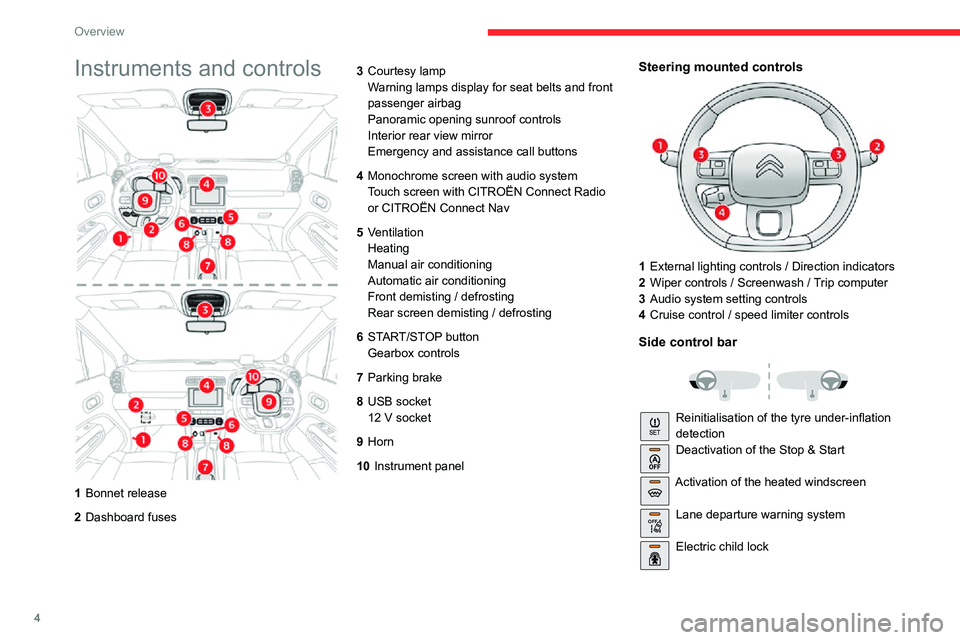
Instruments and controls
1Bonnet release
2 Dashboard fuses 3
Courtesy lamp
Warning lamps display for seat belts and front
passenger airbag
Panoramic opening sunroof controls
Interior rear view mirror
Emergency and assistance call buttons
4 Monochrome screen with audio system
Touch screen with CITROËN Connect Radio
or CITROËN Connect Nav
5 Ventilation
Heating
Manual air conditioning
Automatic air conditioning
Front demisting / defrosting
Rear screen demisting / defrosting
6 START/STOP button
Gearbox controls
7 Parking brake
8 USB socket
12 V socket
9Horn
10 Instrument panel
Steering mounted controls
1External lighting controls / Direction indicators
2 Wiper controls / Screenwash / Trip computer
3 Audio system setting controls
4 Cruise control / speed limiter controls
Side control bar
Reinitialisation of the tyre under-inflation
detectionDeactivation of the Stop & Start
Activation of the heated windscreen
OFF Lane departure warning system
Electric child lock
Page 14 of 244
12
Instruments
Indicators
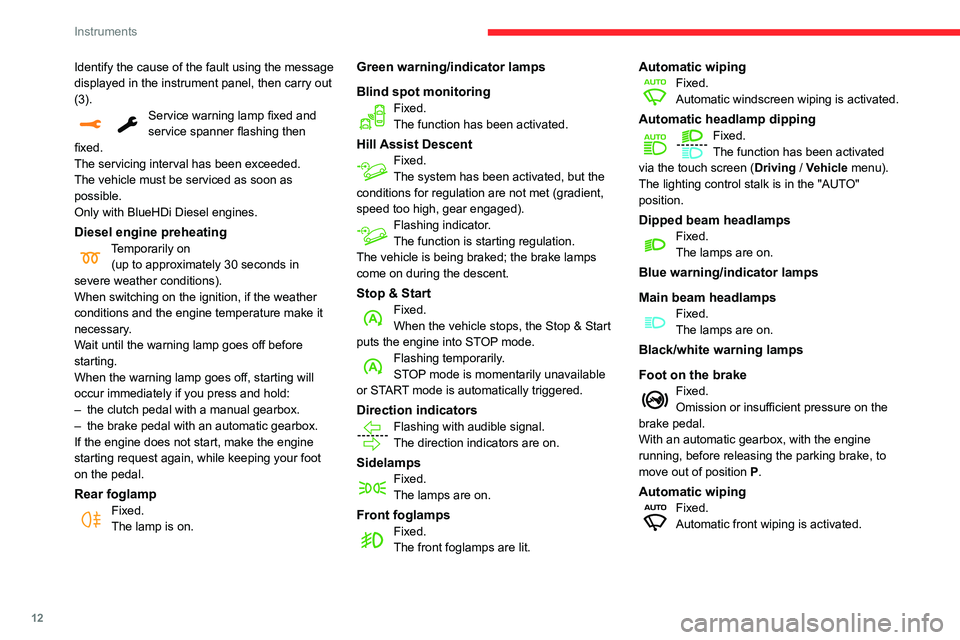
Engine coolant temperature
gauge
With the engine running:– in zone A, the temperature is correct,– in zone B, the temperature is too high; this
warning lamp and the central STOP warning
lamp come on in the instrument panel,
accompanied by the display of a message and
an audible signal.
You MUST stop as soon as it is safe to do so.
Wait a few minutes before switching off the
engine.
After first switching off the ignition, open the bonnet cautiously and check the
coolant level.
Identify the cause of the fault using the message displayed in the instrument panel, then carry out
(3).
Service warning lamp fixed and service spanner flashing then
fixed.
The servicing interval has been exceeded.
The vehicle must be serviced as soon as
possible.
Only with BlueHDi Diesel engines.
Diesel engine preheatingTemporarily on(up to approximately 30 seconds in
severe weather conditions).
When switching on the ignition, if the weather
conditions and the engine temperature make it
necessary.
Wait until the warning lamp goes off before
starting.
When the warning lamp goes off, starting will
occur immediately if you press and hold:
– the clutch pedal with a manual gearbox.– the brake pedal with an automatic gearbox.
If the engine does not start, make the engine
starting request again, while keeping your foot
on the pedal.
Rear foglampFixed.The lamp is on.
Green warning/indicator lamps
Blind spot monitoring
Fixed.The function has been activated.
Hill Assist DescentFixed.The system has been activated, but the
conditions for regulation are not met (gradient,
speed too high, gear engaged).
Flashing indicator.The function is starting regulation.
The vehicle is being braked; the brake lamps
come on during the descent.
Stop & StartFixed.When the vehicle stops, the Stop & Start
puts the engine into STOP mode.
Flashing temporarily.STOP mode is momentarily unavailable
or START mode is automatically triggered.
Direction indicatorsFlashing with audible signal.
The direction indicators are on.
SidelampsFixed.The lamps are on.
Front foglampsFixed.The front foglamps are lit.
Automatic wipingFixed.Automatic windscreen wiping is activated.
Automatic headlamp dippingFixed.The function has been activated
via the touch screen (Driving / Vehicle menu).
The lighting control stalk is in the "AUTO"
position.
Dipped beam headlampsFixed.The lamps are on.
Blue warning/indicator lamps
Main beam headlamps
Fixed.The lamps are on.
Black/white warning lamps
Foot on the brake
Fixed.Omission or insufficient pressure on the
brake pedal.
With an automatic gearbox, with the engine
running, before releasing the parking brake, to
move out of position P.
Automatic wipingFixed.Automatic front wiping is activated.
Page 20 of 244
18
Instruments
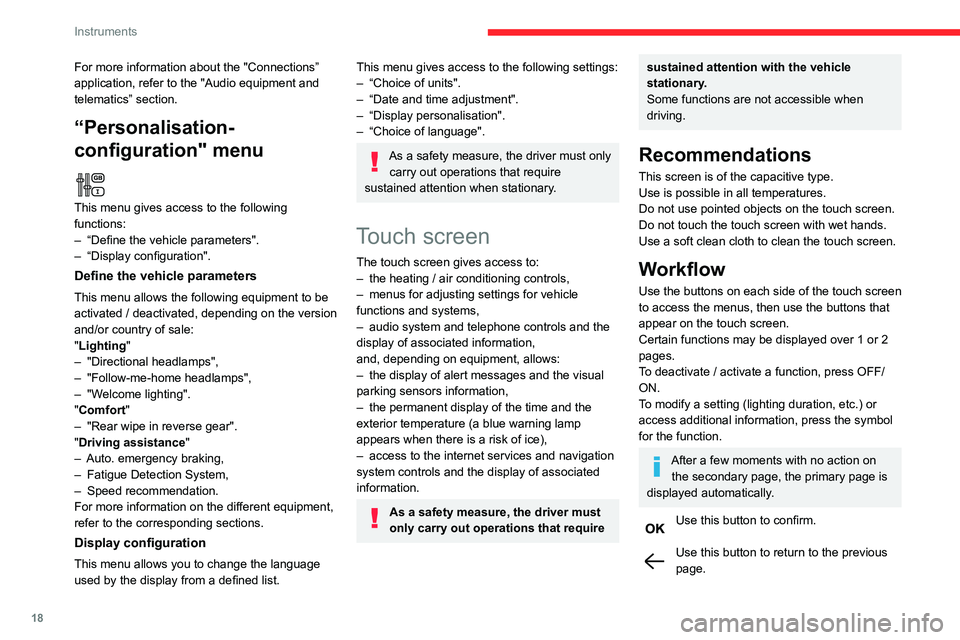
Menus
Radio Media.
See “Audio equipment and telematics”
section..
Mirror Screen or Connected navigation
(depending on equipment) .
See “Audio equipment and telematics” section..
Air conditioning.Allows adjustment of the various settings
for temperature, air flow, etc.
For more information on Heating, Manual air
conditioning and Automatic air conditioning ,
please refer to the corresponding sections.
Telephone.See “Audio equipment and telematics”
section..
Applications.
Allows the display of the connected
services available.
See “Audio equipment and telematics” section.
Vehicle or Driving (depending on
equipment) .
Allows the activation, deactivation and
adjustment of settings for certain functions.
For more information about the "Connections” application, refer to the "Audio equipment and
telematics” section.
“Personalisation-
configuration" menu
This menu gives access to the following
functions:
– “Define the vehicle parameters".– “Display configuration".
Define the vehicle parameters
This menu allows the following equipment to be
activated / deactivated, depending on the version
and/or country of sale:
"Lighting "
– "Directional headlamps",– "Follow-me-home headlamps",– "Welcome lighting"."Comfort"– "Rear wipe in reverse gear".
"Driving assistance"– Auto. emergency braking,– Fatigue Detection System,– Speed recommendation.For more information on the different equipment,
refer to the corresponding sections.
Display configuration
This menu allows you to change the language
used by the display from a defined list.
This menu gives access to the following settings:– “Choice of units".– “Date and time adjustment".– “Display personalisation".– “Choice of language".
As a safety measure, the driver must only
carry out operations that require
sustained attention when stationary.
Touch screen
The touch screen gives access to:– the heating / air conditioning controls,– menus for adjusting settings for vehicle functions and systems,– audio system and telephone controls and the display of associated information,
and, depending on equipment, allows:
– the display of alert messages and the visual parking sensors information,– the permanent display of the time and the exterior temperature (a blue warning lamp
appears when there is a risk of ice),
– access to the internet services and navigation system controls and the display of associated
information.
As a safety measure, the driver must
only carry out operations that require
sustained attention with the vehicle
stationary.
Some functions are not accessible when
driving.
Recommendations
This screen is of the capacitive type.
Use is possible in all temperatures.
Do not use pointed objects on the touch screen.
Do not touch the touch screen with wet hands.
Use a soft clean cloth to clean the touch screen.
Workflow
Use the buttons on each side of the touch screen
to access the menus, then use the buttons that
appear on the touch screen.
Certain functions may be displayed over 1 or 2
pages.
To deactivate / activate a function, press OFF/
ON.
To modify a setting (lighting duration, etc.) or
access additional information, press the symbol
for the function.
After a few moments with no action on the secondary page, the primary page is
displayed automatically.
Use this button to confirm.
Use this button to return to the previous page.
Page 21 of 244
19
Instruments
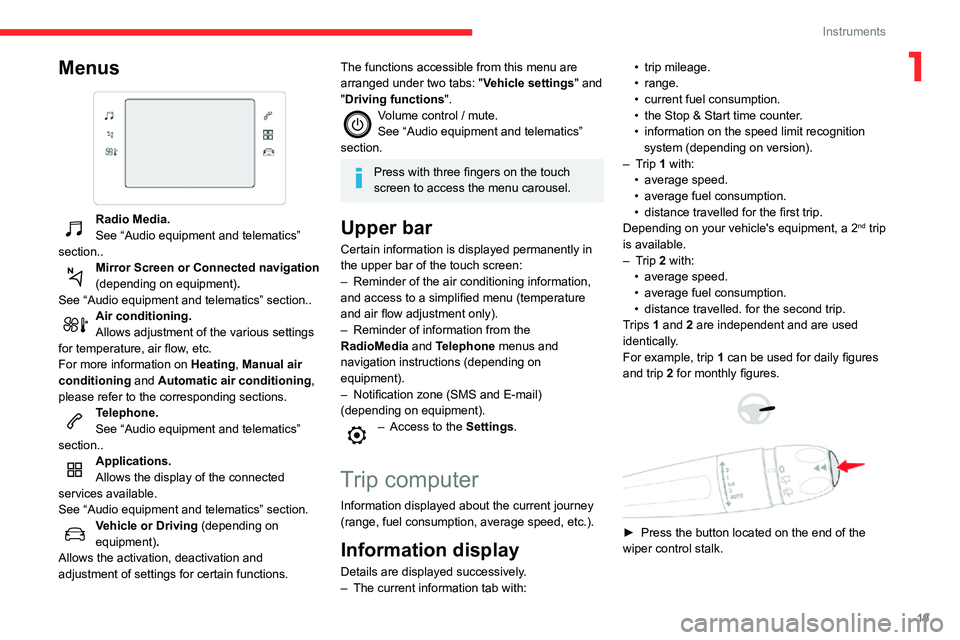
1Menus
Radio Media.
See “Audio equipment and telematics”
section..
Mirror Screen or Connected navigation
(depending on equipment) .
See “Audio equipment and telematics” section..
Air conditioning.Allows adjustment of the various settings
for temperature, air flow, etc.
For more information on Heating, Manual air
conditioning and Automatic air conditioning ,
please refer to the corresponding sections.
Telephone.See “Audio equipment and telematics”
section..
Applications.
Allows the display of the connected
services available.
See “Audio equipment and telematics” section.
Vehicle or Driving (depending on
equipment) .
Allows the activation, deactivation and
adjustment of settings for certain functions.
The functions accessible from this menu are
arranged under two tabs: " Vehicle settings" and
"Driving functions ".
Volume control / mute.See “Audio equipment and telematics”
section.
Press with three fingers on the touch
screen to access the menu carousel.
Upper bar
Certain information is displayed permanently in
the upper bar of the touch screen:
– Reminder of the air conditioning information, and access to a simplified menu (temperature
and air flow adjustment only).
– Reminder of information from the RadioMedia and Telephone menus and
navigation instructions (depending on
equipment).
– Notification zone (SMS and E-mail) (depending on equipment).– Access to the Settings.
Trip computer
Information displayed about the current journey
(range, fuel consumption, average speed, etc.).
Information display
Details are displayed successively.– The current information tab with:
• trip mileage.• range.• current fuel consumption.• the Stop & Start time counter .• information on the speed limit recognition system (depending on version).– Trip 1 with:• average speed.• average fuel consumption.• distance travelled for the first trip.Depending on your vehicle's equipment, a 2nd trip
is available.
– Trip 2 with:• average speed.• average fuel consumption.• distance travelled. for the second trip.Trips 1 and 2 are independent and are used
identically.
For example, trip 1 can be used for daily figures
and trip 2 for monthly figures.
► Press the button located on the end of the
wiper control stalk.
Page 40 of 244

38
Ease of use and comfort
To return to the normal position, guide the
backrest backwards until it locks into place.
This position, together with that of the rear seats,
allows you to transport long objects inside the
vehicle.
Before moving the seat backwards,
ensure that there is nothing that might
prevent the full travel of the seat.
When the front passenger seat is fully folded,
only the outer rear seat behind the driver can
be occupied by a passenger.
Do not place hard, heavy or sharp
objects in the centre of the backrest to
ensure that you don't damage rear lining
behind the backrest.
When sharp deceleration occurs, objects
placed on the folded backrest can turn into
dangerous projectiles.
Heated seats
► With the engine running, use the adjustment knob to switch on and select the level of heating
required:
0
: Off.
1 : Low.
2 : Medium.
3 : High.
The front seats can be heated individually.
Prolonged use of heated seats is not
recommended for people with sensitive
skin.
There is a risk of burns for people whose
perception of heat is impaired (illness, taking
medication, etc.).
To keep the heated pad intact and to prevent
a short circuit:
– Do not place heavy or sharp objects on the seat.– Do not kneel or stand on the seat.
– Do not spill liquids onto the seat.– Never use the heating function if the seat is damp.
Rear seats
Bench seat with a fixed cushion or on rails
(depending on version) and split folding
backrests (2/3-1/3) to adapt the boot loading
space.
Rear head restraints
They have two positions:– a high position , for when the seat is in use:► pull the head restraint fully up.– a low position, for stowing, when the seat is
not in use:
► press the lug A to release the head
restraint and push it fully down.
Page 45 of 244

43
Ease of use and comfort
33.Adjustable and closable side air vents
4. Adjustable and closable central air vents
5. Air outlets to the front footwells
6. Air outlets to the rear footwells
Advice
Using the ventilation and air
conditioning system
► To ensure that air is distributed evenly, keep the external air intake grilles at the base
of the windscreen, the nozzles, the vents, the
air outlets and the air extractor in the boot
free from obstructions.
► Do not cover the sunshine sensor located on the dashboard; this sensor is used to
regulate the automatic air conditioning
system.
► Operate the air conditioning system for at least 5 to 10 minutes once or twice a month to
keep it in perfect working order.
► If the system does not produce cold air , switch it off and contact a CITROËN dealer or
a qualified workshop.
When towing the maximum load on a steep
gradient in high temperatures, switching off
the air conditioning increases the available
engine power, enhancing the towing capacity.
Avoid driving for too long with the
ventilation off or with prolonged operation
of interior air recirculation. Risk of misting and
deterioration of the air quality!
If the interior temperature is very high after the vehicle has stood for a long
time in the sunshine, air the passenger
compartment for a few moments.
Put the air flow control at a setting high
enough to quickly change the air in the
passenger compartment.
Condensation created by the air
conditioning results in a discharge of
water underneath the vehicle. This is perfectly
normal.
Servicing the ventilation and air
conditioning system
► Ensure that the passenger compartment filter is in good condition and have the filter
elements replaced regularly.
We recommend using a composite passenger
compartment filter. Thanks to its special active
additive, this type of filter helps to purify the
air breathed by the occupants and keep the
passenger compartment clean (by reducing
allergic symptoms, unpleasant odours and
greasy deposits).
► To ensure correct operation of the air conditioning system, have it checked
according to the recommendations in the
Maintenance and Warranty Guide.
Stop & Start
The heating and air conditioning systems
only operate when the engine is running.
Temporarily deactivate the Stop & Start
system to maintain a comfortable temperature
in the passenger compartment.
For more information on the Stop & Start,
refer to the corresponding section.
Heating/Manual air
conditioning
The heating only operates when the engine is
running.
The manual air conditioning operates when the
engine is running.
1. Recirculation of interior air
2. Temperature adjustment
3. Air distribution adjustment
4. Air flow adjustment
5. Air conditioning on/off
Page 46 of 244

44
Ease of use and comfort
Adjusting the temperature
► Turn the control from blue (cold) to red (hot) to adjust the temperature to your liking.
Adjusting the air flow
► Turn the knob 4 to obtain a comfortable air
flow.
Adjusting the air distribution
Central and side air vents.
Footwells.
Windscreen and side windows.
The air distribution can be adapted by
combining the corresponding buttons.
Air conditioning ON / OFF
The air conditioning is designed to operate
effectively in all seasons, with the windows
closed.
It enables you to:
– lower the temperature, in summer ,– increase the effectiveness of the demisting in winter, above 3°C.► Press this button to switch the air conditioning on/off.
The air conditioning does not operate
when the air flow adjustment is set to off.
Automatic air conditioning
The air conditioning operates with the engine
running, but the ventilation and its controls can
be accessed with the ignition on.
Operation of the air conditioning and regulation
of temperature, air flow and air distribution in the
passenger compartment are automatic.
Press the Climate menu button to access
the system controls.
1. Temperature adjustment
2. Air flow adjustment
3. Air distribution adjustment
4. Air conditioning on/off
5. Automatic comfort programme on/off
6. Recirculation of interior air
7. Access to the secondary page
Temperature adjustment
► Press one of the buttons 1 to increase (red)
or decrease (blue) the value.
The value displayed corresponds to a level of
comfort and not to a precise temperature.
For maximum cooling or heating of the
passenger compartment, press the
temperature setting button up or down until
LO or HI is displayed.
Automatic comfort programme
Activation/Deactivation
► Press button 5 to activate or deactivate the
air conditioning system’s automatic mode.
The air conditioning system operates
automatically: the system optimises the
temperature, air flow and air distribution in the
passenger compartment based on the comfort
level selected.
► Go to the secondary page by pressing button 7 to adjust the automatic comfort programme by
choosing one of the available settings.
“Soft”: provides soft and quiet operation by
limiting air flow.
“Normal”: offers the best compromise between
a comfortable temperature and quiet operation
(default setting).
“Fast”: provides strong and effective air flow.
Mode AUTO► To change the settings, press the button several times.
The setting is associated with AUTO mode only. However, when AUTO mode is deactivated, the
previous selection is retained.
Changing the setting does not reactivate AUTO
mode if this was deactivated.
In cold weather with the engine cold, the
air flow is increased gradually until the
comfort setting has been reached, in order to
limit the delivery of cold air into the passenger
compartment.
On entering the vehicle, if the interior
temperature is much colder or warmer than
the comfort setting requested, there is no
need to alter the value displayed to reach
the required level of comfort more quickly.
The system automatically corrects the
temperature difference as quickly as possible.
Air flow adjustment
► Press one of the buttons 2 (- or +) to increase
or decrease air flow.
The air flow symbol (a fan) is filled in according
to the request.
When the air flow is reduced to a minimum,
ventilation stops.
"OFF " is displayed alongside the fan.
Adjusting the air distribution
► Press the buttons 3 to adjust the air flow
distribution inside the passenger compartment.
Page 47 of 244

45
Ease of use and comfort
3The setting is associated with AUTO mode only.
However, when AUTO mode is deactivated, the
previous selection is retained.
Changing the setting does not reactivate AUTO
mode if this was deactivated.
In cold weather with the engine cold, the
air flow is increased gradually until the
comfort setting has been reached, in order to
limit the delivery of cold air into the passenger
compartment.
On entering the vehicle, if the interior
temperature is much colder or warmer than
the comfort setting requested, there is no
need to alter the value displayed to reach
the required level of comfort more quickly.
The system automatically corrects the
temperature difference as quickly as possible.
Air flow adjustment
► Press one of the buttons 2 (- or +) to increase
or decrease air flow.
The air flow symbol (a fan) is filled in according
to the request.
When the air flow is reduced to a minimum,
ventilation stops.
"OFF " is displayed alongside the fan.
Adjusting the air distribution
► Press the buttons 3 to adjust the air flow
distribution inside the passenger compartment.
Windscreen.
Central and side air vents.
Footwells.
Each press on a button activates or deactivates
the function.
All three buttons can be activated simultaneously. In this case, priority is
given to the air flows from the central and side
air vents, and from those in the passenger
footwells.
Air conditioning on / off
The air conditioning system is designed to
operate effectively in all seasons, with the
windows closed.
It is used to:
– lower the temperature in summer ,– increase the effectiveness of the demisting in winter, above 3°C.
► Press button 4 to turn the air conditioning on/
off.
When the indicator lamp is on, the air
conditioning function is activated.
The air conditioning cannot operate when the air flow adjustment is set to OFF.
Ventilation function with the
ignition on
When the ignition is switched on, you can
use the ventilation system to adjust the air
flow settings and the air distribution in the
passenger compartment for a duration which
depends on the battery charge.
This function does not operate the air
conditioning.
Recirculation of interior air
The intake of exterior air helps avoid and
eliminate misting of the windscreen and side
windows.
Recirculating the interior air isolates the
passenger compartment from exterior odours
and fumes.
When required, this function also allows
faster heating or cooling of the air in the
passenger compartment.
► Press button 6 to recirculate the interior air or
allow the intake of exterior air.
Avoid prolonged use of interior air recirculation (due to the risk of misting
and deteriorating air quality).
Page 50 of 244
48
Ease of use and comfort
Glove box
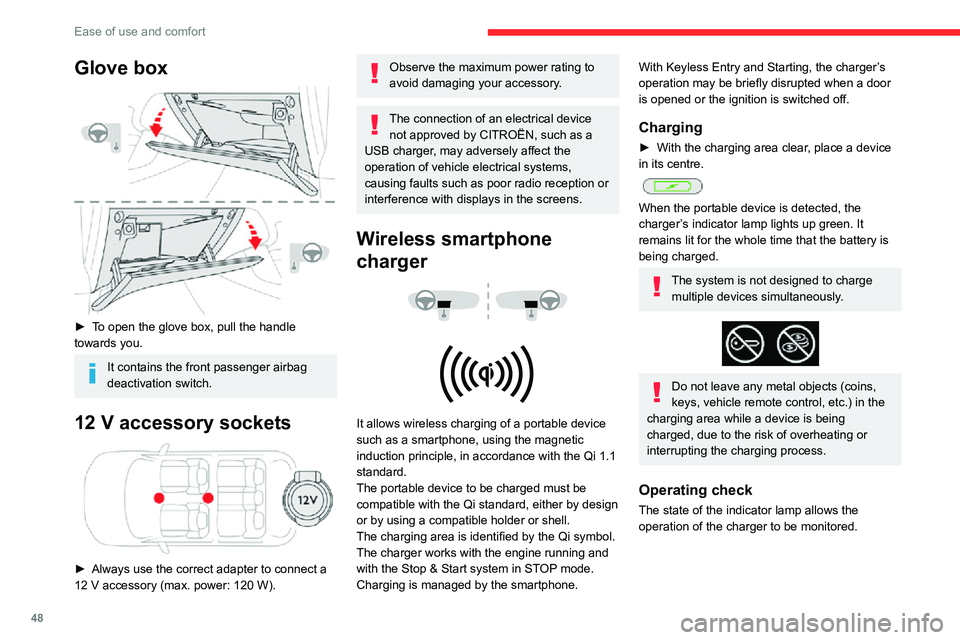
► To open the glove box, pull the handle
towards you.
It contains the front passenger airbag
deactivation switch.
12 V accessory sockets
► Always use the correct adapter to connect a
12 V accessory (max. power: 120 W).
Observe the maximum power rating to
avoid damaging your accessory.
The connection of an electrical device not approved by CITROËN, such as a
USB charger, may adversely affect the
operation of vehicle electrical systems,
causing faults such as poor radio reception or
interference with displays in the screens.
Wireless smartphone
charger
It allows wireless charging of a portable device
such as a smartphone, using the magnetic
induction principle, in accordance with the Qi 1.1
standard.
The portable device to be charged must be
compatible with the Qi standard, either by design
or by using a compatible holder or shell.
The charging area is identified by the Qi symbol.
The charger works with the engine running and
with the Stop & Start system in STOP mode.
Charging is managed by the smartphone.
With Keyless Entry and Starting, the charger’s
operation may be briefly disrupted when a door
is opened or the ignition is switched off.
Charging
► With the charging area clear , place a device in its centre.
When the portable device is detected, the
charger’s indicator lamp lights up green. It
remains lit for the whole time that the battery is
being charged.
The system is not designed to charge
multiple devices simultaneously.
Do not leave any metal objects (coins,
keys, vehicle remote control, etc.) in the
charging area while a device is being
charged, due to the risk of overheating or
interrupting the charging process.
Operating check
The state of the indicator lamp allows the
operation of the charger to be monitored.