navigation system Citroen C3 PICASSO 2013 1.G Owner's Manual
[x] Cancel search | Manufacturer: CITROEN, Model Year: 2013, Model line: C3 PICASSO, Model: Citroen C3 PICASSO 2013 1.GPages: 284, PDF Size: 8.85 MB
Page 44 of 284

Multifunction screens
42
Displays in the eMyWay
s
ystem colour screen
Display confi guration
This menu allows you to adjust the brightness
of the display, the display contrast and the colour of the map (day/night and auto mode), to
set the date and time, the date format, the time format... Set the date and time) Press the SETUP button.)
Select the "Date & Time" function and
press the dial to confirm.
) Select the "Set date & time" function and
press the dial to confirm.
Voice synthesis
This menu allows you to manage the voicesynthesis.
For more information, refer to the "Audio and
telematics" section.
Vehicle parameters
This menu allows you to activate or deactivatecertain systems. This displa
ys the following information:
- time,
- date,
- audio functions,
- navigation system information.
"SETUP" menu
Press the SETUP button to access the
"SETUP"
menu. It gives you access to thefollowing functions:
- Display configuration,
- Voice synthesis,
- Vehicle parameters,
- Tr i p c o m p u t e r.
For safety reasons, configuration of the multifunction screen by the driver mustonly be done when stationary.
Tr ip computer
This menu allows you to display trip computer
information.
)Adjust the settings using the directionalarrows one by one, confirming with the dial.)Select the "Date format" function and press
the dial to confirm. )Confirm the desired format with the dial. )Select the "Time format" function andpress the dial to confirm. )Confirm the desired format with the dial.
Page 51 of 284

2
Multifunction screens
49
Tr ip computer, a few definitions
When the range falls below 20 miles (30 km),
dashes are displayed. After filling with at least5 litres of fuel, the range is recalculated and is
displayed when it exceeds 60 miles (10 0 km).
Range
(miles or km)The distance which can still be
travelled with the fuel remainingin the tank. Related to theaverage fuel consumption over
the last few miles (kilometres)travelled.
Current fuel consumption
(mpg or l/100 km or km/l)
Calculated over the last few seconds.
Average fuel consumption
(mpg or l/100 km or km/l)
Calculated since the last trip
computer reset.
Distance travelled
(miles or km)
Calculated since the last tripcomputer reset.
Average speed
(mph or km/h)Calculated since the last trip computer reset.
Distance remaining todestination
(miles or km)This is the distance remaining to be
travelled to the final destination. It
is either calculated instantly by the
navigation system, if guidance isactivated, or entered by the user.
If the distance is not entered, dashes
are displayed in place of the digits.
Stop & Start time counter
(minutes / seconds or hours / minutes)
If your vehicle is fitted with Stop & Star t, a time counter calculates the
time spent in STOP mode during a journey.
It resets to zero ever
y time theignition is switched on with the key.
If dashes are displayed continuouslywhile driving in place of the digits, contact a CITROËN dealer or aqualified workshop.
This value may vary following a changein the style of driving or the relief,resulting in a significant change in thecurrent fuel consumption.
This function is only displayed from 20 mph (30 km/h).
Page 177 of 284
11
Practical information
175
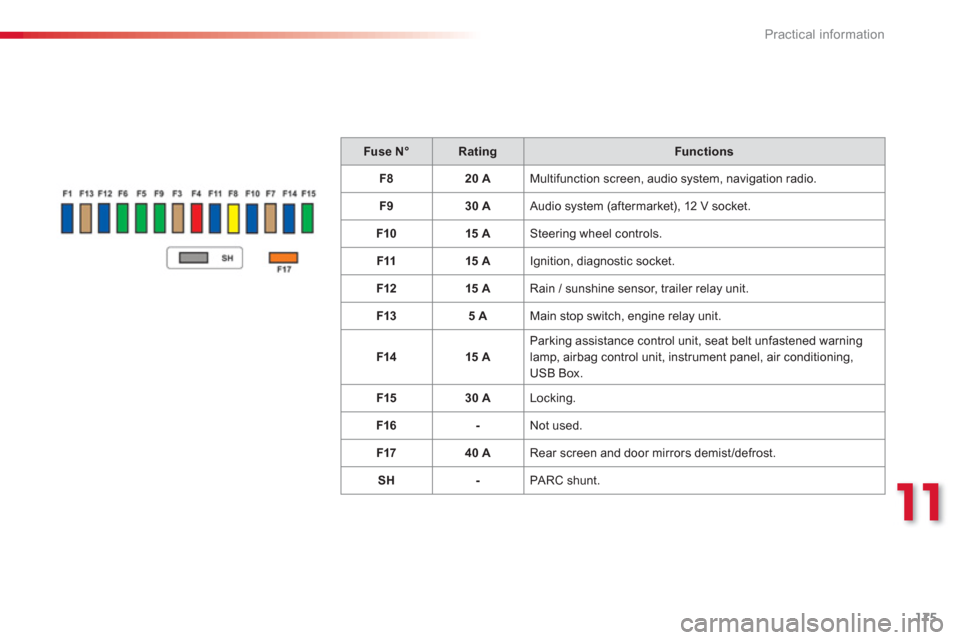
Fuse N°RatingFunctions
F
820 A Multifunction screen, audio system, navigation radio.
F
930 A Audio system (aftermarket), 12 V socket.
F1
015 A Steering wheel controls.
F1115 A
Ignition, diagnostic socket.
F12 15 A
Rain / sunshine sensor, trailer rela
y unit.
F1
35 A Main stop switch, engine relay unit.
F1415 A Parking assistance control unit, seat belt unfastened warninglamp, airbag control unit, instrument panel, air conditioning,USB Box.
F1
530 A Locking.
F1
6- Not used.
F1740 A
Rear screen and door mirrors demist/defrost.
S
H- PA RC shunt.
Page 184 of 284
Practical information
182
Energy economy mode
These functions are reactivated automaticallythe next time the vehicle is driven. )In order to resume the use of these
functions immediately, star t the engine and
let it run for a few minutes.
The time available to you will then be double
the period for which the engine is left running. However, this period will always be betweenfive and thir ty minutes.
Switching to economy mode
Once this period has elapsed, a message
appears on the multifunction screen indicating
that the vehicle has switched to economy mode
and the active functions are put on standby.
A flat battery prevents the engine from starting (refer to the corresponding paragraph).
If the telephone is being used at the same time on the eMyWay audionavigation system, it will be interrupted after 10 minutes. S
ystem which manages the period of use of certain functions to conserve a sufficient level
of charge in the battery.
After the engine has stopped, you can still use functions such as the audioequipment, windscreen wipers, dipped
beam headlamps, cour tesy lamps, etc. for a maximum combined period of thirty minutes.
This period may be greatly reduced if the
battery is not fully charged.
Page 191 of 284
11
Practical information
189
"Multimedia":
semi-integral navigation systems, Bluetooth®
hands free kit, audio systems interfaced to steering mounted controls, speakers, DVD player, USB box, por table navigation systems,mapping update CD, Hi-Fi module, drivingaid assistant, Wi-Fi on board, rear multimediasupport, telephone and smartphone carriers, iPhone ®
charger, head-up display...®
or accessories which are not recommended by CITROËN may resultin a failure of your vehicle's electronicsystem and excessive electrical consumption. Please note this precaution. Youare advised to contact a CITROËNrepresentative to be shown the range of recommended equipment and
accessories.
Installation of radio communication transmitters
Before installing any after-market radio communication transmitter, you can
contact a CITROËN dealer for the specification of transmitters which canbe fitted (frequency, maximum power, aerial position, specific installationrequirements), in line with the VehicleElectromagnetic Compatibility Directive(2004/10 4/EC).
By visiting a CITROËN dealer, you canalso obtain cleaning and maintenance products (interior and exterior), including the ecological products inthe "TECHNATURE" range, productsfor topping up (screenwash fluid...), touch-up pens and paint aerosols theexact colour of your vehicle, recharges (cartridge for the temporary puncturerepair kit...), ....
Depending on the legislation in force in the country, it may be compulsoryto have a high visibility safety vest, warning triangle and spare bulbs and fuses available in the vehicle. The fitting of electrical equipment
Page 203 of 284
201
The system is protected in such a way that it will onlyoperate in your vehicle.
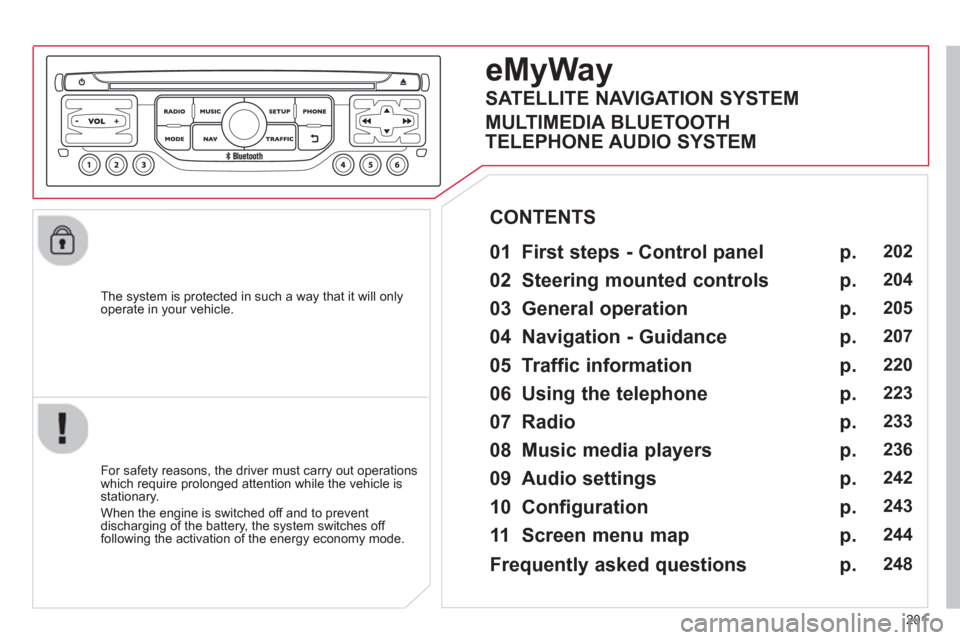
eMyWay
01 First steps - Control panel
For safety reasons, the driver must carry out operations
which require prolonged attention while the vehicle is stationary.
When the en
gine is switched off and to prevent
discharging of the battery, the system switches off following the activation of the energy economy mode.
CONTENTS
02 Steerin
g mounted controls
03 General o
peration
04 Navi
gation - Guidance
05 Traffic information
06 Usin
g the telephone
07 Radio
08 Music media pla
yers
09 Audio settin
gs
10 Confi
guration
11 Screen menu ma
p
p.
p.
p.
p.
p.
p.
p.
p.
p.
p.
p.
202
204
205
207
220
223
233
236
242
243
244
SATELLITE NAVIGATION SYSTEM
MULTIMEDIA BLUETOOTH
TELEPHONE AUDIO SYSTEM
Frequentl
y asked questions p. 248
Page 205 of 284
203
01
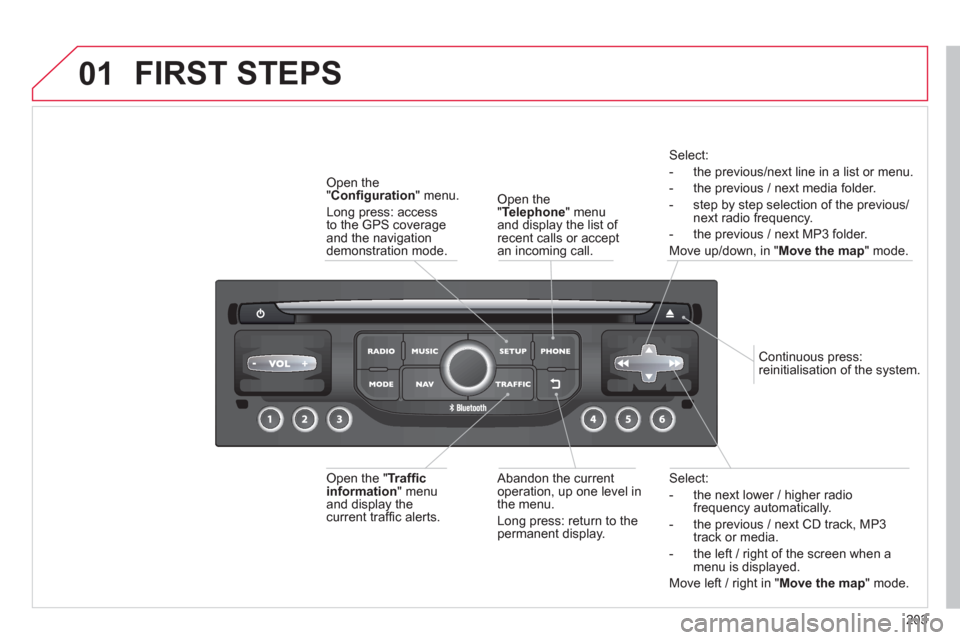
Select:
- the next lower / hi
gher radiofrequency automatically.
- the previous
/ next CD track, MP3
track or media.
- the le
ft / right of the screen when a menu is displayed.
Move left / ri
ght in "Move the map
" mode.
Abandon the current
operation, up one level in
t
he menu.
Long press: return to the permanent display.
Continuous
press:
reinitialisation of the system.
Open the" Telephone" menu
and display the list of recent calls or accept
an incoming call.
Open the
"Confi guration
" menu.
Lon
g press: access
to the GPS coverageand the navigation demonstration mode.
Open the "Traffi c information " menuand display thecurrent traffi c alerts.
Select:
- the previous
/next line in a list or menu.
- the previous
/ next media folder.
- step b
y step selection of the previous/next radio frequency.
- the previous / next MP3 folder.
Move up/down, in "
Move the map " mode.
FIRST STEPS
Page 211 of 284
209
04
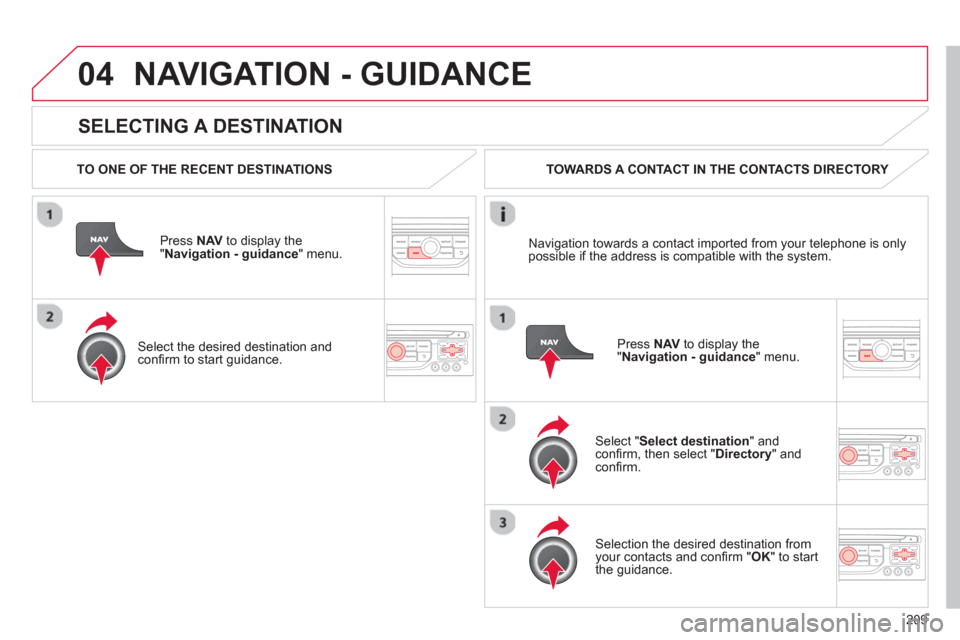
SELECTING A DESTINATION
NAVIGATION - GUIDANCE
TO ONE OF THE RECENT DESTINATIONS
Press NAV
to display the"Navigation - guidance" menu.
Select the desired destination and confi rm to start guidance. TOWARDS A CONTACT IN THE CONTACTS DIRECTORY
Select " Select destination" andconfi rm, then select " Directory " and confi rm.
Selection the desired destination from your contacts and confi rm "OK
" to start
the guidance.
Pr
ess NAVto display the"Navigation - guidance
" menu. Navi
gation towards a contact imported from your telephone is only
possible if the address is compatible with the system.
Page 215 of 284

213
04
ALERT PARAMETERS
RISK AREAS
Select:
- "Vi
sual alert"
- "A
udible alert"
-
"Alert only in guidance"
- "
Overspeed alarm only".
Th
e choice of time of notifi cation defi nes how long in advance that Risk area
warnings are given.
Select " OK
" to confi rm the screen.
Select " Guidance options
" and confi rm,
then select "Set parameters for riskareas
" and confi rm.
These
functions are only available if risk areas have been
downloaded and installed on the system.
The detailed procedure for updatin
g risk area POIs can be found at
www.citroen.com.
Press NAVto display the " Navigation - guidance" menu.
Page 217 of 284

215
04NAVIGATION - GUIDANCE
ROUTE OPTIONS
CALCULATION CRITERIA
Select " Guidance options
" and confi rm.
Select " OK
" and confi rm to save themodifi cations.
Select " Defi ne calculation criteria" andconfi rm.
Thi
s function allows modifi cation of:
- the
guidance criteria: (" Fastest
route", " Shortest route", "Distance/Time "),
- the exclusion criteria:
(" With tolls"or "With Ferry
"),
- traffi c avoidance:
(" Traffi c info
").
Press NAV
to display the"Navigation - guidance" menu.
I
f traffi c avoidance (Traffi c info) is selected, the system suggests
an alternative route if there is a delay on the guidance route.