service Citroen C4 2008 1.G User Guide
[x] Cancel search | Manufacturer: CITROEN, Model Year: 2008, Model line: C4, Model: Citroen C4 2008 1.GPages: 257, PDF Size: 8.06 MB
Page 201 of 257
10
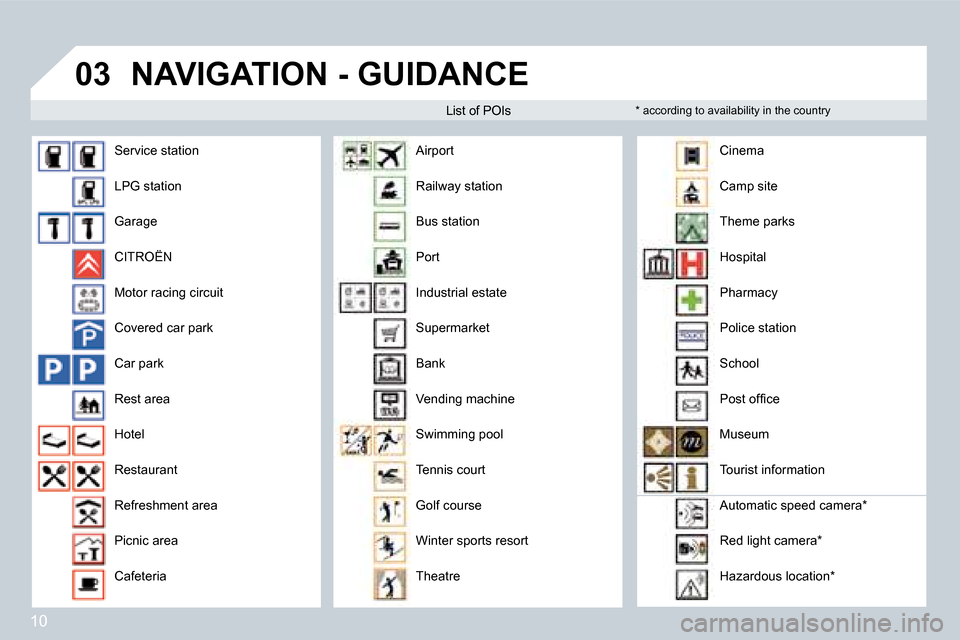
03NAVIGATION - GUIDANCE
Service station
LPG station
Garage
CITROËN
Motor racing circuit
Covered car park
Car park
Rest area
Hotel
Restaurant
Refreshment area
Picnic area
Cafeteria Airport
Railway station
Bus station
Port
Industrial estate
Supermarket
Bank
Vending machine
Swimming pool
Tennis court
Golf course
Winter sports resort
Theatre Cinema
Camp site
Theme parks
Hospital
Pharmacy
Police station
School
Post ofice
Museum
Tourist information
Automatic speed camera*
Red light camera*
Hazardous location*
List of POIs
* according to availability in the country
Page 208 of 257
17
07
1
3
5
4
2
1
2
The services offered by the telephone depend on the network, the SIM card and the compatibility of
the Bluetooth equipment used. Refer to your telepho ne's manual and your operator to check which
services you have access to. A list of mobile telep hones which offer the best range of services is
available from dealers.
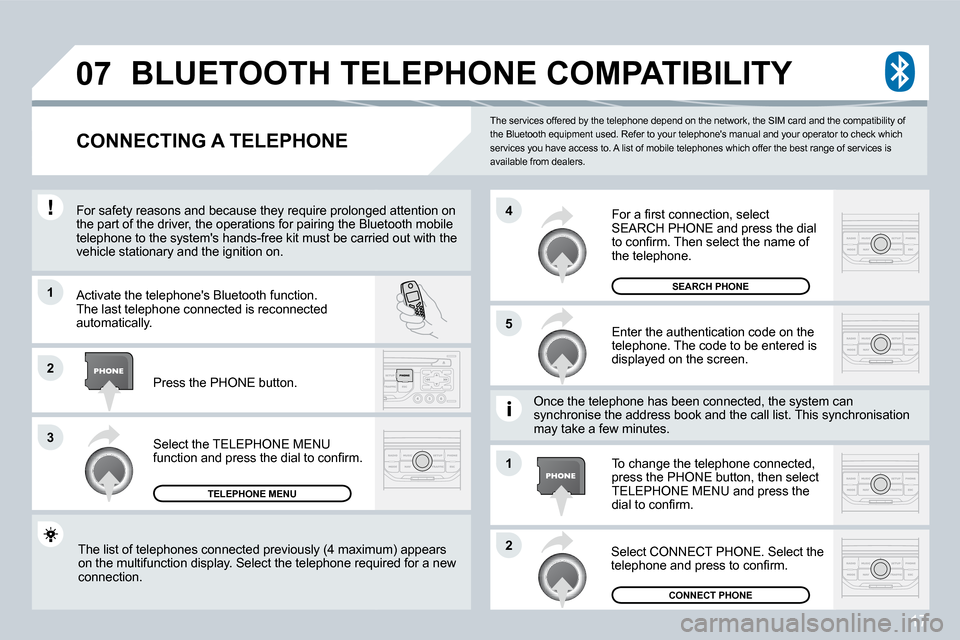
BLUETOOTH TELEPHONE COMPATIBILITY
CONNECTING A TELEPHONE
For safety reasons and because they require prolong ed attention on
the part of the driver, the operations for pairing the Bluetooth mobile
telephone to the system's hands-free kit must be ca rried out with the
vehicle stationary and the ignition on.
Activate the telephone's Bluetooth function.
The last telephone connected is reconnected
automatically.
Select the TELEPHONE MENU
function and press the dial to conirm.
TELEPHONE MENU
Enter the authentication code on the
telephone. The code to be entered is
displayed on the screen.
To change the telephone connected,
press the PHONE button, then select
TELEPHONE MENU and press the
dial to conirm.
Once the telephone has been connected, the system c
an
synchronise the address book and the call list. Thi s synchronisation
may take a few minutes.
Select CONNECT PHONE. Select the
telephone and press to conirm.
The list of telephones connected previously (4 maxi
mum) appears
on the multifunction display. Select the telephone required for a new
connection. Press the PHONE button.
For a irst connection, select
SEARCH PHONE and press the dial
to conirm. Then select the name of
the telephone.
SEARCH PHONE
CONNECT PHONE
Page 220 of 257

2
2
8
16
18 17711 14 3
5 9 4
15 12
13
61
10
01
FIRST STEPS
1. On/Off and Volume adjustment.
2. Selection of the source: radio, Jukebox, CD/DVD, CD
changer and auxiliary
(AUX, if activated on the Coniguration menu).
Long press: CD copy to hard disc.
3. Audio option adjustments: front/rear,
left/right balance, loudness, sound ambiences.
4. Displaying of the list of local radio stations, of the tracks on
the CD/DVD or of the MP3/USB/Jukebox directories.
Long press: updating of the local radio stations.
5. Automatic search for a lower/higher frequency. S election of
the previous/next CD/DVD, MP3, USB or Jukebox track .
Long press: fast forward and backward play.
6. Selection of the wavebands FM1, FM2, FMast, AM. 7. TA (Trafic Announcement) function on/off.
Long press: access to the PTY
(radio Programme TYpes) mode.
8. Ejection of the CD/DVD.
9. SIM card slot.
10. Keypad for entering descriptions by successive
presses.
11. Access to the "CITROËN" services menu.
12. Selection and conirmation.
13. Selection of the previous/next CD/DVD.
Selection of the previous/next MP3/USB/Jukebox dir ectory.14. Cancellation of the current operation.
Long press: return to the current application.
15. Displaying of the general menu.
16. Modiication of the screen display.
Long press: reinitialisation of the system.
17. Selection of the display on the screen from the
modes:
TRIP, TEL, NAV and AUDIO.
18. Long press on the SOS button: emergency call.
Page 227 of 257

9
6
81
2
3
4
7
03
Press the MENU button.
Turn the dial and select the MAP
function.
Press the dial to conirm the selection.
Turn the dial and select
the MAP DETAILS function.
Permits selection of the services
which can be seen on the map
(hotels, restaurants...).
ACTIONS ON THE MAP
MAP DETAILS
During the announcements, the volume of each speech
synthesis
function (guidance, trafic information...) can be a djusted directly by
means of the volume button.
GUIDANCE SPEECH
SYNTHESIS
Select the ADJUST SPEECH
SYNTHESIS function and press the
dial to conirm.
GPS
ADJUST SPEECH SYNTHESIS
DEACTIVATE
Press the dial then adjust the volume
of the speech synthesis or select the
DEACTIVATE function and press the
dial to conirm.
OK
Select OK and press the dial to
conirm.
Page 230 of 257
12
03
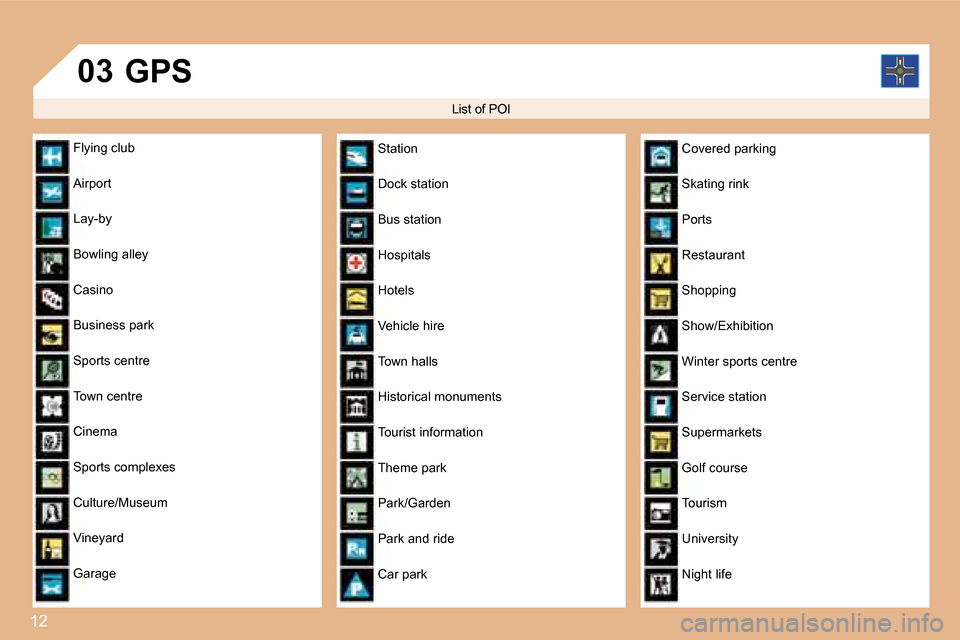
List of POI
GPS
Flying club
Airport
Lay-by
Bowling alley
Casino
Business park
Sports centre
Town centre
Cinema
Sports complexes
Culture/Museum
Vineyard
Garage Station
Dock station
Bus station
Hospitals
Hotels
Vehicle hire
Town halls
Historical monuments
Tourist information
Theme park
Park/Garden
Park and ride
Car parkCovered parking
Skating rink
Ports
Restaurant
Shopping
Show/Exhibition
Winter sports centre
Service station
Supermarkets
Golf course
Tourism
University
Night life
Page 252 of 257
34
1
4
2
3
3
3
4
4
2
4
3
4
4
4
4
4
3
2
3
4
4
4
4
3
3
3
3
4
4
3
3
5
5
5
3
3
2
3
5
5
3
2
4
3
5
4
3
4
3
4
4
3
3
4
4
4
4
4
3
5
4
5
5
2
3
4
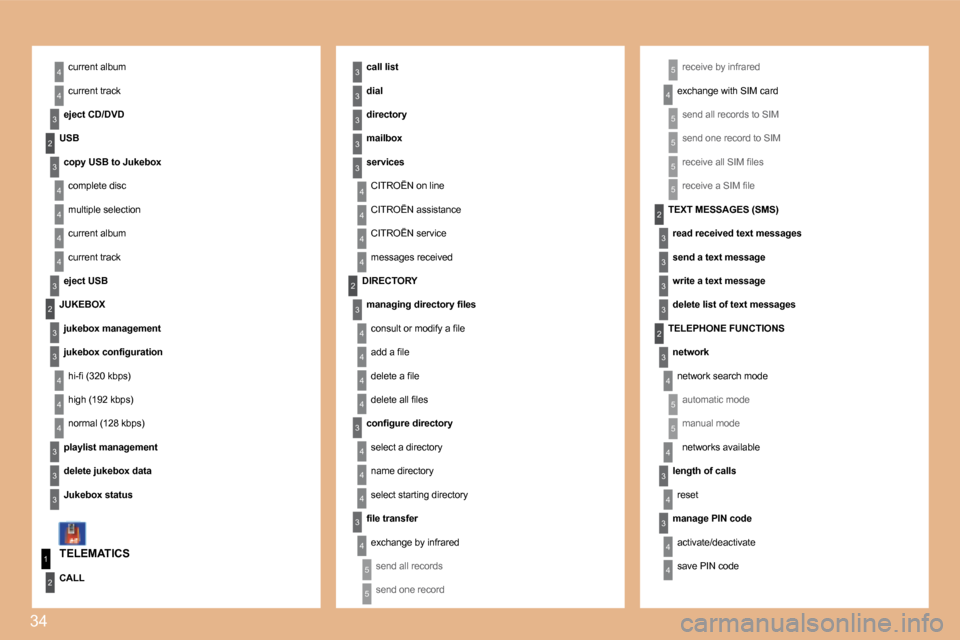
current album
current track
eject CD/DVDreceive by infrared
exchange with SIM card
send all records to SIM
send one record to SIM
receive all SIM iles
receive a SIM ile
TELEMATICS call list
dial
directory
mailbox
services
CITROËN on line
CITROËN assistance
CITROËN service
messages received
USB
copy USB to Jukebox complete disc
multiple selection
current album
current track
eject USB
JUKEBOX jukebox management
jukebox coniguration hi-i (320 kbps)
high (192 kbps)
normal (128 kbps)
playlist management
delete jukebox data
Jukebox status
CALL DIRECTORY
managing directory iles consult or modify a ile
add a ile
delete a ile
delete all iles
conigure directory select a directory
name directory
select starting directory
ile transfer exchange by infraredsend all records
send one record
TEXT MESSAGES (SMS)read received text messages
send a text message
write a text message
delete list of text messages
TELEPHONE FUNCTIONS network network search mode
automatic mode
manual mode
networks available
length of calls reset
manage PIN code activate/deactivate
save PIN code