service Citroen C4 2012 2.G Owner's Guide
[x] Cancel search | Manufacturer: CITROEN, Model Year: 2012, Model line: C4, Model: Citroen C4 2012 2.GPages: 332, PDF Size: 28.33 MB
Page 187 of 332
10
CHECKS
185
Used products
Avoid prolonged contact of used
oil or fl uids with the skin.
Most of these fl uids are harmful
to health or indeed very corro-
sive.
Do not discard used oil or fl uids
into sewers or onto the ground.
Take used oil to a CITROËN
dealer or a qualifi ed workshop
(France) or to an authorised
waste disposal site.
Additive level (Diesel with
particle emissions filter)
According to your version of instrument
panel, the additive reservoir low level is
indicated by:
Topping up
The reservoir must be topped up with-
out delay by a CITROËN dealer or a
qualifi ed workshop.
- fi xed illumination of the par-
ticle emissions fi lter warning
lamp, accompanied by an au-
dible signal and a message
that the particle emissions fi l-
ter additive level is too low,
- fi xed illumination of the
service warning lamp, ac-
companied by an audible
signal and a message that
the particle emissions fi lter additive level is too low. or
Screenwash/headlamp wash
level
Specifi cation of the fl uid
To ensure optimum cleaning and to
avoid freezing, the fl uid should never be
topped up or replaced by plain water.
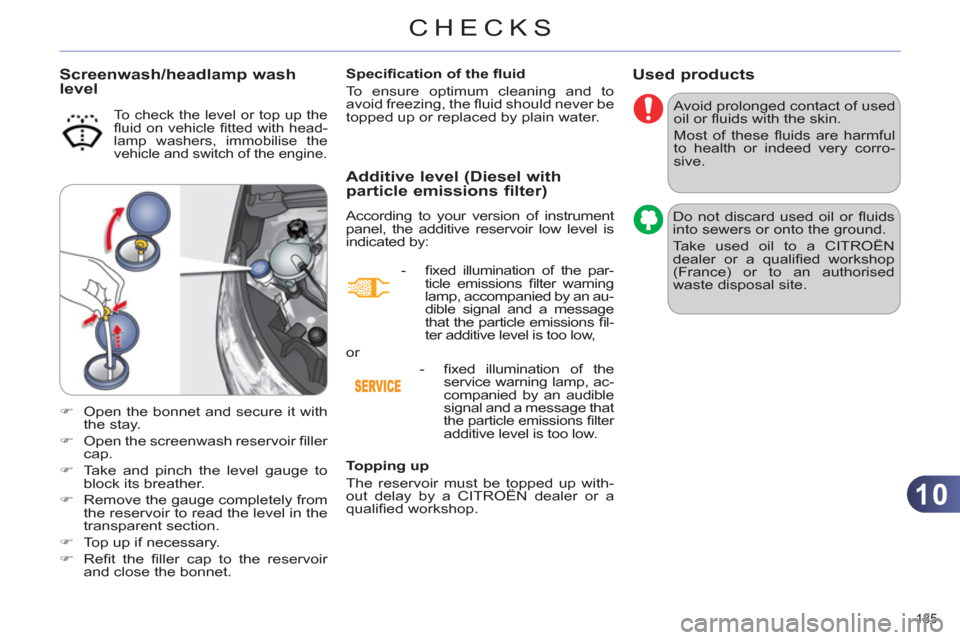
To check the level or top up the
fl uid on vehicle fi tted with head-
lamp washers, immobilise the
vehicle and switch of the engine.
)
Open the bonnet and secure it with
the stay.
)
Open the screenwash reservoir fi ller
cap.
)
Take and pinch the level gauge to
block its breather.
)
Remove the gauge completely from
the reservoir to read the level in the
transparent section.
)
Top up if necessary.
)
Refi t the fi ller cap to the reservoir
and close the bonnet.
Page 188 of 332
10
CHECKS
186
CHECKS
Unless otherwise indicated, check
these components in accordance with
the servicing booklet and according to
your engine.
Otherwise, have them checked by a
CITROËN dealer or a qualifi ed workshop.
Battery
The battery does not require
any maintenance.
However, check that the ter-
minals are clean and correctly
tightened, particularly in sum-
mer and winter.
When carrying out work on the battery,
refer to the "Practical information" sec-
tion for details of the precautions to be
taken before disconnecting the battery
and following its reconnection.
Air filter and passenger compartment filter
Refer to the servicing booklet
for details of the replacement
intervals for these compo-
nents.
Oil filter
Replace the oil fi lter each time
the engine oil is changed.
Refer to the servicing booklet
for details of the replacement
interval for this component.
Particle emission filter (Diesel)
According to your version of instrument
panel, the start of saturation of the par-
ticle emissions fi lter is indicated by:
- fi xed illumination of the par-
ticle emissions fi lter warning
lamp, accompanied by an au-
dible signal and a message
that there is a risk of blockage
of the particle emissions fi lter,
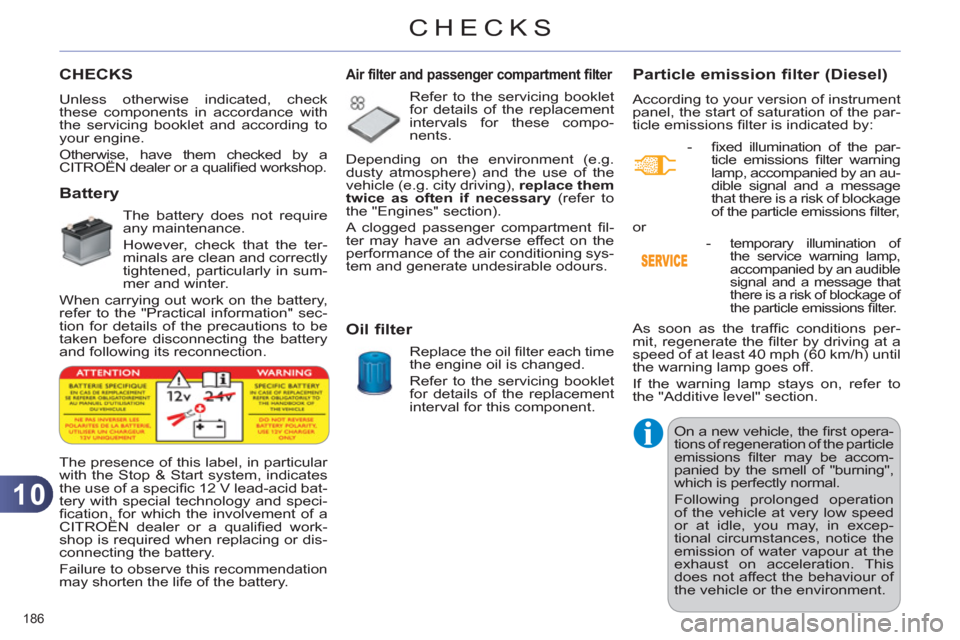
The presence of this label, in particular
with the Stop & Start system, indicates
the use of a specifi c 12 V lead-acid bat-
tery with special technology and speci-
fi cation, for which the involvement of a
CITROËN dealer or a qualifi ed work-
shop is required when replacing or dis-
connecting the battery.
Failure to observe this recommendation
may shorten the life of the battery.
Depending on the environment (e.g.
dusty atmosphere) and the use of the
vehicle (e.g. city driving), replace them
twice as often if necessary
(refer to
the "Engines" section).
A clogged passenger compartment fi l-
ter may have an adverse effect on the
performance of the air conditioning sys-
tem and generate undesirable odours.
As soon as the traffi c conditions per-
mit, regenerate the fi lter by driving at a
speed of at least 40 mph (60 km/h) until
the warning lamp goes off.
If the warning lamp stays on, refer to
the "Additive level" section.
On a new vehicle, the fi rst opera-
tions of regeneration of the particle
emissions fi lter may be accom-
panied by the smell of "burning",
which is perfectly normal.
Following prolonged operation
of the vehicle at very low speed
or at idle, you may, in excep-
tional circumstances, notice the
emission of water vapour at the
exhaust on acceleration. This
does not affect the behaviour of
the vehicle or the environment. or
-
temporary illumination of
the service warning lamp,
accompanied by an audible
signal and a message that
there is a risk of blockage of
the particle emissions fi lter.
Page 189 of 332
10
CHECKS
187
Manual gearbox
The gearbox does not re-
quire any maintenance (no oil
change).
Refer to the servicing book-
let for the details of the level
checking interval for this com-
ponent.
6-speed electronic gearbox
system
The gearbox does not re-
quire any maintenance (no oil
change).
Refer to the servicing booklet
for details of the checking in-
terval for this component.
Automatic gearbox
The gearbox does not re-
quire any maintenance (no oil
change).
Refer to the servicing booklet
for details of the level checking
interval for this component.
Electric parking brake
This system does not require any
routine servicing. However, in
the event of a problem, have the
system checked by a CITROËN
dealer or a qualifi ed workshop.
For more information, see "Driving - Electric parking brake - § Operating faults".
Brake pads
Brake disc wear
If a loss of effectiveness of this
system is noticed, the parking
brake must be checked, even
between two services.
Checking this system must be
done by a CITROËN dealer or a quali-
fi ed workshop.
Only use products recommended
by CITROËN or products of equiv-
alent quality and specifi cation.
In order to optimise the opera-
tion of units as important as
the braking system, CITROËN
selects and offers very specifi c
products.
To avoid damaging the electrical
units, the use of a high pressure
washer in the engine compart-
ment is strictly prohibited
.
Manual parking brake
For information on checking
brake disc wear, contact a
CITROËN dealer or a quali-
fi ed workshop. Brake wear depends on the
style of driving, particularly in
the case of vehicles used in
town, over short distances. It
may be necessary to have the
condition of the brakes checked, even
between vehicle services.
Unless there is a leak in the system, a drop
in the brake fl uid level indicates that the
brake pads are worn.
Page 213 of 332
11
PRACTICAL INFORMATION
211
TOWING THE VEHICLE
Procedure for having your vehicle
towed or for towing another vehicle us-
ing a removable towing eye.
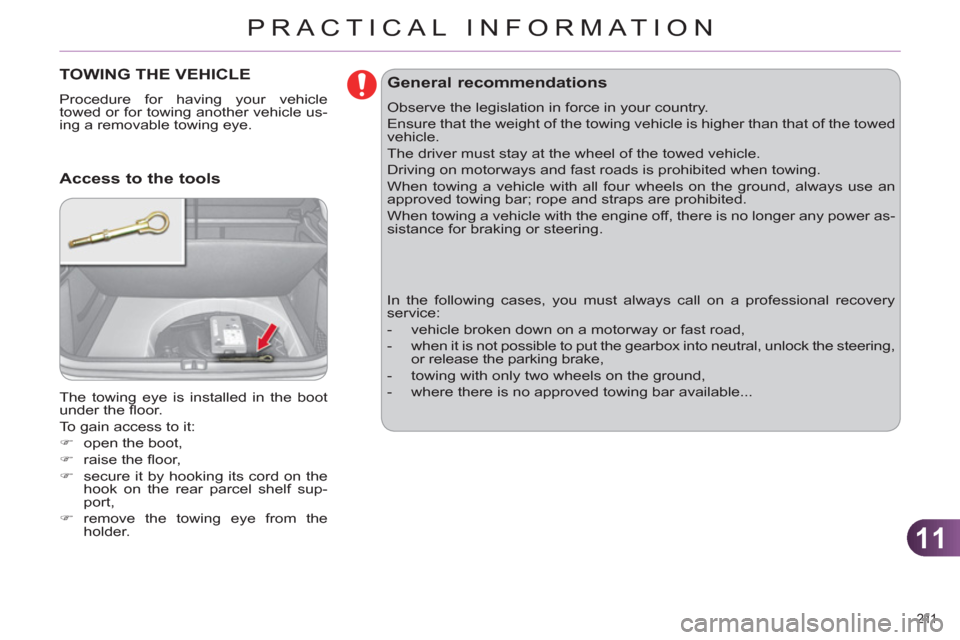
The towing eye is installed in the boot
under the fl oor.
To gain access to it:
)
open the boot,
)
raise the fl oor,
)
secure it by hooking its cord on the
hook on the rear parcel shelf sup-
port,
)
remove the towing eye from the
holder.
Access to the tools
General recommendations
Observe the legislation in force in your country.
Ensure that the weight of the towing vehicle is higher than that of the towed
vehicle.
The driver must stay at the wheel of the towed vehicle.
Driving on motorways and fast roads is prohibited when towing.
When towing a vehicle with all four wheels on the ground, always use an
approved towing bar; rope and straps are prohibited.
When towing a vehicle with the engine off, there is no longer any power as-
sistance for braking or steering.
In the following cases, you must always call on a professional recovery
service:
- vehicle broken down on a motorway or fast road,
- when it is not possible to put the gearbox into neutral, unlock the steering,
or release the parking brake,
- towing with only two wheels on the ground,
- where there is no approved towing bar available...
Page 232 of 332
230
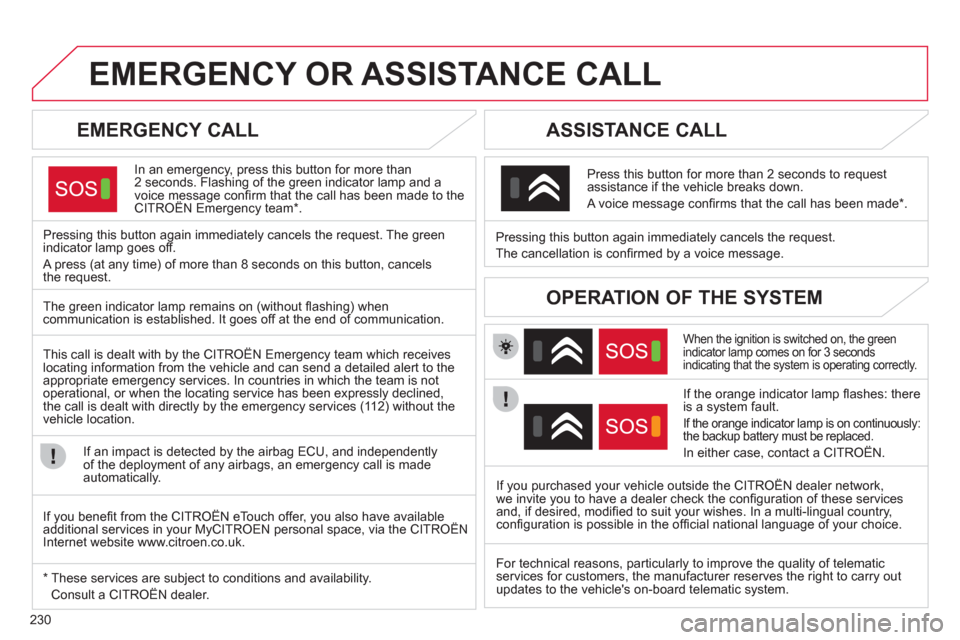
EMERGENCY OR ASSISTANCE CALL
EMERGENCY CALL
In an emergency, press this button for more than
2 seconds. Flashing of the green indicator lamp and a
voice message confi rm that the call has been made to the
CITROËN Emergency team * .
Pressing this button again immediately cancels the request. The green
indicator lamp goes off.
A press (at any time) of more than 8 seconds on this button, cancels
the request.
ASSISTANCE CALL
When the ignition is switched on, the green
indicator lamp comes on for 3 seconds
indicating that the system is operating correctly.
If the orange indicator lamp fl ashes: there
is a system fault.
If the orange indicator lamp is on continuously:
the backup battery must be replaced.
In either case, contact a CITROËN.
Pressing this button again immediately cancels the request.
The cancellation is confi rmed by a voice message.
Press this button for more than 2 seconds to request
assistance if the vehicle breaks down.
A voice message confi rms that the call has been made * .
OPERATION OF THE SYSTEM
The green indicator lamp remains on (without fl ashing) when
communication is established. It goes off at the end of communication.
This call is dealt with by the CITROËN Emergency team which receives
locating information from the vehicle and can send a detailed alert to the
appropriate emergency services. In countries in which the team is not
operational, or when the locating service has been expressly declined,
the call is dealt with directly by the emergency services (112) without the
vehicle location.
If an impact is detected by the airbag ECU, and independently
of the deployment of any airbags, an emergency call is made
automatically.
* These services are subject to conditions and availability.
Consult a CITROËN dealer.
If you purchased your vehicle outside the CITROËN dealer network,
we invite you to have a dealer check the confi guration of these services
and, if desired, modifi ed to suit your wishes. In a multi-lingual country,
confi guration is possible in the offi cial national language of your choice.
If you benefi t from the CITROËN eTouch offer, you also have available
additional services in your MyCITROEN personal space, via the CITROËN
Internet website www.citroen.co.uk.
For technical reasons, particularly to improve the quality of telematic
services for customers, the manufacturer reserves the right to carry out
updates to the vehicle's on-board telematic system.
Page 243 of 332
241
04
1
3
4
5
2
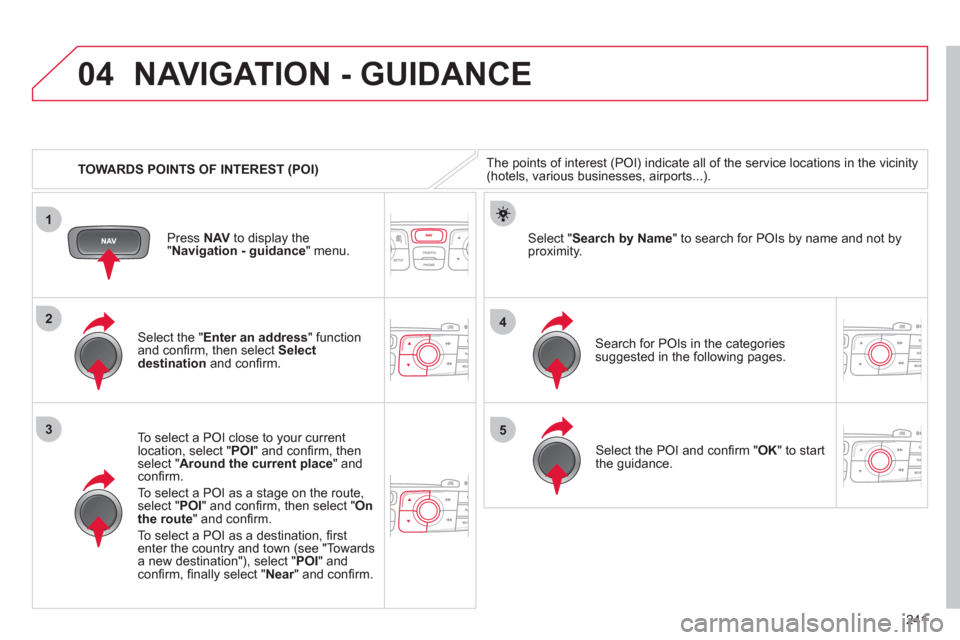
TOWARDS POINTS OF INTEREST (POI)
NAVIGATION - GUIDANCE
The points of interest (POI) indicate all of the service locations in the vicinity
(hotels, various businesses, airports...).
Select the " Enter an address
" function
and confi rm, then select Select
destination
and confi rm.
To select a POI close to your current
location, select " POI
" and confi rm, then
select " Around the current place
" and
confi rm.
To select a POI as a stage on the route,
select " POI
" and confi rm, then select " On
the route
" and confi rm.
To select a POI as a destination, fi rst
enter the country and town (see "Towards
a new destination"), select " POI
" and
confi rm, fi nally select " Near
" and confi rm.
Search for POIs in the categories
suggested in the following pages.
Select " Search by Name
" to search for POIs by name and not by
proximity.
Press NAV
to display the
" Navigation - guidance
" menu.
Select the POI and confi rm " OK
" to start
the guidance.
Page 244 of 332
242
04
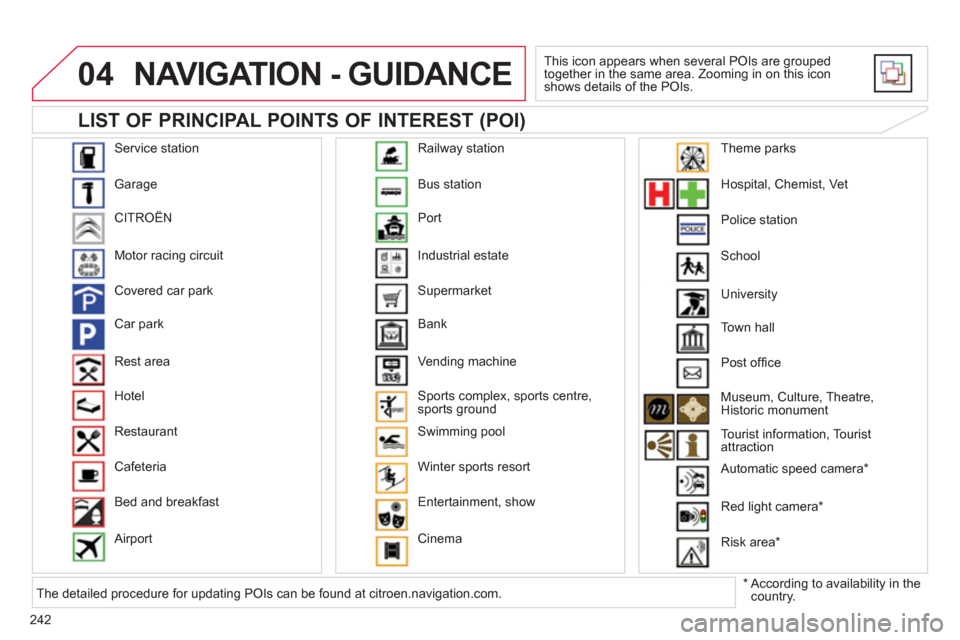
Service station
Garage
CITROËN
Motor racing circuit
Covered car park
Car park
Rest area
Hotel
Restaurant
Cafeteria
Bed and breakfast
Airport Bus station
Port
Industrial estate
Supermarket
Bank
Vending machine
Sports complex, sports centre,
sports ground
Swimming pool
Winter sports resort
Entertainment, show
Cinema Railway station
Hospital, Chemist, Vet
Police station
School
Town hall
Post offi ce
Museum, Culture, Theatre,
Historic monument
Tourist information, Tourist
attraction
Automatic speed camera *
Red light camera *
Risk area *
Theme parks
LIST OF PRINCIPAL POINTS OF INTEREST (POI)
NAVIGATION - GUIDANCE
This icon appears when several POIs are grouped
together in the same area. Zooming in on this icon
shows details of the POIs.
*
According to availability in the
country. University
The detailed procedure for updating POIs can be found at citroen.navigation.com.
Page 257 of 332
255
7
8
06
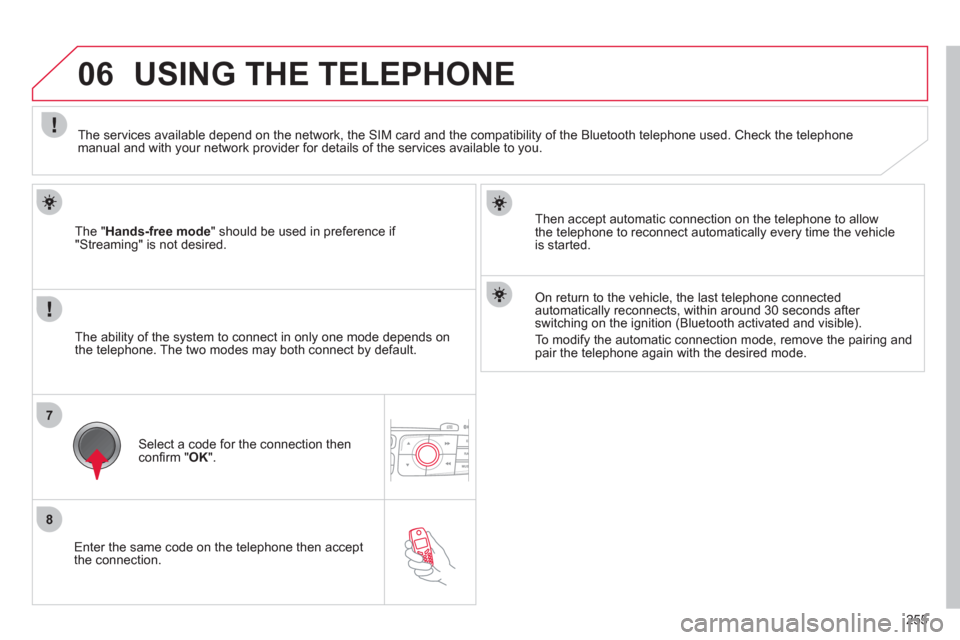
Enter the same code on the telephone then accept
the connection.
The " Hands-free mode
" should be used in preference if
"Streaming" is not desired.
Then accept automatic connection on the telephone to allow
the telephone to reconnect automatically every time the vehicle
is started.
USING THE TELEPHONE
The ability of the system to connect in only one mode depends on
the telephone. The two modes may both connect by default.
The services available depend on the network, the SIM card and the compatibility of the Bluetooth telephone used. Check the telephone
manual and with your network provider for details of the services available to you.
Select a code for the connection then
confi rm " OK
".
On return to the vehicle, the last telephone connected
automatically reconnects, within around 30 seconds after
switching on the ignition (Bluetooth activated and visible).
To modify the automatic connection mode, remove the pairing and
pair the telephone again with the desired mode.
Page 263 of 332
261
1
2a
2b
2c
2d
06 USING THE TELEPHONE
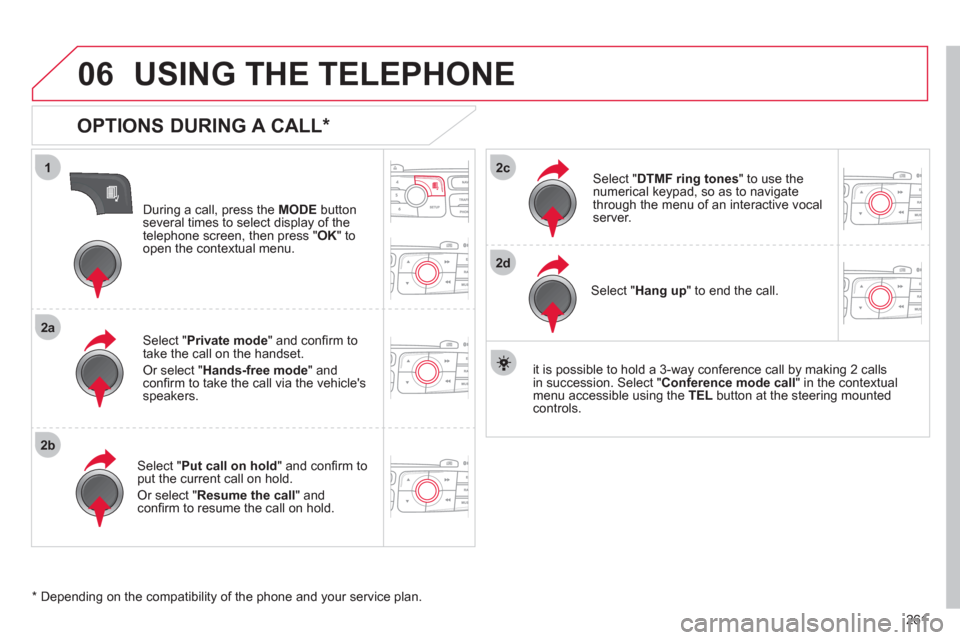
OPTIONS DURING A CALL *
During a call, press the MODE
button
several times to select display of the
telephone screen, then press " OK
" to
open the contextual menu.
Select " Private mode
" and confi rm to
take the call on the handset.
Or select " Hands-free mode
" and
confi rm to take the call via the vehicle's
speakers.
Select " Put call on hold
" and confi rm to
put the current call on hold.
Or select " Resume the call
" and
confi rm to resume the call on hold.
Select " DTMF ring tones
" to use the
numerical keypad, so as to navigate
through the menu of an interactive vocal
server.
Select " Hang up
" to end the call.
* Depending on the compatibility of the phone and your service plan.
it is possible to hold a 3-way conference call by making 2 calls
in succession. Select " Conference
mode call
" in the contextual
menu accessible using the TEL
button at the steering mounted
controls.
Page 299 of 332
297
05
1
2
5
3
4
6
USING THE TELEPHONE
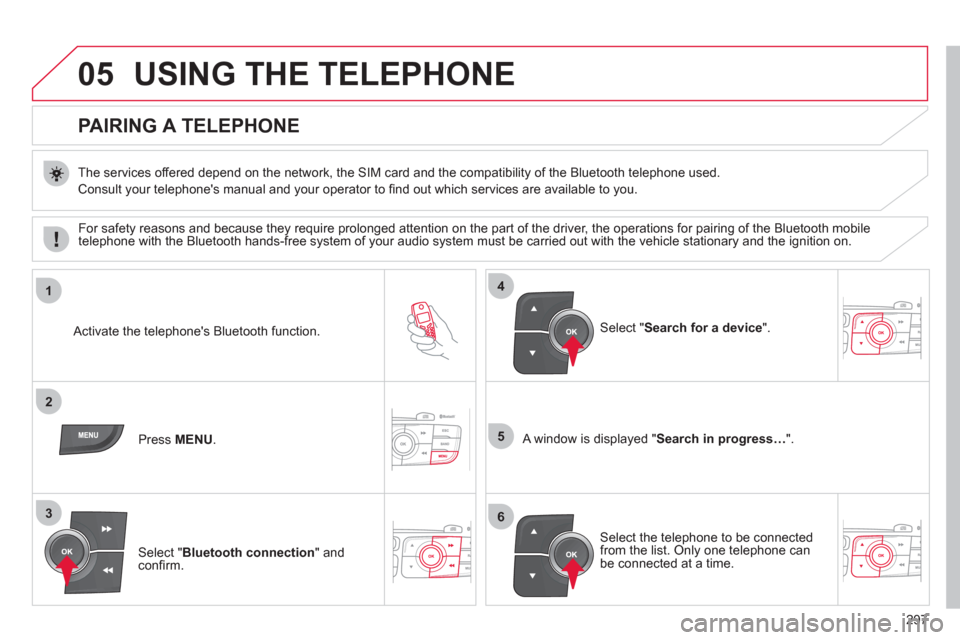
PAIRING A TELEPHONE
The services offered depend on the network, the SIM card and the compatibility of the Bluetooth telephone used.
Consult your telephone's manual and your operator to fi nd out which services are available to you.
Activate the telephone's Bluetooth function.
Press MENU
.
A window is displayed " Search in progress…
".
Select the telephone to be connected
from the list. Only one telephone can
be connected at a time.
Select " Search for a device
".
For safety reasons and because they require prolonged attention on the part of the driver, the operations for pairing of the Bluetooth mobile
telephone with the Bluetooth hands-free system of your audio system must be carried out with the vehicle stationary and the ignition on.
Select " Bluetooth connection
" and
confi rm.