deactivate Citroen C4 2014 2.G User Guide
[x] Cancel search | Manufacturer: CITROEN, Model Year: 2014, Model line: C4, Model: Citroen C4 2014 2.GPages: 340, PDF Size: 28.99 MB
Page 75 of 340
3
COMFORT
73
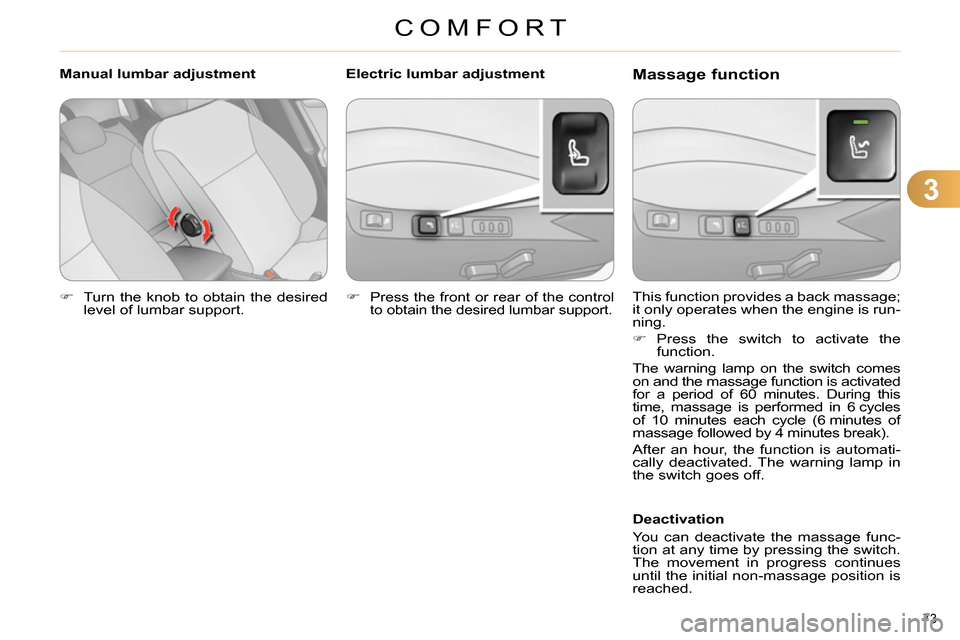
Turn the knob to obtain the desired
level of lumbar support.
This function provides a back massage;
it only operates when the engine is run-
ning.
Press the switch to activate the
function.
The warning lamp on the switch comes
on and the massage function is activated
for a period of 60 minutes. During this
time, massage is performed in 6 cycles
of 10 minutes each cycle (6 minutes of
massage followed by 4 minutes break).
After an hour, the function is automati-
cally deactivated. The warning lamp in
the switch goes off.
Deactivation
You can deactivate the massage func-
tion at any time by pressing the switch.
The movement in progress continues
until the initial non-massage position is
reached.
Manual lumbar adjustment
Massage function
Electric lumbar adjustment
Press the front or rear of the control
to obtain the desired lumbar support.
Page 76 of 340
3
COMFORT
74
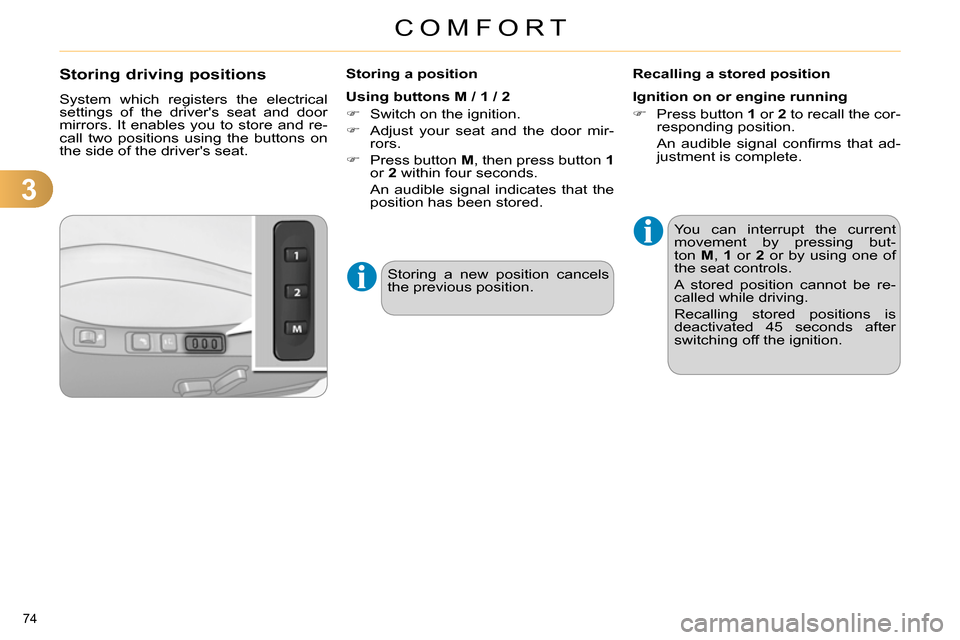
Storing driving positions
System which registers the electrical
settings of the driver's seat and door
mirrors. It enables you to store and re-
call two positions using the buttons on
the side of the driver's seat.
Storing a position
Using buttons M / 1 / 2
Switch on the ignition.
Adjust your seat and the door mir-
rors.
Press button M
, then press button 1
or 2
within four seconds.
An audible signal indicates that the
position has been stored.
Recalling a stored position
Ignition on or engine running
Press button 1
or 2
to recall the cor-
responding position.
An audible signal confi rms that ad-
justment is complete.
You can interrupt the current
movement by pressing but-
ton M
, 1
or 2
or by using one of
the seat controls.
A stored position cannot be re-
called while driving.
Recalling stored positions is
deactivated 45 seconds after
switching off the ignition.
Storing a new position cancels
the previous position.
Page 78 of 340
3
COMFORT
76
MIRRORS
Door mirrors
Each fi tted with an adjustable mirror
glass permitting the lateral rearward vi-
sion necessary for overtaking or park-
ing. They can also be folded for parking
in confi ned spaces.
Demisting - Defrosting
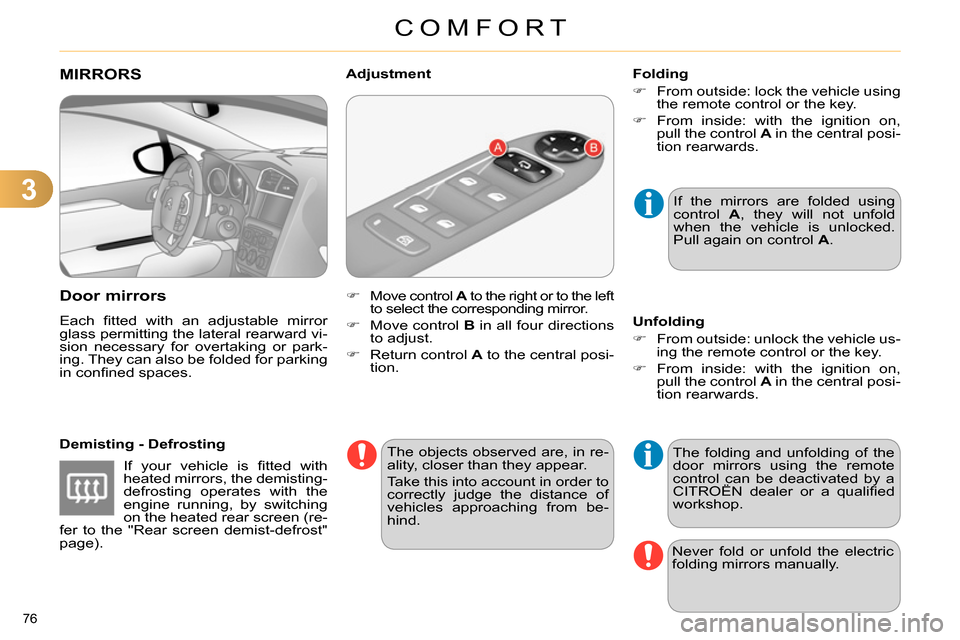
Move control A
to the right or to the left
to select the corresponding mirror.
Move control B
in all four directions
to adjust.
Return control A
to the central posi-
tion.
Adjustment
If the mirrors are folded using
control A
, they will not unfold
when the vehicle is unlocked.
Pull again on control A
.
The objects observed are, in re-
ality, closer than they appear.
Take this into account in order to
correctly judge the distance of
vehicles approaching from be-
hind.
Folding
From outside: lock the vehicle using
the remote control or the key.
From inside: with the ignition on,
pull the control A
in the central posi-
tion rearwards.
The folding and unfolding of the
door mirrors using the remote
control can be deactivated by a
CITROËN dealer or a qualifi ed
workshop.
Unfolding
From outside: unlock the vehicle us-
ing the remote control or the key.
From inside: with the ignition on,
pull the control A
in the central posi-
tion rearwards.
Never fold or unfold the electric
folding mirrors manually.
If your vehicle is fi tted with
heated mirrors, the demisting-
defrosting operates with the
engine running, by switching
on the heated rear screen (re-
fer to the "Rear screen demist-defrost"
page).
Page 81 of 340

4
ACCESS
79
REMOTE CONTROL KEY
System which permits central unlocking
or locking of the vehicle using the door
lock or from a distance. It is also used
to locate and start the vehicle, as well
as providing protection against theft.
Press the open padlock
once to unlock the driver's
door only.
Selective unlocking using the
remote control
Turn the key towards the front in
the driver's door lock to unlock the
vehicle completely.
Complete unlocking using the
remote control
Press the open padlock
to unlock the vehicle com-
pletely.
Opening the vehicle using the
2-button remote control
Unfolding the key
Press this button to unfold the key.
Unlocking using the key
Programming unlocking
Setting the total or selective un-
locking is done via the vehicle
confi guration menu.
Complete unlocking is activated by de-
fault.
Press the open padlock again to un-
lock the other doors and the boot.
The direction indicators fl ash for
a few seconds.
The spotlamps in the door mir-
rors come on.
Depending on version, the door
mirrors unfold, the welcome
lighting comes on, the alarm is
deactivated.
Page 82 of 340
4
ACCESS
80
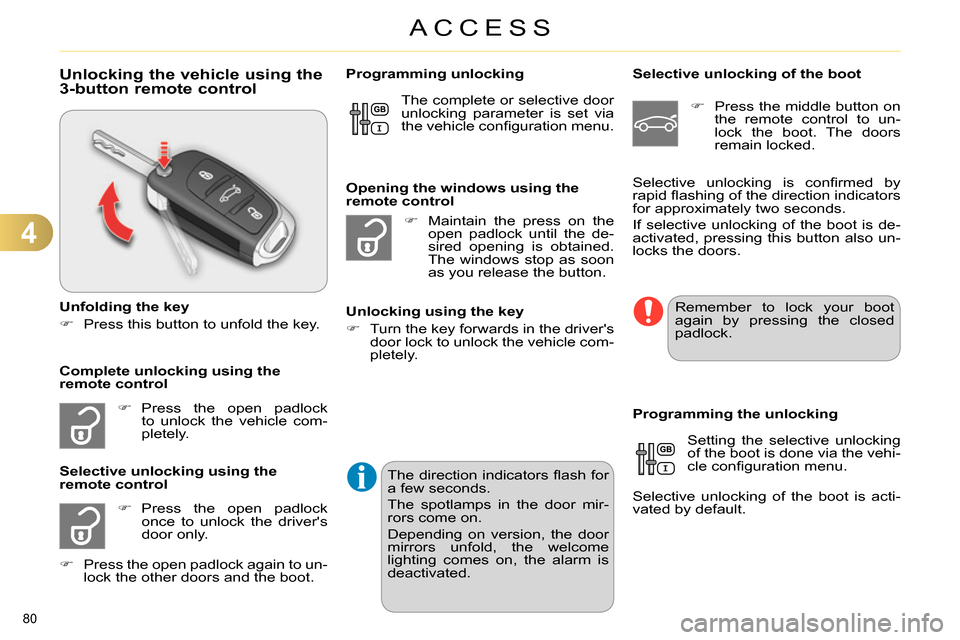
Unlocking the vehicle using the
3-button remote control
Unfolding the key
Press this button to unfold the key.
Press the open padlock
to unlock the vehicle com-
pletely.
Press the open padlock
once to unlock the driver's
door only.
Selective unlocking using the
remote control
Maintain the press on the
open padlock until the de-
sired opening is obtained.
The windows stop as soon
as you release the button.
Opening the windows using the
remote control
Unlocking using the key
Turn the key forwards in the driver's
door lock to unlock the vehicle com-
pletely.
Programming unlocking
Selective unlocking of the boot
Press the middle button on
the remote control to un-
lock the boot. The doors
remain locked.
Setting the selective unlocking
of the boot is done via the vehi-
cle confi guration menu.
Selective unlocking of the boot is acti-
vated by default.
Programming the unlocking
Complete unlocking using the
remote control Selective unlocking is confi rmed by
rapid fl ashing of the direction indicators
for approximately two seconds.
If selective unlocking of the boot is de-
activated, pressing this button also un-
locks the doors. The complete or selective door
unlocking parameter is set via
the vehicle confi guration menu.
Remember to lock your boot
again by pressing the closed
padlock.
Press the open padlock again to un-
lock the other doors and the boot.
The direction indicators fl ash for
a few seconds.
The spotlamps in the door mir-
rors come on.
Depending on version, the door
mirrors unfold, the welcome
lighting comes on, the alarm is
deactivated.
Page 83 of 340
4
ACCESS
81
Locking the vehicle
Press the closed padlock to
lock the vehicle.
Normal locking using the remote
control
Normal locking using the key
Turn the key towards the rear in the
driver's door lock to lock the vehicle.
Locating your vehicle
This function allows you to identify your
vehicle from a distance, particularly in
poor light. Your vehicle must be locked.
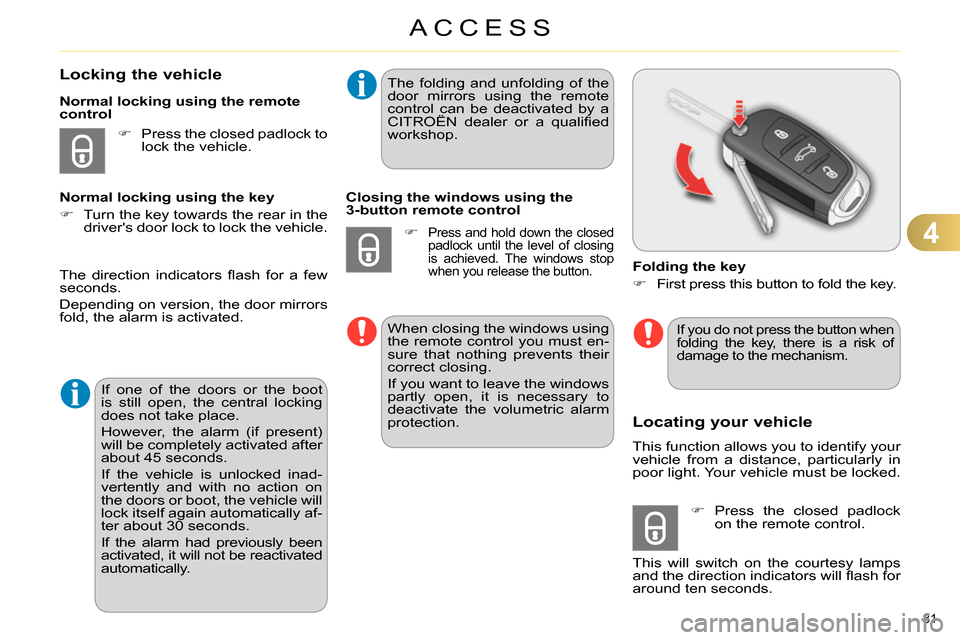
Folding the key
First press this button to fold the key.
Press the closed padlock
on the remote control.
This will switch on the courtesy lamps
and the direction indicators will fl ash for
around ten seconds.
The direction indicators fl ash for a few
seconds.
Depending on version, the door mirrors
fold, the alarm is activated.
If one of the doors or the boot
is still open, the central locking
does not take place.
However, the alarm (if present)
will be completely activated after
about 45 seconds.
If the vehicle is unlocked inad-
vertently and with no action on
the doors or boot, the vehicle will
lock itself again automatically af-
ter about 30 seconds.
If the alarm had previously been
activated, it will not be reactivated
automatically.
The folding and unfolding of the
door mirrors using the remote
control can be deactivated by a
CITROËN dealer or a qualifi ed
workshop.
Closing the windows using the
3-button remote control
Press and hold down the closed
padlock until the level of closing
is achieved. The windows stop
when you release the button.
When closing the windows using
the remote control you must en-
sure that nothing prevents their
correct closing.
If you want to leave the windows
partly open, it is necessary to
deactivate the volumetric alarm
protection.
If you do not press the button when
folding the key, there is a risk of
damage to the mechanism.
Page 89 of 340
4
ACCESS
87
Emergency control
System allowing the doors to be locked
and unlocked manually in the event of
a malfunction of the central locking sys-
tem or battery failure.
Locking the driver's door
Insert the key in the door lock, then
turn it to the rear.
You can also apply the procedure de-
scribed for the passenger doors.
Unlocking the driver's door
Insert the key in the door lock, then
turn it to the front.
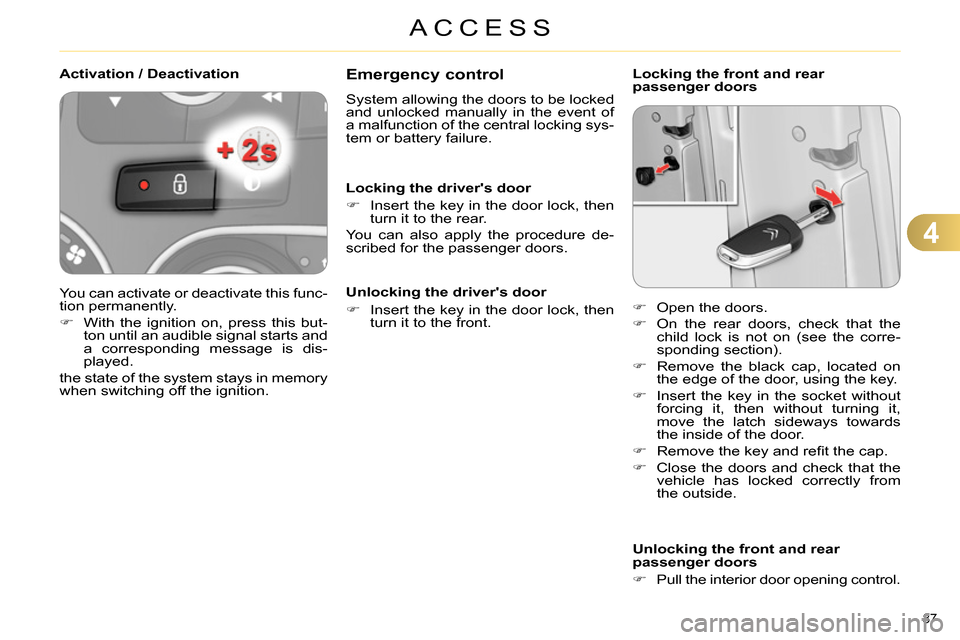
Locking the front and rear
passenger doors
Unlocking the front and rear
passenger doors
Pull the interior door opening control.
Open the doors.
On the rear doors, check that the
child lock is not on (see the corre-
sponding section).
Remove the black cap, located on
the edge of the door, using the key.
Insert the key in the socket without
forcing it, then without turning it,
move the latch sideways towards
the inside of the door.
Remove the key and refi t the cap.
Close the doors and check that the
vehicle has locked correctly from
the outside.
Activation / Deactivation
You can activate or deactivate this func-
tion permanently.
With the ignition on, press this but-
ton until an audible signal starts and
a corresponding message is dis-
played.
the state of the system stays in memory
when switching off the ignition.
Page 90 of 340
4
ACCESS
88
*
According to country.
ALARM *
System which protects and provides a
deterrent against theft and break-ins. It
provides the following types of monitoring.
- exterior perimeter
The system checks for opening of the
vehicle.
The alarm is triggered if anyone tries to
open a door, the boot, the bonnet...
- interior volumetric
The system checks for any variation in the
volume in the passenger compartment.
The alarm is triggered if anyone breaks a
window, enters the passenger compart-
ment or moves inside the vehicle.
- tilt
The system checks for any change in
the attitude of the vehicle.
The alarm is triggered if the vehicle is
lifted, moved or knocked.
Self-protection function
The system checks for the putting out
of service of its components.
The alarm is triggered if the battery, the
central control or the siren wiring are
put out of service or damaged.
For all work on the alarm sys-
tem, contact a CITROËN dealer
or a qualifi ed workshop.
Locking the vehicle with full
alarm system
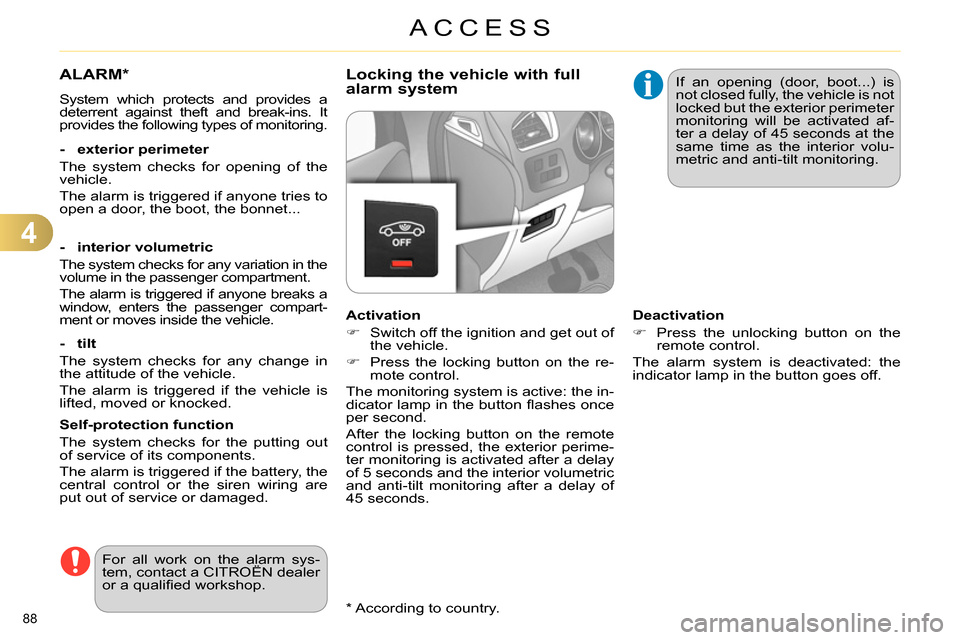
Activation
Switch off the ignition and get out of
the vehicle.
Press the locking button on the re-
mote control.
The monitoring system is active: the in-
dicator lamp in the button fl ashes once
per second.
After the locking button on the remote
control is pressed, the exterior perime-
ter monitoring is activated after a delay
of 5 seconds and the interior volumetric
and anti-tilt monitoring after a delay of
45 seconds. If an opening (door, boot...) is
not closed fully, the vehicle is not
locked but the exterior perimeter
monitoring will be activated af-
ter a delay of 45 seconds at the
same time as the interior volu-
metric and anti-tilt monitoring.
Deactivation
Press the unlocking button on the
remote control.
The alarm system is deactivated: the
indicator lamp in the button goes off.
Page 91 of 340
4
ACCESS
89
Operating fault
When the ignition is switched on, fi xed
illumination of the indicator lamp in the
button indicates a fault with the system.
Have it checked by a CITROËN dealer
or a qualifi ed workshop.
Locking the vehicle with exterior
perimeter monitoring only
Deactivate the interior volumetric and
anti-tilt monitoring to avoid unwanted
triggering of the alarm in certain cases
such as:
- leaving a pet in the vehicle,
- leaving a window partially open,
- washing your vehicle,
- changing a wheel,
- having your vehicle towed,
- transport by sea.
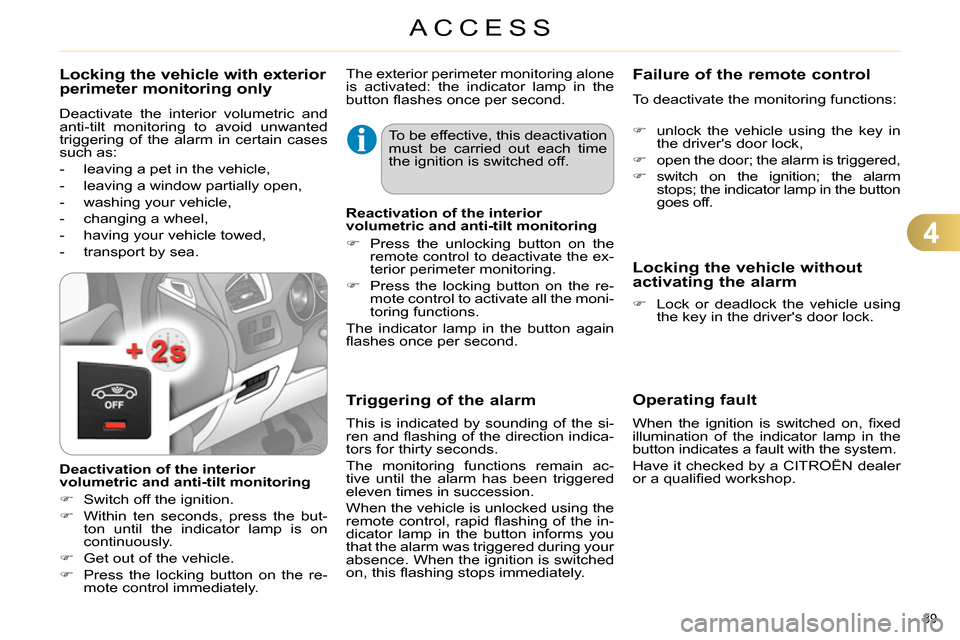
Deactivation of the interior
volumetric and anti-tilt monitoring
Switch off the ignition.
Within ten seconds, press the but-
ton until the indicator lamp is on
continuously.
Get out of the vehicle.
Press the locking button on the re-
mote control immediately. The exterior perimeter monitoring alone
is activated: the indicator lamp in the
button fl ashes once per second.
To be effective, this deactivation
must be carried out each time
the ignition is switched off.
Reactivation of the interior
volumetric and anti-tilt monitoring
Press the unlocking button on the
remote control to deactivate the ex-
terior perimeter monitoring.
Press the locking button on the re-
mote control to activate all the moni-
toring functions.
The indicator lamp in the button again
fl ashes once per second.
Triggering of the alarm
This is indicated by sounding of the si-
ren and fl ashing of the direction indica-
tors for thirty seconds.
The monitoring functions remain ac-
tive until the alarm has been triggered
eleven times in succession.
When the vehicle is unlocked using the
remote control, rapid fl ashing of the in-
dicator lamp in the button informs you
that the alarm was triggered during your
absence. When the ignition is switched
on, this fl ashing stops immediately.
Failure of the remote control
To deactivate the monitoring functions:
unlock the vehicle using the key in
the driver's door lock,
open the door; the alarm is triggered,
switch on the ignition; the alarm
stops; the indicator lamp in the button
goes off.
Locking the vehicle without
activating the alarm
Lock or deadlock the vehicle using
the key in the driver's door lock.
Page 95 of 340
4
ACCESS
93
Reinitialisation
After reconnecting the battery or a fault,
you must be reinitialise the operation of
the electric windows. For each of the
control switches on the driver's side
control panel:
pull the control until the window
stops,
release the control and pull it again
until the window closes fully,
continue to hold the control for ap-
proximately one second after the
window has closed,
press the control to lower the win-
dow automatically to the low posi-
tion,
when the window has reached the
low position, press the control again
for approximately one second.
The safety anti-pinch function is not
operational during these operations.
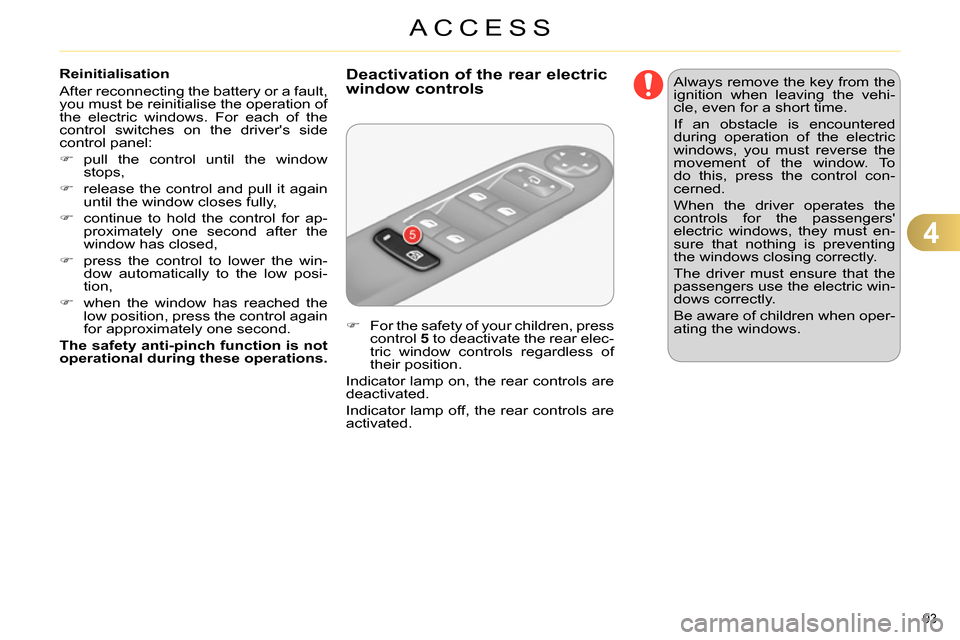
For the safety of your children, press
control 5
to deactivate the rear elec-
tric window controls regardless of
their position.
Indicator lamp on, the rear controls are
deactivated.
Indicator lamp off, the rear controls are
activated.
Deactivation of the rear electric
window controls
Always remove the key from the
ignition when leaving the vehi-
cle, even for a short time.
If an obstacle is encountered
during operation of the electric
windows, you must reverse the
movement of the window. To
do this, press the control con-
cerned.
When the driver operates the
controls for the passengers'
electric windows, they must en-
sure that nothing is preventing
the windows closing correctly.
The driver must ensure that the
passengers use the electric win-
dows correctly.
Be aware of children when oper-
ating the windows.