deactivate Citroen C4 2014 2.G Owner's Guide
[x] Cancel search | Manufacturer: CITROEN, Model Year: 2014, Model line: C4, Model: Citroen C4 2014 2.GPages: 340, PDF Size: 28.99 MB
Page 101 of 340
5
VISIBILITY
99
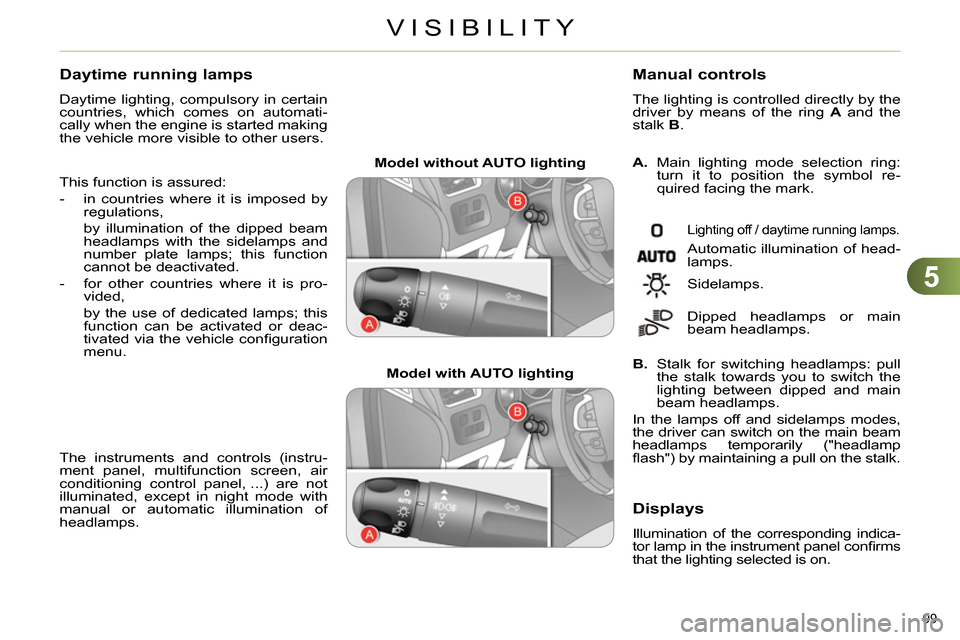
Model without AUTO lighting
Model with AUTO lighting
A.
Main lighting mode selection ring:
turn it to position the symbol re-
quired facing the mark.
Manual controls
The lighting is controlled directly by the
driver by means of the ring A
and the
stalk B
.
Lighting off / daytime running lamps.
Automatic illumination of head-
lamps.
B.
Stalk for switching headlamps: pull
the stalk towards you to switch the
lighting between dipped and main
beam headlamps.
In the lamps off and sidelamps modes,
the driver can switch on the main beam
headlamps temporarily ("headlamp
fl ash") by maintaining a pull on the stalk. Sidelamps.
Dipped headlamps or main
beam headlamps.
Displays
Illumination of the corresponding indica-
tor lamp in the instrument panel confi rms
that the lighting selected is on.
Daytime running lamps
Daytime lighting, compulsory in certain
countries, which comes on automati-
cally when the engine is started making
the vehicle more visible to other users.
This function is assured:
- in countries where it is imposed by
regulations,
by illumination of the dipped beam
headlamps with the sidelamps and
number plate lamps; this function
cannot be deactivated.
- for other countries where it is pro-
vided,
by the use of dedicated lamps; this
function can be activated or deac-
tivated via the vehicle confi guration
menu.
The instruments and controls (instru-
ment panel, multifunction screen, air
conditioning control panel, ...) are not
illuminated, except in night mode with
manual or automatic illumination of
headlamps.
Page 108 of 340
5
VISIBILITY
106
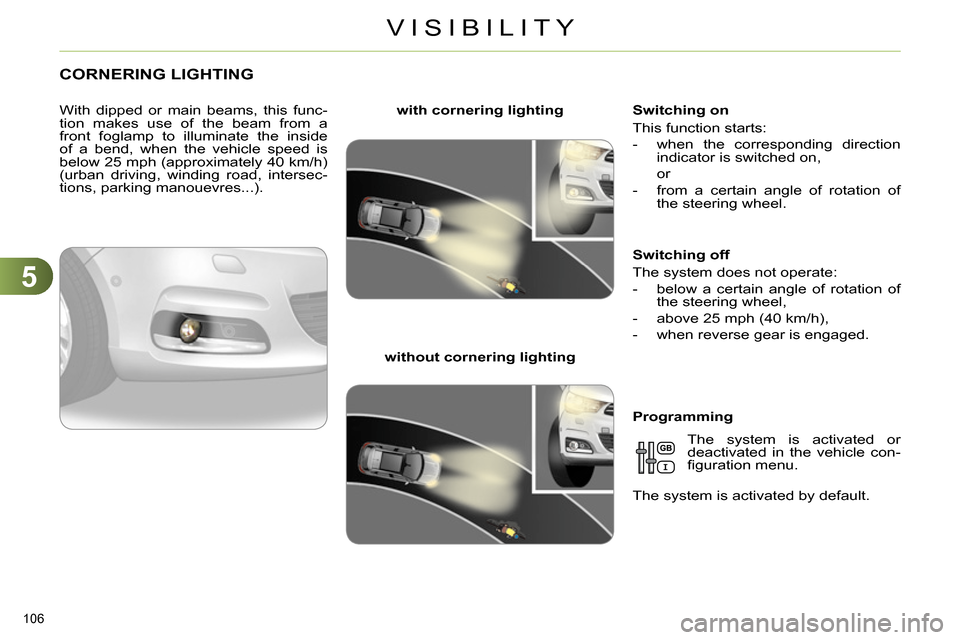
CORNERING LIGHTING
With dipped or main beams, this func-
tion makes use of the beam from a
front foglamp to illuminate the inside
of a bend, when the vehicle speed is
below 25 mph (approximately 40 km/h)
(urban driving, winding road, intersec-
tions, parking manouevres...).
with cornering lighting
without cornering lighting
Switching on
This function starts:
- when the corresponding direction
indicator is switched on,
or
- from a certain angle of rotation of
the steering wheel.
Switching off
The system does not operate:
- below a certain angle of rotation of
the steering wheel,
- above 25 mph (40 km/h),
- when reverse gear is engaged.
Programming
The system is activated or
deactivated in the vehicle con-
fi guration menu.
The system is activated by default.
Page 111 of 340
5
VISIBILITY
109
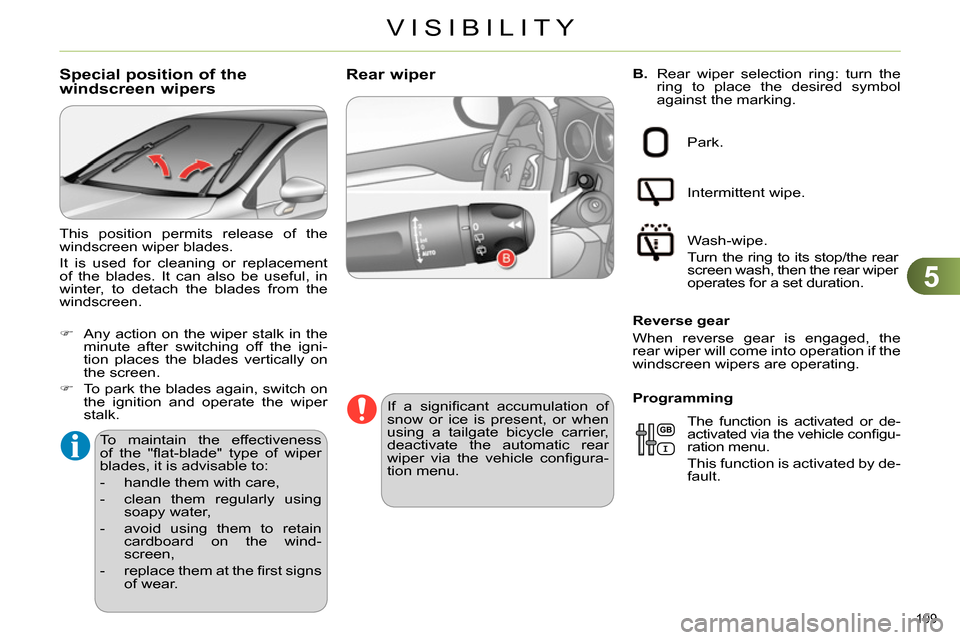
B.
Rear wiper selection ring: turn the
ring to place the desired symbol
against the marking.
Rear wiper
If a signifi cant accumulation of
snow or ice is present, or when
using a tailgate bicycle carrier,
deactivate the automatic rear
wiper via the vehicle confi gura-
tion menu. Park.
Intermittent wipe.
Wash-wipe.
Turn the ring to its stop/the rear
screen wash, then the rear wiper
operates for a set duration.
Reverse gear
When reverse gear is engaged, the
rear wiper will come into operation if the
windscreen wipers are operating.
The function is activated or de-
activated via the vehicle confi gu-
ration menu.
This function is activated by de-
fault.
Programming
Special position of the
windscreen wipers
To maintain the effectiveness
of the "fl at-blade" type of wiper
blades, it is advisable to:
- handle them with care,
- clean them regularly using
soapy water,
- avoid using them to retain
cardboard on the wind-
screen,
- replace them at the fi rst signs
of wear.
This position permits release of the
windscreen wiper blades.
It is used for cleaning or replacement
of the blades. It can also be useful, in
winter, to detach the blades from the
windscreen.
Any action on the wiper stalk in the
minute after switching off the igni-
tion places the blades vertically on
the screen.
To park the blades again, switch on
the ignition and operate the wiper
stalk.
Page 139 of 340
7
CHILD SAFETY
137
For optimum installation of the "for-
ward-facing" child seat, ensure that
the back of the child seat is as close
as possible to the backrest of the ve-
hicle's seat , in contact if possible.
You mst remove the head restraint
before installing a child seat with
backrest to a passenger seat.
Ensure that the head restraint is
stored or attached securely to pre-
vent it from being thrown around the
vehicle in the event of sharp brak-
ing. Refi t the head restraint when the
child seat is removed.
ADVICE ON CHILD SEATS
Installing a booster seat
Children at the front
The incorrect installation of a child
seat in a vehicle compromises the
child's protection in the event of an
accident.
Ensure that there is no seat belt or
seat belt buckle under the child seat,
as this could destabilise it.
Remember to fasten the seat belts or
the child seat harnesses keeping the
slack relative to the child's body to a
minimum, even for short journeys.
When installing a child seat using the
seat belt, ensure that the seat belt is
tightened correctly on the child seat
and that it secures the child seat fi rm-
ly on the seat of your vehicle. If your
passenger seat is adjustable, move it
forwards if necessary.
The legislation on carrying children on
the front passenger seat is specifi c to
each country. Refer to the legislation
in force in your country.
Deactivate the passenger airbag
when a "rearward-facing" child seat
is installed on the front seat.
Otherwise, the child would risk being
seriously injured or killed if the airbag
were to infl ate.
The chest part of the seat belt must
be positioned on the child's shoulder
without touching the neck.
Ensure that the lap part of the seat
belt passes correctly over the child's
thighs.
CITROËN recommends the use of
a booster seat which has a back, fi t-
ted with a seat belt guide at shoulder
level.
As a safety precaution, do not leave:
- a child or children alone and un-
supervised in a vehicle,
- a child or an animal in a vehicle
which is exposed to the sun, with
the windows closed,
- the keys within reach of children
inside the vehicle.
At rear seating positions, always
leave suffi cient space between the
front seat and:
- a "rearwards facing" child seat,
- the child's feet for a child seat fi t-
ted "forwards facing".
To do this, move the front seat for-
wards and, if necessary, move its
backrest into the upright position. To prevent accidental opening of the
doors and rear windows, use the
"Child lock".
Take care not to open the rear win-
dows by more than one third.
To protect young children from the
rays of the sun, fi t side blinds on the
rear windows.
Page 143 of 340
8
SAFETY
141
TRAJECTORY CONTROL
SYSTEMS (ESP)
Anti-slip regulation (ASR) and
electronic stability control (ESC)
The anti-slip regulation (also known as
traction control) optimises traction to pre-
vent skidding of the wheels, by acting on
the brakes of the driving wheels and on
the engine.
The electronic stability control acts on
the brake of one or more wheels and
on the engine to keep the vehicle on the
trajectory required by the driver, within
the limits of the laws of physics.
Activation
These systems are activated automati-
cally each time the vehicle is started.
They come into operation in the event
of a grip or trajectory problem.
This is indicated by fl ashing of
this warning lamp in the instru-
ment panel.
Intelligent traction control
system ("Snow motion")
Your vehicle has a system to help driving
on snow: intelligent traction control.
This system detects situations of diffi -
cult surface adhesion that could make it
diffi cult to move off or make progress on
deep fresh snow or compacted snow.
In these situations, the intelligent trac-
tion control
limits the amount of wheel
slip to provide the best traction and tra-
jectory control for your vehicle.
In extremely severe conditions (deep
snow, mud, ...), when it proves impos-
sible to move off, it may be useful to
temporarily deactivate the ESP/ASR
systems to allow the wheels to spin
freely and so allow movement of the
vehicle.
Deactivation
In exceptional conditions (starting a
vehicle which is bogged down, stuck in
snow, on soft ground...), if you are un-
able to make progress, it may be ad-
visable to temporarily deactivate these
systems, so that the wheels can spin
freely and allow the vehicle to move.
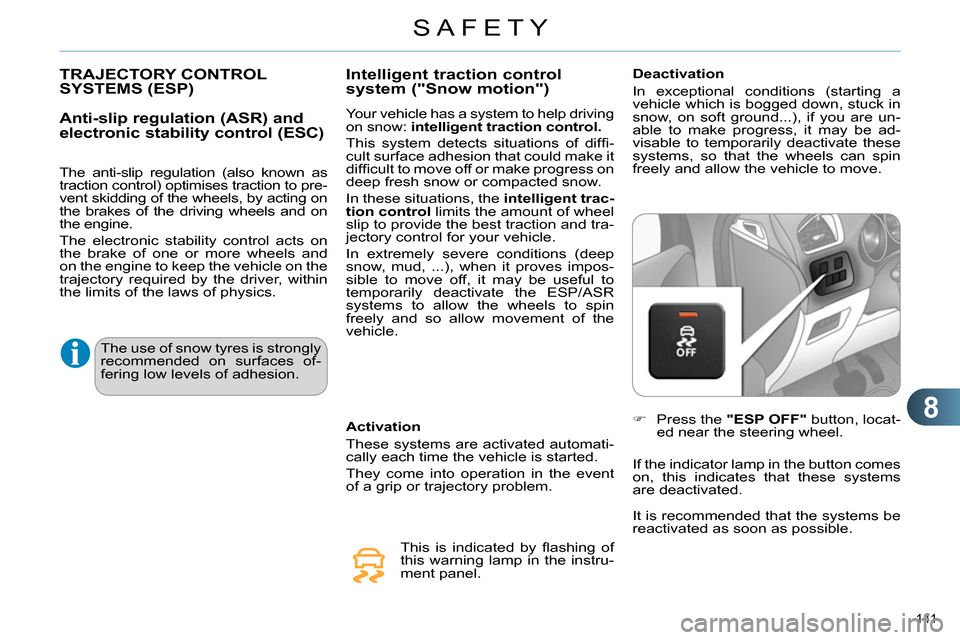
Press the "ESP OFF"
button, locat-
ed near the steering wheel.
If the indicator lamp in the button comes
on, this indicates that these systems
are deactivated.
The use of snow tyres is strongly
recommended on surfaces of-
fering low levels of adhesion.
It is recommended that the systems be
reactivated as soon as possible.
Page 149 of 340
8
SAFETY
147
Deactivation
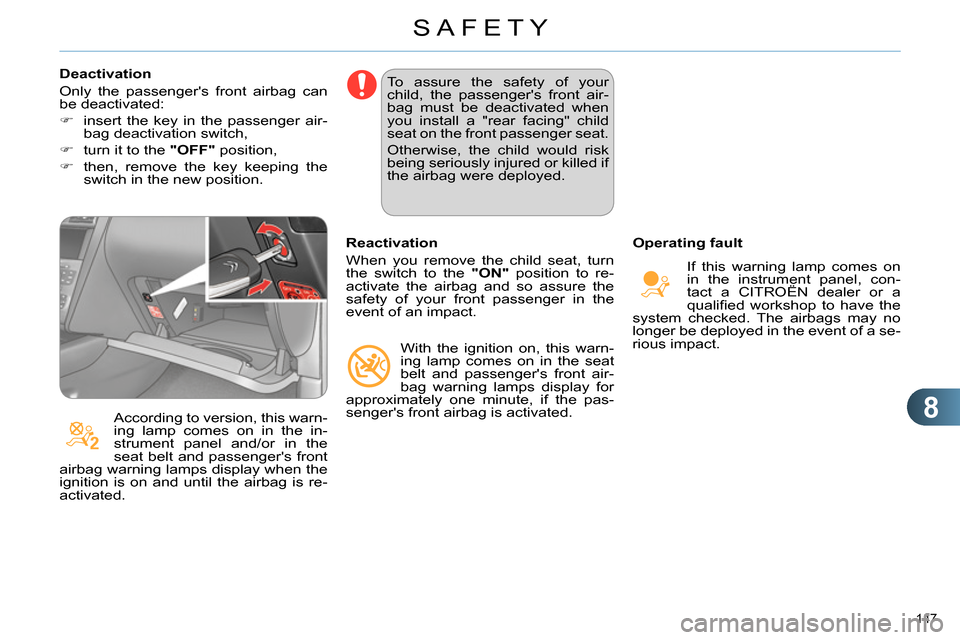
Only the passenger's front airbag can
be deactivated:
insert the key in the passenger air-
bag deactivation switch,
turn it to the "OFF"
position,
then, remove the key keeping the
switch in the new position.
According to version, this warn-
ing lamp comes on in the in-
strument panel and/or in the
seat belt and passenger's front
airbag warning lamps display when the
ignition is on and until the airbag is re-
activated. To assure the safety of your
child, the passenger's front air-
bag must be deactivated when
you install a "rear facing" child
seat on the front passenger seat.
Otherwise, the child would risk
being seriously injured or killed if
the airbag were deployed.
Reactivation
When you remove the child seat, turn
the switch to the "ON"
position to re-
activate the airbag and so assure the
safety of your front passenger in the
event of an impact.
With the ignition on, this warn-
ing lamp comes on in the seat
belt and passenger's front air-
bag warning lamps display for
approximately one minute, if the pas-
senger's front airbag is activated.
Operating fault
If this warning lamp comes on
in the instrument panel, con-
tact a CITROËN dealer or a
qualifi ed workshop to have the
system checked. The airbags may no
longer be deployed in the event of a se-
rious impact.
Page 152 of 340
9
DRIVING
150
ELECTRIC PARKING BRAKE
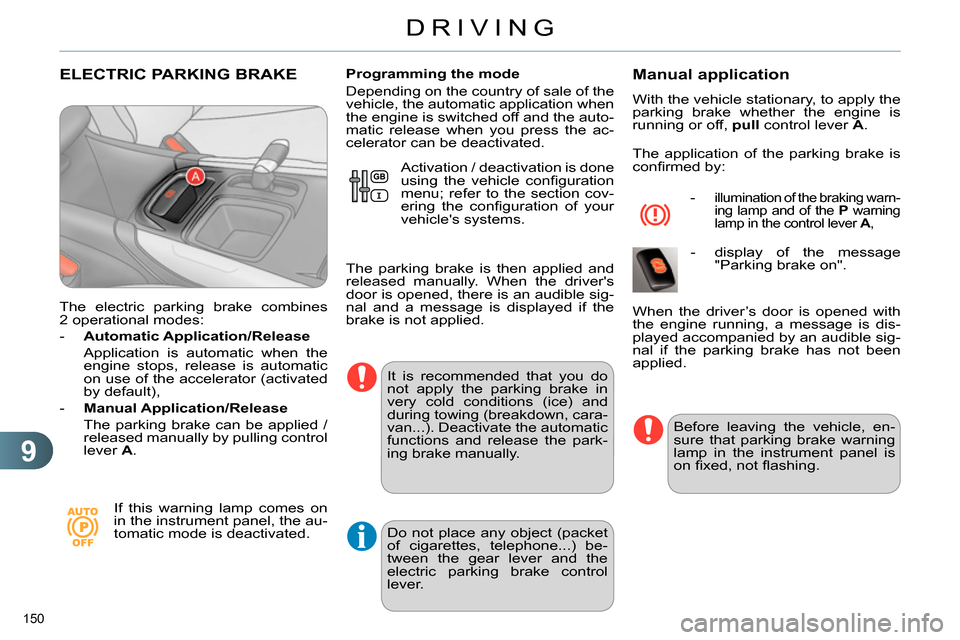
The electric parking brake combines
2 operational modes:
- Automatic Application/Release
Application is automatic when the
engine stops, release is automatic
on use of the accelerator (activated
by default),
- Manual Application/Release
The parking brake can be applied /
released manually by pulling control
lever A
.
If this warning lamp comes on
in the instrument panel, the au-
tomatic mode is deactivated.
Programming the mode
Depending on the country of sale of the
vehicle, the automatic application when
the engine is switched off and the auto-
matic release when you press the ac-
celerator can be deactivated.
It is recommended that you do
not apply the parking brake in
very cold conditions (ice) and
during towing (breakdown, cara-
van...). Deactivate the automatic
functions and release the park-
ing brake manually.
Manual application
With the vehicle stationary, to apply the
parking brake whether the engine is
running or off, pull
control lever A
.
The application of the parking brake is
confi rmed by:
- illumination of the braking warn-
ing lamp and of the P
warning
lamp in the control lever A
,
- display of the message
"Parking brake on".
Before leaving the vehicle, en-
sure that parking brake warning
lamp in the instrument panel is
on fi xed, not fl ashing.
When the driver’s door is opened with
the engine running, a message is dis-
played accompanied by an audible sig-
nal if the parking brake has not been
applied. Activation / deactivation is done
using the vehicle confi guration
menu; refer to the section cov-
ering the confi guration of your
vehicle's systems.
The parking brake is then applied and
released manually. When the driver's
door is opened, there is an audible sig-
nal and a message is displayed if the
brake is not applied.
Do not place any object (packet
of cigarettes, telephone...) be-
tween the gear lever and the
electric parking brake control
lever.
Page 157 of 340
9
DRIVING
155
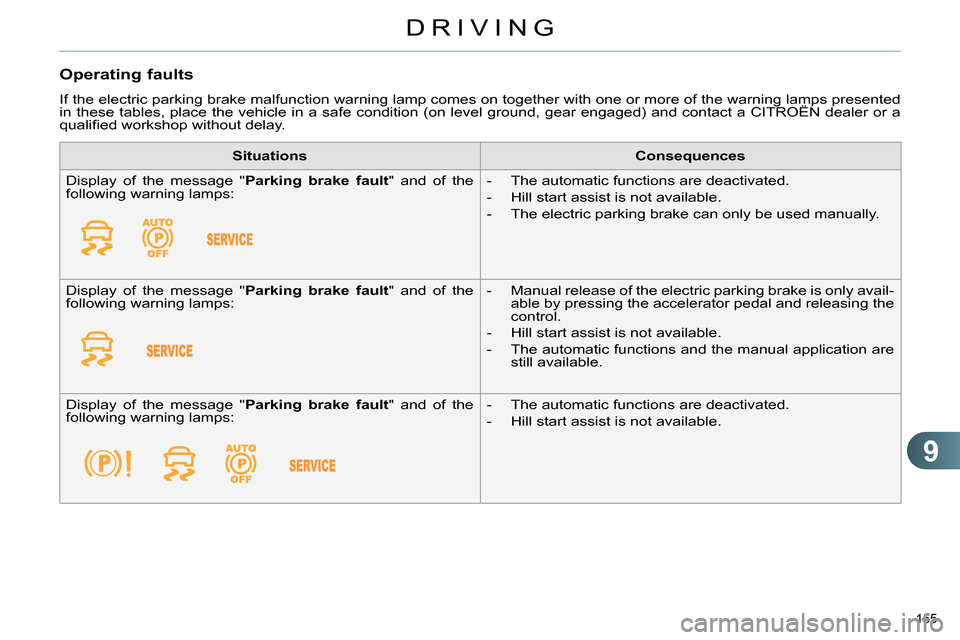
Operating faults
If the electric parking brake malfunction warning lamp comes on together with one or more of the warning lamps presented
in these tables, place the vehicle in a safe condition (on level ground, gear engaged) and contact a CITROËN dealer or a
qualifi ed workshop without delay.
Situations
Consequences
Display of the message " Parking brake fault
" and of the
following warning lamps:
- The automatic functions are deactivated.
- Hill start assist is not available.
- The electric parking brake can only be used manually.
Display of the message " Parking brake fault
" and of the
following warning lamps:
- Manual release of the electric parking brake is only avail-
able by pressing the accelerator pedal and releasing the
control.
- Hill start assist is not available.
- The automatic functions and the manual application are
still available.
Display of the message " Parking brake fault
" and of the
following warning lamps:
- The automatic functions are deactivated.
- Hill start assist is not available.
Page 166 of 340
9
DRIVING
164
HILL START ASSIST
System which keeps your vehicle im-
mobilised temporarily (approximately
2 seconds) when starting on a gradi-
ent, the time it takes to move your foot
from the brake pedal to the accelerator
pedal.
This function is only active when:
- the vehicle is completely stationary,
with your foot on the brake pedal,
- when certain conditions of gradient
are met,
- with the driver’s door closed.
The hill start assist function cannot be
deactivated.
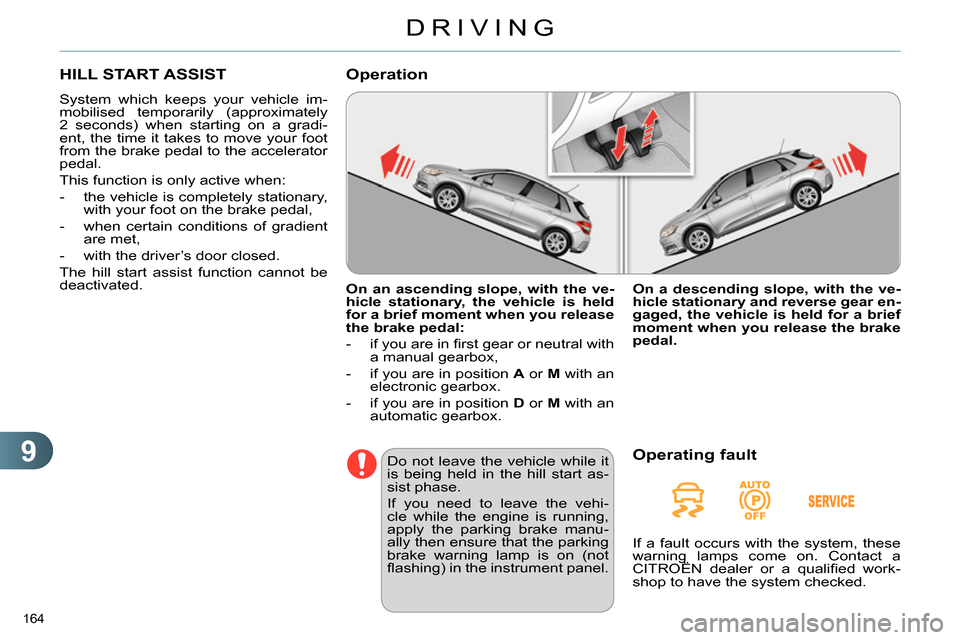
On an ascending slope, with the ve-
hicle stationary, the vehicle is held
for a brief moment when you release
the brake pedal:
- if you are in fi rst gear or neutral with
a manual gearbox,
- if you are in position A
or M
with an
electronic gearbox.
- if you are in position D
or M
with an
automatic gearbox.
Operation
Do not leave the vehicle while it
is being held in the hill start as-
sist phase.
If you need to leave the vehi-
cle while the engine is running,
apply the parking brake manu-
ally then ensure that the parking
brake warning lamp is on (not
fl ashing) in the instrument panel.
On a descending slope, with the ve-
hicle stationary and reverse gear en-
gaged, the vehicle is held for a brief
moment when you release the brake
pedal.
Operating fault
If a fault occurs with the system, these
warning lamps come on. Contact a
CITROËN dealer or a qualifi ed work-
shop to have the system checked.
Page 167 of 340
9
DRIVING
165
GEAR SHIFT INDICATOR
System which reduces fuel consump-
tion by advising the driver to change up.
With an electronic gearbox, the system
is only active in manual mode.
Operation
Depending on the driving situation and
your vehicle's equipment, the system
may advise you to skip one (or more)
gear(s). You can follow this instruc-
tion without engaging the intermediate
gears.
The gear engagement recommenda-
tions must not be considered compulso-
ry. In fact, the confi guration of the road,
the amount of traffi c and safety remain
determining factors when choosing the
best gear. Therefore, the driver remains
responsible for deciding whether or not
to follow the advice given by the system.
This function cannot be deactivated.
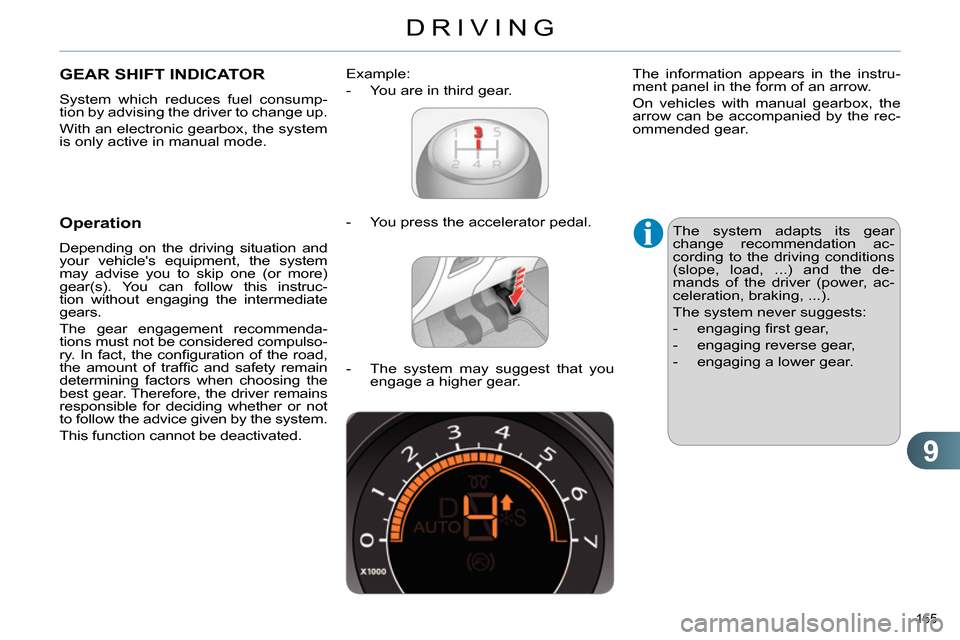
- You press the accelerator pedal.
Example:
- You are in third gear.
- The system may suggest that you
engage a higher gear.
The information appears in the instru-
ment panel in the form of an arrow.
On vehicles with manual gearbox, the
arrow can be accompanied by the rec-
ommended gear.
The system adapts its gear
change recommendation ac-
cording to the driving conditions
(slope, load, ...) and the de-
mands of the driver (power, ac-
celeration, braking, ...).
The system never suggests:
- engaging fi rst gear,
- engaging reverse gear,
- engaging a lower gear.