esp Citroen C4 2015 2.G User Guide
[x] Cancel search | Manufacturer: CITROEN, Model Year: 2015, Model line: C4, Model: Citroen C4 2015 2.GPages: 494, PDF Size: 20.49 MB
Page 48 of 494
46
C4-2_en_Chap02_ecran-multifonction_ed01-2015
C4-2_en_Chap02_ecran-multifonction_ed01-2015
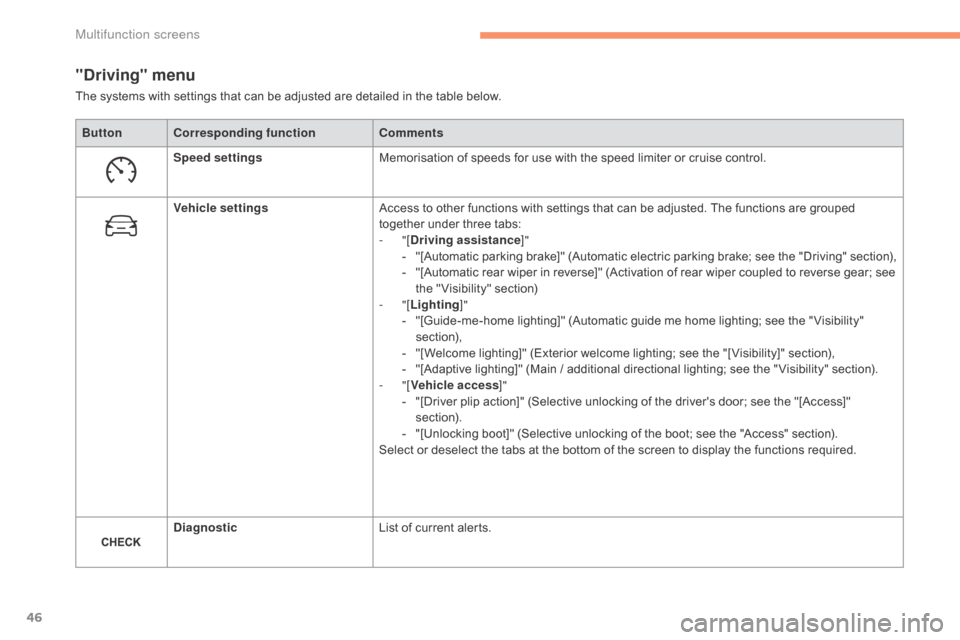
"Driving" menu
ButtonCorresponding function Comments
Speed settings Memorisation
of speeds for use with the speed limiter or cruise control.
Vehicle settings Access
to other functions with settings that can be adjusted. The functions are grouped
t
ogether under three tabs:
-
"[Driving assistance ]"
-
"
[Automatic
p
arking
b
rake]"
(
Automatic
e
lectric
p
arking
b
rake;
s
ee
t
he
"
Driving"
s
ection),
-
"
[Automatic rear wiper in reverse]" (Activation of rear wiper coupled to reverse gear; see
t
he " Visibility" section)
-
"[Lighting ]"
-
"
[Guide-me-home lighting]" (Automatic guide me home lighting; see the " Visibility"
s
ection),
-
"
[Welcome lighting]" (Exterior welcome lighting; see the "[ Visibility]" section),
-
"
[Adaptive lighting]" (Main / additional directional lighting; see the " Visibility" section).
-
"[Vehicle access ]"
-
"
[Driver plip action]" (Selective unlocking of the driver's door; see the "[Access]"
s
ection).
-
"
[Unlocking boot]" (Selective unlocking of the boot; see the "Access" section).
Select
or deselect the tabs at the bottom of the screen to display the functions required.
Diagnostic List
of current alerts.
The
systems with settings that can be adjusted are detailed in the table below.
Multifunction screens
Page 49 of 494
47
C4-2_en_Chap02_ecran-multifonction_ed01-2015
C4-2_en_Chap02_ecran-multifonction_ed01-2015
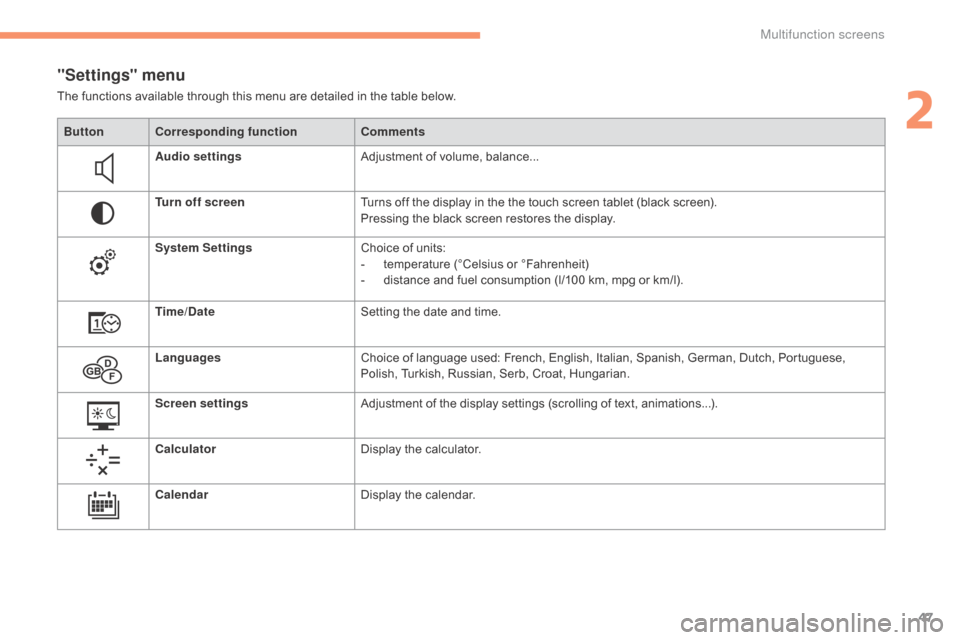
"Settings" menu
The functions available through this menu are detailed in the table below.
Bu tton Corresponding function Comments
Audio settings Adjustment
of volume, balance...
Turn off screen Turns
off the display in the the touch screen tablet (black screen).
Pressing
the black screen restores the display.
System Settings Choice
of units:
-
t
emperature (°Celsius or °Fahrenheit)
-
d
istance and fuel consumption (l/100 km, mpg or km/l).
Time/Date Setting
the date and time.
Languages Choice
of language used: French, English, Italian, Spanish, German, Dutch, Portuguese,
P
olish, Turkish, Russian, Serb, Croat, Hungarian.
Screen settings Adjustment
of the display settings (scrolling of text, animations...).
Calculator Display
the calculator.
Calendar Display
the calendar.
2
Multifunction screens
Page 59 of 494
57
C4-2_en_Chap03_ouvertures_ed01-2015
C4-2_en_Chap03_ouvertures_ed01-2015
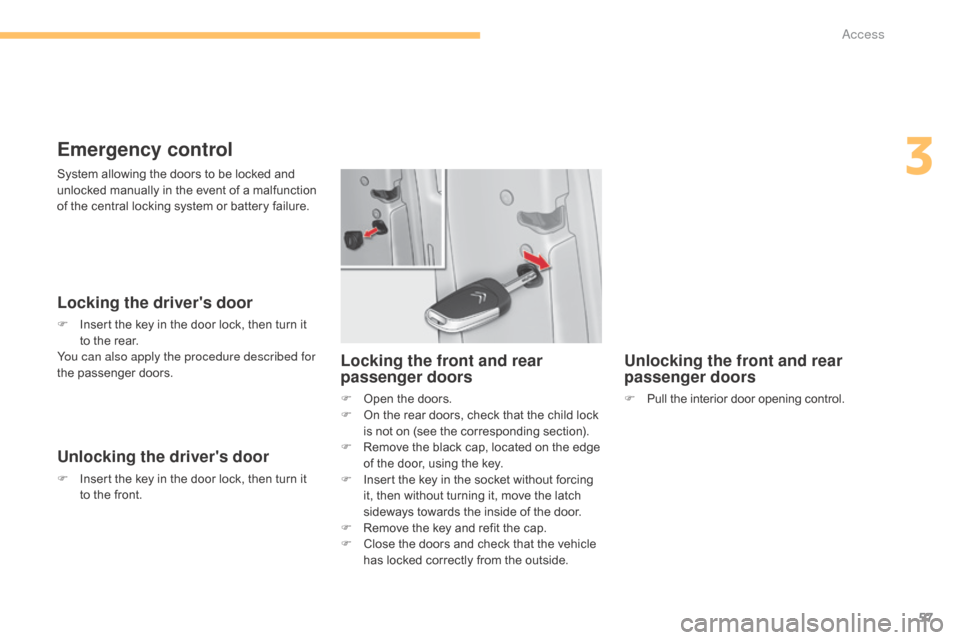
Emergency control
Locking the driver's door
F Insert the key in the door lock, then turn it t
o the rear.
You can also apply the procedure described for
the
p
assenger
do
ors.
Unlocking the driver's door
F Insert the key in the door lock, then turn it t
o the front.
Unlocking the front and rear
passenger doors
F Pull the interior door opening control.
Locking the front and rear
passenger doors
F Open the doors.
F O n the rear doors, check that the child lock
i
s not on (see the corresponding section).
F
R
emove the black cap, located on the edge
o
f the door, using the key.
F
I
nsert the key in the socket without forcing
i
t, then without turning it, move the latch
s
ideways towards the inside of the door.
F
R
emove the key and refit the cap.
F
C
lose the doors and check that the vehicle
h
as locked correctly from the outside.
System
allowing
the
doors
to
be
locked
and
u
nlocked
manually
in
the
event
of
a
malfunction
o
f
the
central
locking
system
or
battery
failure.
3
Access
Page 64 of 494
62
C4-2_en_Chap03_ouvertures_ed01-2015
C4-2_en_Chap03_ouvertures_ed01-2015
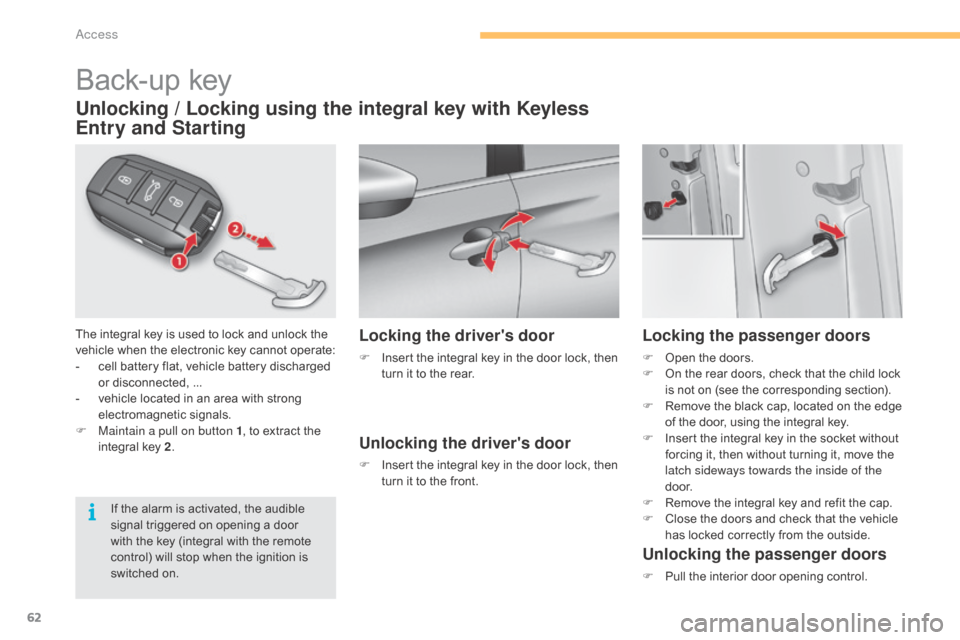
Back-up key
The integral key is used to lock and unlock the vehicle when the electronic key cannot operate:
-
c
ell battery flat, vehicle battery discharged
o
r disconnected, ...
-
v
ehicle located in an area with strong
e
lectromagnetic
si
gnals.
F
M
aintain a pull on button 1 ,
to extract the
i
ntegral key 2.
Unlocking / Locking using the integral key with Keyless
Entry and Starting
If the alarm is activated, the audible s
ignal triggered on opening a door
w
ith the key (integral with the remote
c
ontrol) will stop when the ignition is
s
witched on.
Locking the driver's door
F Insert the integral key in the door lock, then t
urn it to the rear.
Unlocking the driver's door
F Insert the integral key in the door lock, then t
urn it to the front.
Locking the passenger doors
F Open the doors.
F O n the rear doors, check that the child lock
i
s not on (see the corresponding section).
F
R
emove the black cap, located on the edge
o
f the door, using the integral key.
F
I
nsert the integral key in the socket without
f
orcing it, then without turning it, move the
l
atch sideways towards the inside of the
d o o r.
F
R
emove the integral key and refit the cap.
F
C
lose the doors and check that the vehicle
h
as locked correctly from the outside.
Unlocking the passenger doors
F Pull the interior door opening control.
access
Page 68 of 494
66
C4-2_en_Chap03_ouvertures_ed01-2015
C4-2_en_Chap03_ouvertures_ed01-2015
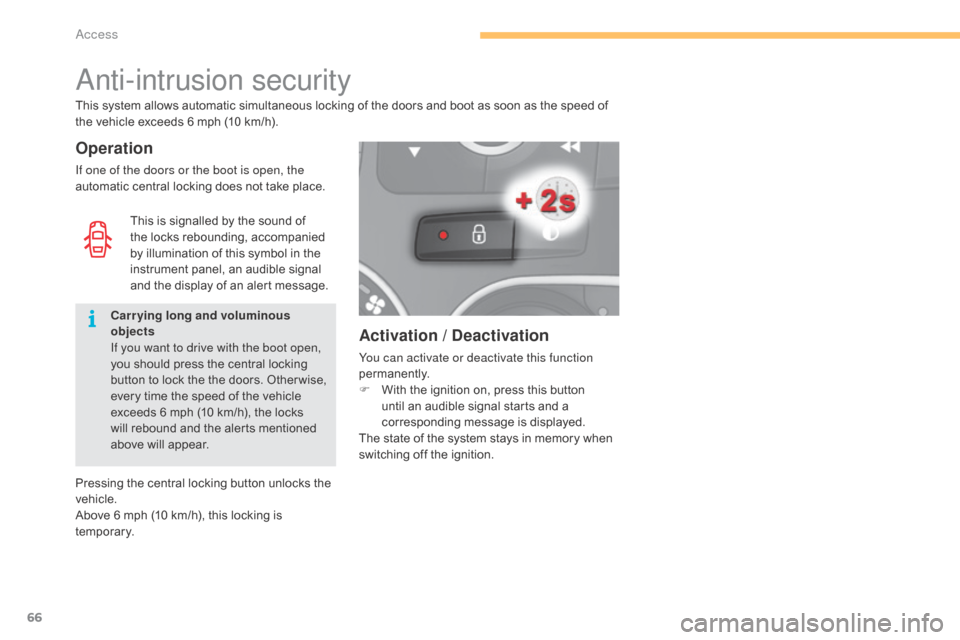
Activation / Deactivation
You can activate or deactivate this function
permanently.
F
W
ith the ignition on, press this button
u
ntil an audible signal starts and a
c
orresponding message is displayed.
The
state of the system stays in memory when
s
witching off the ignition.
anti-intrusion security
Operation
If one of the doors or the boot is open, the
automatic central locking does not take place.
This
system allows automatic simultaneous locking of the doors and boot as soon as the speed of
t
he vehicle exceeds 6 mph (10 km/h).
Pressing the central locking button unlocks the
v
ehicle.
Above
6 mph (10 km/h), this locking is
t
e m p o r a r y. This
is signalled by the sound of
t
he locks rebounding, accompanied
b
y illumination of this symbol in the
i
nstrument panel, an audible signal
a
nd the display of an alert message.
Carrying long and voluminous
objects
If you want to drive with the boot open,
you
should press the central locking
b
utton to lock the the doors. Other wise,
e
very time the speed of the vehicle
e
xceeds 6 mph (10 km/h), the locks
w
ill rebound and the alerts mentioned
a
bove will appear.
Access
Page 82 of 494
80
C4-2_en_Chap04_confort_ed01-2015
C4-2_en_Chap04_confort_ed01-2015
Stop & Start
The heating and air conditioning systems only work when the engine
i
s running. To maintain a comfortable
t
emperature in the passenger
c
ompartment, you can temporarily
d
eactivate the Stop & Start system (see
t
he corresponding section).
In
order
for
these
systems
to
be
fully
effective,
follow
the
operation
and
maintenance
g
uidelines
belo
w:
F
T
o
obtain
an
even
air
distribution,
take
care
not
to
obstruct
the
exterior
air
intake
grilles
l
ocated at the base of the windscreen, the nozzles, the vents and the air outlets, as well
as
the
air
extractor
located
in
the
boot.
F
D
o
not
cover
the
sunshine
sensor,
located
on
the
dashboard;
this
is
used
for
regulation
o
f
the
air
conditioning
system.
F
O
perate
the
air
conditioning
system
for
at
least
5
to
10
minutes,
once
or
twice
a
month
t
o
keep
it
in
per fect
working
order.
F
E
nsure
that
the
passenger
compartment
filter
is
in
good
condition
and
have
the
filter
e
lements
replaced
regularly.
W
e
recommend
the
use
of
a
combined
passenger
compartment
filter.
Thanks
to
its
s
pecial active additive, it contributes to the purification of the air breathed by the
occupants
and
the
cleanliness
of
the
passenger
compartment
(reduction
of
allergic
s
ymptoms,
bad
odours
and
greasy
deposits).
F
T
o
ensure
correct
operation
of
the
air
conditioning
system,
you
are
also
advised
to
have
i
t
checked
regularly
as
recommended
in
the
maintenance
and
warranty
guide.
F
I
f
the
system
does
not
produce
cold
air,
switch
it
off
and
contact
a
CITROËN
dealer
or
a
q
ualified
w
orkshop.
When
towing
the
maximum
load
on
a
steep
gradient
in
high
temperatures,
switching
off
the
a
ir
conditioning
increases
the
available
engine
power
and
so
improves
the
towing
ability. The condensation created by the air
conditioning
results in a discharge
o
f water under the vehicle which is
per fectly normal.
If after an extended stop in sunshine,
t
he interior temperature is very
h
igh, first ventilate the passenger
c
ompartment for a few moments.
Put the air flow control at a setting high
e
nough to quickly change the air in the
p
assenger
c
ompartment.
The air conditioning system does not
c
ontain chlorine and does not present
any danger to the ozone layer.
Recommendations for ventilation and air conditioning
Comfort
Page 87 of 494
85
C4-2_en_Chap04_confort_ed01-2015
C4-2_en_Chap04_confort_ed01-2015
See "Front demisting - defrosting".
4. Automatic visibility programmeIf you wish, you can make a different choice f
rom that offered by the system by changing
a
setting. The the "AUTO"
indicator lamps go
o
ff; the other functions will still be controlled
au
tomatically.
F
P
ressing the "AUTO" button returns the
system
to completely automatic operation.2. Driver's side adjustment
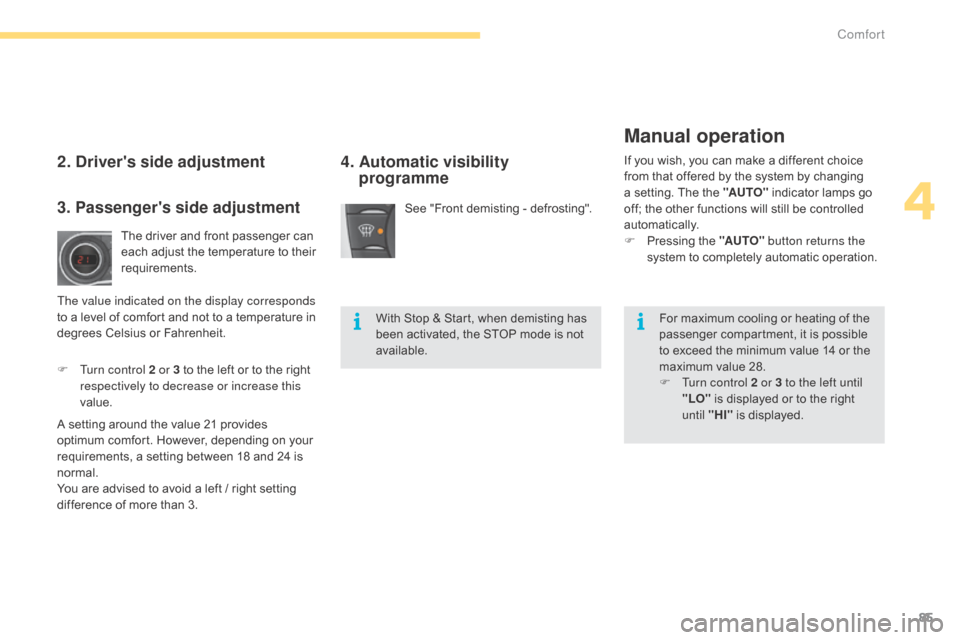
The driver and front passenger can each adjust the temperature to their
r
equirements.
F
T
urn control 2 or 3 to the left or to the right
r
espectively to decrease or increase this
value.
A
setting
around the value 21 provides
o
ptimum
comfort. However, depending on your
r
equirements, a setting between 18 and 24 is
n
ormal.
You
are
advised to avoid a left / right setting
d
ifference
of more than 3.
3. Passenger's side adjustment
The value indicated on the display corresponds
to a level of comfort and not to a temperature in
d
egrees Celsius or Fahrenheit. With
Stop & Start, when demisting has
b
een activated, the STOP mode is not
a
vailable.For
maximum cooling or heating of the
p
assenger compartment, it is possible
t
o exceed the minimum value 14 or the
m
aximum value 28.
F
T
urn control 2 or 3 to the left until
"LO"
is displayed or to the right
u
ntil "HI"
is displayed.
Manual operation
4
Comfort
Page 97 of 494
95
C4-2_en_Chap04_confort_ed01-2015
C4-2_en_Chap04_confort_ed01-2015
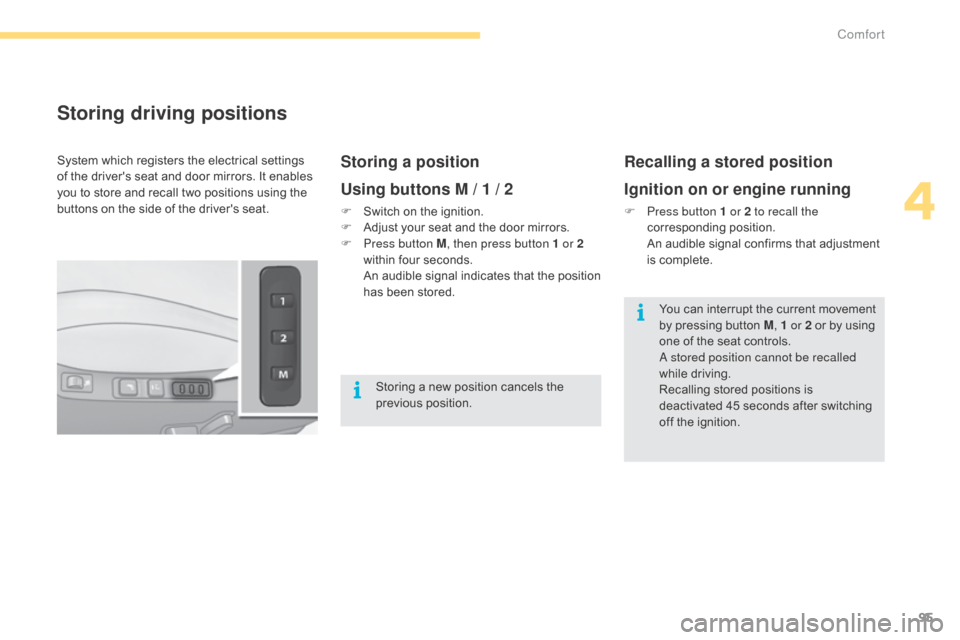
Storing driving positions
Storing a position
Using buttons M / 1 / 2
F Switch on the ignition.
F A djust your seat and the door mirrors.
F
P
ress button M , then press button 1 or 2
within
four seconds.
A
n audible signal indicates that the position
h
as been stored.
Recalling a stored position
Ignition on or engine running
F Press button 1 or 2 to recall the corresponding p osition.
A
n audible signal confirms that adjustment
i
s complete.
System
which
registers
the
electrical
settings
o
f
the
driver's
seat
and
door
mirrors.
It
enables
y
ou
to
store
and
recall
two
positions
using
the
b
uttons
on
the
side
of
the
driver's
seat.
Storing
a
new
position
cancels
the
p
revious
p
osition. You
can interrupt the current movement
b
y pressing button M, 1 or 2
or by using
o
ne of the seat controls.
a
stored position cannot be recalled
while
driving.
Recalling
stored positions is
d
eactivated 45 seconds after switching
o
ff the ignition.
4
Comfort
Page 98 of 494
96
C4-2_en_Chap04_confort_ed01-2015
C4-2_en_Chap04_confort_ed01-2015
Rear seats
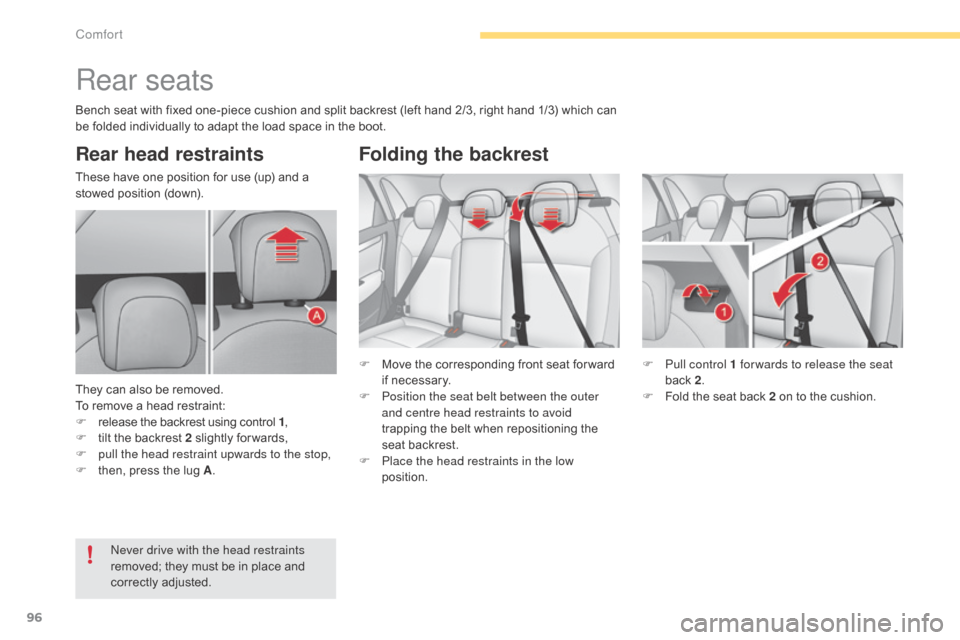
Rear head restraints
These have one position for use (up) and a stowed position (down).
They
can also be removed.
To
remove a head restraint:
F
r
elease the backrest using control 1,
F
t
ilt the backrest 2 slightly for wards,
F
p
ull the head restraint upwards to the stop,
F
t
hen, press the lug A. F
M
ove the corresponding front seat for ward
i
f necessary.
F
P
osition the seat belt between the outer
and centre head restraints to avoid
trapping
the belt when repositioning the
s
eat backrest.
F
P
lace the head restraints in the low
position. F
P
ull control 1 for wards to release the seat
back
2.
F
F
old the seat back 2 on to the cushion.
ne
ver drive with the head restraints
removed;
they must be in place and
c
orrectly
adj
usted.
Folding the backrest
Bench seat with fixed one-piece cushion and split backrest (left hand 2/3, right hand 1/3) which can be folded individually to adapt the load space in the boot.
Comfort
Page 100 of 494
98
C4-2_en_Chap04_confort_ed01-2015
C4-2_en_Chap04_confort_ed01-2015
Mirrors
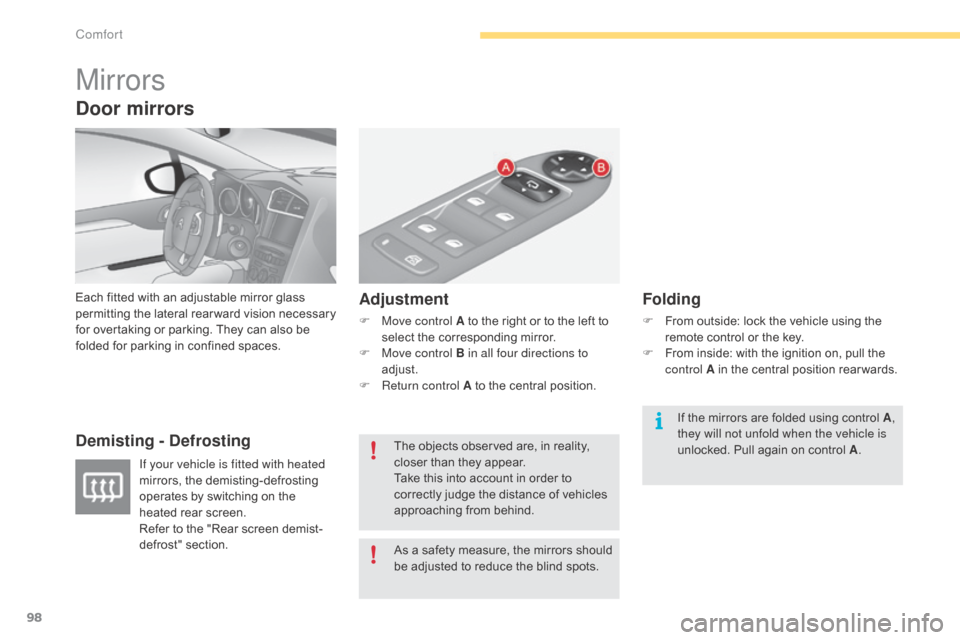
Each fitted with an adjustable mirror glass permitting t he la teral r earward v ision n ecessary f
or overtaking or parking. They can also be
f
olded for parking in confined spaces.
Demisting - Defrosting Adjustment
F Move control A
to the right or to the left to s
elect the corresponding mirror.
F
M
ove control B in all four directions to
adjust.
F
R
eturn control A to the central position.
Folding
F From outside: lock the vehicle using the r
emote control or the key.
F
F
rom inside: with the ignition on, pull the
c
ontrol A in the central position rear wards.
If your vehicle is fitted with heated
mirrors,
the
demisting-defrosting
o
perates
by
switching
on
the
h
eated
rear
screen.
Refer
to
the
"Rear
screen
demist-
defrost"
s
ection. As
a
safety
measure,
the
mirrors
should
b
e
adjusted
to
reduce
the
blind
spots.
The
objects
observed
are,
in
reality,
c
loser
than
they
appear.
Take
this
into
account
in
order
to
c
orrectly
judge
the
distance
of
vehicles
a
pproaching
from
behind. If
the mirrors are folded using control A,
they will not unfold when the vehicle is
unlocked.
Pull again on control A.
Door mirrors
Comfort