ESP Citroen C4 2015 2.G Owner's Guide
[x] Cancel search | Manufacturer: CITROEN, Model Year: 2015, Model line: C4, Model: Citroen C4 2015 2.GPages: 494, PDF Size: 20.49 MB
Page 191 of 494

189
C4-2_en_Chap09_conduite_ed01-2015
C4-2_en_Chap09_conduite_ed01-2015
Gear shift indicator*
Depending on the driving situation and your vehicle's equipment, the system may advise
y
ou to skip one (or more) gear(s). You can
f
ollow this instruction without engaging the
i
ntermediate
g
ears.
The
gear engagement recommendations must
n
ot be considered compulsory. In fact, the
c
onfiguration of the road, the amount of traffic
a
nd safety remain determining factors when
c
hoosing the best gear. Therefore, the driver
r
emains responsible for deciding whether or not
t
o follow the advice given by the system.
This
function cannot be deactivated. -
Y
ou press the accelerator pedal.
Example:
-
Y ou are in third gear.
-
T
he system may suggest that you engage
a
higher gear.
The
information appears in the instrument p
anel in the form of an arrow.
System
which reduces fuel consumption by recommending the most appropriate gear.
With an electronic or automatic gearbox, the
s
ystem is only active in manual mode.
*
Depending on engine. On
vehicle fitted with a manual gearbox,
t
he arrow may be accompanied by the gear
re
commended.The
system adapts its gear change
r
ecommendation according to the
d
riving conditions (slope, load, ...) and
t
he demands of the driver (power,
a
cceleration, braking, ...).
The
system never suggests:
-
e
ngaging first gear,
-
enga
ging
r
everse
g
ear,
Operation
On BlueHDi Diesel versions with manual gearbox, t he s ystem m ay s uggest c hanging i nto
n
eutral so that the engine can go into standby
(
STOP mode with Stop & Start), in certain
d
riving conditions. In this case, N is displayed
in
the instrument panel.
9
driving
Page 198 of 494
196
C4-2_en_Chap09_conduite_ed01-2015
C4-2_en_Chap09_conduite_ed01-2015
blind spot sensors
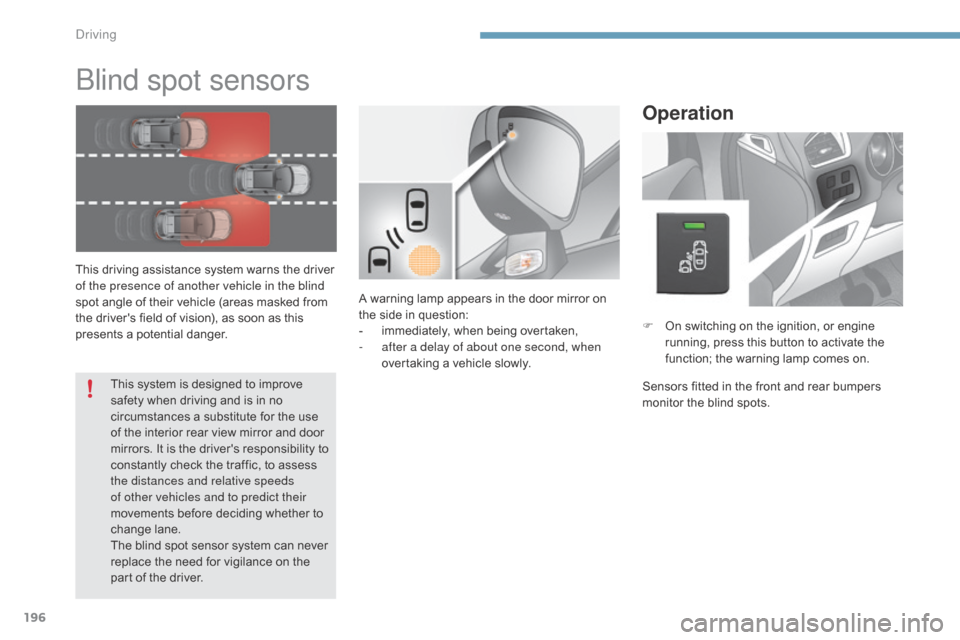
This driving assistance system warns the driver of the presence of another vehicle in the blind
spot
angle of their vehicle (areas masked from
t
he driver's field of vision), as soon as this
p
resents a potential danger.
Operation
F On switching on the ignition, or engine r
unning, press this button to activate the
f
unction; the warning lamp comes on.
Sensors
fitted in the front and rear bumpers
m
onitor the blind spots.
A
warning
lamp
appears
in
the
door
mirror
on
t
he
side
in
question:
-
i
mmediately,
when
being
overtaken,
-
a
fter a delay of about one second, when
overtaking
a
vehicle
slowly.
This
system
is
designed
to
improve
s
afety
when
driving
and
is
in
no
c
ircumstances
a
substitute
for
the
use
o
f
the
interior
rear
view
mirror
and
door
m
irrors.
It
is
the
driver's
responsibility
to
c
onstantly
check
the
traffic,
to
assess
t
he distances and relative speeds
of other vehicles and to predict their
movements
before
deciding
whether
to
c
hange
lan
e.
The
blind
spot
sensor
system
can
never
r
eplace
the
need
for
vigilance
on
the
p
art
of
the
driver.
driving
Page 204 of 494
202
C4-2_en_Chap09_conduite_ed01-2015
C4-2_en_Chap09_conduite_ed01-2015
Programming
Exceeding the programmed speedExiting the speed limiter mode
In the event of a fault with the speed limiter, t he speed is cleared resulting in flashing of the
das
hes.
Have
it checked by a CITROËN dealer or a
q
ualified
w
orkshop.
F
S
witch
the
speed
limiter
off
by
pressing
button
4 :
the
display
c
onfirms
that
it
has
been
switched
off
(Pause).
F
S
et
the
speed
value
by
pressing
button
2 or 3
(e.g.:
55 mph
(
90 km/h)).
You
can
then
change
the
programmed
speed
using
buttons 2 and 3
:
-
b
y
+
or
-
1
mph
(km/h)
=
short
press,
-
i
n
steps
of
+
or
-
5
mph
(km/h)
=
maintained
press.
If
speed
memorisation
is
available
and
activated
on
your
vehicle,
the
p
rogrammed
speed
will
stop
at
the
closest
memorised
speed;
refer
to
t
he
corresponding
section. F
T
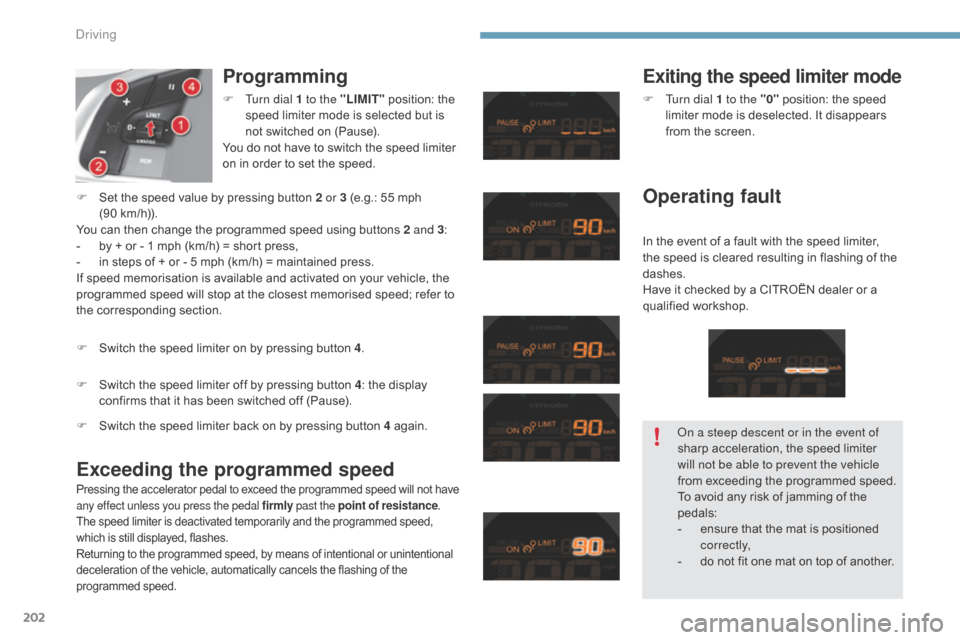
urn dial 1 to the "LIMIT"
position:
the
s
peed
limiter
mode
is
selected
but
is
n
ot
switched
on
(Pause).
You
do
not
have
to
switch
the
speed
limiter
o
n
in
order
to
set
the
speed.
F
S
witch
the
speed
limiter
on
by
pressing
button
4 .
Pressing the accelerator pedal to exceed the programmed speed will not have a
ny effect unless you press the pedal firmly past the point of resistance.
The
speed limiter is deactivated temporarily and the programmed speed,
w
hich is still displayed, flashes.
Returning
to the programmed speed, by means of intentional or unintentional
d
eceleration of the vehicle, automatically cancels the flashing of the
pro
grammed
s
peed.
F Turn dial 1 to the "0" position: the speed l
imiter mode is deselected. It disappears
f
rom the screen.
Operating fault
F Switch the speed limiter back on by pressing button 4 ag ain.on a s
teep descent or in the event of
sharp
acceleration, the speed limiter
w
ill not be able to prevent the vehicle
from
exceeding the programmed speed.
To
avoid any risk of jamming of the
ped
als:
-
e
nsure that the mat is positioned
c
o r r e c t l y,
-
d
o not fit one mat on top of another.
Driving
Page 206 of 494
204
C4-2_en_Chap09_conduite_ed01-2015
C4-2_en_Chap09_conduite_ed01-2015
Programming
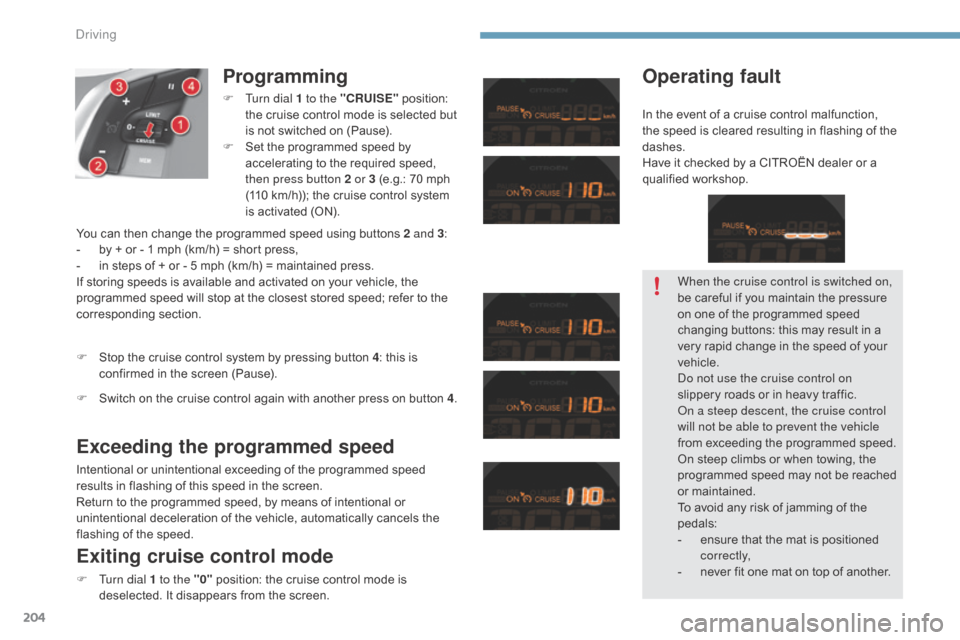
F Turn dial 1 to the "CRUISE" position: t
he cruise control mode is selected but
i
s not switched on (Pause).
F
S
et the programmed speed by
a
ccelerating to the required speed,
t
hen press button 2 or 3 (e.g.: 70 mph
(
110 km/h)); the cruise control system
i
s activated (ON).
Exceeding the programmed speed
Intentional or unintentional exceeding of the programmed speed results in flashing of this speed in the screen.
Return
to the programmed speed, by means of intentional or
u
nintentional deceleration of the vehicle, automatically cancels the
f
lashing of the speed.
Exiting cruise control mode
F Turn dial 1 to the "0" position: the cruise control mode is d
eselected. It disappears from the screen.
F
S
top the cruise control system by pressing button 4
: this is
c
onfirmed in the screen (Pause).
Operating fault
You can then change the programmed speed using buttons 2 and 3
:
- b y + or - 1 mph (km/h) = short press,
-
i
n steps of + or - 5 mph (km/h) = maintained press.
If
storing speeds is available and activated on your vehicle, the
p
rogrammed speed will stop at the closest stored speed; refer to the
c
orresponding
s
ection.
F
S
witch on the cruise control again with another press on button 4. When the cruise control is switched on,
be
careful if you maintain the pressure
o
n one of the programmed speed
c
hanging buttons: this may result in a
v
ery rapid change in the speed of your
v
ehicle.
do n
ot use the cruise control on
slippery
roads or in heavy traffic.
on a s
teep descent, the cruise control
will not be able to prevent the vehicle
from
exceeding the programmed speed.
On
steep climbs or when towing, the
p
rogrammed speed may not be reached
o
r maintained.
To
avoid any risk of jamming of the
ped
als:
-
e
nsure that the mat is positioned
c
o r r e c t l y,
-
n
ever fit one mat on top of another.
In
the event of a cruise control malfunction,
t
he speed is cleared resulting in flashing of the
das
hes.
Have it checked by a CITROËN dealer or a
q
ualified
w
orkshop.
Driving
Page 210 of 494
208
C4-2_en_Chap10_verification_ed01-2015
C4-2_en_Chap10_verification_ed01-2015
Fuel tank
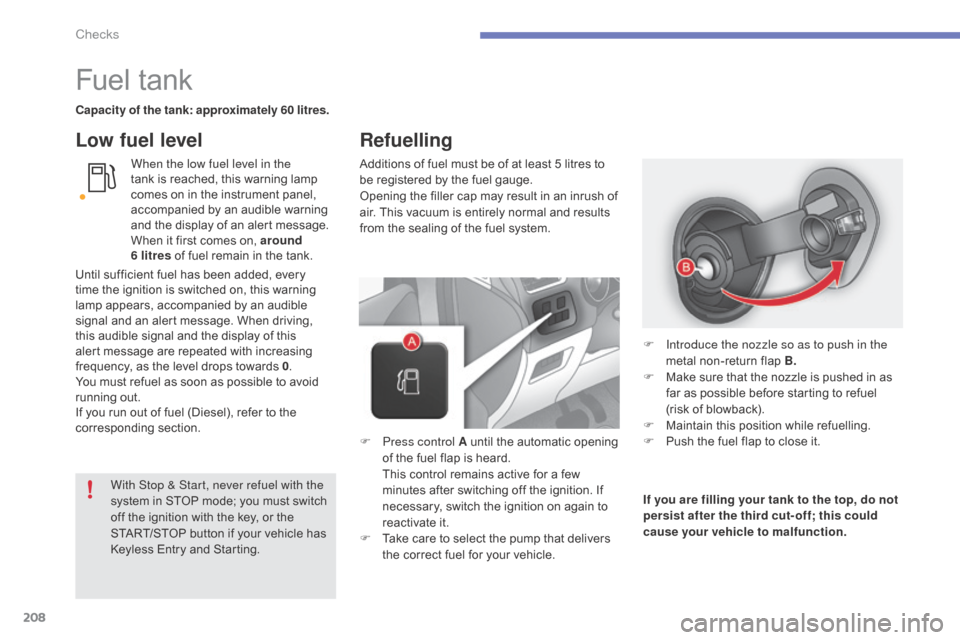
Capacity of the tank: approximately 60 litres.When the low fuel level in the
tank
is reached, this warning lamp
c
omes on in the instrument panel,
a
ccompanied by an audible warning
a
nd the display of an alert message.
W
hen it first comes on, around
6
litres of fuel remain in the tank.
Low fuel level
Additions of fuel must be of at least 5 litres to be registered by the fuel gauge.
Opening
the filler cap may result in an inrush of
a
ir. This vacuum is entirely normal and results
f
rom the sealing of the fuel system.
F
P
ress control A until the automatic opening
o
f the fuel flap is heard.
T
his control remains active for a few
m
inutes after switching off the ignition. If
n
ecessary, switch the ignition on again to
r
eactivate it.
F
T
ake care to select the pump that delivers
t
he correct fuel for your vehicle.If you are filling your tank to the top, do not
persist after the third cut- off; this could
cause your vehicle to malfunction. F
I
ntroduce the nozzle so as to push in the
metal
non-return flap B.
F
M
ake sure that the nozzle is pushed in as
f
ar as possible before starting to refuel
(
risk of blowback).
F
M
aintain this position while refuelling.
F
P
ush the fuel flap to close it.
With Stop & Start, never refuel with the
system
in
STOP
mode;
you
must
switch
o
ff
the
ignition
with
the
key,
or
the
S
TART/STOP
button
if
your
vehicle
has
K
eyless
Entry
and
Starting.
Until
sufficient
fuel
has
been
added,
every
t
ime
the
ignition
is
switched
on,
this
warning
l
amp
appears,
accompanied
by
an
audible
s
ignal
and
an
alert
message.
When
driving,
t
his
audible
signal
and
the
display
of
this
a
lert
message
are
repeated
with
increasing
f
requency,
as
the
level
drops
towards
0 .
You
must
refuel
as
soon
as
possible
to
avoid
r
unning
out.
If
you
run
out
of
fuel
(Diesel),
refer
to
the
c
orresponding
s
ection.
Refuelling
Checks
Page 213 of 494
211
C4-2_en_Chap10_verification_ed01-2015
C4-2_en_Chap10_verification_ed01-2015
Running out of fuel (Diesel)
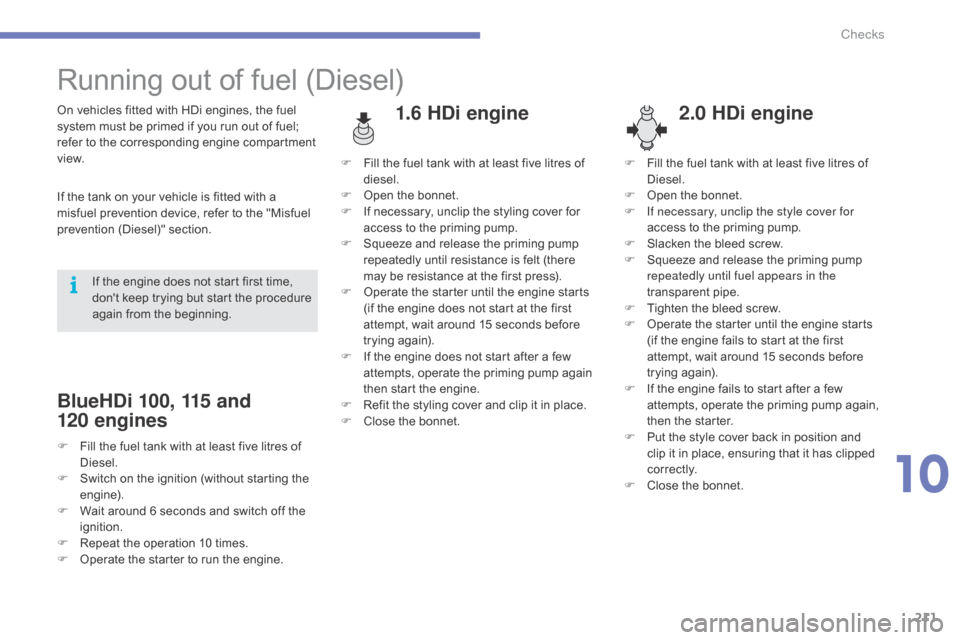
1.6 HDi engine2.0 HDi engineOn vehicles fitted with HDi engines, the fuel s
ystem must be primed if you run out of fuel;
r
efer to the corresponding engine compartment
v
iew.
If
the tank on your vehicle is fitted with a
m
isfuel prevention device, refer to the "Misfuel
p
revention
(
Diesel)"
s
ection.
BlueHDi 100, 115 and
120
engines
If the engine does not start first time, d
on't keep trying but start the procedure
a
gain from the beginning. F
F
ill the fuel tank with at least five litres of
d
iesel.
F
O
pen the bonnet.
F
I
f necessary, unclip the styling cover for
a
ccess to the priming pump.
F
S
queeze and release the priming pump
r
epeatedly until resistance is felt (there m
ay be resistance at the first press).
F O perate the starter until the engine starts
(
if the engine does not start at the first
a
ttempt, wait around 15 seconds before
t
rying
ag
ain).
F
I
f the engine does not start after a few
a
ttempts, operate the priming pump again
t
hen start the engine.
F
R
efit the styling cover and clip it in place.
F
C
lose the bonnet.F
F
ill the fuel tank with at least five litres of
D
iesel.
F
O
pen the bonnet.
F
I
f necessary, unclip the style cover for
access to the priming pump.
F
S
lacken the bleed screw.
F
S
queeze and release the priming pump r
epeatedly until fuel appears in the
transparent p ipe.
F
T
ighten the bleed screw.
F
O
perate the starter until the engine starts
(
if the engine fails to start at the first
a
ttempt, wait around 15 seconds before
t
rying
ag
ain).
F
I
f the engine fails to start after a few
a
ttempts, operate the priming pump again,
t
hen the starter.
F
P
ut the style cover back in position and
c
lip it in place, ensuring that it has clipped
c
o r r e c t l y.
F
C
lose the bonnet.
F
F
ill the fuel tank with at least five litres of
D
iesel.
F
S
witch on the ignition (without starting the
e
ngine).
F
W
ait around 6 seconds and switch off the
ig
nition.
F
R
epeat the operation 10 times.
F
O
perate the starter to run the engine.
10
Checks
Page 217 of 494
215
C4-2_en_Chap10_verification_ed01-2015
C4-2_en_Chap10_verification_ed01-2015
Checking levels
The check is carried out either when the ignition is switched on using the
o
il level indicator in the instrument
p
anel for vehicles so equipped, or
u
sing the dipstick.
Engine oil level
Checking using
the dipstick
Check all of these levels regularly, in line with the manufacturer's service schedule. Top them up if necessary, unless other wise indicated.
I f a level drops significantly, have the corresponding system checked by a CITROËN dealer or a qualified workshop.
It
is normal to top up the oil level between
t
wo services (or oil changes). CITROËN
r
ecommends that you check the level, and top
u
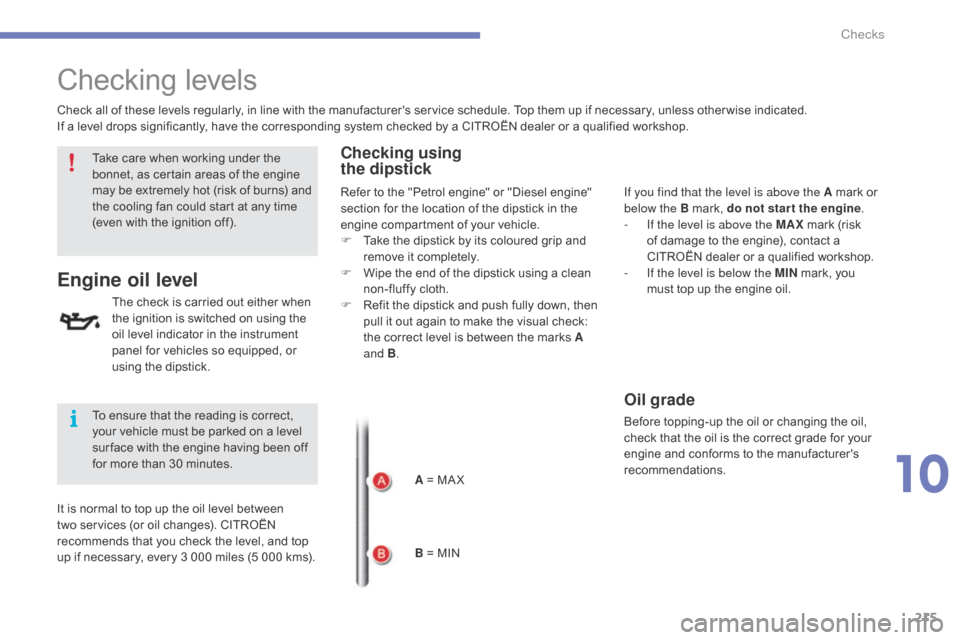
p if necessary, every 3 000 miles (5 000 kms).A
= MA X
B
= MINIf you find that the level is above the A
mark or
belo
w the B mark, do not star t the engine.
-
I
f the level is above the MAX
mark (risk
o
f damage to the engine), contact a
C
ITROËN dealer or a qualified workshop.
-
I
f the level is below the MIN
mark, you
m
ust top up the engine oil.
Oil grade
Before topping-up the oil or changing the oil, check that the oil is the correct grade for your
e
ngine and conforms to the manufacturer's
r
ecommendations.
Take
care
when
working
under
the
b
onnet,
as
certain
areas
of
the
engine
m
ay
be
extremely
hot
(risk
of
burns)
and
t
he
cooling
fan
could
start
at
any
time
(
even
with
the
ignition
off).
To
ensure
that
the
reading
is
correct,
y
our
vehicle
must
be
parked
on
a
level
s
ur face
with
the
engine
having
been
off
f
or
more
than
30
minutes. Refer
to
the
"Petrol
engine"
or
"Diesel
engine"
s
ection
for
the
location
of
the
dipstick
in
the
e
ngine
compartment
of
your
vehicle.
F
T
ake
the
dipstick
by
its
coloured
grip
and
r
emove
it
completely.
F
W
ipe
the
end
of
the
dipstick
using
a
clean
n
on-fluffy
cloth.
F
R
efit
the
dipstick
and
push
fully
down,
then
p
ull
it
out
again
to
make
the
visual
check:
t
he
correct
level
is
between
the
marks
A
and B .
10
Checks
Page 223 of 494
221
C4-2_en_Chap10_verification_ed01-2015
C4-2_en_Chap10_verification_ed01-2015
adblue® additive and SCR system
f
or
BlueHDi Diesel engines
To assure respect for the environment and c
onformity with the new Euro 6 emissions
s
tandard, without adversely affecting the
p
er formance or fuel consumption of Diesel
e
ngines, CITROËN has taken the decision to
e
quip its vehicles with an effective system that
a
ssociates SCR (Selective Catalytic Reduction)
w
ith a particle filter (FAP) for the treatment of
e
xhaust gases.
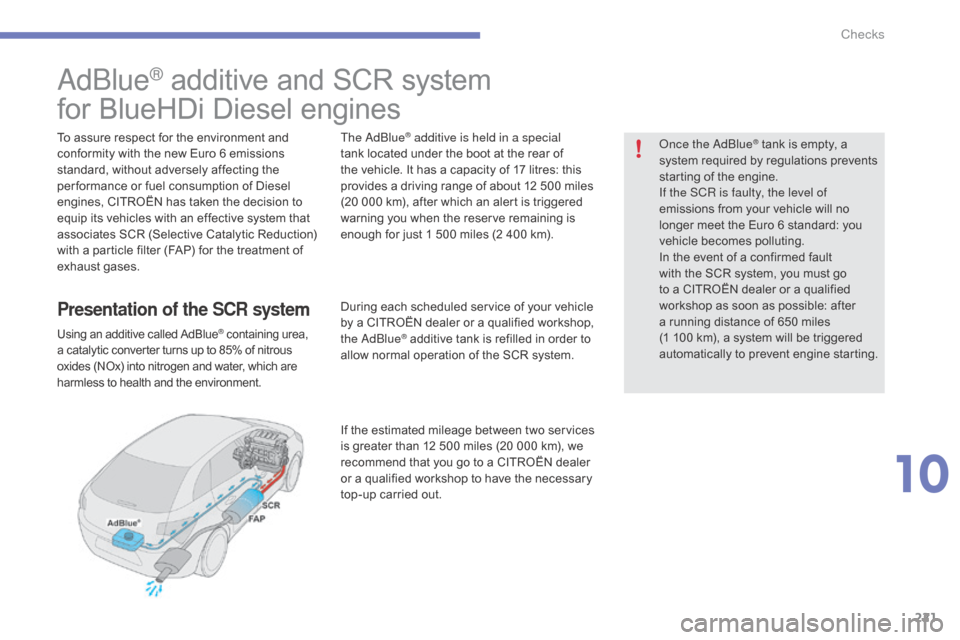
Presentation of the SCR system
Using an additive called AdBlue® containing urea, a
catalytic
converter
turns
up
to
85% of nitrous o
xides
(NOx)
into
nitrogen
and
water, which are
h
armless
to
health
and
the
environment.
The adblue® additive is held in a special
tank
located
under the boot at the rear of
t
he
vehicle.
It has a capacity of 17 litres: this
p
rovides
a
driving range of about 12 500 miles
(
20
000
km),
after which an alert is triggered
w
arning
you
when the reserve remaining is
e
nough
for
just 1 500 miles (2 400 km).
During
each
scheduled service of your vehicle
b
y
a
CITROËN dealer or a qualified workshop,
t
he
a
d
blu
e
® additive tank is refilled in order to a
llow
normal operation of the SCR system.
If
the
estimated mileage between two services
i
s
greater
than 12 500 miles (20 000 km), we
r
ecommend
that you go to a CITROËN dealer
o
r
a
qualified workshop to have the necessary
t
op-up
carried out.
on
ce the a
dbl
ue
® tank is empty, a s
ystem
required
by regulations prevents
s
tarting
of
the
engine.
If the SCR
is faulty, the level of
emissions
from
your vehicle will no
l
onger
meet
the
Euro 6 standard: you
v
ehicle
becomes
polluting.
In
the
event
of
a
confirmed fault
w
ith
the
SCR
system, you must go
t
o
a
CITROËN
dealer or a qualified
w
orkshop
as
soon as possible: after
a
running
distance of 650 miles
(
1 100
km),
a
system will be triggered
a
utomatically
to
prevent engine starting.
10
Checks
Page 250 of 494
248
C4-2_en_Chap11_info-pratique_ed01-2015
C4-2_en_Chap11_info-pratique_ed01-2015
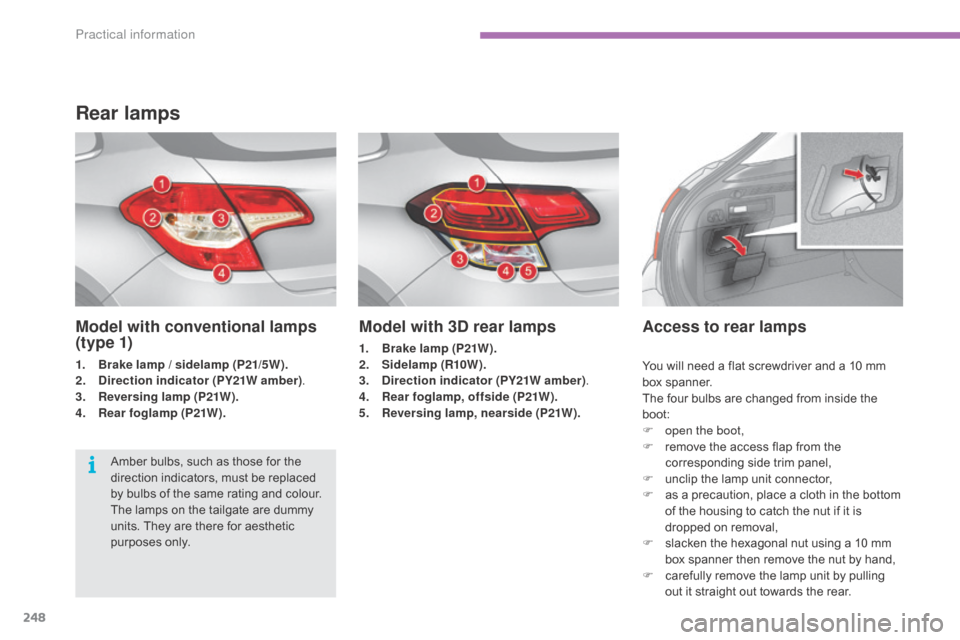
Model with 3D rear lamps
1. Brake lamp (P21W).
2. Sidelamp (R10W ).
3.
D
irection indicator (PY21W amber) .
4.
R
ear foglamp, offside (P21W).
5.
R
eversing lamp, nearside (P21W).
Access to rear lamps
Amber bulbs, such as those for the direction indicators, must be replaced
b
y bulbs of the same rating and colour.
The
lamps on the tailgate are dummy
u
nits. They are there for aesthetic
p
urposes only.
Rear lamps
Model with conventional lamps
(t y p e 1)
1. Brake lamp / sidelamp (P21/5W).
2. Direction indicator (PY21W amber) .
3.
R
eversing lamp (P21W).
4.
R
ear foglamp (P21W). You
will need a flat screwdriver and a 10 mm
b
ox
span
ner.
The
four bulbs are changed from inside the
b
oot:
F
o
pen the boot,
F
r
emove the access flap from the
c
orresponding side trim panel,
F
u
nclip the lamp unit connector,
F
a
s a precaution, place a cloth in the bottom
o
f the housing to catch the nut if it is
d
ropped on removal,
F
s
lacken the hexagonal nut using a 10 mm
b
ox spanner then remove the nut by hand,
F
c
arefully remove the lamp unit by pulling
o
ut it straight out towards the rear.
Practical information
Page 254 of 494
252
C4-2_en_Chap11_info-pratique_ed01-2015
C4-2_en_Chap11_info-pratique_ed01-2015
Changing a fuse
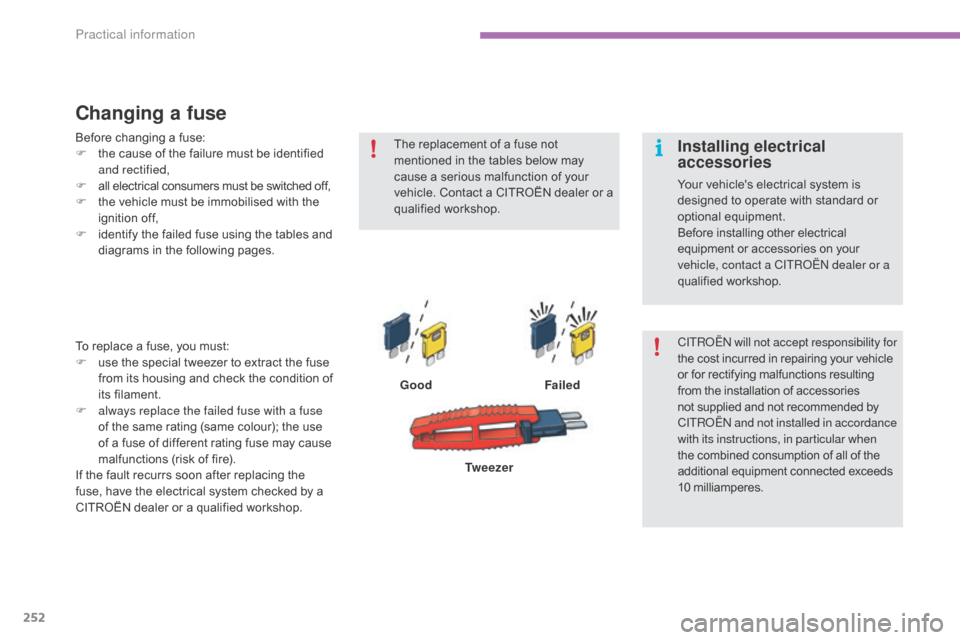
GoodFailed
To
replace
a
fuse,
you
must:
F
u
se
the
special
tweezer
to
extract
the
fuse
f
rom
its
housing
and
check
the
condition
of
it
s f
ilament.
F
a
lways replace the failed fuse with a fuse
of
the
same
rating
(same
colour);
the
use
o
f
a
fuse
of
different
rating
fuse
may
cause
m
alfunctions
(risk
of
fire).
If
the
fault
recurrs
soon
after
replacing
the
f
use,
have
the
electrical
system
checked
by
a
C
ITROËN
dealer
or
a
qualified
workshop. Tw e e z e r
The
replacement of a fuse not
m
entioned in the tables below may
c
ause a serious malfunction of your
v
ehicle. Contact a CITROËN dealer or a
q
ualified
w
orkshop.
CITR
oËn
will not accept responsibility for
the cost incurred in repairing your vehicle
o
r for rectifying malfunctions resulting f
rom the installation of accessories n
ot supplied and not recommended by
C
ITR
oËn an
d not installed in accordance
with its instructions, in particular when
the
combined consumption of all of the
a
dditional equipment connected exceeds
1
0
mil
liamperes.
Installing electrical
accessories
Your vehicle's electrical system is designed to operate with standard or
o
ptional
e
quipment.
Before
installing other electrical
e
quipment or accessories on your
v
ehicle, contact a CITR
oËn
dealer or a
qualified
w
orkshop.
Before
changing
a
fuse:
F
t
he
cause
of
the
failure
must
be
identified
a
nd rectified,
F
a
ll
electrical
consumers
must
be
switched
off,
F
t
he
vehicle
must
be
immobilised
with
the
ig
nition
o
ff,
F
i
dentify
the
failed
fuse
using
the
tables
and
d
iagrams
in
the
following
pages.
Practical information