engine Citroen C4 2016 2.G Owner's Guide
[x] Cancel search | Manufacturer: CITROEN, Model Year: 2016, Model line: C4, Model: Citroen C4 2016 2.GPages: 396, PDF Size: 10.22 MB
Page 37 of 396
35
C4-2_en_Chap01_instruments-de-bord_ed02-2015
In the event of a fault with the the SCR emissions control system
In the event of the detection of a fault
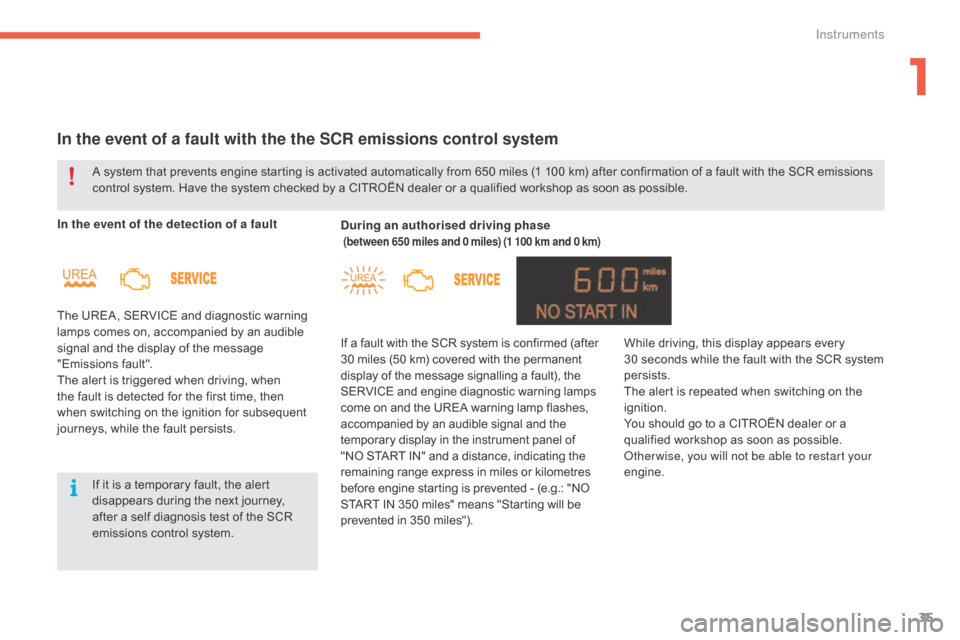
The UREA, SERVICE and diagnostic warning
l
amps comes on, accompanied by an audible
s
ignal and the display of the message
"
Emissions
f
ault".
The
alert is triggered when driving, when
t
he fault is detected for the first time, then
w
hen switching on the ignition for subsequent
j
ourneys, while the fault persists. During an authorised driving phase
(between 650 miles and 0 miles) (1 100 km and 0 km)
If a fault with the SCR system is confirmed (after 3
0 miles (50 km) covered with the permanent d
isplay of the message signalling a fault), the
S
ERVICE and engine diagnostic warning lamps
c
ome on and the UREA warning lamp flashes,
a
ccompanied by an audible signal and the
t
emporary display in the instrument panel of
"
NO START IN" and a distance, indicating the
r
emaining range express in miles or kilometres
b
efore engine starting is prevented - (e.g.: "NO
S
TART IN 350 miles" means "Starting will be
p
revented in 350 miles").
A
system
that
prevents
engine
starting
is
activated automatically from 650 miles (1 100 km) after confirmation of a fault with the SCR emissions
c
ontrol
system.
Have
the
system
checked
by
a CITROËN dealer or a qualified workshop as soon as possible.
If
it
is
a
temporary
fault,
the
alert
d
isappears
during
the
next
journey,
a
fter
a
self
diagnosis
test
of
the
SCR
e
missions
control
system. While
driving, this display appears every 3
0 seconds while the fault with the SCR system
p
ersists.
The
alert is repeated when switching on the
ig
nition.
You
should go to a CITROËN dealer or a
q
ualified workshop as soon as possible.
Other wise, you will not be able to restart your
engine.
1
Instruments
Page 38 of 396
36
C4-2_en_Chap01_instruments-de-bord_ed02-2015
Starting prevented
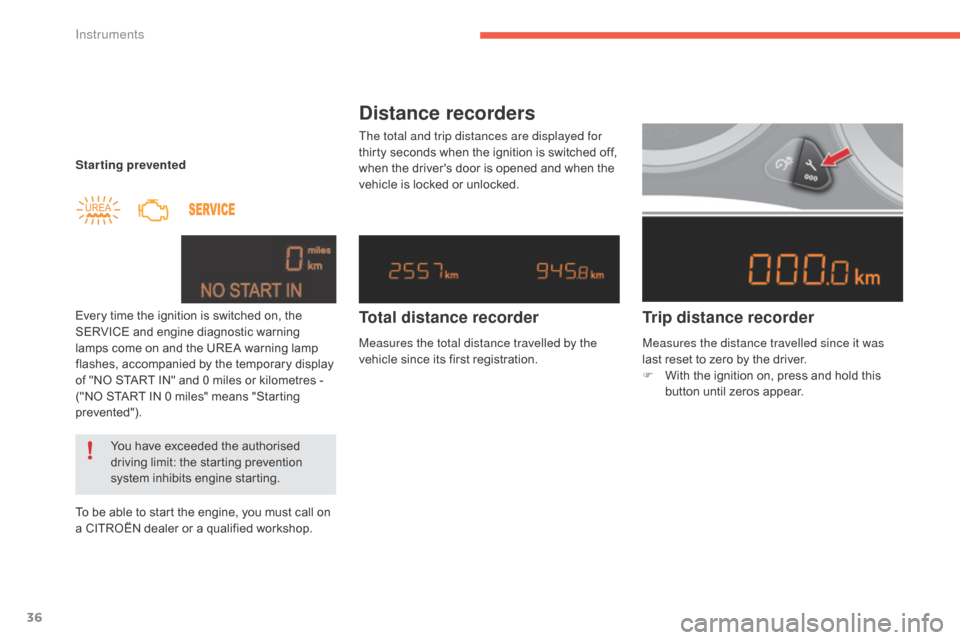
Every time the ignition is switched on, the
S
ERVICE and engine diagnostic warning
l
amps come on and the UREA warning lamp
f
lashes, accompanied by the temporary display
o
f "NO START IN" and 0 miles or kilometres -
(
"NO START IN 0 miles" means "Starting
p
revented").
To
be able to start the engine, you must call on
a
CITROËN dealer or a qualified workshop.
You
have exceeded the authorised
d
riving limit: the starting prevention
s
ystem inhibits engine starting.
Distance recorders
The total and trip distances are displayed for
thirty seconds when the ignition is switched off,
w
hen the driver's door is opened and when the
v
ehicle is locked or unlocked.
Trip distance recorder
Total distance recorder
Measures the total distance travelled by the
vehicle
since its first registration. Measures the distance travelled since it was
last
reset to zero by the driver.
F
W
ith the ignition on, press and hold this
b
utton until zeros appear.
Instruments
Page 65 of 396
63
C4-2_en_Chap02_ouvertures_ed02-2015
Locking the vehicle
Normal locking
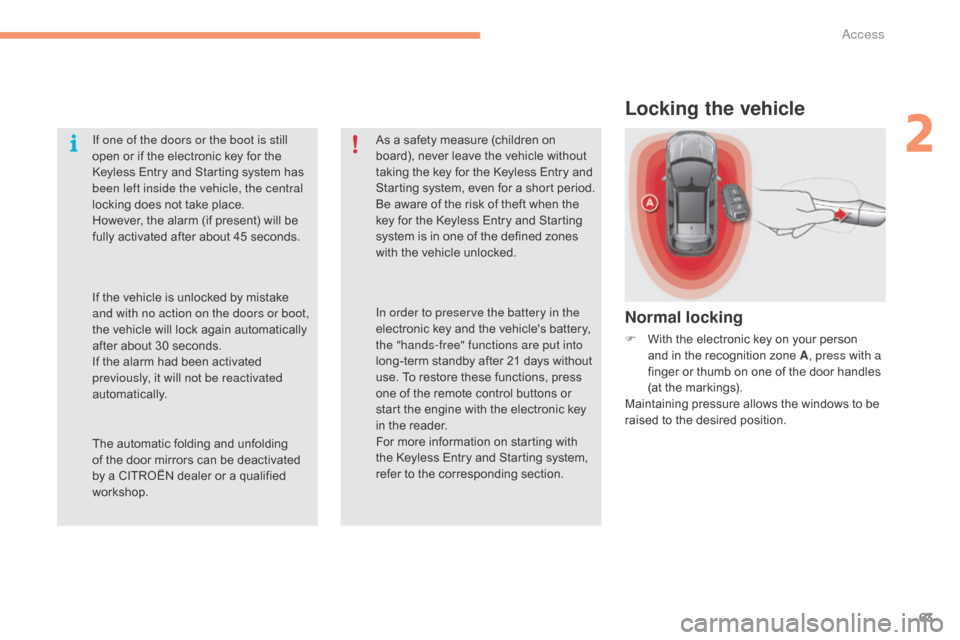
F With the electronic key on your person a
nd in the recognition zone A, press with a
finger
or thumb on one of the door handles
(
at the markings).
Maintaining
pressure allows the windows to be
r
aised to the desired position.
If one of the doors or the boot is still
open
or
if
the
electronic
key
for
the
K
eyless
Entry
and
Starting
system
has
b
een left inside the vehicle, the central
locking
does
not
take
place.
However,
the
alarm
(if
present)
will
be
f
ully
activated
after
about
45
seconds.
As
a
safety
measure
(children
on
b
oard),
never
leave
the
vehicle
without
t
aking
the
key
for
the
Keyless
Entry
and
S
tarting
system,
even
for
a
short
period.
Be
aware
of
the
risk
of
theft
when
the
k
ey
for
the
Keyless
Entry
and
Starting
s
ystem
is
in
one
of
the
defined
zones
w
ith
the
vehicle
unlocked.
The
automatic
folding
and
unfolding
o
f
the
door
mirrors
can
be
deactivated
b
y
a
CITROËN
dealer
or
a
qualified
w
orkshop. In order to preserve the battery in the
electronic
key
and
the
vehicle's
battery,
t
he "hands-free" functions are put into
long-term
standby
after
21
days
without
u
se.
To
restore
these
functions,
press
o
ne
of
the
remote
control
buttons
or
s
tart
the
engine
with
the
electronic
key
i
n
the
reader.
For
more
information
on
starting
with
t
he
Keyless
Entry
and
Starting
system,
r
efer
to
the
corresponding
section.
If
the
vehicle
is
unlocked
by
mistake
a
nd with no action on the doors or boot,
the
vehicle
will
lock
again
automatically
a
fter
about
30
seconds.
If
the
alarm
had
been
activated
p
reviously, it will not be reactivated
automatically.
2
Access
Page 70 of 396
68
C4-2_en_Chap02_ouvertures_ed02-2015
Remote control
The high frequency remote control is a sensitive system; do not operate it while it is in your pocket as there is a possibility that it may unlock the vehicle, without you being aware of it.
Do
not repeatedly press the buttons of your remote control out of range and out of sight of your vehicle. You run the risk of stopping it from
w
orking and the remote control would have to be reinitialised.
The
remote control does not operate when the key is in the ignition, even when the ignition is switched off.
Locking the vehicle
Driving with the doors locked may make access to the passenger compartment by the emergency services more difficult in an emergency.
A s a safety precaution (with children on board), remove the key from the ignition or take the electronic key when you leave the vehicle, even for
a
short time.
Electrical interference
The Keyless Entry and Starting electronic key may not operate if close to certain electronic devices: telephone, laptop computer, strong magnetic fields, ...
Anti-theft protection
Do not make any modifications to the electronic engine immobiliser system; this could cause malfunctions.
D on't forget to turn the steering to engage the steering lock.
Lost keys, remote control, electronic key
Visit a CITROËN dealer with the vehicle's registration certificate, your personal identification documents and if possible, the label bearing the key code.
The
CITROËN dealer will be able to retrieve the key code and the transponder code required to order a new key
Do
not throw the remote control batteries away, they contain metals which are harmful to the environment.
Take
them to an approved collection point.
When purchasing a second-hand vehicle
Have the key codes memorised by a CITROËN dealer, to ensure that the keys in your possession are the only ones which can start the vehicle.
Access
Page 80 of 396
78
C4-2_en_Chap02_ouvertures_ed02-2015
Doors
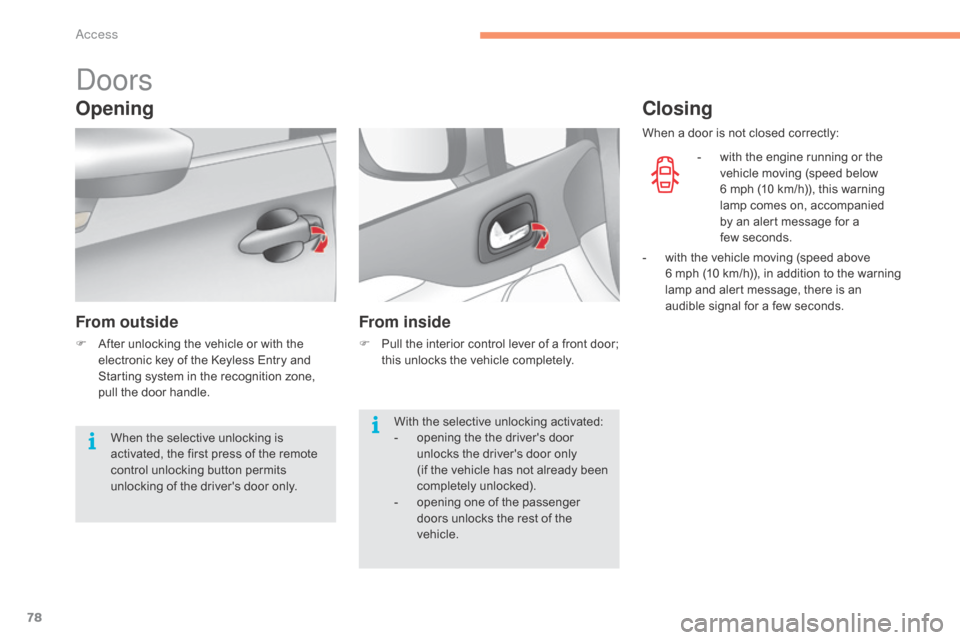
Opening
From outside
F After unlocking the vehicle or with the e
lectronic key of the Keyless Entry and
S
tarting system in the recognition zone,
p
ull the door handle.
From inside
F Pull the interior control lever of a front door; t
his unlocks the vehicle completely.
Closing
- with the engine running or the v
ehicle moving (speed below
6
mph (10 km/h)), this warning
l
amp comes on, accompanied
b
y an alert message for a
f
ew seconds.
With
the
selective
unlocking
activated:
-
o
pening
the
the
driver's
door
u
nlocks
the
driver's
door
only
(if
the
vehicle
has
not
already
been
c
ompletely
u
nlocked).
-
o
pening
one
of
the
passenger
d
oors
unlocks
the
rest
of
the
v
ehicle.
When
the
selective
unlocking
is
a
ctivated,
the
first
press
of
the
remote
c
ontrol
unlocking
button
permits
u
nlocking
of
the
driver's
door
only. When
a
door is not closed correctly:
-
w
ith
the vehicle moving (speed above
6 m
ph (10 km/h)), in addition to the warning
l
amp
and alert message, there is an
a
udible signal for a few seconds.
Access
Page 81 of 396
79
C4-2_en_Chap02_ouvertures_ed02-2015
Boot
Opening
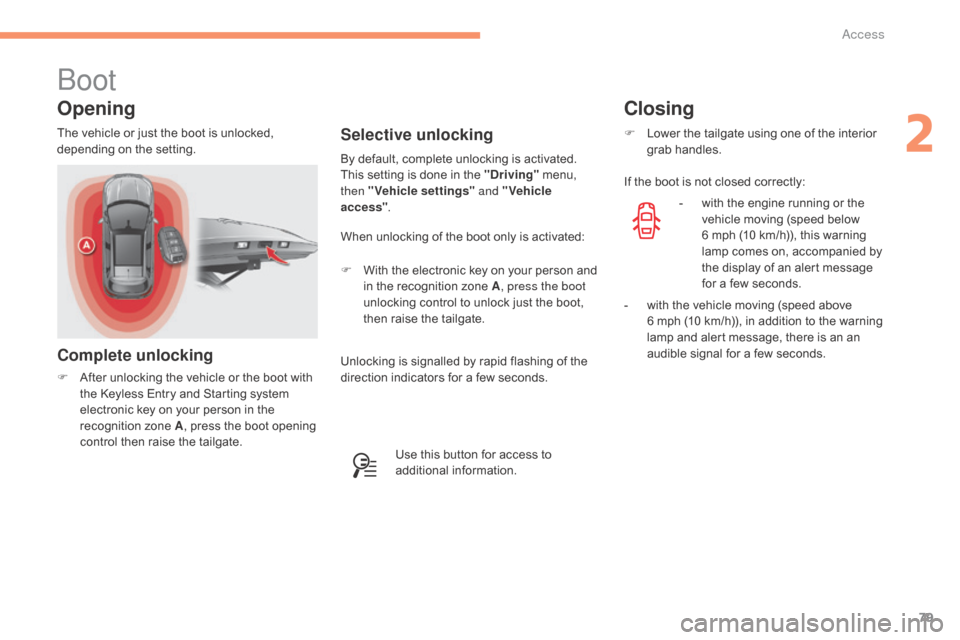
Complete unlocking
F After unlocking the vehicle or the boot with t
he Keyless Entry and Starting system
e
lectronic key on your person in the
r
ecognition zone A,
press the boot opening
c
ontrol then raise the tailgate.
Selective unlocking
When unlocking of the boot only is activated:
F
W
ith the electronic key on your person and
i
n the recognition zone A, press the boot
unlocking
control to unlock just the boot,
t
hen raise the tailgate.
By
default, complete unlocking is activated.
This setting is done in the "Driving"
menu,
t
hen "Vehicle settings"
and "Vehicle
access" .
The
vehicle
or
just
the
boot
is
unlocked,
d
epending
o
n
t
he
se
tting.
Use this button for access to
a
dditional
in
formation.
Closing
F Lower the tailgate using one of the interior g
rab han dles.
If
the boot is not closed correctly:
-
w
ith the engine running or the
v
ehicle moving (speed below
6
mph (10 km/h)), this warning
l
amp comes on, accompanied by
t
he display of an alert message
f
or a few seconds.
-
w
ith the vehicle moving (speed above
6 m
ph (10 km/h)), in addition to the warning
l
amp and alert message, there is an an
a
udible signal for a few seconds.
Unlocking
is
signalled
by
rapid
flashing
of
the
d
irection
indicators
for
a
few
seconds.
2
Access
Page 85 of 396
83
C4-2_en_Chap03_ergonomie-et-confort_ed02-2015
Additional adjustments
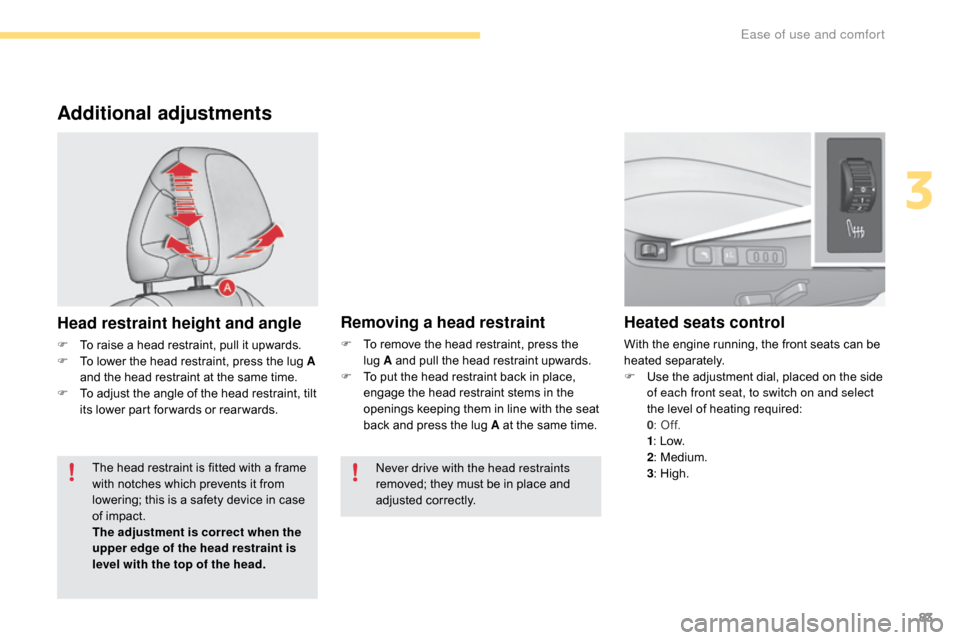
Head restraint height and angle
F To raise a head restraint, pull it upwards.
F T o lower the head restraint, press the lug A
and
the head restraint at the same time.
F
T
o adjust the angle of the head restraint, tilt
i
ts lower part for wards or rear wards.
Heated seats control
With the engine running, the front seats can be heated s eparately.
F
U
se the adjustment dial, placed on the side
o
f each front seat, to switch on and select
the
level of heating required:
0:
Off.
1:
Low.
2:
Medium.
3:
High.
Removing a head restraint
F To remove the head restraint, press the l
ug A and pull the head restraint upwards.
F
T
o put the head restraint back in place,
e
ngage the head restraint stems in the
o
penings keeping them in line with the seat
b
ack and press the lug A at the same time.
The
head
restraint
is
fitted
with
a
frame
w
ith
notches
which
prevents
it
from
l
owering;
this
is
a
safety
device
in
case
o
f
impact.
The adjustment is correct when the
upper edge of the head restraint is
level with the top of the head. Never drive with the head restraints
removed;
they must be in place and
adj
usted
c
orrectly.
3
Ease of use and comfort
Page 86 of 396
84
C4-2_en_Chap03_ergonomie-et-confort_ed02-2015
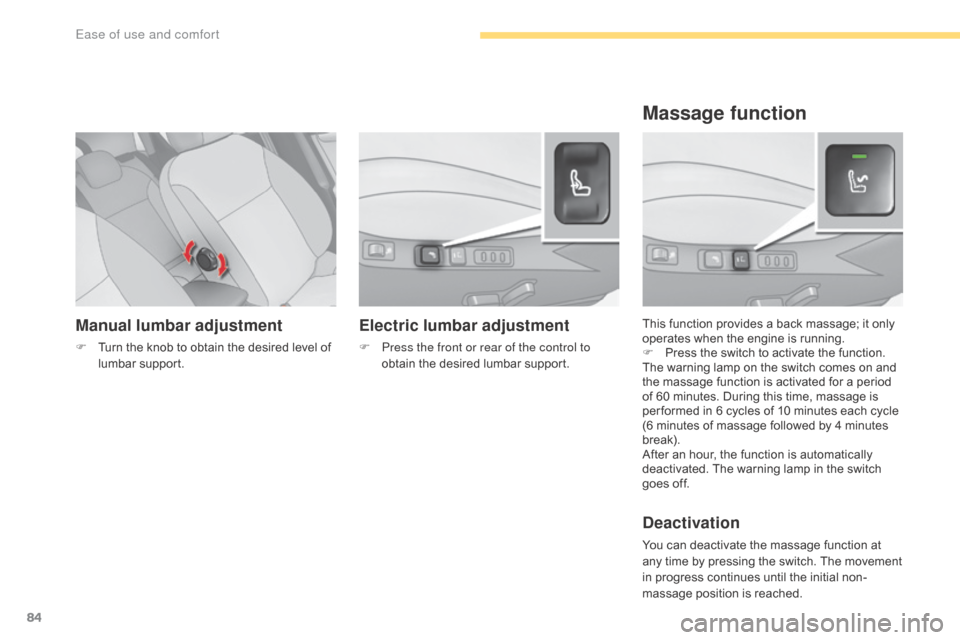
Manual lumbar adjustment
F Turn the knob to obtain the desired level of l
umbar sup port. This
function provides a back massage; it only o
perates when the engine is running.
F P ress the switch to activate the function.
The
warning lamp on the switch comes on and
t
he massage function is activated for a period
o
f 60 minutes. During this time, massage is
p
er formed in 6 cycles of 10 minutes each cycle
(
6 minutes of massage followed by 4 minutes
b
reak).
After
an hour, the function is automatically
d
eactivated. The warning lamp in the switch
g
oes off.
Deactivation
You can deactivate the massage function at any time by pressing the switch. The movement
i
n progress continues until the initial non-
massage
position is reached.
Massage function
Electric lumbar adjustment
F Press the front or rear of the control to obtain the desired lumbar support.
Ease of use and comfort
Page 87 of 396
85
C4-2_en_Chap03_ergonomie-et-confort_ed02-2015
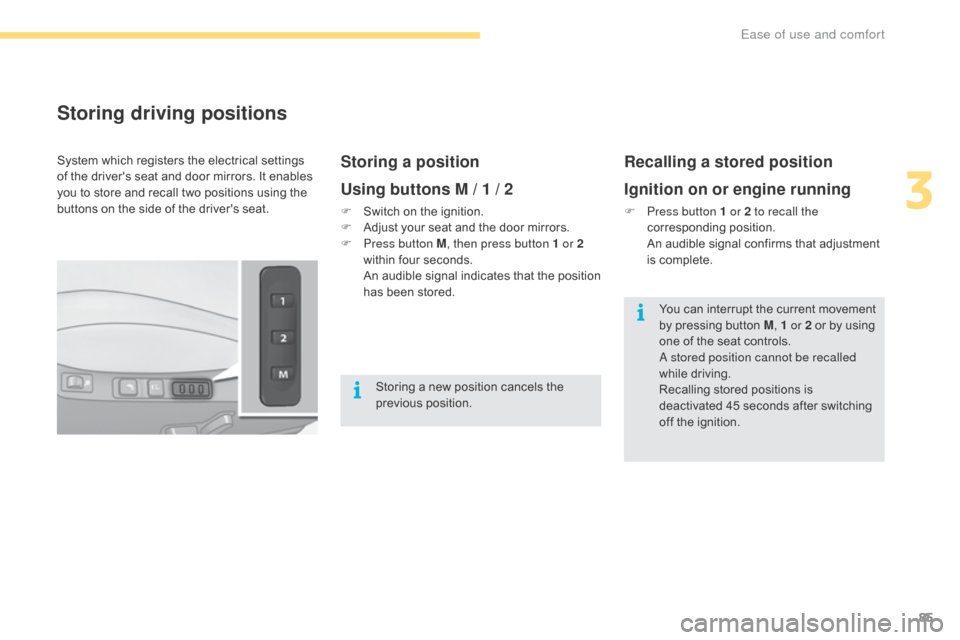
Storing driving positions
Storing a position
Using buttons M / 1 / 2
F Switch on the ignition.
F A djust your seat and the door mirrors.
F
P
ress button M , then press button 1 or 2
within
four seconds.
A
n audible signal indicates that the position
h
as been stored.
Recalling a stored position
Ignition on or engine running
F Press button 1 or 2 to recall the corresponding p osition.
A
n audible signal confirms that adjustment
i
s complete.
System
which
registers
the
electrical
settings
o
f
the
driver's
seat
and
door
mirrors.
It
enables
y
ou
to
store
and
recall
two
positions
using
the
b
uttons
on
the
side
of
the
driver's
seat.
Storing
a
new
position
cancels
the
p
revious
p
osition. You
can interrupt the current movement
b
y pressing button M, 1 or 2
or by using
o
ne of the seat controls.
A stored position cannot be recalled
while
driving.
Recalling
stored positions is
d
eactivated 45 seconds after switching
o
ff the ignition.
3
Ease of use and comfort
Page 90 of 396
88
C4-2_en_Chap03_ergonomie-et-confort_ed02-2015
Automatic tilting in reverse gear
System which provides a view of the ground during parking manoeuvres in reverse gear.
Programming
F With the engine running, engage reverse g
e a r.
F
S
elect and adjust the left-hand and right-
hand
mirrors in succession.
The
adjustment is stored immediately.
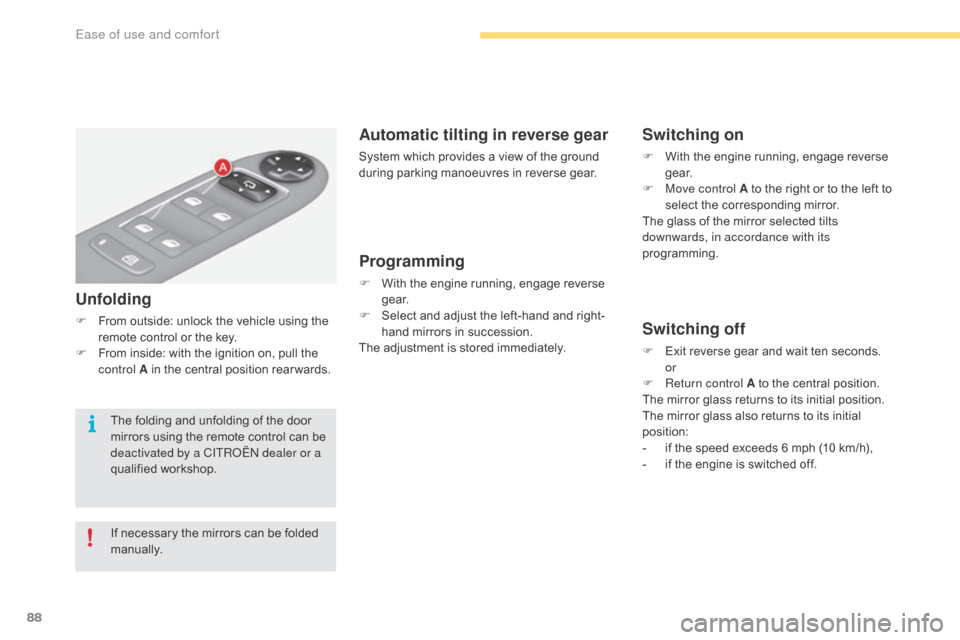
Switching on
F With the engine running, engage reverse g
e a r.
F
M
ove control A to the right or to the left to
s
elect the corresponding mirror.
The
glass of the mirror selected tilts
d
ownwards, in accordance with its
programming.
Switching off
F Exit reverse gear and wait ten seconds.
or
F
R
eturn control A to the central position.
The
mirror glass returns to its initial position.
The
mirror glass also returns to its initial
p
osition:
-
i
f the speed exceeds 6 mph (10 km/h),
-
i
f the engine is switched off.
Unfolding
F From outside: unlock the vehicle using the r
emote control or the key.
F
F
rom inside: with the ignition on, pull the
c
ontrol A in the central position rear wards.
If
necessary the mirrors can be folded
m
anually.
The
folding and unfolding of the door
m
irrors using the remote control can be
d
eactivated by a CITROËN dealer or a
qualified
w
orkshop.
Ease of use and comfort