engine Citroen C4 2016 2.G Workshop Manual
[x] Cancel search | Manufacturer: CITROEN, Model Year: 2016, Model line: C4, Model: Citroen C4 2016 2.GPages: 396, PDF Size: 10.22 MB
Page 174 of 396
172
C4-2_en_Chap06_conduite_ed02-2015
Switching off the engine
F Immobilise the vehicle.
F P lace the gear selector at P or N with
an
automatic gearbox, or neutral with a
m
anual
g
earbox.
Do not leave your vehicle with the
electronic
key still inside.
Switching
off the engine leads to a loss
o
f braking assistance.
If
the vehicle is not immobilised, the
e
ngine will not stop.
F
W
ith the electronic key inside
t
he vehicle, press the " S TA R T/
STOP "
button.
The
engine stops and the steering
c
olumn locks.
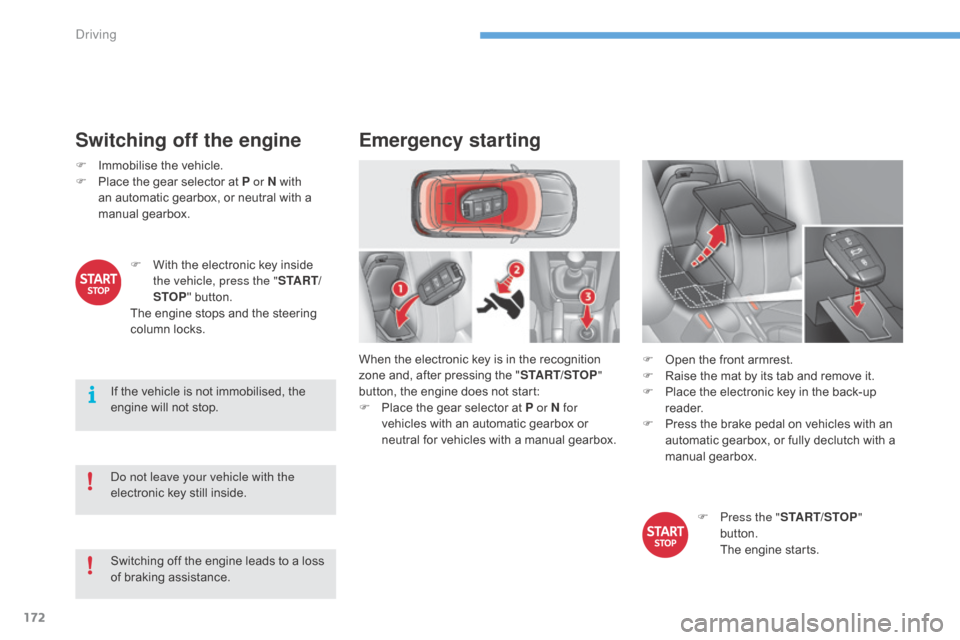
Emergency starting
When the electronic key is in the recognition zone and, after pressing the "START/STOP "
button,
the engine does not start:
F
P
lace the gear selector at P or N for
vehicles
with an automatic gearbox or
n
eutral for vehicles with a manual gearbox.F
O pen the front armrest.
F
R
aise the mat by its tab and remove it.
F
P
lace the electronic key in the back-up
re
ader.
F
P
ress the brake pedal on vehicles with an
a
utomatic gearbox, or fully declutch with a
m
anual
g
earbox.
F
P
ress the "START/STOP "
button.
T
he engine starts.
Driving
Page 175 of 396
173
C4-2_en_Chap06_conduite_ed02-2015
Emergency switch-off
In the event of an emergency only, the e ngine c an b e s witched o f w ithout
c
onditions. To do this, press and hold
t
he " START/STOP " button for about
3
seconds.
In
this
case the steering column locks as soon
a
s
the
vehicle stops.
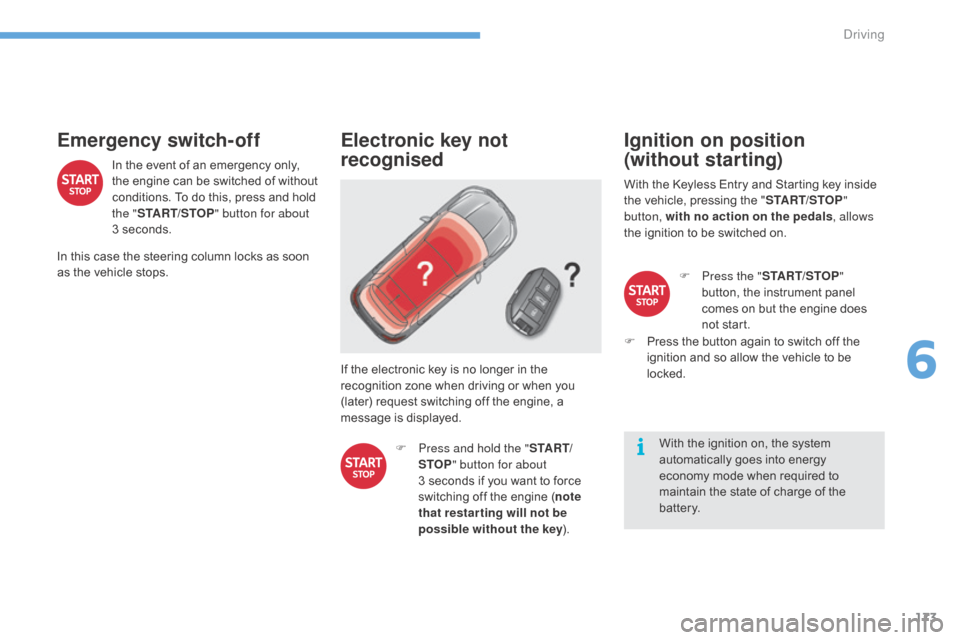
Electronic key not
recognised
If the electronic key is no longer in the recognition zone when driving or when you
(
later) request switching off the engine, a
m
essage is displayed.
F
P
ress and hold the " S TA R T/
STOP " button for about
3 seconds
if you want to force
s
witching off the engine (note
that restar ting will not be
possible without the key ).
Ignition on position
(without starting)
With the Keyless Entry and Starting key inside t
he vehicle, pressing the "START/STOP "
button, with no action on the pedals , allows
the
ignition to be switched on.
With
the ignition on, the system
a
utomatically goes into energy
e
conomy mode when required to
m
aintain the state of charge of the
b
attery.F
P
ress the "START/STOP "
button,
the instrument panel
c
omes on but the engine does
n
ot start.
F
P
ress the button again to switch off the
i
gnition and so allow the vehicle to be
lo
cked.
6
Driving
Page 177 of 396
175
C4-2_en_Chap06_conduite_ed02-2015
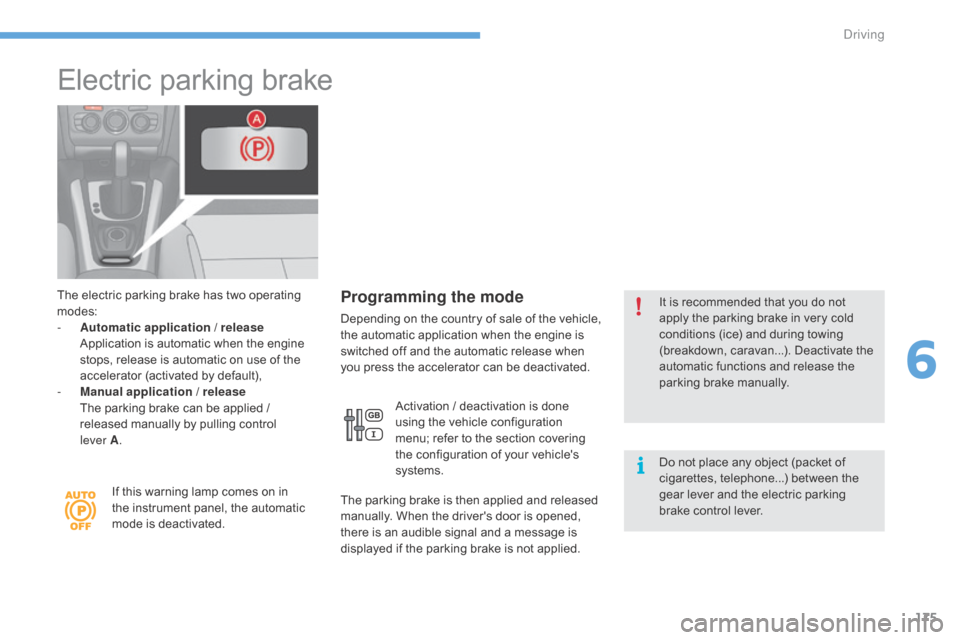
Electric parking brake
The electric parking brake has two operating modes:
-
A
utomatic application / release
A
pplication is automatic when the engine
s
tops, release is automatic on use of the
a
ccelerator (activated by default),
-
M
anual application / release
T
he parking brake can be applied /
r
eleased manually by pulling control
l
ever
A.
If
this warning lamp comes on in
t
he instrument panel, the automatic
m
ode is deactivated.Programming the mode
Depending on t he c ountry o f s ale o f t he v ehicle, t
he automatic application when the engine is
s
witched off and the automatic release when
y
ou press the accelerator can be deactivated.
Activation
/ deactivation is done
u
sing the vehicle configuration
m
enu; refer to the section covering
t
he configuration of your vehicle's
s
ystems.
The
parking brake is then applied and released
m
anually. When the driver's door is opened,
t
here is an audible signal and a message is
d
isplayed if the parking brake is not applied.It
is recommended that you do not a
pply the parking brake in very cold c
onditions (ice) and during towing
(
breakdown, caravan...). Deactivate the
a
utomatic functions and release the
par
king
b
rake
m
anually.
Do
not place any object (packet of
c
igarettes, telephone...) between the
g
ear lever and the electric parking
b
rake control lever.
6
Driving
Page 178 of 396
176
C4-2_en_Chap06_conduite_ed02-2015
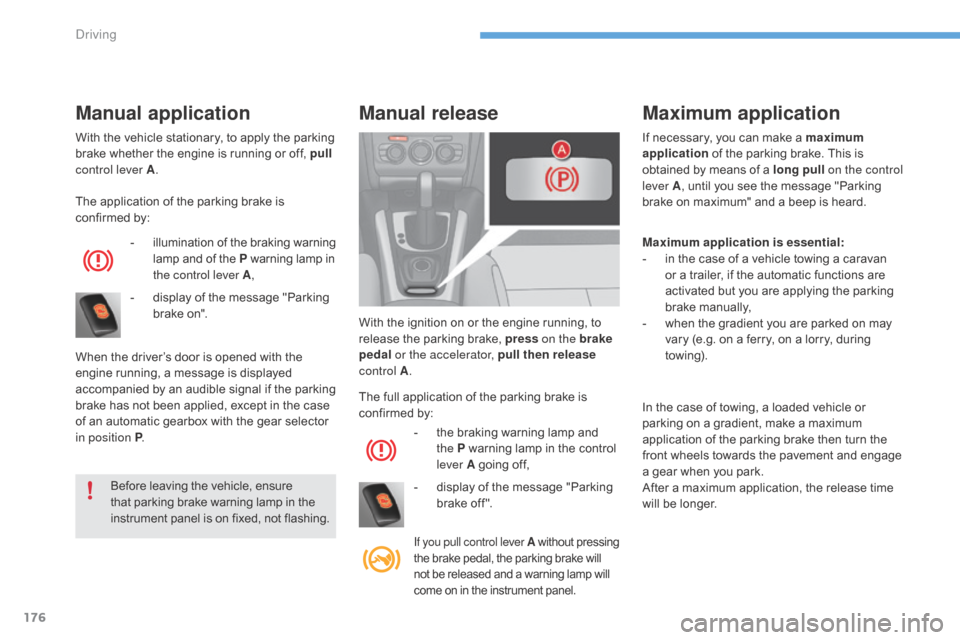
With the vehicle stationary, to apply the parking brake whether the engine is running or off, pull
control lever A .
The
application of the parking brake is
c
onfirmed by:
-
i
llumination
o
f
t
he
b
raking
w
arning
l
amp and of the P
warning lamp in
t
he control lever A ,
-
d
isplay of the message "Parking
b
rake on".
When
the driver’s door is opened with the
e
ngine running, a message is displayed
a
ccompanied by an audible signal if the parking
b
rake has not been applied, except in the case
o
f an automatic gearbox with the gear selector
i
n position P .
Before
leaving the vehicle, ensure
t
hat parking brake warning lamp in the
i
nstrument panel is on fixed, not flashing.
Manual applicationManual release
The full application of the parking brake is c
onfirmed by:
-
t
he braking warning lamp and
t
he P warning lamp in the control
l
ever A going off,
-
d
isplay of the message "Parking
b
rake off ".
If you pull control lever A without pressing t
he brake pedal, the parking brake will n
ot be released and a warning lamp will
c
ome on in the instrument panel.
With the ignition on or the engine running, to release the parking brake, press on the brake
pedal or the accelerator, pull then release
control A . If
necessary, you can make a maximum
application
of the parking brake. This is
o
btained
by m
eans
o
f
a long
pull
on the control
lever A , until you see the message "Parking
b
rake on maximum" and a beep is heard.
In the case of towing, a loaded vehicle or
p
arking on a gradient, make a maximum
a
pplication of the parking brake then turn the
f
ront wheels towards the pavement and engage
a
gear when you park.
After
a maximum application, the release time
w
ill be longer.
Maximum application
Maximum application is essential:
- i n the case of a vehicle towing a caravan
o
r a trailer, if the automatic functions are
a
ctivated but you are applying the parking
b
rake
m
anually,
-
w
hen the gradient you are parked on may
v
ary (e.g. on a ferry, on a lorry, during
tow
ing).
Driving
Page 179 of 396
177
C4-2_en_Chap06_conduite_ed02-2015
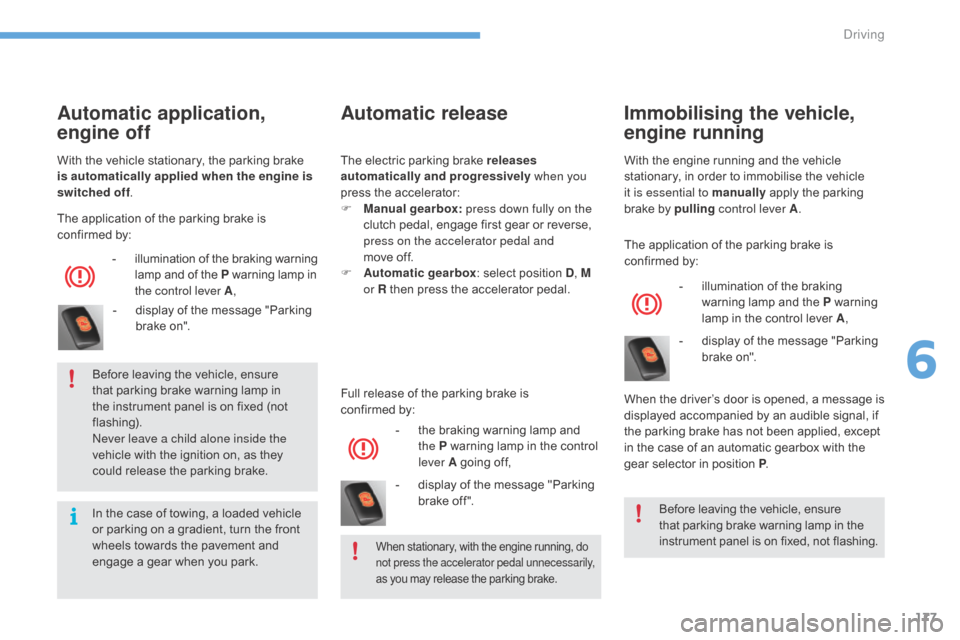
Automatic release
Full release of the parking brake is confirmed by:
-
t
he braking warning lamp and
t
he P warning lamp in the control
l
ever A going off,
-
d
isplay of the message "Parking
b
rake off ".
Automatic application,
engine off
- illumination of t he b raking w arning l
amp and of the P warning lamp in t
he control lever A ,
-
d
isplay of the message "Parking
b
rake on".
The
application of the parking brake is
c
onfirmed by:
With
the
vehicle stationary, the parking brake
i
s automatically applied when the engine is
switched off .
Before leaving the vehicle, ensure
t
hat parking brake warning lamp in
t
he
instrument panel is on fixed (not
f
lashing).
Never leave a child alone inside the
vehicle
with the ignition on, as they
c
ould release the parking brake.
When stationary, with the engine running, do not press the accelerator pedal unnecessarily,
as
you may release the parking brake.
In the case of towing, a loaded vehicle or parking on a gradient, turn the front
w
heels towards the pavement and
e
ngage a gear when you park.The
electric parking brake releases
automatically and progressively when you
press the accelerator:
F
M
anual gearbox:
press down fully on the
clutch pedal, engage first gear or reverse,
p
ress on the accelerator pedal and
move off.
F
A
utomatic gearbox
: select position D
, M
or R then press the accelerator pedal.
Immobilising the vehicle,
engine running
- illumination
of the braking w
arning lamp and the P warning
l
amp in the control lever A,
-
d
isplay of the message "Parking
b
rake on".
When
the
driver’s door is opened, a message is
d
isplayed
accompanied by an audible signal, if
t
he
parking brake has not been applied, except
i
n
the
case of an automatic gearbox with the
g
ear
selector in position P.
The
application of the parking brake is
c
onfirmed by:
With
the
engine running and the vehicle
s
tationary, in order to immobilise the vehicle
i
t is essential to manually
apply the parking
b
rake
by
pulling
control lever A .
Before leaving the vehicle, ensure
t
hat parking brake warning lamp in the
i
nstrument panel is on fixed, not flashing.
6
Driving
Page 180 of 396
178
C4-2_en_Chap06_conduite_ed02-2015
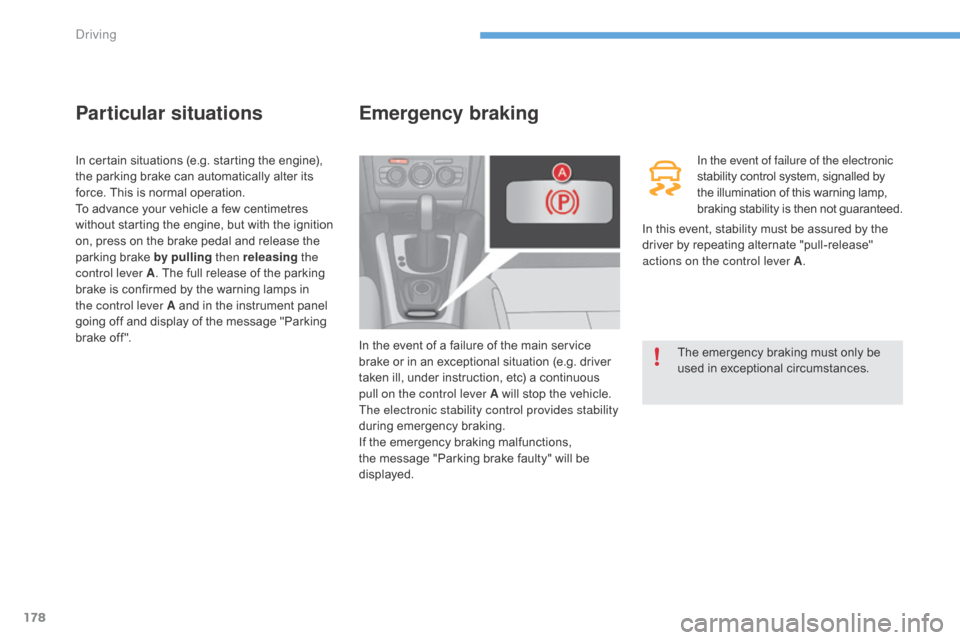
Particular situations
In certain situations (e.g. starting the engine), the parking brake can automatically alter its
f
orce. This is normal operation.
To
advance your vehicle a few centimetres
w
ithout starting the engine, but with the ignition
o
n, press on the brake pedal and release the
p
arking brake by pulling then releasing the
control lever A .
The full release of the parking
b
rake is confirmed by the warning lamps in
t
he control lever A and in the instrument panel
g
oing off and display of the message "Parking
b
rake off ".
Emergency braking
In the event of failure of the electronic
stability control system, signalled by t
he illumination of this warning lamp,
b
raking stability is then not guaranteed.
In
the
event
of
a
failure
of
the
main
service
b
rake
or
in
an
exceptional
situation
(e.g.
driver
t
aken
ill,
under
instruction,
etc)
a
continuous
p
ull on the control lever A
will
stop
the
vehicle.
The electronic stability control provides stability
during
em
ergency
b
raking.
If
the
emergency
braking
malfunctions,
t
he
message
"Parking
brake
faulty"
will
be
d
isplayed. The
emergency braking must only be
us
ed
in e
xceptional
c
ircumstances.
In
this
event, stability must be assured by the
d
river
by
repeating alternate "pull-release"
a
ctions on the control lever A .
Driving
Page 182 of 396
180
C4-2_en_Chap06_conduite_ed02-2015
SituationsConsequences
To apply the electric parking brake:
F
i
mmobilise the vehicle and switch off the ignition.
F
p
ull the control for at least 5 seconds or until application is complete.
F
s
witch on the ignition and check the switching on of the electric parking
b
rake warning lamps.
The
application is slower than during normal operation.
To
release the electric parking brake:
F
s
witch on the ignition.
F
p
ull the control and hold it for approximately 3 seconds then release it.
If
the braking warning lamp is flashing or if the warning lamps do not come
o
n with the ignition on, these procedures will not work. Place the vehicle
o
n level ground and have it checked by a CITROËN dealer or a qualified
w
orkshop.
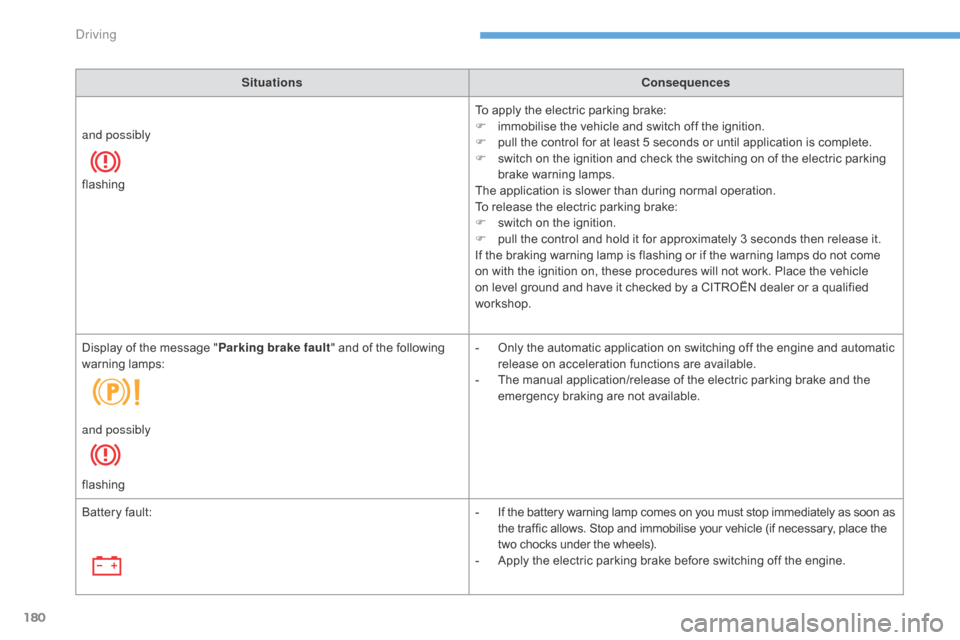
and possibly
flashing
Display
of
the
message
" Parking brake fault "
and of the following
w
arning
lam
ps: -
O
nly the automatic application on switching off the engine and automatic
r
elease on acceleration functions are available.
-
T
he manual application/release of the electric parking brake and the
e
mergency braking are not available.
and possibly
flashing
Battery
fault: -
I
f the battery warning lamp comes on you must stop immediately as soon as
t
he traffic allows. Stop and immobilise your vehicle (if necessary, place the
t
wo chocks under the wheels).
-
A
pply the electric parking brake before switching off the engine.
Driving
Page 183 of 396
181
C4-2_en_Chap06_conduite_ed02-2015
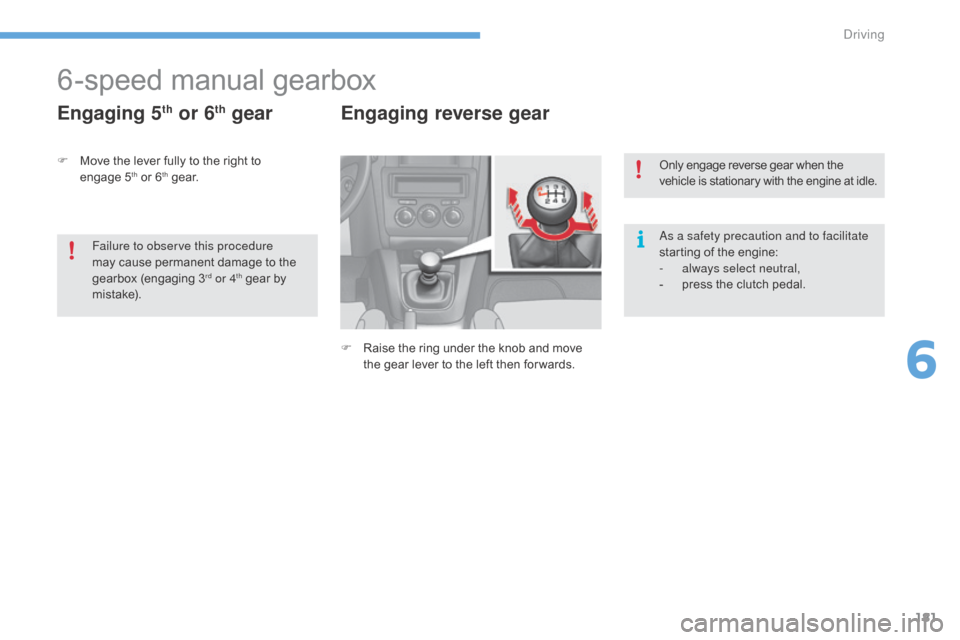
6-speed manual gearbox
Engaging 5th or 6th gear Engaging reverse gear
F Raise the ring under the knob and move t
he gear lever to the left then for wards.Only
engage reverse gear when the
v
ehicle is stationary with the engine at idle.
As a safety precaution and to facilitate
starting of the engine:
-
a
lways select neutral,
-
p
ress the clutch pedal.
F
M
ove
the
lever
fully
to
the
right
to
enga
ge 5
th or 6th ge a r.
Failure to observe this procedure
may
cause
permanent damage to the
g
earbox
(
engaging
3rd or 4th gear by m
i st a ke).
6
Driving
Page 184 of 396
182
C4-2_en_Chap06_conduite_ed02-2015
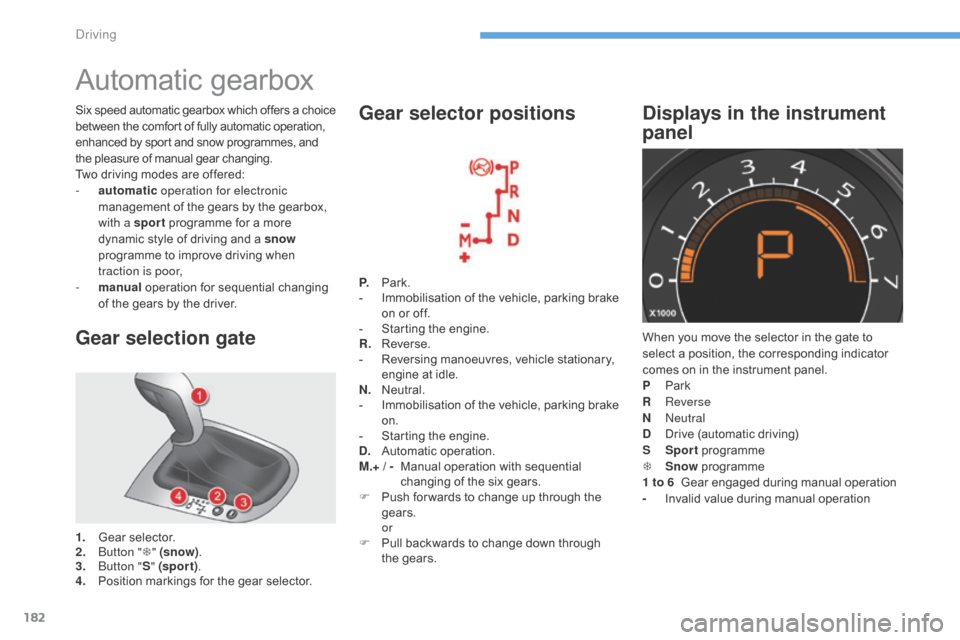
Automatic gearbox
Gear selection gate
1. Gear selector.
2. B utton " T" (snow) .
3.
B
utton " S" (spor t) .
4.
P
osition markings for the gear selector.P.
Pa
rk.
-
I
mmobilisation of the vehicle, parking brake
o
n or off.
-
S
tarting the engine.
R.
R
everse.
-
R
eversing manoeuvres, vehicle stationary,
e
ngine at idle.
N.
N
eutral.
-
I
mmobilisation of the vehicle, parking brake
o
n.
-
S
tarting the engine.
D.
A
utomatic
ope
ration.
M.+ / -
M
anual operation with sequential
c
hanging of the six gears.
F
P
ush for wards to change up through the
g
ears.
or
F P ull backwards to change down through
t
he gears.
Gear selector positions
When you move the selector in the gate to select a position, the corresponding indicator
c
omes on in the instrument panel.
P
Pa
rk
R
Reverse
N
Neutral
D
D
rive (automatic driving)
S
Sp
ort
pro
gramme
T
S
now
pro
gramme
1 to 6
Gear engaged during manual operation
-
I
nvalid value during manual operation
Displays in the instrument
panelSix speed automatic gearbox which of fers a choice b
etween the comfort of fully automatic operation, e
nhanced by sport and snow programmes, and
t
he pleasure of manual gear changing.
Two
driving modes are offered:
-
a
utomatic operation for electronic
management
of the gears by the gearbox,
w
ith a sport
programme for a more
d
ynamic style of driving and a snow
programme
to improve driving when
t
raction is poor,
-
m
anual
operation for sequential changing
o
f the gears by the driver.
Driving
Page 185 of 396
183
C4-2_en_Chap06_conduite_ed02-2015
Moving off
If position N is engaged inadvertently while driving, allow the engine to
r
eturn to idle then engage position D to
accelerate. F
Sel
ect position D for automatic
c
hanging
o
f the six gears.
The gearbox then operates in auto-adaptive
m
ode, without any intervention on the part
o
f the driver. It continuously selects the most
s
uitable gear according to the style of driving, t
he profile of the road and the load in the
vehicle.
For
maximum acceleration without touching
t
he selector, press the accelerator pedal down
fully
(kick down). The gearbox changes down
a
utomatically or maintains the gear selected
u
ntil the maximum engine speed is reached.
On
braking, the gearbox changes down
a
utomatically to provide effective engine
b
raking.
If you release the accelerator sharply, the
gearbox
will not change to a higher gear for
s
afety reasons.
When
the engine is running at idle, with
t
he brakes released, if position R,
D
or
M is selected, the vehicle moves
e
ven without the accelerator being
p
ressed.
Never leave children unsupervised in
the
vehicle when the engine is running.
When
carrying out maintenance with
t
he engine running, apply the parking
b
rake and select position P.
Never select position N while the
vehicle
is moving.
Never select positions P or R unless the
vehicle
is completely stationary.
If
the parking brake does not release
a
utomatically, check that the front doors
a
re fully closed.
F
W
ith
your
foot
on
the
brake,
select
p
osition
P or N
.
F
S
tart
the
engine.
If this procedure is not followed, an audible
signal
is
heard,
accompanied
by
a
message
in
t
he
instrument
panel
screen.
F
W
ith
the
engine
running,
press
the
brake
ped
al.
F
Sel
ect position R , D or M.
Automatic operation
The parking brake is released manually, the v
ehicle moves off.
If
the parking brake is on and automatic mode
i
s activated, accelerate progressively.
If you do not press the brake pedal when trying to move the gear selector out o
f position P ,
this warning lamp or this
s
ymbol
ap
pears
in t
he
in
strument
pan
el
a
ccompanied
b
y
a
message, flashing of the P
symbol, the display of
a
message
and an audible signal.
F Check that the display in the instrument p
anel agrees with the position engaged.
F
G
radually release the brake pedal.
6
Driving