mirror Citroen C4 2016 2.G Owner's Guide
[x] Cancel search | Manufacturer: CITROEN, Model Year: 2016, Model line: C4, Model: Citroen C4 2016 2.GPages: 396, PDF Size: 10.22 MB
Page 199 of 396

197
C4-2_en_Chap06_conduite_ed02-2015
F To deactivate the system, press this button a
gain; the warning lamp goes off.
The
state of the system remains in memory on
s
witching off the ignition.
Operating fault
The system is automatically deactivated when towing with a towbar approved by
CIT
ROËN. The
system may suffer temporary
i
nterference in certain weather
conditions (rain, hail...).
In particular, driving on a wet sur face
o
r moving from a dry area to a wet area
c
an cause false alerts (for example, the
p
resence of a fog of water droplets in
t
he blind spot angle is interpreted as a
v
ehicle).
In bad or wintry weather, ensure that
the sensors are not covered by mud, ice
o
r snow.
Take care not to cover the warning zone
i
n the door mirrors or the detection
z
ones on the front and rear bumpers
w
ith adhesive labels or other objects;
t
hey may hamper the correct operation o
f the system.
In the event of a fault, the warning lamp in the
b
utton flashes then goes off.
Have it checked by a CITROËN dealer or a
q
ualified
w
orkshop.
6
Driving
Page 238 of 396
236
C4-2_en_Chap07_infos-pratiques_ed02-2015
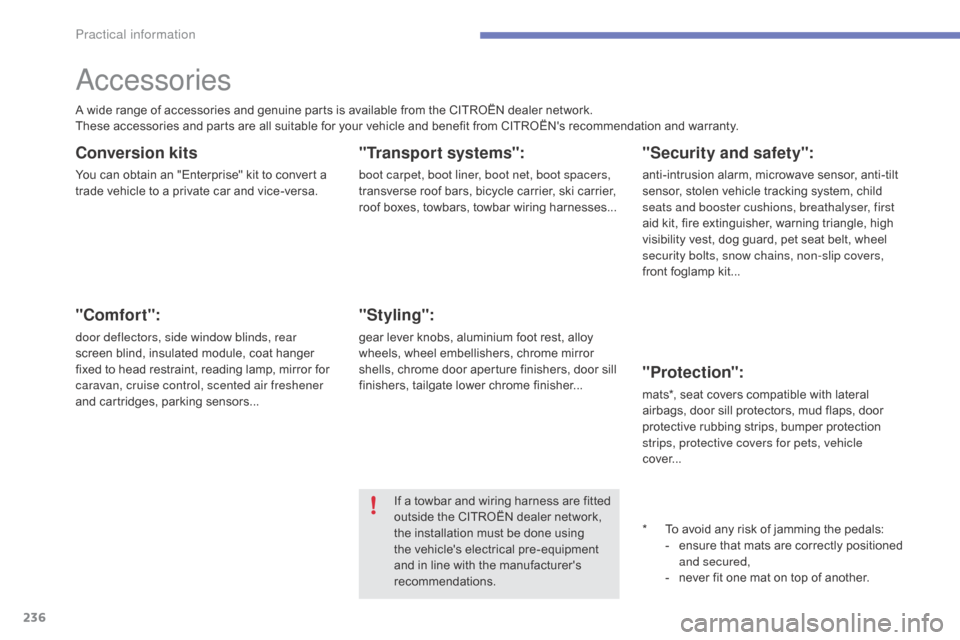
Accessories
Conversion kits
You can obtain an "Enterprise" kit to convert a trade vehicle to a private car and vice-versa.
"Comfort":
door deflectors, side window blinds, rear
screen blind, insulated module, coat hanger
f
ixed to head restraint, reading lamp, mirror for
c
aravan, cruise control, scented air freshener
and
cartridges, parking sensors...
"Transport systems":
boot carpet, boot liner, boot net, boot spacers,
transverse roof bars, bicycle carrier, ski carrier,
r
oof boxes, towbars, towbar wiring harnesses...
"Styling":
gear lever knobs, aluminium foot rest, alloy wheels, wheel embellishers, chrome mirror
s
hells, chrome door
a
perture finishers, door sill
f
inishers, tailgate lower chrome finisher...
*
T
o avoid any risk of jamming the pedals:
-
e
nsure that mats are correctly positioned
a
nd secured,
-
n
ever fit one mat on top of
a
nother.
"Security and safety":
anti-intrusion alarm, microwave sensor, anti-tilt sensor, stolen vehicle tracking system, child
sea
ts and booster cushions, breathalyser, first
aid
kit, fire extinguisher, warning triangle, high
v
isibility vest, dog guard, pet seat belt, wheel
s
ecurity bolts, snow chains, non-slip covers,
front
foglamp kit...
"Protection":
mats*, seat covers compatible with l ateral a
irbags, door sill protectors, mud flaps, door
p
rotective rubbing strips, bumper protection
s
trips, protective covers for pets, vehicle
cover...
If
a
towbar
and
wiring
harness
are
fitted
o
utside
the
CITROËN
dealer
network,
t
he
installation
must
be
done
using
t
he
vehicle's
electrical
pre-equipment
a
nd
in
line
with
the
manufacturer's
r
ecommendations.
A
wide
range
of
accessories
and
genuine
parts
is
available
from
the
CITROËN
dealer
network.
These
accessories
and
parts
are
all
suitable
for
your
vehicle
and
benefit
from
CITROËN's
recommendation and warranty.
Practical information
Page 258 of 396

256
C4-2_en_Chap08_en-cas-de-panne_ed02-2015
Changing foglamp bulbs
F Introduce a flat screwdriver in the hole in the f inisher.
F
P
ull and lever to unclip the bumper finisher
(
the parking sensor stays with the finisher).
F
R
emove the two module fixing screws and
r
emove it from its housing.
F
D
isconnect the bulb holder connector.
F
T
urn the bulb holder a quarter of a turn and
e
xtract it.
F
P
ull the bulb and change it.
To refit, carry out these operations in reverse
o r d e r.
To
replace these bulbs you may also contact a
C
ITROËN dealer or a qualified workshop.
Changing the side spotlamps
(LEDs)
For the replacement of this type of light emitting diode lamp, contact a CITROËN dealer or a
q
ualified
w
orkshop.
Changing integrated direction
indicator side repeaters
F Insert a flat screwdriver towards the centre of the repeater between the repeater and
the
base of the mirror.
F
T
ilt the flat screwdriver to extract the
r
epeater and remove it.
F
D
isconnect the repeater connector.
To
reassemble, carry out these operations in
r
everse
o
rder.
Contact
a CITROËN dealer or a qualified
w
orkshop to obtain replacement repeaters.
In the event of a breakdown
Page 285 of 396
283
C4-2_en_Chap10b_SMEGplus_ed02-2015
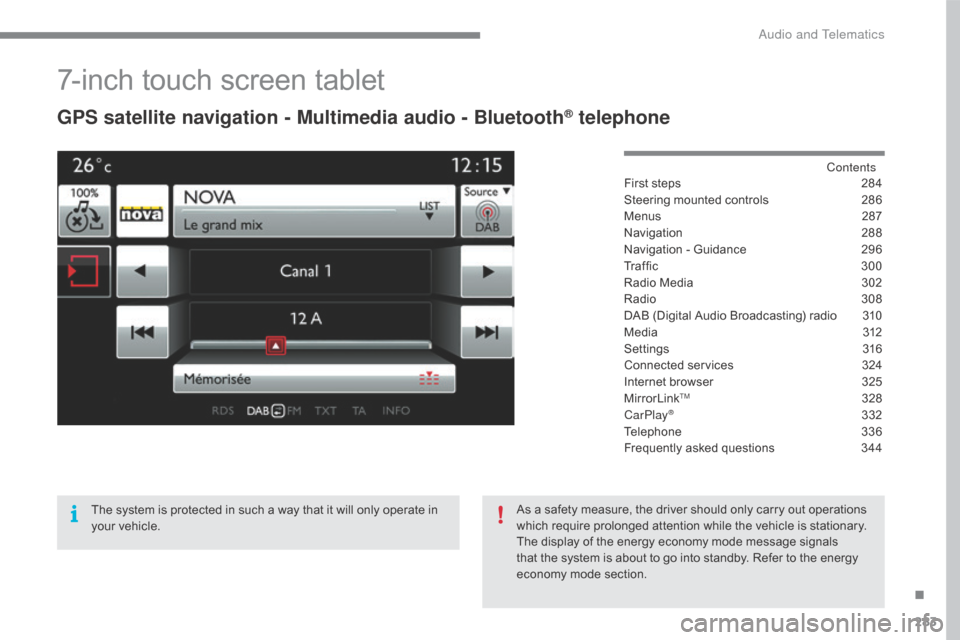
7-inch touch screen tablet
GPS satellite navigation - Multimedia audio - Bluetooth® telephone
Contents
First
steps
2 84
Steering
mounted
controls
2
86
Menus
2
87
Navigation
2
88
Navigation
-
Guidance
2
96
Tr a f fi c
3
0 0
Radio
Media
3
02
Radio
308
D
AB
(Digital
Audio
Broadcasting)
radio
3
10
M edia
3
12
Settings
3
16
Connected
services
3
24
Internet
browser
3
25
MirrorLink
TM 32 8
CarPlay® 3 32
Telephone
3
36
Frequently
asked questions
3
44
The
system
is
protected
in
such
a
way
that
it
will
only
operate
in
y
our
vehicle. As
a
safety
measure,
the
driver should only carry out operations
w
hich
require
prolonged
attention while the vehicle is stationary.
The
display
of
the
energy
economy mode message signals
t
hat
the
system
is
about
to
go into standby. Refer to the energy
ec
onomy
mo
de
s
ection.
.
Audio and Telematics
Page 287 of 396
285
C4-2_en_Chap10b_SMEGplus_ed02-2015
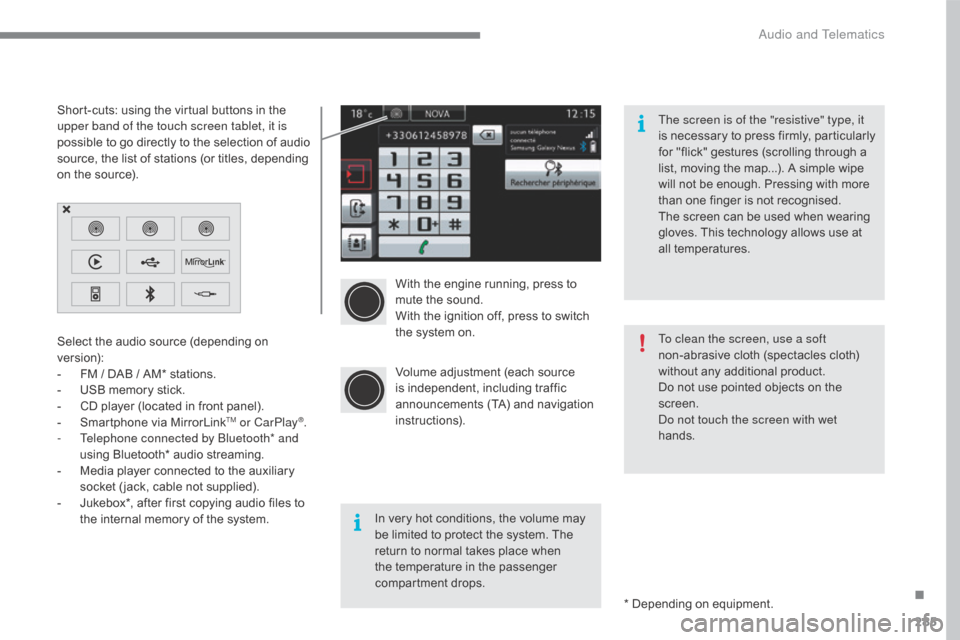
With the engine running, press to mute the sound.
With
the ignition off, press to switch
t
he system on.
Volume
adjustment (each source
i
s
i
ndependent,
i
ncluding
t
raffic
a
nnouncements (TA) and navigation
i
nstructions).
Select
the
audio
source
(depending
on
ve
rsion):
-
F
M
/
DAB
/
AM*
stations.
-
U
SB
memory
stick.
-
C
D
player
(located
in
front
panel).
-
S
martphone
via
MirrorLink
TM or CarPlay®.
-
T
elephone connected by Bluetooth* and
using
Bluetooth*
audio
streaming.
-
M
edia
player
connected
to
the
auxiliary
s
ocket
( jack,
cable
not
supplied).
-
J
ukebox*,
after
first
copying
audio
files
to
t
he
internal
memory
of
the
system. *
Depending on equipment.
Short-cuts:
using
the
virtual
buttons
in
the
u
pper band of the touch screen tablet, it is
possible
to
go
directly
to
the
selection
of
audio
s
ource,
the
list
of
stations
(or
titles,
depending
o
n
the
source).
The screen is of the "resistive" type, it
is
n
ecessary
t
o
p
ress
f
irmly,
p
articularly
f
or "flick" gestures (scrolling through a
l
ist, moving the map...). A simple wipe
w
ill not be enough. Pressing with more
t
han one finger is not recognised.
The screen can be used when wearing
g
loves. This technology allows use at
a
ll
t
emperatures.
In very hot conditions, the volume may
b
e limited to protect the system. The
r
eturn to normal takes place when
t
he temperature in the passenger
c
ompartment drops. To clean the screen, use a soft
non-abrasive
cloth (spectacles cloth)
w
ithout any additional product.
Do not use pointed objects on the
sc
reen.
Do not touch the screen with wet
hands.
.
Audio and Telematics
Page 289 of 396
287
C4-2_en_Chap10b_SMEGplus_ed02-2015
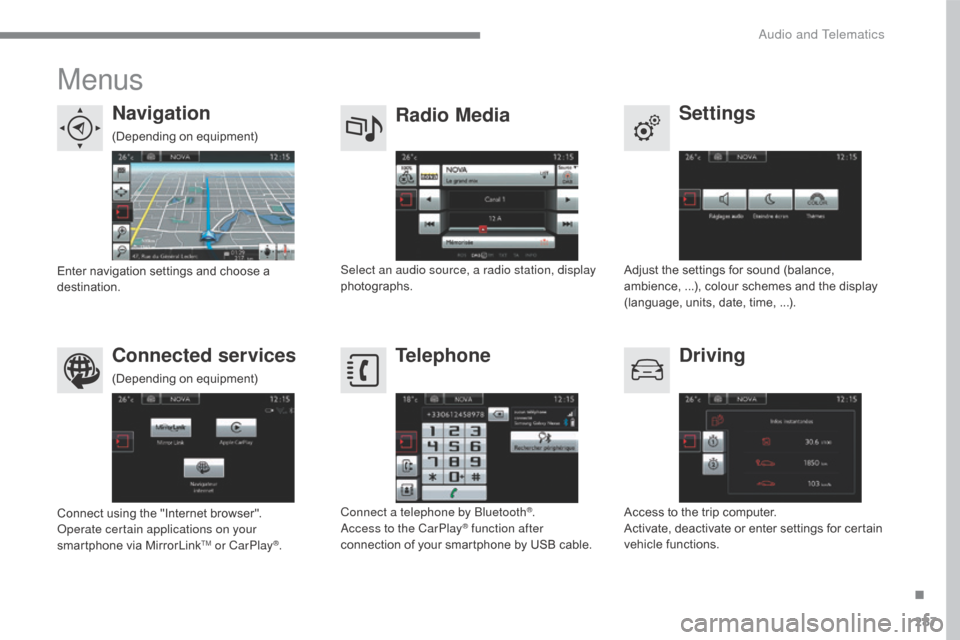
Menus
Settings
Radio Media
Navigation
Driving
Connected services Telephone
Adjust the settings for sound (balance, a
mbience, ...), colour schemes and the display
(
language, units, date, time, ...).
Select an audio source, a radio station, display
photographs.
Enter
navigation
settings
and
choose
a
d
estination.
Access
to the trip computer.
Activate,
deactivate or enter settings for certain
v
ehicle functions.
Connect
using
the
"Internet
browser".
Operate certain applications on your
smartphone
via
MirrorLink
TM or CarPlay®. Connect a telephone by Bluetooth
®.
Access to the CarPlay® function after
connection
of
your
smartphone by USB cable.
(Depending
o
n
e
quipment)
(Depending
o
n
e
quipment)
.
Audio and Telematics
Page 305 of 396
303
C4-2_en_Chap10b_SMEGplus_ed02-2015
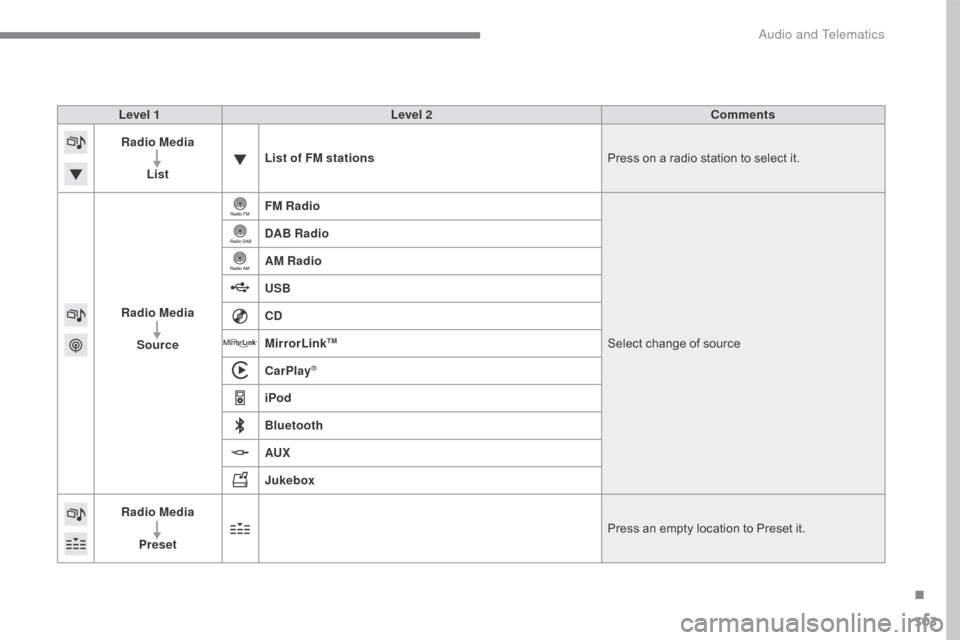
Level 1Level 2 Comments
Radio Media
List List of FM stations
Press
on a radio station to select it.
Radio Media Source FM Radio
Select
change of source
DAB Radio
AM Radio
USB
CD
MirrorLink
TM
CarPlay®
iPod
Bluetooth
AUX
Jukebox
Radio Media
Preset Press
an empty location to Preset it.
.
Audio and Telematics
Page 330 of 396
328
C4-2_en_Chap10b_SMEGplus_ed02-2015
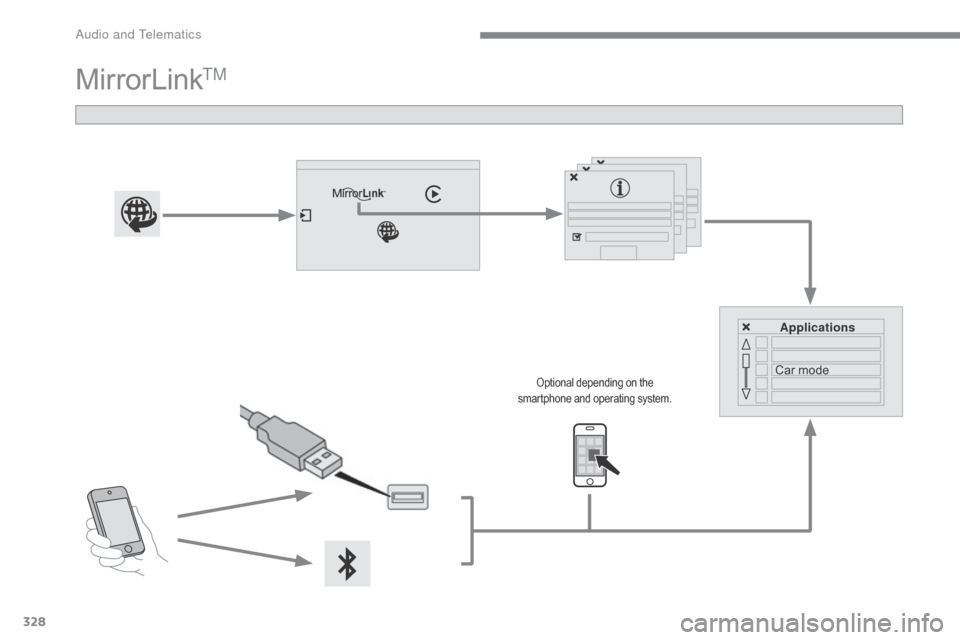
MirrorLinkTM
Applications
Car mode
Optional depending on the s
martphone and operating system.
Audio and Telematics
Page 331 of 396
329
C4-2_en_Chap10b_SMEGplus_ed02-2015
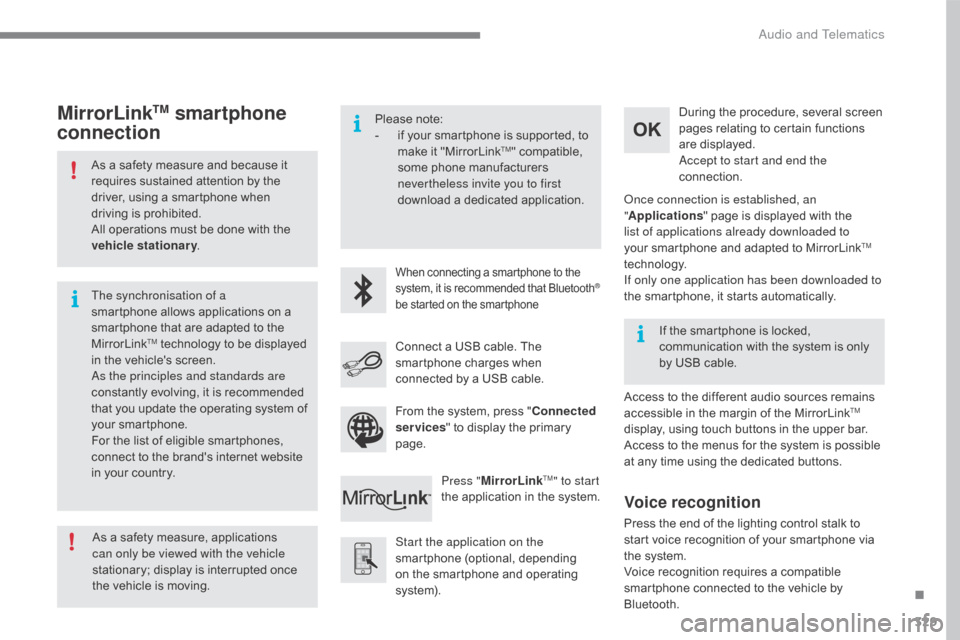
As a safety measure and because it requires sustained attention by the
d
river, using a smartphone when
d
riving is prohibited.
All
operations must be done with the
v
ehicle stationary .
The synchronisation of a
smartphone
allows applications on a
s
martphone that are adapted to the
M
irrorLink
TM technology to be displayed i
n
the
vehicle's screen.
As the principles and standards are
constantly
evolving, it is recommended
t
hat
you
update the operating system of
y
our
smartphone.
For
the
list
of eligible smartphones,
c
onnect
to
the brand's internet website
i
n
your
country. Please
note:
-
i
f your smartphone is supported, to
m
ake it "MirrorLink
TM" compatible, s
ome
phone
manufacturers
n
evertheless invite you to first
download
a
dedicated application.
When connecting a smartphone to the system, it is recommended that Bluetooth®
be
started
on
the
smartphone
Start the application on the
smartphone (optional, depending
o
n the smartphone and operating
s
yste m). During
the procedure, several screen
p
ages relating to certain functions
a
re displayed.
Accept to start and end the
connection.
Connect a USB cable. The
s
martphone charges when
c
onnected by a USB cable.
Press " MirrorLink
TM" to start
the
application
in
the system. Once connection is established, an
"
Applications " page is displayed with the
l
ist of applications already downloaded to
your smartphone and adapted to MirrorLink
TM
technology.
If only one application has been downloaded to
the
smartphone,
it
starts
automatically.
MirrorLinkTM smartphone
connection
Access to the different audio sources remains a
ccessible in the margin of the MirrorLinkTM
display,
using
touch
buttons
in
the
upper
bar.
Access
to
the
menus
for
the
system
is
possible
a
t
any
time
using
the
dedicated
buttons.
If
the
smartphone
is
locked,
c
ommunication
with
the
system
is
only
b
y
USB
cable.
From
the
system,
press
"
Connected
services "
to
display
the
primary
pag
e.
As
a
safety
measure,
applications
c
an only be viewed with the vehicle
stationary;
display
is
interrupted
once
t
he
vehicle
is
moving.
Voice recognition
Press the end of the lighting control stalk to s tart voice recognition of your smartphone via
t
he system.
Voice
recognition requires a compatible
s
martphone connected to the vehicle by
Bl
uetooth.
.
Audio and Telematics
Page 333 of 396
331
C4-2_en_Chap10b_SMEGplus_ed02-2015
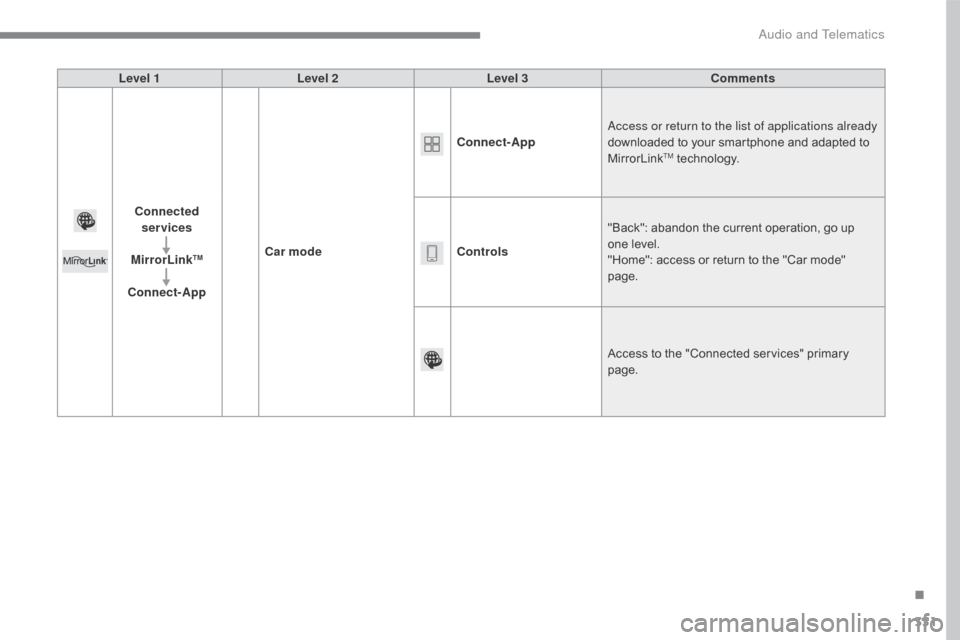
Level 1Level 2 Level 3 Comments
Connected services
MirrorLink
TM
Connect-App Car mode Connect-App
Access or return to the list of applications already
downloaded to your smartphone and adapted to
M
irrorLink
TM technology.
Controls "Back":
abandon the current operation, go up
o
ne
level.
"Home":
access or return to the "Car mode"
pag
e.
Access
to
the "Connected services" primary
pag
e.
.
Audio and Telematics