steering Citroen C4 2016 2.G Owner's Guide
[x] Cancel search | Manufacturer: CITROEN, Model Year: 2016, Model line: C4, Model: Citroen C4 2016 2.GPages: 396, PDF Size: 10.22 MB
Page 203 of 396

201
C4-2_en_Chap06_conduite_ed02-2015
Cruise control
1. Cruise control mode selection wheel.
2. B utton for setting the current speed of the
v
ehicle as the cruise setting or lowering the
c
ruise
se
tting.
3.
B
utton for setting the current speed of the
v
ehicle as the cruise setting or raising the
c
ruise
se
tting.
4.
C
ruise control pause / resume button.
5.
D
isplay memorised speed settings button.
Steering mounted controls
6. Cruise control pause / resume indication.
7. C ruise control mode selected indication.
8.
C
ruise speed setting.
9.
S
electing a memorised cruise speed.
Displays in the instrument panel
The operation of the cruise control can be
interrupted (pause):
-
b
y pressing control 4 or by pressing the
b
rake or clutch pedal,
-
a
utomatically, if operation of the dynamic
s
tability control system is triggered.
Switching
off the ignition cancels any
p
rogrammed speed setting.
The cruise control is switched on
manually.
It requires a minimum vehicle speed of
2
5 mph (40 km/h) as well as:
-
w
ith a manual gearbox, the
e
ngagement of fourth gear or
h
igher,
-
w
ith an automatic gearbox, the gear
s
elector at position D or second
gear or higher in manual mode.
System which automatically maintains the cruising speed of the vehicle at a setting programmed by
t
he driver, without any action on the accelerator pedal.
The cruise control system is a driving aid
t
hat cannot, in any circumstances, replace
t
he need to observe speed limits, nor the
n
eed for vigilance on the part of the driver.As
a safety measure, you are advised
t
o keep your feet near the pedals at all
ti
mes.
6
Driving
Page 226 of 396
224
C4-2_en_Chap07_infos-pratiques_ed02-2015
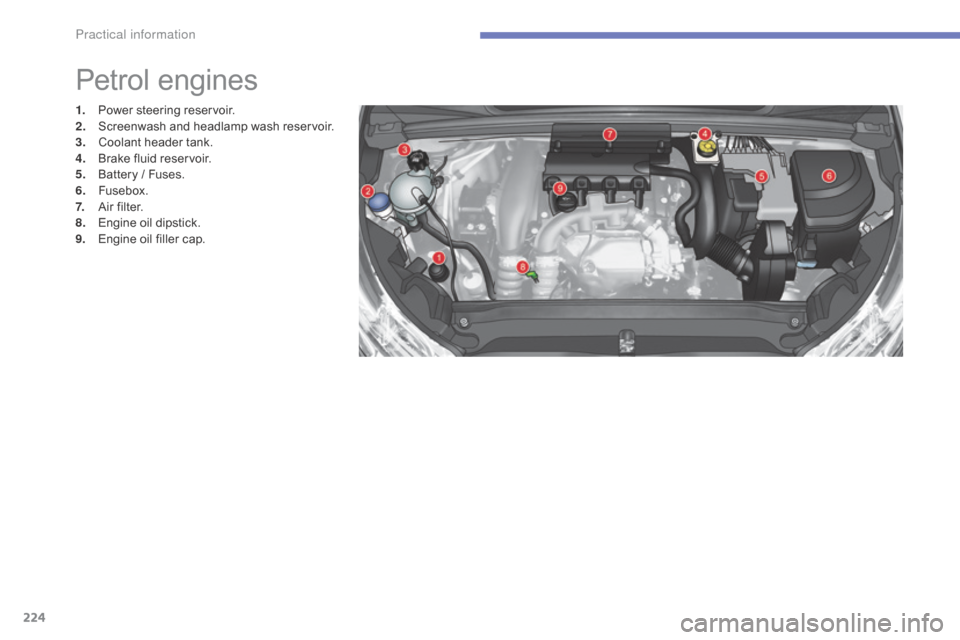
Petrol engines
1. Power steering r eservoir.
2. S creenwash and headlamp wash reservoir.
3.
C
oolant header tank.
4.
B
rake fluid reservoir.
5.
B
attery / Fuses.
6.
F
usebox.
7.
A
ir filter.
8.
E
ngine oil dipstick.
9.
E
ngine oil filler cap.
Practical information
Page 227 of 396
225
C4-2_en_Chap07_infos-pratiques_ed02-2015
* According to engine.
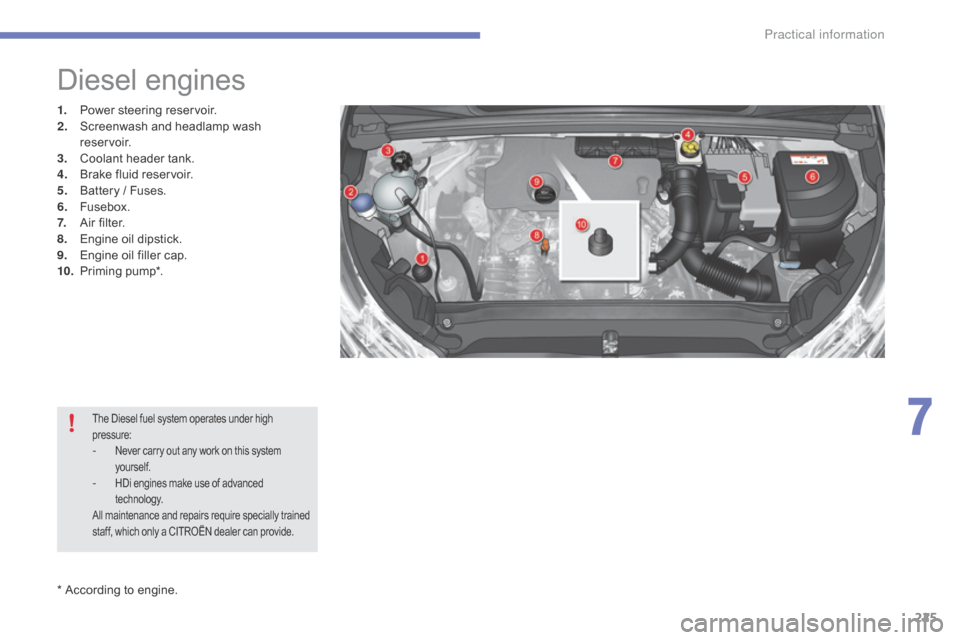
Diesel engines
1. Power steering r eservoir.
2. S creenwash and headlamp wash
reservoir.
3.
C
oolant header tank.
4.
B
rake fluid reservoir.
5.
B
attery / Fuses.
6.
F
usebox.
7.
A
ir filter.
8.
E
ngine oil dipstick.
9.
E
ngine oil filler cap.
10.
P
riming
pu
mp*.
The Diesel fuel system operates under high pressure:
- Never carry out any work on this system y
ourself.
- HDi engines make use of advanced t
echnology.
All
maintenance and repairs require specially trained
s
taff, which only a CITROËN dealer can provide.
7
Practical information
Page 229 of 396
227
C4-2_en_Chap07_infos-pratiques_ed02-2015
Topping-up the engine oil level
F Locate the oil filler cap in the engine c
ompartment of your vehicle.
For
more information on the petrol or Diesel
e
ngine, refer to the corresponding section.
F
U
nscrew the oil filler cap to reveal the filler
a
perture.
F
A
dd oil in small quantities, avoiding any
s
pills on engine components (risk of fire).
F
W
ait a few minutes before checking the
l
evel again using the dipstick.
F
A
dd more oil if necessary.
F
A
fter checking the level, carefully refit the
o
il filler cap and the dipstick in its tube.
After
topping-up the oil, the check when
s
witching on the ignition with the oil level
i
ndicator in the instrument panel is not valid
d
uring the 30 minutes after topping up.
Engine oil change
Refer to the manufacturer's service schedule for details of the interval for this operation.
In
order to maintain the reliability of the engine
a
nd emission control system, never use
a
dditives in the engine oil.
Brake fluid level
Changing the fluid
Refer to the manufacturer's service schedule for details of the interval for this operation.
Fluid specification
The brake fluid must conform to the manufacturer's r ecommendations.
The
brake fluid level should be close
t
o the "MA X" mark. If it is not, check
t
he brake pad wear.
Power steering
fluid level
The power steering fluid level should b
e close to the "MA X" mark. With
t
he engine cold, unscrew the cap to
c
heck the level.
7
Practical information
Page 239 of 396
237
C4-2_en_Chap07_infos-pratiques_ed02-2015
"Multimedia":
audio systems, steering mounted audio controls, speakers, Hi-Fi module, Bluetooth
h
ands-free system, portable satellite navigation
s
ystem, semi-integral support bracket for
p
ortable navigation system, mapping update
C
D, driving assistant, portable video screen,
p
ortable video support bracket, 230 V/50 Hz
s
ocket, 230 V/50 Hz adaptor, iPhone
®
compatible
mobile
phone
charger,
mobile
p
hone/smartphone
bracket,
Wi-Fi
on
board...
By
going to a CITROËN dealer, you can also
o
btain cleaning and maintenance products
(
interior and exterior) - including ecological
p
roducts in the "TECHNATURE" range -,
p
roducts for topping up (screenwash...), touch-
up
pens and paint aerosols for the exact colour
o
f your vehicle, recharges (cartridge for the
t
emporary puncture repair kit...), ...
Installation of radio
communication
transmitters
Before installing any after-market radio communication transmitter, you can
c
ontact a CITROËN dealer for the
specification
of transmitters which can
b
e fitted (frequency, maximum power,
a
erial position, specific installation
requirements),
in line with the Vehicle
E
lectromagnetic
C
ompatibility
D
irective (2004/104/EC). The
fitting of electrical equipment or
a
ccessories which are not recommended
b
y CITROËN may result in a failure of
y
our vehicle's electronic system and
e
xcessive electrical consumption.
Contact a CITROËN dealer
for
information on the range of
r
ecommended equipment and
a
ccessories.
Depending
on the legislation in force in
t
he country, certain safety equipment
m
ay be compulsory: high visibility s
afety vests, warning triangles, b
reathalyzers, spare bulbs, spare fuses,
fire
extinguisher, first aid kit, mud flaps
a
t the rear of the vehicle.
7
Practical information
Page 241 of 396
239
C4-2_en_Chap08_en-cas-de-panne_ed02-2015
Temporary puncture r epair k it
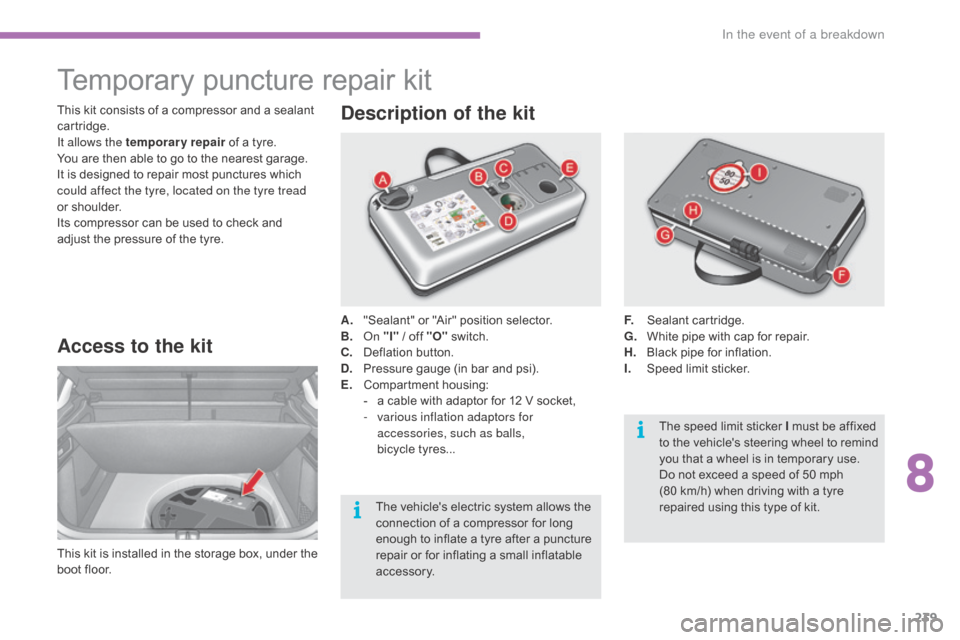
Access to the kit
This kit is installed i n t he s torage b ox, u nder t he b
oot floor. A.
"
Sealant" or "Air" position selector.
B.
On
"I"
/ off "O"
s
witch.
C.
D
eflation button.
D.
P
ressure gauge (in bar and psi).
E.
C
ompartment
h
ousing:
-
a
cable with adaptor for 12 V socket,
-
v
arious inflation adaptors for
accessories, such as balls,
bicycle tyres...
Description of the kit
F. Sealant c artridge.
G. W hite pipe with cap for repair.
H.
B
lack pipe for inflation.
I.
S
peed limit sticker.
This
kit
consists
of
a
compressor
and
a
sealant
c
artridge.
It allows the temporary repair
of
a
tyre.
You
are
then
able
to
go
to
the
nearest
garage.
It
is
designed
to
repair
most
punctures
which
c
ould affect the tyre, located on the tyre tread
or
shoulder.
Its
compressor
can
be
used
to
check
and
a
djust
the
pressure
of
the
tyre.
The
vehicle's
electric
system
allows
the
c
onnection
of
a
compressor
for
long
e
nough
to
inflate
a
tyre
after
a
puncture
r
epair
or
for
inflating
a
small
inflatable
a
ccessory. The
speed limit sticker I must be affixed
t
o the vehicle's steering wheel to remind
y
ou that a wheel is in temporary use.
Do
not exceed a speed of 50 mph
(80
km/h) when driving with a tyre
r
epaired using this type of kit.
8
In the event of a breakdown
Page 271 of 396
269
C4-2_en_Chap08_en-cas-de-panne_ed02-2015
Towing the vehicle
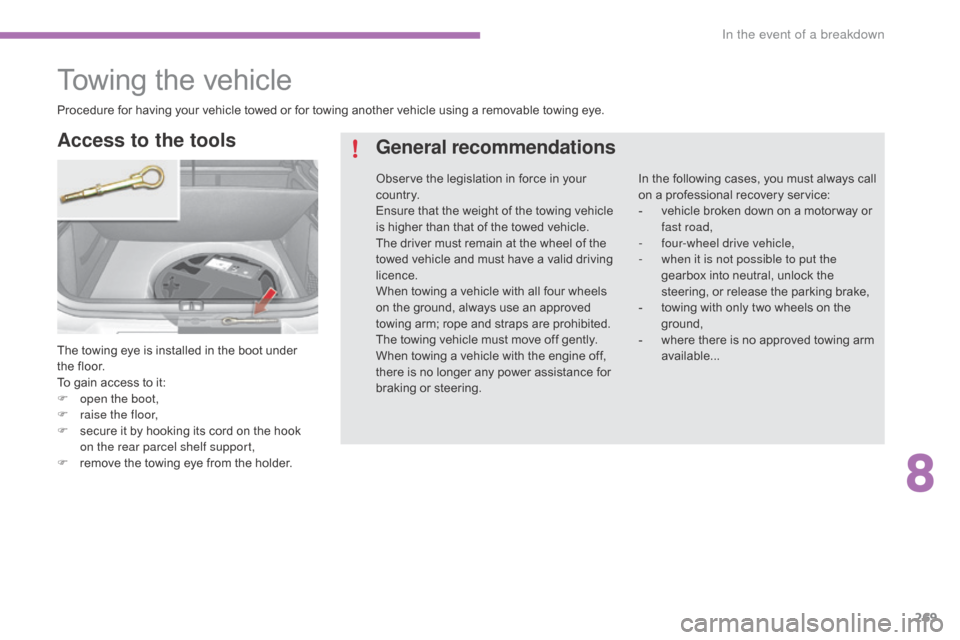
The towing eye is installed in the boot under the floor.
To
gain access to it:
F
o
pen the boot,
F
r
aise the floor,
F
s
ecure it by hooking its cord on the hook
o
n the rear parcel shelf support,
F
r
emove the towing eye from the holder.
Access to the tools General recommendations
In the following cases, you must always call o
n a professional recovery service:
-
v
ehicle broken down on a motor way or
f
ast road,
-
f
our-wheel drive vehicle,
-
w
hen it is not possible to put the
gearbox
into neutral, unlock the
s
teering, or release the parking brake,
-
t
owing with only two wheels on the
g
round,
-
w
here there is no approved towing arm
a
vailable...
Procedure
for
having
your
vehicle
towed
or
for
towing
another
vehicle
using
a
removable
towing
eye.
Observe
the
legislation
in
force
in
your
c
o unt r y.
Ensure
that
the
weight
of
the
towing
vehicle
i
s
higher
than
that
of
the
towed
vehicle.
The
driver
must
remain
at
the
wheel
of
the
t
owed
vehicle
and
must
have
a
valid
driving
l
icence.
When
towing
a
vehicle
with
all
four
wheels
o
n
the
ground,
always
use
an
approved
t
owing
arm;
rope
and
straps
are
prohibited.
The
towing
vehicle
must
move
off
gently.
When
towing
a
vehicle
with
the
engine
off,
t
here
is
no
longer
any
power
assistance
for
b
raking
or
steering.
8
In the event of a breakdown
Page 285 of 396
283
C4-2_en_Chap10b_SMEGplus_ed02-2015
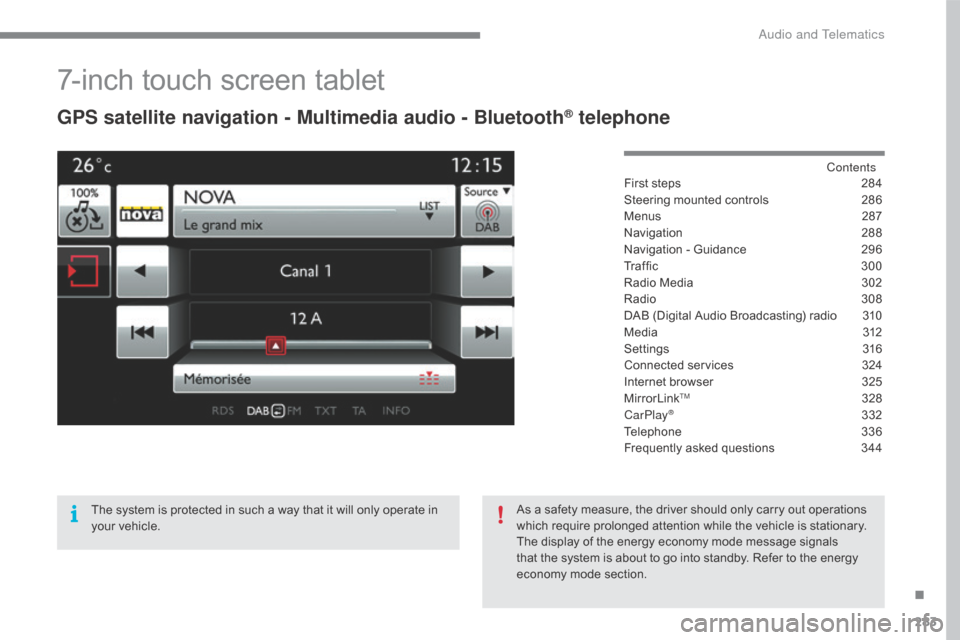
7-inch touch screen tablet
GPS satellite navigation - Multimedia audio - Bluetooth® telephone
Contents
First
steps
2 84
Steering
mounted
controls
2
86
Menus
2
87
Navigation
2
88
Navigation
-
Guidance
2
96
Tr a f fi c
3
0 0
Radio
Media
3
02
Radio
308
D
AB
(Digital
Audio
Broadcasting)
radio
3
10
M edia
3
12
Settings
3
16
Connected
services
3
24
Internet
browser
3
25
MirrorLink
TM 32 8
CarPlay® 3 32
Telephone
3
36
Frequently
asked questions
3
44
The
system
is
protected
in
such
a
way
that
it
will
only
operate
in
y
our
vehicle. As
a
safety
measure,
the
driver should only carry out operations
w
hich
require
prolonged
attention while the vehicle is stationary.
The
display
of
the
energy
economy mode message signals
t
hat
the
system
is
about
to
go into standby. Refer to the energy
ec
onomy
mo
de
s
ection.
.
Audio and Telematics
Page 288 of 396
286
C4-2_en_Chap10b_SMEGplus_ed02-2015
Steering mounted controls
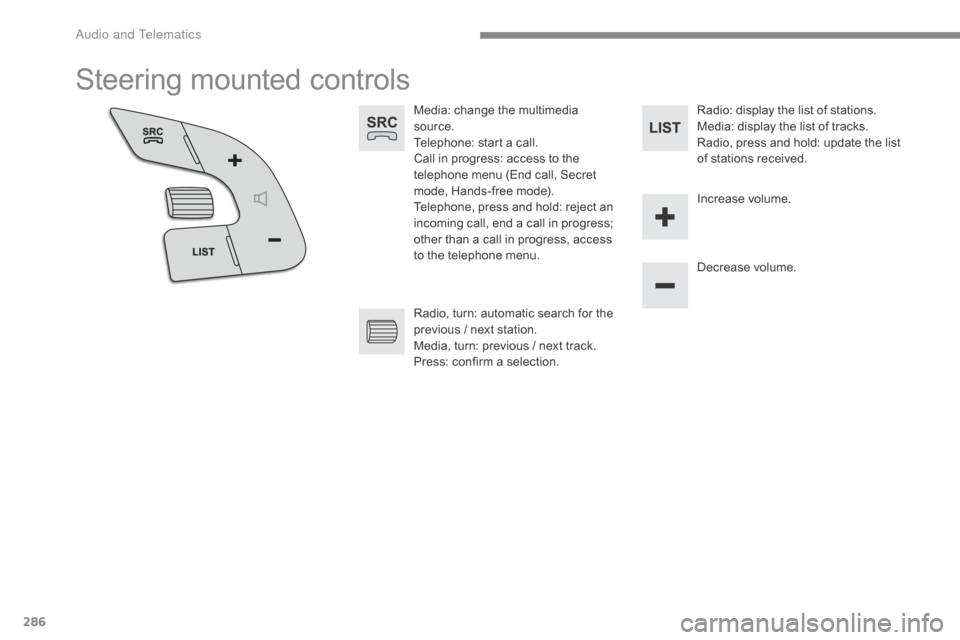
Media: change the multimedia source.
Telephone:
start a call.
Call
in progress: access to the
t
elephone menu (End call, Secret
m
ode, Hands-free mode).
Telephone,
press and hold: reject an
i
ncoming call, end a call in progress;
o
ther than a call in progress, access
t
o the telephone menu. Decrease
volume.
Radio,
turn: automatic search for the
p
revious / next station.
Media,
turn: previous / next track.
Press:
confirm a selection. Radio:
display the list of stations.
Media: display the list of tracks.
Radio,
press and hold: update the list
o
f stations received.
Increase
volume.
Audio and Telematics
Page 314 of 396
312
C4-2_en_Chap10b_SMEGplus_ed02-2015
Media
USB playerSelecting the source
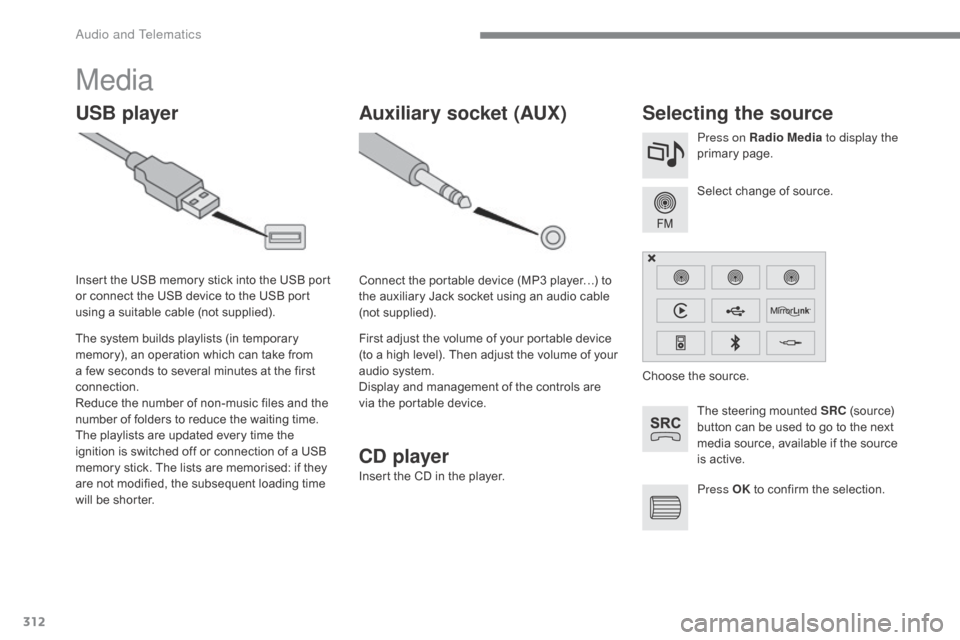
The steering mounted SRC (source) b
utton can be used to go to the next
m
edia source, available if the source
i
s active.
Select
change of source.
Press on Radio Media
to display the
primary
pag
e.
The
system
builds
playlists
(in
temporary
m
emory),
an
operation
which
can
take
from
a
few
seconds
to
several
minutes
at
the
first
c
onnection.
Reduce
the
number
of
non-music
files
and
the
n
umber
of
folders
to
reduce
the
waiting
time.
The
playlists
are
updated
every
time
the
i
gnition
is
switched
off
or
connection
of
a
USB
m
emory
stick.
The
lists
are
memorised:
if
they
a
re
not
modified,
the
subsequent
loading
time
w
ill
be
shorter.
Insert
the
USB
memory
stick
into
the
USB
port
o
r
connect
the
USB
device
to
the
USB
port
u
sing
a
suitable
cable
(not
supplied).
Auxiliary socket (AUX)
Connect the portable device (MP3 player…) to t
he auxiliary Jack socket using an audio cable
(
not
sup
plied).
First
adjust the volume of your portable device
(
to a high level). Then adjust the volume of your
a
udio system.
Display
and management of the controls are
v
ia the portable device. Choose
the source.
Press OK
to confirm the selection.
CD player
Insert the CD in the player.
Audio and Telematics