warning Citroen C4 2016 2.G Owner's Guide
[x] Cancel search | Manufacturer: CITROEN, Model Year: 2016, Model line: C4, Model: Citroen C4 2016 2.GPages: 396, PDF Size: 10.22 MB
Page 35 of 396
33
C4-2_en_Chap01_instruments-de-bord_ed02-2015
Range indicators
Once the AdBlue® tank is on reserve or after d
etection
of
a
fault with the SCR emissions
c
ontrol
system,
when the ignition is switched
o
n,
an
indicator
displays an estimate of the
d
istance
that
can
be covered, the range, before
e
ngine
starting
is
prevented.
In
the
event
of
simultaneous system fault and
l
ow AdBlue
® level, the shortest range figure is t
he
one
displayed.
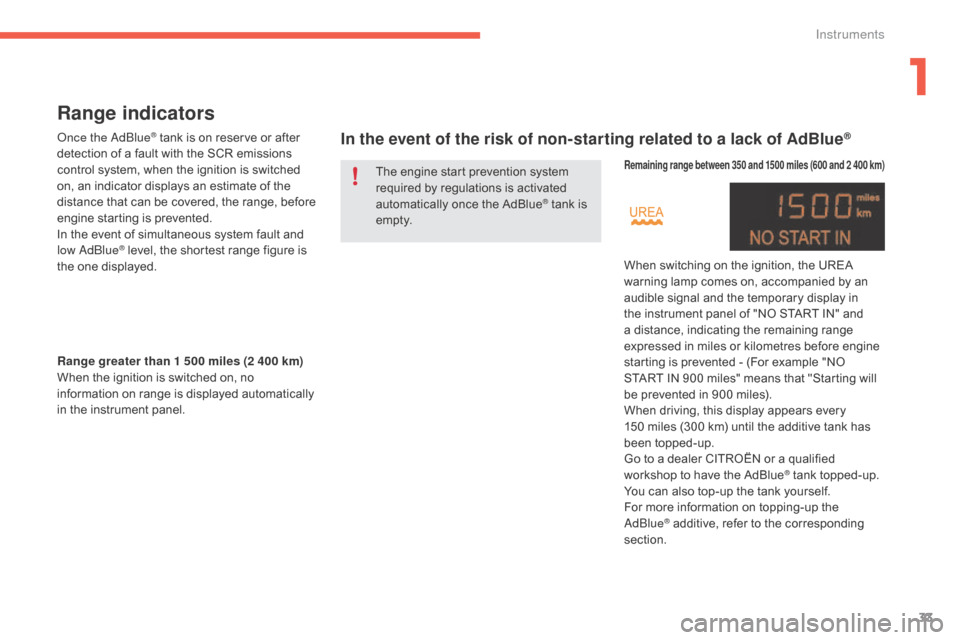
In the event of the risk of non-starting related to a lack of AdBlue®
Range greater than 1 500 miles (2 400 km)
W hen the ignition is switched on, no
i
nformation on range is displayed automatically
i
n the instrument panel.
Remaining range between 350 and 1500 miles (600 and 2 400 km)
When switching on the ignition, the UREA warning lamp comes on, accompanied by an
a
udible signal and the temporary display in
t
he instrument panel of "NO START IN" and
a
distance, indicating the remaining range
e
xpressed in miles or kilometres before engine
s
tarting is prevented - (For example "NO
S
TART IN 900 miles" means that "Starting will
b
e prevented in 900 miles).
When
driving, this display appears every
1
50 miles (300 km) until the additive tank has
be
en
t
opped-up.
Go
to a dealer CITROËN or a qualified
w
orkshop to have the AdBlue
® tank topped-up.
Y
ou
can
also
top-up
the
tank
yourself.
For
more
information
on
topping-up the
Ad
Blue
® additive, refer to the corresponding s
ection.
The
engine
start
prevention
system
r
equired
by
regulations
is
activated
a
utomatically
once
the
AdBlue
® tank is e
m pt y.
1
Instruments
Page 36 of 396
34
C4-2_en_Chap01_instruments-de-bord_ed02-2015
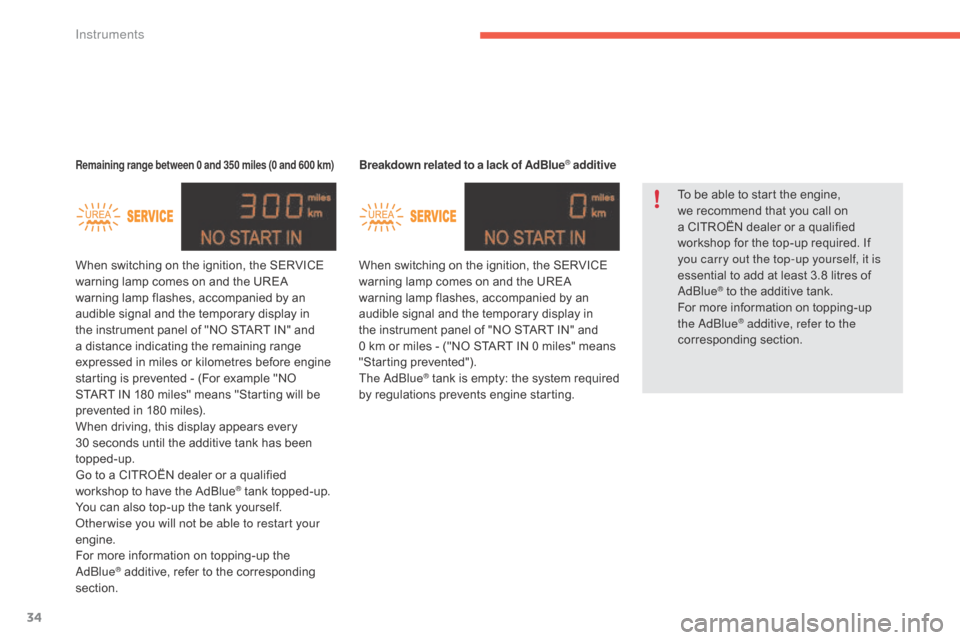
Breakdown related to a lack of AdBlue® additive
When switching on the ignition, the SERVICE w
arning lamp comes on and the UREA
w
arning lamp flashes, accompanied by an
a
udible signal and the temporary display in
t
he instrument panel of "NO START IN" and
0 k
m or miles - ("NO START IN 0 miles" means
"
Starting
p
revented").
The AdBlue
® tank is empty: t he s ystem r equired b
y
regulations prevents engine starting.
Remaining range between 0 and 350 miles (0 and 600 km)
When switching on the ignition, the SERVICE warning lamp comes on and the UREA
w
arning lamp flashes, accompanied by an
a
udible signal and the temporary display in
t
he instrument panel of "NO START IN" and
a
distance indicating the remaining range
e
xpressed in miles or kilometres before engine
s
tarting is prevented - (For example "NO
S
TART IN 180 miles" means "Starting will be
p
revented in 180 miles).
When
driving, this display appears every
3
0 seconds until the additive tank has been
t
opped-up.
Go
to a CITROËN dealer or a qualified
w
orkshop to have the AdBlue
® tank topped-up.
Y
ou
can
also
top-up
the
tank
yourself.
Other wise you will not be able to restart your
engine.
For
more
information
on
topping-up the
Ad
Blue
® additive, refer to the corresponding s
ection. To
be able to start the engine,
w
e recommend that you call on
a
CITROËN dealer or a qualified
w
orkshop for the top-up required. If
y
ou carry out the top-up yourself, it is
essential to add at least 3.8 litres of
Ad
Blue
® to the additive tank.
F
or
more information on topping-up
t
he AdBlue
® additive, refer to the
corresponding s ection.
Instruments
Page 37 of 396
35
C4-2_en_Chap01_instruments-de-bord_ed02-2015
In the event of a fault with the the SCR emissions control system
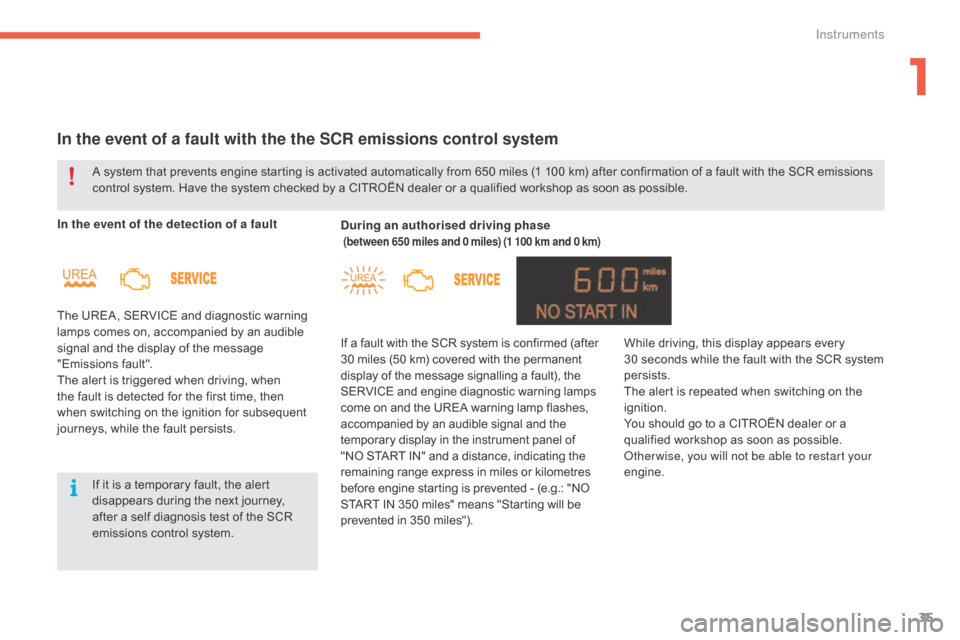
In the event of the detection of a fault
The UREA, SERVICE and diagnostic warning
l
amps comes on, accompanied by an audible
s
ignal and the display of the message
"
Emissions
f
ault".
The
alert is triggered when driving, when
t
he fault is detected for the first time, then
w
hen switching on the ignition for subsequent
j
ourneys, while the fault persists. During an authorised driving phase
(between 650 miles and 0 miles) (1 100 km and 0 km)
If a fault with the SCR system is confirmed (after 3
0 miles (50 km) covered with the permanent d
isplay of the message signalling a fault), the
S
ERVICE and engine diagnostic warning lamps
c
ome on and the UREA warning lamp flashes,
a
ccompanied by an audible signal and the
t
emporary display in the instrument panel of
"
NO START IN" and a distance, indicating the
r
emaining range express in miles or kilometres
b
efore engine starting is prevented - (e.g.: "NO
S
TART IN 350 miles" means "Starting will be
p
revented in 350 miles").
A
system
that
prevents
engine
starting
is
activated automatically from 650 miles (1 100 km) after confirmation of a fault with the SCR emissions
c
ontrol
system.
Have
the
system
checked
by
a CITROËN dealer or a qualified workshop as soon as possible.
If
it
is
a
temporary
fault,
the
alert
d
isappears
during
the
next
journey,
a
fter
a
self
diagnosis
test
of
the
SCR
e
missions
control
system. While
driving, this display appears every 3
0 seconds while the fault with the SCR system
p
ersists.
The
alert is repeated when switching on the
ig
nition.
You
should go to a CITROËN dealer or a
q
ualified workshop as soon as possible.
Other wise, you will not be able to restart your
engine.
1
Instruments
Page 38 of 396
36
C4-2_en_Chap01_instruments-de-bord_ed02-2015
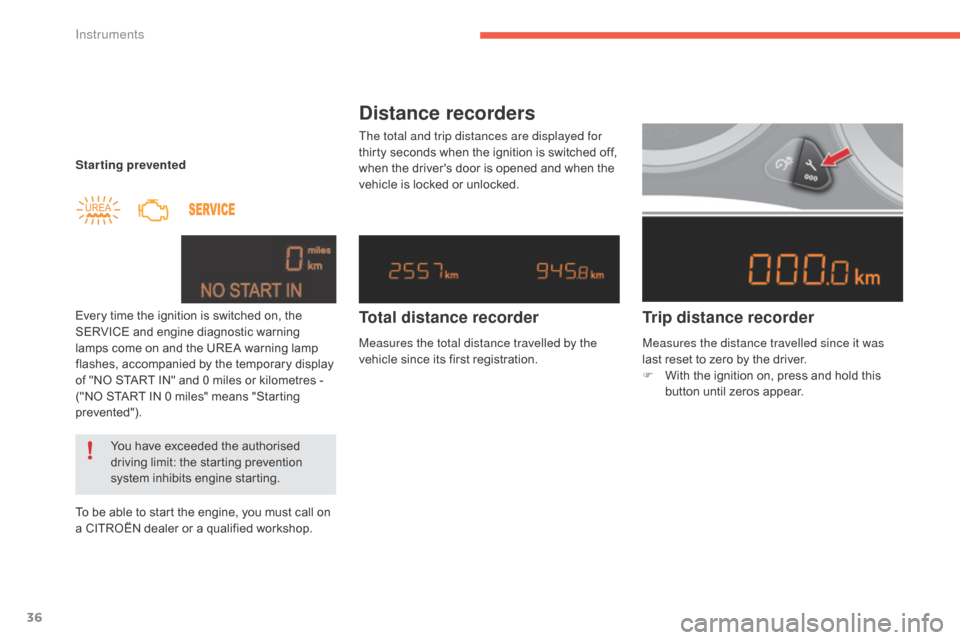
Starting prevented
Every time the ignition is switched on, the
S
ERVICE and engine diagnostic warning
l
amps come on and the UREA warning lamp
f
lashes, accompanied by the temporary display
o
f "NO START IN" and 0 miles or kilometres -
(
"NO START IN 0 miles" means "Starting
p
revented").
To
be able to start the engine, you must call on
a
CITROËN dealer or a qualified workshop.
You
have exceeded the authorised
d
riving limit: the starting prevention
s
ystem inhibits engine starting.
Distance recorders
The total and trip distances are displayed for
thirty seconds when the ignition is switched off,
w
hen the driver's door is opened and when the
v
ehicle is locked or unlocked.
Trip distance recorder
Total distance recorder
Measures the total distance travelled by the
vehicle
since its first registration. Measures the distance travelled since it was
last
reset to zero by the driver.
F
W
ith the ignition on, press and hold this
b
utton until zeros appear.
Instruments
Page 41 of 396
39
C4-2_en_Chap01_instruments-de-bord_ed02-2015
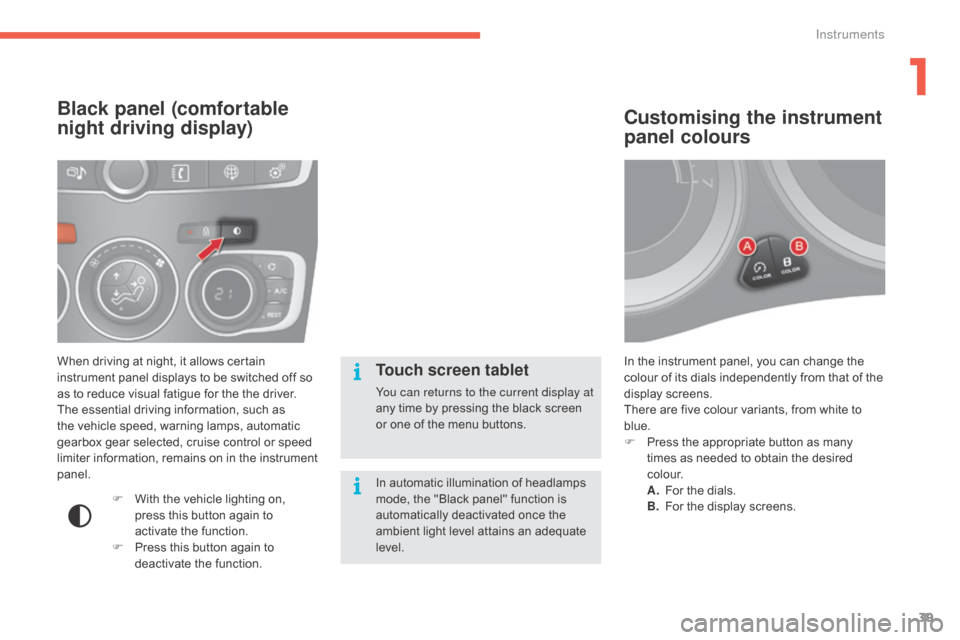
In the instrument panel, you can change the colour of its dials independently from that of the
d
isplay screens.
There
are five colour variants, from white to
b
lue.
F
P
ress the appropriate button as many
t
imes as needed to obtain the desired
c
o l o u r.
A.
F
or the dials.
B.
F
or the display screens.
Customising the instrument
panel colours
When driving at night, it allows certain instrument panel displays to be switched off so
a
s to reduce visual fatigue for the the driver.
The
essential driving information, such as
t
he vehicle speed, warning lamps, automatic
g
earbox gear selected, cruise control or speed
l
imiter information, remains on in the instrument
pan
el.
Black panel (comfortable
night driving display)
F With the vehicle lighting on, p
ress this button again to
a
ctivate the function.
F
P
ress this button again to
d
eactivate the function.
Touch screen tablet
You can returns to the current display at
any time by pressing the black screen
o
r one of the menu buttons.
In
automatic illumination of headlamps
m
ode, the "Black panel" function is
a
utomatically deactivated once the
a
mbient light level attains an adequate
l
evel.
1
Instruments
Page 45 of 396
43
C4-2_en_Chap01_instruments-de-bord_ed02-2015
"Telephone" menu
With the audio system switched on, this menu allows you to make a call or view the various
t
elephone
d
irectories.
For
more information on the "Telephone"
a
pplication, refer to the "Audio and telematics"
s
ection. This
menu allows you to view information on
t
he status of the vehicle.
Warning log
This summarises the status and warning m
essages for systems (active, not active or
f
aulty), displaying them in succession in the
m
ultifunction
s
creen.
F
P
ress the "MENU" button for access to the
main
menu.
F
P
ress the arrows, then the "OK" button to
select the "Trip computer"
menu.
F
I
n the "Trip computer"
menu, select the
"
Warning log" line and confirm.
"Trip computer" menu
"Multimedia" menu
With the audio system switched on, this m
enu allows you to activate or deactivate the
f
unctions associated with use of the radio
(RDS,
DAB / FM auto tracking, RadioText
(
TXT) display) or to choose the media play
m
ode (Normal, Random, Random all, Repeat).
For
more information on the "Multimedia"
a
pplication, refer to the "Audio and telematics"
s
ection.
"Bluetooth
connection" menu
With the audio system on, this menu allows a Bluetooth device (telephone, media player)
t
o be connected or disconnected and the
connection
mode to be defined (hands-free,
p
laying audio files).
For
more information on the "Bluetooth
c
onnection" application, refer to the "Audio and
telematics"
se
ction.
1
Instruments
Page 80 of 396
78
C4-2_en_Chap02_ouvertures_ed02-2015
Doors
Opening
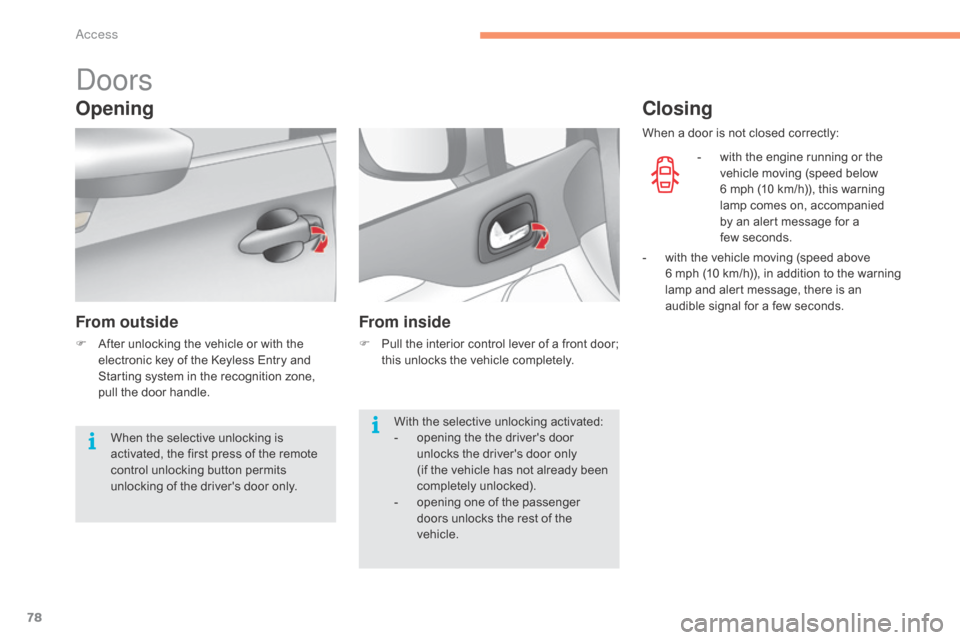
From outside
F After unlocking the vehicle or with the e
lectronic key of the Keyless Entry and
S
tarting system in the recognition zone,
p
ull the door handle.
From inside
F Pull the interior control lever of a front door; t
his unlocks the vehicle completely.
Closing
- with the engine running or the v
ehicle moving (speed below
6
mph (10 km/h)), this warning
l
amp comes on, accompanied
b
y an alert message for a
f
ew seconds.
With
the
selective
unlocking
activated:
-
o
pening
the
the
driver's
door
u
nlocks
the
driver's
door
only
(if
the
vehicle
has
not
already
been
c
ompletely
u
nlocked).
-
o
pening
one
of
the
passenger
d
oors
unlocks
the
rest
of
the
v
ehicle.
When
the
selective
unlocking
is
a
ctivated,
the
first
press
of
the
remote
c
ontrol
unlocking
button
permits
u
nlocking
of
the
driver's
door
only. When
a
door is not closed correctly:
-
w
ith
the vehicle moving (speed above
6 m
ph (10 km/h)), in addition to the warning
l
amp
and alert message, there is an
a
udible signal for a few seconds.
Access
Page 81 of 396
79
C4-2_en_Chap02_ouvertures_ed02-2015
Boot
Opening
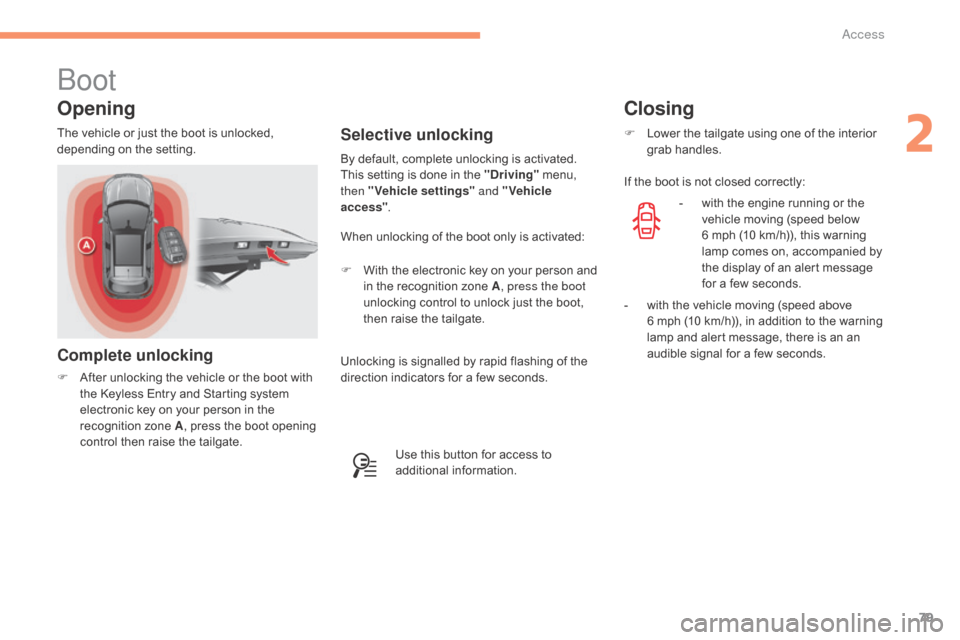
Complete unlocking
F After unlocking the vehicle or the boot with t
he Keyless Entry and Starting system
e
lectronic key on your person in the
r
ecognition zone A,
press the boot opening
c
ontrol then raise the tailgate.
Selective unlocking
When unlocking of the boot only is activated:
F
W
ith the electronic key on your person and
i
n the recognition zone A, press the boot
unlocking
control to unlock just the boot,
t
hen raise the tailgate.
By
default, complete unlocking is activated.
This setting is done in the "Driving"
menu,
t
hen "Vehicle settings"
and "Vehicle
access" .
The
vehicle
or
just
the
boot
is
unlocked,
d
epending
o
n
t
he
se
tting.
Use this button for access to
a
dditional
in
formation.
Closing
F Lower the tailgate using one of the interior g
rab han dles.
If
the boot is not closed correctly:
-
w
ith the engine running or the
v
ehicle moving (speed below
6
mph (10 km/h)), this warning
l
amp comes on, accompanied by
t
he display of an alert message
f
or a few seconds.
-
w
ith the vehicle moving (speed above
6 m
ph (10 km/h)), in addition to the warning
l
amp and alert message, there is an an
a
udible signal for a few seconds.
Unlocking
is
signalled
by
rapid
flashing
of
the
d
irection
indicators
for
a
few
seconds.
2
Access
Page 86 of 396
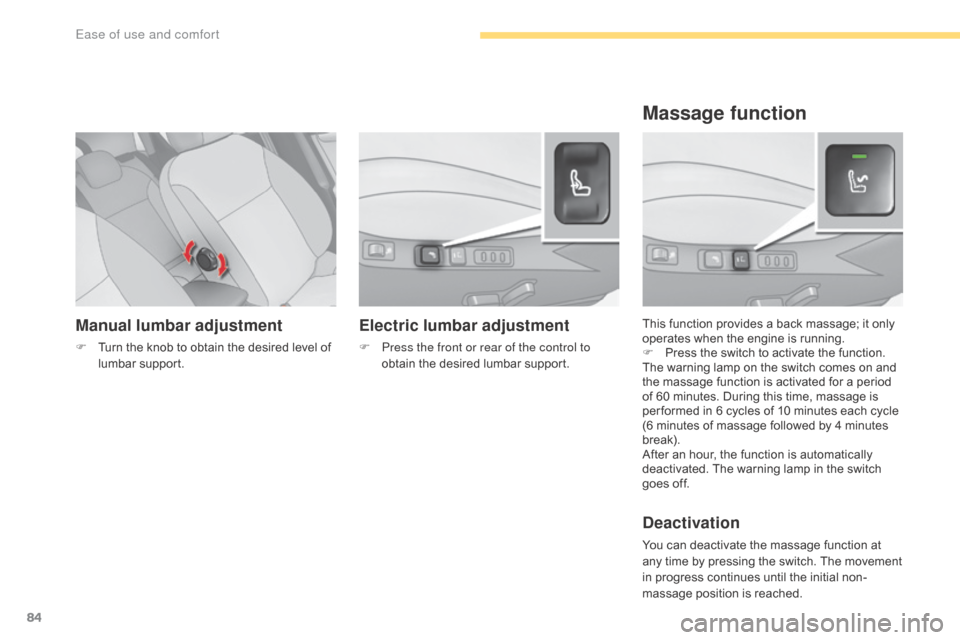
84
C4-2_en_Chap03_ergonomie-et-confort_ed02-2015
Manual lumbar adjustment
F Turn the knob to obtain the desired level of l
umbar sup port. This
function provides a back massage; it only o
perates when the engine is running.
F P ress the switch to activate the function.
The
warning lamp on the switch comes on and
t
he massage function is activated for a period
o
f 60 minutes. During this time, massage is
p
er formed in 6 cycles of 10 minutes each cycle
(
6 minutes of massage followed by 4 minutes
b
reak).
After
an hour, the function is automatically
d
eactivated. The warning lamp in the switch
g
oes off.
Deactivation
You can deactivate the massage function at any time by pressing the switch. The movement
i
n progress continues until the initial non-
massage
position is reached.
Massage function
Electric lumbar adjustment
F Press the front or rear of the control to obtain the desired lumbar support.
Ease of use and comfort
Page 102 of 396

100
C4-2_en_Chap03_ergonomie-et-confort_ed02-2015
Front demist - defrost
These markings on the control panel indicate the control positions for rapid demisting or defrosting of the windscreen and side windows.
With manual air
conditioning
F Put the temperature, air flow and distribution c
ontrols to the dedicated marked position.
F
P
ut the air intake control to the "Exterior air
i
ntake" position
(
indicator lamp on the control off).
F
S
witch on the air conditioning by pressing
t
he "A /C "
button; the warning lamp in the
b
utton comes on.
With digital dual-zone air
conditioning
Automatic visibility programme
F Select this programme to demist or defrost t
he windscreen and side windows as
quickly
as possible.
The
system automatically manages the air
c
onditioning, air flow and air intake, and
p
rovides optimum distribution towards the
w
indscreen and side windows.
F
To stop the programme, press either the "visibility" button again or "AUTO", the
warning
lamp on the button goes off and the
w
arning lamp on the "AUTO"
button comes on.
The system starts again with the values in use before it was overridden by the visibility
programme.
With
Stop & Start, when demisting has
b
een activated, the STOP mode is not
a
vailable.
With
Stop
&
Start,
when
the
demisting,
a
ir
conditioning
and
air
flow
functions
a
re
activated,
STOP
mode
is
not
a
vailable.
Ease of use and comfort