audio Citroen C4 2016 2.G Owner's Guide
[x] Cancel search | Manufacturer: CITROEN, Model Year: 2016, Model line: C4, Model: Citroen C4 2016 2.GPages: 396, PDF Size: 10.22 MB
Page 294 of 396
292
C4-2_en_Chap10b_SMEGplus_ed02-2015
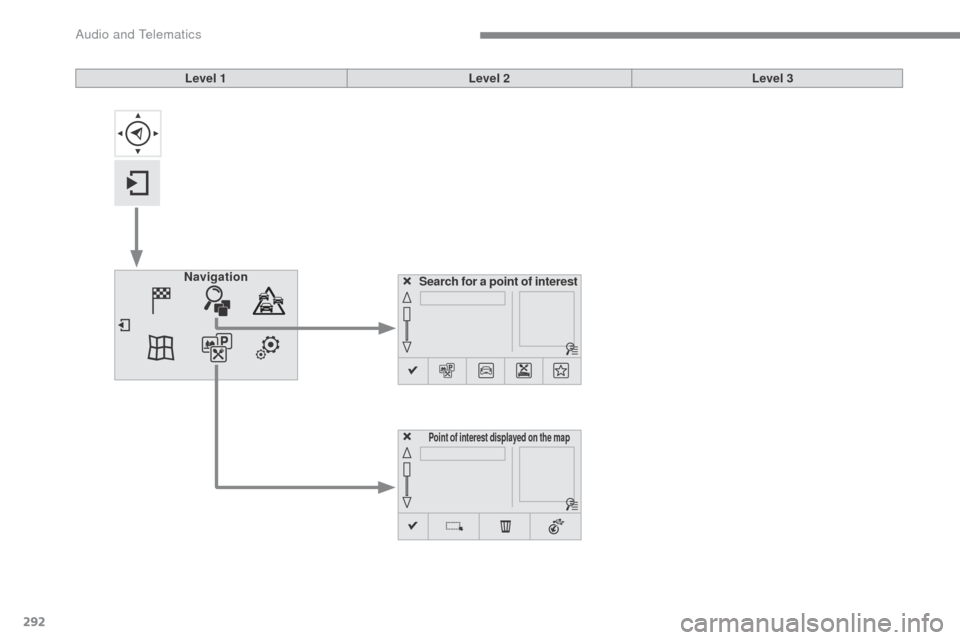
Search for a point of interest
Navigation
Point of interest displayed on the map
Level 1
Level 2Level 3
Audio and Telematics
Page 295 of 396
293
C4-2_en_Chap10b_SMEGplus_ed02-2015
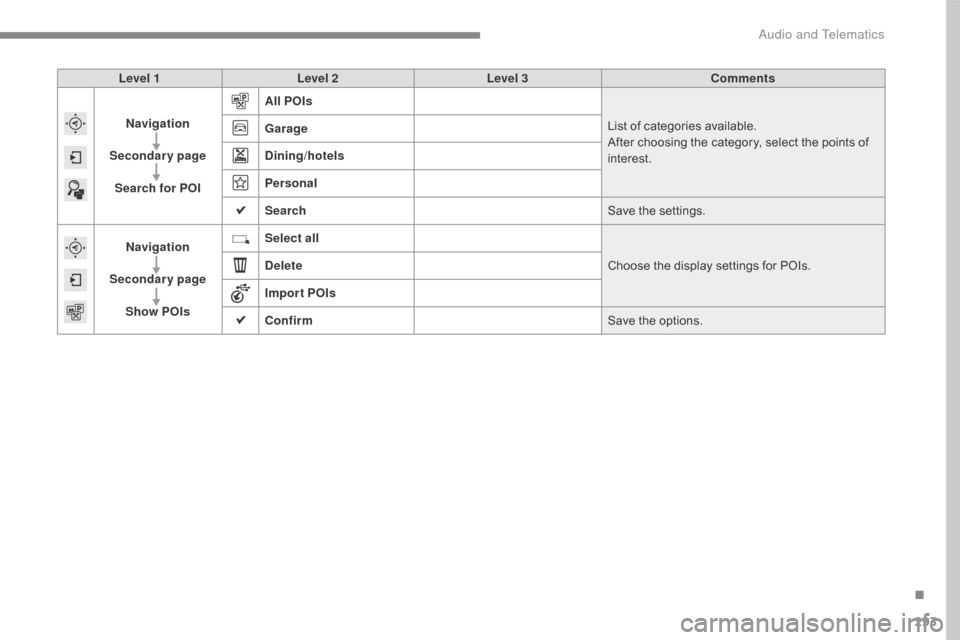
Level 1Level 2 Level 3 Comments
Navigation
Secondary page Search for POI All POIs
List
of categories available.
After
choosing the category, select the points of
i
nterest.
Garage
Dining/hotels
Personal
Search
Save
the settings.
Navigation
Secondary page Show POIs Select all
Choose
the display settings for POIs.
Delete
Import POIs
Confirm Save
the options.
.
Audio and Telematics
Page 296 of 396
294
C4-2_en_Chap10b_SMEGplus_ed02-2015
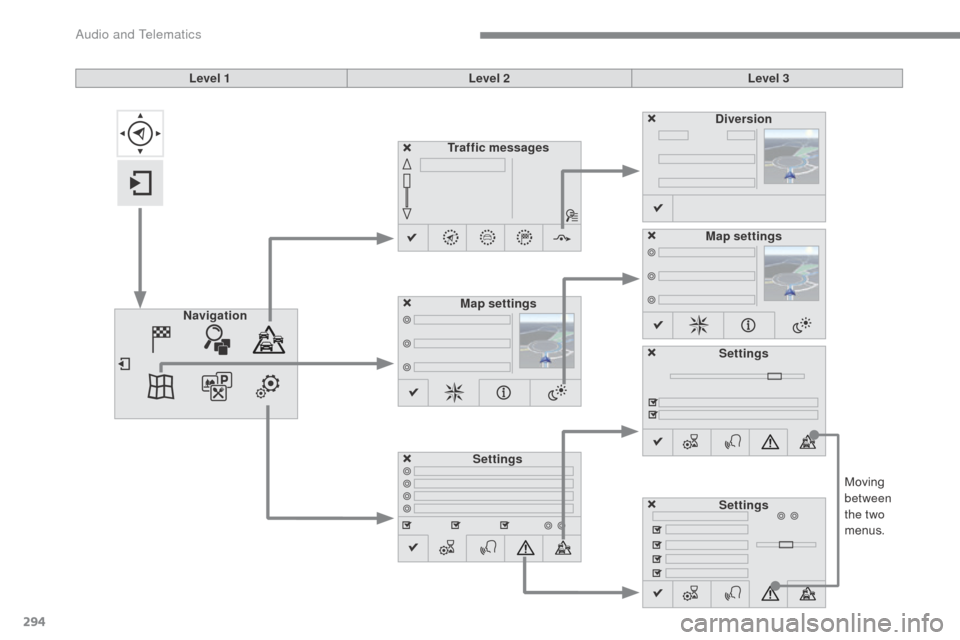
Moving between
the two
menus.
Level 1
Level 2Level 3
Traffic messages
Settings Diversion
Map settings
Navigation Map settings
Settings
Settings
Audio and Telematics
Page 297 of 396
295
C4-2_en_Chap10b_SMEGplus_ed02-2015
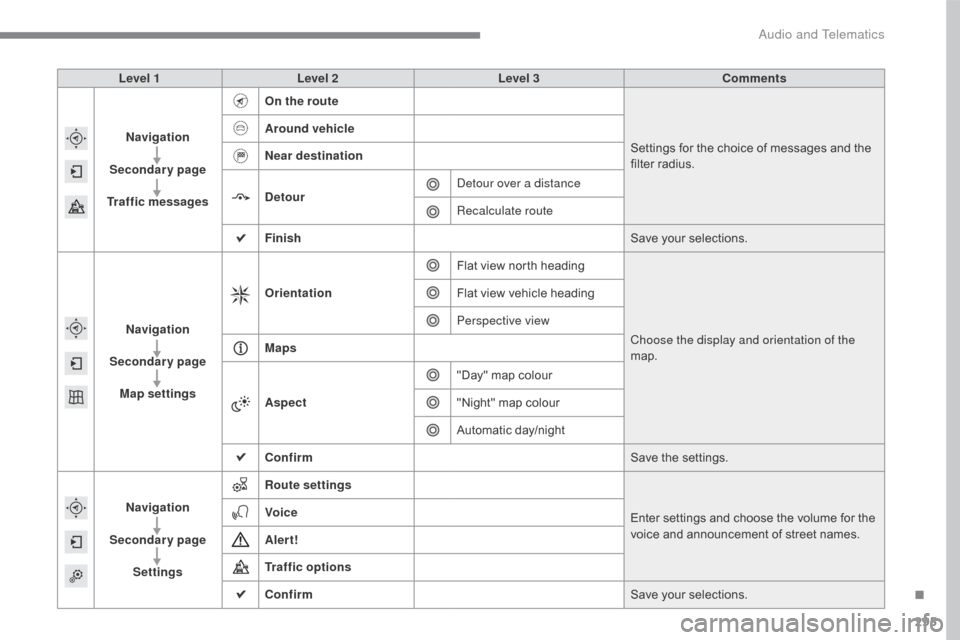
Level 1Level 2 Level 3 Comments
Navigation
Secondary page
Traffic messages On the route
Settings
for the choice of messages and the
f
ilter radius.
Around vehicle
Near destination
Detour
Detour over a distance
Recalculate route
Finish Save
your selections.
Navigation
Secondary page Map settings Orientation
Flat
view north headingChoose the display and orientation of the
map.
Flat
view vehicle heading
Perspective view
Maps
Aspect "Day"
map colour
"Night"
map colour
Automatic
day/night
Confirm Save
the settings.
Navigation
Secondary page Settings Route settings
Enter
settings and choose the volume for the
v
oice and announcement of street names.
Voice
Alert!
Traffic options
Confirm
Save
your selections.
.
Audio and Telematics
Page 298 of 396
296
C4-2_en_Chap10b_SMEGplus_ed02-2015
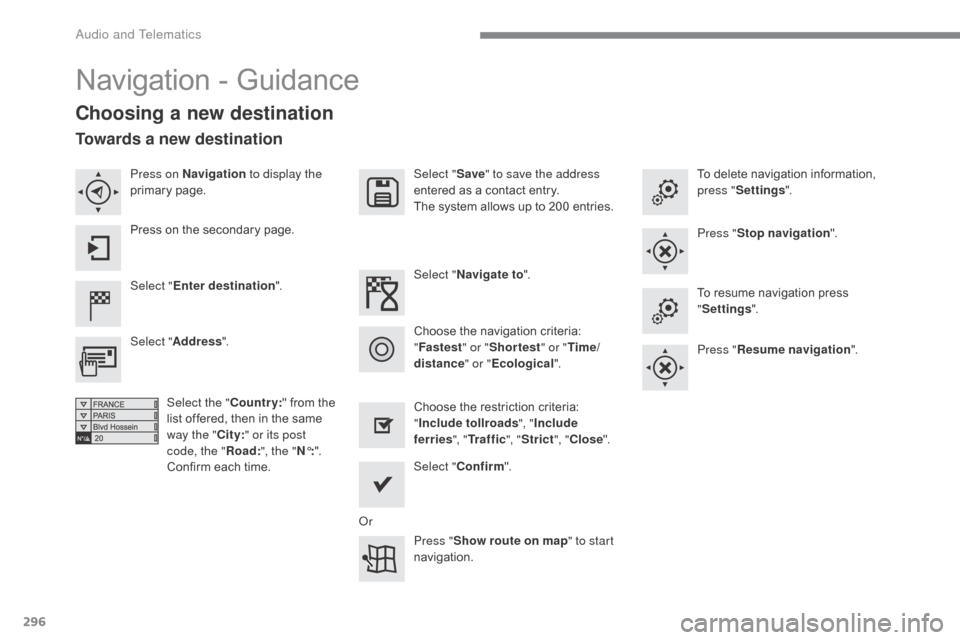
Navigation - Guidance
Choosing a new destination
Select "Enter destination ". Select "
Save" to save the address
entered as a contact entry.
The system allows up to 200 entries.
Select " Confirm ".
Press " Show route on map " to start
navigation.
Select "
Address ".
Select the " Country:"
from the
l
ist offered, then in the same
w
ay the "City:" or its post
code, the " Road:", the " N°:".
Confirm
each time. Select "
Navigate to ".
Choose the restriction criteria:
"I
nclude tollroads", "Include
ferries ", "Tr a f f i c ", "Strict ", "Close ".
Choose
the navigation criteria:
"F
astest" or "Shortest " or "Time/
distance " or "Ecological". To
delete navigation information,
p
ress "
Settings ".
Press " Stop navigation ".
To resume navigation press
"S
ettings".
Press " Resume navigation ".
Press on Navigation
to display the
primary
pag
e.
Press on the secondary page.
Towards a new destination
Or
Audio and Telematics
Page 299 of 396
297
C4-2_en_Chap10b_SMEGplus_ed02-2015
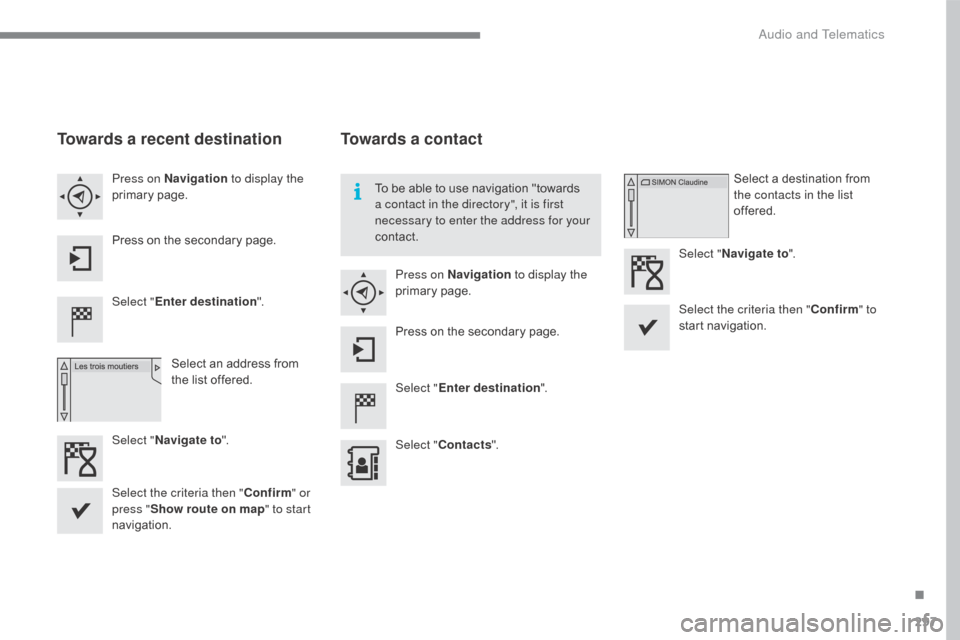
Towards a recent destination
Select "Enter destination ".
Select an address from
t
he list offered.
Press on Navigation
to display the
primary
pag
e.
Press on the secondary page.
Select " Navigate to ".
Towards a contact
Select "Enter destination ".
Select " Contacts ".
Press on Navigation
to display the
primary
pag
e.
Press on the secondary page. Select a destination from
t
he contacts in the list
offered.
Select " Navigate to ".
Select the criteria then " Confirm" to
start
n
avigation.
To
be able to use navigation "towards
a c
ontact in the directory", it is first
necessary to enter the address for your
contact.
Select the criteria then " Confirm" or
press " Show route on map " to start
navigation.
.
Audio and Telematics
Page 300 of 396
298
C4-2_en_Chap10b_SMEGplus_ed02-2015
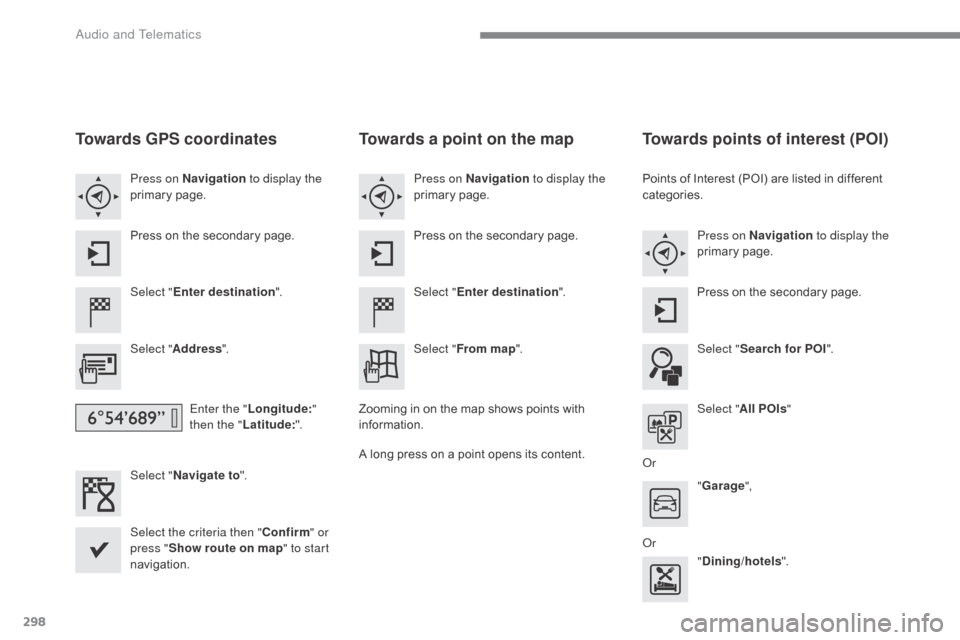
Towards GPS coordinates
Select "Enter destination ".
Select " Address ".
Enter the " Longitude: "
then the " Latitude: ".
Select " Navigate to ".
Select the criteria then " Confirm" or
press " Show route on map " to start
navigation. Press on Navigation to display the
primary
pag
e.
Press on the secondary page.
Towards a point on the map
Select "
Enter destination ".
Select " From map ".
Press on Navigation
to display the
primary
pag
e.
Press on the secondary page.
Zooming
in on the map shows points with
i
nformation.
A
long
press on a point opens its content.
Towards points of interest (POI)
Points of Interest (POI) are listed in different categories.
Press on Navigation to display the
primary
pag
e.
Press
on the secondary page.
Select " Search for POI ".
Select " All POIs "
Or "Garage ",
Or "Dining/hotels ".
Audio and Telematics
Page 301 of 396

299
C4-2_en_Chap10b_SMEGplus_ed02-2015
An annual mapping update allows
n ew points of interest to be presented
to
you.
You
can also update the Risk areas /
D
anger areas every month.
The
detailed procedure is available on:
http://citroen.navigation.com.
.
Audio and Telematics
Page 302 of 396
300
C4-2_en_Chap10b_SMEGplus_ed02-2015
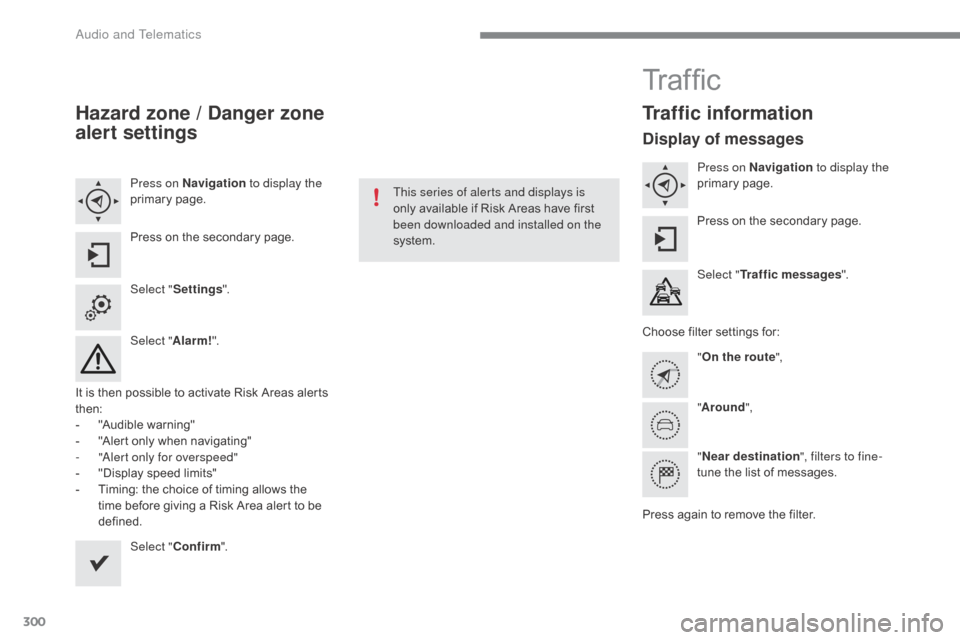
Hazard zone / Danger zone
alert settings
Press on Navigation to display the
primary pag e.
Press
on the secondary page.
Select " Settings ".
Select " Alarm!".
It
is
then
possible to activate Risk Areas alerts
t
hen:
-
"
Audible warning"
-
"
Alert
only when navigating"
-
"
Alert only for overspeed"
-
"
Display speed limits"
-
T
iming: the choice of timing allows the
t
ime
before giving a Risk Area alert to be
de
fined. Select " Confirm ". This series of alerts and displays is
only
available if Risk Areas have first
b
een downloaded and installed on the
system.
Tr a f fi c
Traffic information
Display of messages
Press on Navigation to display the
primary pag e.
Press
on the secondary page.
Select " Traffic messages ".
Choose
filter settings for:
" On the route ",
" Around ",
" Near destination ", filters to fine-
tune
the list of messages.
Press
again to remove the filter.
Audio and Telematics
Page 303 of 396
301
C4-2_en_Chap10b_SMEGplus_ed02-2015
Select the message from the list offered.
Select
the
magnifying glasses to
h
ave
voice
information.
Setting filters
Press on Navigation to display the
primary pag e.
Press
on the secondary page.
Select " Settings ".
Select " Info options ".
Select:
-
"Warn of new messages ",
-
"Speak messages ".
Then
enter the filter radius.
Select " Confirm ".
We
recommend a filter radius of:
-
1
2 miles (20 km) in urban areas,
-
3
0 miles (50 km) on motor ways.
TMC
(Traffic
Message
Channel)
m
essages
on
GPS-Navigation
contain
t
raffic
information
transmitted
in
real
t
ime. The
TA (Traffic Announcement)
f
unction gives priority to TA alert
m
essages. To operate, this function
n
eeds good reception of a radio station
t
ransmitting this type of message.
W
hen a traffic report is transmitted,
t
he current audio source is interrupted
automatically
to play the TA message.
N
ormal playback of the audio source
r
esumes at the end of the transmission
o
f the message.
Receiving TA messages
Press on Navigation to display the
primary pag e.
Press
on the secondary page.
Select " Settings ".
Select " Voice".
Activate
/ Deactivate "Tr a f f i c
( TA ) ".
.
Audio and Telematics