ECU Citroen C4 2016 2.G Service Manual
[x] Cancel search | Manufacturer: CITROEN, Model Year: 2016, Model line: C4, Model: Citroen C4 2016 2.GPages: 396, PDF Size: 10.22 MB
Page 249 of 396
247
C4-2_en_Chap08_en-cas-de-panne_ed02-2015
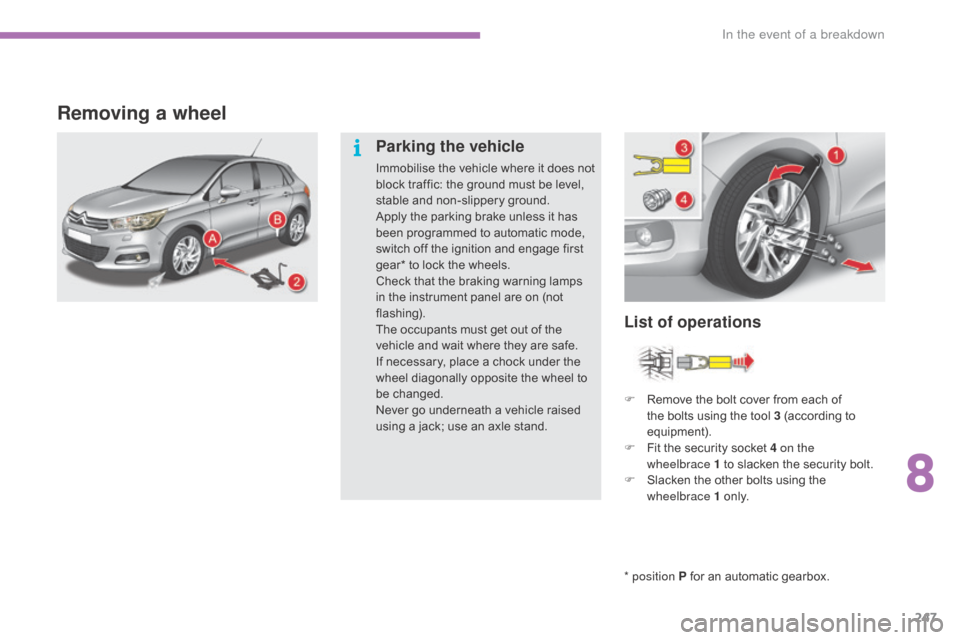
Removing a wheel
* position P for an automatic gearbox.
List of operations
Parking the vehicle
Immobilise the vehicle where it does not b
lock traffic: the ground must be level,
s
table and non-slippery ground.
Apply
the parking brake unless it has
b
een programmed to automatic mode,
s
witch off the ignition and engage first
g
ear* to lock the wheels.
Check
that the braking warning lamps
i
n the instrument panel are on (not
f
lashing).
The
occupants must get out of the
v
ehicle and wait where they are safe.
If
necessary, place a chock under the
w
heel diagonally opposite the wheel to
be c
hanged.
Never
go underneath a vehicle raised
u
sing a jack; use an axle stand.F
R
emove the bolt cover from each of
t
he bolts using the tool 3 (according to
e
quipment).
F
F
it the security socket 4 on the
wheelbrace
1 to slacken the security bolt.
F
S
lacken the other bolts using the
w
heelbrace 1
o
n l y.
8
In the event of a breakdown
Page 251 of 396
249
C4-2_en_Chap08_en-cas-de-panne_ed02-2015
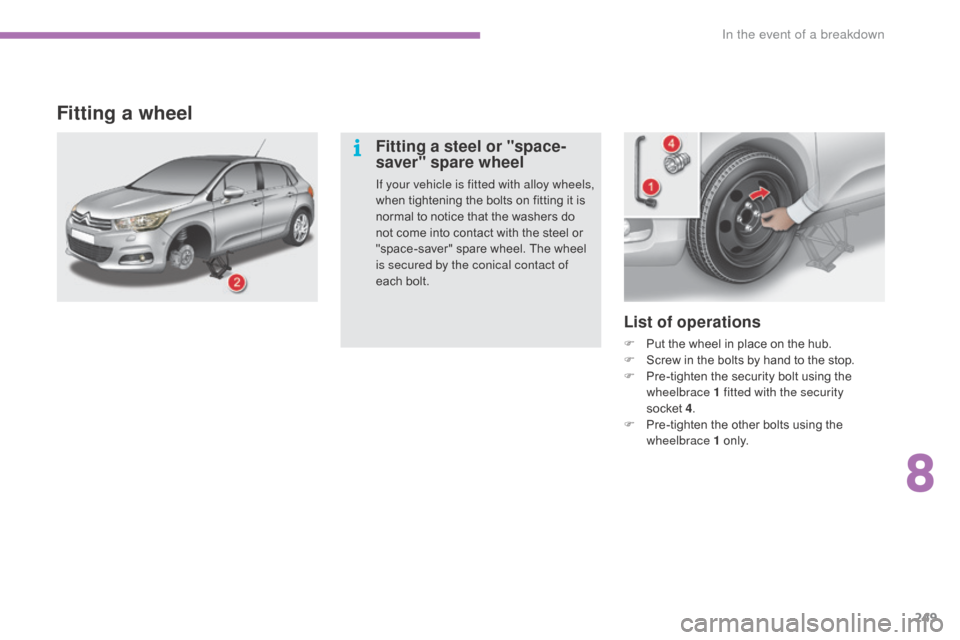
List of operations
F Put the wheel in place on the hub.
F S crew in the bolts by hand to the stop.
F
P
re-tighten the security bolt using the
w
heelbrace 1 fitted with the security
socket 4.
F
P
re-tighten the other bolts using the
w
heelbrace 1
o
n l y.
Fitting a wheel
Fitting a steel or "space-
saver" spare wheel
If your vehicle is fitted with alloy wheels,
when tightening the bolts on fitting it is
n
ormal to notice that the washers do
n
ot come into contact with the steel or
"
space-saver" spare wheel. The wheel
i
s secured by the conical contact of
each
bolt.
8
In the event of a breakdown
Page 252 of 396
250
C4-2_en_Chap08_en-cas-de-panne_ed02-2015
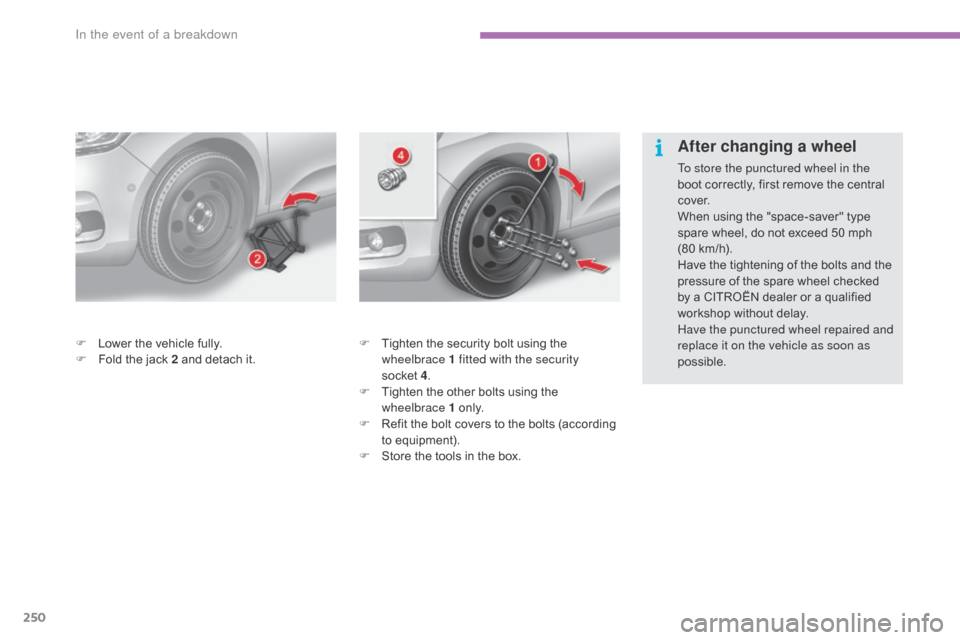
F Tighten the security bolt using the w
heelbrace 1 fitted with the security
socket 4.
F
T
ighten the other bolts using the
w
heelbrace 1
o
n l y.
F
R
efit the bolt covers to the bolts (according
t
o equipment).
F
S
tore the tools in the box.
F
L
ower
the
vehicle
fully.
F
F
old
the
jack
2
and
detach
it.
After changing a wheel
To store the punctured wheel in the
boot
correctly, first remove the central
c
ove r.
When
using the "space-saver" type
s
pare wheel, do not exceed 50 mph
(80
km/h).
Have
the tightening of the bolts and the
p
ressure of the spare wheel checked
b
y a CITROËN dealer or a qualified
w
orkshop without delay.
Have the punctured wheel repaired and
replace it on the vehicle as soon as
possible.
In the event of a breakdown
Page 263 of 396
261
C4-2_en_Chap08_en-cas-de-panne_ed02-2015
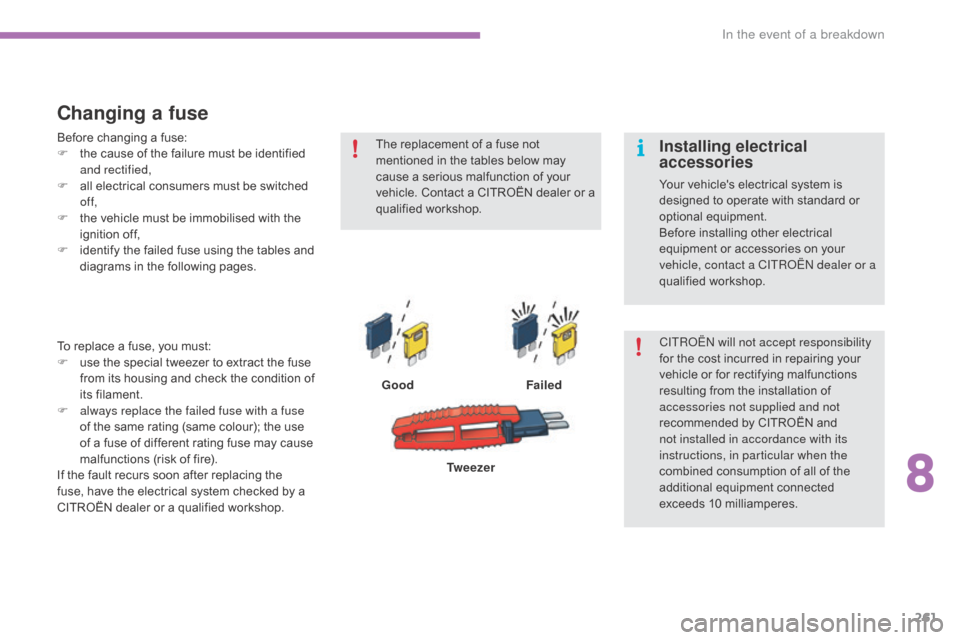
Changing a fuse
GoodFailed
To
replace
a
fuse,
you
must:
F
u
se
the
special
tweezer
to
extract
the
fuse
f
rom
its
housing
and
check
the
condition
of
it
s f
ilament.
F
a
lways replace the failed fuse with a fuse
of
the
same
rating
(same
colour);
the
use
o
f
a
fuse
of
different
rating
fuse
may
cause
m
alfunctions
(risk
of
fire).
If
the
fault
recurs
soon
after
replacing
the
f
use,
have
the
electrical
system
checked
by
a
C
ITROËN
dealer
or
a
qualified
workshop. Tw e e z e r
The
replacement of a fuse not
m
entioned in the tables below may
c
ause a serious malfunction of your
v
ehicle. Contact a CITROËN dealer or a
q
ualified
w
orkshop.
CITROËN will not accept responsibility
for the cost incurred in repairing your v
ehicle or for rectifying malfunctions r
esulting from the installation of
a
ccessories not supplied and not
recommended
by CITROËN and
n
ot installed in accordance with its
instructions, in particular when the
combined
consumption of all of the
a
dditional equipment connected
e
xceeds
1
0
mil
liamperes.
Installing electrical
accessories
Your vehicle's electrical system is designed to operate with standard or
o
ptional
e
quipment.
Before
installing other electrical
e
quipment or accessories on your
v
ehicle, contact a CITROËN dealer or a
qualified
w
orkshop.
Before
changing
a
fuse:
F
t
he
cause
of
the
failure
must
be
identified
a
nd rectified,
F
a
ll
electrical
consumers
must
be
switched
o
f f,
F
t
he
vehicle
must
be
immobilised
with
the
ig
nition
o
ff,
F
i
dentify
the
failed
fuse
using
the
tables
and
d
iagrams
in
the
following
pages.
8
In the event of a breakdown
Page 267 of 396
265
C4-2_en_Chap08_en-cas-de-panne_ed02-2015
12 V battery
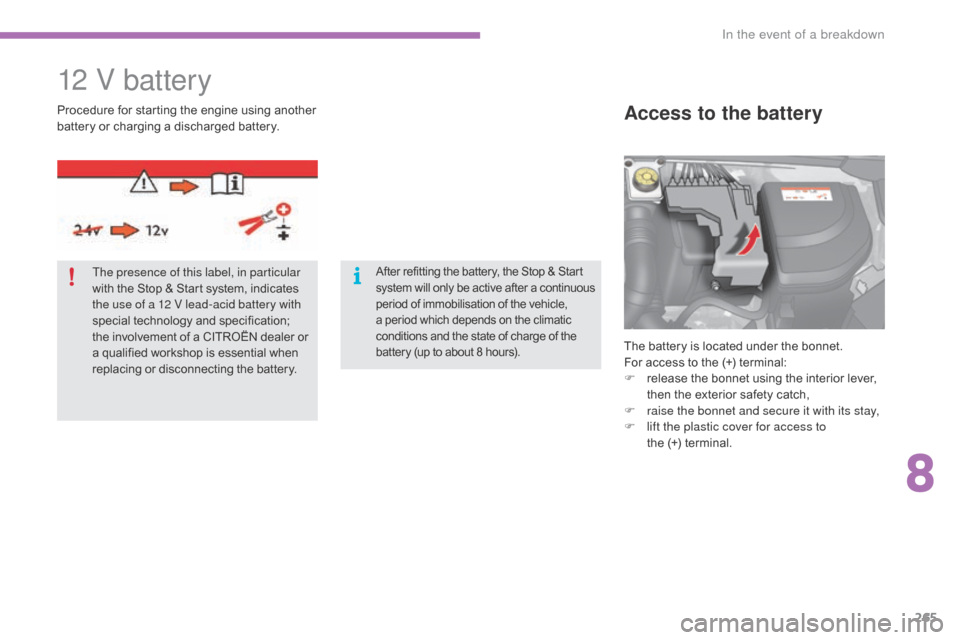
The battery is located under the bonnet.
For access to the (+) terminal:
F
r
elease the bonnet using the interior lever,
t
hen the exterior safety catch,
F
r
aise the bonnet and secure it with its stay,
F
l
ift the plastic cover for access to
the (+)
terminal.
Access to the batteryProcedure for starting the engine u sing another b
attery or charging a discharged battery.
The presence of this label, in particular
with
the Stop & Start system, indicates
t
he use of a 12 V lead-acid battery with
special
t
echnology
a
nd
s
pecification;
t
he involvement of a CITROËN dealer or
a
qualified workshop is essential when
r
eplacing or disconnecting the battery.
After refitting the battery, the Stop & Start system w ill o nly b e a ctive a fter a c ontinuous p
eriod of immobilisation of the vehicle,
a
period which depends on the climatic
c
onditions and the state of charge of the
b
attery (up to about 8 hours).
8
In the event of a breakdown
Page 271 of 396
269
C4-2_en_Chap08_en-cas-de-panne_ed02-2015
Towing the vehicle
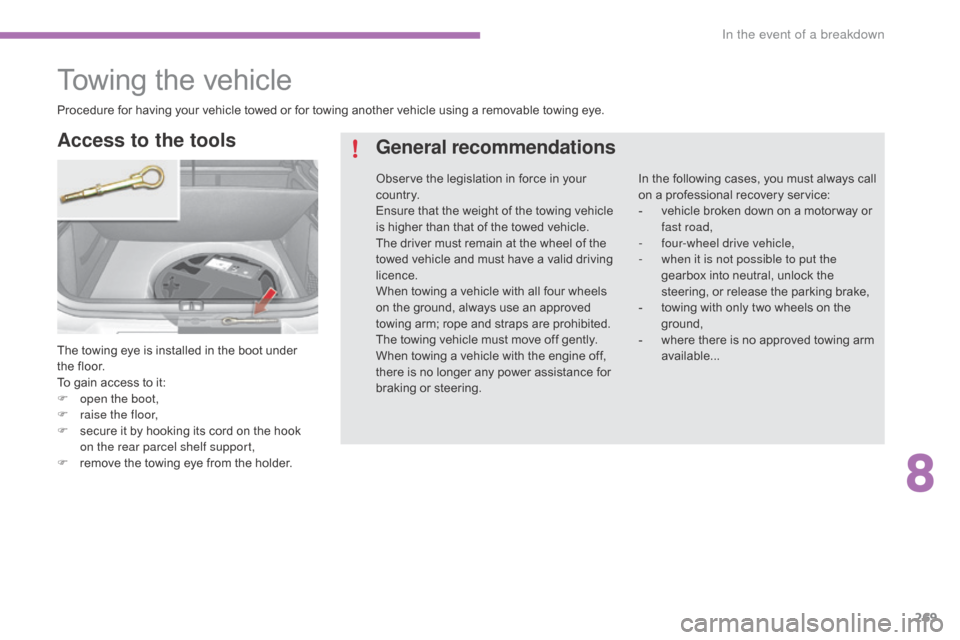
The towing eye is installed in the boot under the floor.
To
gain access to it:
F
o
pen the boot,
F
r
aise the floor,
F
s
ecure it by hooking its cord on the hook
o
n the rear parcel shelf support,
F
r
emove the towing eye from the holder.
Access to the tools General recommendations
In the following cases, you must always call o
n a professional recovery service:
-
v
ehicle broken down on a motor way or
f
ast road,
-
f
our-wheel drive vehicle,
-
w
hen it is not possible to put the
gearbox
into neutral, unlock the
s
teering, or release the parking brake,
-
t
owing with only two wheels on the
g
round,
-
w
here there is no approved towing arm
a
vailable...
Procedure
for
having
your
vehicle
towed
or
for
towing
another
vehicle
using
a
removable
towing
eye.
Observe
the
legislation
in
force
in
your
c
o unt r y.
Ensure
that
the
weight
of
the
towing
vehicle
i
s
higher
than
that
of
the
towed
vehicle.
The
driver
must
remain
at
the
wheel
of
the
t
owed
vehicle
and
must
have
a
valid
driving
l
icence.
When
towing
a
vehicle
with
all
four
wheels
o
n
the
ground,
always
use
an
approved
t
owing
arm;
rope
and
straps
are
prohibited.
The
towing
vehicle
must
move
off
gently.
When
towing
a
vehicle
with
the
engine
off,
t
here
is
no
longer
any
power
assistance
for
b
raking
or
steering.
8
In the event of a breakdown
Page 329 of 396
327
C4-2_en_Chap10b_SMEGplus_ed02-2015
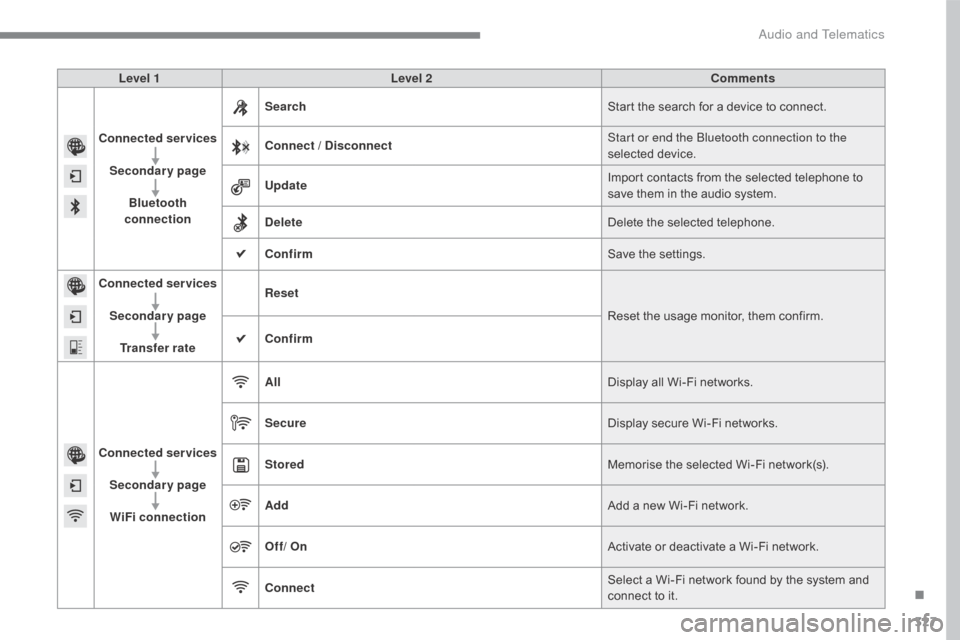
Level 1Level 2 Comments
Connected services Secondary page Bluetooth
connection Search
Start
the search for a device to connect.
Connect / Disconnect Start or end the Bluetooth connection to the
selected
d
evice.
Update Import
contacts from the selected telephone to
s
ave them in the audio system.
Delete Delete
the selected telephone.
Confirm Save
the settings.
Connected services
Secondary pageTransfer rate Reset
Reset
the usage monitor, them confirm.
Confirm
Connected services Secondary pageWiFi connection All
Display
all Wi-Fi networks.
Secure Display
secure Wi-Fi networks.
Stored Memorise
the selected Wi-Fi network(s).
Add Add
a new Wi-Fi network.
Off/ On Activate
or deactivate a Wi-Fi network.
Connect Select
a Wi-Fi network found by the system and
c
onnect to it.
.
Audio and Telematics