key Citroen C4 2016 2.G Service Manual
[x] Cancel search | Manufacturer: CITROEN, Model Year: 2016, Model line: C4, Model: Citroen C4 2016 2.GPages: 396, PDF Size: 10.22 MB
Page 190 of 396
188
C4-2_en_Chap06_conduite_ed02-2015
Stop & Start
Operation
Going into engine STOP mode
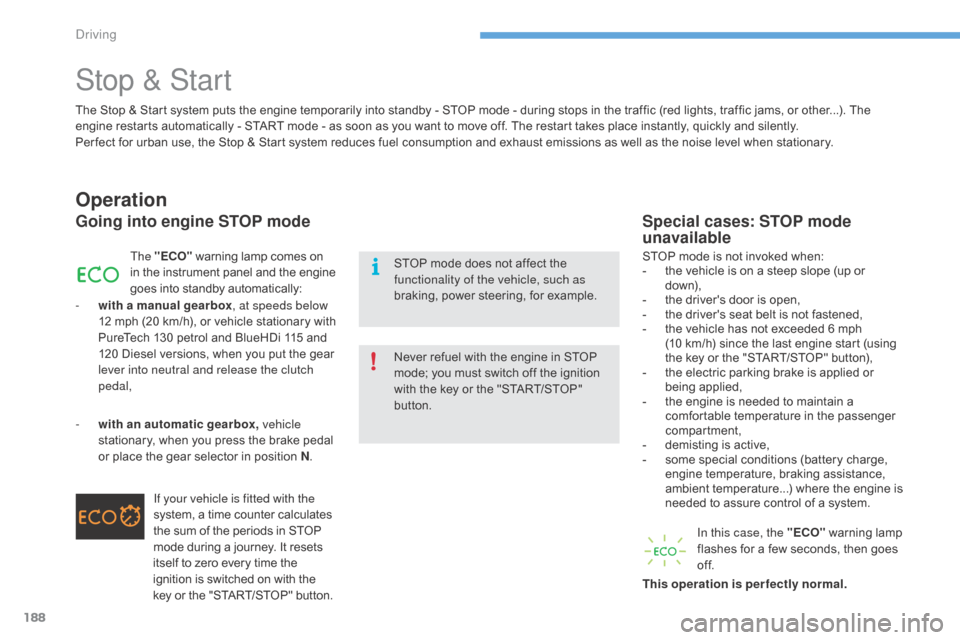
The "ECO" warning lamp comes on i
n the instrument panel and the engine g
oes into standby automatically:
-
w
ith a manual gearbox , at speeds below
12
m
ph
(
20
k
m/h),
o
r
v
ehicle
s
tationary
w
ith
P
ureTech 130 petrol and BlueHDi 115 and
1
20
Diesel versions, when you put the gear
l
ever into neutral and release the clutch
pedal,
If your vehicle is fitted with the
system,
a time counter calculates
t
he sum of the periods in STOP
m
ode during a journey. It resets
i
tself to zero every time the
i
gnition is switched on with the
k
ey or the "START/STOP" button.
-
w
ith an automatic gearbox, vehicle
stationary,
when you press the brake pedal
o
r
place the gear selector in position N.
Special cases: STOP mode
unavailable
STOP mode is not invoked when:
- t he vehicle is on a steep slope (up or
d
ow n),
-
t
he driver's door is open,
-
t
he driver's seat belt is not fastened,
-
t
he vehicle has not exceeded 6 mph
(
10 km/h) since the last engine start (using
t
he key or the "START/STOP" button),
-
t
he electric parking brake is applied or
be
ing
a
pplied,
-
t
he engine is needed to maintain a
c
omfortable temperature in the passenger
c
ompartment,
-
d
emisting is active,
-
s
ome special conditions (battery charge,
e
ngine temperature, braking assistance,
a
mbient temperature...) where the engine is
n
eeded to assure control of a system.
In this case, the "ECO"
warning lamp
f
lashes for a few seconds, then goes
o
f f.
This operation is perfectly normal.
The
Stop
&
Start system
puts
the
engine
temporarily
into
standby
-
STOP
mode
-
during
stops
in
the
traffic (red lights, traffic jams, or other...). The
e
ngine
restarts
automatically
-
START
mode
-
as
soon
as
you
want
to
move
off.
The
restart
takes
place
instantly, quickly and silently.
Per fect
for
urban
use,
the
Stop
&
Start
system
reduces
fuel
consumption
and
exhaust
emissions
as
well
as the noise level when stationary.
Never
refuel
with
the
engine
in
STOP
m
ode;
you
must
switch
off
the
ignition
w
ith
the
key
or
the
"START/STOP"
b
utton.
STOP
mode
does
not
affect
the
f
unctionality of the vehicle, such as
braking,
power
steering,
for
example.
Driving
Page 192 of 396
190
C4-2_en_Chap06_conduite_ed02-2015
Maintenance
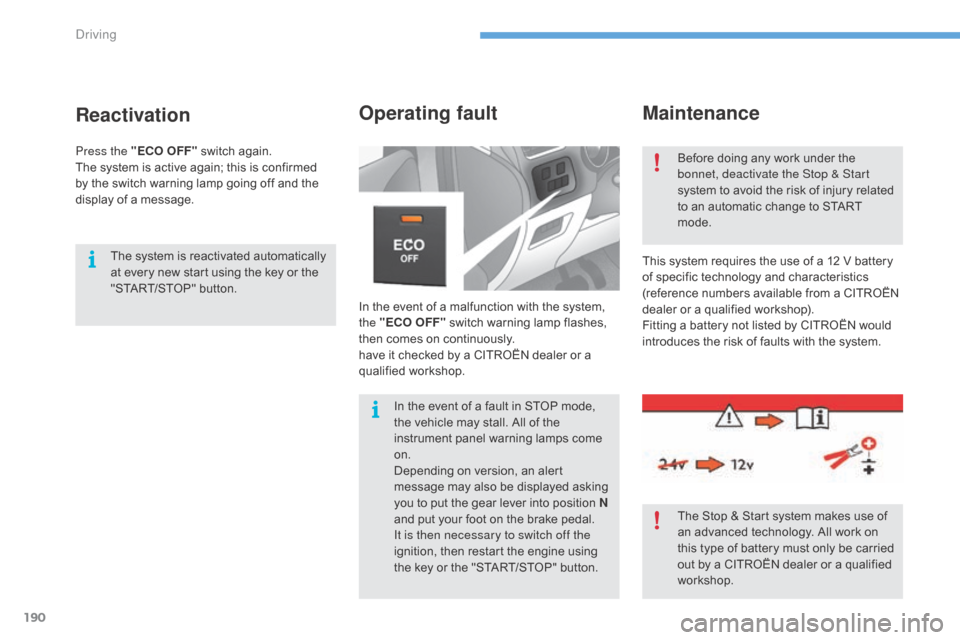
In the event of a malfunction with the system, the "ECO OFF" switch warning lamp flashes,
t
hen comes on continuously.
have
it checked by a CITROËN dealer or a
q
ualified
w
orkshop.
Operating fault
This system requires the use of a 12 V battery of specific technology and characteristics
(
reference numbers available from a CITROËN
d
ealer or a qualified workshop).
Fitting
a battery not listed by CITROËN would
i
ntroduces the risk of faults with the system.
Before
doing any work under the
b
onnet, deactivate the Stop & Start
system to avoid the risk of injury related
t
o an automatic change to START
m
ode.
The Stop & Start system makes use of
a
n advanced technology. All work on
t
his type of battery must only be carried
o
ut by a CITROËN dealer or a qualified
w
orkshop.
In
the
event
of
a
fault
in
STOP
mode,
t
he
vehicle
may
stall.
All
of
the
i
nstrument
panel
warning
lamps
come
o
n.
Depending
on
version,
an
alert
m
essage
may
also
be
displayed
asking
y
ou
to
put
the
gear
lever
into
position
N
and
put
your
foot
on
the
brake
pedal.
It is then necessary to switch off the
ignition,
then
restart
the
engine
using
t
he
key
or
the
"START/STOP"
button.
Reactivation
The system is reactivated automatically a t every new start using the key or the
"
START/STOP" button.
Press the "ECO OFF"
switch again.
The
system is active again; this is confirmed
b
y
the
switch warning lamp going off and the
d
isplay of a message.
Driving
Page 211 of 396
209
C4-2_en_Chap07_infos-pratiques_ed02-2015
Fuel
Capacity of the tank: approximately 60 litres.When the low fuel level in the
tank
is reached, this warning lamp
c
omes on in the instrument panel,
a
ccompanied by an audible warning
a
nd the display of an alert message.
W
hen it first comes on, around
6
litres of fuel remain in the tank.
Low fuel level
Additions of fuel must be of at least 5 litres to be registered by the fuel gauge.
Opening
the filler cap may result in an inrush of
a
ir. This vacuum is entirely normal and results
f
rom the sealing of the fuel system.
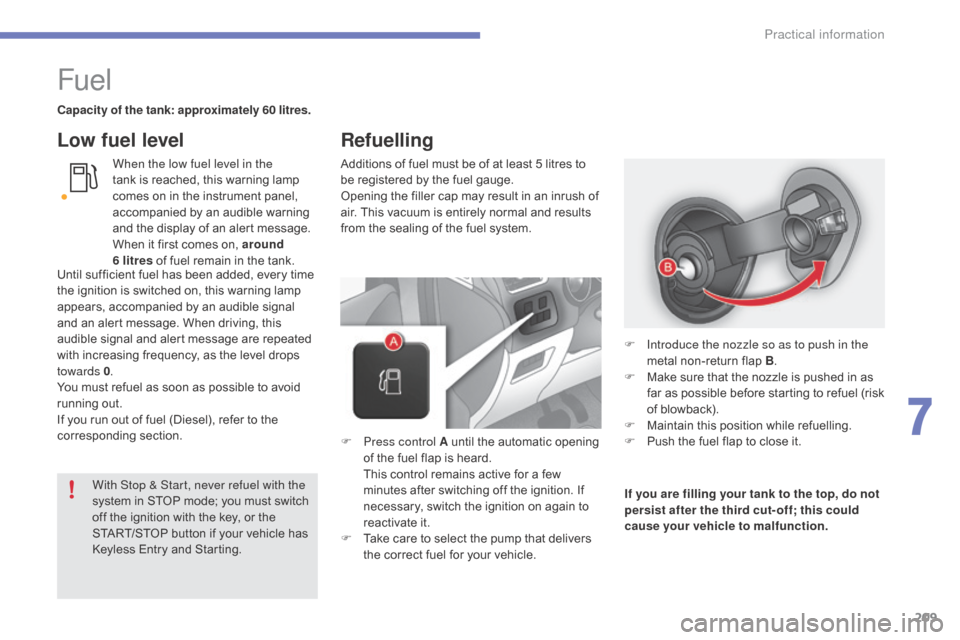
F
P
ress control A until the automatic opening
o
f the fuel flap is heard.
T
his control remains active for a few
m
inutes after switching off the ignition. If
n
ecessary, switch the ignition on again to
r
eactivate it.
F
T
ake care to select the pump that delivers
t
he correct fuel for your vehicle.If you are filling your tank to the top, do not
persist after the third cut- off; this could
cause your vehicle to malfunction.
F
I
ntroduce the nozzle so as to push in the
metal
non-return flap B.
F
M
ake sure that the nozzle is pushed in as
f
ar as possible before starting to refuel (risk
o
f blowback).
F
M
aintain this position while refuelling.
F
P
ush the fuel flap to close it.
With Stop & Start, never refuel with the
system
in
STOP
mode;
you
must
switch
o
ff
the
ignition
with
the
key,
or
the
S
TART/STOP
button
if
your
vehicle
has
K
eyless
Entry
and
Starting.
Until
sufficient
fuel
has
been
added,
every
time
t
he
ignition
is
switched
on,
this
warning
lamp
a
ppears,
accompanied
by
an
audible
signal
a
nd
an
alert
message.
When
driving,
this
a
udible
signal
and
alert
message
are
repeated
w
ith
increasing
frequency,
as
the
level
drops
tow
ards 0 .
You
must
refuel
as
soon
as
possible
to
avoid
r
unning
out.
If
you
run
out
of
fuel
(Diesel),
refer
to
the
c
orresponding
s
ection.
Refuelling
7
Practical information
Page 216 of 396
214
C4-2_en_Chap07_infos-pratiques_ed02-2015
Towbar with quickly detachable towball
Presentation
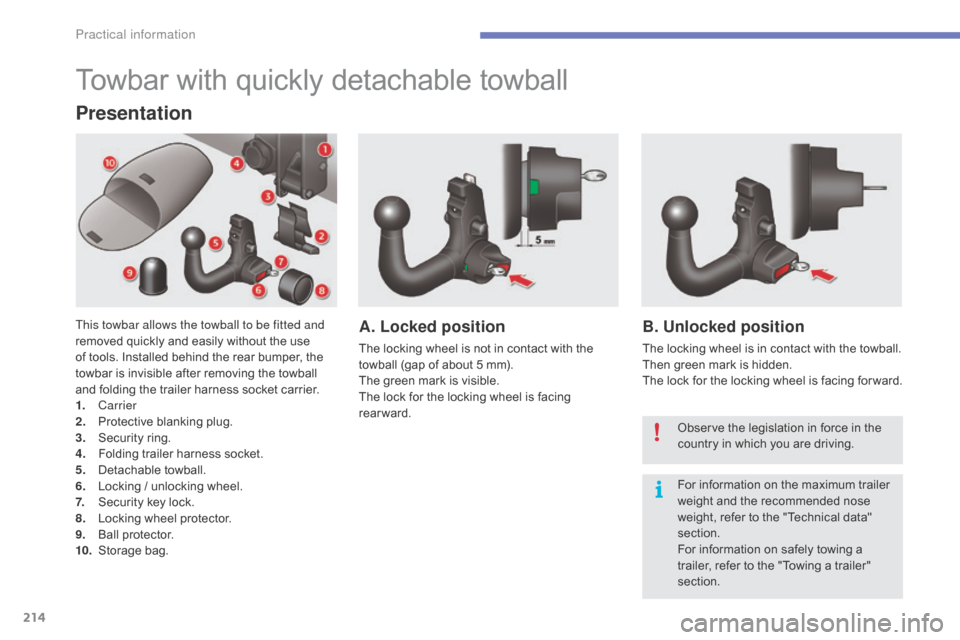
This towbar allows the towball to be fitted and
removed quickly and easily without the use
o
f tools. Installed behind the rear bumper, the
t
owbar is invisible after removing the towball
a
nd folding the trailer harness socket carrier.
1.
Carrier
2.
P
rotective blanking plug.
3.
S
ecurity ring.
4.
F
olding trailer harness socket.
5.
D
etachable
t
owball.
6.
L
ocking / unlocking wheel.
7.
S
ecurity key lock.
8.
L
ocking wheel protector.
9.
Ba
ll
pro
tector.
10.
St
orage
b
ag.A. Locked position
The locking wheel is not in contact with the towball (gap of about 5 mm).
The
green mark is visible.
The
lock for the locking wheel is facing
r
earward.
B. Unlocked position
The locking wheel is in contact with the towball.
T hen green mark is hidden.
The
lock for the locking wheel is facing for ward.
Observe
the legislation in force in the
c
ountry in which you are driving.
For
information on the maximum trailer
w
eight and the recommended nose
w
eight, refer to the "Technical data"
s
ection.
For
information on safely towing a
t
railer, refer to the "Towing a trailer"
s
ection.
Practical information
Page 217 of 396
215
C4-2_en_Chap07_infos-pratiques_ed02-2015
Before each use
Check that the towball is correctly fitted by verifying the following points:
- t he towball is correctly locked in place (position A),
-
t
he security key lock is on and the key removed; the locking wheel can no longer be
ope
rated,
-
t
he towball must no longer move at all in its carrier; try to shake it by hand.
During use
Never unlock the device when a trailer or load carrier is fitted to the towball.
N ever exceed the maximum authorised weight for the vehicle plus trailer (Gross Train
W
eight - GTW).
Before
driving, check the adjustment of the headlamp beam height.
For
more information on adjusting the headlamps, refer to the corresponding section.
After use
For journeys made without a trailer or load carrier, the trailer harness socket must be folded away, the towball removed and the blanking plug inserted in the carrier. This measure
a
pplies particularly if the towball could hinder visibility of the number plate or lighting.
7
Practical information
Page 218 of 396
216
C4-2_en_Chap07_infos-pratiques_ed02-2015
Fitting the towball
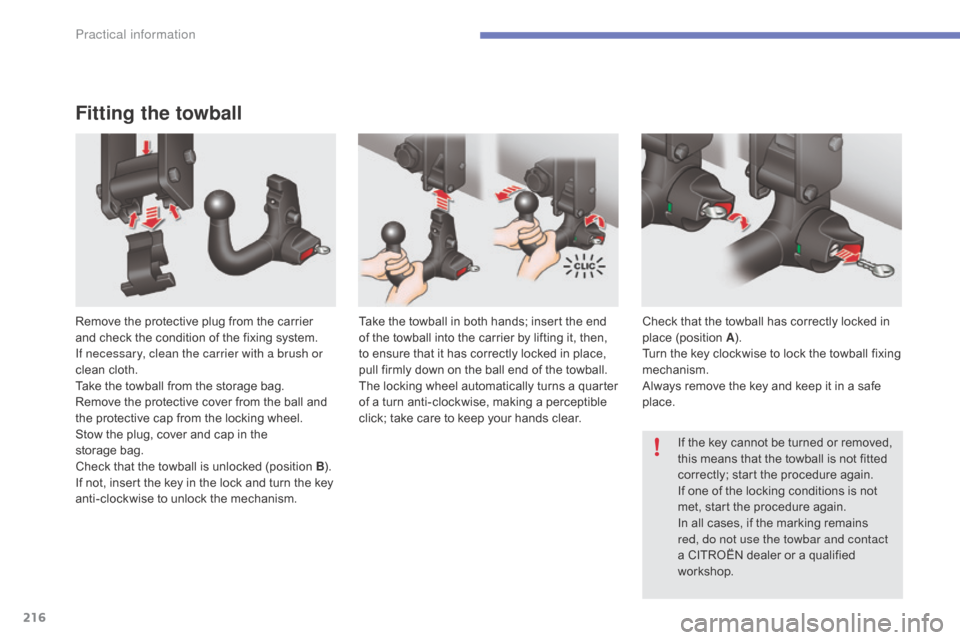
Remove the protective plug from the carrier and check the condition of the fixing system.
I
f necessary, clean the carrier with a brush or
clean
cloth.
Take
the towball from the storage bag.
Remove
the protective cover from the ball and
t
he protective cap from the locking wheel.
Stow
the plug, cover and cap in the
s
torage bag.
Check
that the towball is unlocked (position B).
I
f not, insert the key in the lock and turn the key
a
nti-clockwise to unlock the mechanism.Take
the towball in both hands; insert the end o
f the towball into the carrier by lifting it, then,
t
o ensure that it has correctly locked in place,
p
ull firmly down on the ball end of the towball.
The
locking wheel automatically turns a quarter
o
f a turn anti-clockwise, making a perceptible
c
lick; take care to keep your hands clear.Check
that the towball has correctly locked in p
lace (position A).
Turn
the key clockwise to lock the towball fixing
m
echanism.
Always
remove the key and keep it in a safe
p
lace.If
the key cannot be turned or removed,
t
his means that the towball is not fitted
c
orrectly; start the procedure again.
If
one of the locking conditions is not
m
et, start the procedure again.
In
all cases, if the marking remains
r
ed, do not use the towbar and contact
a
CITROËN dealer or a qualified
w
orkshop.
Practical information
Page 219 of 396
217
C4-2_en_Chap07_infos-pratiques_ed02-2015
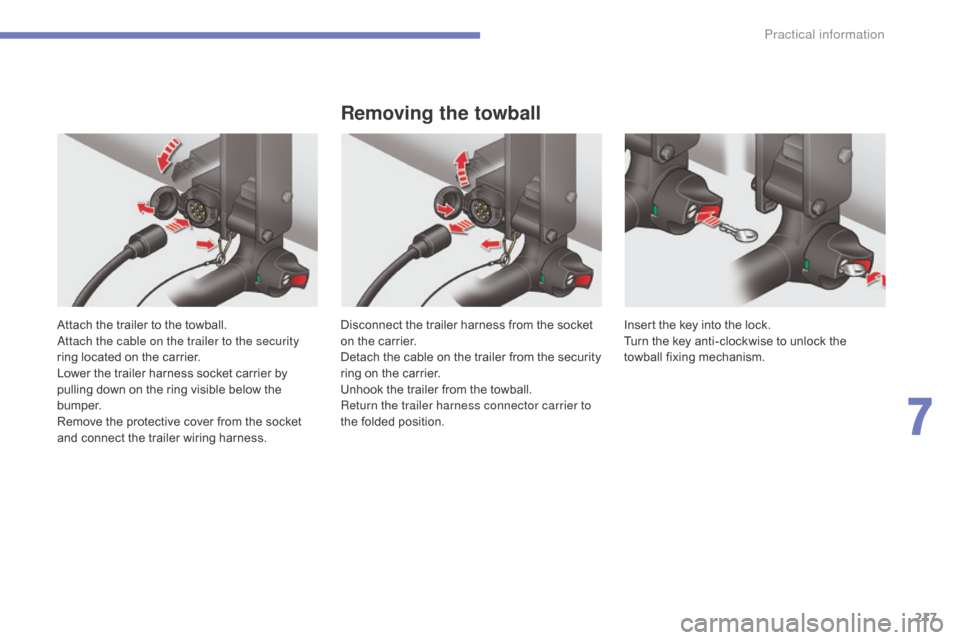
Attach the trailer to the towball.
A ttach the cable on the trailer to the security
ring
located on the carrier.
Lower
the trailer harness socket carrier by
p
ulling down on the ring visible below the
b
u m p e r.
Remove
the protective cover from the socket
a
nd connect the trailer wiring harness.
Removing the towball
Disconnect the trailer harness from the socket on the carrier.
Detach
the cable on the trailer from the security
r
ing on the carrier.
Unhook
the trailer from the towball.
Return the trailer harness connector carrier to
the
folded position. Insert
the key into the lock.
Turn the key anti-clockwise to unlock the
t
owball
f
ixing
m
echanism.
7
Practical information
Page 237 of 396
235
C4-2_en_Chap07_infos-pratiques_ed02-2015
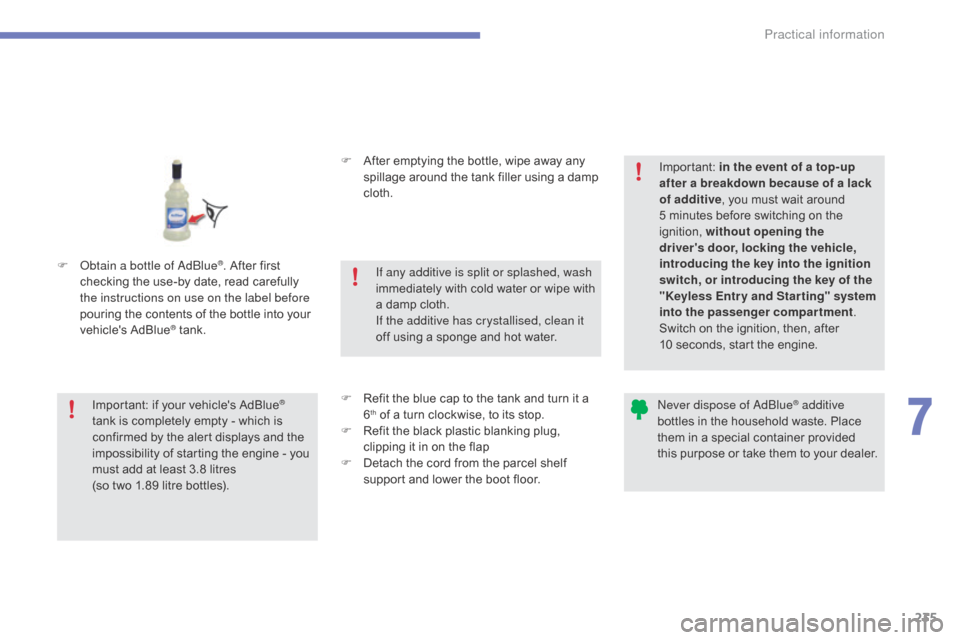
F Obtain a bottle of AdBlue®. After first c
hecking
the
use-by
date,
read carefully
t
he instructions on use on the label before
pouring
the
contents
of
the bottle into your
v
ehicle's
Ad
Blue
® tank. F
A
fter emptying the bottle, wipe away any
s
pillage around the tank filler using a damp
c
loth.
F
R
efit the blue cap to the tank and turn it a
6th of a turn clockwise, to its stop.
F
R
efit the black plastic blanking plug,
c
lipping it in on the flap
F
D
etach the cord from the parcel shelf
s
upport and lower the boot floor.
Important:
if
your
vehicle's
AdBlue®
tank
is
completely
empty
-
which
is
c
onfirmed
by
the
alert
displays
and
the
i
mpossibility
of
starting
the
engine
- you
m
ust
add
at
least
3.8
litres
(so
two
1.89 litre
bottles). If any additive is split or splashed, wash
immediately
w
ith
c
old
w
ater
o
r
w
ipe
w
ith
a
damp cloth.
If the additive has crystallised, clean it
off using a sponge and hot water.Important:
i
n the event of a top-up
after a breakdown because of a lack
of additive , you must wait around
5 minutes before switching on the
ig
nition,
w
ithout opening the
driver's door, locking the vehicle,
introducing the key into the ignition
switch, or introducing the key of the
"Keyless Entr y and Star ting" system
into the passenger compartment .
Switch on the ignition, then, after
10 seconds, start the engine.
Never dispose of AdBlue® additive
bottles
in
the
household
waste. Place
t
hem
in
a
special
container provided
t
his
p
urpose
o
r
t
ake
t
hem
t
o
y
our
d
ealer.
7
Practical information
Page 311 of 396
309
C4-2_en_Chap10b_SMEGplus_ed02-2015
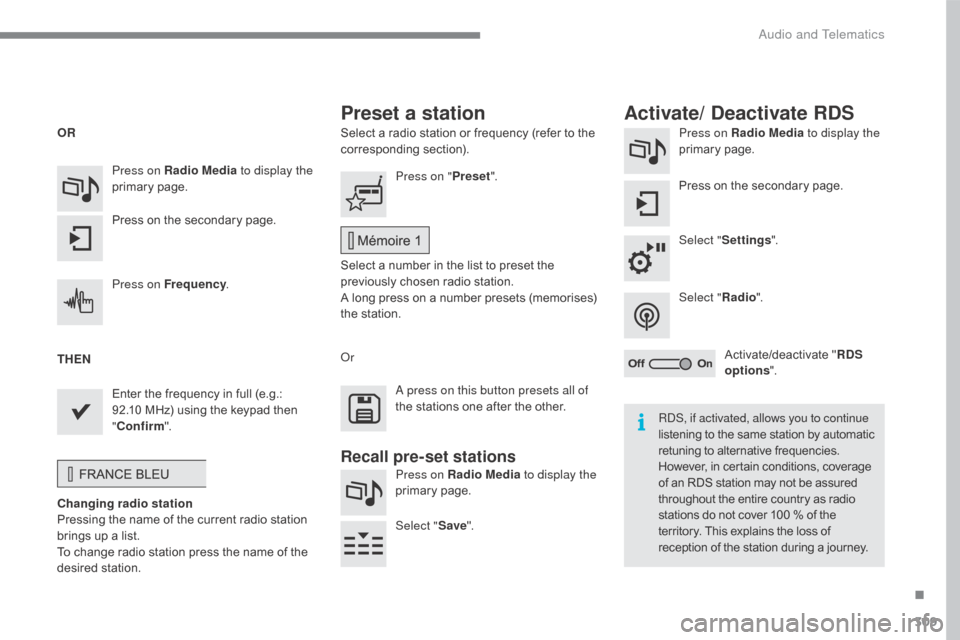
Select a radio station or frequency (refer to the corresponding s ection). Press on Radio Media
to display the
primary pag e.
Press
on the secondary page.
Select " Settings ".
Select " Radio".
Activate/deactivate
" R
DS
options ".
Press on Radio Media
to display the
primary
pag
e.
Press
on
the
secondary
page. Press on "
Preset".
Select
a number in the list to preset the
p
reviously chosen radio station.
A
long press on a number presets (memorises)
t
he station.
Press on Frequency
.
Enter
the
frequency
in
full
(e.g.:
9
2.10
MHz)
using
the
keypad
then
" Co
nfirm ".
Changing radio station
Pressing
the
name
of
the
current
radio
station
b
rings
up
a
list.
To
change
radio
station
press
the
name
of
the
de
sired
s
tation. Or
Press on Radio Media to display the
primary
pag
e.
Select " Save".
Preset a station Activate/ Deactivate RDS
OR
THEN
A press on this button presets all of
the
stations one after the other.
Recall pre-set stations
RDS, if activated, allows you to continue
listening to the same station by automatic r
etuning to alternative frequencies.
H
owever, in certain conditions, coverage
o
f an RDS station may not be assured
t
hroughout the entire country as radio
s
tations do not cover 100 % of the
t
erritory. This explains the loss of
r
eception of the station during a journey.
.
Audio and Telematics
Page 337 of 396
335
C4-2_en_Chap10b_SMEGplus_ed02-2015
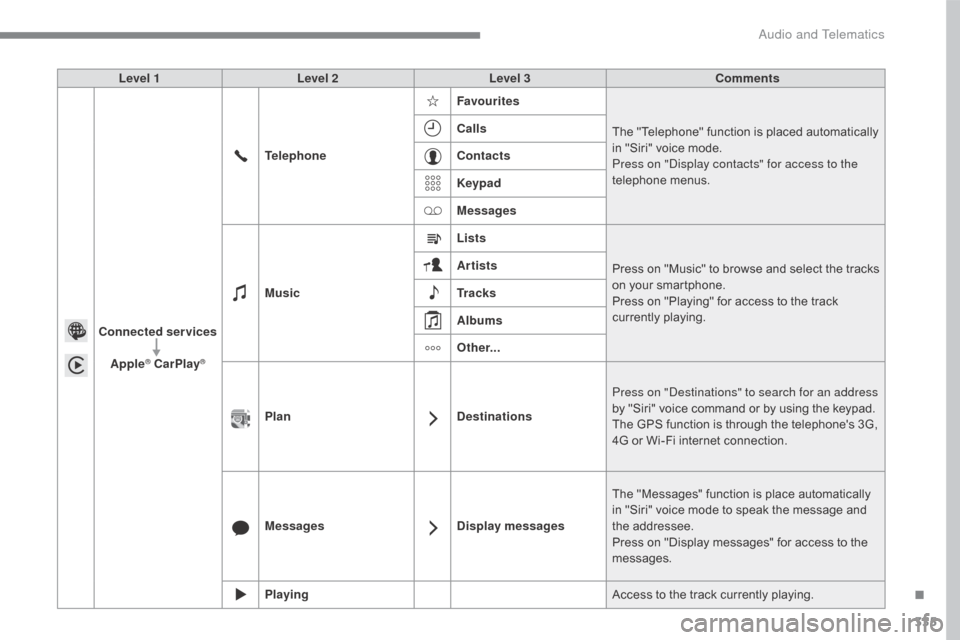
Level 1Level 2 Level 3 Comments
Connected services Apple
® CarPlay®
Telephone Favourites
The "Telephone" function is placed automatically i
n "Siri" voice mode.
Press on "Display contacts" for access to the
telephone
me
nus.
Calls
Contacts
Keypad
Messages
Music Lists
Press
on "Music" to browse and select the tracks
o
n your smartphone.
Press
on "Playing" for access to the track
c
urrently playing.
Artists
Tr a c k s
Albums
Other...
Plan DestinationsPress on "Destinations" to search for an address
by
"Siri" voice command or by using the keypad.
The
GPS function is through the telephone's 3G,
4
G or Wi-Fi internet connection.
Messages Display messagesThe
"Messages" function is place automatically
i
n "Siri" voice mode to speak the message and
t
he
a
ddressee.
Press
on "Display messages" for access to the
m
essages.
Playing Access
to the track currently playing.
.
Audio and Telematics