service Citroen C4 2016 2.G Service Manual
[x] Cancel search | Manufacturer: CITROEN, Model Year: 2016, Model line: C4, Model: Citroen C4 2016 2.GPages: 396, PDF Size: 10.22 MB
Page 337 of 396
335
C4-2_en_Chap10b_SMEGplus_ed02-2015
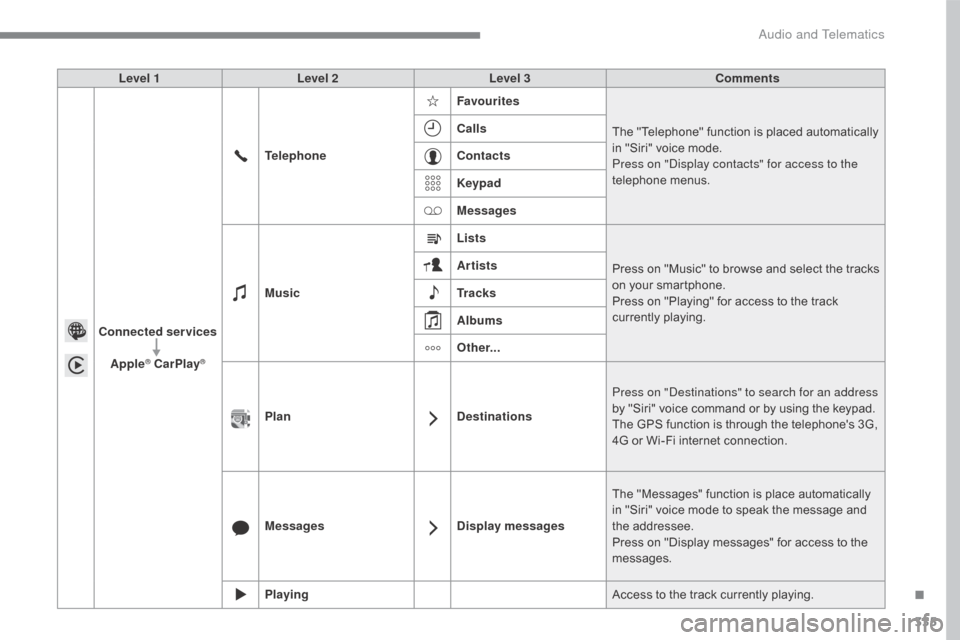
Level 1Level 2 Level 3 Comments
Connected services Apple
® CarPlay®
Telephone Favourites
The "Telephone" function is placed automatically i
n "Siri" voice mode.
Press on "Display contacts" for access to the
telephone
me
nus.
Calls
Contacts
Keypad
Messages
Music Lists
Press
on "Music" to browse and select the tracks
o
n your smartphone.
Press
on "Playing" for access to the track
c
urrently playing.
Artists
Tr a c k s
Albums
Other...
Plan DestinationsPress on "Destinations" to search for an address
by
"Siri" voice command or by using the keypad.
The
GPS function is through the telephone's 3G,
4
G or Wi-Fi internet connection.
Messages Display messagesThe
"Messages" function is place automatically
i
n "Siri" voice mode to speak the message and
t
he
a
ddressee.
Press
on "Display messages" for access to the
m
essages.
Playing Access
to the track currently playing.
.
Audio and Telematics
Page 343 of 396
341
C4-2_en_Chap10b_SMEGplus_ed02-2015
The services available depend on
the network, the SIM card and the
c
ompatibility of the Bluetooth telephone
u
sed. Check the telephone manual and
w
ith your network provider for details of
t
he services available to you.
The
ability of the system to connect
w
ith only one profile depends on the
telephone.
The three profiles may all
c
onnect by default.
Visit
www.citroen.co.uk for more information
(
compatibility, additional help, ...).
The
recognised telephone
a
ppears in the list.
Depending
on your telephone, you may be
a
sked
to accept automatic connection every
t
ime
the ignition is switched on. On return to the vehicle, if the last telephone
connected
is present again, it is reconnected
a
utomatically and within around 30 seconds
a
fter switching on the ignition the pairing is
d
one without any action on your part, with
(Bluetooth
a
ctivated).
To
modify the automatic connection mode,
s
elect the telephone in the list then select the
desired
p
rofile.
Depending
on the type of telephone, t
he system will ask you to accept or not
t
he transfer of your contacts.
If not, select " Update".
Connecting a Bluetooth®
peripheral device
Automatic reconnection
On switching on the ignition, the telephone c
onnected when the ignition was last switched
o
ff is automatically reconnected, if this
c
onnection mode had been activated during the
pa
iring
p
rocedure.
The
connection is confirmed by the display of a
m
essage and the name of the telephone.
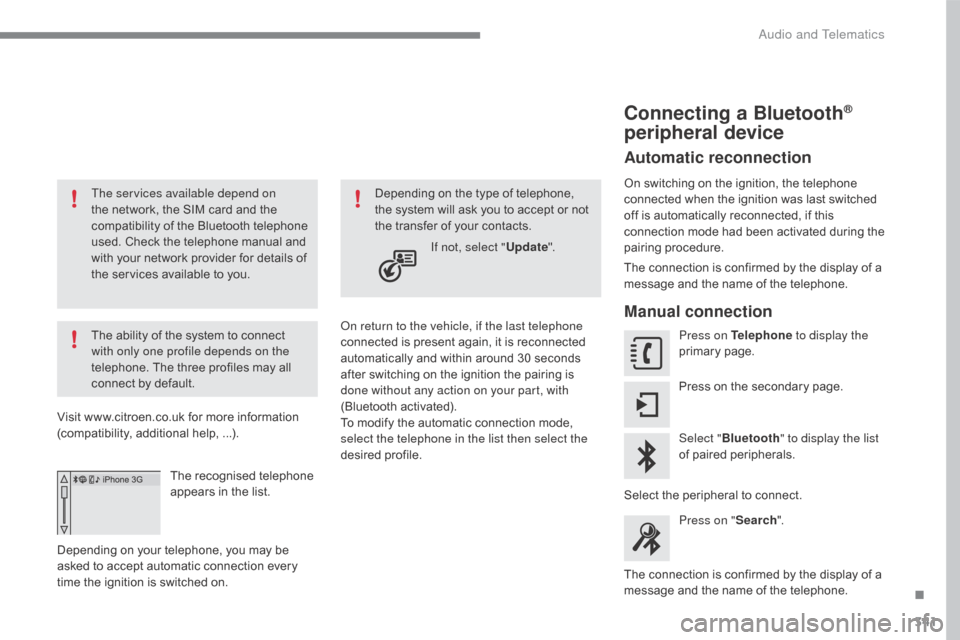
Manual connection
Press on Telephone to display the
primary pag e.
Press
on the secondary page.
Select " Bluetooth " to display the list
of
paired peripherals.
Select
the peripheral to connect.
Press on " Search".
The
connection is confirmed by the display of a
m
essage
and the name of the telephone.
.
Audio and Telematics
Page 353 of 396
351
C4-2_en_Chap10b_SMEGplus_ed02-2015
Telephone
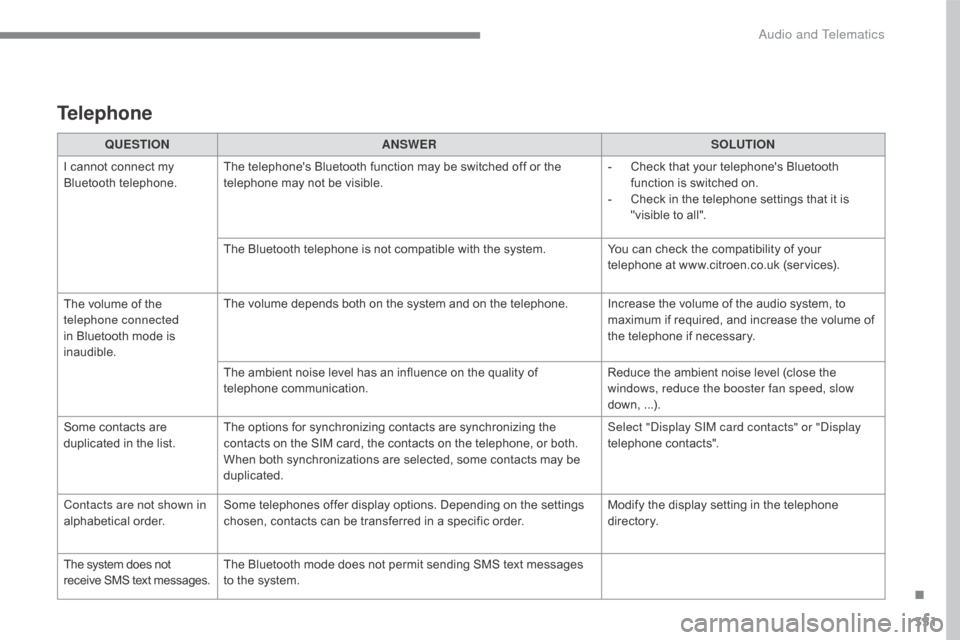
QUESTIONANSWER SOLUTION
I
cannot connect my
B
luetooth
t
elephone. The
telephone's Bluetooth function may be switched off or the
t
elephone may not be visible. -
C
heck that your telephone's Bluetooth
f
unction is switched on.
-
C
heck in the telephone settings that it is
"
visible to all".
The
Bluetooth telephone is not compatible with the system.You
can check the compatibility of your
t
elephone at www.citroen.co.uk (services).
The
volume of the
t
elephone connected
in
Bluetooth mode is
ina
udible. The
volume depends both on the system and on the telephone. Increase the volume of the audio system, to
m
aximum if required, and increase the volume of
t
he telephone if necessary.
The
ambient noise level has an influence on the quality of
t
elephone
c
ommunication. Reduce
the ambient noise level (close the
w
indows, reduce the booster fan speed, slow
down,
...
).
Some
contacts are
d
uplicated in the list. The
options for synchronizing contacts are synchronizing the
c
ontacts on the SIM card, the contacts on the telephone, or both.
W
hen both synchronizations are selected, some contacts may be
dup
licated. Select "Display SIM card contacts" or "Display
telephone
c
ontacts".
Contacts are not shown in
alphabetical
o
rder. Some
telephones offer display options. Depending on the settings
c
hosen, contacts can be transferred in a specific order.Modify
the display setting in the telephone
d
i r e c to r y.
The
system does not
r
eceive
SMS
text
messages. The
Bluetooth mode does not permit sending SMS text messages
t
o the system.
.
Audio and Telematics
Page 362 of 396
360
C4-2_en_Chap10c_RD5_ed02-2015
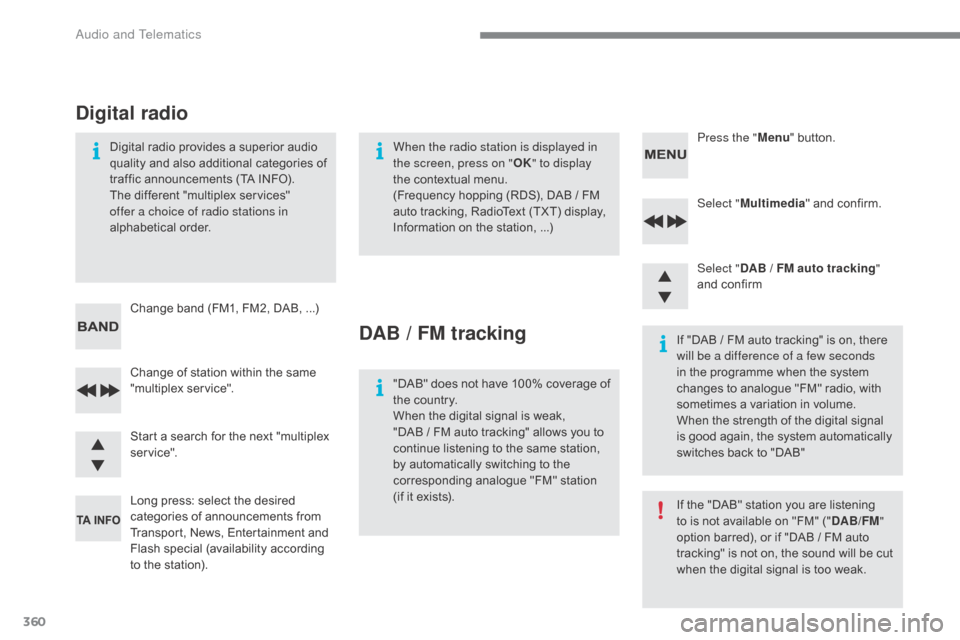
Select "Multimedia " and confirm.
Select " DAB
/ FM auto tracking "
and
confirm
Long
press:
select
the
desired
c
ategories
of
announcements
from
T
ransport,
News,
Entertainment
and
F
lash
sp
ecial
(
availability
a
ccording
t
o
the
station).
Change
of
station
within
the
same
"
multiplex
s
ervice". Press the "
Menu" button.
Start
a
search
for
the
next
"multiplex
ser
vice".
Change
band
(FM1,
FM2,
DAB, ...)
Digital
radio
provides
a
superior
audio
q
uality
and
also
additional
categories
of
t
raffic
announcements
(TA
INFO).
The
different
"multiplex
services"
o
ffer a choice of radio stations in
alphabetical
o
rder.
Digital radio
When the radio station is displayed in
the screen, press on " OK" to display
the
contextual menu.
(Frequency
hopping (RDS), DAB / FM
a
uto tracking, RadioText (TXT) display,
I
nformation on the station, ...)
DAB / FM tracking
"DAB" does not have 100% coverage of t
he country.
When
the digital signal is weak,
"DAB
/ FM auto tracking" allows you to
c
ontinue listening to the same station,
b
y automatically switching to the
c
orresponding analogue "FM" station
(
if it exists). If
"DAB / FM auto tracking" is on, there
w
ill be a difference of a few seconds
in the programme when the system c
hanges to analogue "FM" radio, with
s
ometimes a variation in volume.
When
the strength of the digital signal
i
s good again, the system automatically
s
witches back to "DAB"
If
the "DAB" station you are listening
t
o is not available on "FM" ("DAB/FM "
option
barred), or if "DAB / FM auto
t
racking" is not on, the sound will be cut
w
hen the digital signal is too weak.
Audio and Telematics
Page 368 of 396
366
C4-2_en_Chap10c_RD5_ed02-2015
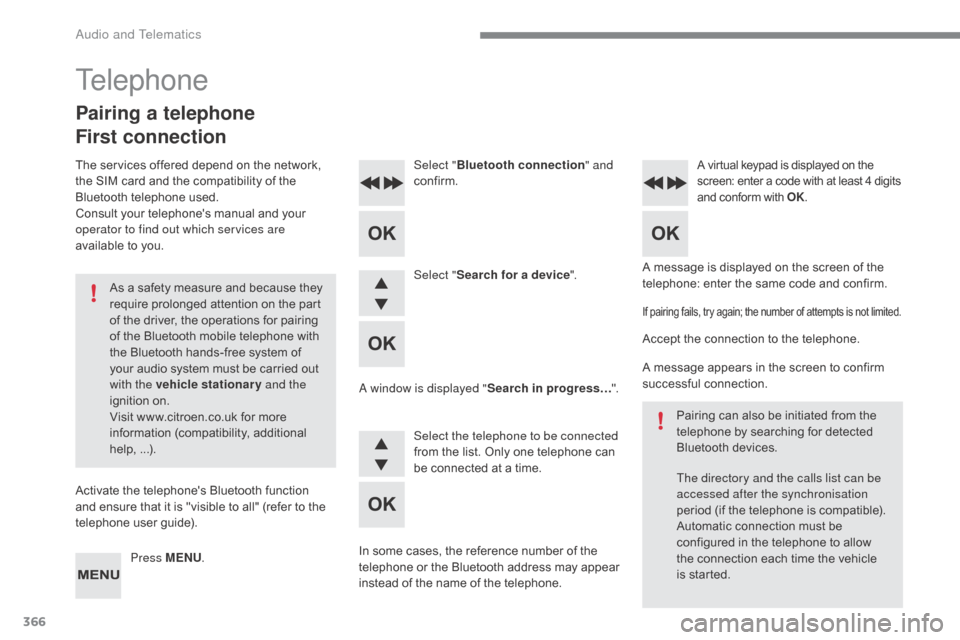
A message is displayed on the screen of the telephone: enter the same code and confirm.
Select "
Bluetooth connection " and
confirm.
A virtual keypad is displayed on the s creen: enter a code with at least 4 digits a
nd conform with OK.
Select "Search for a device".
Select the telephone to be connected
from
the list. Only one telephone can
b
e connected at a time.
A window is displayed "
Search in progress…".
In
some
cases, the reference number of the
t
elephone
or the Bluetooth address may appear
i
nstead
of
the name of the telephone.
If pairing fails, try again; the number of attempts is not limited.
Accept the connection to the telephone.
A message appears in the screen to confirm
s
uccessful
c
onnection.
Pairing
can also be initiated from the
t
elephone by searching for detected
B
luetooth devices.
The directory and the calls list can be
accessed after the synchronisation
period
(if the telephone is compatible).
Automatic
connection must be
c
onfigured in the telephone to allow
t
he connection each time the vehicle
i
s started.
Press MENU
.
Telephone
Pairing a telephone
First connection
The services offered depend on the network, t
he SIM card and the compatibility of the
B
luetooth telephone used.
Consult
your telephone's manual and your
o
perator to find out which services are
available
to you.
As
a safety measure and because they
r
equire prolonged attention on the part
o
f the driver, the operations for pairing
o
f the Bluetooth mobile telephone with
t
he Bluetooth hands-free system of
y
our audio system must be carried out
w
ith the vehicle stationary and the
ignition
o
n.
Visit
www.citroen.co.uk for more
in
formation
(
compatibility,
a
dditional
h
elp,
...
).
Activate
the telephone's Bluetooth function
a
nd ensure that it is "visible to all" (refer to the
t
elephone user guide).
Audio and Telematics
Page 381 of 396
379
C4-2_en_Chap10c_RD5_ed02-2015
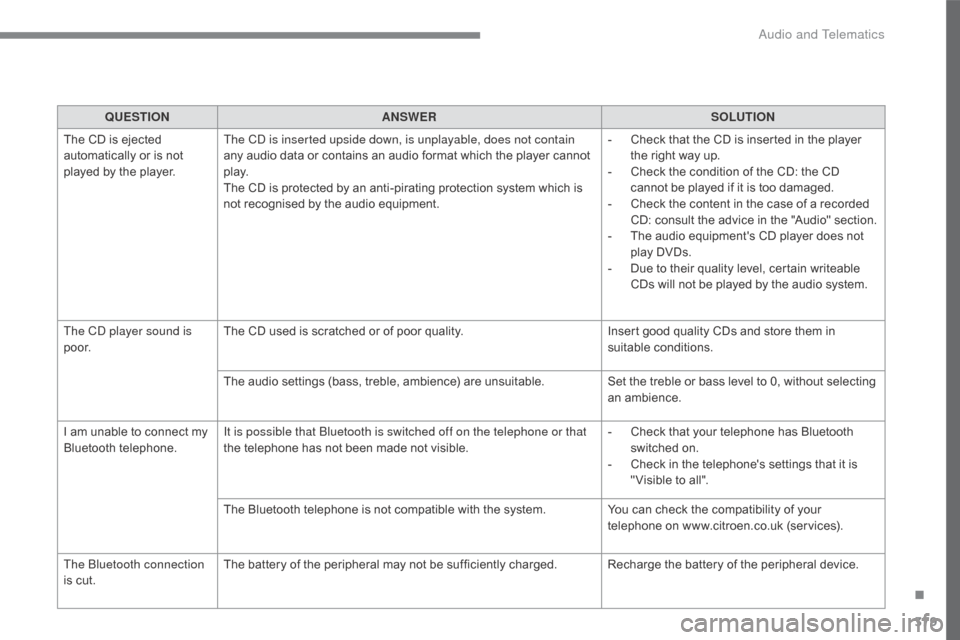
QUESTIONANSWER SOLUTION
The
CD is ejected
a
utomatically or is not
p
layed
by the player. The CD is inserted upside down, is unplayable, does not contain
any
audio data or contains an audio format which the player cannot
p
l ay.
The
CD is protected by an anti-pirating protection system which is
n
ot recognised by the audio equipment.-
C
heck that the CD is inserted in the player
t
he right way up.
-
C
heck the condition of the CD: the CD
c
annot be played if it is too damaged.
-
C
heck the content in the case of a recorded
C
D: consult the advice in the "Audio" section.
-
T
he audio equipment's CD player does not
p
lay DVDs.
-
D
ue to their quality level, certain writeable
C
Ds will not be played by the audio system.
The CD player sound is
p o o r. The
CD used is scratched or of poor quality.Insert
good quality CDs and store them in
sui
table
c
onditions.
The
audio settings (bass, treble, ambience) are unsuitable.Set
the treble or bass level to 0, without selecting
an am
bience.
I
am
unable to connect my
B
luetooth
t
elephone. It is possible that Bluetooth is switched off on the telephone or that
the
telephone has not been made not visible.-
C
heck that your telephone has Bluetooth
s
witched on.
-
C
heck in the telephone's settings that it is
"
Visible to all".
The
Bluetooth telephone is not compatible with the system.You
can check the compatibility of your
t
elephone on www.citroen.co.uk (services).
The Bluetooth connection
is
cut. The
battery of the peripheral may not be sufficiently charged. Recharge the battery of the peripheral device.
.
Audio and Telematics
Page 384 of 396
382
C4-2_en_Chap11_index-alpha_ed02-2015
ABS and EBFD systems ..............................14 0
Accessories .............................. ...................236
Accessory position
....................................... 17
3
Accessory
socket, 12V
.................................11
7
Additive, AdBlue
..................................... 2
3, 232
Adjusting
h
eadlamps
................................... 13
2
Adjusting
h
ead restraints
...............................
..............83
Adjusting
s
eats
..........................................8
1, 82
Adjusting
the date
.............................. 4
0, 42, 51
Adjusting
the height and reach
of
the steering wheel
...................................86
A
djusting the seat belt
height
...............
.................................. 143,
14
5
Adjusting
the time
......................... 3
7, 41, 46, 51
Advice
on driving
..............................
...166,
16
7
Airbags
...............
.................................... 22, 147
Airbags,
c
urtain
.................................... 14
9, 15 0
Airbags,
front........................................ 148, 150
Airbags,
la
teral
..................................... 14
9, 15 0
Air
c
onditioning
...............................
.........10, 91
Air
conditioning, automatic
............................95
A
ir
c
onditioning,
m
anual
................................ 93
A
ir vents
..............................
...........................90
Alarm
............................................................... 71
A
nti-lock braking system (ABS)
...................14
0
Anti-pinch
............................................... 7
6, 107
Anti-theft
..............................
.................. 66, 168
Armrest,
front
........................................ 11
0 , 111
Armrest,
rear
................................................. 11
7
Assistance call
...............................
...... 139, 280
Audible
w
arning
........................................... 13
9
Audio
streaming
(Bluetooth)
..............................
... 314, 364, 367Battery
...............................
...........230,
26
5-268
Battery,
c
harging
...............................
... 267, 268
Battery,
remote control
.......................6
1, 66 - 68
Black
pan
el..................................................... 39
Blanking
screen (snow shield)
......................2
13
Blind,
panoramic roof
...................................10
7
Blind spot sensors
....................................... 19
5
BlueHDi
...............................
.........................232
Bluetooth
(hands-free)
......................... 3
40, 366
Bluetooth
(
telephone)
........................... 3
40, 341
Bonnet
...............
...........................................223
Boot
........
........................................................79
Brake
discs
...................................................2
31
Brake
lamps
...............................
..................257
Brake
p
ads
...............................
....................231
Braking
assistance
system
................
........................................140
Braking,
d
ynamic
em
ergency
.......................17
8
Bulbs
(
changing)
...............................
....251-259
A
B
Audio system ............................... ..... 40, 42, 353
Audio system pre-equipment .......................2
20
Auxiliary
....................................... 1
04, 312, 364Cable, audio ......................................... 3
12, 364
Capacity, fuel tank .............................. .........209
CarPlay connection ..............................333,
33
4
CD
..............................
...........................312, 361
CD,
MP3
....................................... 3
12, 361, 362
Central
locking
................................... 5
6, 62, 69
Centre console
............................................. 10
8
Changing
a bu
lb
....................................25
1-259
Changing
a f
use
....................................26
0-264
Changing
a wheel
...............................
..244-250
Changing
a wiper blade
........................ 1
37, 221
Changing
the remote
control battery .................................. 61,
66, 67
Checking
the engine oil level
................. 2
9, 266
Checking
the levels
...............................2
26-229
Checking
tyre pressures
(using
the kit)
..............................
...............243
Checks
...............
...................................224 -231
Checks,
routine
.................................... 2
30, 231
Child
lock
...............................
.......................165
Children
(
safety)
.................... 1
46, 148, 151-165
Child seats
........... 1
46, 151, 152, 156 -158, 164
Child seats, conventional
............................. 15
7
Child seats, ISOFIX
......................................16
1
C
ITROËN
Connect
Box
.............................................28
0
C
ITROËN
L
ocalised
Emergency
C
all
.........................................28
0
Clock
...............
...............................................37
Closing
the boot
...............................
........ 58, 79
Closing
the doors
............................... 5
8, 63, 78
Configuration,
v
ehicle
........................4
1, 44, 49
Connected services
..................................... 3
24
Connection, Bluetooth
................................. 3
40
C
Alphabetical index
Page 388 of 396
386
C4-2_en_Chap11_index-alpha_ed02-2015
Safety, children ...................... 146, 148, 151-165
Screen, cold climate ..................................... 2
13
Screen
menu map
....... 2
88, 290, 294, 302, 304,
306,
316, 318, 320, 336, 338, 374-376
Screen,
m
ultifunction
............... 4
0, 42, 356, 374
Screenwash, front
......................................... 13
7
Screenwash, rear
...............................
..........13 8
SCR
(Selective Catalytic
Reduction)
................................................. 2
32
Seat belts
...................................... 14
3 -146,
1
57
Seats, electric
................................................ 8
2
Seats, front
...............................
.......... 81, 82, 85
Seats, heated
...............................
..................83
Seats, rear
..................................................... 11
5
S erial
number,
vehicle
...............................
.........................279
Service indicator
............................................ 3
0
Servicing
...............................
.........................10
S
Settings, equipment ........................... 4 1, 44, 49
Settings ( Menus) .................. 3 16, 318, 320, 323
Sidelamps
.................... 1
24, 128, 251, 255, 257
Side repeater
..............................
.................256
Ski
flap
..............................
............................117
Snow chains
.................................................. 2
12
Socket,
12 V accessory
............... 1
03, 109, 120
Sockets,
audio
............................. 1
04, 363, 364
Speakers
(
fitting)
.......................................... 2
20
Speed
l
imiter
...............................
......... 198, 204
Speedometer
..............................
...............12-14
Spotlamps,
si
de
................................... 1
30, 256
Starting
the engine
...................................... 16
8
Starting
using another
battery
........................................................ 26
6
Station, radio
........................................ 3
08, 357
Stay, bonnet
...............................
..................223
Steering
wheel,
adjustment
................................................... 86
St
op & Start
........................ 2
7, 55, 96, 100, 188,
209,
223, 230, 265
Storage
................
.. 102, 103, 108, 110, 111, 118
Storage
c
ompartments
................................ 10
8
Storing
driving positions
................................85
S
towing
r
ings
..............................
..................118
Sun visor
...................................................... 10
3
Switching
off the engine
..............................16
8
Synchronising
the remote
control
.....................................................6
1, 67
Replacing
the
oil
filter
.................................. 23
0
Replacing t
he p
assenger
c
ompartment
filter
..................................... 23
0
Resetting
the
service
indicator
...................... 32
R
esetting
the
trip
recorder
............................. 36
R
ev counter
................................................ 1
2-15
Reversing
lam
ps
.......................................... 2
57
Risk
areas
(update)
...................................... 29
9
Roof bars
...................................................... 2
22
Running
out
of
fuel
(Diesel)
......................... 23
8 Table
of weights ........................... 2 72, 275, 277
Tables of engines ............................... ...271, 273
Tables of fuses
.............................................26
0
Tank,
AdBlue
® additive ................................2 32
Tank,
fuel
............................... ................2 0 9 , 2 11
Technical data
....................................... 2
71-278
Telephone
............................................ 3
36, 366
Three flashes (direction
i
ndicators)
................................... 13
1
Ticket
holder
................................................ 10
2
Time
(setting)
..............................
.. 37, 41, 46, 50
TMC
(Traffic
info)
......................................... 3
00
To o l s
................
............................................. 244
Topping-up
the AdBlue
® additive ................ 23 3
To r c h ..............................
.............................. 120
Total distance recorder
.................................. 36
T
ouch screen tablet
....................................... 47
T
ouch screen tablet ( M e nu s)
...............................
... 48, 50, 283, 287
Towball,
quickly
detachable
.......................... 2
14
To w b a r
................
................................... 167, 213
Towbar
with
quickly
detachable
towball
...............................
.......................... 214
Towed loads
................................. 2
72, 275, 277
Towing
another
vehicle
................................ 26
9
Traction
control
(ASR)
.................................. 1
41
Traffic
information
(TA)
........................ 3
01, 358
Traffic
information
(TMC)
............................. 3
00
Tr a i l e r
...............
..................................... 167, 213
Trajectory
control
systems
............................ 1
41
Trip
computer
............................................ 5
2-55
Trip distance recorder
.................................... 36
T
y r e s
..............................................................
.10
Tyre under-inflation detection
...................... 19
2
T
Alphabetical index
Page 389 of 396
387
C4-2_en_Chap11_index-alpha_ed02-2015
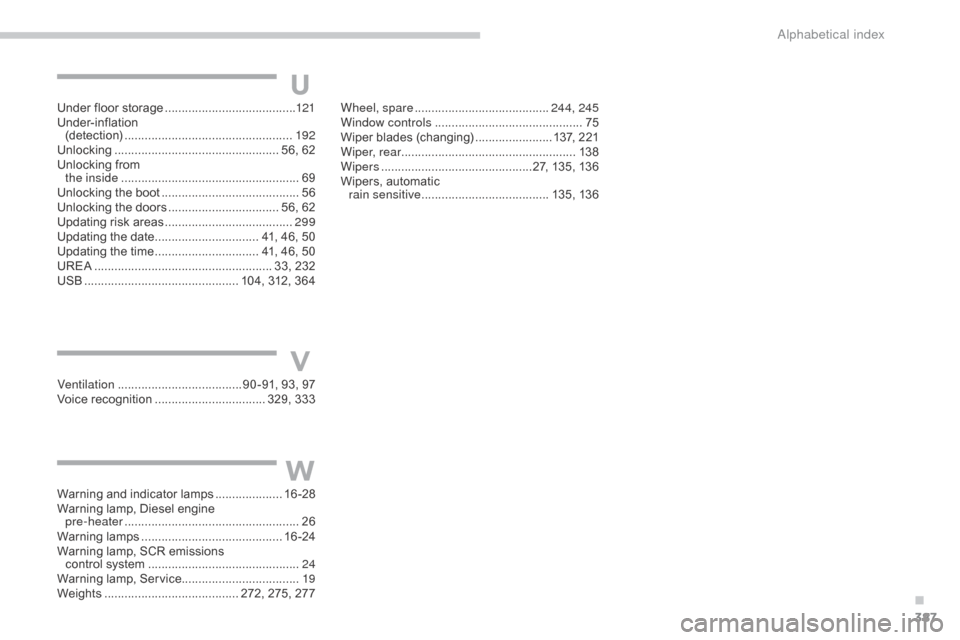
Under floor storage .......................................12 1
Under-inflation
(
detection)
...............................
...................192
Unlocking
..............................
................... 56, 62
Unlocking
from
the inside
..............................
.......................69
Unlocking
the boot
......................................... 56
U
nlocking the doors
................................. 5
6, 62
Updating
risk areas
...................................... 29
9
Updating
the date
............................... 4
1, 46, 50
Updating
the time
............................... 4
1, 46, 50
UREA
...............
...................................... 33, 232
USB
........
...................................... 104, 312, 364
Ventilation
..............................
....... 90 -91, 93, 97
Voice
recognition
...............................
.. 329, 333
Warning
and indicator lamps
....................16
-28
Warning
lamp, Diesel engine
pre-heater
...............................
.....................26
Warning
lam
ps
.......................................... 16
-24
Warning
lamp, SCR emissions
control
system
............................................. 24
W
arning lamp, Service................................... 19
Weights
...............
......................... 272, 275, 277Wheel, spare ........................................
24
4, 245
Window controls ............................................ 75
W
iper
b
lades
(
changing)
....................... 1
37, 221
Wiper, rear .................................................... 13 8
Wipers
.............................................2
7, 135, 136
Wipers,
automatic
rain sensitive
...................................... 13
5,
13
6
U
V
W
.
Alphabetical index