stop start Citroen C4 2016 2.G Service Manual
[x] Cancel search | Manufacturer: CITROEN, Model Year: 2016, Model line: C4, Model: Citroen C4 2016 2.GPages: 396, PDF Size: 10.22 MB
Page 276 of 396
274
C4-2_en_Chap09_caracteristiques_ed02-2015
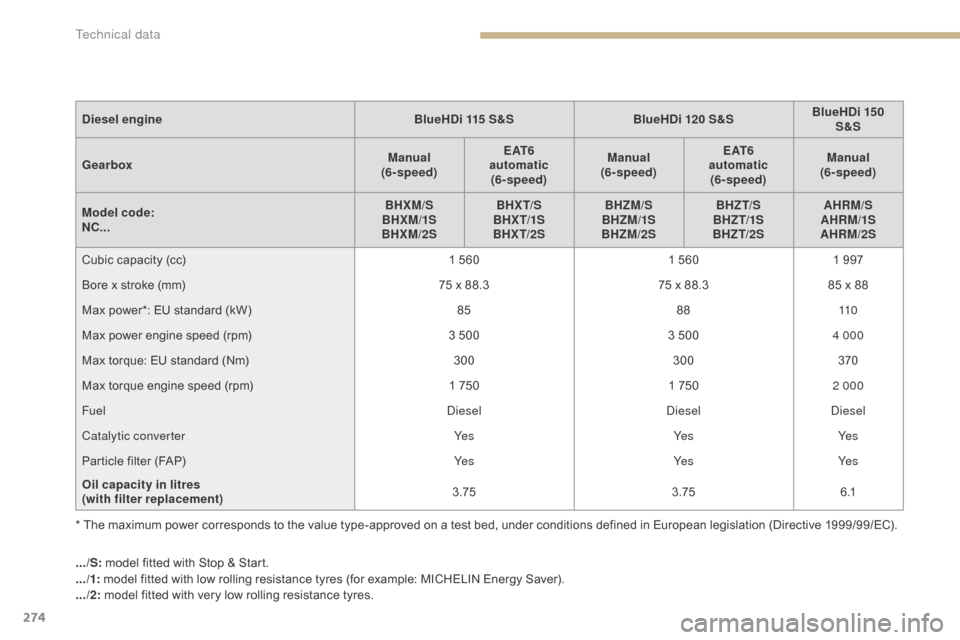
.../S: model fitted with Stop & Start.
.../1: model fitted with low rolling resistance tyres (for example: MICHELIN Energy Saver).
.../2:
model fitted with very low rolling resistance tyres.
Diesel engine
BlueHDi 115 S&SBlueHDi 120 S&SBlueHDi 150
S&S
Gearbox Manual
(6- speed) E AT 6
automatic (6- speed) Manual
(6- speed) E AT 6
automatic (6- speed) Manual
(6- speed)
Model code:
NC... BHXM/S
BHXM/1S
BHXM/2S BHX T/S
BHX T/1S
BHX T/2S BHZM/S
BHZM/1S
BHZM/2S BHZT/S
BHZ T/1S
BHZT/2S AHRM/S
AHRM/1S
AHRM/2S
Cubic capacity (cc)
1 560
1 560
1 997
Bore x stroke (mm)
75 x 88.3
75 x 88.3
85 x 88
Max power*: EU standard (kW)
858811 0
Max power engine speed (rpm)
3 500
3 500
4 000
Max torque: EU standard (Nm)
300300370
Max torque engine speed (rpm)
1 750
1 750
2 000
Fuel DieselDieselDiesel
Catalytic converter Ye sYe sYe s
Particle filter (FAP)
Ye sYe sYe s
Oil capacity in litres
(with filter replacement) 3.75
3.756 .1
* The maximum power corresponds to the value type-approved on a test bed, under conditions defined in European legislation (Directive 1999/99/EC).
Technical data
Page 291 of 396
289
C4-2_en_Chap10b_SMEGplus_ed02-2015
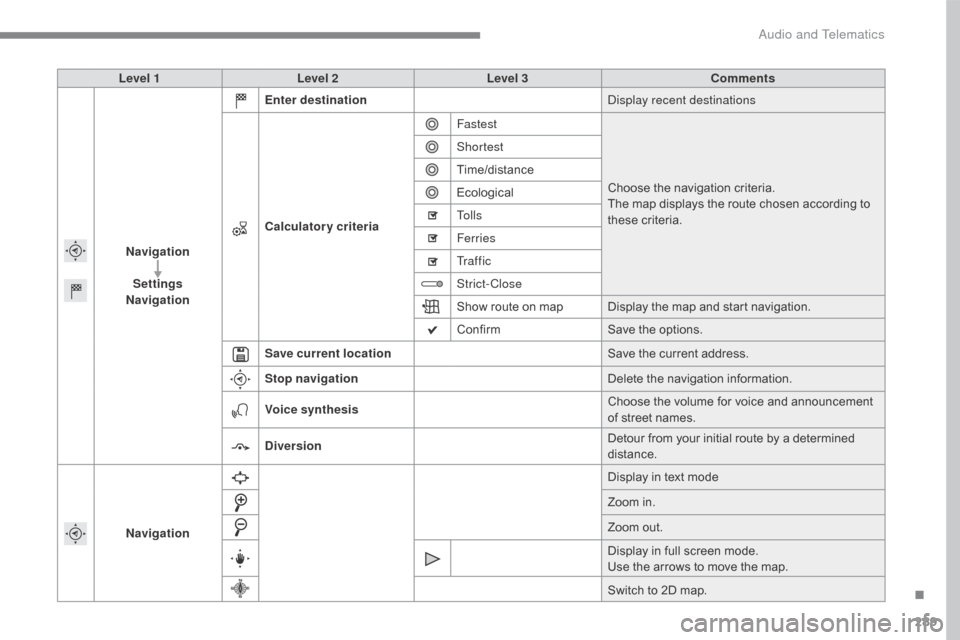
Level 1Level 2 Level 3 Comments
Navigation Settings
Navigation Enter destination
Display recent destinations
Calculatory criteria Fastest
Choose
the navigation criteria.
The
map displays the route chosen according to
t
hese
c
riteria.
Shortest
Time/distance
Ecological
To l l s
Ferries
Tr a f f i c
Strict-Close
Show
route on map Display the map and start navigation.
Confirm Save
the options.
Save current location Save
the current address.
Stop navigation Delete
the navigation information.
Voice synthesis Choose
the volume for voice and announcement
o
f street names.
Diversion Detour
from your initial route by a determined
di
stance.
Navigation Display
in text mode
Zoom
in.
Zoom
out.
Display
in full screen mode.
Use
the arrows to move the map.
Switch
to 2D map.
.
Audio and Telematics
Page 298 of 396
296
C4-2_en_Chap10b_SMEGplus_ed02-2015
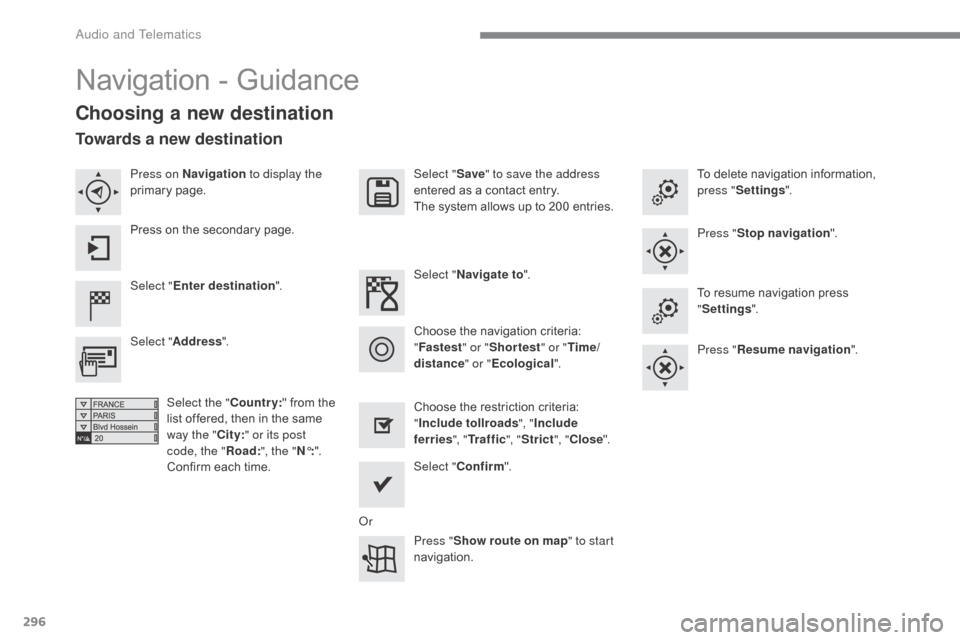
Navigation - Guidance
Choosing a new destination
Select "Enter destination ". Select "
Save" to save the address
entered as a contact entry.
The system allows up to 200 entries.
Select " Confirm ".
Press " Show route on map " to start
navigation.
Select "
Address ".
Select the " Country:"
from the
l
ist offered, then in the same
w
ay the "City:" or its post
code, the " Road:", the " N°:".
Confirm
each time. Select "
Navigate to ".
Choose the restriction criteria:
"I
nclude tollroads", "Include
ferries ", "Tr a f f i c ", "Strict ", "Close ".
Choose
the navigation criteria:
"F
astest" or "Shortest " or "Time/
distance " or "Ecological". To
delete navigation information,
p
ress "
Settings ".
Press " Stop navigation ".
To resume navigation press
"S
ettings".
Press " Resume navigation ".
Press on Navigation
to display the
primary
pag
e.
Press on the secondary page.
Towards a new destination
Or
Audio and Telematics
Page 341 of 396
339
C4-2_en_Chap10b_SMEGplus_ed02-2015
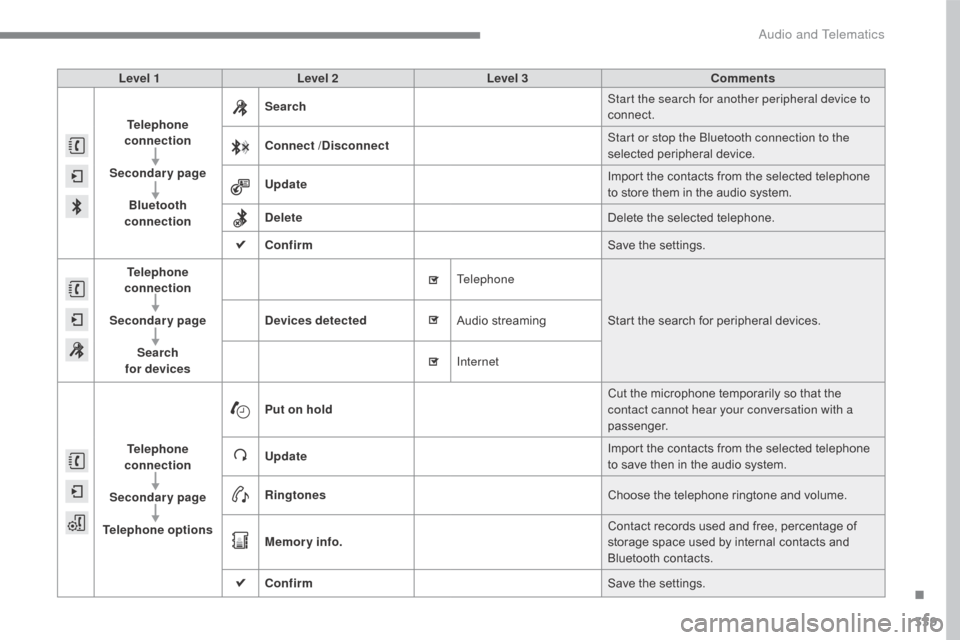
Level 1Level 2 Level 3 Comments
Telephone
connection
Secondary page Bluetooth
connection Search
Start the search for another peripheral device to
connect.
Connect /Disconnect Start or stop the Bluetooth connection to the
selected
pe
ripheral
d
evice.
Update Import
the contacts from the selected telephone
t
o store them in the audio system.
Delete Delete
the selected telephone.
Confirm Save
the settings.
Telephone
conn ection
Secondary page Search
for devices Devices detected
Telephone
Start
the search for peripheral devices.
Audio
s
treaming
Internet
Telephone
connection
Secondary page
Telephone options Put on hold
Cut
the microphone temporarily so that the
c
ontact cannot hear your conversation with a
passenger.
Update Import
the contacts from the selected telephone
t
o save then in the audio system.
Ringtones Choose
the telephone ringtone and volume.
Memory info. Contact
records used and free, percentage of
s
torage space used by internal contacts and
Bl
uetooth
c
ontacts.
Confirm Save
the settings.
.
Audio and Telematics
Page 383 of 396
381
C4-2_en_Chap10c_RD5_ed02-2015
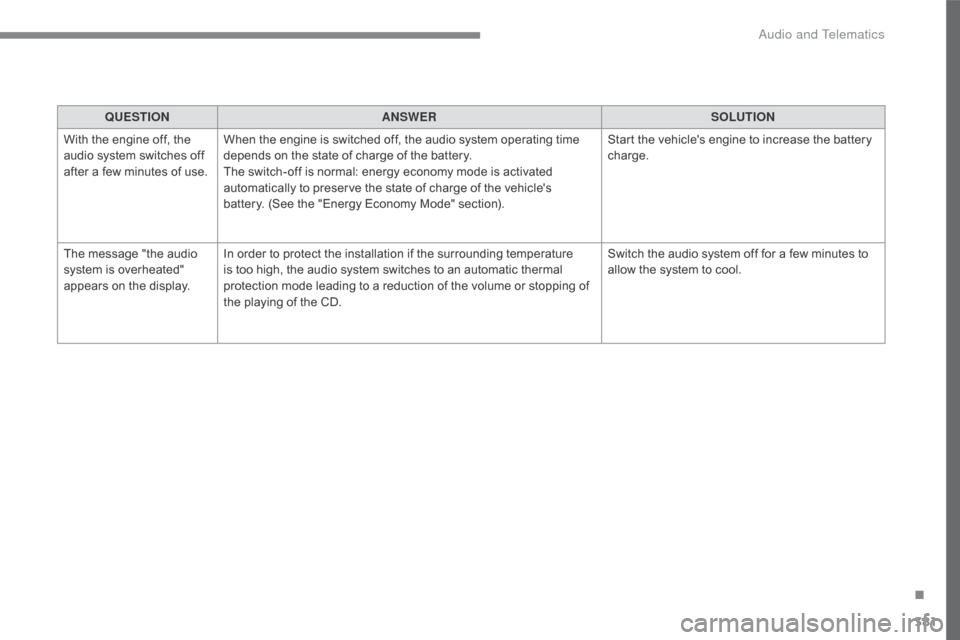
QUESTIONANSWER SOLUTION
With
the engine off, the
a
udio
system switches off
a
fter
a
few minutes of use.When
the engine is switched off, the audio system operating time
d
epends on the state of charge of the battery.
The
switch-off is normal: energy economy mode is activated
a
utomatically to preserve the state of charge of the vehicle's
b
attery. (See the "Energy Economy Mode" section).Start
the vehicle's engine to increase the battery
c
harge.
The
message "the audio
s
ystem
is overheated"
a
ppears on the display. In
order to protect the installation if the surrounding temperature
i
s too high, the audio system switches to an automatic thermal
p
rotection mode leading to a reduction of the volume or stopping of
t
he playing of the CD. Switch
the audio system off for a few minutes to
a
llow the system to cool.
.
Audio and Telematics