warning Citroen C4 2016 2.G Manual PDF
[x] Cancel search | Manufacturer: CITROEN, Model Year: 2016, Model line: C4, Model: Citroen C4 2016 2.GPages: 396, PDF Size: 10.22 MB
Page 243 of 396
241
C4-2_en_Chap08_en-cas-de-panne_ed02-2015
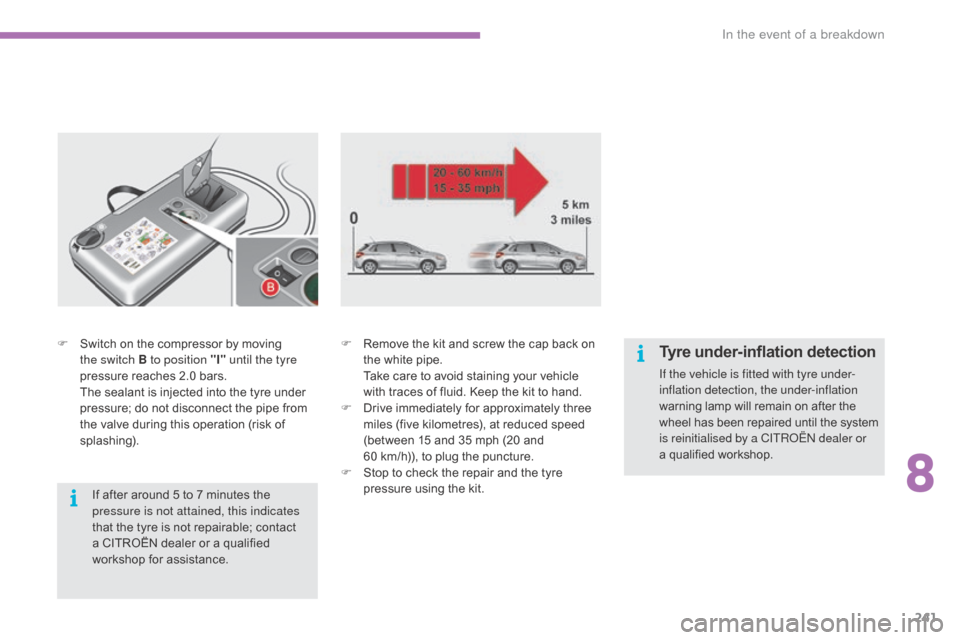
F Switch on the compressor by moving t
he switch B to position "I" until the tyre
pressure
reaches 2.0 bars.
T
he sealant is injected into the tyre under
p
ressure; do not disconnect the pipe from
t
he valve during this operation (risk of
sp
lashing). F
R emove the kit and screw the cap back on t
he white pipe.
T
ake care to avoid staining your vehicle
w
ith traces of fluid. Keep the kit to hand.
F
D
rive immediately for approximately three
m
iles (five kilometres), at reduced speed
(
between 15 and 35 mph (20 and
60
km/h)), to plug the puncture.
F
S
top to check the repair and the tyre
p
ressure using the kit.
If
after around 5 to 7 minutes the
p
ressure is not attained, this indicates
that
the tyre is not repairable; contact
a
CITROËN dealer or a qualified
w
orkshop for assistance.Tyre under-inflation detection
If the vehicle is fitted with tyre under-
inflation detection, the under-inflation
warning lamp will remain on after the
w
heel has been repaired until the system
i
s reinitialised by a CITROËN dealer or
a qualified
workshop.
8
In the event of a breakdown
Page 249 of 396
247
C4-2_en_Chap08_en-cas-de-panne_ed02-2015
Removing a wheel
* position P for an automatic gearbox.
List of operations
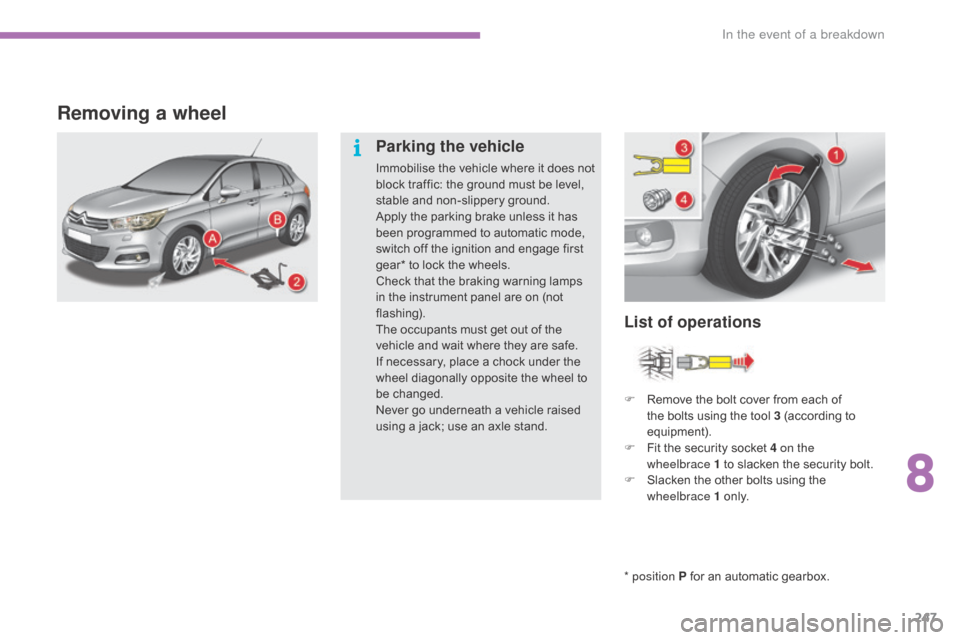
Parking the vehicle
Immobilise the vehicle where it does not b
lock traffic: the ground must be level,
s
table and non-slippery ground.
Apply
the parking brake unless it has
b
een programmed to automatic mode,
s
witch off the ignition and engage first
g
ear* to lock the wheels.
Check
that the braking warning lamps
i
n the instrument panel are on (not
f
lashing).
The
occupants must get out of the
v
ehicle and wait where they are safe.
If
necessary, place a chock under the
w
heel diagonally opposite the wheel to
be c
hanged.
Never
go underneath a vehicle raised
u
sing a jack; use an axle stand.F
R
emove the bolt cover from each of
t
he bolts using the tool 3 (according to
e
quipment).
F
F
it the security socket 4 on the
wheelbrace
1 to slacken the security bolt.
F
S
lacken the other bolts using the
w
heelbrace 1
o
n l y.
8
In the event of a breakdown
Page 269 of 396
267
C4-2_en_Chap08_en-cas-de-panne_ed02-2015
Charging the battery using
a battery charger
F Disconnect the battery from the vehicle.
F F ollow the instructions for use provided by
the
manufacturer of the charger.
F
C
onnect the battery starting with the
n
egative terminal (-).
F
C
heck that the terminals and connectors
a
re clean. If they are covered
w
ith
s
ulphate
(
whitish or greenish deposit), remove them
a
nd clean them.
Reinitialisation after
reconnection
After any reconnection of the battery, switch on
the ignition and wait at least one minute before
s
tarting, to allow time for the initialisation of the
e
lectronic systems.
By
referring to the corresponding sections, you
s
hould set or initialise the following systems
y
ourself:
-
o
ne-touch electric windows,
-
t
ime and date,
-
a
udio and navigation system settings.
Check
that no alert message or warning lamp
c
omes on after switching on the ignition.
However,
if minor problems persist after
c
arrying out these operations, contact a
C
ITROËN dealer or a qualified workshop.
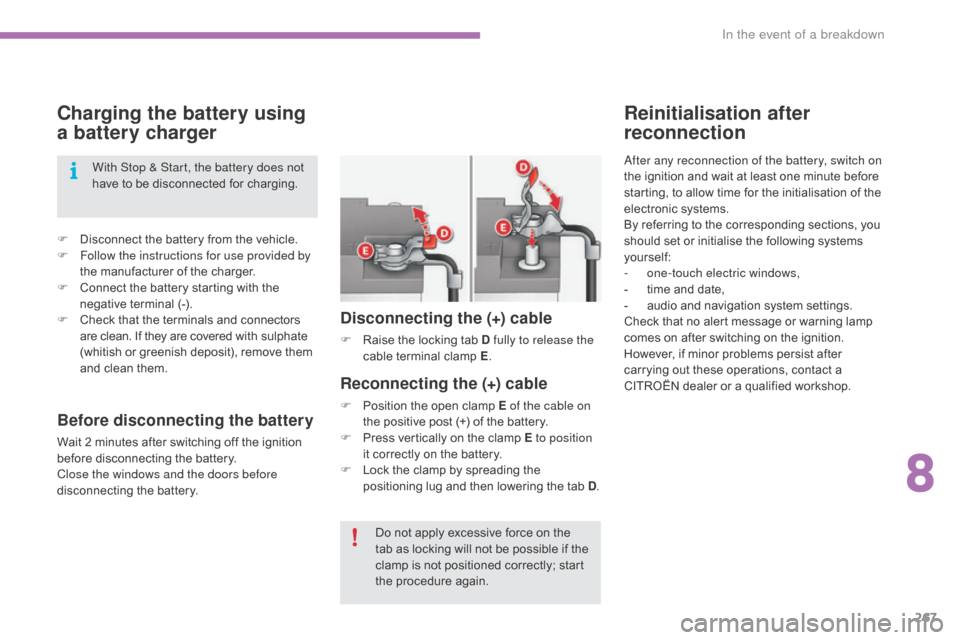
Reconnecting the (+) cable
F Position the open clamp E of the cable on
the positive post (+) of the battery.
F
P
ress vertically on the clamp E to position
it
correctly on the battery.
F
L
ock the clamp by spreading the
p
ositioning lug and then lowering the tab D.
Disconnecting the (+) cable
F Raise the locking tab D fully to release the
cable t erminal c lamp E.
D
o not apply excessive force on the
t
ab as locking will not be possible if the
c
lamp is not positioned correctly; start
t
he procedure again.
With Stop & Start, the battery does not
have
to
be
disconnected
for
charging.
Before disconnecting the battery
Wait 2 minutes after switching off the ignition b
efore disconnecting the battery.
Close the windows and the doors before
disconnecting
the battery.
8
In the event of a breakdown
Page 272 of 396
270
C4-2_en_Chap08_en-cas-de-panne_ed02-2015
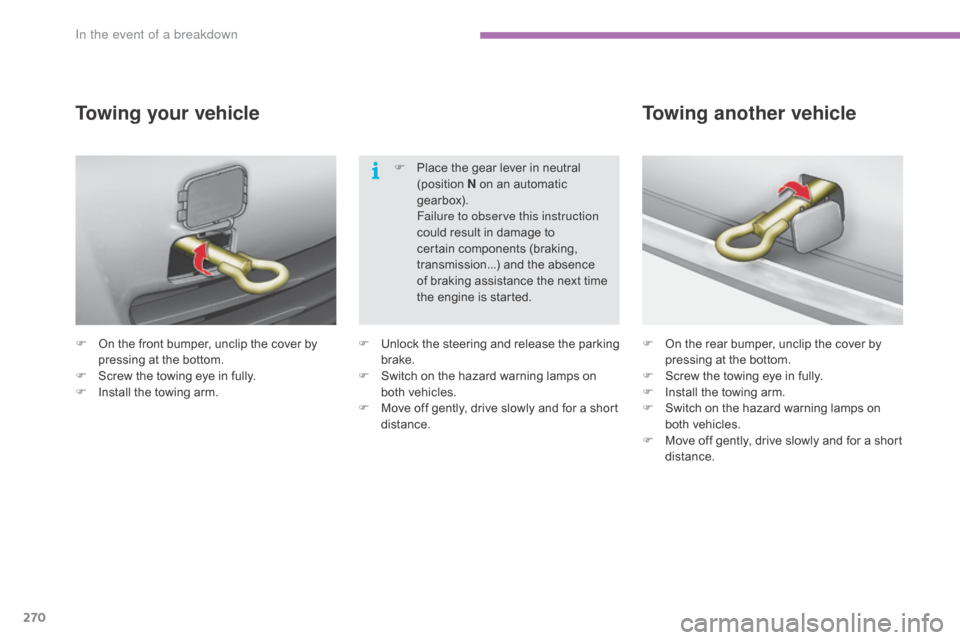
F On the front bumper, unclip the cover by p
ressing at the bottom.
F
S
crew the towing eye in fully.
F
I
nstall the towing arm.
Towing your vehicle
F On the rear bumper, unclip the cover by p
ressing at the bottom.
F
S
crew the towing eye in fully.
F
I
nstall the towing arm.
F
S
witch on the hazard warning lamps on
b
oth vehicles.
F
M
ove off gently, drive slowly and for a short
di
stance.
Towing another vehicle
F Unlock t he s teering a nd r elease t he p arking b
rake.
F
S
witch on the hazard warning lamps on
b
oth vehicles.
F
M
ove off gently, drive slowly and for a short
di
stance.F
P
lace the gear lever in neutral
(
position
N
on an automatic
g
earbox).
F
ailure to observe this instruction
could result in damage to
c
ertain components (braking,
t
ransmission...) and the absence
o
f braking assistance the next time
t
he engine is started.
In the event of a breakdown
Page 274 of 396
272
C4-2_en_Chap09_caracteristiques_ed02-2015
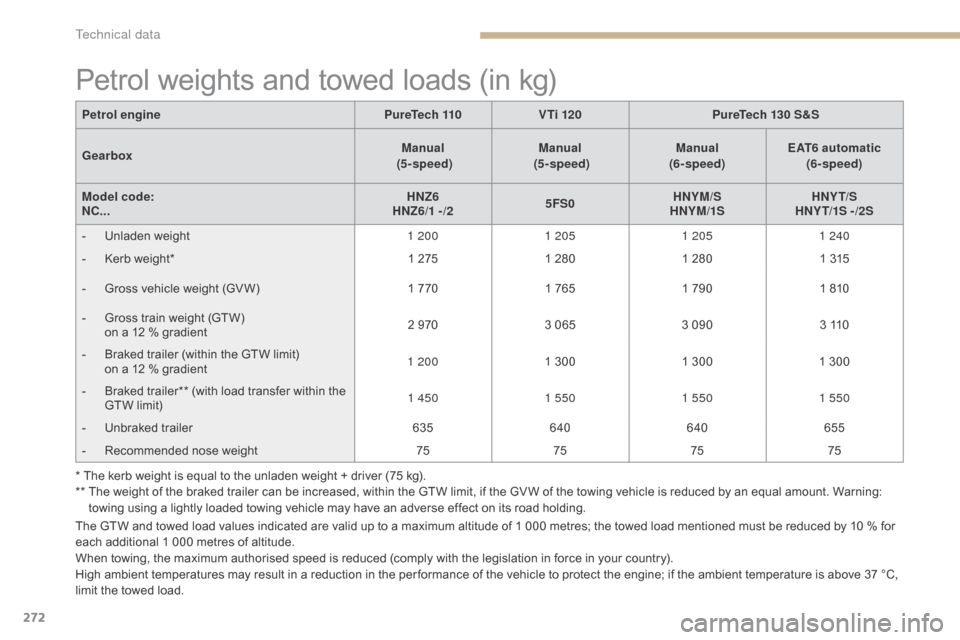
Petrol weights and towed loads (in kg)
The GTW and towed load values indicated are valid up to a maximum altitude of 1 000 metres; the towed load mentioned must be reduced by 10 % for each additional 1 000 metres of altitude.
When
towing, the maximum authorised speed is reduced (comply with the legislation in force in your country).
High
ambient temperatures may result in a reduction in the per formance of the vehicle to protect the engine; if the ambient temperature is above 37 °C,
l
imit the towed load.
Petrol engine
PureTech 110 V Ti 120 PureTech 130 S&S
Gearbox Manual
(5 - speed) Manual
(5 - speed) Manual
(6- speed) EAT6 automatic
(6- speed)
Model code:
NC... HNZ6
HNZ6/1 -/2 5FS0HNYM/S
HNYM/1S HNY T/S
HNY T/1S - /2S
-
U
nladen weight
1 2001 2051 205 1 240
-
K
erb weight*
1 275
1 280
1 280
1 315
-
G
ross vehicle weight (GV W)
1 770
1 765
1 790
1 810
-
G
ross train weight (GTW)
o
n a 12 % gradient
2 970
3 065
3 090
3 110
-
B
raked trailer (within the GTW limit)
o
n a 12 % gradient
1 200
1 300
1 300
1 300
-
B
raked trailer** (with load transfer within the
G
TW limit)
1 450
1 550 1 5501 550
-
U
nbraked trailer
635640 640 655
-
R
ecommended nose weight
75757575
* The kerb weight is equal to the unladen weight + driver (75 kg).
**
T
he weight of the braked trailer can be increased, within the GTW limit, if the GV W of the towing vehicle is reduced by an equal amount. Warning:
t
owing using a lightly loaded towing vehicle may have an adverse effect on its road holding.
Technical data
Page 277 of 396
275
C4-2_en_Chap09_caracteristiques_ed02-2015
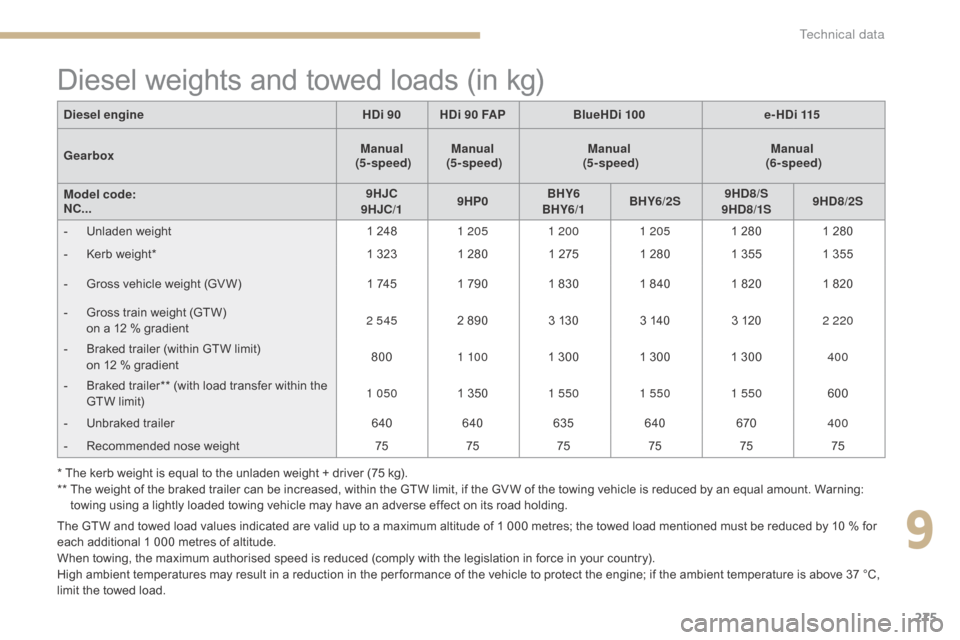
Diesel weights and towed loads (in kg)
The GTW and towed load values indicated are valid up to a maximum altitude of 1 000 metres; the towed load mentioned must be reduced by 10 % for each additional 1 000 metres of altitude.
When
towing, the maximum authorised speed is reduced (comply with the legislation in force in your country).
High
ambient temperatures may result in a reduction in the per formance of the vehicle to protect the engine; if the ambient temperature is above 37 °C,
l
imit the towed load.
Diesel engine
HDi 90HDi 90 FAP BlueHDi 100 e-HDi 115
Gearbox Manual
(5 - speed) Manual
(5 - speed) Manual
(5 - speed) Manual
(6- speed)
Model code:
NC... 9HJC
9HJC/1 9HP0BHY6
BHY6/1 BHY6/2S 9HD8/S
9HD8/1S 9HD8/2S
-
U
nladen weight
1 248
1 205 1 200 1 2051 280
1 280
-
K
erb weight*
1 323 1 280 1 275
1 280
1 355
1 355
-
G
ross vehicle weight (GV W)
1 745
1 790 1 830 1 840
1 820
1 820
-
G
ross train weight (GTW)
o
n a 12 % gradient
2 545
2 890 3 130
3 140
3 120
2 220
-
B
raked trailer (within GTW limit)
o
n 12 % gradient
800
1 10 0 1 300 1 300 1 300
400
-
B
raked trailer** (with load transfer within the
G
TW limit)
1 050
1 350
1 550 1 550 1 550 600
-
U
nbraked trailer
640640 635 640 670400
-
R
ecommended nose weight
757575 757575
* The kerb weight is equal to the unladen weight + driver (75 kg).
**
T
he weight of the braked trailer can be increased, within the GTW limit, if the GV W of the towing vehicle is reduced by an equal amount. Warning:
t
owing using a lightly loaded towing vehicle may have an adverse effect on its road holding.
9
Technical data
Page 278 of 396
276
C4-2_en_Chap09_caracteristiques_ed02-2015
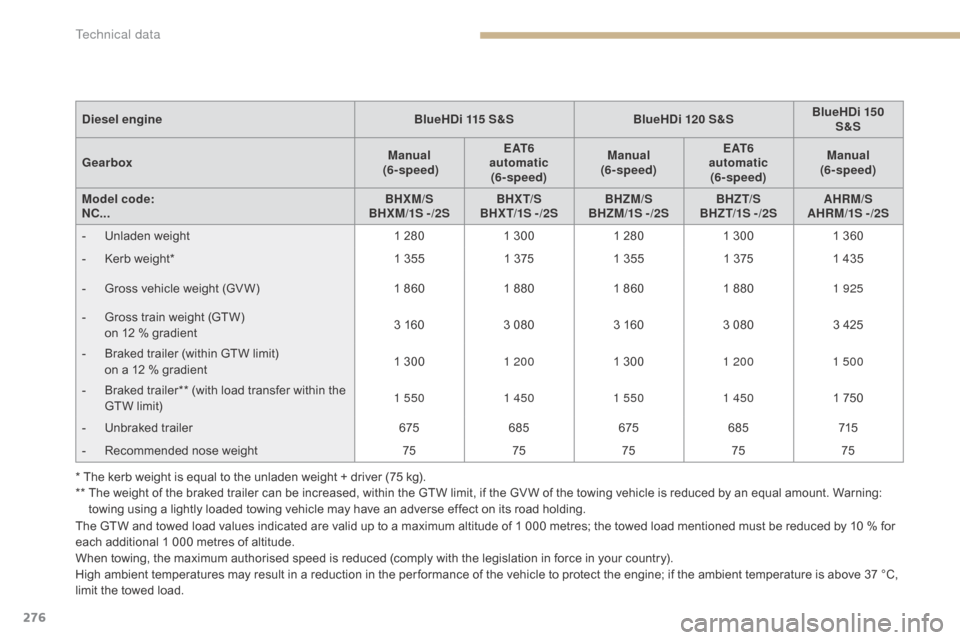
The GTW and towed load values indicated are valid up to a maximum altitude of 1 000 metres; the towed load mentioned must be reduced by 10 % for each additional 1 000 metres of altitude.
When
towing, the maximum authorised speed is reduced (comply with the legislation in force in your country).
High
ambient temperatures may result in a reduction in the per formance of the vehicle to protect the engine; if the ambient temperature is above 37 °C,
l
imit the towed load.
Diesel engine
BlueHDi 115 S&SBlueHDi 120 S&SBlueHDi 150
S&S
Gearbox Manual
(6- speed) E AT 6
automatic (6- speed) Manual
(6- speed) E AT 6
automatic (6- speed) Manual
(6- speed)
Model code:
NC... BHXM/S
BHXM/1S -/2S BHX T/S
BHX T/1S - /2S BHZM/S
BHZM/1S - /2S BHZT/S
BHZ T/1S - /2S AHRM/S
AHRM/1S -/2S
-
U
nladen weight
1 280
1 300
1 280
1 300
1 360
-
K
erb weight*
1 355
1 375
1 355
1 375
1 435
-
G
ross vehicle weight (GV W)
1 860
1 880
1 860
1 880
1 925
-
G
ross train weight (GTW)
o
n 12 % gradient
3 160
3 080
3 160
3 080
3 425
-
B
raked trailer (within GTW limit)
o
n a 12 % gradient
1 300
1 200 1 300
1 200 1 500
-
B
raked trailer** (with load transfer within the
G
TW limit)
1 550
1 4501 550 1 450 1 750
-
U
nbraked trailer
675685 675685 715
-
R
ecommended nose weight
7575757575
* The kerb weight is equal to the unladen weight + driver (75 kg).
**
T
he weight of the braked trailer can be increased, within the GTW limit, if the GV W of the towing vehicle is reduced by an equal amount. Warning:
t
owing using a lightly loaded towing vehicle may have an adverse effect on its road holding.
Technical data
Page 302 of 396
300
C4-2_en_Chap10b_SMEGplus_ed02-2015
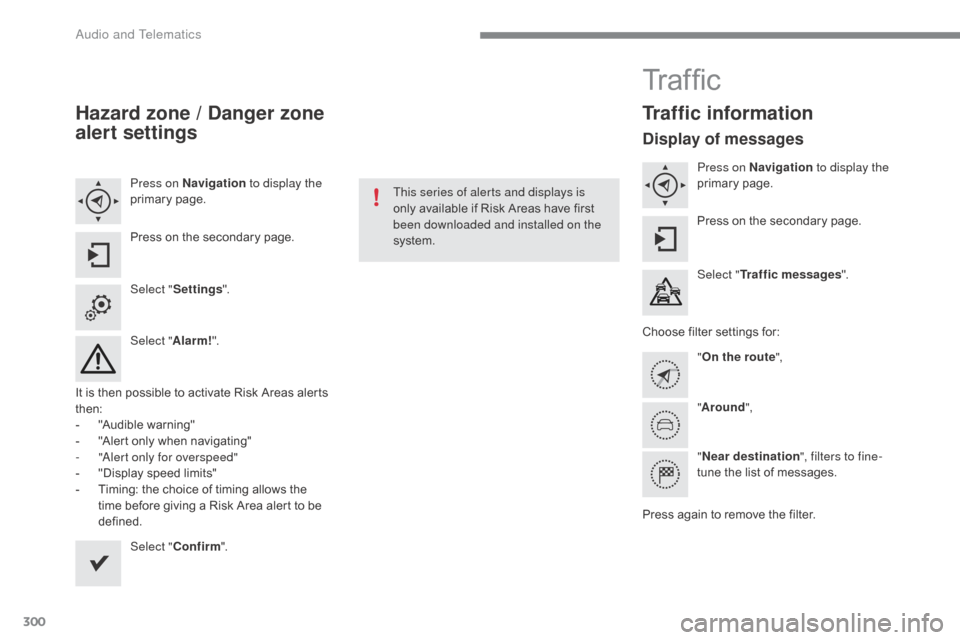
Hazard zone / Danger zone
alert settings
Press on Navigation to display the
primary pag e.
Press
on the secondary page.
Select " Settings ".
Select " Alarm!".
It
is
then
possible to activate Risk Areas alerts
t
hen:
-
"
Audible warning"
-
"
Alert
only when navigating"
-
"
Alert only for overspeed"
-
"
Display speed limits"
-
T
iming: the choice of timing allows the
t
ime
before giving a Risk Area alert to be
de
fined. Select " Confirm ". This series of alerts and displays is
only
available if Risk Areas have first
b
een downloaded and installed on the
system.
Tr a f fi c
Traffic information
Display of messages
Press on Navigation to display the
primary pag e.
Press
on the secondary page.
Select " Traffic messages ".
Choose
filter settings for:
" On the route ",
" Around ",
" Near destination ", filters to fine-
tune
the list of messages.
Press
again to remove the filter.
Audio and Telematics
Page 346 of 396
344
C4-2_en_Chap10b_SMEGplus_ed02-2015
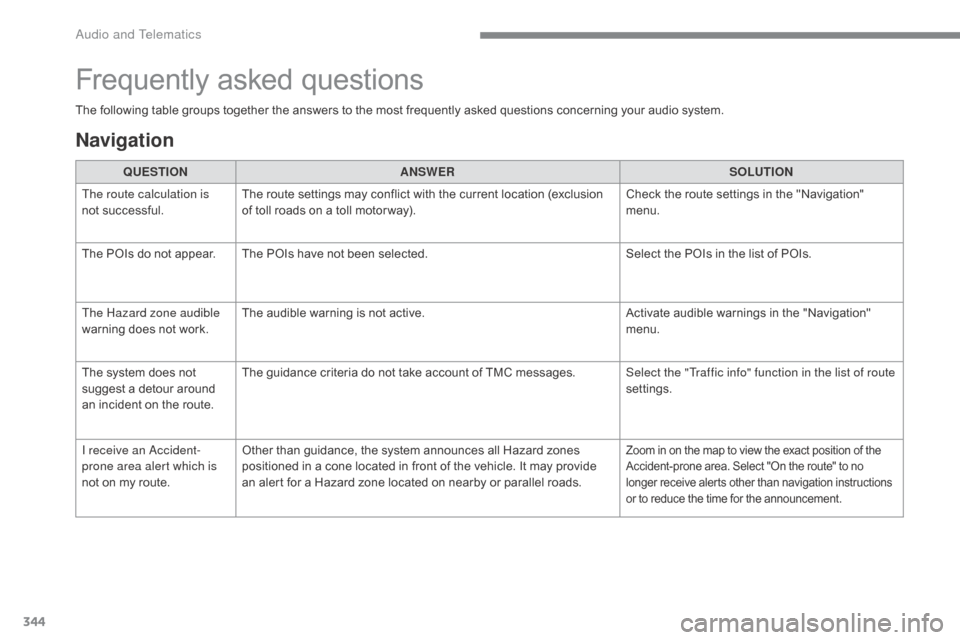
The following table groups together the answers to the most frequently asked questions concerning your audio system.
Frequently asked questions
Navigation
QUESTIONANSWER SOLUTION
The route calculation is
not
successful. The
route settings may conflict with the current location (exclusion
o
f toll roads on a toll motor way). Check
the route settings in the "Navigation"
m
enu.
The
POIs do not appear. The POIs have not been selected.Select
the POIs in the list of POIs.
The Hazard zone audible
warning
does not work. The
audible warning is not active.Activate
audible warnings in the "Navigation"
m
enu.
The
system does not
s
uggest a detour around
a
n
incident on the route.The
guidance criteria do not take account of TMC messages.Select the "Traffic info" function in the list of route
settings.
I receive an Accident-
prone area alert which is
not
on
my route. Other
than guidance, the system announces all Hazard zones
p
ositioned in a cone located in front of the vehicle. It may provide
a
n alert for a Hazard zone located on nearby or parallel roads.
Zoom in on the map to view the exact position of the Accident-prone area. Select "On the route" to no l
onger receive alerts other than navigation instructions
o
r to reduce the time for the announcement.
Audio and Telematics
Page 358 of 396
356
C4-2_en_Chap10c_RD5_ed02-2015
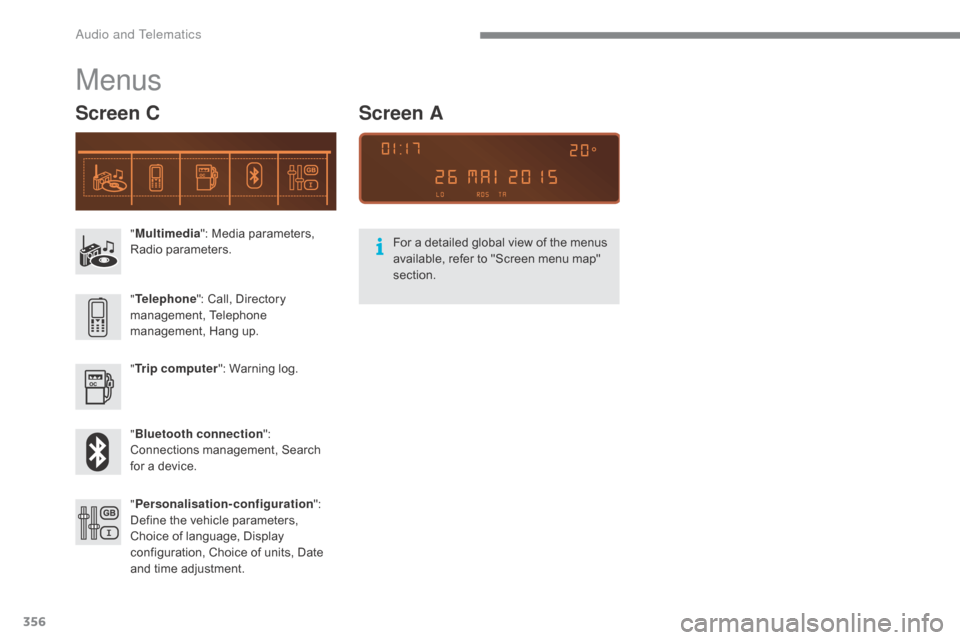
"Multimedia ": Media parameters, R
adio par ameters.
" Trip computer ":
Warning log.
" Bluetooth connection ":
C
onnections management, Search
f
or a device.
"
Telephone ":
Call, Directory
ma
nagement,
T
elephone
m
anagement, Hang up.
" Personalisation-configuration ":
D
efine the vehicle parameters,
C
hoice of language, Display
c
onfiguration, Choice of units, Date
a
nd time adjustment.
Menus
Screen C
For a detailed global view of the menus available, refer to "Screen menu map"
s
ection.
Screen A
Audio and Telematics