warning CITROEN C4 2019 Repair Manual
[x] Cancel search | Manufacturer: CITROEN, Model Year: 2019, Model line: C4, Model: CITROEN C4 2019Pages: 317, PDF Size: 9.31 MB
Page 195 of 317
193
C4-cactus_en_Chap08_En-cas-de-panne_ed01-2016
Removing a wheel
Parking the vehicle
Immobilise the vehicle where it does not block traffic: the ground must be level,
s
table and not slippery.
Apply
the parking brake, switch off the
i
gnition and engage first gear to block
t
he wheels.
Check
that the parking brake warning
l
amps in the instrument panel come on.
The
occupants must get out of the
v
ehicle and wait where they are safe.
Ensure
that the jack is correctly
p
ositioned at one of the vehicle's
j
acking points.
Incorrect
use of the jack could cause
t
he vehicle to drop.
Never
go underneath a vehicle raised
u
sing a jack; use an axle stand.
List of operations
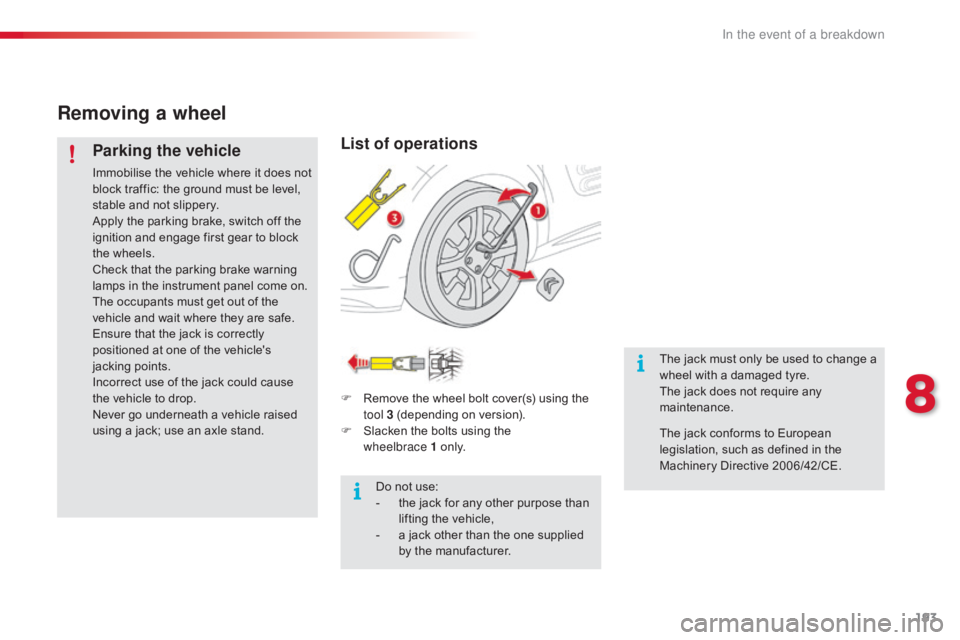
F Remove the wheel bolt cover(s) using the t
ool 3 (depending on version).
F
S
lacken the bolts using the
w
heelbrace
1 o n l y.
Do
not use:
-
t
he jack for any other purpose than
l
ifting the vehicle,
-
a
jack other than the one supplied
b
y the manufacturer. The
jack must only be used to change a
w
heel with a damaged tyre.
The jack does not require any m
aintenance.
The
jack conforms to European
l
egislation, such as defined in the
M
achinery Directive 2006/42/CE.
8
In the event of a breakdown
Page 210 of 317
208
C4-cactus_en_Chap08_En-cas-de-panne_ed01-2016
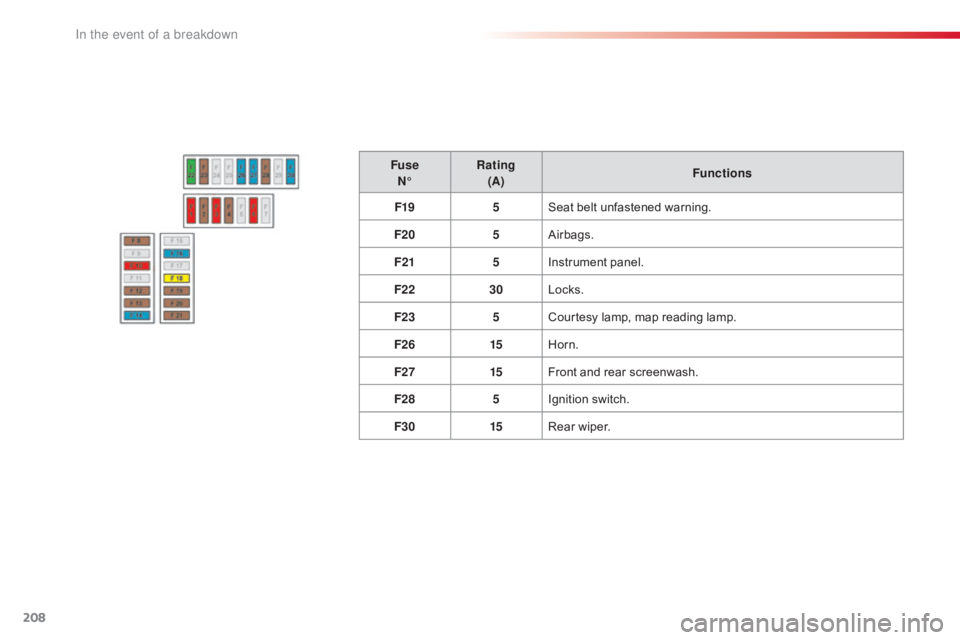
FuseN° Rating
(A) Functions
F19 5Seat
belt unfastened warning.
F20 5Airbags.
F21 5Instrument
panel.
F22 30Locks.
F23 5Courtesy
lamp, map reading lamp.
F26 15Horn.
F27 15Front
and rear screenwash.
F28 5Ignition
s
witch.
F30 15Rear
wiper.
In the event of a breakdown
Page 219 of 317
217
C4-cactus_en_Chap08_En-cas-de-panne_ed01-2016
Towing another vehicle
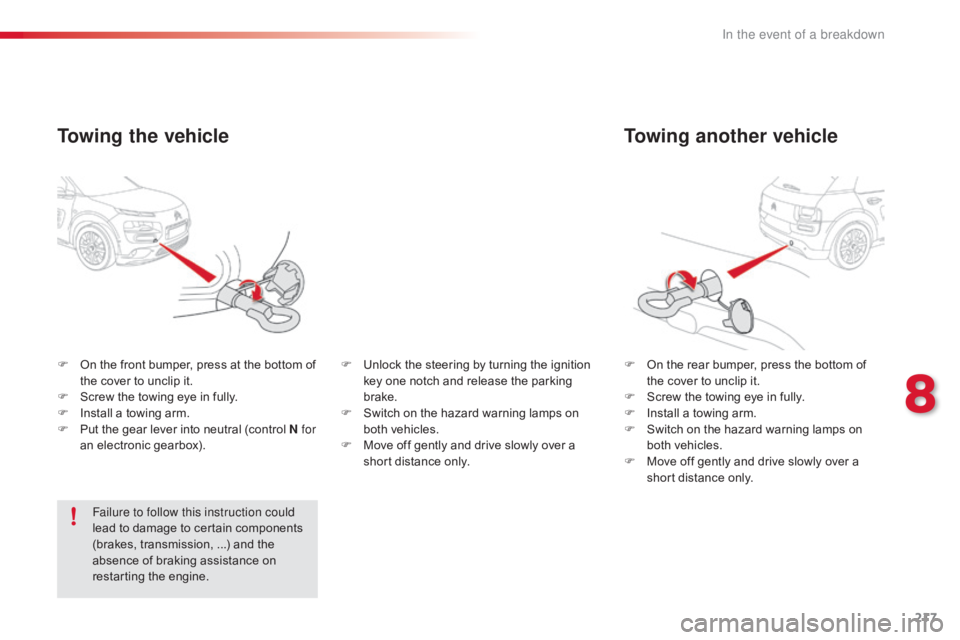
F On the rear bumper, press the bottom of t
he cover to unclip it.
F
S
crew the towing eye in fully.
F
I
nstall a towing arm.
F
S
witch on the hazard warning lamps on
b
oth vehicles.
F
M
ove off gently and drive slowly over a
s
hort distance only.
F
O
n
the
front
bumper,
press
at
the
bottom
of
t
he
cover
to
unclip
it.
F
S
crew
the
towing
eye
in
fully.
F
I
nstall
a
towing
arm.
F
P
ut
the
gear
lever
into
neutral
(control
N for
an
electronic
gearbox).
Towing the vehicle
Failure to follow this instruction could
lead to damage to certain components
(
brakes, transmission, ...) and the
a
bsence of braking assistance on
r
estarting the engine. F
U
nlock the steering by turning the ignition
k
ey one notch and release the parking
b
rake.
F
S
witch on the hazard warning lamps on
b
oth vehicles.
F
M
ove off gently and drive slowly over a
s
hort distance only.
8
In the event of a breakdown
Page 237 of 317
235
C4-cactus_en_Chap10b_SMEGplus_ed01-2016
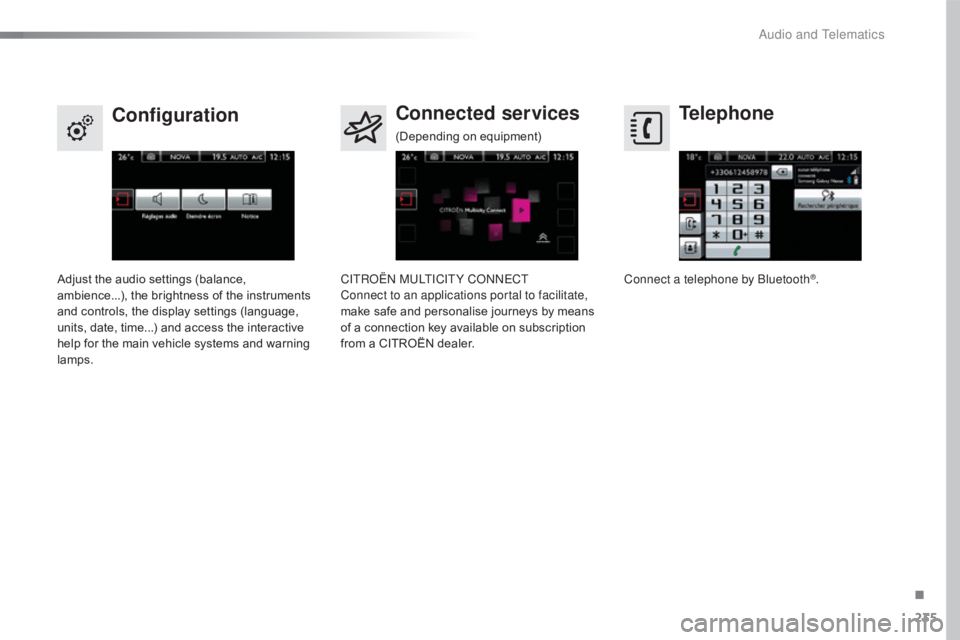
Telephone
Configuration Connected services
Connect a telephone by Bluetooth®.
Adjust
the
audio
settings
(balance,
a
mbience...),
the
brightness
of
the
instruments
a
nd
controls,
the
display
settings
(language,
u
nits,
date,
time...)
and
access
the
interactive
h
elp
for
the
main
vehicle
systems
and
warning
lam
ps. CITROËN MULTICITY CONNECT
Connect to an applications portal to facilitate,
make
safe
and
personalise
journeys
by
means
o
f
a
connection
key
available
on
subscription
f
rom
a
CITROËN
dealer.
(Depending
o
n
e
quipment)
.
Audio and Telematics
Page 264 of 317
262
C4-cactus_en_Chap10b_SMEGplus_ed01-2016
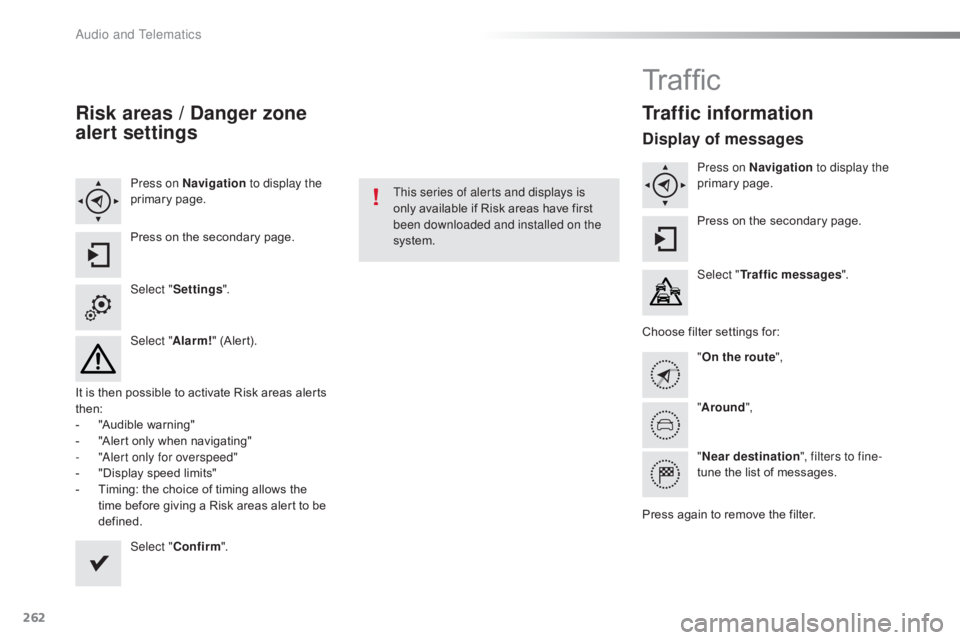
Risk areas / Danger zone
alert settings
Press on Navigation to display the
primary pag e.
Press
on the secondary page.
Select " Settings ".
Select " Alarm!"
(Alert).
It
is
then
possible to activate Risk areas alerts
t
hen:
-
"
Audible warning"
-
"
Alert
only when navigating"
-
"
Alert only for overspeed"
-
"
Display speed limits"
-
T
iming: the choice of timing allows the
t
ime
before giving a Risk areas alert to be
de
fined. Select " Confirm ". This series of alerts and displays is
only
available if Risk areas have first
b
een downloaded and installed on the
system.
Tr a f fi c
Traffic information
Display of messages
Press on Navigation to display the
primary pag e.
Press
on the secondary page.
Select " Traffic messages ".
Choose
filter settings for:
" On the route ",
" Around ",
" Near destination ", filters to fine-
tune
the list of messages.
Press
again to remove the filter.
Audio and Telematics
Page 267 of 317
265
C4-cactus_en_Chap10b_SMEGplus_ed01-2016
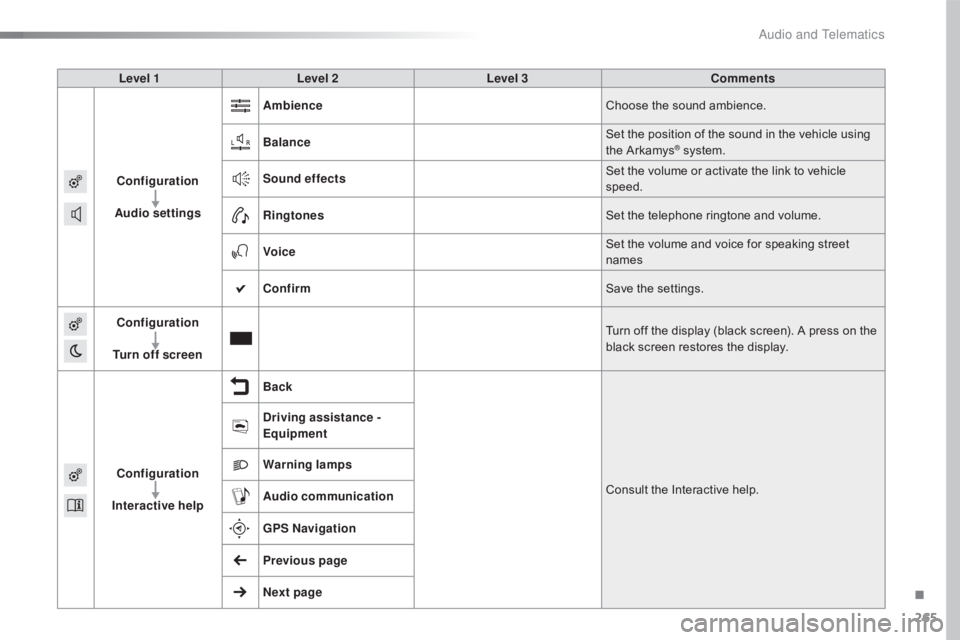
Level 1Level 2 Level 3 Comments
Configuration
Audio settings Ambience
Choose
the sound ambience.
Balance Set
the position of the sound in the vehicle using
t
he Arkamys
® system.
S
ound effects Set
the
volume or activate the link to vehicle
s
peed.
Ringtones Set
the
telephone ringtone and volume.
Voice Set
the
volume and voice for speaking street
nam
es
Confirm Save
the
settings.
Configuration
Turn off screen Turn
off
the
display (black screen). A press on the
b
lack
screen
restores the display.
Configuration
Interactive help Back
Consult
the
Interactive help.
Driving assistance
-
Equipment
Warning lamps
Audio communication
GPS Navigation
Previous page
Next page
.
Audio and Telematics
Page 284 of 317
282
C4-cactus_en_Chap10b_SMEGplus_ed01-2016
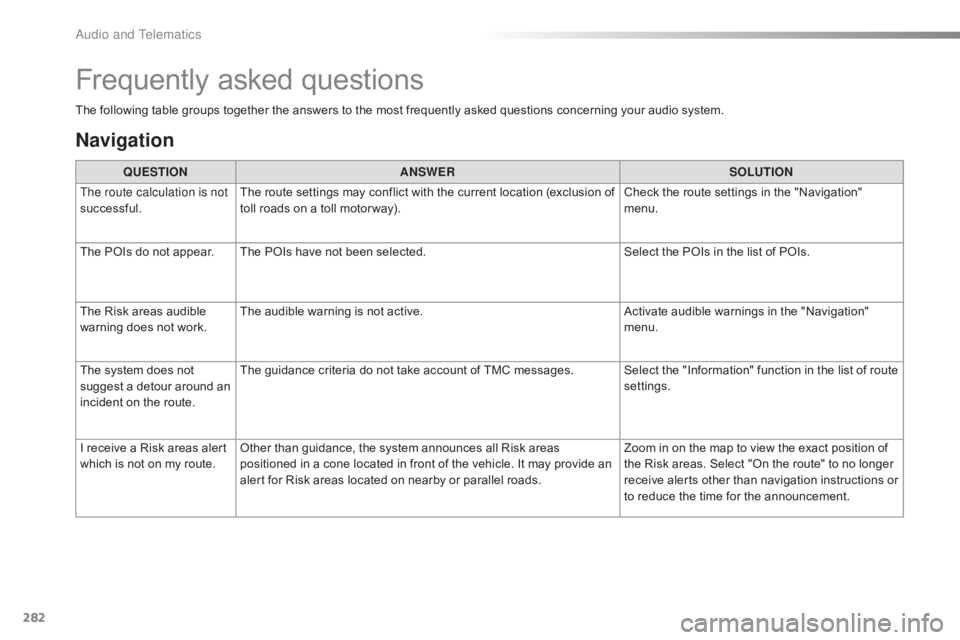
The following table groups together the answers to the most frequently asked questions concerning your audio system.
Frequently asked questions
Navigation
QUESTIONANSWER SOLUTION
The route calculation is not
successful. The
route settings may conflict with the current location (exclusion of
t
oll roads on a toll motor way). Check
the route settings in the "Navigation"
m
enu.
The
POIs do not appear. The POIs have not been selected.Select
the POIs in the list of POIs.
The
Risk areas audible
w
arning does not work. The
audible warning is not active.Activate
audible warnings in the "Navigation"
m
enu.
The
system does not
s
uggest a detour around an
i
ncident
on the route. The
guidance criteria do not take account of TMC messages. Select the "Information" function in the list of route
se
ttings.
I
receive a Risk areas alert
w
hich
is not on my route.Other
than guidance, the system announces all Risk areas
p
ositioned in a cone located in front of the vehicle. It may provide an
a
lert for Risk areas located on nearby or parallel roads.Zoom
in on the map to view the exact position of
t
he Risk areas. Select "On the route" to no longer
r
eceive alerts other than navigation instructions or
t
o reduce the time for the announcement.
Audio and Telematics
Page 295 of 317
293
C4-cactus_en_Chap11_index-alpha_ed01-2016
Radio ............................................................. 242
Radio, digital (Digital Audio Broadcasting -
D
A B) ............................................................ 244
RDS
................
............................................... 243
Rear
screen, demisting / defrosting................66
Recharging
the battery
.........................21
2, 214
Recirculation, air
...............................
. 58, 60, 64Safety, children
...............
10
0, 104 -107, 110 -118
Screen,
cold climate
.....................................15
8
Screen, colour
................................ 2
9, 234, 235
S
R
Screenwash, front ...........................................87
S creenwash, rear ............................... .............87
SCR (Selective Catalytic Reduction)
............ 17
5
Seat belts
.......................................... 9
6 -98, 110
Seat, rear bench
..............................
...............51
Seats, front
...............................
.......................49
Seats, heated
...............................
...................50
Seats, rear
....................................................... 51
S
erial number, vehicle
..................................2
24
Service indicator
............................................. 24
S
ervicing
...............................
..........................10
Settings,
e
quipment
........................................ 28
S
ettings
(
Menus)
...............................
............264
Settings,
system
...............................
.............271
Sidelamps
......................... 7
8, 83, 197, 198, 202
Side repeater
..............................
..................201
Snow chains
.................................................. 15
7
Socket,
12 V accessory
.............................6
9 -71
Socket,
auxiliary
...............................
.......72, 246
Socket,
JACK
...............................
...........72, 246
Sockets,
audio
................................................ 72
Spe
ed
l
imiter
...............................
.......... 135, 141
Stability control (ESC) ............................... 16,
91
Starting
the engine
............................... 12
1, 127
Starting
using another battery
......................2
13
Station, radio
.........................................2
42, 243
Stay, bonnet
...............................
...................167
Steering
wheel, adjustment
............................54
S
topping the vehicle
..................................... 12
1
Stop & Start
........................ 1
5, 36, 65, 132, 145,
153,
167, 173, 212, 215
Stop
(warning lamp)
........................................ 17
St
orage
................
...................................... 71, 73
Sun visor
.................................................... 6
9 -71
Switching
off the engine
...............................12
1
Synchronising
the remote
control
........................................................... 42
P
aint colour code
.......................................... 2
24
Panoramic
glass
sunroof
................
.......................................... 68
Parcel shelf, rear
....................................... 76
, 77
Park
Assist
...............................
..................... 145
Parking
brake
........................................ 1
2 4 , 174
Parking
sensors,
front
................................... 14
3
Parking
sensors,
rear.................................... 142
Plates, identification ...................................... 224
Player, Apple
® .............................. .................248
Player,
MP3
CD ............................... ..............246
Player, USB
................................................... 24
6
Plip
..............................
.............................. 4 0 , 41
Pre-heater, Diesel
...............................
............14
Pressures, tyres
............................
185, 190, 224
Pre-tensioning
seat belts
................................ 98
P
riming
pu
mp
...............................
.................218
Priming
the
fuel system
................................ 2
18
Protecting
c
hildren
......................... 10
0, 104 -107, 110 -118
Protectors
...................................................... 18
2
Puncture
................
........................................ 185
PReduction of electrical load ..........................16 0
Regeneration of the particle
filter
........
..................................................... 173
Reinitialisation of the under-inflation detection
system
......................................... 1
51
Reinitialising
the remote control
.....................42
R
eminder, lighting on
...................................... 81
R
emote control
................................................ 40
R
emoving a wheel
..............................
..........193
Removing
the mat
...............................
............74
Replacing
bu
lbs
..............................
..............197
Replacing
f
uses
..............................
..............205
Replacing
the air filter
...................................17
3
Replacing
the oil filter
................................... 17
3
Replacing
t
he
p
assenger
c
ompartment filter
...................................... 17
3
Reservoir, screenwash
................................. 17
2
Resetting
the service
indicator
...............................
.........................26
Resetting
the trip recorder
..............................37
R
eversing
c
amera
...............................
..........14 4
Reversing
lam
p
............................................. 2
02
Risk
areas (update)
....................................... 2
61
Roof bars
....................................................... 16
4
Running
out of fuel
(Diesel)
....................................................... 2
18
.
Alphabetical index
Page 296 of 317
294
C4-cactus_en_Chap11_index-alpha_ed01-2016
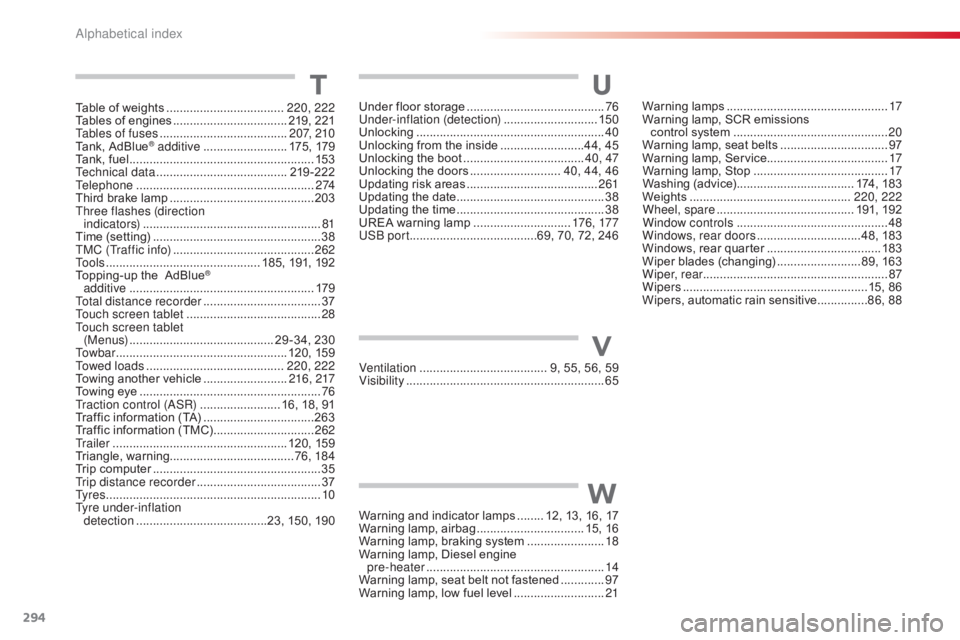
Warning lamps ................................................ 17
W arning lamp, SCR emissions
control
system
.............................................. 20
W
arning lamp, seat belts
................................97
W
arning lamp, Service.................................... 17
Warning
lamp, Stop
........................................ 17
W
ashing
(
advice)................................... 174,
183
Weights
...............
................................. 220, 222
Wheel, spare
......................................... 19
1,
19
2
Window controls
............................................. 48
W
indows, rear doors
...............................4
8, 183
Windows,
rear quarter
..................................18
3
Wiper
b
lades
(
changing)
.........................8
9, 163
Wiper, rear ....................................................... 87
Wipers
.......................................................1
5, 86
Wipers,
automatic rain sensitive
...............8
6, 88 T
Table of weights ...................................2 20, 222
Tables of engines ............................... ...219, 2
21
Tables of fuses
...................................... 2
0 7, 2 1 0
Tank,
AdBlue
® additive ......................... 17 5 , 17 9
Tank,
fuel
............................... ........................ 153
Technical data
....................................... 2
19-222
Telephone
..................................................... 2
74
Third
brake
lamp
........................................... 20
3
Three flashes (direction i n di c ato r s)
..................................................... 81
T
ime
(setting)
..............................
....................38
TMC (Traffic info)
.......................................... 2
62
To o l s
................
.............................. 185, 191, 192
Topping-up
the AdBlue
®
additive ...............
........................................ 179
Total distance recorder
................................... 37
T
ouch screen tablet
........................................ 28
T
ouch screen tablet ( M e nu s)
...............................
............ 29 -34, 230
To w b a r
................
................................... 120, 159
Towed loads
......................................... 2
20, 222
Towing
another
vehicle
......................... 21
6, 217
Towing
eye
...................................................... 76
T
raction control (ASR)
........................ 1
6, 18, 91
Traffic
information
(TA)
................................. 26
3
Traffic
information
(TMC)
.............................. 2
62
Tr a i l e r
...............
..................................... 120, 159
Triangle,
w
arning ..................................... 76, 18 4
Trip
computer
.................................................. 35
T
rip distance recorder
..................................... 37
T
y r e s
..............................................................
..10
Tyre under-inflation detection
...............
........................23, 150, 190Under
floor storage
.........................................
76
U
nder-inflation (detection)
............................
15
0
Unlocking
..............................
..........................
40
Unlocking from the inside
.........................4
4, 45
Unlocking the boot
....................................
4
0, 47
Unlocking the doors
...........................
4
0, 44, 46
Updating risk areas
.......................................
2
61
Updating the date
............................................
38
U
pdating the time
............................................
38
U
REA warning lamp
.............................
17
6 , 17 7
USB port ......................................69, 70, 72, 246
U
Ventilation ..............................
........ 9, 55, 56, 59
Visibility ............................... ............................65V
Warning and indicator lamps ........ 1 2, 13, 16, 17
Warning lam p, a irbag ................................ 1 5, 16
Warning
lamp, braking system
.......................18
W
arning lamp, Diesel engine
pre-heater
...............................
......................14
Warning
lamp, seat belt not fastened
.............97
W
arning lamp, low fuel level
...........................21
W
Alphabetical index
Page 307 of 317
11-15
C4-cactus_en_Chap12_couv-fin_ed01-2016
Labels are fitted in various areas of your vehicle. They carry
safety warnings as well as vehicle identification
information.
Do
not
remove
them:
they
form
an
integral
part
of
your vehicle.
Automobiles
CITROËN declares, by application of the
provisions
of the European regulation (Directive 2000/53)
relating
to End of Life Vehicles, that it achieves the
objectives
set by this regulation and that recycled materials
are
used in the manufacture of the products that it sells.
Reproduction
or translation of all or part of this document
is
prohibited without written authorisation from
Automobiles CITROËN. W
e draw your attention to the following points:
-
The
fitting of electrical equipment or accessories not
listed
by CITROËN may cause faults and failures
with
the electrical system of your vehicle. Contact
a
CITROËN dealer for information on the range of
recommended
accessories.
-
As
a safety measure, access to the diagnostic socket,
used
for the vehicle's electronic systems, is reserved
strictly
for CITROËN dealers or qualified workshops,
equipped
with the special diagnostic tool required (risk
of
malfunctions of the vehicle's electronic systems that
could
cause breakdowns or serious accidents).
The
manufacturer
cannot be held responsible if this advice is
not
followed.
-
Any
modification or adaptation not intended or
authorised
by
Automobiles
CITROËN or carried out
without
meeting the technical requirements defined by
the
manufacturer would lead to the suspension of the
legal
and contractual warranties.Printed in the EU
Anglais
For
any
work
on
your
vehicle,
use
a
qualified
workshop
that
has
the technical information, competence and equipment
required,
which a CITROËN dealer is able to provide.
* Subject to official publication of the results by the FIA.