child lock CITROEN C4 2020 Owners Manual
[x] Cancel search | Manufacturer: CITROEN, Model Year: 2020, Model line: C4, Model: CITROEN C4 2020Pages: 260, PDF Size: 7.12 MB
Page 4 of 260
2
Contents
■
Overview
■
Eco-driving
1InstrumentsDriver information 9
Instrument panels 9
Head-up display 10
Warning and indicator lamps 12
Indicators 18
Manual test 22
Total distance recorder 23
Lighting dimmer 23
Trip computer 23
Touch screen BLUETOOTH audio system 24
10-inch touch screen 25
Remotely operable functions (Electric) 27
2AccessElectronic key with remote control function and
built-in key 28
Proximity Keyless Entry and Start 30
Central locking 32
Back-up procedures 32
Doors 35
Boot 35
Alarm 35
Electric windows 37
Sunroof 38
3Ease of use and comfortFront seats 40
Steering wheel adjustment 42
Heated steering wheel 42
Mirrors 43
Rear bench seat 44
Heating and Ventilation 45
Manual air conditioning 47
Dual-zone automatic air conditioning 47
Front demisting - defrosting 50
Heated windscreen 50
Rear screen demisting/defrosting 51
Temperature conditioning (Electric) 51
Interior fittings 52
Courtesy lamps 55
Interior ambient lighting 55
Boot fittings 55
4Lighting and visibilityLighting control stalk 57
Direction indicators 58
Automatic illumination of headlamps 59
Headlamp beam height adjustment 59
Guide-me-home and welcome lighting 59
Automatic lighting systems - General
recommendations
60
Automatic headlamp dipping 60
Cornering lighting 61
Wiper control stalk 62
Intermittent wipers 63
Automatic wipers 63
Changing a wiper blade 64
5SafetyGeneral safety recommendations 66
Hazard warning lamps 66
Horn 67
Pedestrian horn (Electric) 67
Emergency or assistance 67
Electronic stability control (ESC) 69
Seat belts 71
Airbags 73
Child seats 75
Deactivating the front passenger airbag 77
ISOFIX child seats 78
i-Size child seats 80
Installing child seats 81
Child lock 83
6DrivingDriving recommendations 84
Starting / Switching off the engine with the key 86
Starting/Switching off the engine with
Keyless Entry and Start
87
Manual parking brake 89
Electric parking brake 90
6-speed manual gearbox 92
Automatic gearbox 92
Drive selector (Electric) 94
Driving modes 95
Hill start assist 96
Gear shift indicator 97
Stop & Start 97
Tyre under-inflation detection 99
ConnectedCAM Citroën 100
Driving and manoeuvring aids - General
recommendations
101
Road signs recognition 102
Speed limiter 105
Cruise control - Specific recommendations 107
Cruise control 107
Highway Driver Assist 109
Adaptive cruise control 109
Lane positioning assist 11 3
Page 17 of 260

15
Instruments
1If automatic release is not available, use manual
release or carry out (3).
Hill start assistFixed, accompanied by the
message "Anti roll-back system
fault".
The system has a fault.
Carry out (3).
Dynamic stability control (DSC)/Anti-slip
regulation (ASR)
Fixed.
The system is deactivated.
The DSC/ASR system is reactivated
automatically when the vehicle is restarted,
and at speeds above approximately 31 mph
(50
km/h).
At speeds below 31
mph (50 km/h), it can be
reactivated manually.
Under-inflationFixed.
The pressure in one or more tyres is too
low.
Check the pressure of the tyres as soon as
possible.
Reinitialise the detection system after adjusting
the pressure.
Under-inflation warning lamp
flashing then fixed and Service
warning lamp fixed.
The tyre pressure monitoring system is faulty.
Under-inflation detection is no longer monitored. Check the tyre pressures as soon as possible
and carry out (3).
Engine pre-heating (Diesel)Temporarily on
(up to approximately 30 seconds in
severe weather conditions).
When switching on the ignition, if the weather
conditions and the engine temperature make it
necessary.
Wait until the warning lamp goes off before
starting.
When the warning lamp goes off, starting will
occur immediately if you press and hold:
–
the clutch pedal with a manual gearbox.
–
the brake pedal with an automatic gearbox.
If the engine does not start, make the engine
starting request again, while keeping your foot
on the pedal.
Particle filter (Diesel)Fixed, accompanied by an audible signal
and a message about the risk of particle
filter blockage.
The particle filter is nearing saturation.
As soon as traffic conditions permit, regenerate
the filter by driving at a speed of at least 37
mph
(60
km/h) until the warning lamp goes off.
Fuel filter (Diesel)Fixed.
The Diesel fuel filter contains water.
Carry out (2) without delay. Risk of damaging the
fuel injection system!
AirbagsFixed.
One of the airbags or seat belt
pyrotechnic pretensioners is faulty.
Carry out (3).
Front passenger airbag (ON)Fixed.
The front passenger airbag is activated.
The control is in the "ON" position.
In this case, do NOT install a "rearward
facing" child seat on the front passenger seat
- risk of serious injury!
Front passenger airbag (OFF)Fixed.
The front passenger airbag is deactivated.
The control is set to the “OFF ” position.
A "rearward facing" child seat can be installed,
unless there is a fault with the airbags (Airbags
warning lamp on).
Low fuel level (Petrol or Diesel)Fixed, with the reserve level shown in red,
accompanied by an audible signal and
the display of a message.
When it first comes on, you have approximately
6 litres of fuel remaining in the tank (reserve).
Until the fuel level is topped up, this alert will
be repeated every time the ignition is switched
on, with increasing frequency as the fuel level
decreases and approaches zero.
Refuel without delay to avoid running out of fuel.
Page 30 of 260
28
Access
Electronic key with
remote control function
and built-in key
Remote control function
The remote control can be used for the following
remote functions, depending on version:
–
Unlocking/Locking/Deadlocking the vehicle.
–
Remote operation of lighting.
–
Folding/Unfolding the door mirrors.
–
Activating/Deactivating the alarm.
–
Locating the vehicle.
–
Opening/Closing the windows.
–
Closing the sunroof.
–
Activating the vehicle’
s electronic immobiliser.
Back-up procedures allow the vehicle to be
locked/unlocked in the event of a failure of the
remote control, the central locking, the battery,
etc. For more information on the Back-up
procedures, refer to the corresponding section.
Built-in key
The key built into the remote control can be
used for the following operations, depending on
version:
–
Locking/Unlocking the vehicle.
–
Activation/Deactivation of the manual child
lock.
–
Activation/Deactivation of the front passenger
airbag.
–
Back-up Unlocking/Locking of the doors.
–
Switching on the ignition and starting/switching
off the engine.
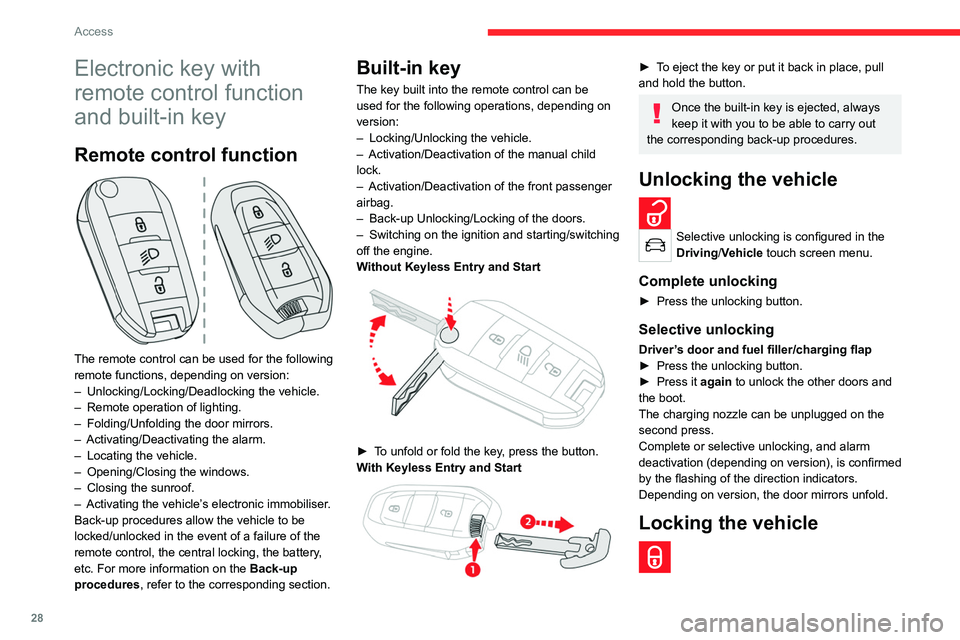
W
ithout Keyless Entry and Start
► To unfold or fold the key, press the button.
With Keyless Entry and Start
► To eject the key or put it back in place, pull
and hold the button.
Once the built-in key is ejected, always
keep it with you to be able to carry out
the corresponding back-up procedures.
Unlocking the vehicle
Selective unlocking is configured in the
Driving/Vehicle touch screen menu.
Complete unlocking
► Press the unlocking button.
Selective unlocking
Driver’s door and fuel filler/charging flap
► Press the unlocking button.
►
Press it
again to unlock the other doors and
the boot.
The charging nozzle can be unplugged on the
second press.
Complete or selective unlocking, and alarm
deactivation (depending on version), is confirmed
by the flashing of the direction indicators.
Depending on version, the door mirrors unfold.
Locking the vehicle
Page 35 of 260

33
Access
2If the vehicle is fitted with an alarm, it will
not be activated when locking with the
key.
If the alarm is activated, the siren sounds
when the door is opened; switch on the
ignition to stop it.
Central locking not
functioning
Use these procedures in the following cases:
– Central locking malfunction.
–
Battery disconnected or discharged.
In the event of a malfunction of the
central locking system, the battery must
be disconnected to ensure that the vehicle is
locked fully.
Front left-hand door
► Insert the key into the lock and turn it towards
the front or rear of the vehicle to lock and unlock
the door
.
Other doors
Unlocking
► Pull the interior door opening control.
Locking
► Open the doors.
► For the rear doors, check that the child lock
is not on.
Refer to the corresponding section.
►
Gently insert the key into the latch located in
the door lock, then turn the latch an eighth of a
turn towards the outside of the door
.
►
Close the doors and check from the outside
that the vehicle is locked.
Changing the battery
If the battery is flat, this warning lamp
comes on, accompanied by an audible
signal and the display of a message.
Battery type: CR2032/3 volts.
Without Keyless Entry and Start
With Keyless Entry and Start
► Unclip the cover by inserting a small
screwdriver in the slot and lift the cover .
►
Remove the flat battery from its housing.
►
Put the new battery in place, respecting the
polarity
. Start by inserting it into the contacts
Page 36 of 260

34
Access
located in the corner, then clip the cover onto
the unit.
►
Reinitialise the remote control.
For more information on Reinitialising the
remote control
, refer to the corresponding
section.
Do not throw remote control batteries
away, as they contain metals that are
harmful to the environment. Take them to an
approved disposal point.
This equipment contains a button type battery.
Do not swallow the battery. Risk of chemical
burns!
Swallowing the battery can cause serious
internal burning in only 2 hours and can be
fatal.
If batteries have been swallowed or inserted
into a part of the body, seek immediate
medical advice.
Keep new and used batteries out of the reach
of children.
If the battery compartment does not close
properly, stop using the product and keep it
out of the reach of children.
Risk of explosion if the battery is
replaced with an incorrect type!
Replace the battery with the same type.
Risk of explosion or leaking of
inflammable liquid or gas!
Do not use in/store in/place in an environment
where the temperature is extremely high or
where the pressure is extremely low due to
very high altitude.
Do not try to burn, crush or cut a used battery.
Reinitialising the remote
control
Following replacement of the battery or in
the event of a fault, it may be necessary to
reinitialise the remote control.
To reinitialise the remote control, visit a
CITROËN dealer or a qualified workshop.
Without Keyless Entry and Start
► Switch the ignition off.
► T urn the key to position 2 (Ignition on) .►
Immediately press the closed padlock button
for a few seconds.
►
Switch off the ignition and remove the key
from the ignition switch.
The remote control is now fully operational
again.
With Keyless Entry and Start
► Insert the mechanical key (incorporated into
the remote control) into the lock to open the
vehicle.
►
Place the electronic key against the back-up
reader on the steering column and hold it there
until the ignition is switched on.
►
W
ith a manual gearbox, place the gear lever
in neutral then fully depress the clutch pedal.
►
W
ith an automatic gearbox or drive
selector, while in mode
P
, depress the brake
pedal.
►
Switch on the ignition by pressing the
"
START/STOP" button.
Page 41 of 260

39
Access
2Ensure that any luggage or accessories
carried on the roof bars do not interfere
with the movement of the sunroof.
Do not place heavy loads on the movable
glass panel of the sunroof.
If the sunroof is wet, following a shower
or washing the vehicle, wait until it is
completely dry before opening.
Do not operate the sunroof if it is covered by
snow or ice - risk of damage!
Use only plastic scrapers to remove snow or
ice from the sunroof.
Regularly check the condition of the
sunroof seals (e.g. presence of dust,
dead leaves).
If using a car wash, check first that the roof is
correctly closed and keep the high-pressure
jet at least 30 centimetres from the seals.
Never leave the vehicle with the sunroof
open.
Operation
When opening the sunroof fully, the movable
glass moves to a partially open position, then
slides over the roof. Any intermediate position is
possible.
Before operating the sunroof control
button, ensure that no object or person
might prevent the movement.
Pay particular attention to children when
operating the sunroof.
If something is trapped when operating the
sunroof, reverse the movement of the sunroof
by pressing the control button in question.
The driver must ensure that passengers use
the sunroof correctly.
Any manual intervention on the position of
the sunroof may disturb the anti-pinch device.
Perform a reinitialisation.
Anti-pinch system
If the sunroof encounters an obstacle when
closing, the movement is automatically reversed.
Opening/closing the sunroof
► To open the sunroof, use the part of the
button located towards the rear.
►
T
o close the sunroof, use the part of the
button located towards the front.
Operating the button
► Pressing the button beyond its point of
resistance opens or closes the sunroof fully .
►
Pressing the button again stops the
movement in progress.
►
By keeping the button pressed (without going
beyond the point of resistance), the movement of
the glass stops when this button is released.
► When the sunroof is closed: pressing once
without passing the point of resistance moves it
to the partially open position.
►
When the sunroof is partially open: pressing
once on the front part of the button, without
going beyond the point of resistance, closes it
completely
.
The sunroof and windows can be closed by holding down the remote control
locking button.
Opening/closing the blind
► To open the blind, pull its handle backwards
until the desired position is reached.
►
T
o close the blind, push its handle forwards
until the desired position is reached.
Reinitialisation
Reinitialisation is required after reconnecting the
battery, or if the sunroof malfunctions or moves
in a jerky manner.
►
Check that nothing is affecting the movement
of the sunroof and that the seals are clean.
► With the ignition on, press and hold
the front part of the button to close the
sunroof.
The sunroof closes step by step. When fully
closed, it performs a slight opening/closing
movement.
►
Release the button 1 second after the end of
the movement.
Page 78 of 260
76
Safety
seats suited to their weight, on seats fitted with
a seat belt or ISOFIX mountings.
–
Statistically
, the safest seats in your
vehicle for carrying children are the rear
seats.
–
Children weighing less than 9 kg must
travel in the "rearward facing" position,
whether in the front or rear of the vehicle.
It is recommended that children travel
on the rear seats of the vehicle:
–
‘rearward facing’ up to the age of 3,
–
‘forward facing’ over the age of 3.
Make sure that the seat belt is correctly
positioned and tightened.
For child seats with a support leg, ensure that
the support leg is in firm and steady contact
with the floor.
Advice
An incorrectly installed child seat compromises the child's safety in the
event of an accident.
Ensure that there is no seat belt or seat belt
buckle under the child seat, as this could
destabilise it.
Remember to fasten the seat belts or the
harness of child seats, keeping the slack
relative to the child's body to a minimum,
even for short journeys.
When installing a child seat using the seat
belt, ensure that the seat belt is tightened
correctly on the child seat and that it secures
the child seat firmly on the seat of the vehicle.
If the passenger seat is adjustable, move it
forwards if necessary.
Remove the head restraint before
installing a child seat with a backrest on a
passenger seat.
Ensure that the head restraint is stored or
attached securely to prevent it from being
thrown around the vehicle in the event of
sharp braking. Refit the head restraint once
the child seat has been removed.
Installing a booster seat
The chest part of the seat belt must be
positioned on the child's shoulder without
touching the neck.
Ensure that the lap part of the seat belt
passes correctly over the child's thighs.
Use a booster seat with backrest, equipped
with a belt guide at shoulder level.
Additional protections
To prevent accidental opening of the
doors and rear windows, use the "Child lock".
Take care not to open the rear windows by
more than one third.
To protect young children from the rays of the
sun, fit side blinds on the rear windows.
As a safety precaution, do not leave:
– a child alone and unattended in a vehicle,
– a child or an animal in a vehicle which is
exposed to the sun, with the windows closed,
–
the keys within reach of children inside the
vehicle.
Child seat at the rear
Forward-facing or rearward-facing
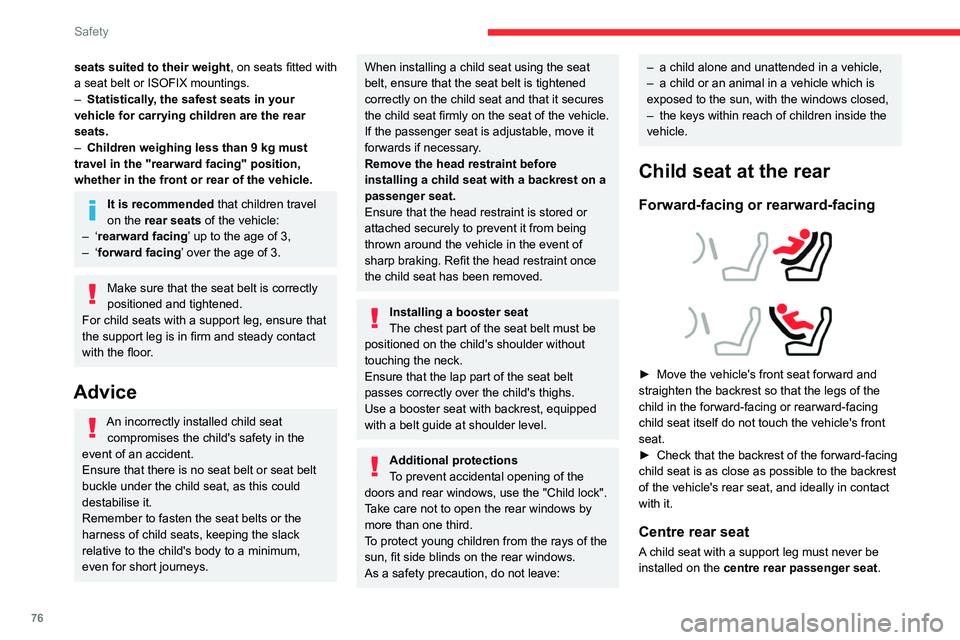
► Move the vehicle's front seat forward and
straighten the backrest so that the legs of the
child in the forward-facing or rearward-facing
child seat itself do not touch the vehicle's front
seat.
►
Check that the backrest of the forward-facing
child seat is as close as possible to the backrest
of the vehicle's rear seat, and ideally in contact
with it.
Centre rear seat
A child seat with a support leg must never be
installed on the centre rear passenger seat .
Page 85 of 260
83
Safety
5and universally approved "rearward facing"
and/or "forward facing" (U) for all sizes and
weight groups.
Seat position suitable for the installation
of a child seat secured using the seat belt
and universally approved "forward facing"
(UF) for groups 1, 2 & 3 only.
Seat position authorised for the
installation of an i-Size child seat.
Seat position not suitable for the
installation of a child seat with support
leg.
Presence of a Top Tether anchorage
point at the rear of the backrest,
authorising the installation of a universal ISOFIX
child seat.
"Rearward facing" ISOFIX child seat:
–
R1
: ISOFIX child seat for a baby.
–
R2
: ISOFIX reduced size child seat.
–
R3
: ISOFIX large size child seat.
"Forward facing" ISOFIX child seat:
–
F2X
: ISOFIX child seat for toddlers.
–
F2
: ISOFIX reduced height child seat.
–
F3
: ISOFIX full height child seat.
Booster child seat:
–
B2
: reduced width booster seat.
–
B3
: full width booster seat.
Seat position where the installation of an
ISOFIX child seat is forbidden. For seat adjustments, refer to the table
"Installing universal, ISOFIX and i-Size child
seats
".
Manual child lock
The system prevents a rear door from being
opened using its interior handle.
The control is located on the edge of each rear
door (marked by a label on the bodywork).
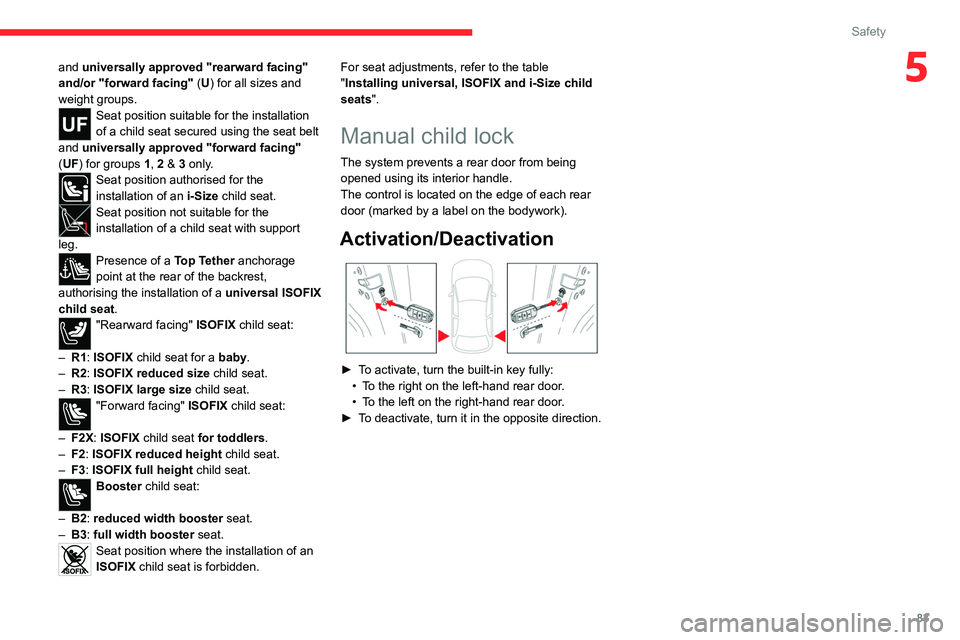
Activation/Deactivation
► To activate, turn the built-in key fully:
• T o the right on the left-hand rear door.
•
T
o the left on the right-hand rear door.
►
T
o deactivate, turn it in the opposite direction.
Page 163 of 260

161
Practical information
7Precautions for use
AdBlue® is a urea-based solution. This fluid is
non-flammable, colourless and odourless (when
kept in a cool place).
In the event of contact with the skin, wash the
affected area with soap and running water. In the
event of contact with the eyes, immediately rinse
the eyes with large amounts of water or with an
eye wash solution for at least 15 minutes. Seek
medical attention if you feel a persistent burning
sensation or irritation.
If swallowed, immediately wash out the mouth
with clean water and then drink plenty of water.
In certain conditions (high temperature, for
example), the risk of release of ammonia cannot
be excluded: do not inhale the fluid. Ammonia
vapours have an irritant effect on mucous
membranes (eyes, nose and throat).
Store AdBlue® out of the reach of
children, in its original container.
Procedure
Before starting the top-up procedure, ensure that
the vehicle is parked on a flat and level surface.
In wintry conditions, ensure that the temperature
of the vehicle is above -11°C. Otherwise the
AdBlue
® may be frozen and so cannot be poured
into the tank. Park the vehicle in a warmer area
for a few hours to allow the top-up to be carried
out.
Never pour the AdBlue® into the Diesel
fuel tank.
If any AdBlue® is splashed, or if there are
any spillages on the bodywork, rinse
immediately with cold water or wipe with a
damp cloth.
If the fluid has crystallised, clean it off using a
sponge and hot water.
Important: in the event of a top-up after
a breakdown because of a lack of
AdBlue, it is essential to wait around 5
minutes before switching on the ignition,
without opening the driver’s door,
unlocking the vehicle, inserting the key
into the ignition switch, or bringing the
key for the "Keyless Entry and Start"
system into the passenger compartment.
Switch on the ignition, then wait for 10
seconds before starting the engine.
►
Switch off the ignition and remove the key
from the switch to switch off the engine.
or
►
With Keyless Entry and Start, press the
"
START/STOP" button to switch off the engine.
► Turn the blue cap of the AdBlue® tank anti-
clockwise and remove it.
►
With a container of
AdBlue
®: after checking
the expiry date, read the instructions on the
label carefully before pouring the contents of the
container into the vehicle's AdBlue tank.
►
With an
AdBlue® pump: insert the nozzle and
fill the tank until the nozzle automatically cuts
out.
In order not to overfill the AdBlue® tank:
–
Add between 10 and 13 litres using
AdBlue® containers.
–
Stop after the nozzle’ s first automatic cut-
out, if you are refilling at a service station.
The system only registers AdBlue
® top-ups of
5
litres or more.
If the AdBlue® tank is completely empty
– which is confirmed by the message
"Top up
AdBlue: Starting impossible" – it is
essential to add at least 5 litres.
Page 240 of 260

238
Alphabetical index
Charging connector (Electric) 140, 145,
147–148
Charging flap (Electric)
140, 145, 147–148
Charging system (Electric)
5, 8, 26, 138, 156
Charging the traction battery
(Electric)
21, 138, 142, 145, 147–148
CHECK
22
Checking the engine oil level
19
Checking the levels
156–157
Checking tyre pressures
(using the kit)
166, 168
Checks
155, 158–160
Checks, routine
158–159
Child lock
83
Children
72, 78–80
Children (safety)
83
Child seats
72, 75–78
Child seats, conventional
78, 81–82
Child seats, i-Size
80–82
Child seats, ISOFIX
78–79, 81–82
Cleaning (advice)
139, 162–163
Closing the boot
31, 35
Closing the doors
31, 35
Collision Risk Alert
122–123
Configuration, vehicle
25–26
Connected applications
221
ConnectedCAM Citroën™
100
Connection, Bluetooth
201–202,
221–222, 226–227
Connection, Wi-Fi network
222
Connectivity
220
Consumption figures
26Container, AdBlue® 160–161
Control, emergency boot release
35
Control, emergency door
32–33
Control, heated seats
42, 45
Controls, steering mounted
93–94
Control stalk, lighting
57–58
Control stalk, wipers
62–63
Control unit
141–142
Courtesy lamps
55
Cruise control
104–105, 107–108
Cruise control, adaptive
104–105, 109
Cruise control by speed limit
recognition
104–105
D
DAB (Digital Audio Broadcasting) -
Digital radio
199–200, 224
Date (setting)
206, 229
Daytime running lamps
58, 173
Deactivating the passenger airbag
74, 77
Deadlocking
29, 31
Deferred charging
27
Deferred charging
(Electric)
26–27, 140, 145, 148
Defrosting
43, 50
Defrosting, front
50
Demisting
43, 50
Demisting, front
50
Demisting, rear
51
Demisting, rear screen
51
Dials and gauges 9–10
Digital instrument panel
10
Dimensions
185
Dipstick
19, 156
Direction indicators
58, 173–174
Display, head-up
11
Display screen, instrument panel
9
Domestic charging
(Electric)
142, 147–148, 184
Doors
35
Drive Assist Plus
109
Driver’s attention warning
125
Drive selector (Electric)
94
Driving
84–85
Driving aids camera (warnings)
101
Driving aids (recommendations)
101
Driving economically
7
Driving modes
95–96
Dynamic stability control (DSC)
70
E
EBFD 69
Eco-driving (advice)
7
ECO mode
96
Economy mode
153
Electric motor
5, 8, 22, 26, 138,
150, 156, 175, 178, 184
Electric windows
37
Electronic brake force distribution (EBFD)
69
Emergency braking assistance (EBA)
70