ESP Citroen C4 CACTUS 2014 1.G User Guide
[x] Cancel search | Manufacturer: CITROEN, Model Year: 2014, Model line: C4 CACTUS, Model: Citroen C4 CACTUS 2014 1.GPages: 331, PDF Size: 9 MB
Page 57 of 331

55
E3_en_Chap02_ouvertures_ed01-2014
Front electric window controls
The electric window switches
remain operational for approximately
45 seconds after the ignition is
switched off or until a front door
is opened. If, during this period of
45
seconds, you open a door while
operating a window, the window stops.
The window switch will then only be
operative after the ignition is switched
on again.
1.
F
ront left electric window switch.
2.
F
ront right electric window switch.
F
P
ress the switch to open the window.
F
P
ull the switch to close the window.
The window stops when you release the switch. Always remove the key from the ignition
when leaving the vehicle, even for a
short time.
In the event of contact during operation
of the windows, reverse the movement
of the window. To do this, press the
corresponding switch.
When the driver operates the
passenger electric window switch, they
should ensure that no one is preventing
correct closing of the window.
The driver should ensure that the
passenger uses the electric window
c o r r e c t l y.
Be particularly aware of children when
operating the windows.
2
Access
Page 64 of 331
62
E3_en_Chap03_confort_ed01-2014
Mirrors
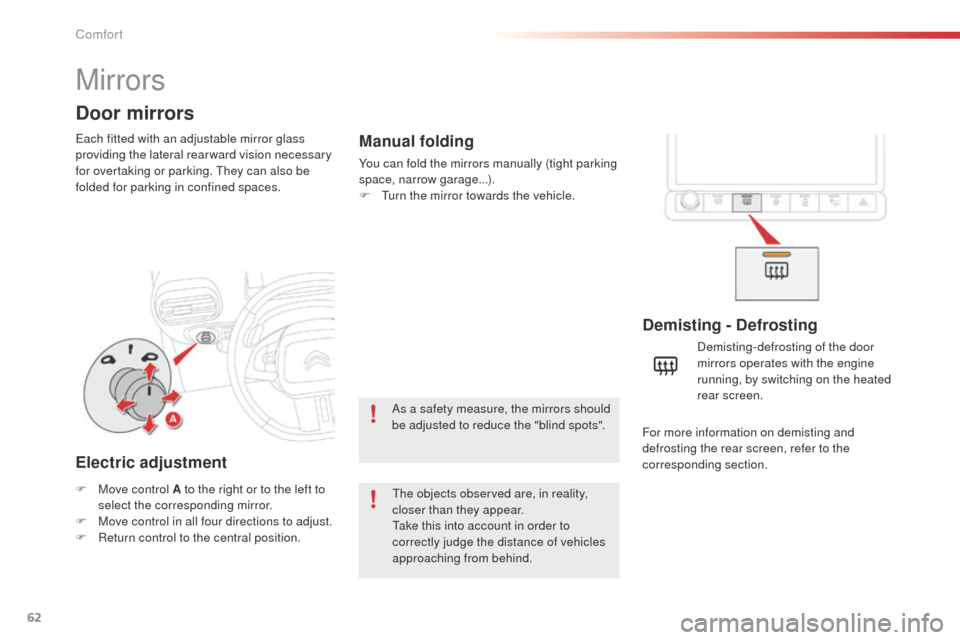
Each fitted with an adjustable mirror glass
providing the lateral rear ward vision necessary
for overtaking or parking. They can also be
folded for parking in confined spaces.
Door mirrors
Demisting - Defrosting
F Move control A to the right or to the left to select the corresponding mirror.
F
M
ove control in all four directions to adjust.
F
R
eturn control to the central position. Demisting-defrosting of the door
mirrors operates with the engine
running, by switching on the heated
rear screen.
Electric adjustment
The objects observed are, in reality,
closer than they appear.
Take this into account in order to
correctly judge the distance of vehicles
approaching from behind.
Manual folding
You can fold the mirrors manually (tight parking
space, narrow garage...).
F
T
urn the mirror towards the vehicle.
As a safety measure, the mirrors should
be adjusted to reduce the "blind spots". For more information on demisting and
defrosting the rear screen, refer to the
corresponding section.
Comfort
Page 68 of 331
66
E3_en_Chap03_confort_ed01-2014
In order for these systems to be fully effective, follow the operation and maintenance
guidelines below:
F
T
o obtain an even air distribution, take care not to obstruct the exterior air intake grilles
located at the base of the windscreen, the nozzles, the vents and the air outlets, as well
as the air extractor located in the boot.
F
D
o not cover the sunshine sensor, located on the dashboard; this is used for regulation
of the air conditioning system.
F
O
perate the air conditioning system for at least 5 to 10 minutes, once or twice a month
to keep it in per fect working order.
F
E
nsure that the passenger compartment filter is in good condition and have the filter
elements replaced regularly.
W
e recommend the use of a combined passenger compartment filter. Thanks to its
special active additive, it contributes to the purification of the air breathed by the
occupants and the cleanliness of the passenger compartment (reduction of allergic
symptoms, bad odours and greasy deposits).
F
T
o ensure correct operation of the air conditioning system, you are also advised to have
it checked regularly as recommended in the maintenance and warranty guide.
F
I
f the system does not produce cold air, switch it off and contact a CITROËN dealer or a
qualified workshop.
Recommendations for ventilation and air conditioning
If after an extended stop in sunshine,
the interior temperature is very high, first
ventilate the passenger compartment for
a few moments.
Put the air flow control at a setting high
enough to quickly change the air in the
passenger compartment.
The air conditioning system does not
contain chlorine and does not present
any danger to the ozone layer.
The condensation created by the air
conditioning results in a discharge
of water under the vehicle which is
perfectly normal.
When towing the maximum load on a steep gradient in high temperatures, switching off the
air conditioning increases the available engine power and so improves the towing ability.
Stop & Start
The heating and air conditioning
systems only work when the engine
is running. To maintain a comfortable
temperature in the passenger
compartment, you can temporarily
deactivate the Stop & Start system (see
the corresponding section).
Comfort
Page 73 of 331
71
E3_en_Chap03_confort_ed01-2014
Automatic air conditioning
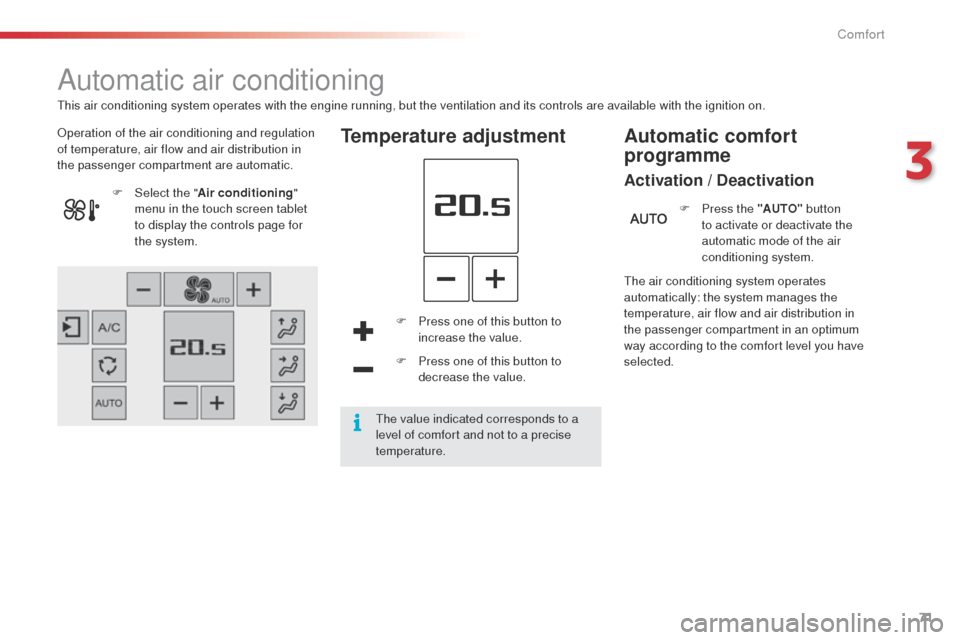
Operation of the air conditioning and regulation
of temperature, air flow and air distribution in
the passenger compartment are automatic.Temperature adjustment
F Press one of this button to increase the value.
F
P
ress one of this button to
decrease the value.
F
Sel
ect the "
Air conditioning "
menu in the touch screen tablet
to display the controls page for
the system.
The air conditioning system operates
automatically: the system manages the
temperature, air flow and air distribution in
the passenger compartment in an optimum
way according to the comfort level you have
selected.F
P
ress the "AUTO"
button
to activate or deactivate the
automatic mode of the air
conditioning system.
Automatic comfort
programme
Activation / Deactivation
This air conditioning system operates with the engine running, but the ventilation and its controls are available with the ignition on.
The value indicated corresponds to a
level of comfort and not to a precise
temperature.
3
Comfort
Page 91 of 331
89
E3_en_Chap05_conduite_ed01-2014
Operation
Gear shift indicator
System which reduces fuel consumption by advising the driver to change up, on vehicles fitted with a manual gearbox.The system adapts its gear change
recommendation according to the
driving conditions (slope, load,
...) and
the demands of the driver (power,
acceleration, braking,
...).
The system never suggests:
-
e
ngaging first gear,
-
enga
ging reverse gear,
-
enga
ging a lower gear.
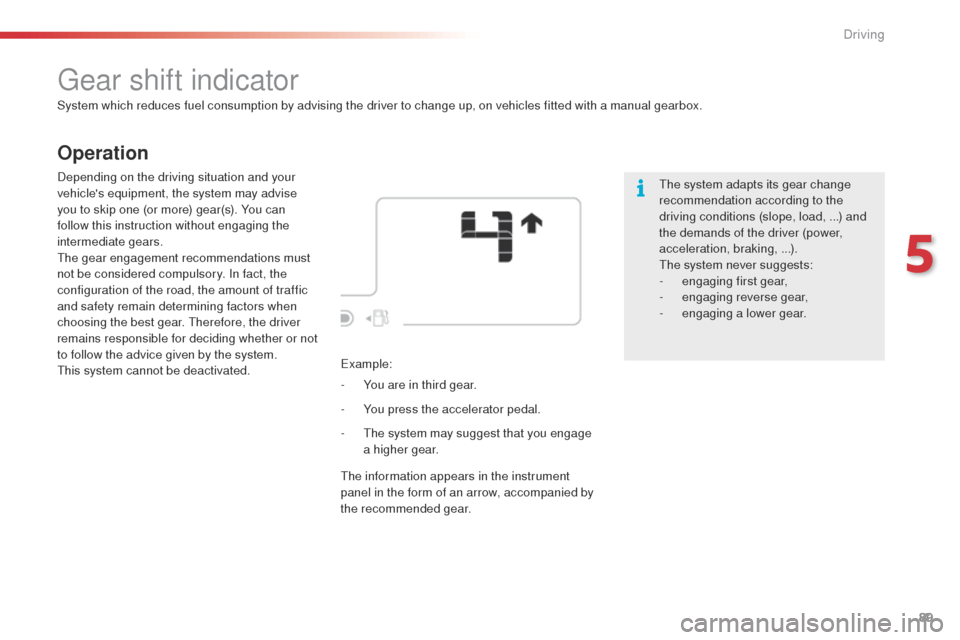
Example:
-
Y
ou are in third gear.
Depending on the driving situation and your
vehicle's equipment, the system may advise
you to skip one (or more) gear(s). You can
follow this instruction without engaging the
intermediate gears.
The gear engagement recommendations must
not be considered compulsory. In fact, the
configuration of the road, the amount of traffic
and safety remain determining factors when
choosing the best gear. Therefore, the driver
remains responsible for deciding whether or not
to follow the advice given by the system.
This system cannot be deactivated.
-
Y
ou press the accelerator pedal.
-
T
he system may suggest that you engage
a higher gear.
The information appears in the instrument
panel in the form of an arrow, accompanied by
the recommended gear.
5
Driving
Page 100 of 331
98
E3_en_Chap05_conduite_ed01-2014
Steering mounted controls
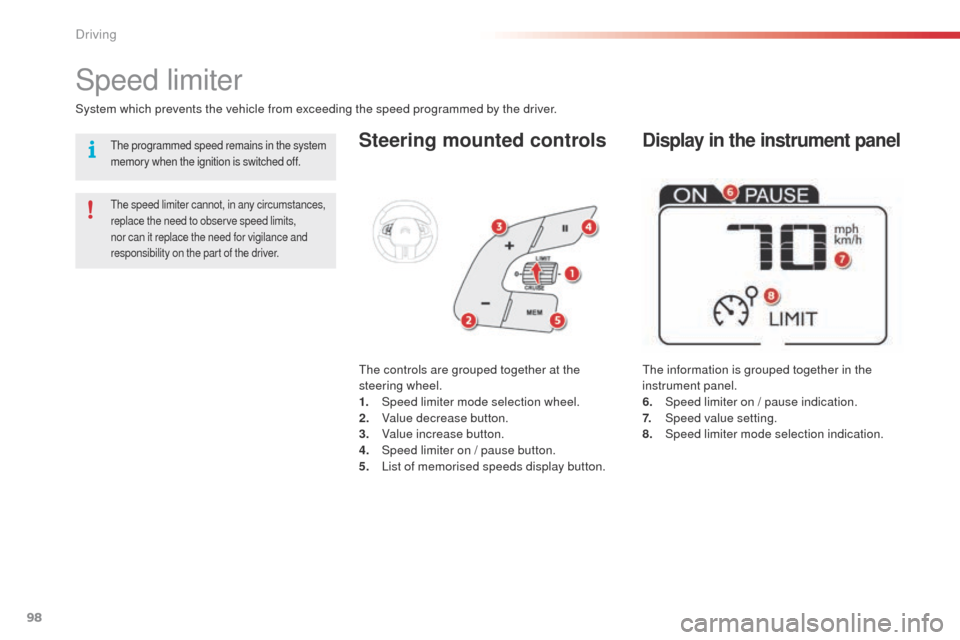
The information is grouped together in the
instrument panel.
6.
S
peed limiter on / pause indication.
7.
Spe
ed value setting.
8.
Spe
ed limiter mode selection indication.
Speed limiter
System which prevents the vehicle from exceeding the speed programmed by the driver.
The speed limiter cannot, in any circumstances,
replace the need to observe speed limits,
nor can it replace the need for vigilance and
responsibility on the part of the driver.
The controls are grouped together at the
steering wheel.
1.
Spe
ed limiter mode selection wheel.
2.
V
alue decrease button.
3.
V
alue increase button.
4.
S
peed limiter on / pause button.
5.
L
ist of memorised speeds display button.
Display in the instrument panelThe programmed speed remains in the system
memory when the ignition is switched off.
Driving
Page 103 of 331
101
E3_en_Chap05_conduite_ed01-2014
Steering mounted controls
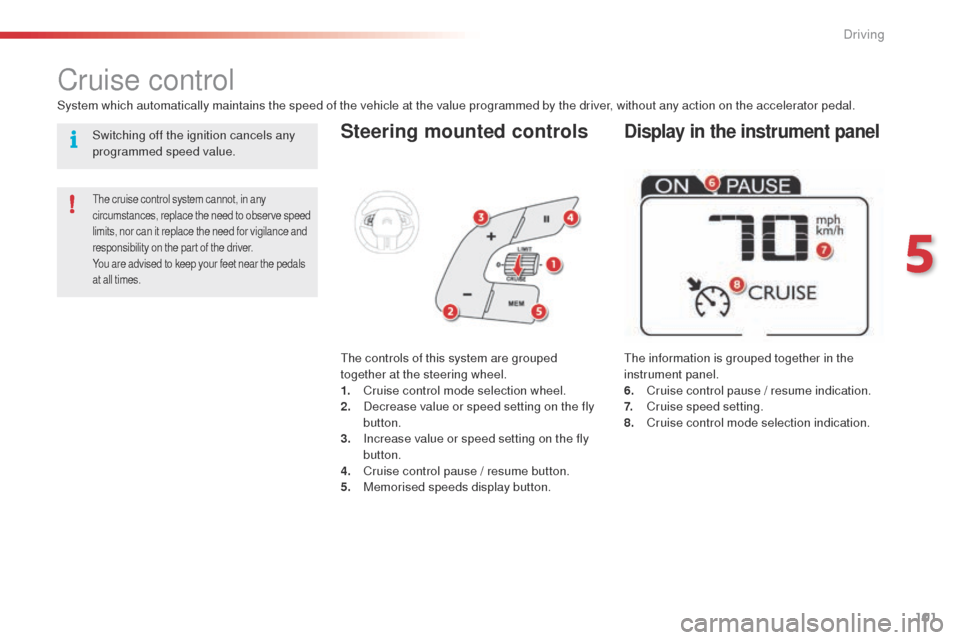
The information is grouped together in the
instrument panel.
6.
C
ruise control pause / resume indication.
7.
C
ruise speed setting.
8.
C
ruise control mode selection indication.
Cruise control
System which automatically maintains the speed of the vehicle at the value programmed by the driver, without any action on the accelerator pedal.
The cruise control system cannot, in any
circumstances, replace the need to observe speed
limits, nor can it replace the need for vigilance and
responsibility on the part of the driver.
You are advised to keep your feet near the pedals
at all times.
The controls of this system are grouped
together at the steering wheel.
1.
C
ruise control mode selection wheel.
2.
D
ecrease value or speed setting on the fly
button.
3.
I
ncrease value or speed setting on the fly
button.
4.
C
ruise control pause / resume button.
5.
M
emorised speeds display button.
Display in the instrument panelSwitching off the ignition cancels any
programmed speed value.
5
Driving
Page 105 of 331
103
E3_en_Chap05_conduite_ed01-2014
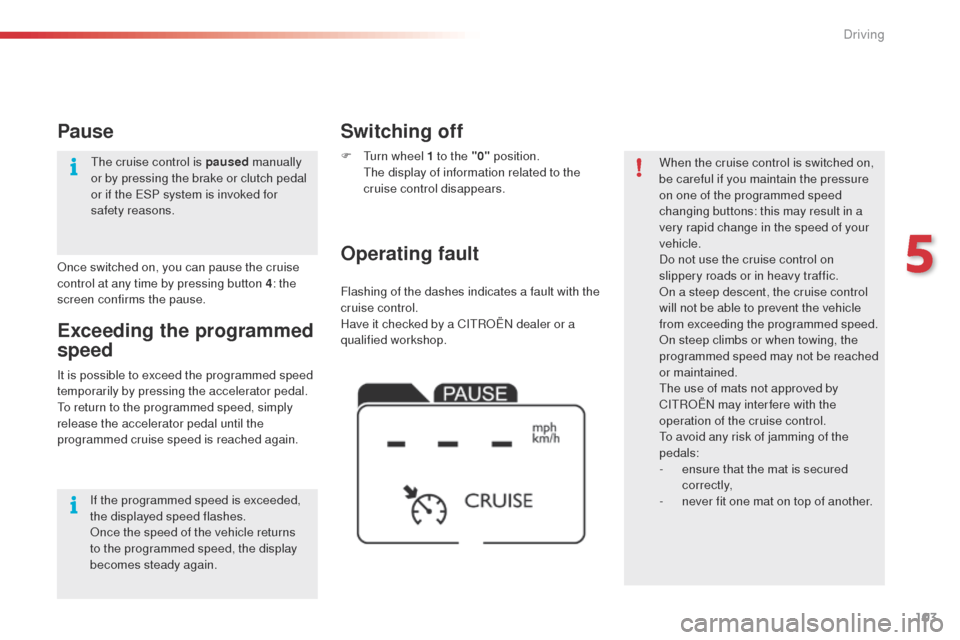
Flashing of the dashes indicates a fault with the
cruise control.
Have it checked by a CITROËN dealer or a
qualified workshop.
Operating fault Switching off
F Turn wheel 1 to the "0" position. T
he display of information related to the
cruise control disappears. When the cruise control is switched on,
be careful if you maintain the pressure
on one of the programmed speed
changing buttons: this may result in a
very rapid change in the speed of your
vehicle.
Do not use the cruise control on
slippery roads or in heavy traffic.
On a steep descent, the cruise control
will not be able to prevent the vehicle
from exceeding the programmed speed.
On steep climbs or when towing, the
programmed speed may not be reached
or maintained.
The use of mats not approved by
CITROËN may inter fere with the
operation of the cruise control.
To avoid any risk of jamming of the
pedals:
-
e
nsure that the mat is secured
c o r r e c t l y,
-
n
ever fit one mat on top of another.
It is possible to exceed the programmed speed
temporarily by pressing the accelerator pedal.
To return to the programmed speed, simply
release the accelerator pedal until the
programmed cruise speed is reached again.
Exceeding the programmed
speed
Once switched on, you can pause the cruise
control at any time by pressing button 4: the
screen confirms the pause.
Pause
If the programmed speed is exceeded,
the displayed speed flashes.
Once the speed of the vehicle returns
to the programmed speed, the display
becomes steady again. The cruise control is paused
manually
or by pressing the brake or clutch pedal
or if the ESP system is invoked for
safety reasons.
5
Driving
Page 107 of 331

105
E3_en_Chap05_conduite_ed01-2014
This system indicates the proximity of an
obstacle (person, vehicle, tree, gate, etc.)
which comes within the field of detection of
sensors located in the bumper.
Certain types of obstacle (stake, roadworks
cone, etc.) detected initially will no longer be
detected at the end of the manoeuvre due to
the presence of blind spots.
Parking sensors
This function cannot, in any
circumstances, take the place of the
vigilance and responsibility of the driver.The system is switched on by engaging reverse
gear. This is accompanied by an audible signal.
The system is switched off when you come out
of reverse gear.
Audible assistance
The proximity information is given by an
intermittent audible signal, the frequency of which
increases as the vehicle approaches the obstacle.
The sound emitted by the speaker (right or
left) indicates the side on which the obstacle is
located.
When the distance between the vehicle and
the obstacle becomes less than approximately
thirty centimetres, the audible signal becomes
continuous.
Rear parking sensors
Visual assistance
This supplements the audible signal by
displaying bars in the screen or the instrument
panel which move progressively nearer to
the vehicle. When the obstacle is near, the
"Danger" symbol is displayed.
5
Driving
Page 109 of 331

107
E3_en_Chap05_conduite_ed01-2014
Reversing camera
Clean the reversing camera regularly
using a soft, dry cloth.
The reversing camera is activated automatically
when reverse gear is engaged.
The image is displayed in the touch screen tablet.
The space between the blue lines represents
the width of your vehicle except for the door
mirrors.
The blue lines represent the general direction
of the vehicle.
The red lines represent a distance of about
30 cm beyond the edge of your vehicle's
rear bumper. The audible signal becomes
continuous from this limit.
The green lines represent distances of about 1
and 2 metres beyond the edge of your vehicle's
rear bumper.
The turquoise blue curves represent the
maximum turning circle.
The reversing camera cannot in any
circumstances be a substitute for the
vigilance and responsibility of the driver. Opening the tailgate causes the display
to disappear.
The reversing camera function may be
completed with parking sensors. High pressure jet washing
When washing your vehicle, do not direct the
lance within 30 cm of the camera lens.
5
Driving