tow CITROEN C4 CACTUS 2023 Owner's Manual
[x] Cancel search | Manufacturer: CITROEN, Model Year: 2023, Model line: C4 CACTUS, Model: CITROEN C4 CACTUS 2023Pages: 196, PDF Size: 6.12 MB
Page 85 of 196
83
Driving
6Adjusting the limit speed setting
You do not have to switch the speed limiter on in
order to set the speed.
To modify the limit speed setting based on the
vehicle’s current speed:
►
Briefly press button
2 or 3 to change the
value in steps of +
or - 1 mph (1.6 km/h).
►
Press and hold button
2
or 3 to change the
value in steps of +
or - 5 mph (8 km/h).
To modify the cruise speed setting based on the speed suggested by the Speed Limit Recognition
and Recommendation, as shown on the
instrument panel:
►
Press button
5 once; a message is displayed
to confirm the memorisation request.
►
Press button
5 again to save the suggested
speed.
The speed is immediately shown on the
instrument panel as the new speed setting.
Temporarily exceeding the
speed setting
► Press the accelerator pedal down fully .
The speed limiter is deactivated temporarily and
the displayed speed setting flashes.
Release the accelerator pedal to return to below
the programmed speed.
When the limit speed is exceeded but this is not
due to action by the driver (in case of a steep
slope, for example), an audible signal triggers
immediately.
On a steep descent or in the event of
sharp acceleration, the speed limiter will
not be able to prevent the vehicle from
exceeding the speed setting.
Brake if necessary to control the speed of
your vehicle.
Once the speed of the vehicle returns to the
programmed setting, the speed limiter functions
again: the display of the speed setting becomes
fixed again.
Switching off
► Turn the thumbwheel 1 to the "0" position:
the display of information on the speed limiter
disappears.
Malfunction
The display of dashes (flashing then fixed)
indicates a fault with the speed limiter.
Have it checked by a CITROËN dealer or a
qualified workshop.
Cruise control - particular
recommendations
For the safety of everyone, only use the
cruise control where the driving
conditions allow running at a constant speed
and keeping an adequate safety distance.
Remain vigilant when the cruise control is
activated. If you hold one of the speed setting
modification buttons, a very rapid change in
the speed of your vehicle may occur.
When descending a steep hill , the cruise
control system cannot prevent the vehicle
from exceeding the set speed. Brake if
necessary to control the speed of your
vehicle.
On steep climbs or when towing, the set
speed may not be reached or maintained.
Exceeding the programmed speed
setting
You can temporarily exceed the speed
setting by pressing the accelerator pedal (the
programmed speed flashes).
To return to the speed setting, release the
accelerator pedal (when the set speed is
reached again, the displayed speed stops
flashing).
Operating limits
Never use the system in the following
situations:
Page 88 of 196
86
Driving
Where the speed of your vehicle is too
high approaching another vehicle, the
first level of alert may not be displayed: the
level 2 alert may be displayed directly.
Important: the level 1 alert is not displayed
when there is a stationary obstacle or when
the "Close" trigger threshold has been
selected.
Modifying the alert trigger threshold
This threshold determines how you wish to be
warned of the presence of a moving or stationary
vehicle in front of you, or a pedestrian present in
your traffic lane.
The current threshold can be modified via the
vehicle configuration menu.
You can select one of three pre-defined
thresholds:
– "Distant",
– "Normal",
– "Close".
The last threshold selected is memorised when
the ignition is switched off.
Intelligent emergency
braking assistance
If the driver brakes, but not sufficiently to avoid a
collision, this system will supplement the braking,
within the limits of the laws of physics.
This assistance will only be provided if you press
the brake pedal.
– warns the driver that their vehicle is at risk of
collision with the vehicle in front or a pedestrian.
–
reduces the vehicle's speed to avoid a
collision or limit its severity
.
This system is comprised of three functions:
–
Collision
Risk Alert.
–
Intelligent emergency braking assistance.
–
Active Safety Brake (automatic emergency
braking).
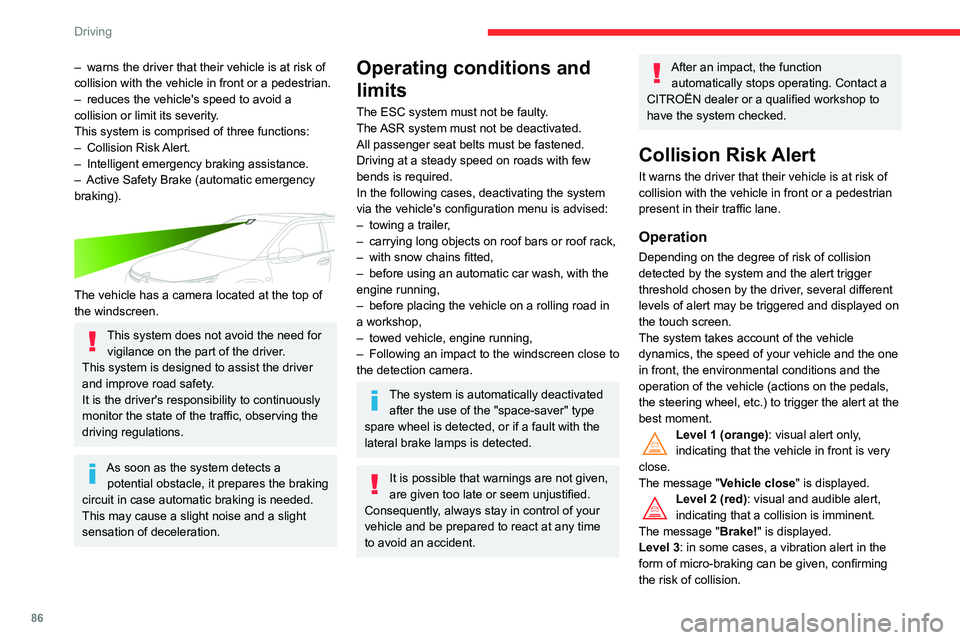
The vehicle has a camera located at the top of
the windscreen.
This system does not avoid the need for vigilance on the part of the driver.
This system is designed to assist the driver
and improve road safety.
It is the driver's responsibility to continuously
monitor the state of the traffic, observing the
driving regulations.
As soon as the system detects a potential obstacle, it prepares the braking
circuit in case automatic braking is needed.
This may cause a slight noise and a slight
sensation of deceleration.
Operating conditions and
limits
The ESC system must not be faulty.
The ASR system must not be deactivated.
All passenger seat belts must be fastened.
Driving at a steady speed on roads with few
bends is required.
In the following cases, deactivating the system
via the vehicle's configuration menu is advised:
–
towing a trailer
,
–
carrying long objects on roof bars or roof rack,
–
with snow chains fitted,
–
before using an automatic car wash, with the
engine running,
–
before placing the vehicle on a rolling road in
a workshop,
–
towed vehicle, engine running,
–
Following
an impact to the windscreen close to
the detection camera.
The system is automatically deactivated after the use of the "space-saver" type
spare wheel is detected, or if a fault with the
lateral brake lamps is detected.
It is possible that warnings are not given,
are given too late or seem unjustified.
Consequently, always stay in control of your
vehicle and be prepared to react at any time
to avoid an accident.
After an impact, the function automatically stops operating. Contact a
CITROËN dealer or a qualified workshop to
have the system checked.
Collision Risk Alert
It warns the driver that their vehicle is at risk of
collision with the vehicle in front or a pedestrian
present in their traffic lane.
Operation
Depending on the degree of risk of collision
detected by the system and the alert trigger
threshold chosen by the driver, several different
levels of alert may be triggered and displayed on
the touch screen.
The system takes account of the vehicle
dynamics, the speed of your vehicle and the one
in front, the environmental conditions and the
operation of the vehicle (actions on the pedals,
the steering wheel, etc.) to trigger the alert at the
best moment.
Level 1 (orange): visual alert only,
indicating that the vehicle in front is very
close.
The message
"Vehicle close" is displayed.
Level 2 (red): visual and audible alert,
indicating that a collision is imminent.
The message "Brake! " is displayed.
Level 3: in some cases, a vibration alert in the
form of micro-braking can be given, confirming
the risk of collision.
Page 92 of 196
90
Driving
or other objects; they may hamper correct
operation of the system.
Parking sensors
Refer to the General recommendations on the
use of driving and manoeuvring aids.
Using sensors located in the bumper, this
system signals the proximity of obstacles
(e.g. pedestrian, vehicle, tree, barrier) present in
their field of detection.
Rear parking sensors
The system is switched on by engaging reverse
gear, which is confirmed by an audible signal.
The system is switched off when disengaging
reverse gear.
The state of the system stays in the memory
when switching off the ignition.
The system is automatically deactivated
when towing with a towing device
approved by CITROËN.
Conditions for operation
– All vehicles are moving in the same direction
and in adjacent lanes.
–
The speed of your vehicle must be between 7
and 87 mph (12 and 140
km/h).
–
When overtaking a vehicle, the speed
difference is less than 6
mph (10 km/h).
–
When overtaken by a vehicle, the speed
difference is less than 16
mph (25 km/h).
–
T
raffic is flowing normally.
–
Overtaking a vehicle over a certain period of
time and the vehicle being overtaken remains in
the blind spot.
–
Y
ou are driving on a straight or slightly curved
road.
–
Y
our vehicle is not pulling a trailer, a caravan,
etc.
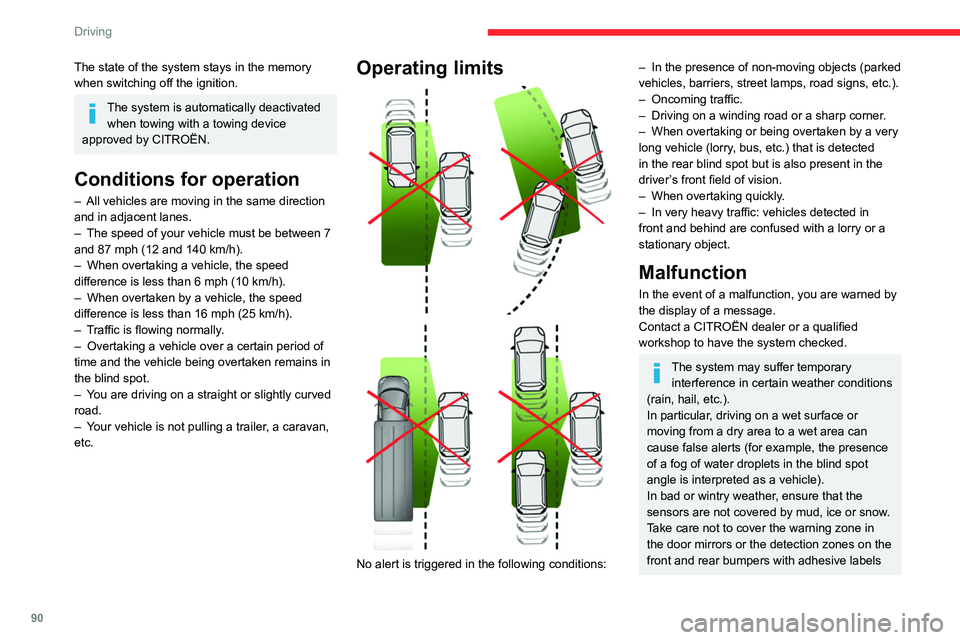
Operating limits
No alert is triggered in the following conditions:
– In the presence of non-moving objects (parked
vehicles, barriers, street lamps, road signs, etc.).
–
Oncoming traffic.
–
Driving on a winding road or a sharp corner
.
–
When overtaking or being overtaken by a very
long vehicle (lorry
, bus, etc.) that is detected
in the rear blind spot but is also present in the
driver’s front field of vision.
–
When overtaking quickly
.
–
In very heavy traffic: vehicles detected in
front and behind are confused with a lorry or a
stationary object.
Malfunction
In the event of a malfunction, you are warned by
the display of a message.
Contact a CITROËN dealer or a qualified
workshop to have the system checked.
The system may suffer temporary interference in certain weather conditions
(rain, hail, etc.).
In particular, driving on a wet surface or
moving from a dry area to a wet area can
cause false alerts (for example, the presence
of a fog of water droplets in the blind spot
angle is interpreted as a vehicle).
In bad or wintry weather, ensure that the
sensors are not covered by mud, ice or snow.
Take care not to cover the warning zone in
the door mirrors or the detection zones on the
front and rear bumpers with adhesive labels
Page 94 of 196
92
Driving
The front parking sensors are interrupted if the
vehicle stops for more than three seconds in
forward gear, if an obstacle is no longer detected
or when the speed of the vehicle exceeds 6 mph
(10
km/h).
The sound emitted by the speaker (front or rear) locates the obstacle in relation to
the vehicle, in the vehicle trajectory, in front or
behind.
Deactivation / Activation
It is set via the Driving / Vehicle touch
screen menu.
The state of the system stays in the memory
when the ignition is switched off.
The rear parking sensors system will be deactivated automatically if a trailer or
bicycle carrier is connected to a towing device
installed in accordance with the
manufacturer's recommendations.
Operating limits
If the boot is heavily loaded, the vehicle may tilt,
affecting distance measurements.
Malfunction
In the event of a malfunction when
changing into reverse, this warning lamp
comes on on the instrument panel, accompanied
by an onscreen message and an audible signal
(short beep).
Contact a CITROËN dealer or a qualified
workshop to have the system checked.
Reversing Camera
Refer to the General recommendations on the
use of driving and manoeuvring aids .
The reversing camera is automatically activated
when reverse gear is engaged.
The image is displayed on the touch screen.
The reversing camera function may be
supplemented with parking sensors.
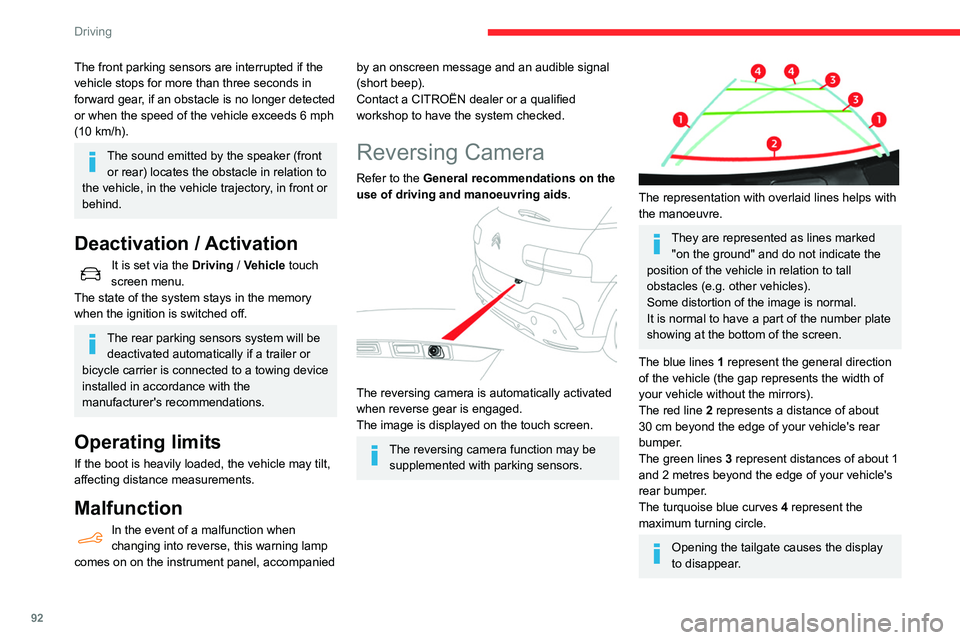
The representation with overlaid lines helps with
the manoeuvre.
They are represented as lines marked "on the ground" and do not indicate the
position of the vehicle in relation to tall
obstacles (e.g. other vehicles).
Some distortion of the image is normal.
It is normal to have a part of the number plate
showing at the bottom of the screen.
The blue lines 1 represent the general direction
of the vehicle (the gap represents the width of
your vehicle without the mirrors).
The red line 2 represents a distance of about
30
cm beyond the edge of your vehicle's rear
bumper.
The green lines 3 represent distances of about 1
and 2 metres beyond the edge of your vehicle's
rear bumper.
The turquoise blue curves 4 represent the
maximum turning circle.
Opening the tailgate causes the display
to disappear.
Page 99 of 196
97
Practical information
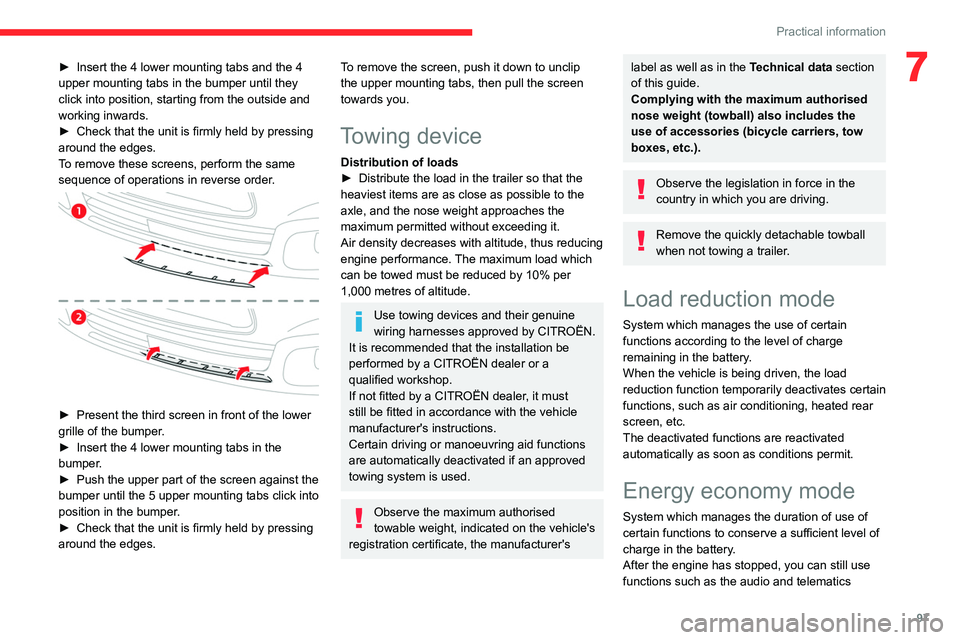
7► Insert the 4 lower mounting tabs and the 4
upper mounting tabs in the bumper until they
click into position, starting from the outside and
working inwards.
►
Check that the unit is firmly held by pressing
around the edges.
T
o remove these screens, perform the same
sequence of operations in reverse order.
► Present the third screen in front of the lower
grille of the bumper .
►
Insert the 4 lower mounting tabs in the
bumper
.
►
Push the upper part of the screen against the
bumper until the 5 upper mounting tabs click into
position in the bumper
.
►
Check that the unit is firmly held by pressing
around the edges.
To remove the screen, push it down to unclip
the upper mounting tabs, then pull the screen
towards you.
Towing device
Distribution of loads
► Distribute the load in the trailer so that the
heaviest items are as close as possible to the
axle, and the nose weight approaches the
maximum permitted without exceeding it.
Air density decreases with altitude, thus reducing
engine performance.
The maximum load which
can be towed must be reduced by 10% per
1,000
metres of altitude.
Use towing devices and their genuine
wiring harnesses approved by CITROËN.
It is recommended that the installation be
performed by a CITROËN dealer or a
qualified workshop.
If not fitted by a CITROËN dealer, it must
still be fitted in accordance with the vehicle
manufacturer's instructions.
Certain driving or manoeuvring aid functions
are automatically deactivated if an approved
towing system is used.
Observe the maximum authorised
towable weight, indicated on the vehicle's
registration certificate, the manufacturer's
label as well as in the Technical data section
of this guide.
Complying with the maximum authorised
nose weight (towball) also includes the
use of accessories (bicycle carriers, tow
boxes, etc.).
Observe the legislation in force in the
country in which you are driving.
Remove the quickly detachable towball
when not towing a trailer.
Load reduction mode
System which manages the use of certain
functions according to the level of charge
remaining in the battery.
When the vehicle is being driven, the load
reduction function temporarily deactivates certain
functions, such as air conditioning, heated rear
screen, etc.
The deactivated functions are reactivated
automatically as soon as conditions permit.
Energy economy mode
System which manages the duration of use of
certain functions to conserve a sufficient level of
charge in the battery.
After the engine has stopped, you can still use
functions such as the audio and telematics
Page 101 of 196
99
Practical information
7Recommendations
► Distribute the load uniformly , taking
care to avoid overloading one of the sides.
►
Arrange the heaviest part of the load as
close as possible to the roof.
►
Lash the load down securely and fit a
warning flag if it overhangs the vehicle.
►
Drive gently: the vehicle will be more
susceptible to the effects of side winds
(stability may be affected).
►
Remove the roof bars once they are no
longer needed.
Maximum load, distributed over the roof
bars, for a loading height not exceeding
40 cm: 80 kg.
As this value may change, please verify the
maximum load quoted on the note supplied
with the roof bars.
If the height exceeds 40 cm, adapt the
speed of the vehicle to the profile of the road
to avoid damaging the roof bars and the
mountings on the vehicle.
Be sure to refer to national legislation in order
to comply with the regulations for transporting
objects which are longer than the vehicle.
Bonnet
Stop & Start
Before doing anything under the bonnet,
you must switch off the ignition to avoid any
risk of injury resulting from an automatic
change to START mode.
The location of the interior bonnet release lever prevents opening the
bonnet when the left-hand front door is
closed.
When the engine is hot, handle the
exterior safety catch and the bonnet stay
with care (risk of burns), using the protected
area.
When the bonnet is open, take care not to
damage the safety catch.
Do not open the bonnet under very windy
conditions.
Cooling of the engine when stopped
The engine cooling fan may start after
the engine has been switched off.
Take care with objects or clothing that
could be caught in the blades of the fan!
Opening
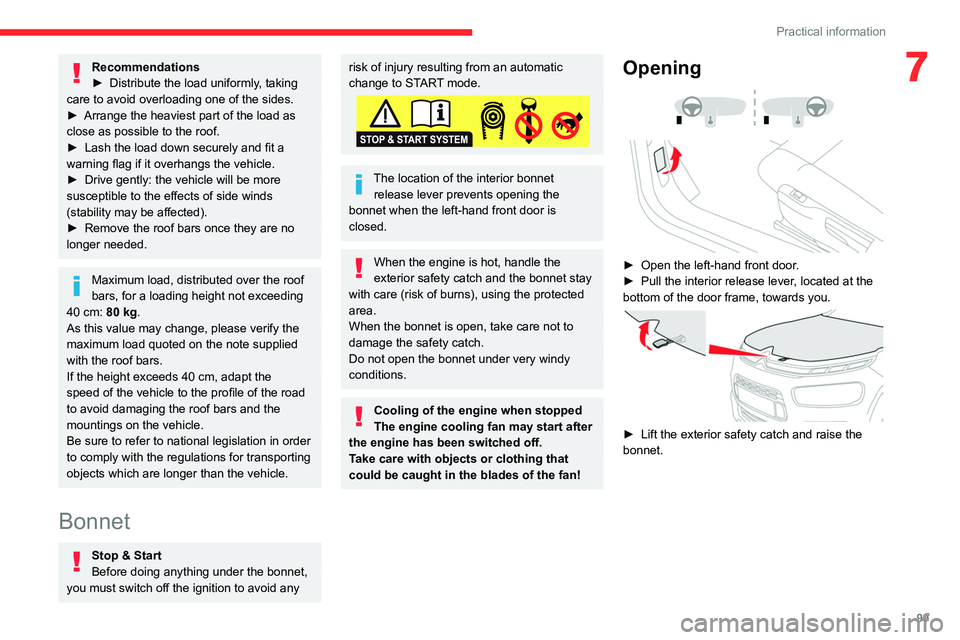
► Open the left-hand front door .
► Pull the interior release lever , located at the
bottom of the door frame, towards you.
► Lift the exterior safety catch and raise the
bonnet.
Page 105 of 196
103
Practical information
7city driving), change it twice as often, if
necessary.
A clogged passenger compartment filter
can adversely affect air conditioning
system performance and generate
undesirable odours.
Air filter
Depending on the environment and the
use of the vehicle (e.g. dusty atmosphere,
city driving), change it twice as often, if
necessary .
Oil filter
Change the oil filter each time the engine
oil is changed.
Particle filter (Diesel)
The start of saturation of the particle filter
is signalled by the temporary illumination
of this warning lamp, accompanied by a
message warning of the risk of the filter clogging
up.
As soon as the traffic conditions permit,
regenerate the filter by driving at a speed of at
least 37 mph (60
km/h) until the warning lamp
goes off.
If the warning lamp stays on, this
indicates a low Diesel additive level.
For more information on Checking levels,
refer to the corresponding section.
Following prolonged operation of the
vehicle at very low speed or at idle, you
may, in exceptional circumstances, notice the
emission of water vapour at the exhaust on
acceleration. This does not affect the
behaviour of the vehicle or the environment.
New vehicle
The first particle filter regeneration
operations may be accompanied by a
"burning" smell, which is perfectly normal.
Manual gearbox
The gearbox does not require any maintenance (no oil change).
Automatic gearbox
The gearbox does not require any maintenance (no oil change).
Brake pads
Brake wear depends on the style of
driving, particularly in the case of vehicles
used in town, over short distances. It may be
necessary to have the condition of the brakes
checked, even between vehicle services.
Unless there is a leak in the circuit, a drop in the
brake fluid level indicates that the brake pads
are worn.
After washing the vehicle, moisture, or in wintry conditions, ice can form on the
brake discs and pads: braking efficiency may
be reduced. Gently dab the brakes to dry and
defrost them.
Brake disc/drum wear
For any information on checking brake
disc/drum wear, contact a CITROËN
dealer or a qualified workshop.
Parking brake
If excessive travel or a loss of
effectiveness of this system is noticed, the
parking brake must be checked, even between
two services.
This system must be checked by a CITROËN
dealer or a qualified workshop.
Wheels and tyres
The pressure must be checked on all tyres, including the spare wheel, when the
tyres are "cold".
The pressures indicated on the tyre pressure
label are valid for "cold" tyres. If you have driven
for more than 10 minutes or more than 6 miles
(10 kilometres) at over 31 mph (50
km/h), add
0.3 bar (30 kPa) to the values indicated on the
label.
Driving with under-inflated tyres
increases fuel consumption. Non-
compliant tyre pressure causes premature
wear on tyres and has an adverse effect on
Page 110 of 196

108
In the event of a breakdown
Warning triangle (storage)
This safety device is used in addition to the
hazard warning lamps.
Its presence in the vehicle is mandatory.
The triangle may be stowed under the boot
carpet (in the storage well) or, depending on
version, under the front passenger seat.
Before leaving your vehicle to set up and
install the triangle, switch on the hazard
warning lamps and put on your high visibility
vest.
Refer to the manufacturer's instructions
on using the triangle.
Placing the triangle on the
road
► Place the triangle behind the vehicle, as
required by the legislation in force in your
country
.
The triangle is available as an accessory; contact a CITROËN dealer or a qualified
workshop.
Running out of fuel
(Diesel)
With Diesel engines, the fuel system must be
primed if you run out of fuel.
Before starting to prime the system, it is
essential to put at least 5 litres of Diesel into the
fuel tank.
For more information on Refuelling and
on Misfuel prevention (Diesel), please
refer to the corresponding section.
BlueHDi engines
► Switch on the ignition (without starting the
engine).
►
W
ait around 1 minute and switch off the
ignition.
►
Operate the starter motor to start the engine.
If the engine does not start at the first attempt,
do not keep trying, but restart the procedure.
Temporary puncture repair kit
Scan the QR Code on page 3 to view
explanatory videos.
Made up of a compressor and a sealant
cartridge,
it allows you to carry out a temporary
repair of the tyre so that you can drive to the
nearest garage.
It is designed to repair most punctures located
on the tyre tread.
Only the 12 V socket at the front of the
vehicle allows the compressor to be
connected for long enough to repair or inflate
the vehicle tyre.
The other 12 V sockets of the vehicle are not
designed to be used with the compressor.
Access to the kit
This kit is installed in the storage box, under the
boot floor.
List of tools
1. Temporary puncture repair kit.
Contains a sealant cartridge for the
temporary repair of a tyre and can also be
used for adjusting tyre pressures.
2. Socket for the security bolts (located in the
glove box or in the tool box) (depending on
version).
For adapting the wheelbrace to the special
"security" bolts.
3. Removable towing eye.
For more information on Towing the vehicle
and using the removable towing eye, refer to the
corresponding section.
Page 111 of 196
109
In the event of a breakdown
8This kit is installed in the storage box, under the
boot floor.
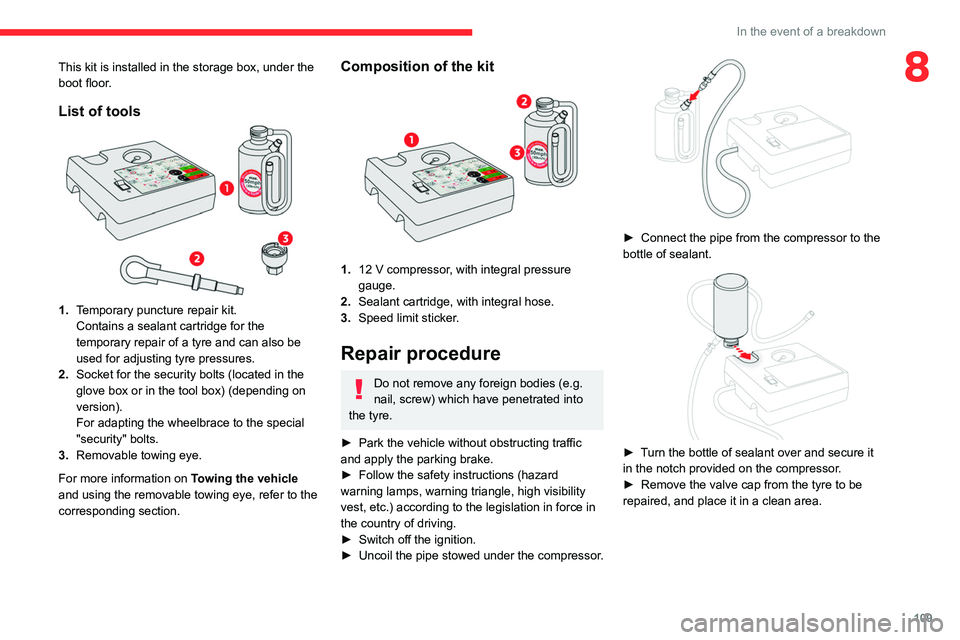
List of tools
1.Temporary puncture repair kit.
Contains a sealant cartridge for the
temporary repair of a tyre and can also be
used for adjusting tyre pressures.
2. Socket for the security bolts (located in the
glove box or in the tool box) (depending on
version).
For adapting the wheelbrace to the special
"security" bolts.
3. Removable towing eye.
For more information on Towing the vehicle
and using the removable towing eye, refer to the
corresponding section.
Composition of the kit
1. 12 V compressor, with integral pressure
gauge.
2. Sealant cartridge, with integral hose.
3. Speed limit sticker.
Repair procedure
Do not remove any foreign bodies (e.g.
nail, screw) which have penetrated into
the tyre.
►
Park the vehicle without obstructing traffic
and apply the parking brake.
►
Follow the safety instructions (hazard
warning lamps, warning triangle, high visibility
vest, etc.) according to the legislation in force in
the country of driving.
►
Switch off the ignition.
►
Uncoil
the pipe stowed under the compressor.
► Connect the pipe from the compressor to the
bottle of sealant.
► Turn the bottle of sealant over and secure it
in the notch provided on the compressor.
►
Remove the valve cap from the tyre to be
repaired, and place it in a clean area.
Page 112 of 196
11 0
In the event of a breakdown
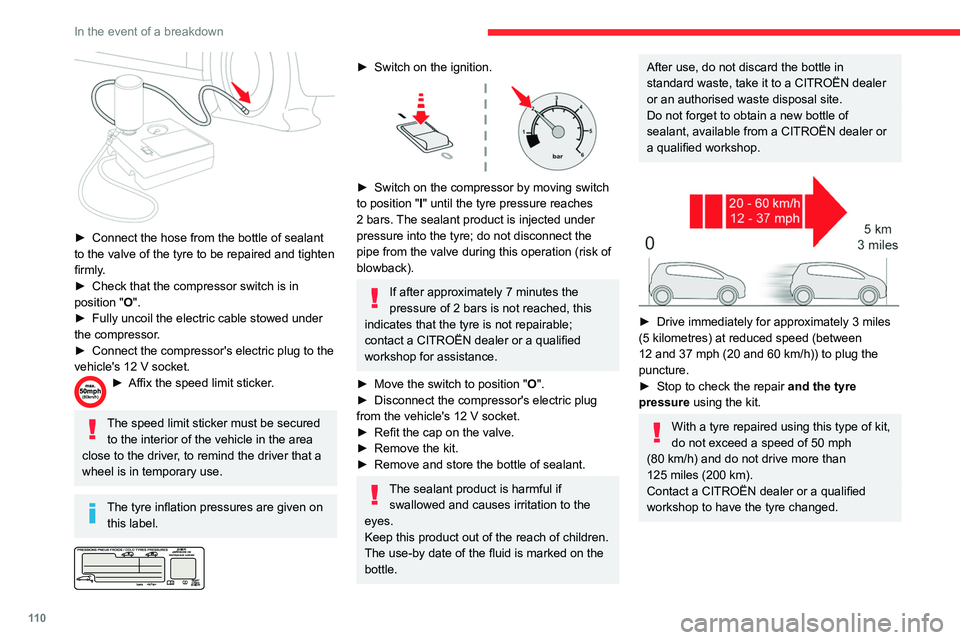
► Connect the hose from the bottle of sealant
to the valve of the tyre to be repaired and tighten
firmly
.
►
Check that the compressor switch is in
position
"O".
►
Fully uncoil the electric cable stowed under
the compressor
.
►
Connect the compressor's electric plug to the
vehicle's 12
V socket.
► Affix the speed limit sticker .
The speed limit sticker must be secured
to the interior of the vehicle in the area
close to the driver, to remind the driver that a
wheel is in temporary use.
The tyre inflation pressures are given on this label.
► Switch on the ignition.
► Switch on the compressor by moving switch
to position " I" until the tyre pressure reaches
2 bars. The sealant product is injected under
pressure into the tyre; do not disconnect the
pipe from the valve during this operation (risk of
blowback).
If after approximately 7 minutes the
pressure of 2 bars is not reached, this
indicates that the tyre is not repairable;
contact a CITROËN dealer or a qualified
workshop for assistance.
►
Move the switch to position " O
".
►
Disconnect the compressor's electric plug
from the vehicle's 12
V socket.
►
Refit the cap on the valve.
►
Remove the kit.
►
Remove and store the bottle of sealant.
The sealant product is harmful if swallowed and causes irritation to the
eyes.
Keep this product out of the reach of children.
The use-by date of the fluid is marked on the
bottle.
After use, do not discard the bottle in
standard waste, take it to a CITROËN dealer
or an authorised waste disposal site.
Do not forget to obtain a new bottle of
sealant, available from a CITROËN dealer or
a qualified workshop.
► Drive immediately for approximately 3 miles
(5 kilometres) at reduced speed (between
12 and 37 mph (20 and 60
km/h)) to plug the
puncture.
►
Stop to check the repair
and the tyre
pressure using the kit.
With a tyre repaired using this type of kit,
do not exceed a speed of 50
mph
(80
km/h) and do not drive more than
125
miles (200 km).
Contact a CITROËN dealer or a qualified
workshop to have the tyre changed.
Checking / adjusting tyre
pressures
The compressor can be used, without injecting
sealant, to check and, if necessary, adjust the
tyre pressures.
► Remove the valve cap from the tyre and keep
it in a clean place.
► Uncoil the pipe stowed under the compressor.
► Screw the pipe onto the valve and tighten
firmly.
► Check that the compressor switch is in
position " O".
► Fully uncoil the electric cable stowed under
the compressor.
► Connect the compressor's electric plug to the
vehicle's 12 V socket.
► Switch on the ignition.
The tyre inflation pressures are given on
this label.
► Start the compressor by placing the switch at
position " I" and adjust the pressure to the value
shown on the vehicle's tyre pressure label. To
deflate: press the black button located on the
compressor pipe, near the valve connection.
If after 7 minutes the pressure of 2 bars
is not reached, this indicates that the tyre