ignition Citroen C4 DAG 2014.5 2.G User Guide
[x] Cancel search | Manufacturer: CITROEN, Model Year: 2014.5, Model line: C4 DAG, Model: Citroen C4 DAG 2014.5 2.GPages: 340, PDF Size: 12.89 MB
Page 28 of 340

26
C4-2_en_Chap01_controle-de-marche_ed01-2014
Warning/indicator lampis onCause Action/Observations
Parking brake fixed.The
parking
brake
is
applied
or
not properly released.Release
the parking brake to switch off
the
warning lamp, keeping your foot on
the
brake pedal.
Observe
the safety recommendations.
For
more information on the parking
brake,
refer to the "Parking brake" and
"Electric
parking brake" sections.
Electric
parking brake fixed.The
electric parking brake is
applied.Release
the electric parking brake to
switch
off the warning lamp: with your
foot
on the brake pedal, pull the electric
brake
control.
Observe
the safety recommendations.
For
more information on the electric
parking
brake, refer to the "Driving"
section.
Deactivation of the automatic functions of the electric
parking brake fixed.The
"automatic application"
(on
switching off the engine)
and
"automatic release"
functions
are deactivated or
faulty
.Activate
the function (according to
country)
via the vehicle configuration
menu
or contact a CITROËN dealer or a
qualified
workshop.
Diesel engine pre-heating fixed.The
key is at position 2
(ignition
on) in the ignition
switch.W
ait until the warning lamp goes off
before
starting.
The
period of illumination of the warning
lamp
is determined by the climatic
conditions
(up to about thirty seconds in
extreme
climatic conditions).
If
the engine does not start, switch the
ignition
off and then on, wait until the
warning
lamp goes off again, then start
the
engine.
1
MONITORING
Page 32 of 340
30
C4-2_en_Chap01_controle-de-marche_ed01-2014
Service indicator
System that informs the driver when the next
service is due, in accordance with
the
manufacturer's service schedule.
The
point
at
which
the
service
is
due
is
calculated
from
the
last
service
indica
-
tor
zero
reset,
according
to
the
distance
covered
and
the
time
elapsed
since
the
last
service.
For
b lueH d i d iesel versions, the level
of
deterioration
of
the
engine
oil
may
also
be
taken
into
account,
depending
on
the country of sale.
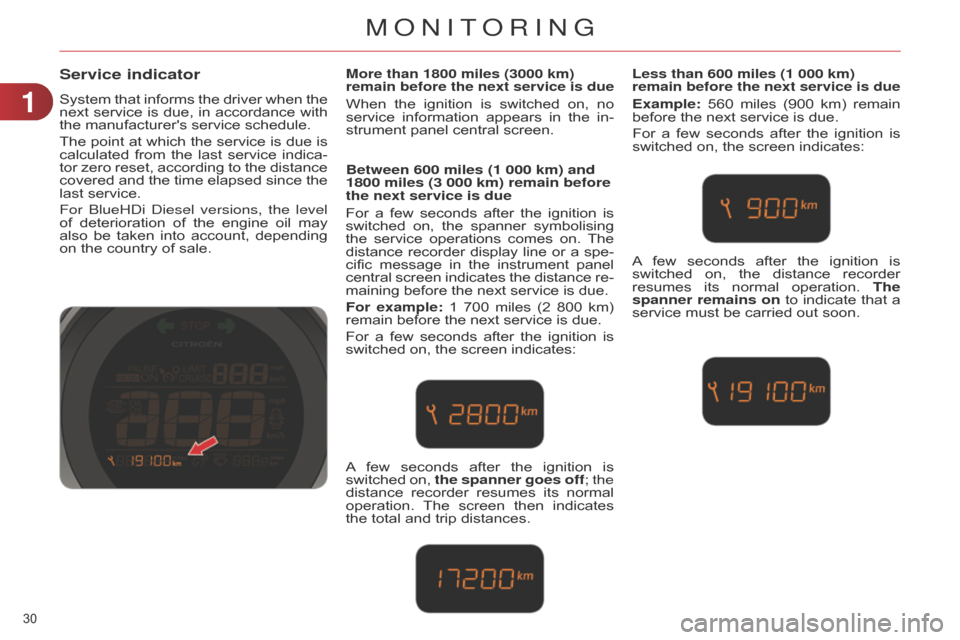
More than 1800 miles (3000 km)
remain before the next service is due
When the ignition is switched on, no service
information appears in the in -
strument
panel central screen.
Between 600 miles (1 000 km) and
1800 miles (3 000 km) remain before
the next service is due
For a few seconds after the ignition is switched
on, the spanner symbolising
the
service
operations
comes
on.
The
distance
recorder
display
line
or
a
spe
-
cific
message
in
the
instrument
panel
central
screen
indicates
the
distance
re
-
maining
before the next service is due.
For example:
1
700
miles
(2
800
km)
remain
before the next service is due.
For
a
few
seconds
after
the
ignition
is
switched
on, the screen indicates:
Less than 600 miles (1 000 km)
remain before the next service is due
Example: 560 miles (900 km) remain before
the next service is due.
For
a
few
seconds
after
the
ignition
is
switched
on, the screen indicates:
A
few
seconds
after
the
ignition
is
switched
on,
the spanner goes off
; the
distance
recorder
resumes
its
normal
operation.
The
screen
then
indicates
the
total
and
trip
distances. A
few
seconds
after
the
ignition
is
switched
on,
the
distance
recorder
resumes
its
normal
operation.
The
spanner remains on
to
indicate
that
a
service
must be carried out soon.
1
MONITORING
Page 33 of 340
31
C4-2_en_Chap01_controle-de-marche_ed01-2014
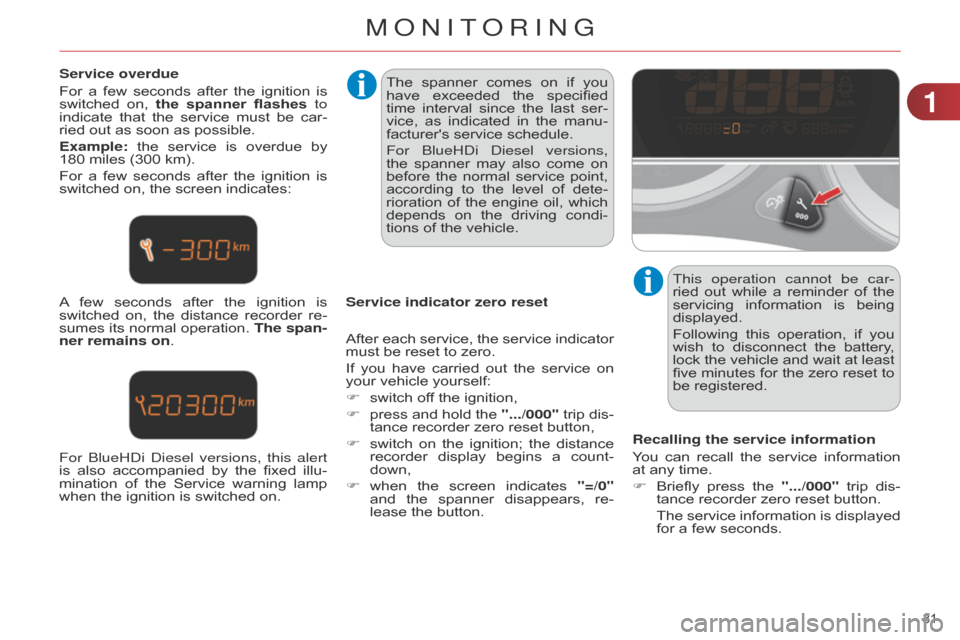
Service overdue
For
a
few
seconds
after
the
ignition
is
switched
on,
the
spanner flashes to
indicate
that
the
service
must
be
car
-
ried
out as soon as possible.
Example:
the
service
is
overdue
by
180
miles (300 km).
For
a
few
seconds
after
the
ignition
is
switched
on, the screen indicates:
A
few
seconds
after
the
ignition
is
switched
on,
the
distance
recorder
re
-
sumes
its
normal
operation.
The span
-
ner remains on. The
spanner comes on if you
have
exceeded
the
specified
time
interval
since
the
last
ser
-
vice,
as
indicated
in
the
manu
-
facturer's
service schedule.
For
b lueH d i d iesel versions,
the
spanner
may
also
come
on
before
the
normal
service
point,
according
to
the
level
of
dete
-
rioration
of
the
engine
oil,
which
depends
on
the
driving
condi
-
tions
of the vehicle.
Service indicator zero reset This operation cannot be car-
ried
out
while
a
reminder
of
the
servicing
information
is
being
displayed.
Following
this
operation,
if
you
wish
to
disconnect
the
battery
,
lock
the
vehicle
and
wait
at
least
five
minutes
for
the
zero
reset
to
be
registered.
Recalling the service information
You
can
recall
the
service
information
at
any time.
F
Briefly
press
the
".../000"
trip
dis
-
tance
recorder zero reset button.
The
service
information
is
displayed
for
a few seconds.
After
each
service,
the
service
indicator
must
be reset to zero.
If
you
have
carried
out
the
service
on
your
vehicle yourself:
F
switch
off the ignition,
F
press
and
hold
the
".../000"
trip
dis
-
tance
recorder zero reset button,
F
switch
on
the
ignition;
the
distance
recorder
display
begins
a
count
-
down,
F
when
the
screen
indicates
"=/0"
and
the
spanner
disappears,
re
-
lease
the button.
For
b lueH d i d iesel versions, this alert
is
also
accompanied
by
the
fixed
illu-
mination
of
the
Service
warning
lamp
when
the ignition is switched on.
1
MONITORING
Page 34 of 340
32
C4-2_en_Chap01_controle-de-marche_ed01-2014
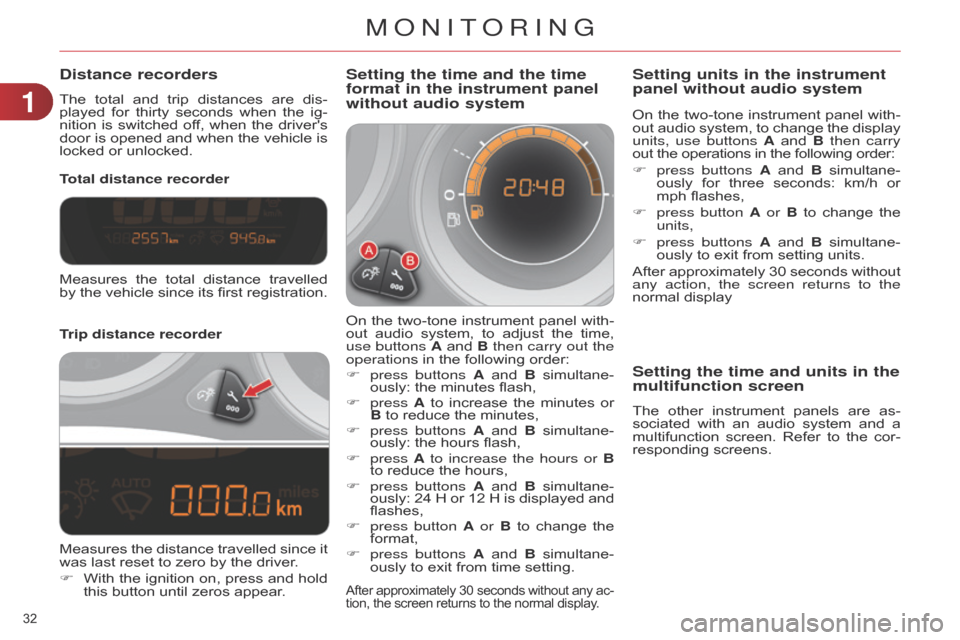
Distance recorders
The total and trip distances are dis -
played for thirty seconds when the ig -
nition
is
switched
of
f,
when
the
driver's
door
is
opened
and
when
the
vehicle
is
locked
or unlocked.
Trip distance recorder Total distance recorder
Setting the time and the time
format in the instrument panel
without audio system
On the two-tone instrument panel with -
out audio system, to adjust the time,
use buttons
A
and
B
then carry out the
operations
in the following order:
F
press buttons
A
and
B
simultane
-
ously:
the minutes flash,
F
press A
to
increase
the
minutes
or
B
to reduce the minutes,
F
press buttons
A
and
B
simultane
-
ously:
the hours flash,
F
press A to increase the hours or B
to
reduce the hours,
F
press buttons
A
and
B
simultane
-
ously:
24
H
or
12
H
is
displayed
and
flashes,
F
press button
A or B
to
change
the
format,
F
press buttons
A
and
B
simultane
-
ously
to exit from time setting.
After approximately 30 seconds without any ac -
tion, the screen returns to the normal display.
Measures the total distance travelled by
the vehicle since its first registration.
Measures
the
distance
travelled
since
it
was
last reset to zero by the driver.
F
With
the
ignition
on,
press
and
hold
this
button until zeros appear. On
the
two-tone
instrument
panel
with
-
out
audio
system,
to
change
the
display
units, use buttons
A
and
B
then carry
out the operations in the following order:
F
press buttons
A
and
B
simultane
-
ously
for
three
seconds:
km/h
or
mph
flashes,
F
press button
A or B
to
change
the
units,
F
press buttons
A
and
B
simultane
-
ously to exit from setting units.
After approximately 30 seconds without any action, the screen returns to the
normal
display
Setting units in the instrument
panel without audio system
Setting the time and units in the
multifunction screen
The other instrument panels are as -
sociated with an audio system and a
multifunction
screen.
Refer
to
the
cor
-
responding
screens.
1
MONITORING
Page 36 of 340
34
C4-2_en_Chap01_controle-de-marche_ed01-2014
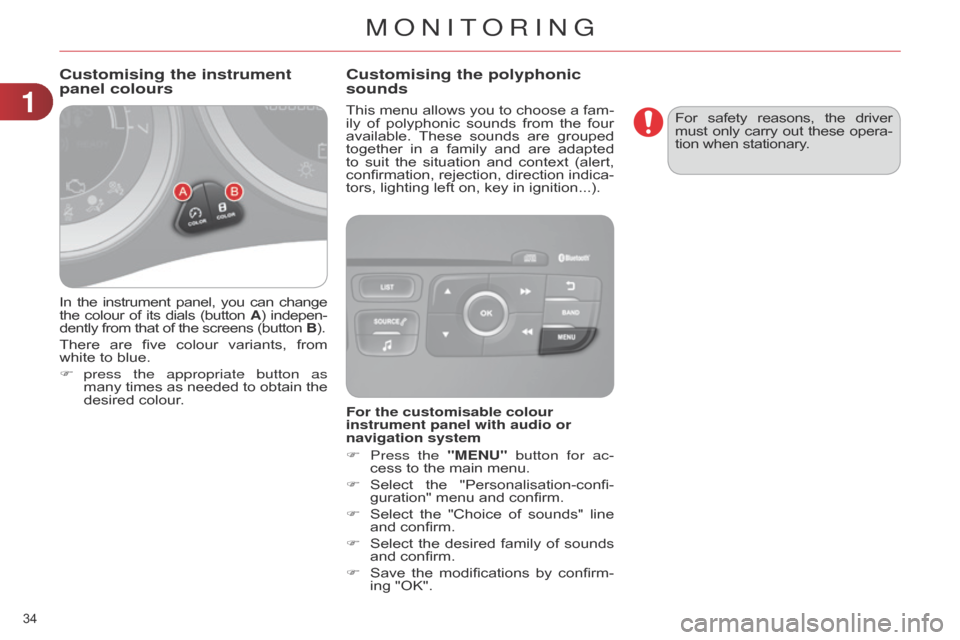
In the instrument panel, you can change the
colour of its dials (button A)
indepen -
dently
from that of the screens (button B).
There
are
five
colour
variants,
from
white
to blue.
F
press
the appropriate button as
many
times
as
needed
to
obtain
the
desired
colour. This
menu
allows
you
to
choose
a
fam
-
ily
of
polyphonic
sounds
from
the
four
available.
These
sounds
are
grouped
together
in
a
family
and
are
adapted
to
suit
the
situation
and
context
(alert,
confirmation,
rejection,
direction
indica
-
tors, lighting left on, key in ignition...).
Customising the instrument
panel colours
Customising the polyphonic
sounds
For the customisable colour
instrument panel with audio or
navigation system
F
Press the
"MENU" button for ac-
cess
to the main menu.
F
Select
the
"Personalisation-confi
-
guration"
menu and confirm.
F
Select
the
"Choice
of
sounds"
line
and
confirm.
F
Select
the
desired
family
of
sounds
and
confirm.
F
Save
the
modifications
by
confirm
-
ing
"OK". For
safety
reasons,
the
driver must
only
carry
out
these
opera
-
tion when stationary.
1
MONITORING
Page 42 of 340
22
40
C4-2_en_Chap02_ecran-multifonction_ed01-2014
Choice of language
Once
this
menu
has
been
selected,
you
can
choose
the
language
used
by
the
display
from a pre-defined list.
For
safety
reasons,
configura
-
tion
of
the
multifunction
screen
by
the
driver
must
only
be
done
when
stationary.
Display configuration
This
menu
gives
access
to
the
following
settings:
-
"Choice
of units",
-
"Date
and time adjustment",
-
"Display
parameters",
-
"Brightness". Choice of sounds
This
menu
allows
you
to
choose
a
fam
-
ily
of
polyphonic
sounds
from
the
four
available.
These
sounds
are
grouped
together
in
a
family
and
are
adapted
to
suit
the
situation
and
context
(alert,
confirmation,
rejection,
direction
indica
-
tors,
lighting left on, key in ignition...).
Adjusting the date and time
F
Press
the "7" or "8" button to
display
the
"Display
configuration"
menu,
then press "OK".
F
Press
the "5" or "6" button to se-
lect
the
"Date
and
time
adjustment"
button, then press
"OK".
F
Press
the "7" or "8" button to se-
lect
the
setting
to
modify
.
Confirm
by
pressing
"OK"
,
then
modify
the
setting
and
confirm
again
to
save
the
modification.
F
Adjust
the
settings
one
by
one,
con
-
firming
with the "OK" button.
F
Press the "
5" or "6" button, then
the "OK" button to select the "OK"
box
and
confirm
or
the
"Back"
but-
ton
to cancel.
MULTIFUNCTION SCREENS
Page 44 of 340
22
42
C4-2_en_Chap02_ecran-multifonction_ed01-2014
Choice of sounds
This
menu
allows
you
to
choose
a
family
of
polyphonic
sounds
from
four
available.
These
sounds
are
grouped
together
in
a
family
and
are
adapted
to
suit
the
situation
and
context
(alert,
confirmation,
rejection,
direction
indica
-
tors,
lighting left on, key in ignition...).
Display configuration
This
menu
is
used
to
select
the
colour scheme
for
the
screen,
adjust
the
bright
-
ness,
set
the
date
and
time
and
to
choose the
units
for
distance
(km
or
miles),
fuel consumption
(l/100
km,
mpg
or
km/l)
and temperature
(°Celsius or °Fahrenheit).Adjusting the voice synthesiser
This
menu
is
used
to
adjust
the
volume
setting
for
navigation
instructions
and
to
choose
the
type
of
voice
(male
or
female).
Adjusting the date and time
-
Press
on SETUP.
-
Select
"Display
configuration"
and
confirm.
-
Select
"Set
date
and
time"
and
con
-
firm.
Select
"Minute
adjustment
via
GPS"
so
that
the
minutes
are
adjusted
automati
-
cally
by satellite reception.
-
Select
the
setting
to
modify
.
Confirm
by
pressing
on
OK
,
then
modify
the
setting
and
confirm
again
to
save
the
modification.
-
Adjust
the settings one by one.
-
Select
"
OK" in the screen then con-
firm
to save the setting. Choice of language
This
menu
is
used
to
choose
the
language used
by the screen from a defined list.
Vehicle parameters
This
menu
is
used
to
activate
or
deac
-
tivate
certain
driving
and
comfort
sys
-
tems,
classified by category:
-
"Driver
aid":
●
"Electric
brake*"
(Automatic
elec
-
tric
parking
brake;
see
"Driving"
section),
●
"Rear
wiper"
(Rear
wiper
coupled
to
reverse
gear;
see
"V
isibility"
section),
●
"Speed
limits"
(Memorising
speed settings
for
the
cruise
control
and speed
limiter;
see
"Driving"
section).Alert log
This
lists
the
active
alerts
by
displaying
in
turn
the
dif
ferent
messages
associ
-
ated
with them.
-
"V ehicle access" (see "Access" sec -
tion):
●
"Driver
doors
selectivity"
(Selective unlocking
of the driver's door),
●
"Rear
doors
selectivity"
(Selective
unlocking
of
the
boot
using
the
centre
button
on
the
remote
con
-
trol;
see "Access section).
-
"Driving
lights"
(see
"V
isibility"
sec
-
tion):
●
"Day lights*" (Daytime running lamps),
● "Directional headlights" (Main / additional
directional lighting).
-
"Comfort
lighting"
(see
"V
isibility"
section):
●
"W
elcome
lights"
(Interior
wel
-
come
lighting),
●
"Running
lights"
(Automatic
timed
operation
of headlamps).
*
Depending on country.
MULTIFUNCTION SCREENS
Page 48 of 340
22
46
C4-2_en_Chap02_ecran-multifonction_ed01-2014
A few definitions…
This value may vary following a change
in the style of driving or
the
relief,
resulting
in
a
signifi
-
cant
change
in
the
current
fuel
consumption.
If
dashes
are
displayed
continu
-
ously
while
driving
in
place
of
the digits,
contact
a
CITROËN
dealer or
a qualified workshop. This
function
is
only
displayed
from
20 mph (30 km/h).
Range
(miles or km)
This
indicates
the
distance
which
can
still
be
travelled
with
the
fuel
remaining
in
the
tank
in
relation
to
the
average
fuel
consump
-
tion
over
the
last
few
miles
(kilometres)
travelled.
When
the
range
falls
below
20
miles
(30
km),
dashes
are
displayed.
After
fillin
g
with
at
least
5
litres
of
fuel,
the
range
is
recalculated
and
is
displayed
when
it exceeds 60 miles (100 km).Current fuel consumption
(mpg
or l/100 km or km/l)
This
is
the
average
fuel
consump
-
tion during the last few seconds.
Average fuel consumption
(mpg or l/100 km or km/l)
This
is
the
average
fuel
con
-
sumption
since
the
last
trip
computer
zero reset.Average speed
(mph
or km/h)
This
is
the
average
speed
calcu
-
lated
since
the
last
trip
computer zero
reset (ignition on).
Distance travelled
(miles or km)
This
indicates
the
distance
travelled
since the last trip computer
zero reset.
Stop & Start time counter
(minutes/seconds
or
hours/
minutes)
If
your
vehicle
is
fitted
with
Stop
&
Start,
a
time
counter
calculates
the
time
spent
in
STOP
mode during a journey.
It
resets
to
zero
every
time
the
ignition
is
switched on with the key.
The
fuel
consumption
of
your
vehicle
will
be
higher
than
the
official
figures
obtained
by
CITROËN
during
the
first
3
000 miles
(5
000 km)
of
the
vehicle's
life.
MULTIFUNCTION SCREENS
Page 56 of 340
33
54
C4-2_en_Chap03_confort_ed01-2014
9. "REST" function: ventilation with
the engine off
On switching on the engine
-
The
control
screens
come
on:
the
function
is available.
-
Pressing
the
REST
button activates
the
ventilation
for
a
few
minutes.
a
ctivation of the function is con-
firmed
by
the
display
of
two
dashes
in
the
control
screens
and
four
air
flow
level indicator lamps.
-
The
function
can
be
deactivated
and
reactivated
if
the
control
screens
are
on.
-
The
screens
go
of
f
at
the
end
of
this
period.Even
with
the
engine
is
of
f,
you can operate the ventila
-
tion
for a few minutes.
For
example,
while
you
are
away
from
the
vehicle,
the
passengers
can
still
enjoy
some
air
cir
-
culation
without
having
the
engine
run
-
ning.
This
function
is
available
after
switching
on
the
ignition,
as
well
as
after
stopping
the
engine.
The
period
that
the
function
is
available
depends
on
the
state
of
charge
of
the
battery
.
You can activate the "REST" func-
tion
while
the
air
conditioning
control
screens
are on.
7. Air flow adjustment
F
T
urn this control to the left
to
decrease
the
air
flow
or
to
the
right
to
increase
the
air
flow.
The
air
flow
indicator
lamps,
between
the
two
fans,
come
on
progressively
in
relation
to
the
value
requested.
5. Air conditioning On / Off
F
Press
this button to switch
off
the
air
conditioning.
Switching
the
system
of
f
could
result
in
discomfort
(humidity,
condensation).
F
Press
this
button
again
to
return
to
automatic
operation
of
the
air
con
-
ditioning.
The
indicator
lamp
on
the
"A/C"
button
comes
on.
F
Press
one
or
more
but
-
tons
to
direct
the
air
flow
towards:
6.
Air distribution adjustment
-
the
windscreen
and
side
windows
(demisting
or
defrosting),
-
the
outer
and
centre
air
vents,
-
the
footwells.
You
can
combine
the
three
orientations
to
obtain
the
desired
air
distribution. 8. Air intake / Air recirculation
F
Press this button for recir
-
culation
of
the
interior
air
.
The
indicator
lamp
in
the
button
comes
on.
Air
recirculation
enables
the
passenger
compartment
to
be
isolated
from
exte
-
rior
odours
and
smoke.
F
a
s soon as possible, press this but-
ton
again
to
permit
the
intake
of
out
-
side
air
and
prevent
the
formation
of
condensation.
The
indicator
lamp
in
the
button
goes
off.
Avoid
prolonged
operation
in
in
-
terior
air
recirculation
mode
(risk
of
misting
and
deterioration
of
air
quality).
COMFORT
Page 60 of 340
33
58
C4-2_en_Chap03_confort_ed01-2014
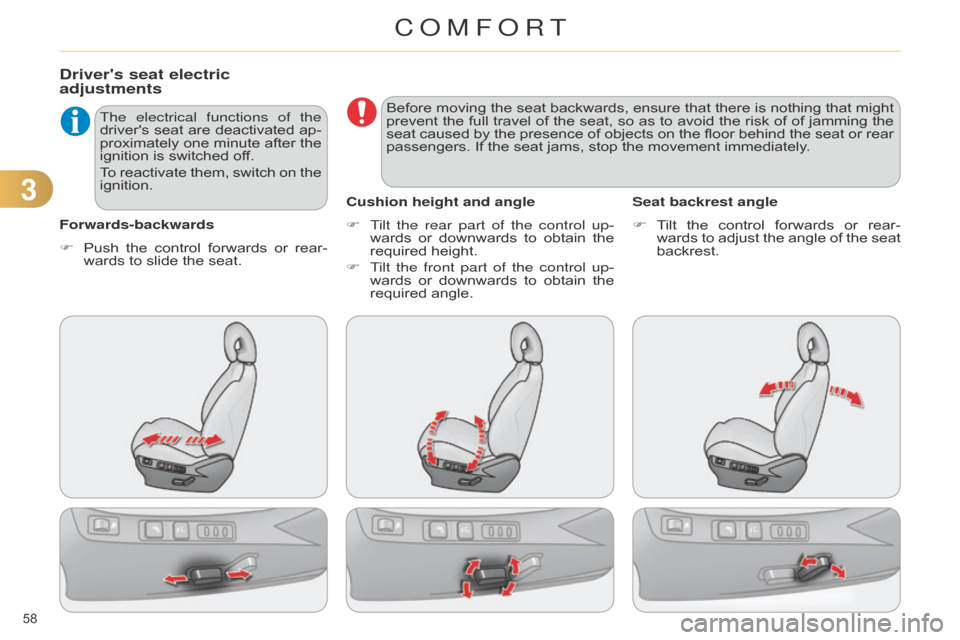
Driver's seat electric
adjustments
Forwards-backwardsThe electrical functions of the
driver's
seat
are
deactivated
ap
-
proximately
one
minute
after
the
ignition
is switched off.
To
reactivate
them,
switch
on
the
ignition.
F
T ilt the rear part of the control up-
wards
or downwards to obtain the
required
height.
F
T
ilt the front part of the control up-
wards
or
downwards
to
obtain
the
required
angle.
Cushion height and angle
F T ilt the control forwards or rear -
wards
to adjust the angle of the seat
backrest.
Seat backrest angle
F
Push
the
control
forwards
or
rear
-
wards
to slide the seat. Before
moving
the
seat
backwards,
ensure
that
there
is
nothing
that
might
prevent
the
full
travel
of
the
seat,
so
as
to
avoid
the
risk
of
of
jamming
the
seat
caused
by
the
presence
of
objects
on
the
floor
behind
the
seat
or
rear
passengers.
If the seat jams, stop the movement immediately.
COMFORT