lock Citroen C4 DAG 2014.5 2.G User Guide
[x] Cancel search | Manufacturer: CITROEN, Model Year: 2014.5, Model line: C4 DAG, Model: Citroen C4 DAG 2014.5 2.GPages: 340, PDF Size: 12.89 MB
Page 44 of 340
22
42
C4-2_en_Chap02_ecran-multifonction_ed01-2014
Choice of sounds
This
menu
allows
you
to
choose
a
family
of
polyphonic
sounds
from
four
available.
These
sounds
are
grouped
together
in
a
family
and
are
adapted
to
suit
the
situation
and
context
(alert,
confirmation,
rejection,
direction
indica
-
tors,
lighting left on, key in ignition...).
Display configuration
This
menu
is
used
to
select
the
colour scheme
for
the
screen,
adjust
the
bright
-
ness,
set
the
date
and
time
and
to
choose the
units
for
distance
(km
or
miles),
fuel consumption
(l/100
km,
mpg
or
km/l)
and temperature
(°Celsius or °Fahrenheit).Adjusting the voice synthesiser
This
menu
is
used
to
adjust
the
volume
setting
for
navigation
instructions
and
to
choose
the
type
of
voice
(male
or
female).
Adjusting the date and time
-
Press
on SETUP.
-
Select
"Display
configuration"
and
confirm.
-
Select
"Set
date
and
time"
and
con
-
firm.
Select
"Minute
adjustment
via
GPS"
so
that
the
minutes
are
adjusted
automati
-
cally
by satellite reception.
-
Select
the
setting
to
modify
.
Confirm
by
pressing
on
OK
,
then
modify
the
setting
and
confirm
again
to
save
the
modification.
-
Adjust
the settings one by one.
-
Select
"
OK" in the screen then con-
firm
to save the setting. Choice of language
This
menu
is
used
to
choose
the
language used
by the screen from a defined list.
Vehicle parameters
This
menu
is
used
to
activate
or
deac
-
tivate
certain
driving
and
comfort
sys
-
tems,
classified by category:
-
"Driver
aid":
●
"Electric
brake*"
(Automatic
elec
-
tric
parking
brake;
see
"Driving"
section),
●
"Rear
wiper"
(Rear
wiper
coupled
to
reverse
gear;
see
"V
isibility"
section),
●
"Speed
limits"
(Memorising
speed settings
for
the
cruise
control
and speed
limiter;
see
"Driving"
section).Alert log
This
lists
the
active
alerts
by
displaying
in
turn
the
dif
ferent
messages
associ
-
ated
with them.
-
"V ehicle access" (see "Access" sec -
tion):
●
"Driver
doors
selectivity"
(Selective unlocking
of the driver's door),
●
"Rear
doors
selectivity"
(Selective
unlocking
of
the
boot
using
the
centre
button
on
the
remote
con
-
trol;
see "Access section).
-
"Driving
lights"
(see
"V
isibility"
sec
-
tion):
●
"Day lights*" (Daytime running lamps),
● "Directional headlights" (Main / additional
directional lighting).
-
"Comfort
lighting"
(see
"V
isibility"
section):
●
"W
elcome
lights"
(Interior
wel
-
come
lighting),
●
"Running
lights"
(Automatic
timed
operation
of headlamps).
*
Depending on country.
MULTIFUNCTION SCREENS
Page 57 of 340
33
55
C4-2_en_Chap03_confort_ed01-2014
Switching the system off
Avoid prolonged operation in in -
terior air recirculation mode or
driving
for
long
periods
with
the
system
of
f
(risk
of
misting
and
deterioration
of air quality).
On stopping the engine
-
While
the
control
screens
remain
on:
the
function
is
available.
-
Pressing
the
REST
button activates
the
ventilation
for
a
few
minutes.
a
ctivation of the function is con-
firmed
by
the
display
of
two
dashes
in
the
control
screens
and
four
air
flow
level
indicator
lamps.
Locking
the
vehicle
has
no
ef
fect
on
this
function.
-
The
control
screens
go
of
f
at
the
end
of
this
period.
Pressing
again
before
the
end
of
the
period
interrupts
of
f
the
ventila
-
tion
definitively:
the
control
screens
go
of
f
and
the
function
is
no
longer
available. F
T
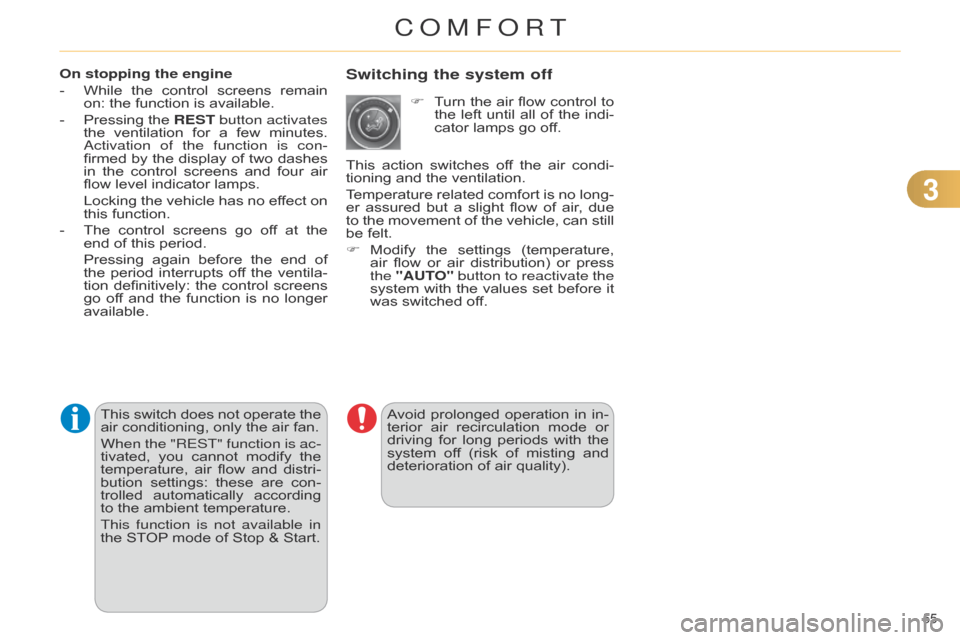
urn
the
air
flow
control
to
the
left
until
all
of
the
indi
-
cator lamps go off.
This
action
switches
of
f
the
air
condi
-
tioning and the ventilation.
Temperature
related
comfort
is
no
long
-
er
assured
but
a
slight
flow
of
air
,
due
to
the
movement
of
the
vehicle,
can
still
be
felt.
F
Modify
the
settings
(temperature,
air
flow
or
air
distribution)
or
press
the
"AUT
O" button to reactivate the
system
with
the
values
set
before
it
was
switched off.
This
switch
does
not
operate
the
air
conditioning,
only
the
air
fan.
When the "REST" function is ac-
tivated,
you
cannot
modify
the
temperature,
air
flow
and
distri
-
bution
settings:
these
are
con
-
trolled
automatically
according
to
the
ambient
temperature.
This function is not available in
the
STOP
mode
of
Stop
&
Start.
COMFORT
Page 59 of 340
33
57
C4-2_en_Chap03_confort_ed01-2014
FRONT SEATS
Manual adjustments
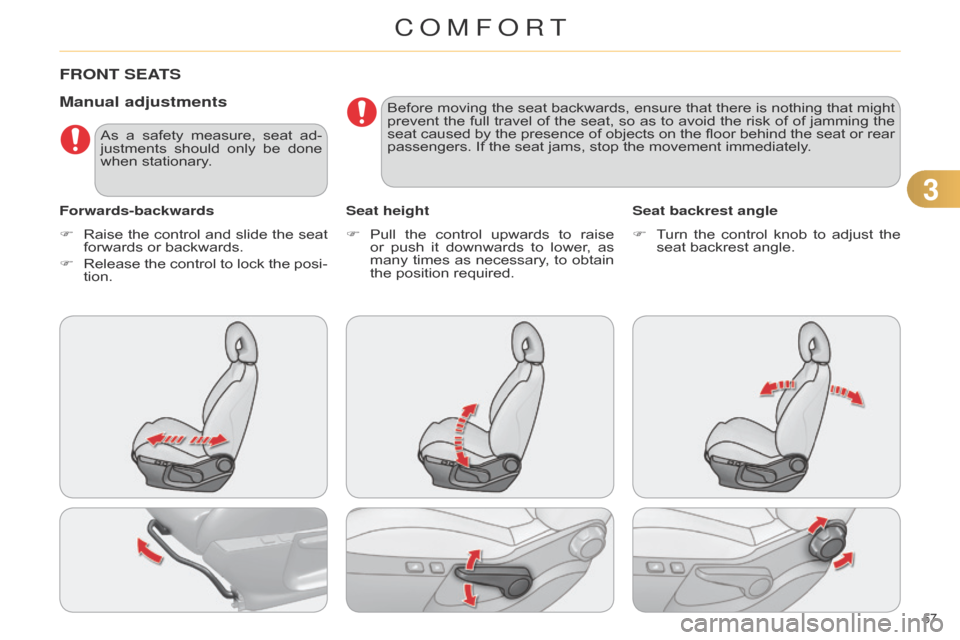
Forwards-backwardsSeat heightSeat backrest angle
F
Raise
the
control
and
slide
the
seat
forwards
or backwards.
F
Release
the
control
to
lock
the
posi
-
tion. F
Pull
the
control
upwards
to
raise
or
push
it
downwards
to
lower
,
as
many
times
as
necessary
,
to
obtain
the
position required.F
T
urn
the
control
knob
to
adjust
the
seat
backrest angle.
As
a
safety
measure,
seat
ad
-
justments
should
only
be
done
when
stationary. Before
moving
the
seat
backwards,
ensure
that
there
is
nothing
that
might
prevent
the
full
travel
of
the
seat,
so
as
to
avoid
the
risk
of
of
jamming
the
seat
caused
by
the
presence
of
objects
on
the
floor
behind
the
seat
or
rear
passengers.
If the seat jams, stop the movement immediately.
COMFORT
Page 65 of 340
33
63
C4-2_en_Chap03_confort_ed01-2014
MIRRORS
Door mirrors
Each fitted with an adjustable mirror glass
permitting the lateral rearward vi -
sion
necessary
for
overtaking
or
park
-
ing.
They
can
also
be
folded
for
parking
in
confined spaces.
Demisting - Defrosting F
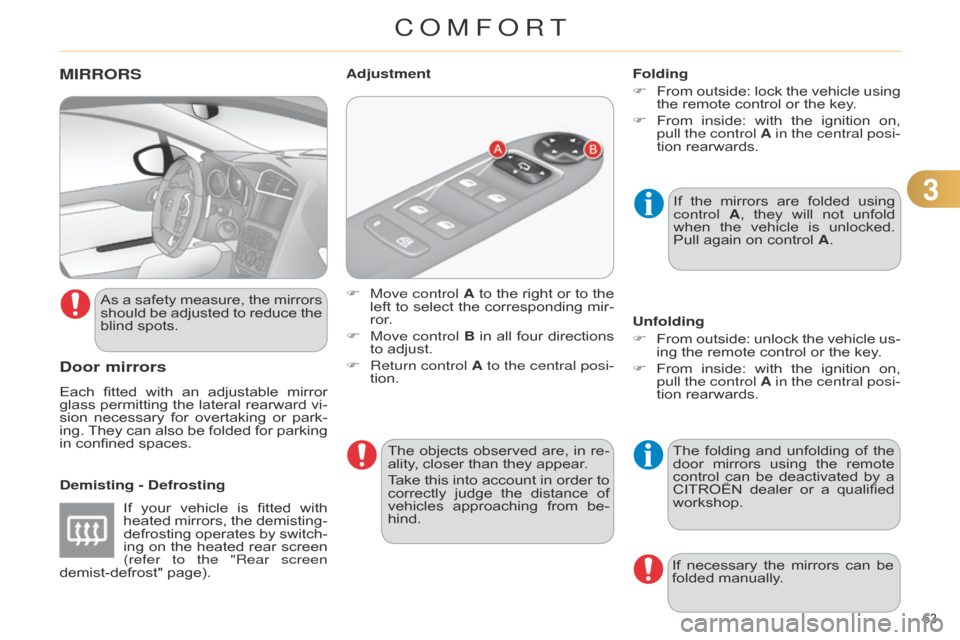
Move control
A
to
the
right
or
to
the
left
to
select
the
corresponding
mir
-
ror.
F
Move control
B
in
all
four
directions
to
adjust.
F
Return control
A to the central posi-
tion.
Adjustment
If
the
mirrors
are
folded
using
control
A
,
they
will
not
unfold
when
the
vehicle
is
unlocked.
Pull
again on control A.
Folding
F
From
outside:
lock
the
vehicle
using
the
remote control or the key.
F
From
inside:
with
the
ignition
on,
pull the
control A in the central posi-
tion rearwards.
The
folding
and
unfolding
of
the
door
mirrors
using
the
remote
control
can
be
deactivated
by
a
CITROËN
dealer
or
a
qualified
workshop.
Unfolding
F
From
outside:
unlock
the
vehicle
us
-
ing the remote control or the key.
F
From
inside:
with
the
ignition
on,
pull the
control A in the central posi-
tion rearwards.
If
necessary
the
mirrors
can
be
folded
manually.
If
your
vehicle
is
fitted
with
heated
mirrors,
the
demisting-
defrosting
operates
by
switch
-
ing
on
the
heated
rear
screen
(refer to the "Rear screen
demist-defrost"
page).
As
a
safety
measure,
the
mirrors
should
be
adjusted
to
reduce
the
blind
spots.
The
objects
observed
are,
in
re
-
ality,
closer than they appear.
Take
this
into
account
in
order
to
correctly
judge
the
distance
of
vehicles
approaching
from
be
-
hind.
COMFORT
Page 67 of 340

33
65
C4-2_en_Chap03_confort_ed01-2014
Automatic day/night model
By
means
of
a
sensor
,
which
measures
the
light
from
the
rear
of
the
vehicle,
this
system
automatically
and
progres
-
sively
changes
between
the
day
and
night
uses.In
order
to
ensure
optimum
vis
-
ibility
during
your
manoeuvres,
the
mirror
lightens
automatically
when
reverse gear is engaged.STEERING WHEEL AD j USTMENT
F When stationary, pull the control
lever to release the adjustment
mechanism.
F
Adjust
the
height
and
reach
to
suit
your
driving position.
F
Push
the
control
lever
to
lock
the
adjustment
mechanism.
a
s a safety precaution, these
operations
should
only
be
carried out
with the vehicle stationary.
Rear view mirror
Adjustable mirror providing a central rearward
view.
Equipped
with
an
anti-dazzle
system,
which
darkens
the
mirror
glass
and
re
-
duces
the
nuisance
to
the
driver
caused
by
the
sun,
headlamps
from
other
ve
-
hicles...
Manual day/night model
Adjustment
F
Adjust
the
mirror
so
that
the
glass
is
directed
correctly in the "day" position.
Day/night position
F
Pull
the
lever
to
change
to
the
"night"
anti-dazzle position.
F
Push
the
lever
to
change
to
the
normal
"day" position.
COMFORT
Page 68 of 340
66
C4-2_en_Chap04_ouvertures_ed01-2014
REMOTE CONTROL KEY
System which permits central unlocking or
locking of the vehicle using the door
lock
or
from
a
distance.
It
is
also
used
to
locate
and
start
the
vehicle,
as
well
as
providing protection against theft.
F
Press
the
open
padlock
once
to
unlock
the
driver's
door
only.
Selective unlocking using the
remote control
F
T
urn
the
key
towards
the
front
in
the
driver's
door
lock
to
unlock
the
vehicle
completely.
Complete unlocking using the
remote control
F Press the open padlock
to
unlock
the
vehicle
com
-
pletely.
Opening the vehicle using the
2-button remote control
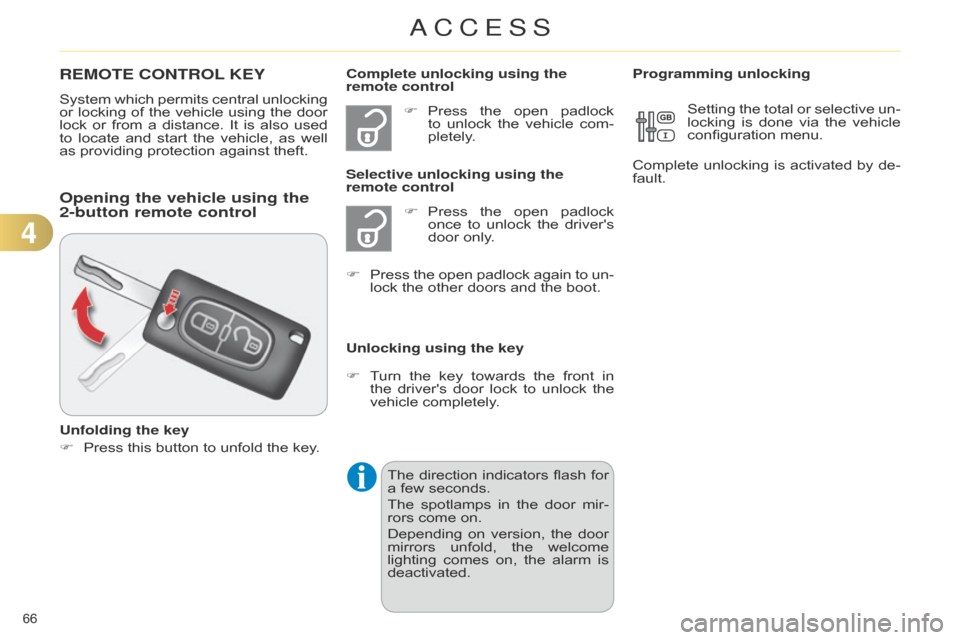
Unfolding the key
F
Press
this button to unfold the key.Unlocking using the key Programming unlocking
Setting
the
total
or
selective
un
-
locking
is
done
via
the
vehicle
configuration
menu.
Complete
unlocking
is
activated
by
de
-
fault.
F
Press
the
open
padlock
again
to
un
-
lock the other doors and the boot.
The
direction
indicators
flash
for
a
few seconds.
The
spotlamps
in
the
door
mir
-
rors
come on.
Depending
on
version,
the
door
mirrors
unfold,
the
welcome
lighting
comes
on,
the
alarm
is
deactivated.
4
ACCESS
Page 69 of 340
67
C4-2_en_Chap04_ouvertures_ed01-2014
Unlocking the vehicle using the
3-button remote control
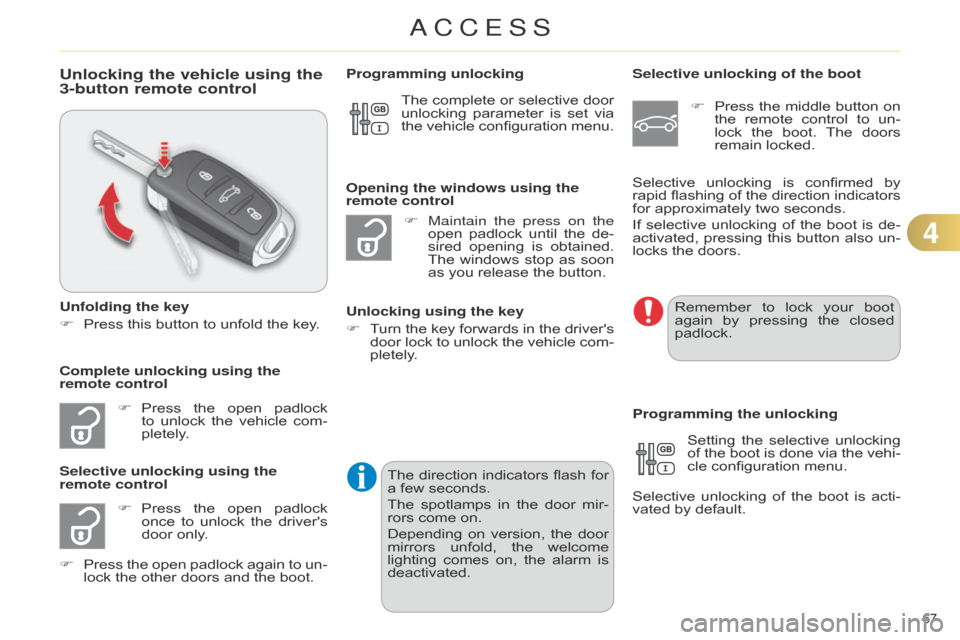
Unfolding the key
F
Press
this button to unfold the key.
F
Press
the
open
padlock
to
unlock
the
vehicle
com
-
pletely.
F
Press
the
open
padlock
once
to
unlock
the
driver's
door
only.
Selective unlocking using the
remote control F
Maintain the press on the
open
padlock
until
the
de
-
sired
opening
is
obtained.
The
windows
stop
as
soon
as
you release the button.
Opening the windows using the
remote control
Unlocking using the key
F
T
urn
the
key
forwards
in
the
driver's
door
lock
to
unlock
the
vehicle
com
-
pletely.
Programming unlocking
Selective unlocking of the boot
F
Press
the
middle
button
on
the
remote
control
to
un
-
lock
the
boot.
The
doors
remain
locked.
Setting
the
selective
unlocking
of
the
boot
is
done
via
the
vehi
-
cle
configuration menu.
Selective
unlocking
of
the
boot
is
acti
-
vated
by default.
Programming the unlocking
Complete unlocking using the
remote control Selective
unlocking
is
confirmed
by
rapid
flashing
of
the
direction
indicators
for
approximately two seconds.
If
selective
unlocking
of
the
boot
is
de
-
activated,
pressing
this
button
also
un
-
locks the doors.
The
complete
or
selective
door
unlocking
parameter
is
set
via
the
vehicle
configuration
menu.
Remember
to lock your boot again
by pressing the closed
padlock.
F
Press
the
open
padlock
again
to
un
-
lock
the other doors and the boot.The
direction
indicators
flash
for
a
few seconds.
The
spotlamps
in
the
door
mir
-
rors
come on.
Depending
on
version,
the
door
mirrors
unfold,
the
welcome
lighting
comes
on,
the
alarm
is
deactivated.
4
ACCESS
Page 70 of 340
68
C4-2_en_Chap04_ouvertures_ed01-2014
Locking the vehicle
F Press the closed padlock to lock
the vehicle.
Normal locking using the remote
control
Normal locking using the key
F
T
urn
the
key
towards
the
rear
in
the
driver's
door
lock
to
lock
the
vehicle.
Locating your vehicle
This function allows you to identify your vehicle
from a distance, particularly in
poor
light.
Y
our
vehicle
must
be
locked.
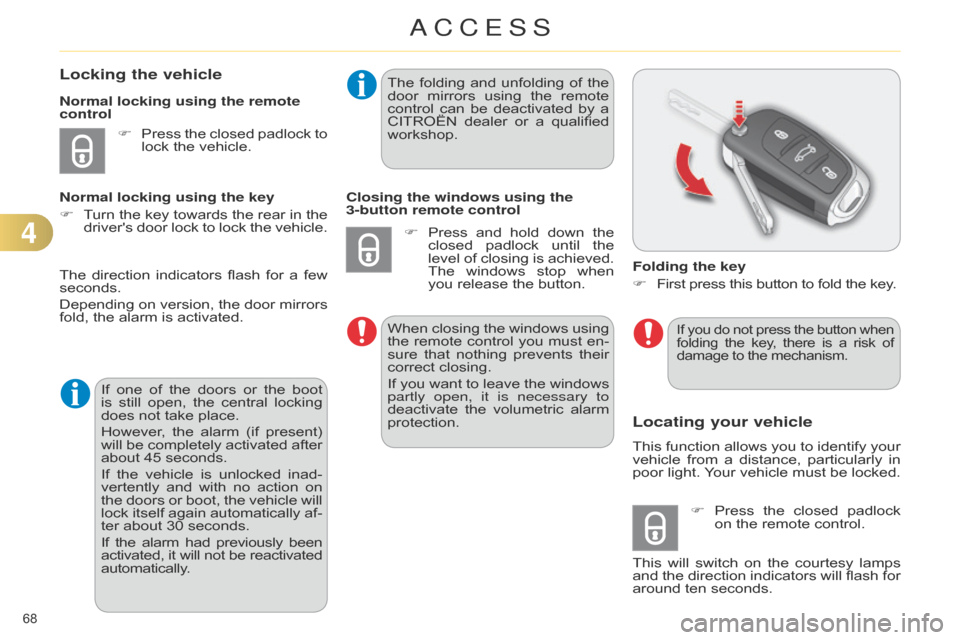
Folding the key
F
First
press this button to fold the key.
F
Press
the
closed
padlock
on
the remote control.
This
will
switch
on
the
courtesy
lamps
and
the
direction
indicators
will
flash
for
around
ten seconds.
The
direction
indicators
flash
for
a
few
seconds.
Depending
on
version,
the
door
mirrors
fold,
the
alarm
is
activated.
If
one
of
the
doors
or
the
boot
is
still
open,
the
central
locking
does
not
take
place.
However,
the
alarm
(if
present)
will
be
completely
activated
after
about
45
seconds.
If
the
vehicle
is
unlocked
inad
-
vertently
and
with
no
action
on
the
doors
or
boot,
the
vehicle
will
lock
itself
again
automatically
af
-
ter
about
30
seconds.
If
the
alarm
had
previously
been activated,
it
will
not
be
reactivated automatically
. The
folding
and
unfolding
of
the
door
mirrors
using
the
remote
control
can
be
deactivated
by
a
CITROËN
dealer
or
a
qualified
workshop.
Closing the windows using the
3-button remote control
F
Press
and
hold
down
the
closed
padlock
until
the
level
of
closing
is
achieved.
The
windows
stop
when
you
release
the
button.
When
closing
the
windows
using
the
remote
control
you
must
en
-
sure
that
nothing
prevents
their
correct
closing.
If
you
want
to
leave
the
windows
partly open, it is necessary to
deactivate
the
volumetric
alarm
protection.
If you
do not press the button when folding
the key , there is a risk of damage
to the mechanism.
4
ACCESS
Page 71 of 340
69
C4-2_en_Chap04_ouvertures_ed01-2014
Operating fault with the
2-button remote control
Following disconnection of the vehicle battery
, replacement of the remote con -
trol
battery
or
in
the
event
of
malfunction
of
the
remote
control,
you
can
no
longer
unlock,
lock or locate your vehicle.
F
First
of
all,
use
the
key
in
the
lock
to
unlock
or lock your vehicle.
F
Then,
reinitialise the remote control.
Reinitialisation
F
Switch
off the ignition.
F
Turn the key to position 2 (Ignition on) .
F Press the closed padlock immedi -
ately for a few seconds.
F
Switch
of
f
the
ignition
and
remove
the
key from the ignition switch.
The
remote
control
is
fully
operational
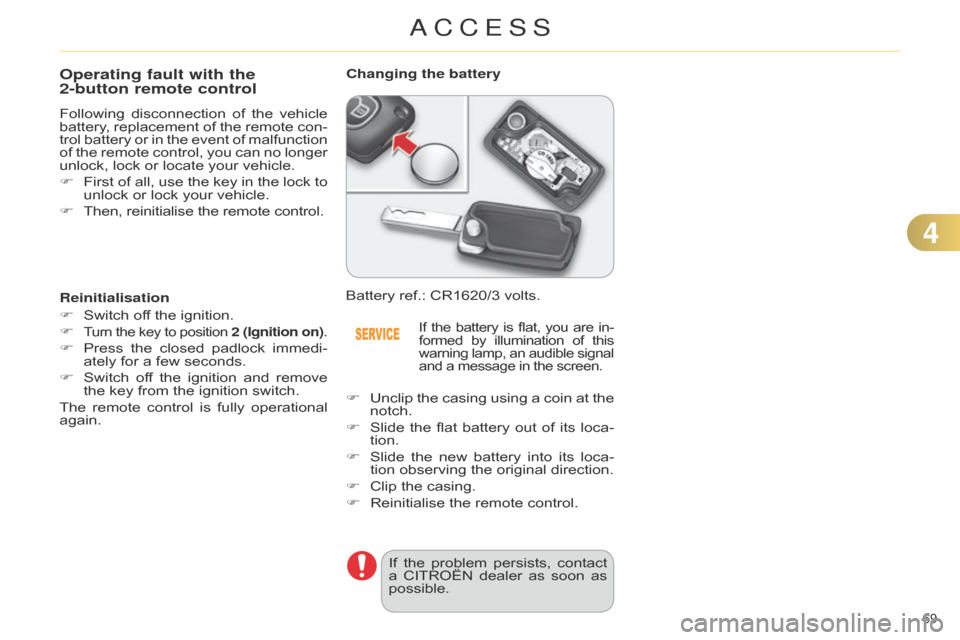
again. Battery
ref.: CR1620/3 volts.
Changing the battery
If the
battery is flat, you are in -
formed by illumination of this warning
lamp,
an
audible
signal and
a message in the screen.
F Unclip the casing using a coin at the notch.
F
Slide
the
flat
battery
out
of
its
loca
-
tion.
F
Slide
the
new
battery
into
its
loca
-
tion
observing the original direction.
F
Clip
the casing.
F
Reinitialise
the remote control.
If
the
problem
persists,
contact
a
CITROËN
dealer
as
soon
as
possible.
4
ACCESS
Page 72 of 340
70
C4-2_en_Chap04_ouvertures_ed01-2014
Operating fault with the
3-button remote control
In the event of a malfunction with the remote
control, you can no longer un -
lock,
lock or locate your vehicle.
F
First
of
all,
use
the
key
in
the
lock
to
unlock
or lock your vehicle.
F
Then,
reinitialise the remote control.
Reinitialisation
F
Switch
of
f
the
ignition
and
remove
the
ignition key.
F
Press
the
closed
padlock
immedi
-
ately
for a few seconds.
F
T
urn
the
key
to
position
2 (Ignition
on)
.
F
Switch
of
f
the
ignition
and
remove
the
key from the ignition switch.
The
remote
control
is
fully
operational
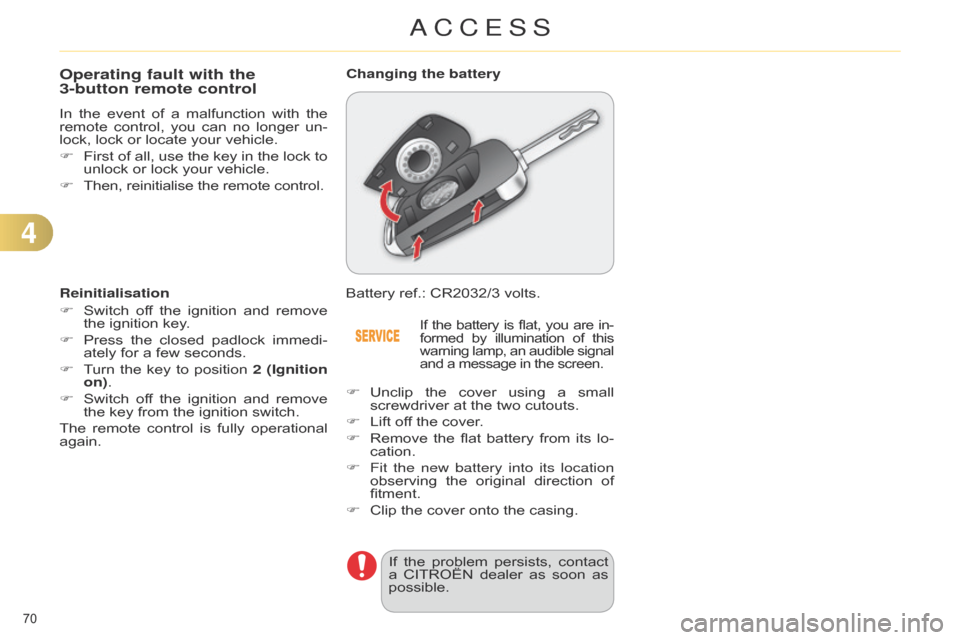
again. Battery
ref.: CR2032/3 volts.
Changing the battery
If the
battery is flat, you are in -
formed by illumination of this warning
lamp,
an
audible
signal and
a message in the screen.
F Unclip the cover using a small screwdriver
at the two cutouts.
F
Lift
off the cover.
F
Remove
the
flat
battery
from
its
lo
-
cation.
F
Fit the new battery into its location
observing
the
original
direction
of
fitment.
F
Clip
the cover onto the casing.
If
the
problem
persists,
contact
a
CITROËN
dealer
as
soon
as
possible.
4
ACCESS