miles Citroen C4 PICASSO 2015 2.G Owner's Manual
[x] Cancel search | Manufacturer: CITROEN, Model Year: 2015, Model line: C4 PICASSO, Model: Citroen C4 PICASSO 2015 2.GPages: 420, PDF Size: 10.72 MB
Page 12 of 420
10
Limit the causes of excess consumption
Spread loads throughout the vehicle; place the heaviest items in the bottom of the boot, as close as possible to the rear seats.
Limit
the loads carried in the vehicle and reduce wind resistance
(roof
bars, roof rack, bicycle carrier, trailer...). Use a roof box in
p
reference.
Remove
roof bars and roof racks after use.
At
the end of winter, remove snow tyres and refit your summer tyres.
Observe the recommendations on
maintenance
Check the tyre pressures regularly, when cold, referring to the label in the door aperture, driver's side.
Carry
out this check in particular:
-
b
efore a long journey,
-
a
t each change of season,
-
a
fter a long period out of use.
Don't
forget the spare wheel and the tyres on any trailer or caravan.
Have
your vehicle serviced regularly (engine oil, oil filter, air filter,
p
assenger compartment filter...) and observe the schedule of
o
perations recommended in the manufacturer's service schedule.
With
a BlueHDi Diesel engine, if the SCR system is faulty your vehicle
b
ecomes polluting; go to a CITROËN dealer or a qualified workshop
w
ithout delay to have the emissions of nitrous oxides brought back to
t
he legal level.
When
refuelling, do not continue after the third cut-off of the nozzle to
a
void any over flow.
At
the wheel of your new vehicle, it is only after the first 1 800 miles
(3
000 kilometres) that you will see the fuel consumption settle down to
a
consistent average.
Eco-driving
Page 22 of 420
20
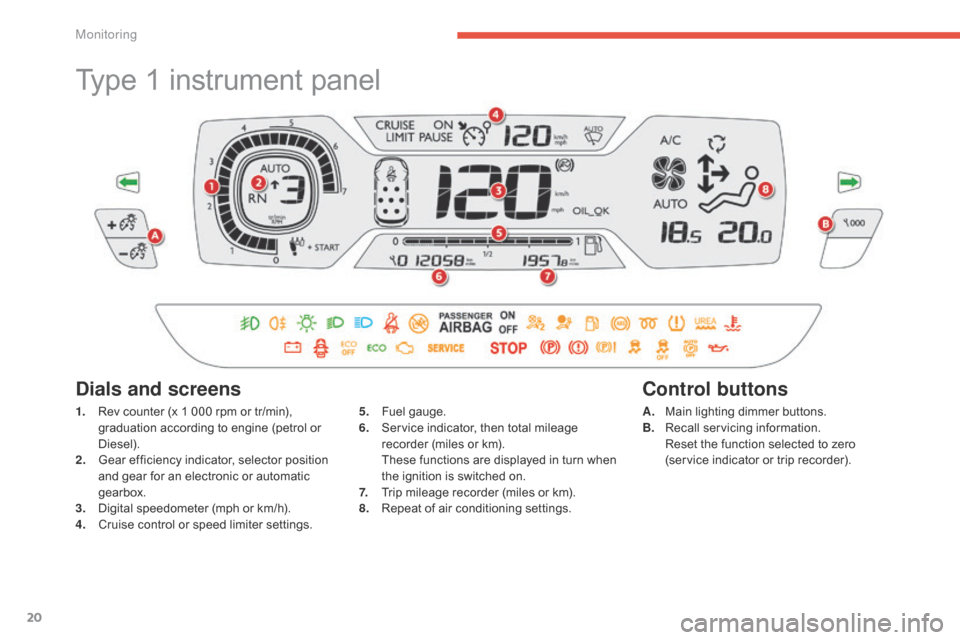
Type 1 instrument panel
1. Rev counter (x 1 000 rpm or tr/min), g
raduation according to engine (petrol or
D
iesel).
2.
G
ear efficiency indicator, selector position
a
nd gear for an electronic or automatic
g
earbox.
3.
D
igital speedometer (mph or km/h).
4.
C
ruise control or speed limiter settings.
Dials and screens
5. Fuel gauge.
6. S ervice indicator, then total mileage
r
ecorder (miles or km).
T
hese functions are displayed in turn when
t
he ignition is switched on.
7.
T
rip mileage recorder (miles or km).
8.
R
epeat of air conditioning settings.A. M
ain lighting dimmer buttons.
B. R ecall servicing information.
R
eset the function selected to zero
(service
indicator or trip recorder).
Control buttons
Monitoring
Page 23 of 420
21
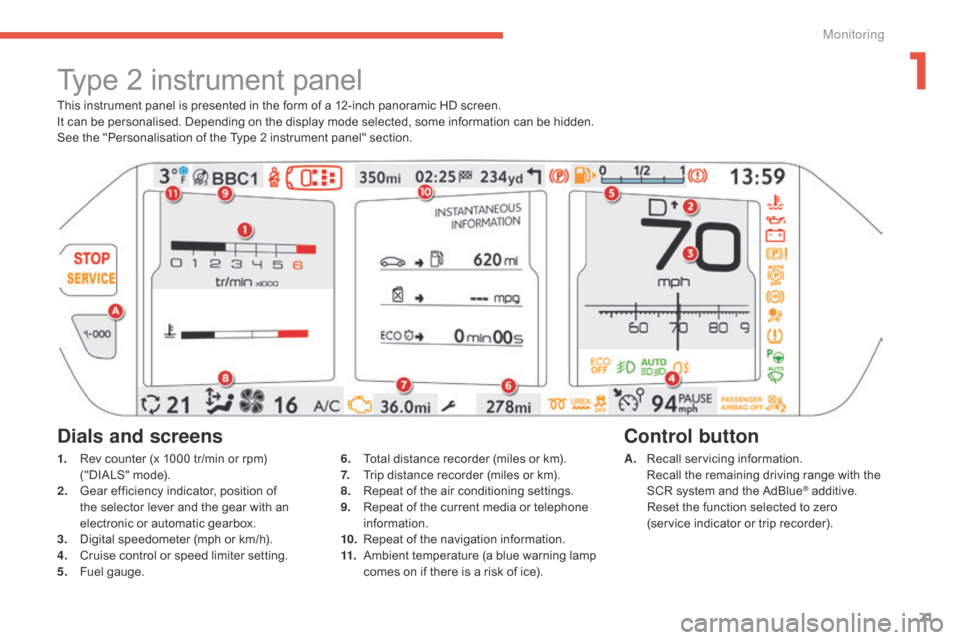
This instrument panel is presented in the form of a 12-inch panoramic HD screen.
I t can be personalised. Depending on the display mode selected, some information can be hidden.
See
the "Personalisation of the Type 2 instrument panel" section.
Type 2 instrument panel
1. Rev counter (x 1000 tr/min or rpm) (
"DIALS" mode).
2.
G
ear efficiency indicator, position of
t
he selector lever and the gear with an
e
lectronic or automatic gearbox.
3.
D
igital speedometer (mph or km/h).
4.
C
ruise control or speed limiter setting.
5.
F
uel gauge. A. R
ecall servicing information. R
ecall the remaining driving range with the
S
CR system and the AdBlue
® additive. R
eset
the
function
selected
to zero
(service
indicator
or
trip
recorder).
Control button
Dials and screens
6. Total distance recorder (miles or km).
7. T rip distance recorder (miles or km).
8.
R
epeat of the air conditioning settings.
9.
R
epeat of the current media or telephone
i
nformation.
10.
R
epeat of the navigation information.
11.
A
mbient temperature (a blue warning lamp
c
omes on if there is a risk of ice).
1
Monitoring
Page 40 of 420
38
Warning / indicator lampStateCause Action / Observations
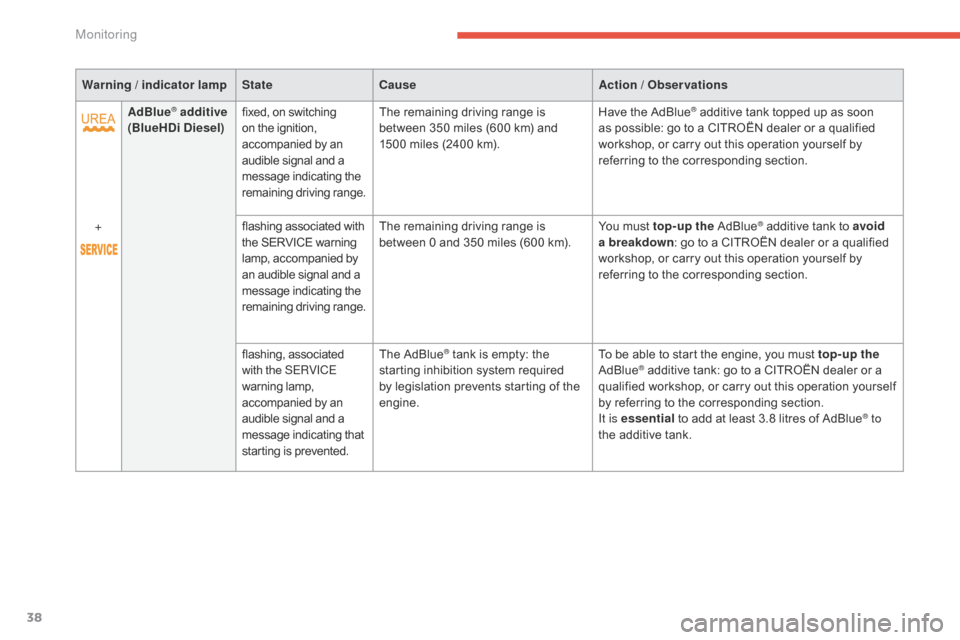
AdBlue
® additive
(BlueHDi Diesel) fixed,
on switching o
n the ignition, a
ccompanied by an
a
udible signal and a
m
essage indicating the
r
emaining
d
riving
r
ange.The
remaining driving range is b
etween 350 miles (600 km) and
1
500 miles (2400 km).Have
the AdBlue® additive tank topped up as soon a
s
possible:
go
to
a CITROËN dealer or a qualified
w
orkshop,
or
carry out this operation yourself by
r
eferring
to
the
corresponding section.
+ flashing
associated
with
t
he
SERVICE
warning
l
amp,
accompanied
by
a
n
audible
signal
and
a
m
essage
indicating
the
r
emaining
d
riving
r
ange. The
remaining
driving
range
is
b
etween
0
and
350
miles
(600
km). You
must
top-up the
Ad
Blue
® additive tank to avoid
a
breakdown :
go
to
a
CITROËN dealer or a qualified
w
orkshop,
or
carry
out
this
operation yourself by
r
eferring
to
the
corresponding
section.
flashing,
as
sociated
w
ith the SERVICE
warning
lam
p,
a
ccompanied
by
an
a
udible
signal
and
a
m
essage
indicating
that
s
tarting
is
prevented. The
AdBlue
® tank is empty: the s
tarting
inhibition system required
b
y
legislation prevents starting of the
e
ngine. To
be able to start the engine, you must top-up the
AdBlue® additive tank: go to a CITROËN dealer or a q
ualified workshop, or carry out this operation yourself
b
y
referring to the corresponding section.
It is essential
to add at least 3.8 litres of AdBlue
® to
the
additive
tank.
Monitoring
Page 41 of 420
39
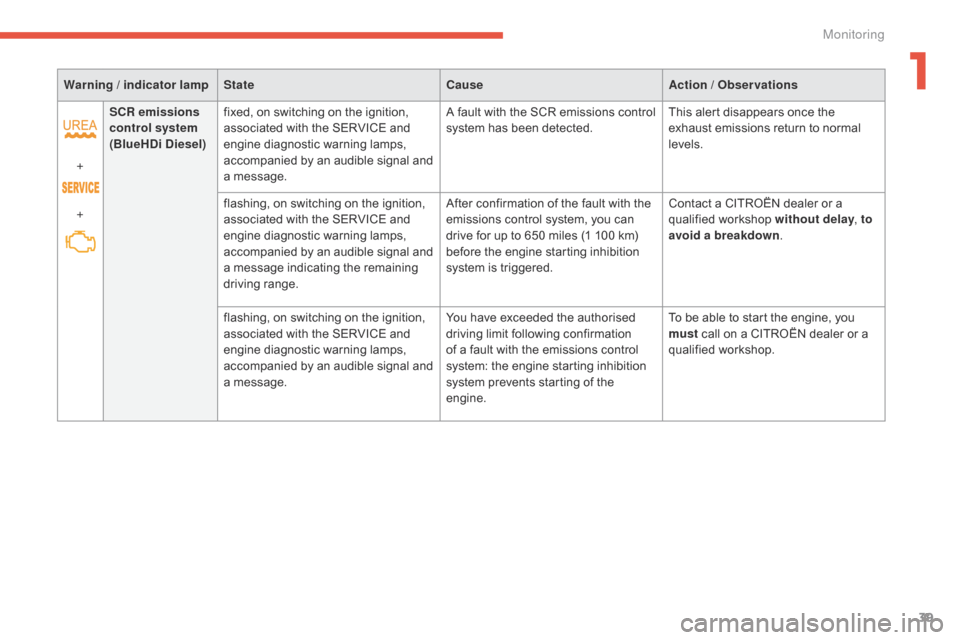
Warning / indicator lampState CauseAction / Observations
+
+ SCR emissions
control system
(BlueHDi Diesel) fixed,
on switching on the ignition,
a
ssociated with the SERVICE and
e
ngine diagnostic warning lamps,
a
ccompanied
b
y
an a
udible
s
ignal
an
d
a
message. A
fault with the SCR emissions control
s
ystem has been detected.This
alert disappears once the
e
xhaust emissions return to normal
l
evels.
flashing,
on switching on the ignition,
a
ssociated with the SERVICE and
e
ngine diagnostic warning lamps,
a
ccompanied
b
y
an a
udible
s
ignal
an
d
a
message indicating the remaining
d
riving
r
ange.After
confirmation of the fault with the
e
missions control system, you can
d
rive for up to 650 miles (1 100 km)
b
efore the engine starting inhibition
s
ystem is triggered.Contact
a CITROËN dealer or a
q
ualified
w
orkshop
w
ithout delay, to
avoid a breakdown .
flashing,
on switching on the ignition,
a
ssociated with the SERVICE and
e
ngine diagnostic warning lamps,
a
ccompanied
b
y
an a
udible
s
ignal
an
d
a
message. You
have exceeded the authorised
d
riving limit following confirmation
o
f a fault with the emissions control
s
ystem: the engine starting inhibition
s
ystem prevents starting of the
e
ngine.To
be able to start the engine, you
m
ust
call on a CITROËN dealer or a
q
ualified
w
orkshop.
1
Monitoring
Page 42 of 420
40
Service indicator
System which informs the driver when the next service is due, in accordance with the
ma
nufacturer's
ser
vice
s
chedule.
The
point at which the service is due is
c
alculated from the last indicator zero reset,
a
ccording to the mileage covered and the time
e
lapsed since the last service.
For
BlueHDi Diesel versions, depending on the
c
ountry of sale, the degree of deterioration of
t
he engine oil may also be taken into account.
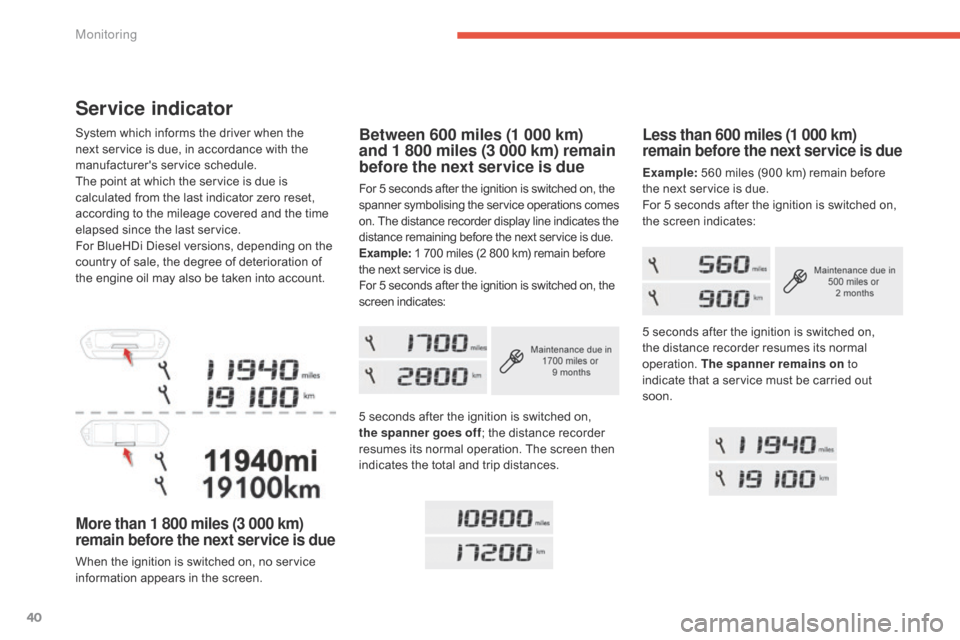
More than 1 800 miles (3 000 km)
remain before the next service is due
When the ignition is switched on, no service information appears in the screen.
Less than 600 miles (1 000 km)
remain before the next service is due
Example: 560 miles (900 km) remain before t
he next service is due.
For
5 seconds after the ignition is switched on,
t
he screen indicates:
Between 600 miles (1 000 km)
and 1 800 miles (3 000 km) remain
before the next service is due
For 5 seconds after the ignition is switched on, the spanner s ymbolising t he ser vice o perations c omes o
n. The distance recorder display line indicates the
d
istance remaining before the next service is due.
Example:
1 700 miles (2 800 km) remain before
t
he next service is due.
For
5 seconds after the ignition is switched on, the
s
creen indicates:
5
seconds after the ignition is switched on,
t
he spanner goes off ;
the distance recorder
r
esumes its normal operation. The screen then
i
ndicates the total and trip distances.5
seconds after the ignition is switched on,
t
he distance recorder resumes its normal
ope
ration.
T
he spanner remains on to
indicate
that a service must be carried out
s
oon.
Monitoring
Page 43 of 420
41
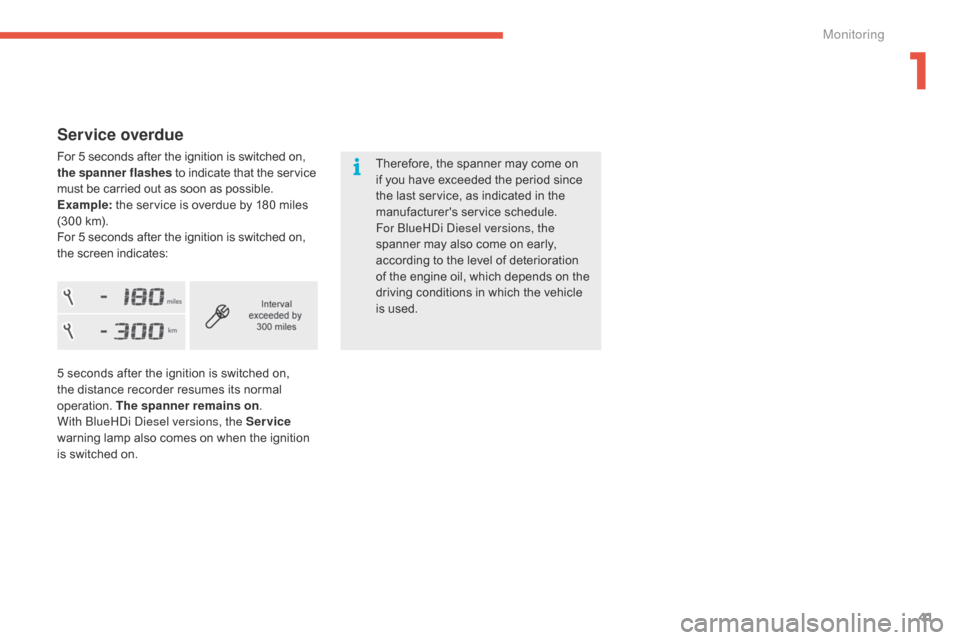
Service overdue
For 5 seconds after the ignition is switched on, the spanner flashes to indicate that the service m
ust be carried out as soon as possible.
Example:
the service is overdue by 180 miles
(
300 km).
For
5 seconds after the ignition is switched on,
t
he screen indicates: Therefore,
the spanner may come on
i
f you have exceeded the period since
t
he last service, as indicated in the
ma
nufacturer's
ser
vice
s
chedule.
For
b
l
ueH
di
d
i
esel versions, the
spanner
may also come on early,
a
ccording to the level of deterioration
o
f the engine oil, which depends on the
d
riving conditions in which the vehicle
i
s used.
5
seconds after the ignition is switched on,
t
he distance recorder resumes its normal
ope
ration.
T
he spanner remains on .
With
b
l
ueH
di
d
i
esel versions, the Service
warning
lamp also comes on when the ignition
i
s switched on.
1
Monitoring
Page 46 of 420
44
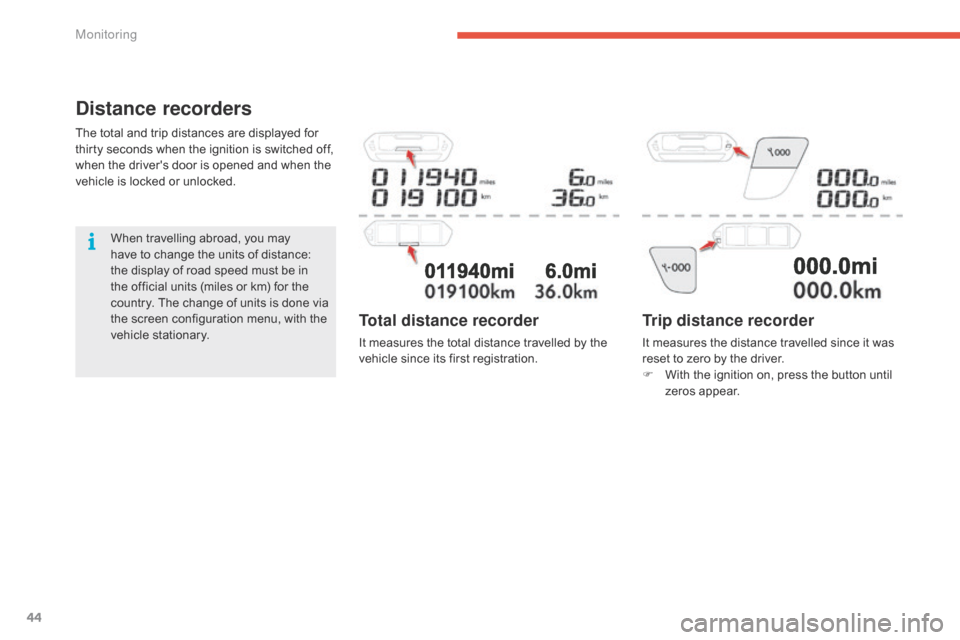
Distance recorders
The total and trip distances are displayed for thirty seconds when the ignition is switched off,
w
hen the driver's door is opened and when the
v
ehicle is locked or unlocked.
When
travelling abroad, you may
h
ave to change the units of distance:
t
he display of road speed must be in
t
he official units (miles or km) for the
c
ountry. The change of units is done via
t
he screen configuration menu, with the
v
ehicle stationary.
Trip distance recorder
It measures the distance travelled since it was reset to zero by the driver.
F
W
ith the ignition on, press the button until
z
eros appear.
Total distance recorder
It measures the total distance travelled by the vehicle since its first registration.
Monitoring
Page 52 of 420
50
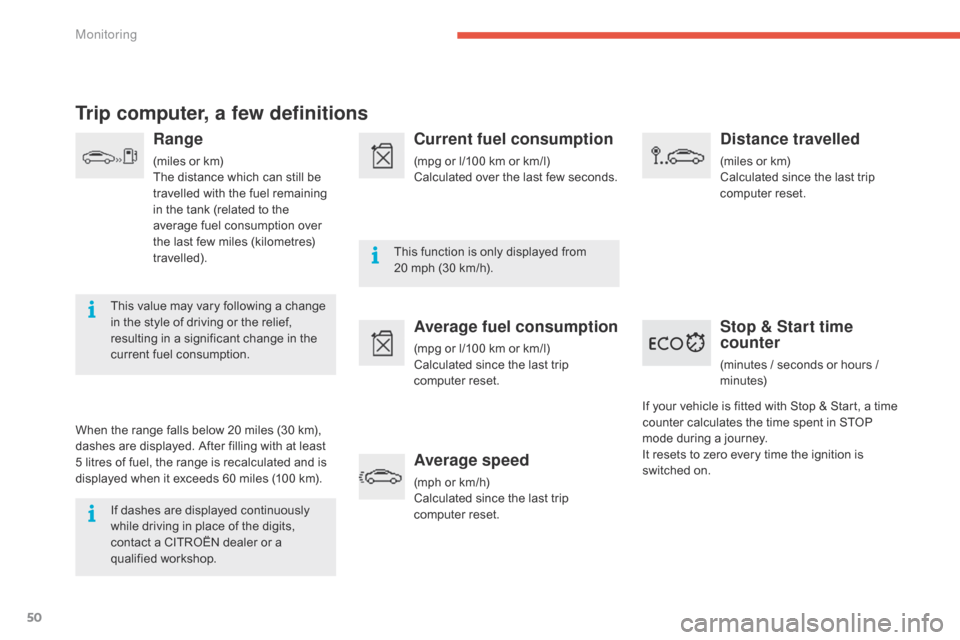
Trip computer, a few definitions
Range
(miles or km)
T he distance which can still be
t
ravelled with the fuel remaining
i
n the tank (related to the
a
verage fuel consumption over
t
he last few miles (kilometres)
t
ravelled).
This
value may vary following a change
i
n
the
style of driving or the relief,
r
esulting in a significant change in the
c
urrent
fuel consumption.
When
the
range falls below 20 miles (30 km),
d
ashes
are
displayed. After filling with at least
5
litres
of
fuel,
the range is recalculated and is
d
isplayed
when it exceeds 60 miles (100 km).
If
dashes are displayed continuously
w
hile
driving in place of the digits,
c
ontact
a CITROËN dealer or a
q
ualified
w
orkshop. This
function is only displayed from
2
0 mph (30 km/h).
Current fuel consumption
(mpg or l/100 km or km/l)
C alculated over the last few seconds.
Average fuel consumption
(mpg or l/100 km or km/l)
C alculated since the last trip
c
omputer
re
set.
Average speed
(mph or km/h)
C alculated since the last trip
c
omputer
re
set.
Distance travelled
(miles or km)
C alculated since the last trip
c
omputer
re
set.
Stop & Start time
counter
(minutes / seconds or hours / minutes)
If
your
vehicle
is fitted with Stop & Start, a time
c
ounter
calculates the time spent in STOP
m
ode
during
a journey.
It
resets
to
zero every time the ignition is
s
witched
on.
Monitoring
Page 205 of 420
203
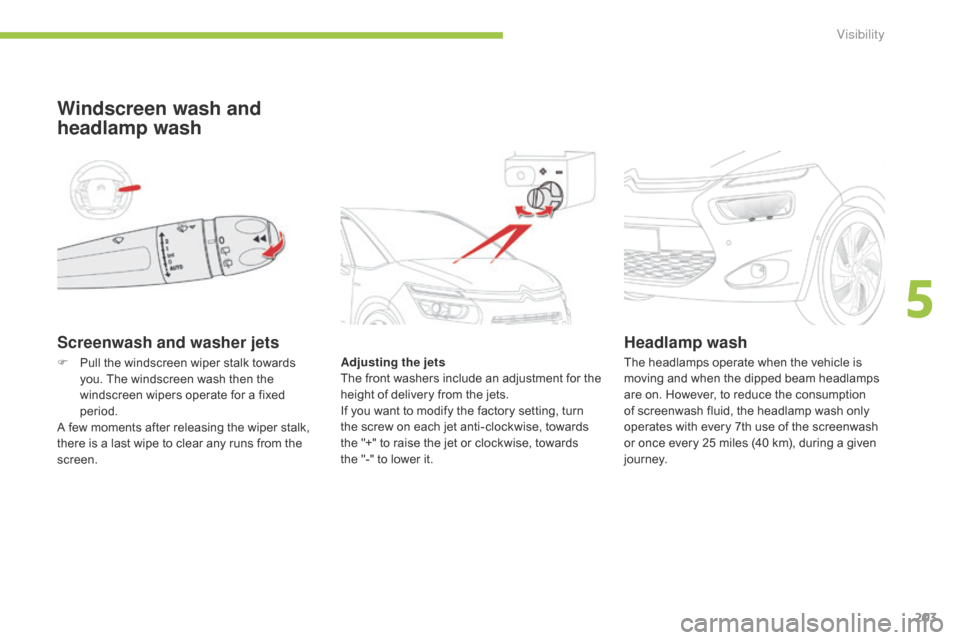
Screenwash and washer jets
Windscreen wash and
headlamp wash
Adjusting the jets
The f ront w ashers i nclude a n a djustment f or t he
h
eight of delivery from the jets.
If
you want to modify the factory setting, turn
t
he screw on each jet anti-clockwise, towards
t
he "+" to raise the jet or clockwise, towards
t
he "-" to lower it.
Headlamp wash
F Pull the windscreen wiper stalk towards y
ou. The windscreen wash then the
w
indscreen wipers operate for a fixed
p
eriod.
A
few moments after releasing the wiper stalk,
t
here is a last wipe to clear any runs from the
sc
reen. The
headlamps operate when the vehicle is m
oving and when the dipped beam headlamps
a
re on. However, to reduce the consumption
o
f screenwash fluid, the headlamp wash only
o
perates with every 7th use of the screenwash
o
r once every 25 miles (40 km), during a given
j
o u r n ey.
5
Visibility