warning light Citroen C4 PICASSO 2015 2.G Owner's Manual
[x] Cancel search | Manufacturer: CITROEN, Model Year: 2015, Model line: C4 PICASSO, Model: Citroen C4 PICASSO 2015 2.GPages: 420, PDF Size: 10.72 MB
Page 5 of 420
Direction indicators 209
Hazard warning lamps
2
09
Horn
2
09
Emergency
or assistance call
2
10
Warning
triangle
2
10
Under-inflation
d
etection
2
11
ESC
system
2
14
Seat
belts
2
18
Airbags
2
23
Child
seats
2
29
Deactivating
the passenger's front airbag
2
31
ISOFIX
mountings
2
40
Child
lock
2
48
Safety
Temporary puncture
r epair kit 2 49
Changing
a wheel
2
57
Snow
chains
2
67
Changing
a bulb
2
68
Changing
a fuse
2
77
12
V battery
2
84
Energy
economy mode
2
87
Changing
a wiper blade
2
88
Towing
the vehicle
2
89
Towbar
with quickly detachable
towball
2
91
Towing
a trailer
2
93
Roof
bars
2
95
Very
cold climate screen
2
97
Accessories
2
98
Practical information
Bonnet 3 01
Petrol engines
3
02
Diesel
engines
3
03
Fuel
3
0 4
Running
out of fuel (Diesel)
3
07
Checking
levels
3
08
Chec ks
3
12
AdBlue
® additive and SCR system
(
BlueHDi Diesel) 3 14
Checks
Petrol engines 3 21
Petrol weights
3
23
Diesel
engines
3
25
Diesel
weights
3
28
Dimensions
3
31
Identification
ma
rkings
3
33
Technical data
Emergency or assistance 3 34
7-inch touch screen tablet
3
37
Audio and telematics
Lighting controls 1 89
Automatic illumination of headlamps
1
94
Automatic
headlamp dipping
1
95
Daytime
running lamps
1
97
Headlamp
adj
ustment
1
98
Directional
l
ighting
2
00
Wiper
controls
2
01
Screenwash
2
03
Automatic
rain sensitive wipers
2
04
Courtesy
lamps
2
06
Panoramic
sunroof
2
07
Interior
mood lighting
2
08
Visibility
Alphabetical
in
dex
Contents
Page 8 of 420
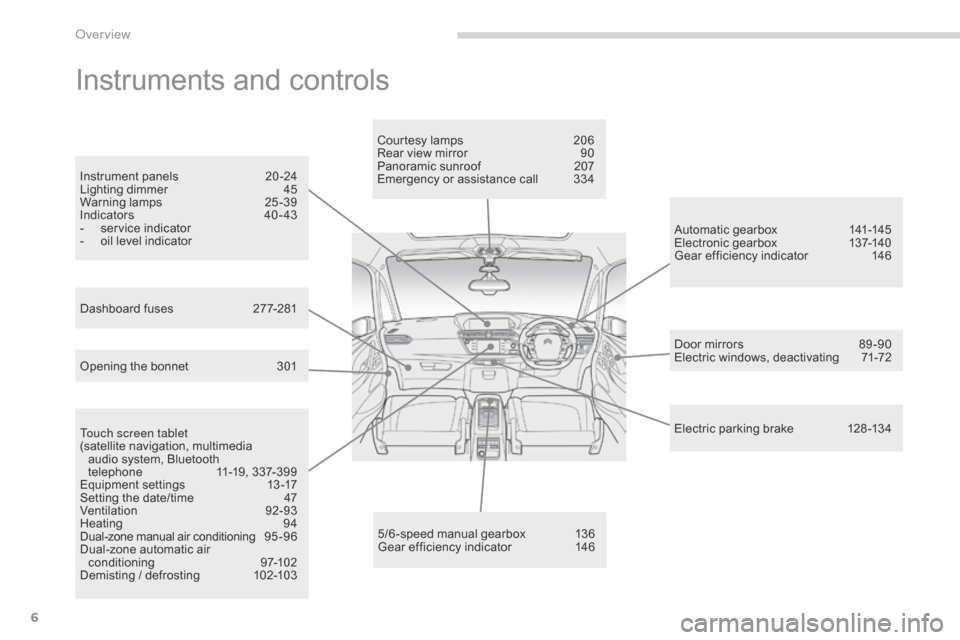
6
Instruments and controls
Touch screen tablet
(satellite navigation, multimedia
a
udio system, Bluetooth
t
elephone
1
1-19, 337-399
Equipment
se
ttings
1
3-17
Setting
the date/time
4
7
Ventilation
9
2-93
Heating
9
4
Dual-zone
m
anual
a
ir
c
onditioning
9
5 - 9 6
Dual-zone
automatic air
c
onditioning
9
7-102
Demisting
/ defrosting
1
02-103 Door
mirrors
8
9 -90
Electric windows, deactivating
7
1-72
5/6 -speed manual gearbox
1
36
Gear
efficiency indicator
1
46Automatic
gearbox
1
41-145
Electronic gearbox
1
37-140
Gear efficiency indicator
1
46
Opening the bonnet
3
01Courtesy lamps
2
06
Rear view mirror
9
0
Panoramic sunroof
2
07
Emergency or assistance call
3
34
Instrument panels
2
0 -24
Lighting dimmer
4
5
Warning
lam
ps
2
5-39
Indicators
4
0 - 43
-
s
ervice indicator
-
o
il level indicator
Electric parking brake 1 28 -134
Dashboard fuses
2
77-281
over view
Page 9 of 420
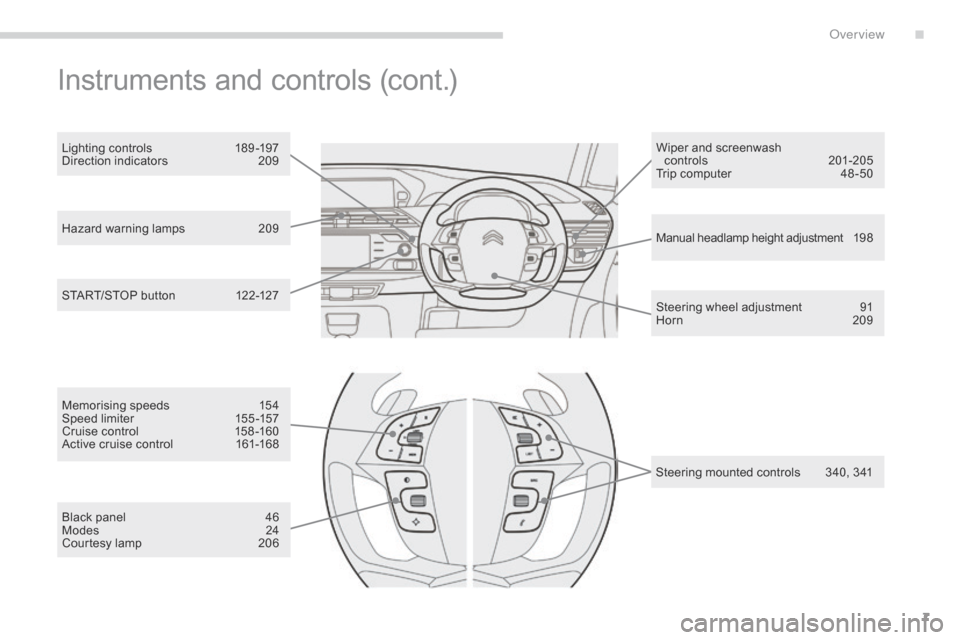
7
Hazard warning lamps 209
Manual headlamp height adjustment 1 9 8
Steering
wheel adjustment
9
1
Horn
2
09
START/STOP
button
1
22-127 Wiper
and screenwash
controls
20
1-205
Trip computer
4
8 -50
Lighting controls
1
89 -197
Direction indicators
2
09
Instruments and controls (cont.)
Memorising speeds 1
54
Speed limiter 1 55 -157
Cruise
control
1
58 -160
Active
cruise control
1
61-168
Black
panel
4
6
Modes
2
4
Courtesy
lamp
2
06 Steering
mounted controls
3
40, 341
.
over view
Page 13 of 420
11
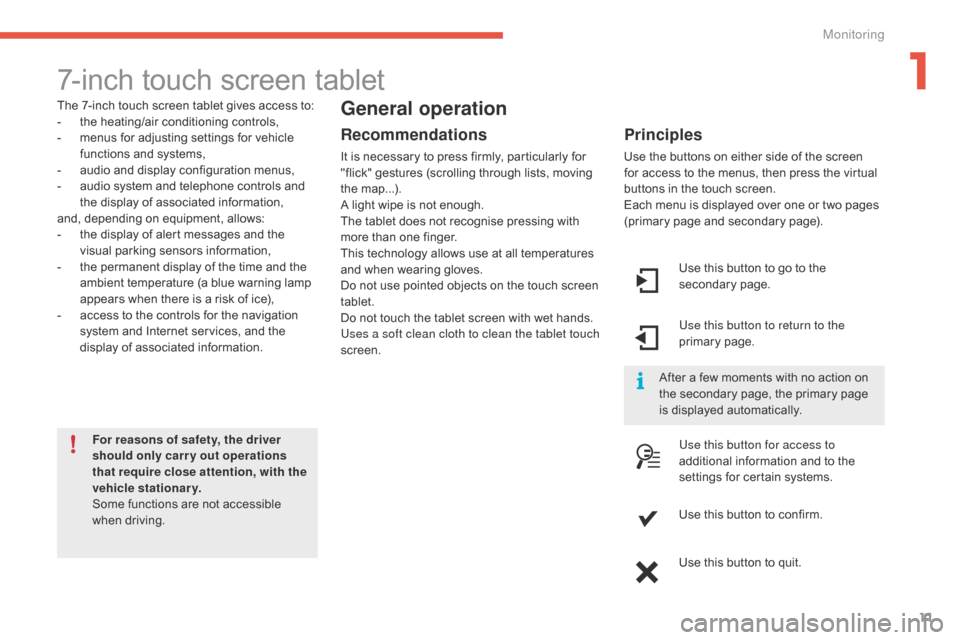
7-inch touch screen tablet
The 7-inch touch screen tablet gives access to:
- t he heating/air conditioning controls,
-
m
enus for adjusting settings for vehicle
f
unctions and systems,
-
a
udio and display configuration menus,
-
a
udio system and telephone controls and
t
he display of associated information,
and,
depending on equipment, allows:
-
t
he display of alert messages and the
v
isual
par
king
s
ensors
in
formation,
-
t
he permanent display of the time and the
a
mbient temperature (a blue warning lamp
a
ppears when there is a risk of ice),
-
a
ccess to the controls for the navigation
s
ystem and Internet services, and the
d
isplay of associated information.
For reasons of safety, the driver
should only carr y out operations
that require close attention, with the
vehicle stationary.
Some
functions are not accessible
w
hen
d
riving.General operation
Recommendations
It is necessary to press firmly, particularly for "flick" gestures (scrolling through lists, moving
t
he
m
ap...).
A
light wipe is not enough.
The
tablet does not recognise pressing with
m
ore than one finger.
This
technology allows use at all temperatures
a
nd when wearing gloves.
Do
not use pointed objects on the touch screen
t
ablet.
Do
not touch the tablet screen with wet hands.
Uses a soft clean cloth to clean the tablet touch
screen. Use
this button to go to the
s
econdary
pag
e.
Use this button to return to the
primary
pag
e.
Use this button for access to
additional
information and to the
s
ettings for certain systems.
Use
this button to confirm.
Use
this button to quit.
Principles
Use the buttons on either side of the screen for access to the menus, then press the virtual
b
uttons in the touch screen.
Each
menu is displayed over one or two pages
(
primary page and secondary page).
After
a few moments with no action on
t
he secondary page, the primary page
i
s displayed automatically.
1
Monitoring
Page 29 of 420
27
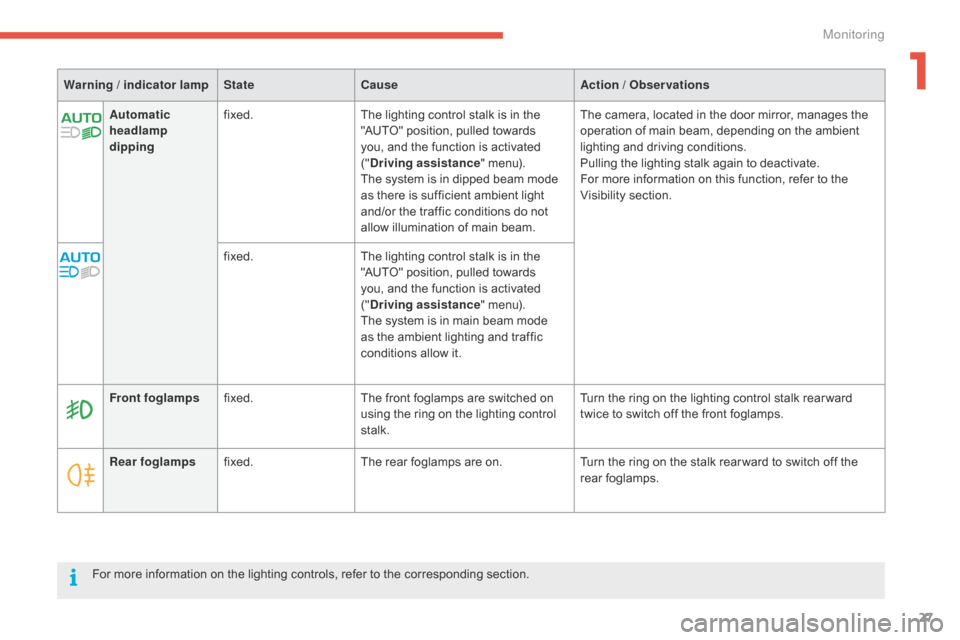
Automatic
headlamp
dippingfixed.
The lighting control stalk is in the "
AUTO" position, pulled towards
y
ou, and the function is activated
("D
riving assistance"
menu).
The
system is in dipped beam mode
a
s there is sufficient ambient light
a
nd/or the traffic conditions do not
a
llow illumination of main beam.The
camera, located in the door mirror, manages the o
peration of main beam, depending on the ambient
l
ighting and driving conditions.
Pulling
the lighting stalk again to deactivate.
For
more information on this function, refer to the
V
isibility
s
ection.
fixed. The
lighting control stalk is in the
"
AUTO" position, pulled towards
y
ou, and the function is activated
("D
riving assistance"
menu).
The
system is in main beam mode
a
s the ambient lighting and traffic
c
onditions allow it.
Warning / indicator lamp
StateCause Action / Observations
Rear foglamps fixed. The
rear foglamps are on.Turn
the ring on the stalk rear ward to switch off the
r
ear
fo
glamps.
Front foglamps
fixed. The
front foglamps are switched on
u
sing the ring on the lighting control
st
alk.Turn
the ring on the lighting control stalk rear ward
t
wice to switch off the front foglamps.
For
more information on the lighting controls, refer to the corresponding section.
1
Monitoring
Page 31 of 420
29
Warning / indicator lampStateCause Action / Observations
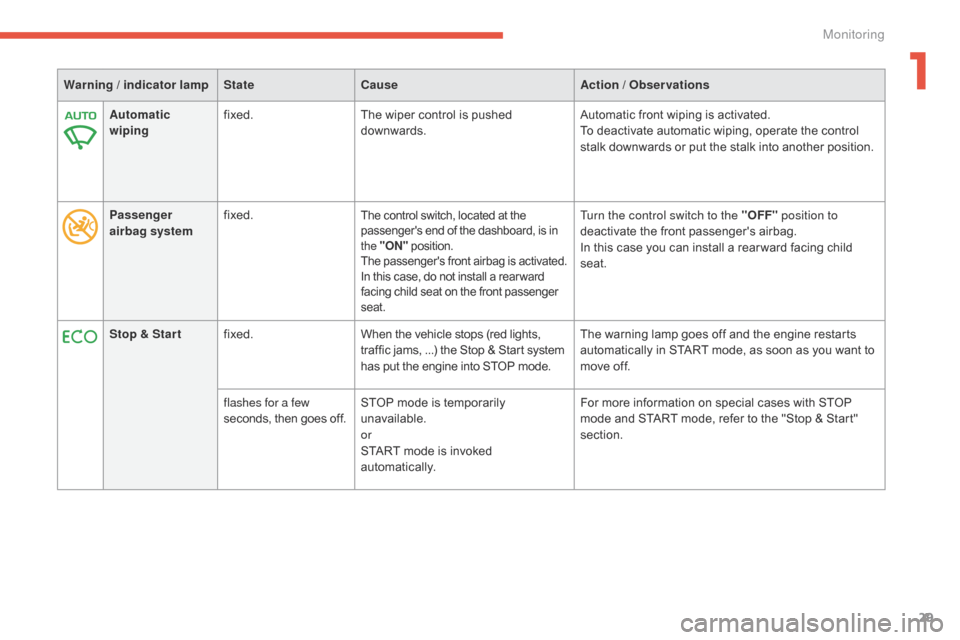
Automatic
wiping fixed.
The
wiper control is pushed
d
ownwards.Automatic
front wiping is activated.
To
deactivate automatic wiping, operate the control
s
talk downwards or put the stalk into another position.
Passenger
airbag system fixed.
The control switch, located at the p
assenger's end of the dashboard, is in t
he "ON "
p
osition.
The
p
assenger's
f
ront
a
irbag
i
s
a
ctivated.
In
this case, do not install a rear ward
f
acing child seat on the front passenger
sea
t.Turn the control switch to the " OFF" position to
deactivate the front passenger's airbag.
In
this case you can install a rear ward facing child
sea
t.
Stop & Star t fixed. When
the
vehicle
stops
(red
lights,
t
raffic
jams,
...)
the
Stop
&
Start
system
h
as
put
the
engine
into
STOP
mode. The
warning lamp goes off and the engine restarts
a
utomatically in START mode, as soon as you want to
m
ove off.
flashes for a few
seconds,
then
goes
off. STOP
mode
is
temporarily
u
navailable.
or
START
mode
is
invoked
au
tomatically. For
more information on special cases with STOP
m
ode and START mode, refer to the "Stop & Start"
s
ection.
1
Monitoring
Page 118 of 420
116
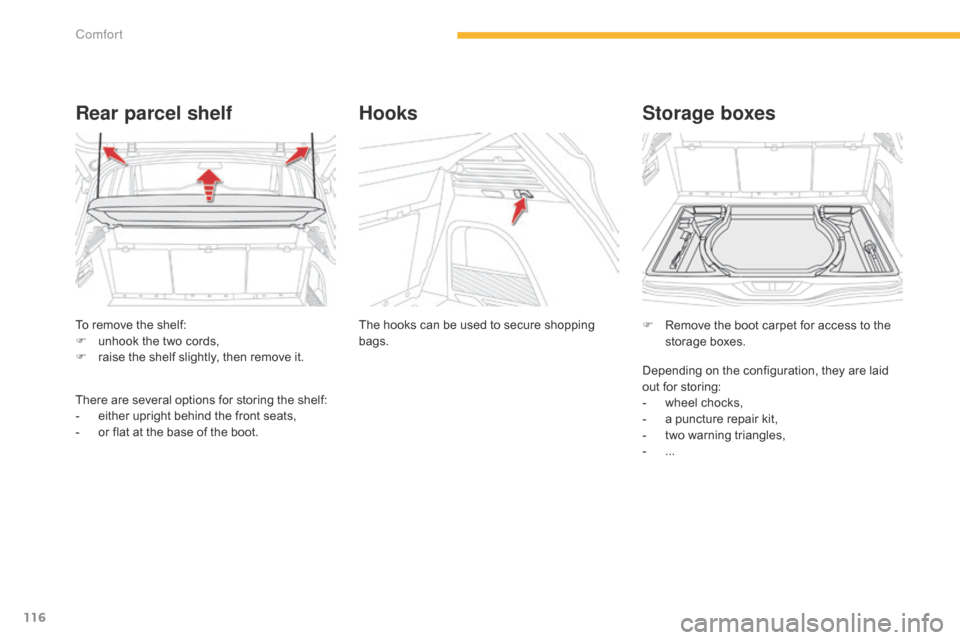
To remove the shelf:
F u nhook the two cords,
F
r
aise the shelf slightly, then remove it.
Rear parcel shelf
There are several options for storing the shelf:
- e ither upright behind the front seats,
-
o
r flat at the base of the boot.The
hooks can be used to secure shopping
b
ags.
Hooks
F Remove
the boot carpet for access to the s
torage bo xes.
Storage boxes
Depending on the configuration, they are laid out for storing:
-
w
heel chocks,
-
a
puncture repair kit,
-
t
wo warning triangles,
-
...
Comfort
Page 124 of 420

122
Starting-switching off the engine with the electronic key
F Place the gear selector lever at N for
vehicles with an electronic gearbox, P or N
for
vehicles with an automatic gearbox or
n
eutral with a manual gearbox.
F
I
nsert the electronic key in the reader.
F
P
ress the brake pedal for vehicles with
a
n electronic or automatic gearbox, or
f
ully declutch for vehicles with a manual
g
earbox.
Starting the engine
For Diesel vehicles , in
temperatures below zero the
e
ngine
will not start until the preheater
w
arning
lamp has gone off.
If
this
warning lamp comes on after
p
ressing "START/STOP", you should
h
old
the
brake or clutch pedal down
u
ntil
the
warning lamp goes off and
d
o
not
press the START/STOP button
ag
ain.
If
one
of
the starting conditions is not
m
et,
a
reminder message appears in
t
he
instrument panel screen. In some
c
ircumstances, it is necessary to turn
t
he
steering wheel slightly while pressing
t
he
"START/STOP" button to assist
u
nlocking of the steering; a message
w
arns
you when this is needed.
F
b
r
iefly press the "
START/STOP"
button.
T
he
steering
column
unlocks
and
t
he
engine
starts
more
or
less
i
mmediately
(see
the
advice
for
D
iesel
v
ersions).
Driving
Page 126 of 420
124
Starting-switching off the engine with the "Keyless Entry and
S
tarting" system
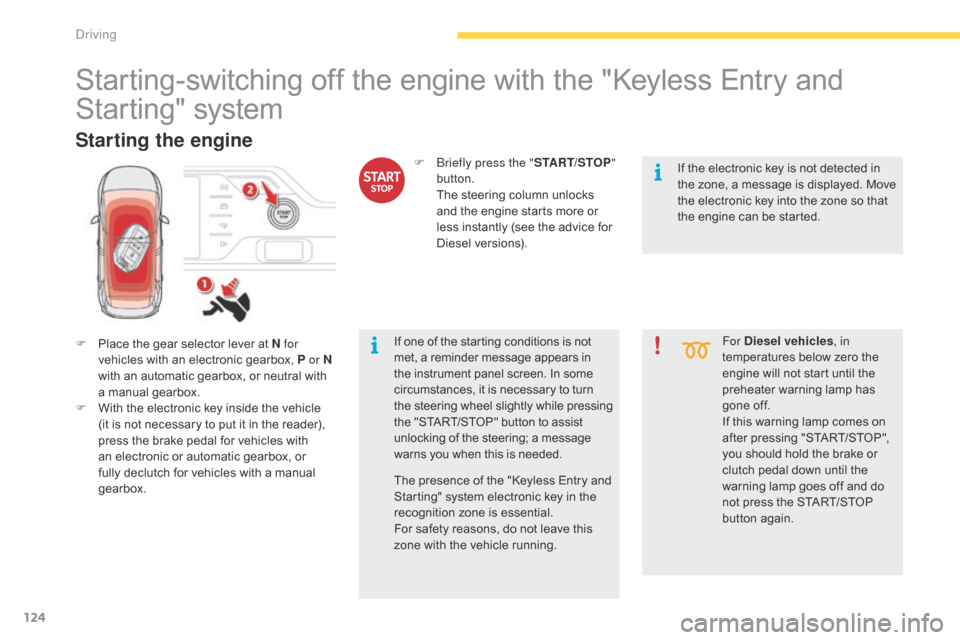
F Place the gear selector lever at N for
vehicles with an electronic gearbox, P or N
with
an automatic gearbox, or neutral with
a m
anual
g
earbox.
F
W
ith the electronic key inside the vehicle
(
it is not necessary to put it in the reader),
p
ress the brake pedal for vehicles with
a
n electronic or automatic gearbox, or
f
ully declutch for vehicles with a manual
g
earbox. For Diesel vehicles
, in
temperatures below zero the
e
ngine will not start until the
p
reheater warning lamp has
g
one off.
If
this warning lamp comes on
a
fter pressing "START/STOP",
y
ou should hold the brake or
c
lutch pedal down until the
w
arning lamp goes off and do
n
ot press the START/STOP
bu
tton
ag
ain.
Starting the engine
If one of the starting conditions is not met, a reminder message appears in t
he instrument panel screen. In some
c
ircumstances, it is necessary to turn
t
he steering wheel slightly while pressing
t
he "START/STOP" button to assist
u
nlocking of the steering; a message
w
arns you when this is needed.
F
b
r
iefly press the "
START/STOP"
button.
T
he steering column unlocks
a
nd the engine starts more or
l
ess instantly (see the advice for
D
iesel
v
ersions).
The presence of the "Keyless Entry and
S
tarting" system electronic key in the
r
ecognition zone is essential.
For
safety reasons, do not leave this
z
one with the vehicle running. If
the electronic key is not detected in
t
he zone, a message is displayed. Move
t
he electronic key into the zone so that
t
he engine can be started.
Driving
Page 149 of 420
147
Stop & Start
The Stop & Start system puts the engine temporarily into standby - STOP mode - during stops in the traffic (red lights, traffic jams, or other...). The engine restarts automatically - START mode - as soon as you want to move off. The restart takes place instantly, quickly and silently.
Operation
Going into engine STOP
mode
The "ECO" warning lamp comes on in the i
nstrument panel and the engine goes into
s
tandby
a
utomatically:
-
w
ith a manual gearbox ,
at speeds below
1
2 mph (20 km/h), or vehicle stationary
(
with PureTech 130, THP 165 and BlueHDi
1
00, 115 and 120 versions), when you
p
lace the gear lever in neutral, and you
r
elease the clutch pedal,
-
w
ith an ETG6 electronic gearbox , at
speeds
below 5 mph (8 km/h), when you
p
ress the brake pedal or place the gear
s
elector lever in position N ,
-
w
ith an automatic gearbox , with the
vehicle stationary, when you press the
brake
pedal or place the gear selector lever
i
n position N . Never
refuel with the engine in STOP
m
ode; you must switch off the ignition
w
ith the START/STOP button.
For
your comfort, during parking
m
anoeuvres, STOP mode is not
a
vailable for a few seconds after
c
oming out of reverse gear.
STOP
mode does not affect the
f
unctionality of the vehicle, such as for
example,
braking, power steering...
Special cases: STOP mode not
available
STOP mode is not invoked when:
- t he driver's door is open,
-
t
he driver's seat belt is not fastened,
-
t
he vehicle has not exceeded 6 mph
(
10 km/h) since the last engine start using
t
he START/STOP button,
-
t
he electric parking brake is applied or
be
ing
a
pplied,
-
t
he engine is needed to maintain a
c
omfortable temperature in the passenger
c
ompartment,
-
d
emisting is active,
-
s
ome special conditions (battery charge,
e
ngine temperature, braking assistance,
a
mbient temperature...) where the engine is
n
eeded to assure control of a system.
In this case, the "ECO"
warning lamp
f
lashes for a few seconds then goes
o
f f.
This operation is perfectly normal.
Per fect
for
urban
use,
the
Stop
&
Start
system
reduces
fuel
consumption
and
exhaust
emissions
as
well
as the noise level when stationary.
If
your
vehicle
is
fitted
with
the
system,
a
time
c
ounter
calculates
the
sum
of
the
periods
in
S
TOP
mode
during
a
journey.
It
resets
itself
to
z
ero
every
time
the
ignition
is
switched
on
with
t
he
START/STOP
button.
4
driving