mirror Citroen C4 PICASSO 2016 2.G User Guide
[x] Cancel search | Manufacturer: CITROEN, Model Year: 2016, Model line: C4 PICASSO, Model: Citroen C4 PICASSO 2016 2.GPages: 527, PDF Size: 13.72 MB
Page 80 of 527
78
C4-Picasso-II_en_Chap03_ergonomie-confort_ed01-2016
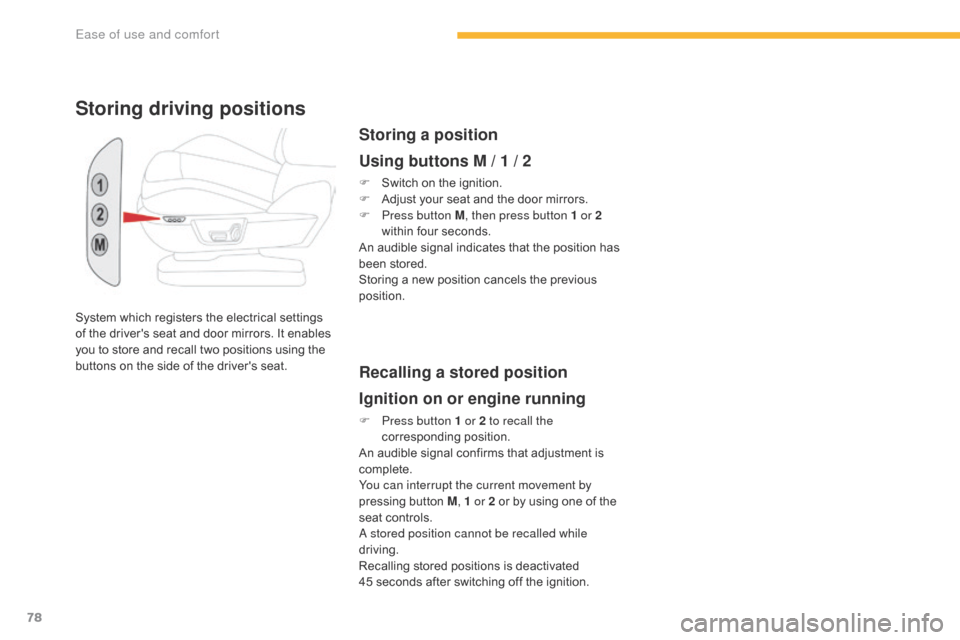
System which registers the electrical settings of the driver's seat and door mirrors. It enables
y
ou to store and recall two positions using the
b
uttons on the side of the driver's seat.
Storing driving positions
Storing a position
Using buttons M / 1 / 2
F Switch on the ignition.
F A djust your seat and the door mirrors.
F
P
ress button M , then press button 1 or 2
within
four seconds.
An
audible signal indicates that
t
he position has
b
een stored.
Storing
a new position cancels the previous
p
osition.
Recalling a stored position
Ignition on or engine running
F Press button 1 or 2 to recall the corresponding p osition.
An
audible signal confirms that adjustment is
c
omplete.
You can interrupt the current movement by
pressing
button M, 1 or 2
or by using one of the
s
eat controls.
A stored position cannot be recalled while
driving.
Recalling
stored positions is deactivated
4
5 seconds after switching off the ignition.
Ease of use and comfort
Page 104 of 527

102
C4-Picasso-II_en_Chap03_ergonomie-confort_ed01-2016
Front demist -
defrost
F Press this button to demist or defrost the windscreen and side
windows
as quickly as possible.
T
he indicator lamp in the button
comes
on.
With
Stop & Start, when demisting has
b
een activated, the STOP mode is not
available.
The
system automatically manages the air
c
onditioning (depending on version), air
f
low
and
air intake, and provides optimum
d
istribution towards the windscreen and side
windows.
F
T
o
switch it off press this button again or
a
djust the setting for air flow or distribution.
T
he
indicator lamp goes off.
Rear screen demist -
defrost
Switching on
Switching off
F Press this button to demist /
defrost the rear screen and
(depending
on version) the door
m
irrors.
The demisting/defrosting switches off automatically to prevent an excessive consumption of current.
The rear screen demist - defrost
can only operate when the engine is
r
unning.
Switch
off the heating of the rear screen
a
nd door mirrors as soon as you judge it
p
ossible, as reducing the consumption
o
f electrical current reduces fuel
consumption.
F
I
t is possible to stop the
demisting/defrosting
o
peration
b
efore it is switched off
automatically
by
pressing
the
bu
tton
ag
ain.
The indicator lamp associated with the button
goes
off.
The indicator lamp associated with the button comes on.
Ease of use and comfort
Page 123 of 527
121
C4-Picasso-II_en_Chap03_ergonomie-confort_ed01-2016
Courtesy lamps
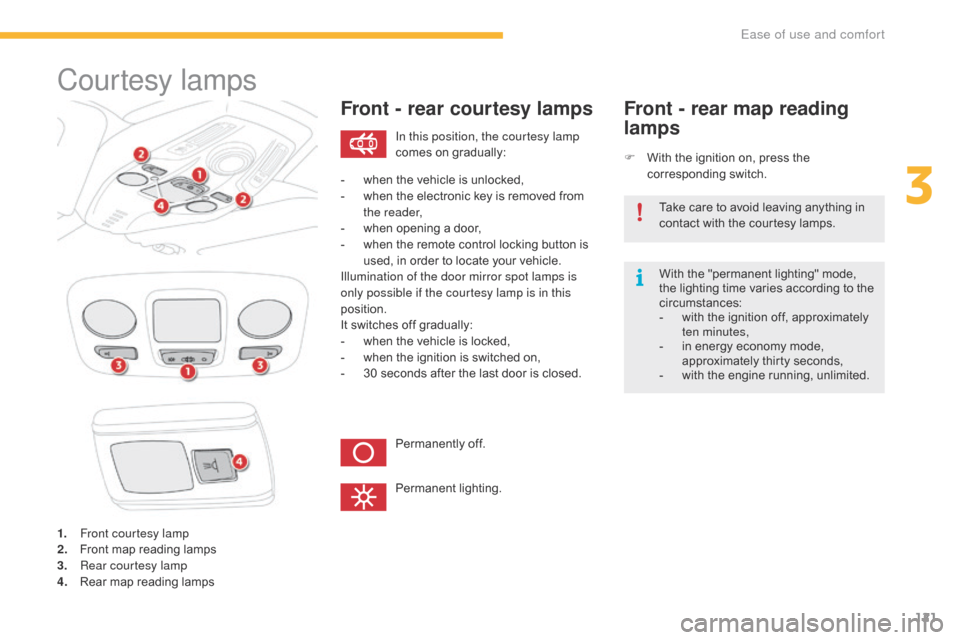
1. Front courtesy lamp
2. Front map reading lamps
3.
R
ear courtesy lamp
4.
R
ear map reading lamps
Front - rear courtesy lamps
F With the ignition on, press the c
orresponding s witch.
Front - rear map reading
lamps
With the "permanent lighting" mode, the lighting time varies according to the
c
ircumstances:
-
w
ith the ignition off, approximately
t
en minutes,
-
i
n energy economy mode,
a
pproximately thirty seconds,
-
w
ith the engine running, unlimited.
In this position, the courtesy lamp
comes
on
gradually:
Permanently
off.
Permanent
l
ighting.
-
w
hen
the
vehicle
is
unlocked,
-
w
hen
the
electronic
key
is
removed
from
t
he reader,
-
w
hen
opening
a
door,
-
w
hen
the
remote
control
locking
button
is
u
sed,
in
order
to
locate
your
vehicle.
Illumination of the door mirror spot lamps is
only possible if the courtesy lamp is in this
position.
It
switches
off
gradually:
-
w
hen
the
vehicle
is
locked,
-
w
hen
the
ignition
is
switched
on,
-
3
0
seconds
after
the
last
door
is
closed. Take
care to avoid leaving anything in
c
ontact with the courtesy lamps.
3
Ease of use and comfort
Page 184 of 527
182
C4-Picasso-II_en_Chap04_conduite_ed01-2016
Blind spot monitoring system
Activation / Deactivation
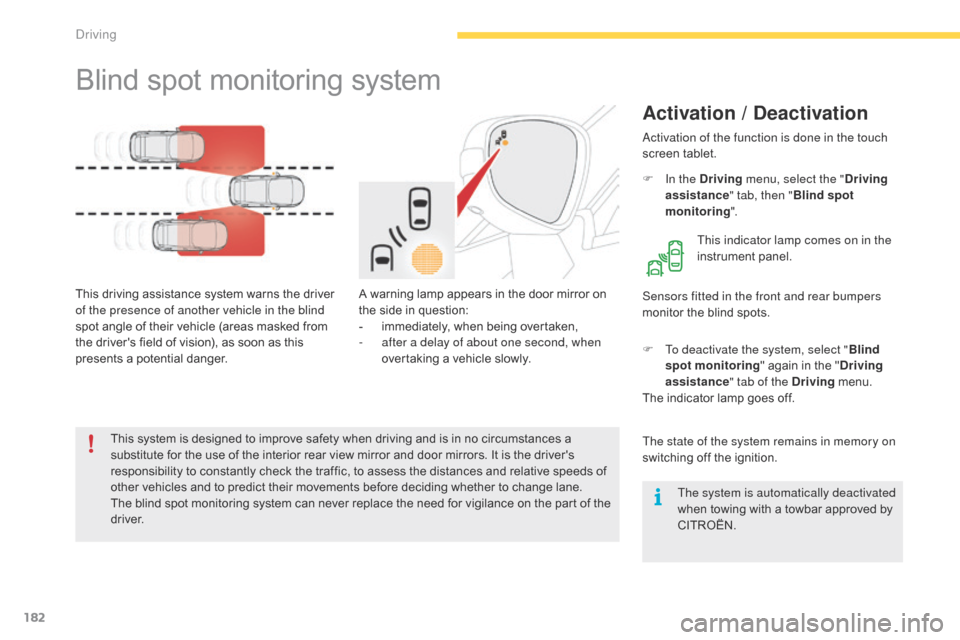
A warning lamp appears in the door mirror on the side in question:
-
i
mmediately, when being overtaken,
-
a
fter a delay of about one second, when
overtaking
a vehicle slowly.
This
driving
assistance
system
warns
the
driver
o
f the presence of another vehicle in the blind
spot
angle
of
their
vehicle
(areas
masked
from
t
he
driver's
field
of
vision),
as
soon
as
this
p
resents
a
potential
danger. Sensors fitted in the front and rear bumpers
monitor
the blind spots.
This
system
is
designed
to
improve
safety
when driving and is in no circumstances a
s
ubstitute
for
the
use
of
the
interior
rear
view
mirror and door mirrors. It is the driver's
r
esponsibility
to
constantly
check
the
traffic,
to assess the distances and relative speeds of
o
ther
vehicles
and
to
predict
their
movements before deciding whether to change lane.
The
blind
spot
monitoring
system
can
never
replace the need for vigilance on the part of the
d
river. Activation of the function is done in the touch
screen
t
ablet.
F
I
n the Driving
menu, select the " Driving
assistance " tab, then "Blind spot
monitoring ".
This indicator lamp comes on in the
instrument
pan
el.
The state of the system remains in memory on
switching off the ignition.
F
T
o deactivate the system, select "Blind
spot monitoring "
again in the "Driving
assistance " tab of the Driving
menu.
The
indicator lamp goes off.
The system is automatically deactivated
when
towing with a towbar approved by
CIT
ROËN.
Driving
Page 185 of 527
183
C4-Picasso-II_en_Chap04_conduite_ed01-2016
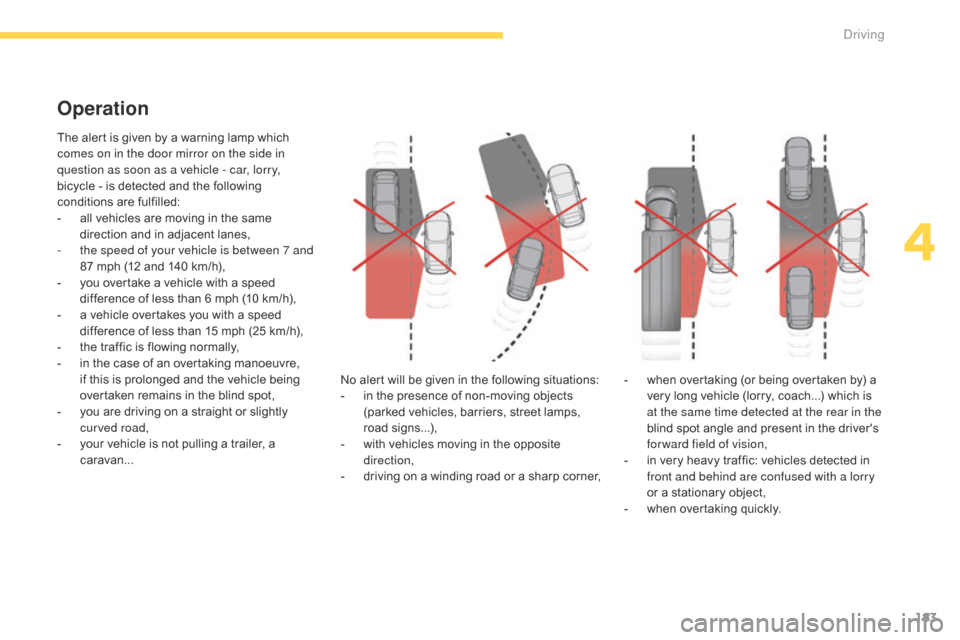
The alert is given by a warning lamp which comes on in the door mirror on the side in
question as soon as a vehicle - car, lorry,
bicycle
- is detected and the following
c
onditions are fulfilled:
-
a
ll vehicles are moving in the same
d
irection and in adjacent lanes,
-
t
he speed of your vehicle is between 7 and
87
mph (12 and 140 km/h),
-
y
ou overtake a vehicle with a speed
d
ifference of less than 6 mph (10 km/h),
-
a
vehicle overtakes you with a speed
d
ifference of less than 15 mph (25 km/h),
-
t
he traffic is flowing normally,
-
i
n the case of an overtaking manoeuvre,
i
f this is prolonged and the vehicle being
ov
ertaken remains in the blind spot,
-
y
ou are driving on a straight or slightly
c
urved road,
-
y
our vehicle is not pulling a trailer, a
c
aravan... No
alert will be given in the following situations:
-
i
n the presence of non-moving objects
(
parked vehicles, barriers, street lamps,
r
oad
s
igns...),
-
w
ith vehicles moving in the opposite
d
irection,
-
d
riving on a winding road or a sharp corner,
Operation
- when overtaking (or being overtaken by) a v
ery long vehicle (lorry, coach...) which is
a
t the same time detected at the rear in the
blind
spot angle and present in the driver's
f
orward field of vision,
-
i
n very heavy traffic: vehicles detected in
f
ront and behind are confused with a lorry
or
a stationary object,
-
w
hen overtaking quickly.
4
Driving
Page 186 of 527
184
C4-Picasso-II_en_Chap04_conduite_ed01-2016
In the event of a fault, this warning lamp flashes for a few moments in
the instrument panel, accompanied
by
a message.
Operating fault
Have it checked by a CITROËN dealer or a qualified w orkshop. The system may suffer temporary
interference in certain weather
conditions
(rain, hail...).
In particular, driving on a wet sur face o
r moving from a dry area to a wet area c
an cause false alerts (for example, the
p
resence of a fog of water droplets in
t
he blind spot angle is interpreted as a
v
ehicle).
In bad or wintry weather, ensure that
the sensors are not covered by mud, ice
or
snow.
Take
care not to cover the warning zone
i
n the door mirrors or the detection
zones on the front and rear bumpers
with
adhesive labels or other objects;
t
hey may hamper the correct operation
of
the system.
High pressure jet wash
When
washing your vehicle, direct the
l
ance at least 30 cm away from the
sen
sors.In
addition to the fixed warning lamp in the door
m
irror on the side in question, a correction of
trajectory will be felt if you cross a lane marking w
ith the direction indicators on, to help you
avoid a collision.
Conditions for operation
The following systems must be activated:
- b lind spot monitoring,
-
a
ctive lane departure warning.
Active blind spot
monitoring system
For more information on the Blind spot
monitoring system and the Active lane
departure warning system , refer to the
corresponding
s
ections.
Driving
Page 191 of 527
189
C4-Picasso-II_en_Chap04_conduite_ed01-2016
Reversing camera
Clean the reversing camera regularly u
sing a soft, dry cloth.
The
reversing
camera
is
activated
automatically
w
hen
r
everse
g
ear
i
s
enga
ged.
Depending
on
version,
the
image
is
displayed
in
t
he
touch
screen
tablet
or
the
instrument
panel. The
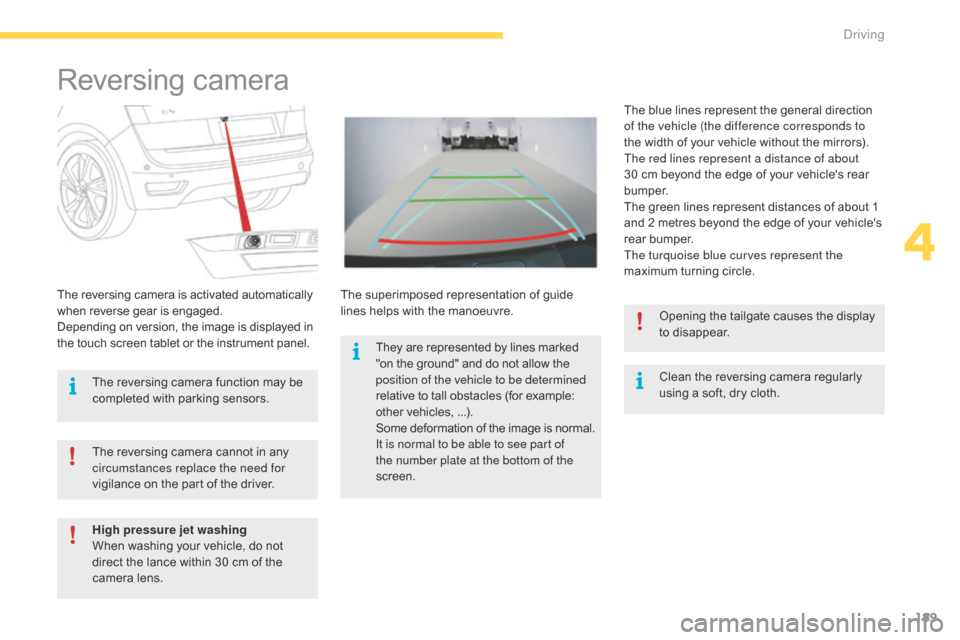
superimposed
representation
of
guide
l
ines
helps
with
the
manoeuvre. The
blue lines represent the general direction
o
f the vehicle (the difference corresponds to
the
width of your vehicle without the mirrors).
The red lines represent a distance of about
30
cm
beyond the edge of your vehicle's rear
b
u m p e r.
The
green lines represent distances of about 1
a
nd
2
metres beyond the edge of your vehicle's
r
ear
bumper.
The turquoise blue curves represent the
maximum turning circle.
The
reversing
camera
cannot
in
any
c
ircumstances replace the need for
vigilance
on
the
part
of
the
driver. Opening
the tailgate causes the display
t
o disappear.
The
reversing
camera
function
may
be
c
ompleted
with
parking
sensors.
High pressure jet washing
When
washing
your
vehicle,
do
not
d
irect
the
lance
within
30
cm
of
the
c
amera
lens. They
are
represented
by
lines
marked
"
on
the
ground"
and
do
not
allow
the p
osition of the vehicle to be determined
relative
to
tall
obstacles
(for
example:
o
ther
vehicles,
...).
Some
d
eformation
o
f
t
he
i
mage
i
s
n
ormal.
It is normal to be able to see part of
the number plate at the bottom of the
screen.
4
Driving
Page 192 of 527
190
C4-Picasso-II_en_Chap04_conduite_ed01-2016
360 Vision
This system provides a view in the instrument
panel of the near surroundings of your vehicle,
u
sing cameras mounted at the front and rear of
y
our vehicle and under the door mirrors.
Depending
on the angle of view chosen (front
v
iew, rear view or 360° panoramic view),
3
60 Vision provides special visual assistance
i
n particular driving conditions such as when
e
ntering a blind junction or manoeuvring in
a
reas of reduced visibility.
Once activated, this function operates up to
9 mph
(15 km/h). Above 18 mph (30 km/h), the
f
unction is deactivated automatically. This system is a visual aid which in no
circumstances can replace the need for
vigilance
on the part of the driver.
The images provided by the cameras
m
ay be deformed by the relief. The
p
resence of areas in shade, in sunny
conditions, or of low ambient light may
d
arken the image and reduce contrast.Forward vision
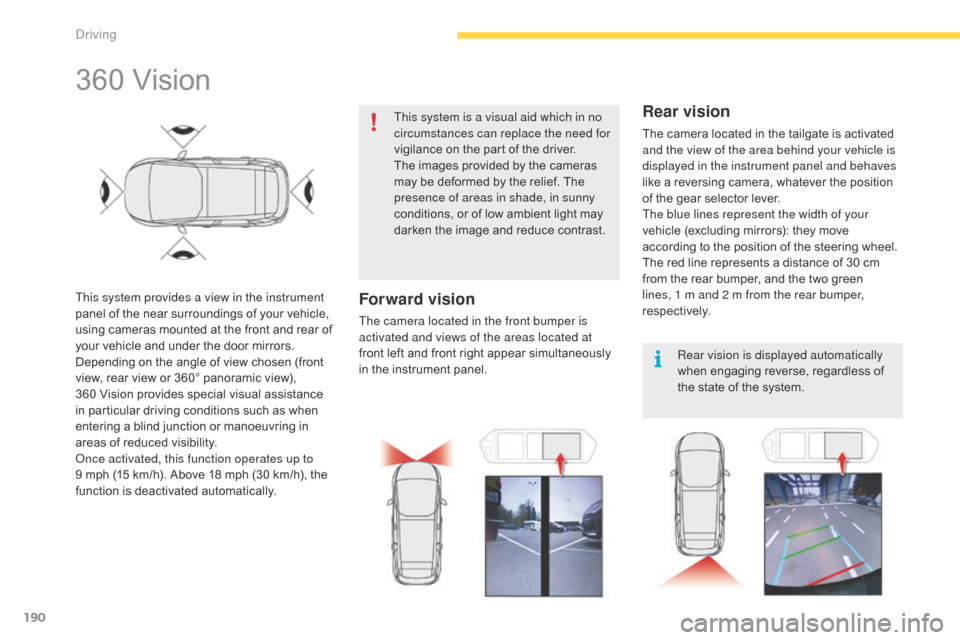
The camera located in the front bumper is
activated and views of the areas located at
front
left and front right appear simultaneously
i
n the instrument panel.
Rear vision
The camera located in the tailgate is activated and the view of the area behind your vehicle is
displayed in the instrument panel and behaves
like
a reversing camera, whatever the position
o
f the gear selector lever.
The blue lines represent the width of your
vehicle
(excluding mirrors): they move
a
ccording to the position of the steering wheel.
The
red line represents a distance of 30 cm
f
rom the rear bumper, and the two green
l
ines, 1 m and 2 m from the rear bumper,
respectively.
Rear vision is displayed automatically
when
engaging reverse, regardless of
t
he state of the system.
Driving
Page 193 of 527
191
C4-Picasso-II_en_Chap04_conduite_ed01-2016
Operation
Activating the function
With the engine running:
F I n the Driving menu, select the " Driving
assistance " tab, then "Panoramic visual
aid ".
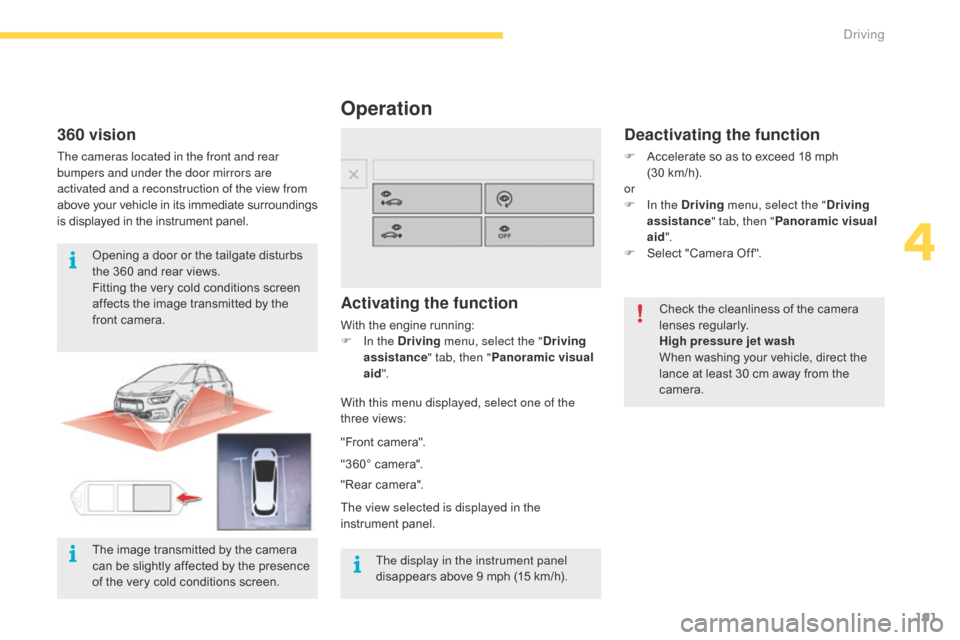
With this menu displayed, select one of the
three
views:
Deactivating the function
F Accelerate so as to exceed 18 mph
(30 km/h).
or
F
I
n the Driving menu, select the " Driving
assistance " tab, then "Panoramic visual
aid ".
F
Sel
ect
"
Camera
O
ff".
Check
the cleanliness of the camera
l
enses
r
egularly.
High pressure jet wash
When
washing your vehicle, direct the
l
ance at least 30 cm away from the
c
amera.
"Front
camera".
"360°
camera".
"Rear
camera".
The view selected is displayed in the
instrument
pan
el.
360 vision
The cameras located in the front and rear
bumpers and under the door mirrors are
activated and a reconstruction of the view from
above
y
our
v
ehicle
i
n
i
ts
i
mmediate
s
urroundings
i
s displayed in the instrument panel.
Opening
a door or the tailgate disturbs
t
he 360 and rear views.
Fitting
the very cold conditions screen
a
ffects the image transmitted by the
f
ront camera.
The display in the instrument panel
disappears
above 9 mph (15 km/h).
The
image transmitted by the camera
c
an be slightly affected by the presence
o
f the very cold conditions screen.
4
Driving
Page 205 of 527
203
C4-Picasso-II_en_Chap05_eclairage-visibilite_ed01-2016
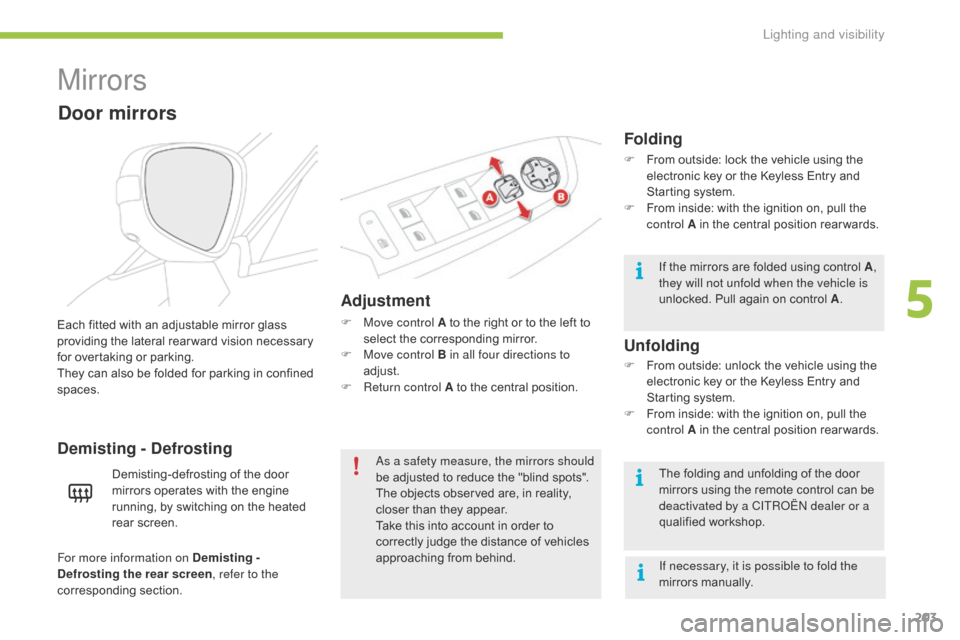
Mirrors
Adjustment
F Move control A to the right or to the left to s
elect the corresponding mirror.
F
M
ove control B in all four directions to
adjust.
F
R
eturn control A to the central position.
Each
fitted
with
an
adjustable
mirror
glass
p
roviding
the
lateral
rear ward
vision
necessary
f
or
overtaking
or
parking.
They
can
also
be
folded
for
parking
in
confined
spa
ces.
Demisting - Defrosting
Door mirrors
Demisting-defrosting of the door m irrors operates with the engine
r
unning, by switching on the heated
re
ar
sc
reen. As a safety measure, the mirrors should
be
adjusted to reduce the "blind spots".
The
objects observed are, in reality,
c
loser than they appear.
Take
this into account in order to
c
orrectly judge the distance of vehicles
a
pproaching from behind.
Folding
F From outside: lock the vehicle using the e
lectronic key or the Keyless Entry and
S
tarting system.
F
F
rom inside: with the ignition on, pull the
c
ontrol A in the central position rear wards.
If
the mirrors are folded using control A,
they will not unfold when the vehicle is
unlocked.
Pull again on control A.
The
folding and unfolding of the door
m
irrors using the remote control can be
d
eactivated by a CITROËN dealer or a
qualified
w
orkshop.
F
F
rom outside: unlock the vehicle using the
e
lectronic key or the Keyless Entry and
S
tarting system.
F
F
rom inside: with the ignition on, pull the
c
ontrol A in the central position rear wards.
Unfolding
If necessary, it is possible to fold the
mirrors manually.
For more information on Demisting -
Defrosting the rear screen
, refer to the
corresponding
s
ection.
5
Lighting and visibility