automatic Citroen C4 PICASSO 2016 2.G Owner's Guide
[x] Cancel search | Manufacturer: CITROEN, Model Year: 2016, Model line: C4 PICASSO, Model: Citroen C4 PICASSO 2016 2.GPages: 527, PDF Size: 13.72 MB
Page 66 of 527
64
C4-Picasso-II_en_Chap02_ouvertures_ed01-2016
Motorised tailgate
General points
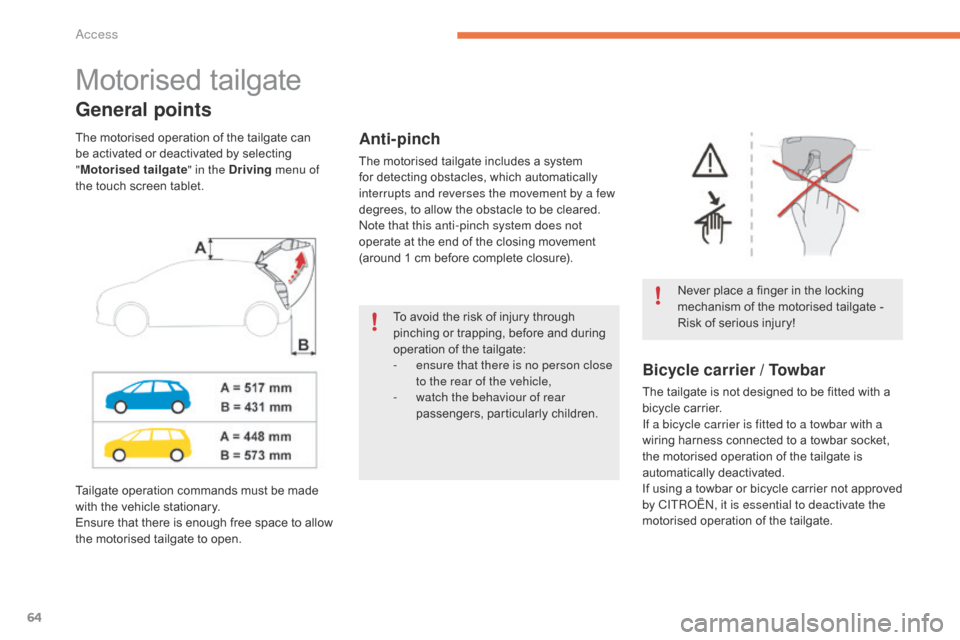
Never place a finger in the locking mechanism of the motorised tailgate -
R
isk of serious injury!
Anti-pinch
The motorised tailgate includes a system for detecting obstacles, which automatically
i
nterrupts and reverses the movement by a few
degrees,
to allow the obstacle to be cleared.
Note that this anti-pinch system does not
operate
at the end of the closing movement
(
around 1 cm before complete closure).
The
motorised
operation
of
the
tailgate
can
b
e
activated
or
deactivated
by
selecting
"
M
otorised tailgate " in the Driving menu of
the
touch
screen
tablet.
Bicycle carrier / Towbar
The tailgate is not designed to be fitted with a b icycle carrier.
If a bicycle carrier is fitted to a towbar with a
wiring
harness connected to a towbar socket,
t
he motorised operation of the tailgate is
a
utomatically
d
eactivated.
If
using a towbar or bicycle carrier not approved
b
y CITROËN, it is essential to deactivate the
motorised
operation of the tailgate.
Tailgate
operation
commands
must
be
made
w
ith
the
vehicle
stationary.
Ensure
that
there
is
enough
free
space
to
allow
t
he
motorised
tailgate
to
open. To
avoid
the
risk
of
injury
through
p
inching
or
trapping,
before
and
during
o
peration
of
the
tailgate:
-
e
nsure that there is no person close
to the rear of the vehicle,
-
w
atch the behaviour of rear
passengers,
par
ticularly
c
hildren.
Access
Page 69 of 527
67
C4-Picasso-II_en_Chap02_ouvertures_ed01-2016
Reinitialising the motorised
tailgate
This operation is necessary where there is
no movement - after detection of an obstacle,
connecting or recharging the battery, ...
F
O
pen the tailgate manually, if necessary.
F
M
anually close the tailgate fully.
If the problem persists, contact a CITROËN
dealer
or a qualified workshop.
Precautions in use
In wintry conditions
In the event of an accumulation of snow
on the tailgate, clear the snow before
c
ommanding a motorised opening of
t
he tailgate.
The
formation of ice can block the
t
ailgate and prevent its opening: wait
u
ntil the ice melts with the heating of
t
he
p
assenger
c
ompartment.
When washing the vehicle
When washing the vehicle in an automatic car wash, don't forget to
l
ock your vehicle to avoid the risk of
u
nexpected
ope
ning.
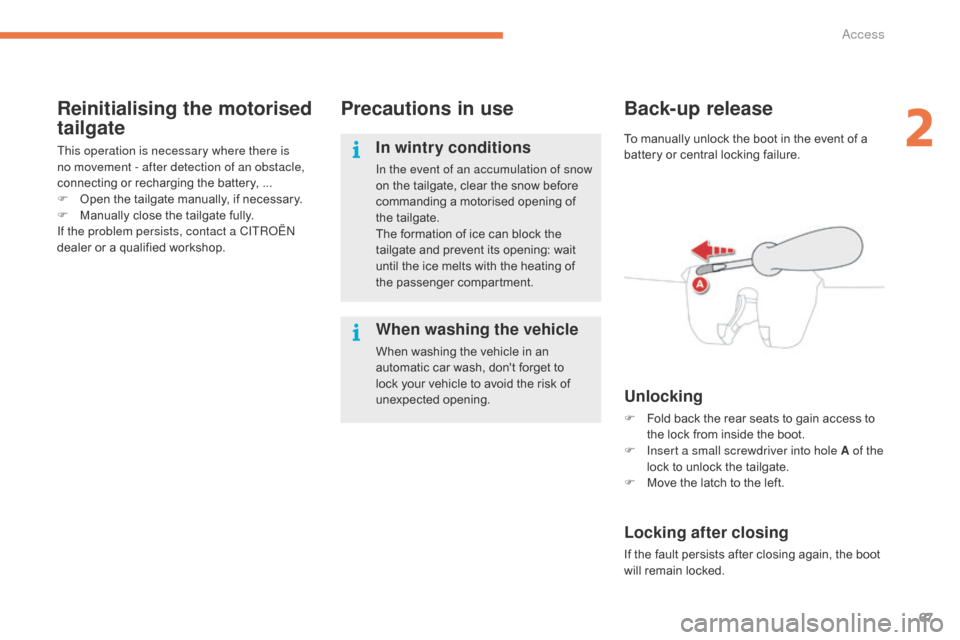
Back-up release
Unlocking
F Fold back the rear seats to gain access to t
he lock from inside the boot.
F
I
nsert a small screwdriver into hole A of the
lock
to unlock the tailgate.
F
M
ove the latch to the left.
Locking after closing
If the fault persists after closing again, the boot will remain locked.
To
manually unlock the boot in the event of a
b
attery or central locking failure.
2
Access
Page 70 of 527
68
C4-Picasso-II_en_Chap02_ouvertures_ed01-2016
Hands-free tailgate access
The tailgate my be equipped with a hands-free function, to allow you to open or close the tailgate when your hands are full.
For more information on the Motorised tailgate ,
refer to the corresponding section.
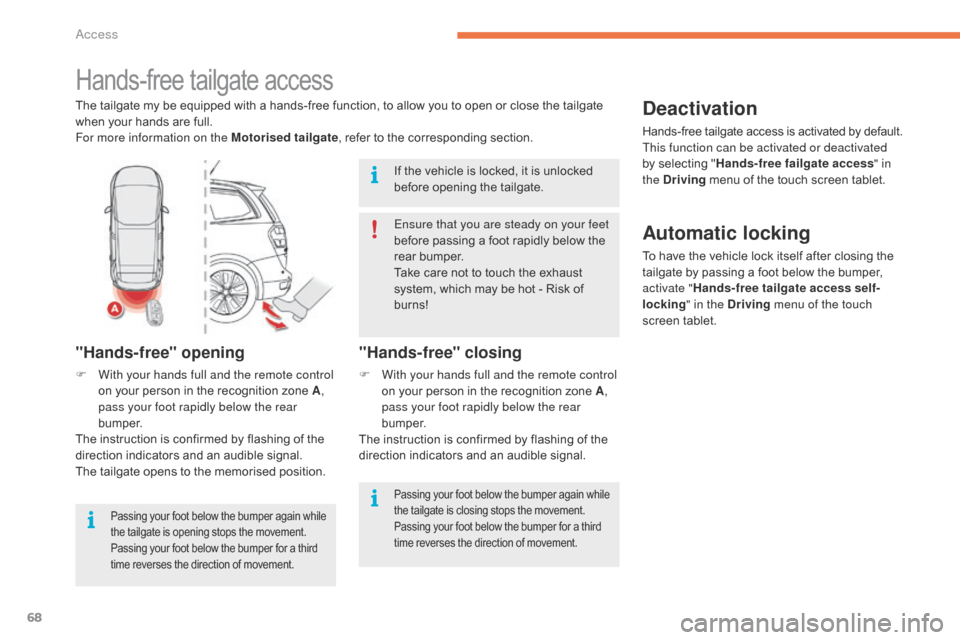
"Hands-free" opening
F With your hands full and the remote control on your person in the recognition zone A,
pass your foot rapidly below the rear
b u m p e r.
The
instruction is confirmed by flashing of the
d
irection indicators and an audible signal.
The
tailgate opens to the memorised position.
Passing your foot below the bumper again while the tailgate is opening stops the movement. P
assing your foot below the bumper for a third
t
ime reverses the direction of movement.
"Hands-free" closing
F With your hands full and the remote control on your person in the recognition zone A,
pass your foot rapidly below the rear
b u m p e r.
The
instruction is confirmed by flashing of the
d
irection indicators and an audible signal.
Deactivation
Hands-free tailgate access is activated by default.
T his function can be activated or deactivated
by
selecting "Hands-free failgate access " in
the Driving
menu of the touch screen tablet.
Ensure that you are steady on your feet
before
passing
a
foot
rapidly
below
the
r
ear
bumper.
Take
care
not
to
touch
the
exhaust
s
ystem,
which
may
be
hot
-
Risk
of
b
urns!
If
the
vehicle
is
locked,
it
is
unlocked
b
efore
opening
the
tailgate.
Automatic locking
To have the vehicle lock itself after closing the t ailgate by passing a foot below the bumper,
a
ctivate " Hands-free tailgate access self-
locking " in the Driving menu of the touch
screen
t
ablet.
Passing your foot below the bumper again while the tailgate is closing stops the movement. P
assing your foot below the bumper for a third
t
ime reverses the direction of movement.
Access
Page 71 of 527
69
C4-Picasso-II_en_Chap02_ouvertures_ed01-2016
Operating faults
If several foot movements below the rear
bumper fail to open the tailgate, wait a
f
ew seconds before starting again.
The function is automatically deactivated in the
event
of heavy rain or accumulation of snow.
If
the function fails to operate, check
t
hat the electronic key is not exposed to
s
trong electromagnetic inter ference (a
s
mar tphone, ...).
The
function may not work correctly with a
pro
sthetic
le
g.
The
function may not work correctly if your
v
ehicle is fitted with a towbar. In
some circumstances, the tailgate may only o
pen or close, particularly if:
-
y
our vehicle is fitted with a towbar,
-
y
ou hitch or unhitch a trailer,
-
y
ou fit or remove a bicycle carrier,
-
y
ou load or unload bicycles from a bicycle
c a r r i e r,
-
y
ou place or lift something behind the
v
ehicle,
-
an
animal approaches the bumper,
-
y
ou are washing your vehicle,
-
a
service is being carried out on your
v
ehicle,
-
y
ou are accessing the spare wheel
(
depending
o
n
v
ersion).
To
avoid such operating problems, keep the
e
lectronic key away from the recognition zone
o
r deactivate "Hands-Free Tailgate Access".
Ensure
that no object or person might prevent
t
he correct opening or closing of the tailgate.
Be particularly aware of children when
operating
the tailgate.
2
Access
Page 73 of 527
71
OFF
C4-Picasso-II_en_Chap02_ouvertures_ed01-2016
Locking the vehicle with exterior perimeter
monitoring only
Deactivate the interior volumetric monitoring to avoid unwanted triggering of the alarm in
c
ertain cases such as:
-
l
eaving a window partially open,
-
w
ashing your vehicle,
-
c
hanging a wheel,
-
t
owing your vehicle,
-
t
ransport on a ferry.
Deactivating the volumetric
monitoring
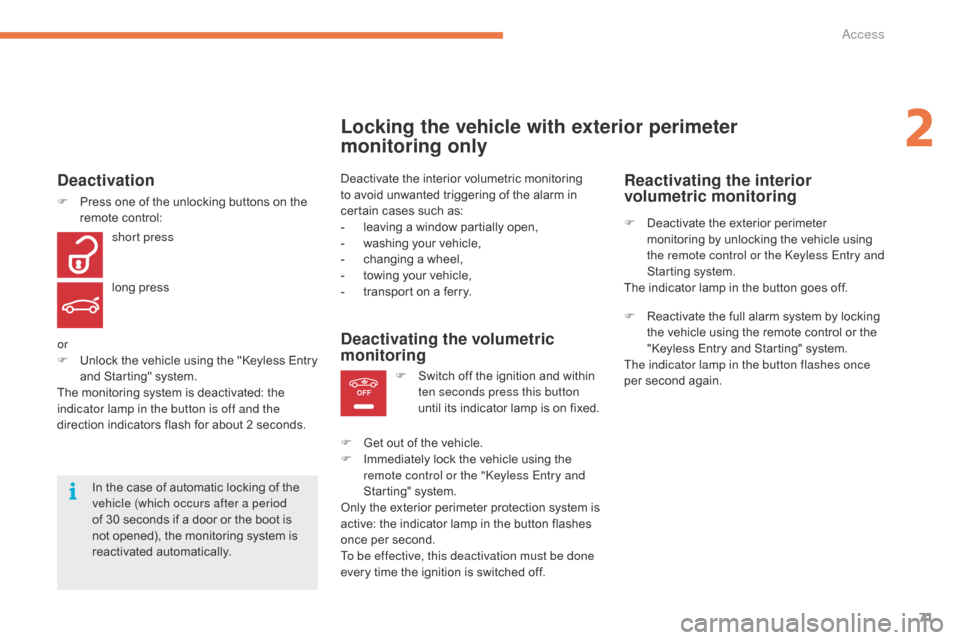
F Switch off the ignition and within t
en seconds press this button
until
its indicator lamp is on fixed.
F
G
et
out of the vehicle.
F
I
mmediately lock the vehicle using the
r
emote control or the "Keyless Entry and
Starting"
system.
Only
the
exterior perimeter protection system is
a
ctive:
the indicator lamp in the button flashes
o
nce
per
second.
To be effective, this deactivation must be done
every
time the ignition is switched off.
In
the
case
of
automatic
locking
of
the
v
ehicle (which occurs after a period
of
30
seconds
if
a
door
or
the
boot
is
n
ot
opened),
the
monitoring
system
is
r
eactivated
a
utomatically.
Deactivation
F Press one of the unlocking buttons on the r
emote control:
short press
long
press
or
F
U
nlock the vehicle using the "Keyless Entry
a
nd Starting" system.
The
monitoring system is deactivated: the
i
ndicator lamp in the button is off and the
direction
indicators flash for about 2 seconds.
Reactivating the interior
volumetric monitoring
F Deactivate the exterior perimeter m
onitoring by unlocking the vehicle using
t
he remote control or the Keyless Entry and
Starting
system.
The
indicator lamp in the button goes off.
F
R
eactivate the full alarm system by locking
t
he vehicle using the remote control or the
"
Keyless Entry and Starting" system.
The indicator lamp in the button flashes once
per
second again.
2
Access
Page 74 of 527
72
C4-Picasso-II_en_Chap02_ouvertures_ed01-2016
Triggering of the alarm
This is indicated by sounding of the siren and flashing of the direction indicators for
t
hirty seconds.
The
monitoring functions remain active until
t
he alarm has been triggered eleven times in
s
uccession.
When
the vehicle is unlocked using the remote
c
ontrol or the Keyless Entry and Starting
s
ystem, rapid flashing of the indicator lamp
i
n the button informs you that the alarm was
triggered
during your absence. When the
i
gnition is switched on, this flashing stops
i
mmediately.
Failure of the remote control
To deactivate the monitoring functions:
F
U
nlock the vehicle using the key (integral
w
ith the remote control) in the driver's door
l
ock.
F
O
pen the door; the alarm is triggered.
F
S
witch on the ignition; the alarm stops. The
i
ndicator lamp in the button goes off.
Locking the vehicle without
activating the alarm
F Lock or deadlock the vehicle using the key (
integral with the remote control) in the
d
river's door lock.
Operating fault
When the ignition is switched on, fixed illumination of the indicator lamp in the button
indicates
a fault in the system.
Have
it checked by a CITROËN dealer or a
q
ualified
w
orkshop.
Automatic activation*
2 minutes after the last door or the boot is
closed, the system is activated automatically.
F
T
o avoid triggering the alarm on entering
t
he vehicle, first press the unlocking button
o
n the remote control or unlock the vehicle
u
sing the Keyless Entry and Starting
s
ystem.
*
Depending on the country of sale.
Access
Page 75 of 527
73
C4-Picasso-II_en_Chap02_ouvertures_ed01-2016
Electric windows
Manual operation
To open or close the window, press or pull the
switch gently. The window stops as soon as the
s
witch is released.
To open or close the window, press or pull
the
switch fully: the window opens or closes
c
ompletely when the switch is released.
P
ressing the switch again stops the movement
o
f the window.
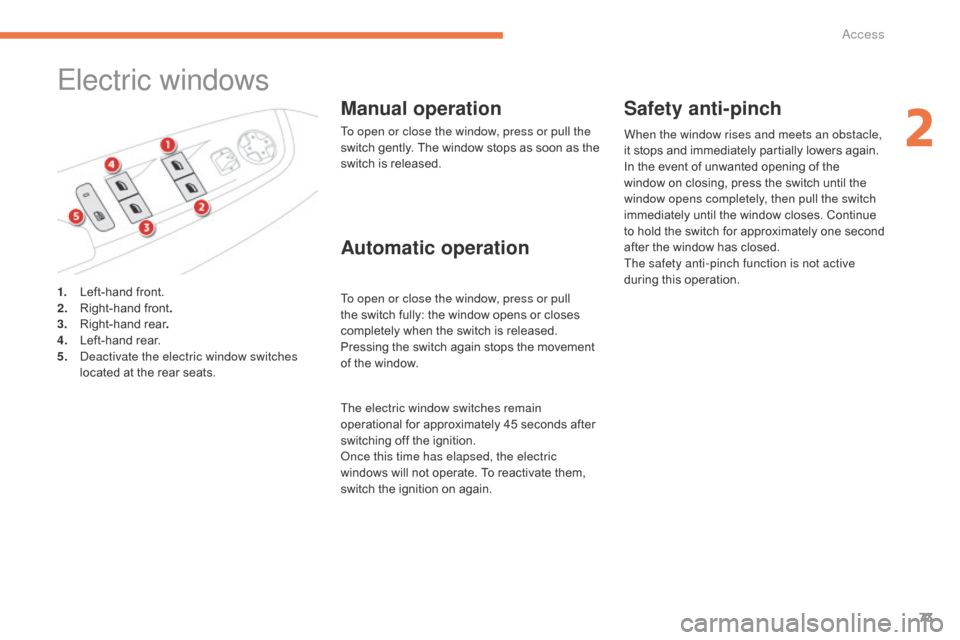
1.
L
eft-hand
front.
2.
R
ight-hand
front .
3.
R
ight-hand
r
ear .
4.
L
eft-hand
r
ear.
5.
D
eactivate the electric window switches
located
at
the
rear
seats.
Automatic operation Safety anti-pinch
When the window rises and meets an obstacle,
it
stops and immediately partially lowers again.
In
the event of unwanted opening of the
w
indow on closing, press the switch until the
w
indow opens completely, then pull the switch
immediately
until the window closes. Continue
t
o
h
old
t
he
s
witch
f
or
a
pproximately
o
ne
s
econd
a
fter the window has closed.
The safety anti-pinch function is not active
during
this operation.
The electric window switches remain
operational
for
approximately
45
seconds
after
s
witching
off
the
ignition.
Once this time has elapsed, the electric
windows
will
not
operate.
To
reactivate
them,
s
witch
the
ignition
on
again.
2
Access
Page 99 of 527
97
C4-Picasso-II_en_Chap03_ergonomie-confort_ed01-2016
Dual-zone automatic air conditioning
This air conditioning system operates with the engine running, but the ventilation and its
c
ontrols are available with the ignition on.
Operation
of the air conditioning and regulation
o
f temperature, air flow and air distribution in
the
passenger compartment are automatic.Temperature adjustment
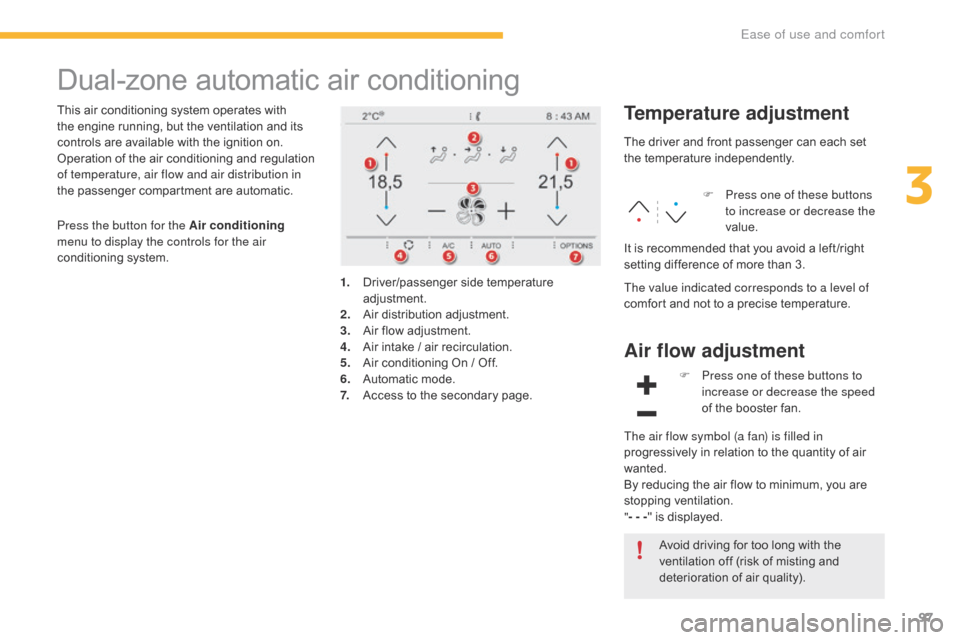
1. Driver/passenger side t emperature adj
ustment.
2.
A
ir
d
istribution
a
djustment.
3.
A
ir flow adjustment.
4.
A
ir intake / air recirculation.
5.
A
ir conditioning On / Off.
6.
A
utomatic mode.
7.
A
ccess to the secondary page.The
driver and front passenger can each set
t
he
t
emperature
i
ndependently.
F
P
ress one of these buttons
to increase or decrease the
value.
The value indicated corresponds to a level of
comfort and not to a precise temperature.
It
is recommended that you avoid a left /right
s
etting difference of more than 3.
Press the button for the Air conditioning
menu to display the controls for the air
conditioning
system.
Air flow adjustment
Avoid driving for too long with the v
entilation off (risk of misting and
d
eterioration of air quality).
F
P
ress one of these buttons to
increase or decrease the speed
of the booster fan.
The air flow symbol (a fan) is filled in
progressively in relation to the quantity of air
w
anted.
By
reducing the air flow to minimum, you are
s
topping
v
entilation.
" - - - "
is displayed.
3
Ease of use and comfort
Page 101 of 527
99
C4-Picasso-II_en_Chap03_ergonomie-confort_ed01-2016
In cold weather with the engine cold, the air flow is increased gradually until
t
he system has warmed up, in order
to limit the delivery of cold air into the
passenger
c
ompartment.
On
entering the vehicle, if the interior
t
emperature is much colder or warmer
than
the comfort value setting, there
i
s no need to alter the value displayed
in
order to reach more quickly the
r
equired level of comfort. The system
c
ompensates automatically and
corrects the temperature difference as
quickly
as possible.
This
setting is associated with AUTO mode
o
nly.
However, on deactivation of AUTO mode,
t
he
last setting remains on.
Changing the setting does not reactivate AUTO
m
ode
if deactivated.
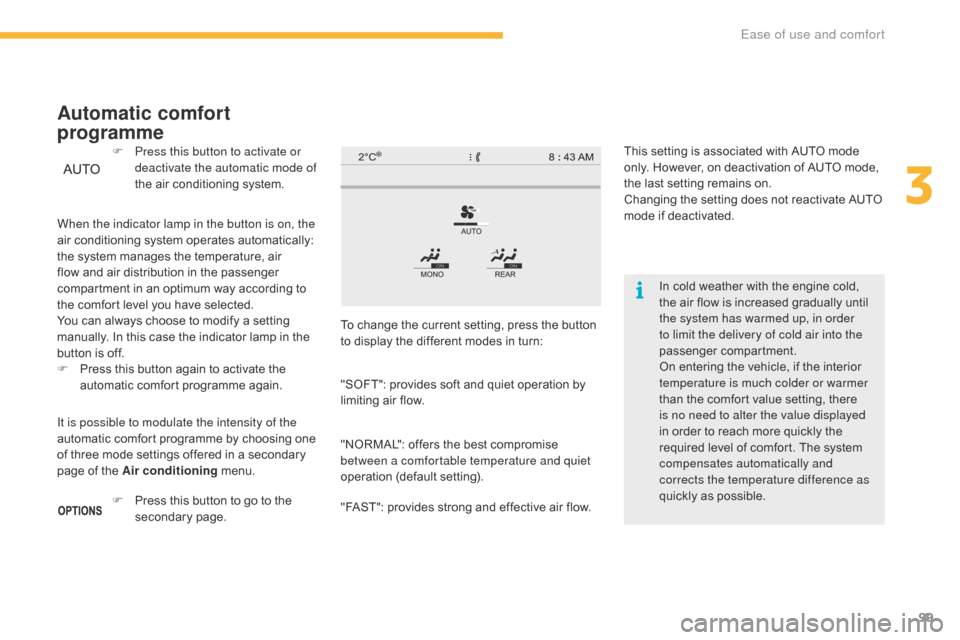
When the indicator lamp in the button is on, the
air
conditioning
system
operates
automatically:
t
he
system
manages
the
temperature,
air
f
low
and
air
distribution
in
the
passenger
c
ompartment
in
an
optimum
way
according
to
t
he
comfort
level
you
have
selected.
You
can
always
choose
to
modify
a
setting
m
anually.
In
this
case
the
indicator
lamp
in
the
b
utton
is
off.
F
P
ress
this
button
again
to
activate
the
a
utomatic
comfort
programme
again.
F
P
ress this button to activate or
deactivate the automatic mode of
the
air
conditioning
system.
Automatic comfort
programme
To change the current setting, press the button t
o display the different modes in turn:
"SOFT":
provides soft and quiet operation by
l
imiting air flow.
"NORMAL":
offers the best compromise
b
etween a comfortable temperature and quiet
operation
(default setting).
"FAST":
provides strong and effective air flow.
It is possible to modulate the intensity of the
automatic
comfort
programme
by
choosing
one
o
f
three
mode
settings
offered
in
a
secondary
p
age
of
the
Air conditioning
menu.
F
P
ress
this
button
to
go
to
the
s
econdary
pag
e.
3
Ease of use and comfort
Page 102 of 527
100
C4-Picasso-II_en_Chap03_ergonomie-confort_ed01-2016
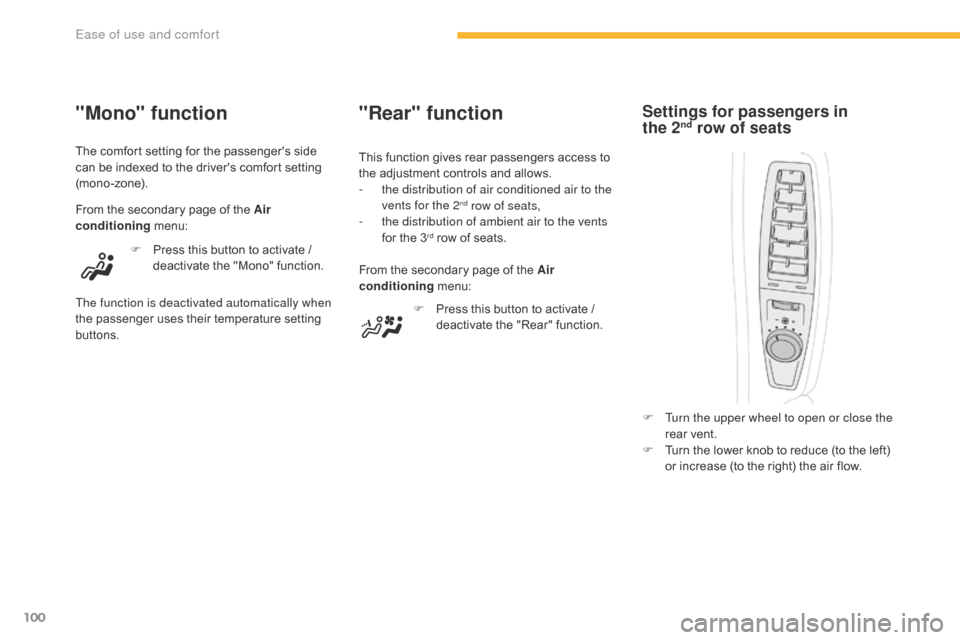
"Rear" function
F Press this button to activate / d
eactivate the "Rear" function.
From
the
secondary page of the Air
conditioning
m
enu:
This
function gives rear passengers access to
t
he
adjustment controls and allows.
-
t
he distribution of air conditioned air to the
vents for the 2
nd row of seats,
-
t
he distribution of ambient air to the vents
for
the
3
rd row of seats.
F
T
urn the upper wheel to open or close the
rear
vent.
F
T
urn the lower knob to reduce (to the left)
o
r increase (to the right) the air flow.
Settings for passengers in
the 2nd row of seats"Mono" function
The comfort setting for the passenger's side c
an be indexed to the driver's comfort setting
(
mono-zone).
From
the secondary page of the Air
conditioning
m
enu:
F
P
ress this button to activate /
d
eactivate the "Mono" function.
The function is deactivated automatically when
the
p
assenger
u
ses
t
heir
t
emperature
se
tting
b
uttons.
Ease of use and comfort