steering Citroen C4 PICASSO RHD 2015 1.G User Guide
[x] Cancel search | Manufacturer: CITROEN, Model Year: 2015, Model line: C4 PICASSO RHD, Model: Citroen C4 PICASSO RHD 2015 1.GPages: 428, PDF Size: 10.09 MB
Page 130 of 428
128
Starting-switching off the engine with the "Keyless Entry
a
nd Starting" system
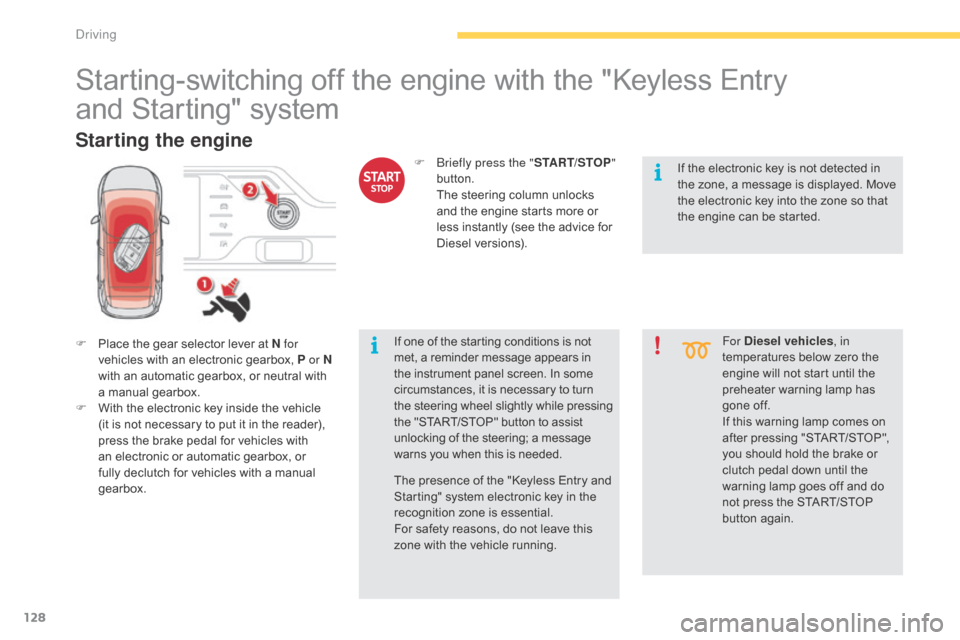
F Place the gear selector lever at N for
vehicles with an electronic gearbox, P or N
with
an automatic gearbox, or neutral with
a m
anual
g
earbox.
F
W
ith the electronic key inside the vehicle
(
it is not necessary to put it in the reader),
p
ress the brake pedal for vehicles with
a
n electronic or automatic gearbox, or
f
ully declutch for vehicles with a manual
g
earbox. For Diesel vehicles
, in
temperatures below zero the
e
ngine will not start until the
p
reheater warning lamp has
g
one off.
If
this warning lamp comes on
a
fter pressing "START/STOP",
y
ou should hold the brake or
c
lutch pedal down until the
w
arning lamp goes off and do
n
ot press the START/STOP
bu
tton
ag
ain.
Starting the engine
If one of the starting conditions is not met, a reminder message appears in t
he instrument panel screen. In some
c
ircumstances, it is necessary to turn
t
he steering wheel slightly while pressing
t
he "START/STOP" button to assist
u
nlocking of the steering; a message
w
arns you when this is needed.
F
b
r
iefly press the "
START/STOP"
button.
T
he steering column unlocks
a
nd the engine starts more or
l
ess instantly (see the advice for
D
iesel
v
ersions).
The presence of the "Keyless Entry and
S
tarting" system electronic key in the
r
ecognition zone is essential.
For
safety reasons, do not leave this
z
one with the vehicle running. If
the electronic key is not detected in
t
he zone, a message is displayed. Move
t
he electronic key into the zone so that
t
he engine can be started.
Driving
Page 132 of 428

130
Electronic key not
recognised
If the electronic key is no longer in the recognition zone when driving or when you
(
later) request switching off the engine, a
m
essage appears in the instrument panel.
F
P
ress and hold the "START/
ST
oP
" button for about
3 seconds
if you want to force
s
witching off the engine (note
that restar ting will not be
possible without the key ).
Emergency switch-off
In the event of an emergency only, t
he e ngine c an b e s witched o f w ithout
c
onditions. To do this, press and hold
t
he "START/STOP" button for about
3
seconds.
In
this
case the steering column locks as soon
a
s
the
vehicle stops.
Driving
Page 143 of 428
141
Electronic gearbox
Electronic gearbox system which offers a c
hoice between the comfort of fully automatic
o
peration
an
d
m
anual
g
ear
c
hanging.
There
are two driving modes:
-
a
utomated
mode for automatic control
o
f the gears by the gearbox, without any
a
ction on the part of the driver
-
m
anual
mode for sequential gear changing
b
y the driver using the steering mounted
p
addles.
In
automated mode, you can temporarily take
ov
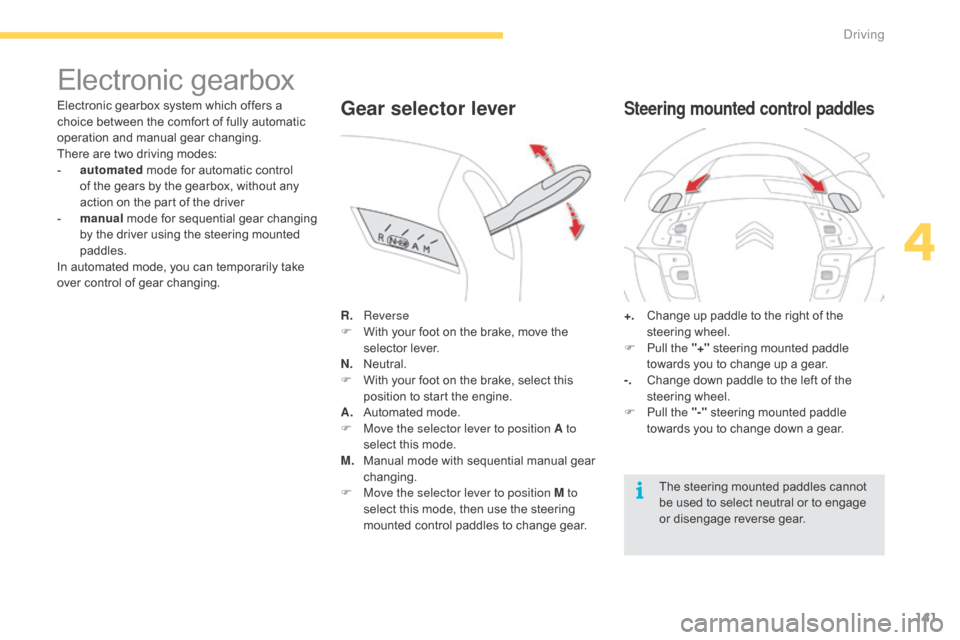
er control of gear changing. R.
R
everse
F
W
ith your foot on the brake, move the
s
elector lever.
N.
N
eutral.
F
W
ith your foot on the brake, select this
p
osition to start the engine.
A.
A
utomated mode.
F
M
ove the selector lever to position A to
select
this mode.
M.
M
anual mode with sequential manual gear
c
hanging.
F
M
ove the selector lever to position M to
select
this mode, then use the steering
m
ounted control paddles to change gear.Gear selector lever
+. Change up paddle to the right of the s
teering w heel.
F
P
ull the "+"
steering mounted paddle
t
owards you to change up a gear.
-.
C
hange down paddle to the left of the
s
teering
w
heel.
F
P
ull the "-"
steering mounted paddle
t
owards you to change down a gear.
Steering mounted control paddles
The steering mounted paddles cannot be used to select neutral or to engage
o
r
d
isengage
r
everse
g
ear.
4
Driving
Page 145 of 428
143
never select neutral N w hen d riving.
Automated mode
F Select position A.
AUTO or A
and the gear engaged is
d
isplayed in the instrument panel.
The
gearbox operates in auto-active mode,
w
ithout any action on the part of the driver. It
c
ontinuously selects the most suitable gear for:
-
o
ptimisation of fuel consumption,
-
t
he style of driving,
-
t
he profile of the road.
-
t
he vehicle load.
For
optimum acceleration, for example
w
hen overtaking another vehicle, press
t
he accelerator pedal firmly past the
p
oint of resistance.
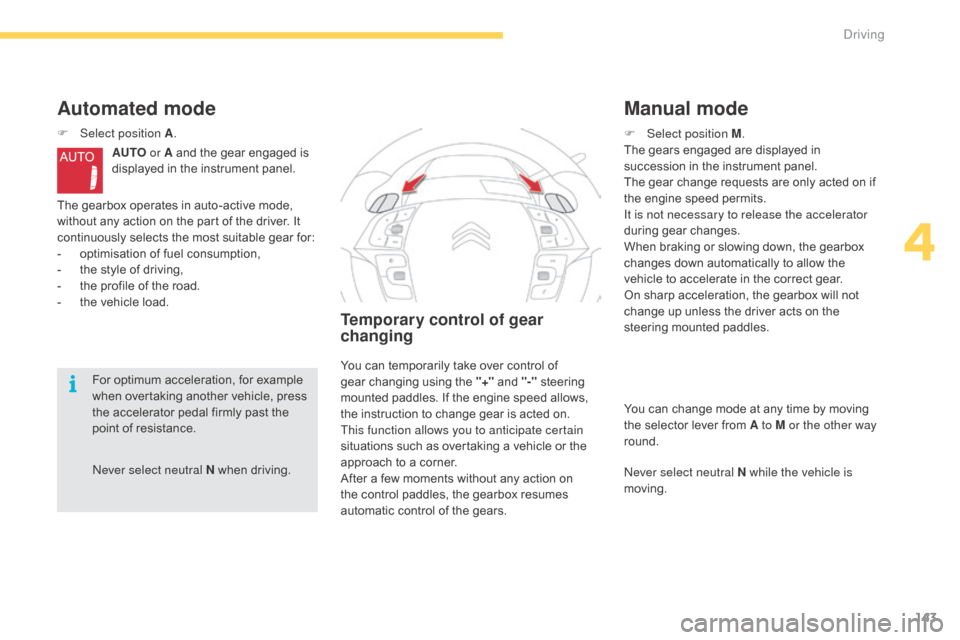
Temporary control of gear
changing
F Select position M .
The gears engaged are displayed in
s
uccession in the instrument panel.
The
gear change requests are only acted on if
t
he engine speed permits.
It is not necessary to release the accelerator
during
gear changes.
When
braking or slowing down, the gearbox
c
hanges down automatically to allow the
v
ehicle to accelerate in the correct gear.
On
sharp acceleration, the gearbox will not
c
hange up unless the driver acts on the
s
teering mounted paddles.
Manual mode
You can change mode at any time by moving the selector lever from A to M or the other way
round.
ne
ver select neutral N while the vehicle is
moving.
You
can
temporarily
take
over
control
of
g
ear
changing
using
the
"+"
and
"-"
steering
m
ounted
paddles.
If
the
engine
speed
allows,
t
he
instruction
to
change
gear
is
acted
on.
This function allows you to anticipate certain
situations
such
as
overtaking
a
vehicle
or
the
a
pproach
to
a
corner.
After
a
few
moments
without
any
action
on
t
he
control
paddles,
the
gearbox
resumes
a
utomatic
control
of
the
gears.
4
driving
Page 147 of 428
145
Automatic gearbox
This gearbox offers two driving modes.
- a utomated mode for automatic
m
anagement of the gears by the gearbox,
w
ithout any action on the part of the driver,
-
m
anual
mode for sequential gear changing
b
y the driver using the steering mounted
p
addles.
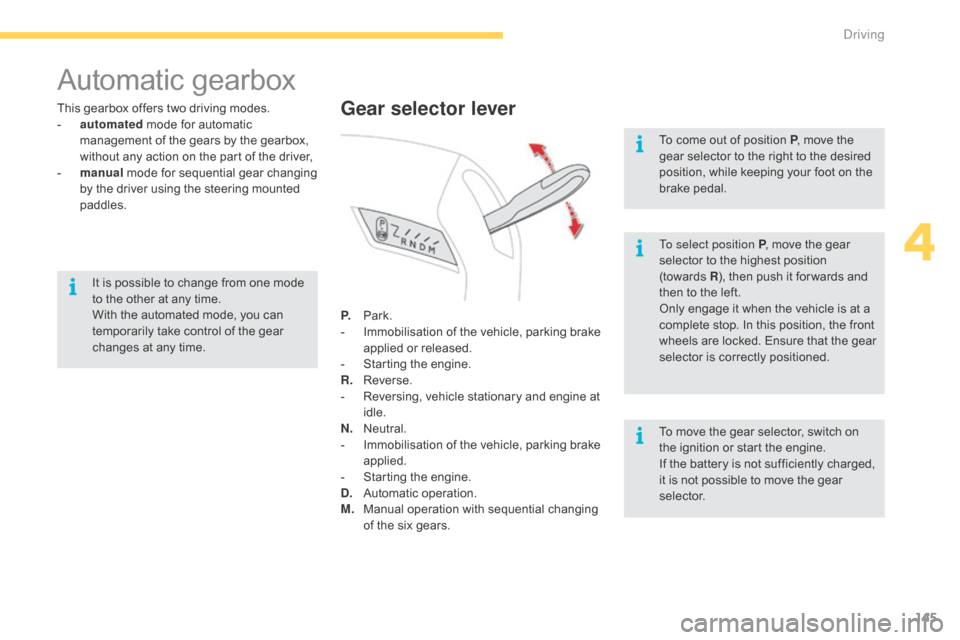
P.
Pa
rk.
-
I
mmobilisation of the vehicle, parking brake
a
pplied or released.
-
S
tarting the engine.
R.
R
everse.
-
R
eversing, vehicle stationary and engine at
i
dle.
N.
N
eutral.
-
I
mmobilisation of the vehicle, parking brake
a
pplied.
-
S
tarting the engine.
D.
A
utomatic
ope
ration.
M.
M
anual operation with sequential changing
o
f the six gears.Gear selector lever
To select position P, move the gear s
elector to the highest position
(
towards R),
then push it for wards and
t
hen to the left.
Only
engage it when the vehicle is at a
c
omplete stop. In this position, the front
w
heels are locked. Ensure that the gear
s
elector is correctly positioned.
To
move the gear selector, switch on
t
he ignition or start the engine.
If
the battery is not sufficiently charged,
i
t is not possible to move the gear
s
elector.
To
come out of position P
, move the
g
ear selector to the right to the desired
p
osition, while keeping your foot on the
b
rake
ped
al.
It
is
possible
to
change
from
one
mode
t
o
the
other
at
any
time.
With
the
automated
mode,
you
can
t
emporarily
take
control
of
the
gear
c
hanges
at
any
time.
4
Driving
Page 148 of 428
146
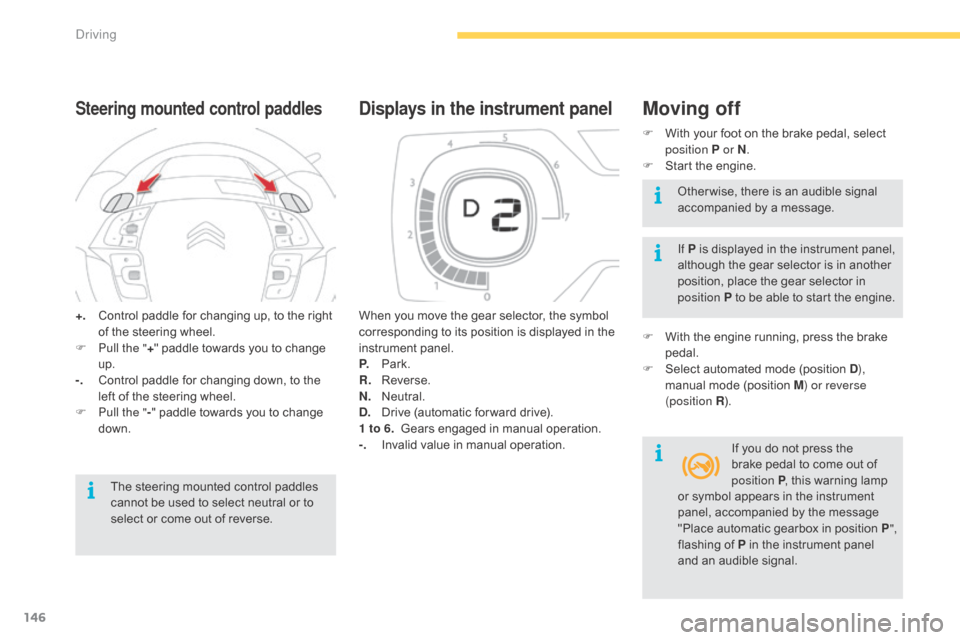
+. Control paddle for changing up, to the right o
f the steering wheel.
F
P
ull the " +"
paddle towards you to change
u
p.
-.
C
ontrol paddle for changing down, to the
l
eft of the steering wheel.
F
P
ull the " -"
paddle towards you to change
d
own.
Steering mounted control paddles
The steering mounted control paddles cannot be used to select neutral or to
s
elect or come out of reverse. When
you move the gear selector, the symbol
c
orresponding to its position is displayed in the
in
strument
pan
el.
P.
Pa
rk.
R.
R
everse.
N.
N
eutral.
D.
D
rive (automatic for ward drive).
1 to 6.
G
ears engaged in manual operation.
-.
I
nvalid value in manual operation.
Displays in the instrument panelMoving off
F With
your foot on the brake pedal, select p
osition P or N .
F
S
tart the engine.
If P
is displayed in the instrument panel,
a
lthough the gear selector is in another
p
osition, place the gear selector in
p
osition P to be able to start the engine.
F
W
ith the engine running, press the brake
ped
al.
F
S
elect automated mode (position D),
manual
mode (position M) or reverse
(position R ).
If
you do not press the
b
rake pedal to come out of
p
osition P,
this warning lamp
O
ther wise, there is an audible signal
a
ccompanied by a message.
or
symbol appears in the instrument
p
anel, accompanied by the message
"
Place automatic gearbox in position P",
flashing
of P in the instrument panel
a
nd an audible signal.
Driving
Page 150 of 428
148
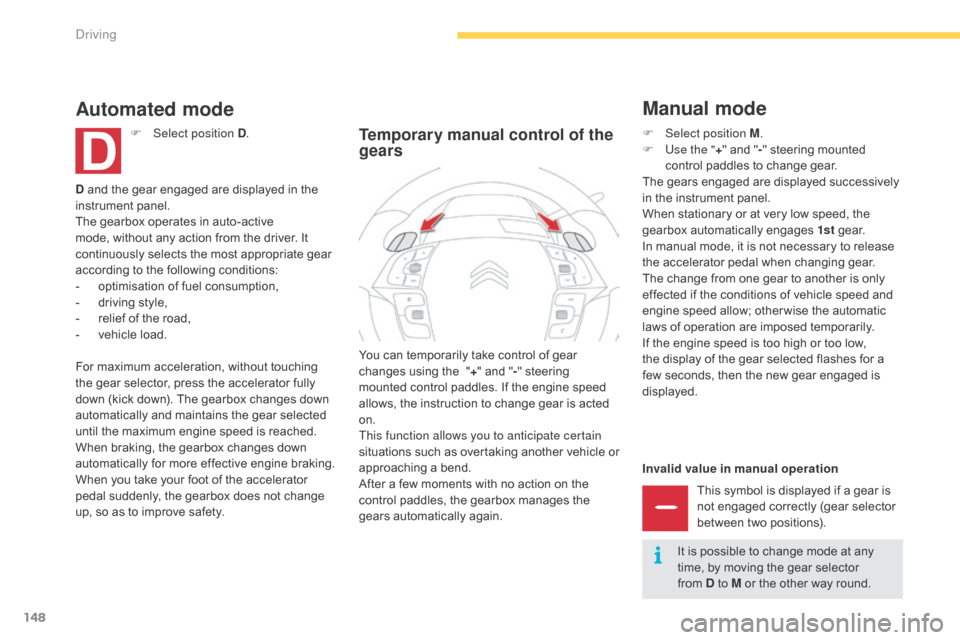
Invalid value in manual operationThis symbol is displayed if a gear is
n
ot engaged correctly (gear selector
b
etween two positions).
You
can
temporarily
take
control
of
gear
c
hanges
using
the
"
+"
and
"
- "
steering
m
ounted
control
paddles.
If
the
engine
speed
a
llows,
the
instruction
to
change
gear
is
acted
o
n.
This function allows you to anticipate certain
situations
s
uch
a
s
ov
ertaking
a
nother
v
ehicle
o
r
a
pproaching
a
bend.
After
a
few
moments
with
no
action
on
the
c
ontrol
paddles,
the
gearbox
manages
the
g
ears
automatically
again.
Temporary manual control of the
gears
Manual mode
D and the gear engaged are displayed in the in strument pan el.
The
gearbox operates in auto-active
m
ode, without any action from the driver. It
c
ontinuously selects the most appropriate gear
a
ccording to the following conditions:
-
o
ptimisation of fuel consumption,
-
d
riving style,
-
r
elief of the road,
-
v
ehicle load.
Automated mode
F Select position D .
For
maximum acceleration, without touching
t
he
gear
selector, press the accelerator fully
d
own
(kick down). The gearbox changes down
a
utomatically and maintains the gear selected
u
ntil
the
maximum engine speed is reached.
When
braking, the gearbox changes down
a
utomatically for more effective engine braking.
When
you take your foot of the accelerator
p
edal
suddenly, the gearbox does not change
u
p,
so
as
to improve safety. F
Sel ect position M.
F
U
se the "+"
and "- "
steering mounted
c
ontrol paddles to change gear.
The
gears engaged are displayed successively
i
n the instrument panel.
When
stationary or at very low speed, the
g
earbox automatically engages 1st
g
e a r.
In
manual mode, it is not necessary to release
t
he accelerator pedal when changing gear.
The
change from one gear to another is only
e
ffected if the conditions of vehicle speed and
e
ngine speed allow; other wise the automatic
l
aws of operation are imposed temporarily.
If
the engine speed is too high or too low,
t
he display of the gear selected flashes for a
f
ew seconds, then the new gear engaged is
d
isplayed.It
is possible to change mode at any
t
ime, by moving the gear selector
f
rom D to M or the other way round.
Driving
Page 153 of 428
151
Stop & Start
The Stop & Start system puts the engine temporarily into standby - STOP mode - during stops in the traffic (red lights, traffic jams, or other...).
T he engine restarts automatically - START mode - as soon as you want to move off. The restart takes place instantly, quickly and silently.
Operation
Going into engine STOP
mode
The "ECO" warning lamp comes on in the i
nstrument panel and the engine goes into
s
tandby
a
utomatically:
-
w
ith a manual gearbox, at speeds below
1
2 mph (20 km/h), or vehicle stationary
(
with e-THP 130 and 165 petrol versions
a
nd BlueHDi 100, 115 and 120 versions),
w
hen you place the gear lever in neutral,
a
nd you release the clutch pedal,
-
w
ith an electronic gearbox, at speeds
b
elow 5 mph (8 km/h), when you press the
b
rake pedal or place the gear selector lever
i
n position N ,
-
w
ith an automatic gearbox, with the
vehicle stationary, when you press the
brake
pedal or place the gear selector lever
i
n position N . Never
refuel with the engine in STOP
m
ode; you must switch off the ignition
w
ith the START/STOP button.
For
your comfort, during parking
m
anoeuvres, STOP mode is not
a
vailable for a few seconds after
c
oming out of reverse gear.
STOP
mode does not affect the
f
unctionality of the vehicle, such as for
example,
braking, power steering...
Special cases: STOP mode not
available
STOP mode is not invoked when:
- t he driver's door is open,
-
t
he driver's seat belt is not fastened,
-
t
he vehicle has not exceeded 6 mph
(
10 km/h) since the last engine start using
t
he START/STOP button,
-
t
he electric parking brake is applied or
be
ing
a
pplied,
-
t
he engine is needed to maintain a
c
omfortable temperature in the passenger
c
ompartment,
-
d
emisting is active,
-
s
ome special conditions (battery charge,
e
ngine temperature, braking assistance,
a
mbient temperature...) where the engine is
n
eeded to assure control of a system.
In this case, the "ECO"
warning lamp
f
lashes for a few seconds then goes
o
f f.
This operation is perfectly normal.
Per fect
for
urban
use,
the
Stop
&
Start
system
reduces
fuel
consumption
and
exhaust
emissions
as
well
as the noise level when stationary.
If
your
vehicle
is
fitted
with
the
system,
a
time
c
ounter
calculates
the
sum
of
the
periods
in
S
TOP
mode
during
a
journey.
It
resets
itself
to
z
ero
every
time
the
ignition
is
switched
on
with
t
he
START/STOP
button.
4
driving
Page 161 of 428
159
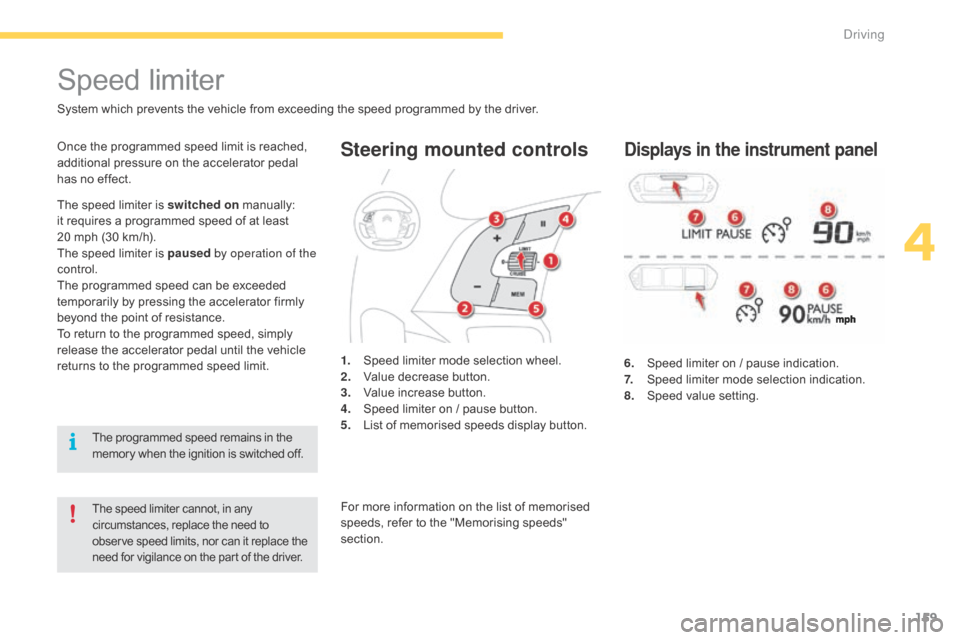
Steering mounted controls
6. Speed limiter on / pause indication.
7. S peed limiter mode selection indication.
8.
S
peed value setting.
Speed limiter
System which prevents the vehicle from exceeding the speed programmed by the driver.
The speed limiter cannot, in any circumstances, replace the need to o
bserve speed limits, nor can it replace the
n
eed for vigilance on the part of the driver.
Once the programmed speed limit is reached, additional pressure on the accelerator pedal
h
as no effect.
1.
S
peed limiter mode selection wheel.
2.
V
alue decrease button.
3.
V
alue increase button.
4.
S
peed limiter on / pause button.
5.
L
ist of memorised speeds display button.Displays in the instrument panel
The speed limiter is switched on manually: i
t requires a programmed speed of at least
2
0 mph (30 km/h).
The
speed limiter is paused by operation of the
control.
The
programmed speed can be exceeded
t
emporarily by pressing the accelerator firmly
b
eyond the point of resistance.
To
return to the programmed speed, simply
r
elease the accelerator pedal until the vehicle
r
eturns to the programmed speed limit.
The
programmed speed remains in the
m
emory when the ignition is switched off.For
more information on the list of memorised
s
peeds, refer to the "Memorising speeds"
s
ection.
4
Driving
Page 164 of 428
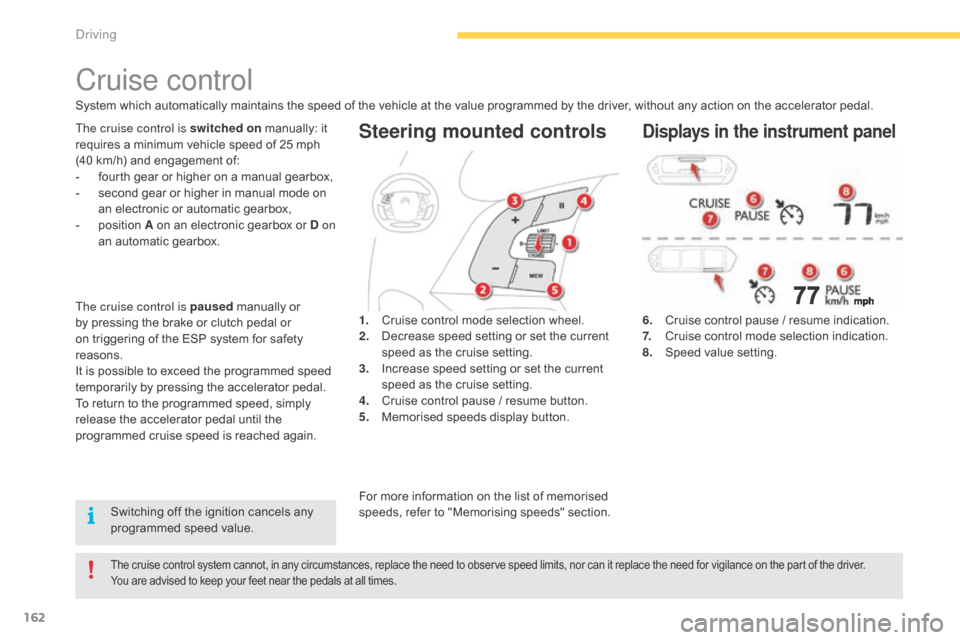
162
Steering mounted controls
6. Cruise control pause / resume indication.
7. C ruise control mode selection indication.
8.
S
peed value setting.
Cruise control
System which automatically maintains the speed of the vehicle at the value programmed by the driver, without any action on the accelerator pedal.
The cruise control system cannot, in any circumstances, replace the need to observe speed limits, nor can it replace the need for vigilance on the part of the driver.
Y ou are advised to keep your feet near the pedals at all times.
The cruise control is switched on manually: it r
equires a minimum vehicle speed of 25 mph
(
40 km/h) and engagement of:
-
f
ourth gear or higher on a manual gearbox,
-
s
econd gear or higher in manual mode on
a
n electronic or automatic gearbox,
-
p
osition A on an electronic gearbox or D on
an
automatic gearbox. 1.
C
ruise control mode selection wheel.
2.
D
ecrease speed setting or set the current
s
peed as the cruise setting.
3.
I
ncrease speed setting or set the current
s
peed as the cruise setting.
4.
C
ruise control pause / resume button.
5.
M
emorised speeds display button.Displays in the instrument panel
Switching off the ignition cancels any programmed speed value.
The cruise control is paused
manually or
b
y
pressing the brake or clutch pedal or
o
n
triggering of the ESP system for safety
r
easons.
It
is
possible to exceed the programmed speed
t
emporarily by pressing the accelerator pedal.
To
return to the programmed speed, simply
r
elease the accelerator pedal until the
p
rogrammed cruise speed is reached again.
For more information on the list of memorised s
peeds, refer to "Memorising speeds" section.
Driving