steering Citroen C4 PICASSO RHD 2015 1.G Owner's Guide
[x] Cancel search | Manufacturer: CITROEN, Model Year: 2015, Model line: C4 PICASSO RHD, Model: Citroen C4 PICASSO RHD 2015 1.GPages: 428, PDF Size: 10.09 MB
Page 230 of 428
228
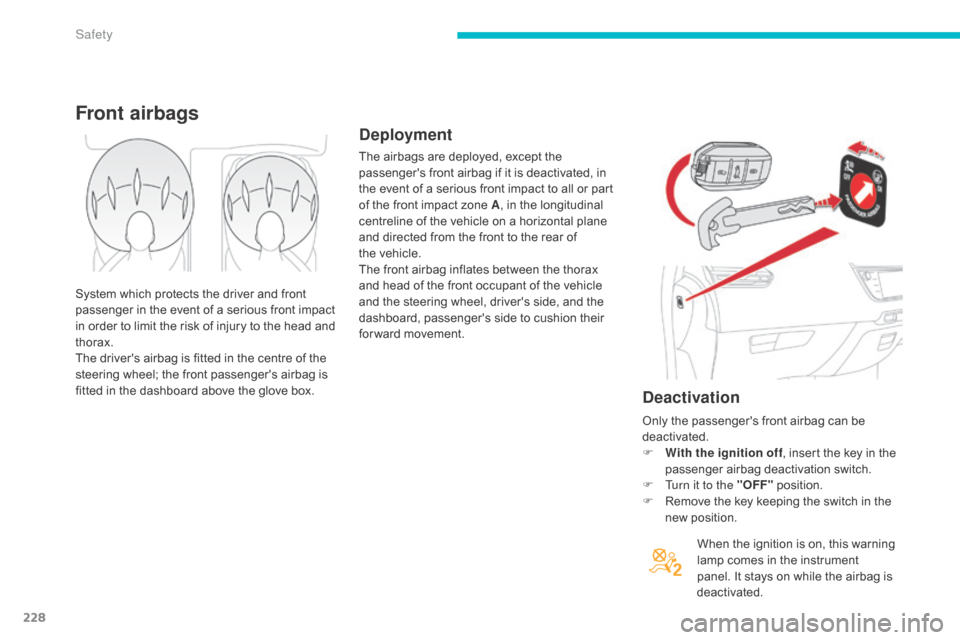
Deactivation
When the ignition is on, this warning lamp comes in the instrument
p
anel. It stays on while the airbag is
d
eactivated.
Front airbags
Deployment
The airbags are deployed, except the p assenger's front airbag if it is deactivated, in
t
he event of a serious front impact to all or part
o
f the front impact zone A,
in the longitudinal
c
entreline of the vehicle on a horizontal plane
a
nd directed from the front to the rear of
t
he vehicle.
The
front airbag inflates between the thorax
a
nd head of the front occupant of the vehicle
a
nd the steering wheel, driver's side, and the
d
ashboard, passenger's side to cushion their
f
or ward movement.
System
which
protects
the
driver
and
front
p
assenger
in
the
event
of
a
serious
front
impact
i
n
order
to
limit
the
risk
of
injury
to
the
head
and
t
horax.
The
driver's
airbag
is
fitted
in
the
centre
of
the
s
teering
wheel;
the
front
passenger's
airbag
is
f
itted
in
the
dashboard
above
the
glove
box. Only
the passenger's front airbag can be
d
eactivated.
F
W
ith the ignition off,
insert the key in the
p
assenger airbag deactivation switch.
F
T
urn it to the "OFF"
p
osition.
F
R
emove the key keeping the switch in the
n
ew position.
Safety
Page 234 of 428
232
Sit in a normal upright position.
W ear a correctly adjusted seat belt.
Do
not leave anything between the
o
ccupants and the airbags (a child, pet,
o
bject...). This could hamper the operation of
t
he airbags or injure the occupants.
After
an accident or if the vehicle has been
s
tolen or broken into, have the airbag
s
ystems checked.
All
work on the airbag system must be
c
arried out by a CITROËN dealer or a
q
ualified
w
orkshop.
Even
if all of the precautions mentioned
a
re observed, a risk of injury or of minor
b
urns to the head, chest or arms when an
a
irbag is deployed cannot be ruled out. The
b
ag inflates almost instantly (within a few
m
illiseconds) then deflates within the same
t
ime discharging the hot gas via openings
p
rovided for this purpose.Front airbags
Do not drive holding the steering wheel by its spokes or resting your hands on the centre
p
art of the wheel.
Passengers
must not place their feet on the
das
hboard.
Do
not smoke as deployment of the airbags
c
an cause burns or the risk of injury from a
c
igarette or pipe.
Never
remove
or
pierce
the
steering
wheel
or
h
it it violently.
Do
not fit or attach anything to the steering
w
heel or dashboard, this could cause
i
njuries with deployment of the airbags.
For the airbags to be fully effective, observe the following safety rules: Lateral airbags
Use only approved covers on the seats, compatible with the deployment the lateral
a
irbags. For information on the range of seat
c
overs suitable for your vehicle, you can
contact
a CITROËN dealer.
Refer
to the "Accessories" section.
Do
not fix or attach anything to the seat
b
acks (clothing...). This could cause injury
t
o the chest or arms if the lateral airbag is
d
eployed.
Do
not sit with the upper part of the body any
n
earer to the door than necessary.
Curtain airbags
Do not fix or attach anything to the roof. This could cause injury to the head if the curtain
a
irbag is deployed.
If
fitted on your vehicle, do not remove the
g
rab handles installed on the roof, they play
a
part in securing the curtain airbags.
Safety
Page 257 of 428
255
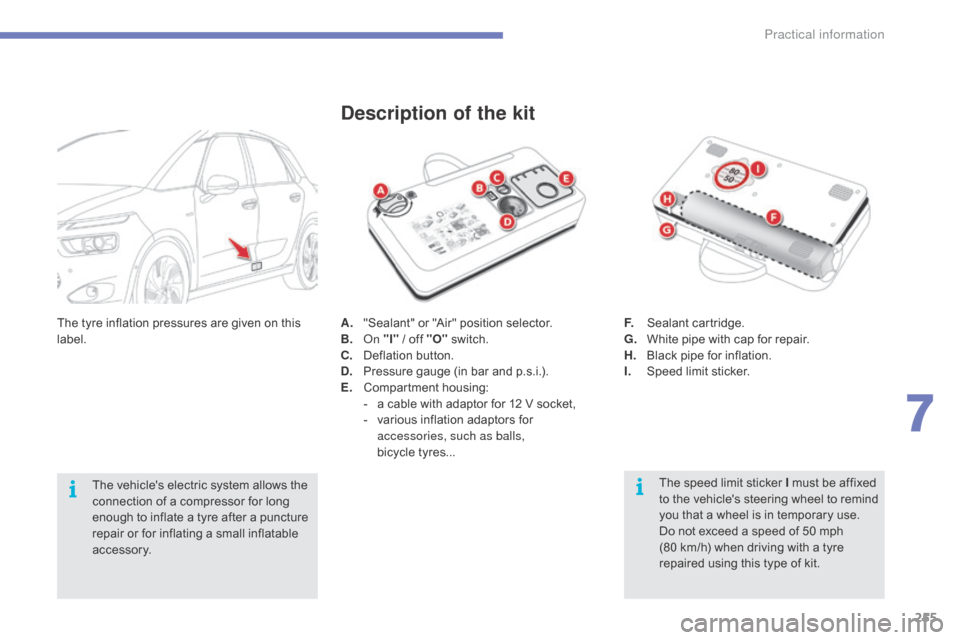
A. "Sealant" or "Air" position selector.
B. on "
I" / off "O" s witch.
C.
D
eflation button.
D.
P
ressure gauge (in bar and p.s.i.).
E.
C
ompartment
h
ousing:
-
a
cable with adaptor for 12 V socket,
-
v
arious inflation adaptors for
a
ccessories, such as balls,
bicycle tyres...
Description of the kit
The speed limit sticker I must be affixed t o the vehicle's steering wheel to remind
y
ou that a wheel is in temporary use.
Do
not exceed a speed of 50 mph
(
80 km/h) when driving with a tyre
r
epaired using this type of kit.
F.
S
ealant
c
artridge.
G.
W
hite pipe with cap for repair.
H.
B
lack pipe for inflation.
I.
S
peed limit sticker.
The
tyre
inflation
pressures
are
given
on
this
lab
el.
The
vehicle's
electric
system
allows
the
c
onnection
of
a
compressor
for
long
e
nough
to
inflate
a
tyre
after
a
puncture
r
epair
or
for
inflating
a
small
inflatable
a
ccessory.
7
Practical information
Page 285 of 428
283
Type 1 fuse tables
Fusebox 1
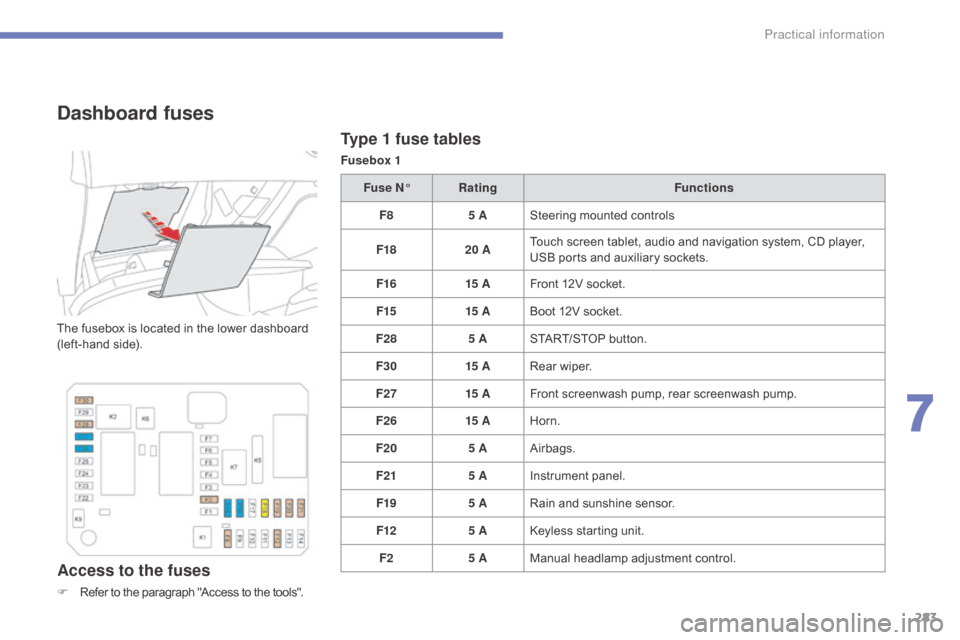
Dashboard fuses
The fusebox is located in the lower dashboard (left-hand side).
Access to the fuses
F Refer to the paragraph "Access to the tools".Fuse N°
Rating Functions
F8 5 ASteering mounted controls
F18 20 ATouch screen tablet, audio and navigation system, CD player,
U
SB ports and auxiliary sockets.
F16 15 AFront 12V socket.
F15 15 ABoot 12V socket.
F28 5 ASTART/STOP button.
F30 15 ARear wiper.
F27 15 AFront screenwash pump, rear screenwash pump.
F26 15 AHorn.
F20 5 AAirbags.
F21 5 AInstrument panel.
F19 5 ARain and sunshine sensor.
F12 5 AKeyless starting unit.
F2 5 AManual
h
eadlamp
a
djustment
c
ontrol.
7
Practical information
Page 287 of 428
285
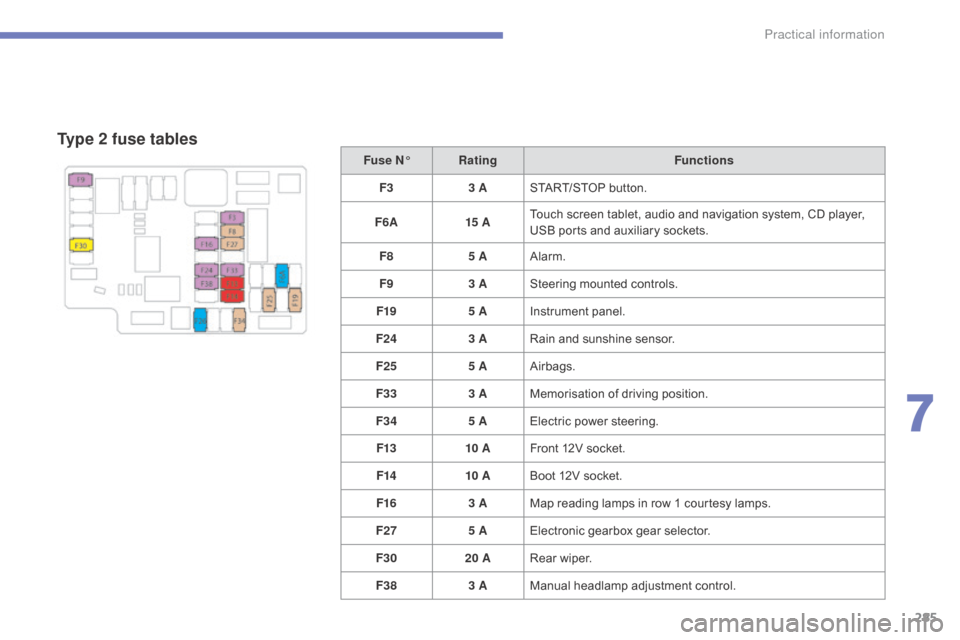
Type 2 fuse tables
Fuse N°Rating Functions
F3 3 ASTART/STOP
button.
F6 A 15 ATouch
screen tablet, audio and navigation system, CD player,
U
SB ports and auxiliary sockets.
F8 5 AAlarm.
F9 3 ASteering
mounted controls.
F19 5 AInstrument
panel.
F24 3 ARain
and sunshine sensor.
F25 5 AAirbags.
F33 3 AMemorisation
o
f
d
riving
p
osition.
F34 5 AElectric
power steering.
F13 10 AFront
12V socket.
F14 10 ABoot
12V socket.
F16 3 AMap
reading lamps in row 1 courtesy lamps.
F27 5 AElectronic
gearbox gear selector.
F30 20 ARear
wiper.
F38 3 AManual
h
eadlamp
a
djustment
c
ontrol.
7
Practical information
Page 295 of 428
293
Towing the vehicle
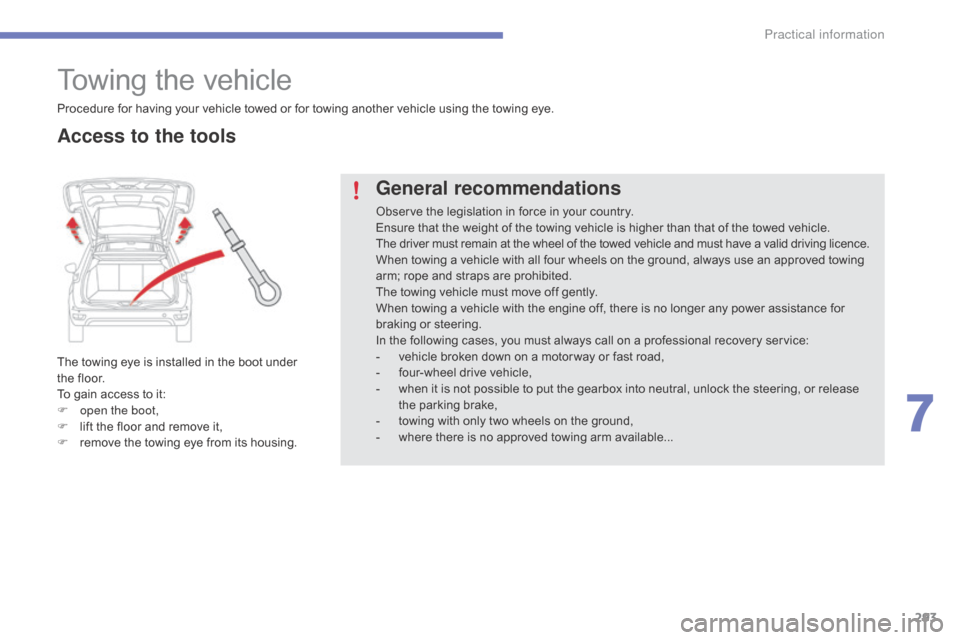
The towing eye is installed in the boot under the floor.
To
gain access to it:
F
o
pen the boot,
F
l
ift the floor and remove it,
F
r
emove the towing eye from its housing.
General recommendations
Observe the legislation in force in your country.
E nsure that the weight of the towing vehicle is higher than that of the towed vehicle.
The
driver must remain at the wheel of the towed vehicle and must have a valid driving licence.
When
towing a vehicle with all four wheels on the ground, always use an approved towing
a
rm; rope and straps are prohibited.
The
towing vehicle must move off gently.
When
towing a vehicle with the engine off, there is no longer any power assistance for
b
raking or steering.
In
the following cases, you must always call on a professional recovery service:
-
v
ehicle broken down on a motor way or fast road,
-
f
our-wheel drive vehicle,
-
w
hen it is not possible to put the gearbox into neutral, unlock the steering, or release
t
he parking brake,
-
t
owing with only two wheels on the ground,
-
w
here there is no approved towing arm available...
Procedure
for
having
your
vehicle
towed
or
for
towing
another vehicle using the towing eye.
Access to the tools
7
Practical information
Page 296 of 428

294
Towing another vehicle
F On the rear bumper, unclip the cover by p
ressing at the bottom.
F
S
crew the towing eye in fully.
F
I
nstall the towing bar.
F
S
witch on the hazard warning lamps on
b
oth vehicles.
F
M
ove off gently, drive slowly and for a short
di
stance.
F
O
n
the
front
bumper,
unclip
the
cover
by
p
ressing
on
the
left.
F
S
crew
the
towing
eye
in
fully.
F
I
nstall
the
towing
bar.
F
P
lace
the
gear
lever
in
neutral
(position
N
on
an
electronic
or
automatic
gearbox).
Towing your vehicle
Failure to observe this instruction could r esult in damage to certain components
(
braking, transmission...) and the
a
bsence of braking assistance the next
t
ime the engine is started.
F
U
nlock the steering by turning the key
i
n
the ignition one notch and release the
par
king
b
rake.
F
S
witch on the hazard warning lamps on
b
oth vehicles.
F
M
ove off gently, drive slowly and for a short
di
stance.
Practical information
Page 345 of 428
343
The
system
is
protected
in
such
a
way
that
it
will
only
operate
in
your
vehicle.
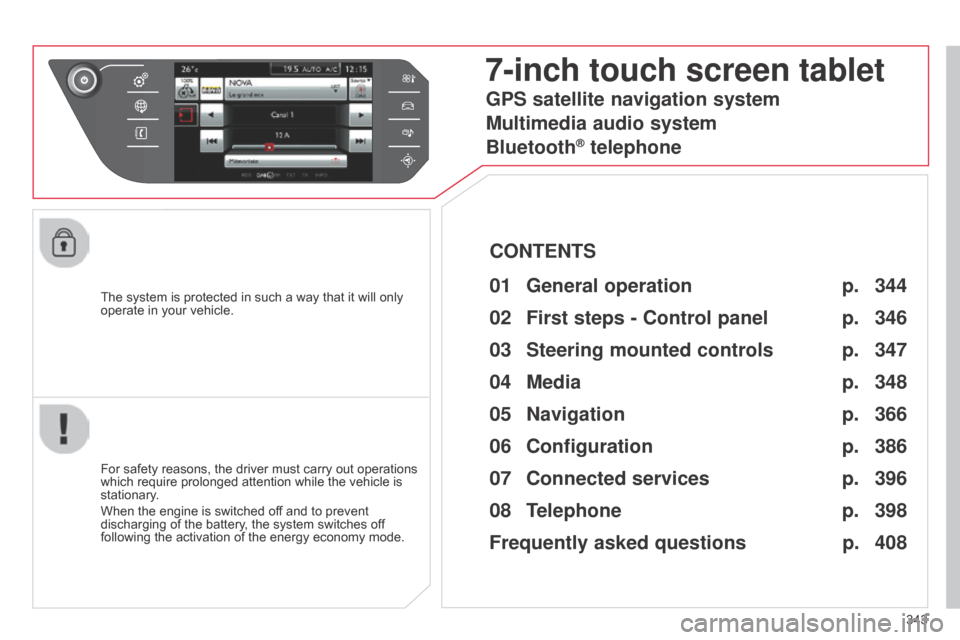
7-inch touch screen tablet
01 General
operation
For safety reasons, the driver must carry out operations which
require prolonged attention while the vehicle is
stationary
.
When
the engine is switched off and to prevent
discharging
of the battery, the system switches off
following
the activation of the energy economy mode.
CONTENTS
02
First steps - Control
panel
04
Media
05
Navigation
06
Configuration
07
Connected service
s
08
Telephone p.
p.
p.
p.
p.
p.
p.
Frequently asked questions p.
GPS satellite navigation system
Multimedia audio system
Bluetooth
® telephone
344
346
366 348
386
396
398
408
03
Steering mounted
controls p. 347
Page 349 of 428
03
347
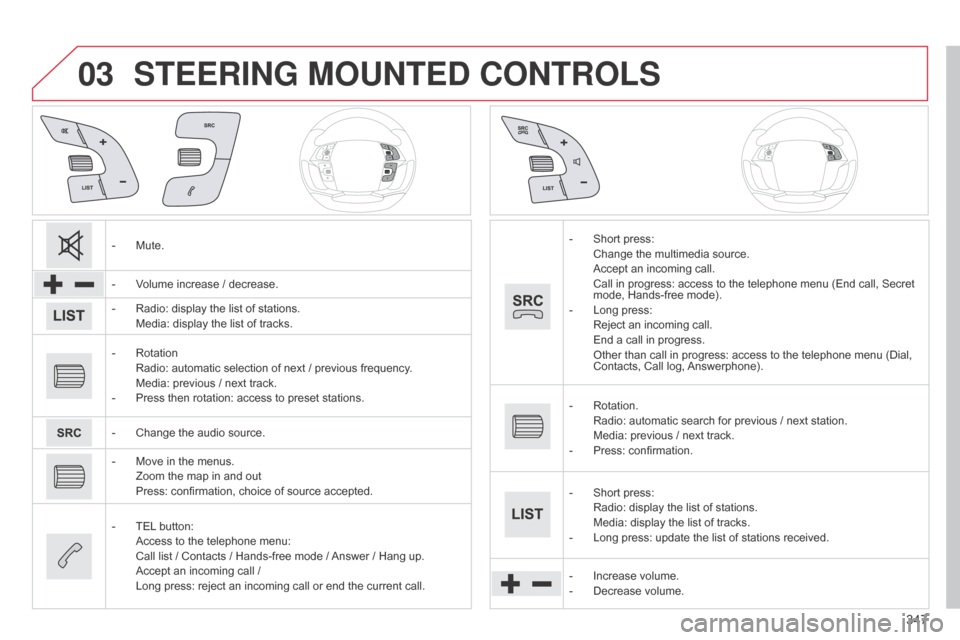
STEERING MOUNTED CONTROLS
- Mute.
-
V
olume increase / decrease.
-
Radio:
display the list of stations.
Media:
display the list of tracks.
-
Rotation Radio:
automatic selection of next / previous frequency.
Media:
previous / next track.
-
Press
then rotation: access to preset stations.
-
Change
the audio source.
-
Move
in the menus.
Zoom
the map in and out
Press:
confirmation, choice of source accepted.
-
TEL
button:
Access
to the telephone menu:
Call
list / Contacts / Hands-free mode /
Answer
/ Hang up.
Accept
an incoming call /
Long
press: reject an incoming call or end the current call.-
Short press: Change
the multimedia source.
Accept
an incoming call.
Call
in progress: access to the telephone menu (End call, Secret
mode,
Hands-free mode).
-
Long
press:
Reject
an incoming call.
End
a call in progress.
Other
than call in progress: access to the telephone menu (Dial,
Contacts,
Call log,
Answerphone).
-
Rotation. Radio:
automatic search for previous / next station.
Media:
previous / next track.
-
Press:
confirmation.
-
Short
press:
Radio:
display the list of stations.
Media:
display the list of tracks.
-
Long
press: update the list of stations received.
-
Increase
volume.
-
Decrease
volume.
Page 362 of 428
04
360
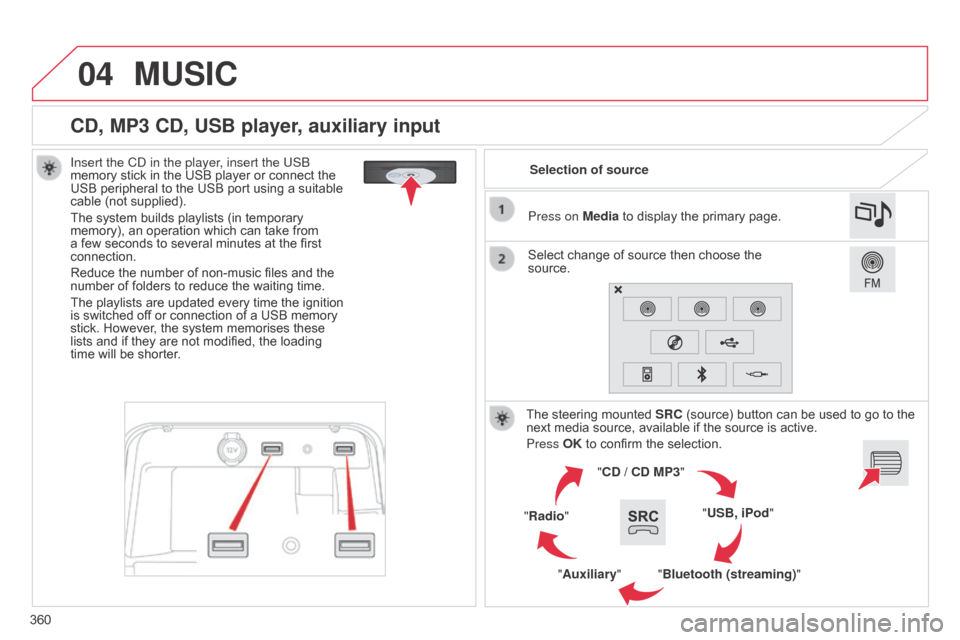
CD, MP3 CD, USB player, auxiliary input
Insert the Cd in the player, insert the USb
memory stick in the USB player or connect the
USB
peripheral to the USB port using a suitable
cable
(not supplied).
The
system builds playlists (in temporary
memory),
an operation which can take from
a
few seconds to several minutes at the first
connection.
Reduce
the number of non-music files and the
number
of folders to reduce the waiting time.
The
playlists are updated every time the ignition
is
switched off or connection of a USB memory
stick.
However, the system memorises these
lists
and if they are not modified, the loading
time
will be shorter. Selection of source
The
steering mounted
SRC
(source) button can be used to go to the
next
media source, available if the source is active.
Press OK
to confirm the selection.
"CD / CD MP3"
"USB, iPod"
"Bluetooth (streaming)"
"Auxiliary"
"Radio" Select
change of source then choose the
source. Press on
Media to display the primary page.
MUSIC