warning light Citroen C4 RHD 2015 2.G Owner's Manual
[x] Cancel search | Manufacturer: CITROEN, Model Year: 2015, Model line: C4 RHD, Model: Citroen C4 RHD 2015 2.GPages: 328, PDF Size: 12.72 MB
Page 14 of 328

12
TWO-TONE INSTRUMENT PANEL WITHOUT AUDIO SYSTEM
Dials and screens
1. Rev counter (x 1 000 rpm or tr/min).
2.
Gear
efficiency
indicator
or
gear
se
-
lector
lever
position
and
gear
for
an
electronic
or automatic gearbox.
3.
Cruise
control
or
speed
limiter
setting.
4.
Digital
speedometer (mph or km/h).
5.
Engine
oil level indicator. 6.
Service indicator
(miles
or km) then,
total
mileage recorder.
These
two
functions
are
displayed
successively
on
switching
on
the
ignition.
Lighting
dimmer
setting
(when
making an
adjustment).
7.
T
rip
mileage
recorder
(miles
or
km).
8.
Fuel
gauge
and
associated
low
fuel
level
warning
lamp
(
a or b
accord
-
ing
to version).
9.
T
ime.
Control buttons
A. Lighting dimmer (available in night mode).
B.
Reminder
of servicing information
Reset
service
indicator
or
trip
mile
-
age
recorder.
A
and B.
Setting
the
time
and
select
-
ing
units.
1
MONITORING
Page 15 of 328
13
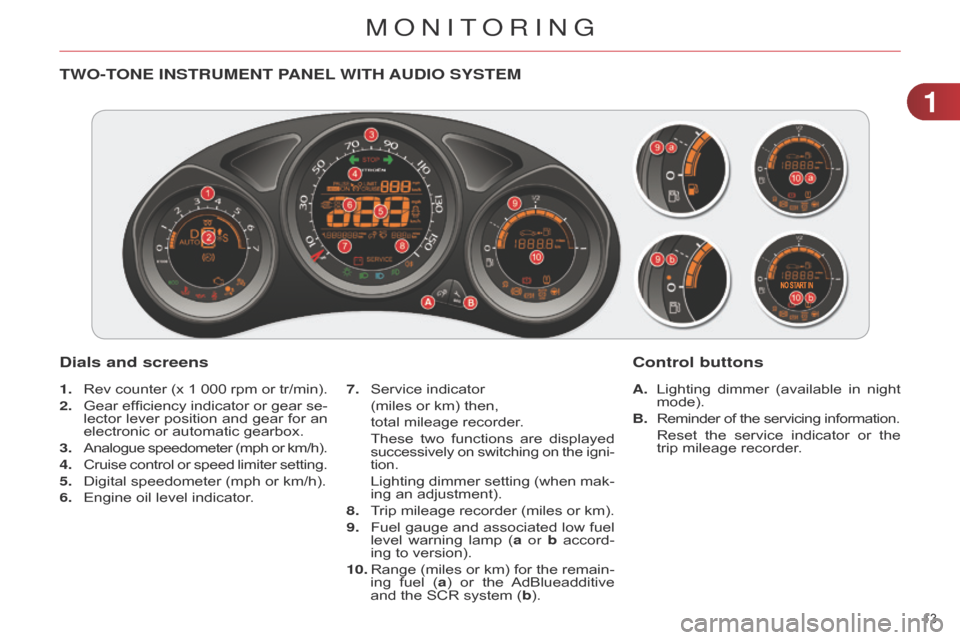
TWO-TONE INSTRUMENT PANEL WITH AUDIO SYSTEM
Dials and screens
A. Lighting dimmer (available in night mode).
B.
Reminder
of the servicing information.
Reset
the
service
indicator
or
the
trip
mileage recorder.
7.
Service
indicator
(miles
or
km)
then,
total
mileage
recorder.
These
two
functions
are
displayed
successively on switching on the igni -
tion.
Lighting dimmer setting (when mak -
ing an adjustment).
8.
T
rip
mileage
recorder
(miles
or
km).
9.
Fuel
gauge
and
associated
low
fuel
level
warning
lamp
(
a or b
accord
-
ing
to version).
10.
Range
(miles
or
km)
for
the
remain
-
ing
fuel
(
a)
or
the
AdBlueadditive
and
the SCR system (b).
Control buttons
1. Rev counter (x 1 000 rpm or tr/min).
2.
Gear
efficiency
indicator
or
gear
se
-
lector
lever
position
and
gear
for
an
electronic
or automatic gearbox.
3.
Analogue
speedometer
(mph
or
km/h).
4.
Cruise
control
or
speed
limiter
setting.
5.
Digital
speedometer (mph or km/h).
6.
Engine
oil level indicator.
1
MONITORING
Page 16 of 328

14
CUSTOMISABLE COLOUR INSTRUMENT PANEL WITH AUDIO SYSTEM OR NAVIGATION SYSTEM
1. Rev counter (x 1 000 rpm or tr/min).
2.
Gear
efficiency
indicator
or
gear
se
-
lector
lever
position
and
gear
for
an
electronic
or automatic gearbox.
3.
Analogue
speedometer
(mph
or
km/h).
4.
Cruise
control
or
speed
limiter
set
-
ting.
5.
Digital
speedometer (mph or km/h).
6.
Engine
oil level indicator. A.
Dial COLOUR: customisation of the background
colour of the dials.
B.
Screen
COLOUR:
customisation
of
the
background
colour
of
the
screens.
C.
Lighting
dimmer
(available
in
night
mode).
D.
Reminder
of
the
servicing
informa
-
tion.
Reset
the
service
indicator
or
the
trip
mileage recorder.
Dials and screens
7. Service indicator
(miles
or km) then,
total
mileage recorder.
These
two
functions
are
displayed
successively on switching on the igni -
tion.
Lighting dimmer setting (when mak -
ing an adjustment).
8.
T
rip
mileage
recorder
(miles
or
km).
9.
Fuel
gauge
and
associated
low
fuel
level
warning lamp.
10.
Range
(miles
or
km)
for
the
remain
-
ing
fuel
(
a)
or
the
AdBlueadditive
and
the SCR system (b).
Control buttons
1
MONITORING
Page 27 of 328

25
Operation indicator lamps
If one of the following indicator lamps comes on, this confirms that the corresponding system has come into operation.
It
may be accompanied by an audible signal and a message in the screen.
Warning/indicator lamp is onCause Action/Observations
Left-hand direction
indicator flashing
with
buzzer
.The
lighting stalk is pushed
down.
Right-hand direction
indicator flashing
with
buzzer
.The
lighting stalk is pushed up.
Hazard warning lamps flashing
with
audible
signal.The
hazard warning lamps
switch,
located on the
dashboard,
has been operated.The
left-hand and right-hand direction
indicators
and their associated indicator
lamps
flash simultaneously.
Sidelamps fixed.The
lighting stalk is in the
"Sidelamps"
position.
Dipped beam headlamps fixed.The
lighting stalk is in the
"Dipped
beam headlamps"
position
or in the "AUTO"
position
in conditions of low
light.
Main beam
headlamps fixed.The
lighting stalk is pulled
towards
you.Pull
the stalk again to return to dipped
beam
headlamps.
Front foglamps fixed.The
front foglamps are
switched
on using the ring on
the
lighting control stalk.Turn
the ring on the lighting control stalk
rearwards
twice to switch off the front
foglamps.
Rear foglamps fixed. The
rear foglamps are on.Turn
the ring on the stalk rearward to turn
of
f the rear foglamps.
1
MONITORING
Page 29 of 328

27
Passenger's
airbag system fixed
in the seat
belt and passenger's
front
airbag
warning
lamps
display.The
control switch, located
in
the glove box, has been placed
in the "ON" position.
The passenger's front airbag
is
activated.
In
this case, do not install a
"rearward
facing" child seat.Move the control switch to the "OFF"
position
to deactivate the passenger's front
airbag.
In
this case, you can install a "rearward
facing"
child seat.
Warning/indicator lamp
is onCause Action/Observations
Stop & Start fixed.
When
the vehicle stops (red
lights,
traffic jams, ...) the
Stop
& Start system has put
the
engine into STOP
mode.The
warning lamp goes off and the
engine
restarts automatically in START
mode,
as soon as you want to move off.
flashes
for a few
seconds,
then
goes
off.STOP
mode is temporarily
unavailable.
or
ST
ART
mode is invoked
automatically
.For
more information on special cases
with
STOP
mode and START
mode, refer
to
the "Stop & Start" section.
Parking space
sensors fixed.
The
parking space sensors
function
is selected.To
start measurement, operate the direction
indicator
on the side of the space to be
measured,
and do not exceed 12 mph
(20
km/h).
A
message is displayed once the
measurement
has been completed.
Automatic
wiping fixed.The wiper control is pushed
downwards.
Automatic
front wiping is activated.
To deactivate automatic wiping, operate
the
control stalk downwards or put the
stalk
into another position.
Lighting dimmer fixed.The lighting dimmer is making
an
adjustment.
You can adjust the level of illumination of
the
instruments between 1 and 16.
1
MONITORING
Page 69 of 328

67
Locating your vehicle
This function allows you to identify your vehicle
from a distance, particularly in
poor
light.
Y
our
vehicle
must
be
locked.
Folding the key
F
First
press this button to fold the key.
F
Press
the
closed
padlock
on
the remote control.
This
will
switch
on
the
courtesy
lamps
and
the
direction
indicators
will
flash
for
around
ten seconds.
If
you
do
not
press
the
button when
folding
the
key
,
there
is
a risk
of
damage
to
the
mechanism.
Fault with the remote control
In the
event of a malfunction with the remote
control, you can no longer un -
lock,
lock or locate your vehicle.
F
First
of
all,
use
the
key
in
the
lock
to
unlock
or lock your vehicle.
F
Then,
reinitialise
the
remote
control.
Reinitialisation
F
Switch
of
f
the
ignition
and
remove
the
ignition key.
F
Press
the
closed
padlock
immedi
-
ately
for a few seconds.
F
T
urn
the
key
to
position
2 (Ignition
on)
.
F
Switch
of
f
the
ignition
and
remove
the
key from the ignition switch.
The
remote
control
is
fully
operational
again. Battery
ref.: CR2032 / 3 volts.
Changing the battery
If the
battery is flat, you are in -
formed by illumination of this warning
lamp,
an
audible
signal and
a message in the screen.
F Unclip the cover using a small screwdriver
at the two cutouts.
F
Lift
off the cover.
F
Remove
the
flat
battery
from
its
lo
-
cation.
F
Fit the new battery into its location
observing
the
original
direction
of
fitment.
F
Clip
the cover onto the casing.
If
the
problem
persists,
contact
a
CITROËN
dealer
as
soon
as
possible.
4
ACCESS
Page 83 of 328
55
81
Parking lamps
Side markers for the vehicle by illu mi-
nation of the sidelamps on the traffic
side
only.
F
Within
one
minute
of
switching
of
f
the
ignition,
operate
the
lighting
con
-
trol
stalk
up
or
down
depending
on
the
traffic
side
(for
example:
when
parking
on
the
left;
lighting
control
stalk
upwards;
the
right
hand
side
-
lamps
are on).
This
is
confirmed
by
an
audible
signal
and
illu
mination
of
the
corresponding
direction
indicator
warning
lamp
in
the
instrument
panel.
To
switch
of
f
the
parking
lamps,
return
the
lighting
control
stalk
to
the
central
position.
Switching off the lighting when
switching off the ignition
When
the
ignition
is
switched
of
f, all
of
the
lamps
switch
of
f
immedi
-
ately,
except
for
the
dipped
beam headlamps
if
automatic
guide-
me-home
lighting
is
activated.
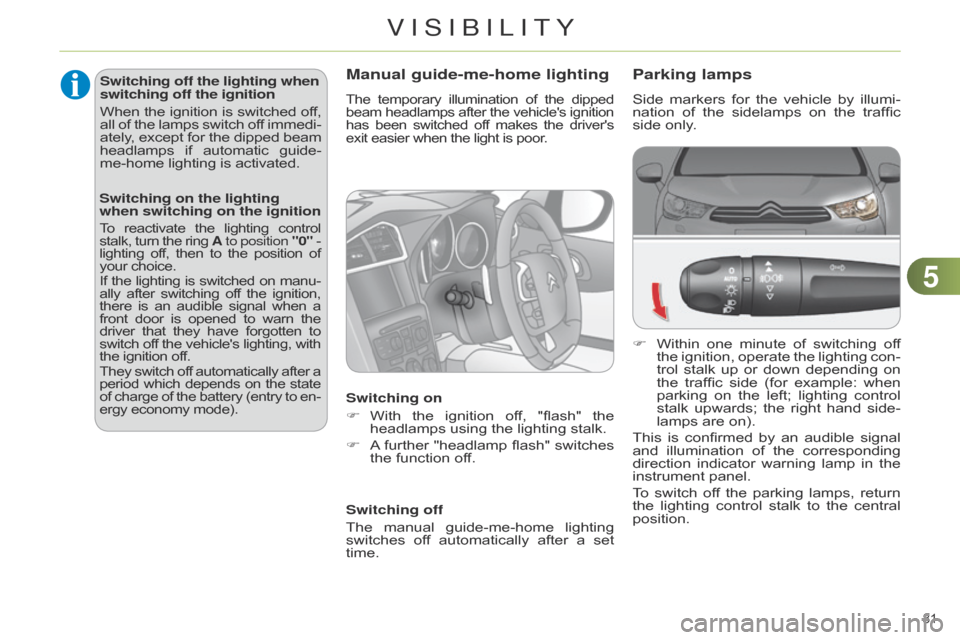
Manual guide-me-home lighting
The temporary illumination of the dipped beam
headlamps after the vehicle's ignition has
been
switched
of
f
makes
the
driver's exit
easier when the light is poor.
Switching on
F
With
the
ignition
of
f,
"flash"
the
headlamps
using the lighting stalk.
F
A further
"headlamp
flash"
switches
the
function off.
Switching off
The
manual
guide-me-home
lighting
switches
of
f
automatically
after
a
set
time.
Switching on the lighting
when switching on the ignition
To reactivate the lighting control stalk, turn the ring A to position "0" - lighting off, then to the position of your
choice.
If
the
lighting
is
switched
on
manu
-
ally
after
switching
of
f
the
ignition, there
is
an
audible
signal
when
a front
door
is
opened
to
warn
the driver
that
they
have
forgotten
to switch
of
f
the
vehicle's
lighting,
with the
ignition off.
They
switch
of
f
automatically
after
a period
which
depends
on
the
state of
charge
of
the
battery
(entry
to
en
-
ergy
economy mode).
VISIBILITY
Page 84 of 328
55
82
Automatic illumination of
headlamps
The sidelamps and dipped beam head -
lamps are switched on automatically ,
without any action on the part of the
driver
,
when
a
low
level
of
external
light
is
detected
or
in
certain
cases
of
activa
-
tion
of the windscreen wipers.
As
soon
as
the
brightness
returns
to
a
sufficient
level
or
after
the
windscreen
wipers
are
switched
of
f,
the
lamps
are
switched
off automatically.
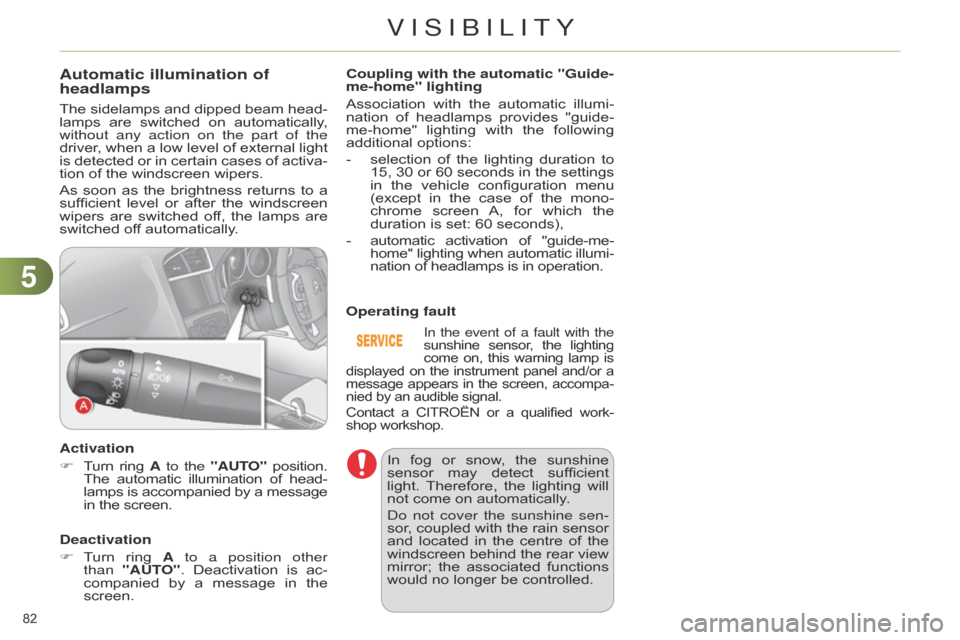
Activation
F
T
urn
ring
A to the
"AUTO"
position. The
automatic
illumination
of
head
-
lamps
is accompanied by
a
message in
the screen.
Deactivation
F
T
urn
ring
A
to a position other
than
"AUT
O".
Deactivation
is
ac
-
companied
by
a
message
in
the
screen.Coupling with the automatic "Guide-
me-home" lighting
Association
with the automatic illumi -
nation of headlamps provides "guide-
me-home"
lighting
with
the
following additional
options:
-
selection
of
the
lighting
duration
to
15,
30
or
60
seconds
in
the
settings
in
the
vehicle
configuration
menu
(except
in
the
case
of
the
mono
-
chrome
screen
A,
for
which
the
duration
is set: 60 seconds),
-
automatic
activation
of
"guide-me-
home"
lighting
when
automatic
illumi
-
nation
of headlamps is in operation.
In the event of a fault with the
sunshine sensor , the lighting come
on,
this
warning
lamp
is displayed
on
the
instrument
panel
and/or
a message
appears
in
the
screen,
accompa
-
nied
by
an
audible signal.
Contact
a
CITROËN
or
a
qualified
work
-
shop
workshop.
Operating fault
In
fog
or
snow
,
the
sunshine
sensor
may
detect
sufficient
light.
Therefore,
the
lighting
will
not
come on automatically.
d
o not cover the sunshine sen-
sor,
coupled
with
the
rain
sensor
and
located
in
the
centre
of
the
windscreen
behind
the
rear
view
mirror;
the
associated
functions
would
no longer be controlled.
VISIBILITY
Page 87 of 328
55
85
DIRECTIONAL LIGHTING
Programming
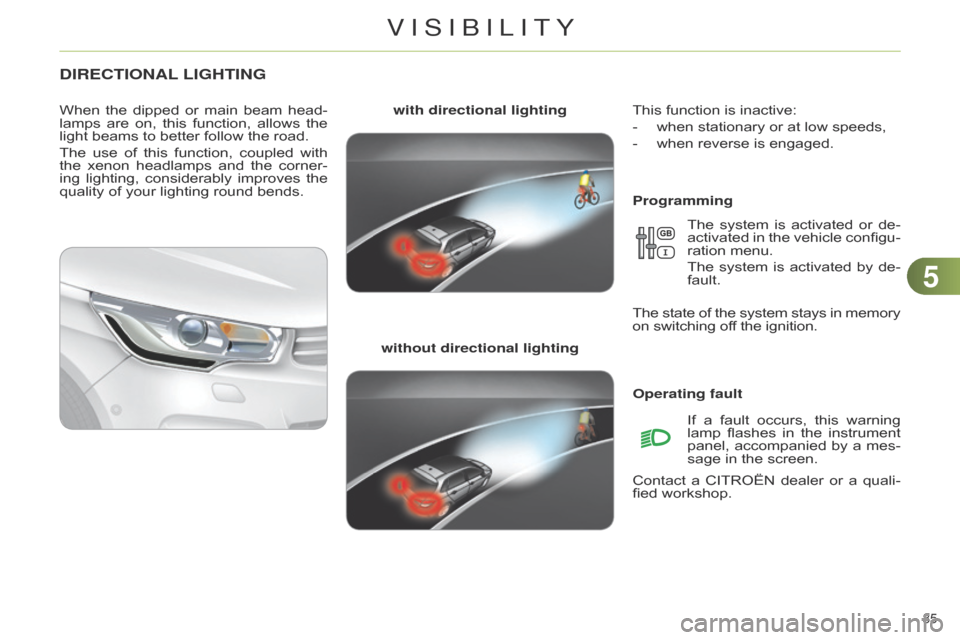
with directional lighting
without directional lighting
When
the
dipped
or
main
beam
head
-
lamps
are
on,
this
function,
allows
the
light
beams
to
better
follow
the
road.
The
use
of
this
function,
coupled
with
the
xenon
headlamps
and
the
corner
-
ing
lighting,
considerably
improves
the
quality
of
your
lighting
round
bends.
Operating faultIf
a
fault
occurs,
this
warning
lamp
flashes
in
the
instrument
panel,
accompanied
by
a
mes
-
sage
in the screen.
Contact
a
CITROËN
dealer
or
a
quali
-
fied
workshop.
This
function is inactive:
-
when
stationary or at low speeds,
-
when
reverse is engaged.
The
system
is
activated
or
de
-
activated
in
the
vehicle
configu
-
ration
menu.
The
system
is
activated
by
de
-
fault.
The
state
of
the
system
stays
in
memory on
switching off the ignition.
VISIBILITY
Page 119 of 328
88
117
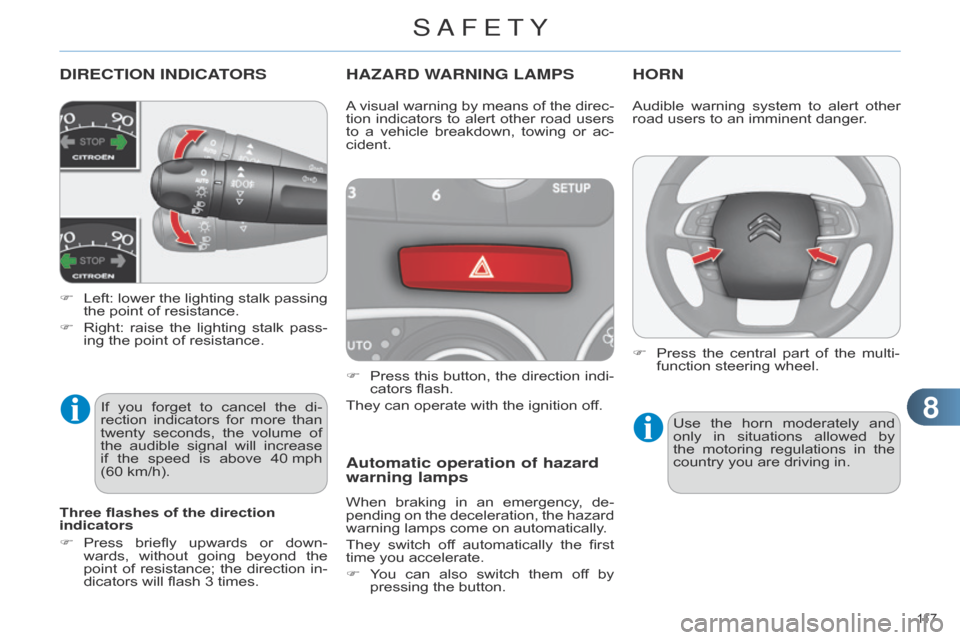
DIRECTION INDICATORS
F Left: lower the lighting stalk passing the
point of resistance.
F
Right:
raise
the
lighting
stalk
pass
-
ing
the point of resistance.
HAZARD WARNING LAMPS
F Press this button, the direction indi -
cators flash.
They
can operate with the ignition off.
Automatic operation of hazard
warning lamps
When braking in an emergency , de -
pending on the deceleration, the hazard
warning
lamps come on automatically.
They
switch
of
f
automatically
the
first
time
you accelerate.
F
Y
ou
can
also
switch
them
of
f
by
pressing
the button.
HORN
A visual warning by means of the direc -
tion indicators to alert other road users
to
a
vehicle
breakdown,
towing
or
ac
-
cident.
Three flashes of the direction
indicators
F
Press
briefly
upwards
or
down
-
wards,
without
going
beyond
the
point
of
resistance;
the
direction
in
-
dicators
will
flash
3
times.
If
you
forget
to
cancel
the
di
-
rection
indicators
for
more
than
twenty
seconds,
the
volume
of
the
audible
signal
will
increase
if
the
speed
is
above
40
mph
(60
km/h). Audible
warning system to alert other road
users to an imminent danger.
Use
the
horn
moderately
and
only
in
situations
allowed
by
the
motoring
regulations
in
the
country
you are driving in.
F
Press
the
central
part
of
the
multi
-
function
steering wheel.
SAFETY