deactivate Citroen C5 2012 (RD/TD) / 2.G Workshop Manual
[x] Cancel search | Manufacturer: CITROEN, Model Year: 2012, Model line: C5, Model: Citroen C5 2012 (RD/TD) / 2.GPages: 316, PDF Size: 9.75 MB
Page 272 of 316

270
11SCREEN MENU MAP
2
3
3
1
4
2
2
1
4
4
2
2
1
1
1
2
1
1
2
2
2
2
2
2
2
3
3
2
2
2
1
Random on all media
Re
petition
Audio settings (same as RADIO)
Activate / Deactivate AUX input
"MUSIC" MENU
Chan
ge Media
E
ject USB support
Read mode
Normal
Random All passengers
Le-Ri balance
Fr-Re balance
Auto. Volume
Update radio list
Bass
Treble
Loudness
Distribution
Driver
Night mode
Auto Day/Night
Ad
just luminosity
Set date and time
"SETUP" MENU
Displa
y configuration
Choose colour
Harmon
y
Cartography
Day mode
Speech synthesis setting
Guidance instructions volume
Select male voice / Select female voice
2
Select units
Page 285 of 316
283
04 AUDIO
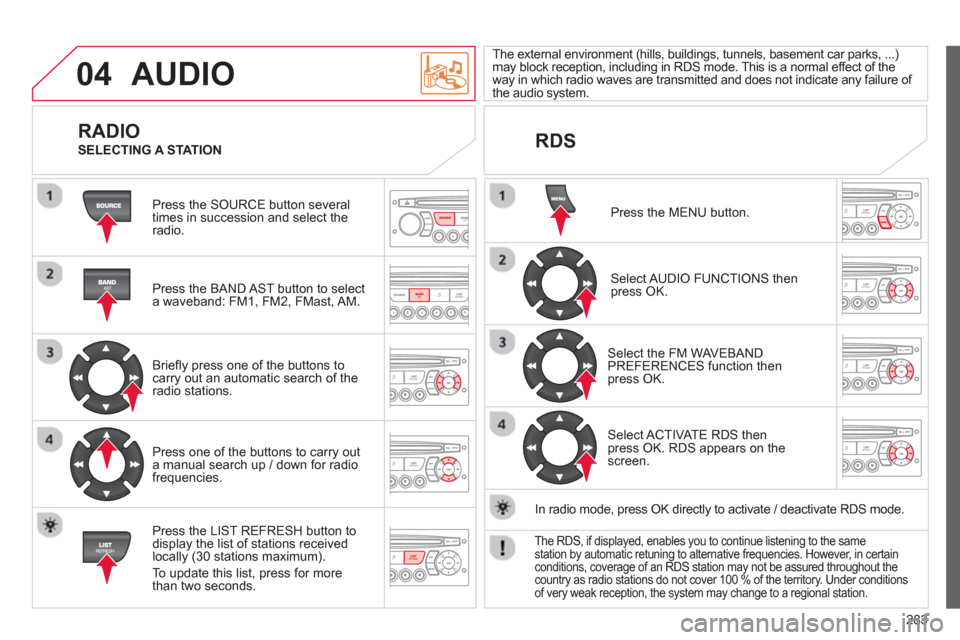
Press the SOURCE button several
times in succession and select theradio.
Press the BAND A
ST button to select
a waveband: FM1, FM2, FMast, AM.
Briefl
y press one of the buttons tocarry out an automatic search of theradio stations.
Press one o
f the buttons to carry out
a manual search up / down for radiofrequencies.
Press the LI
ST REFRESH button to
display the list of stations received
locally (30 stations maximum).
To update this list, press for more
t
han two seconds.
The external environment
(hills, buildings, tunnels, basement car parks, ...)may block reception, including in RDS mode. This is a normal effect of the
way in which radio waves are transmitted and does not indicate any failure of
the audio system.
RDS
RADIO
SELECTING A STATION
Press the MENU button.
Select AUDIO FUNCTIONS thenpress OK.
Select the FM WAVEBANDPREFERENCES function thenpress OK.
Select ACTIVATE RDS then press OK. RDS appears on thescreen.
In radio mode, press
OK directly to activate / deactivate RDS mode.
The RDS, if displayed, enables you to continue listening to the samestation by automatic retuning to alternative frequencies. However, in certainconditions, coverage of an RDS station may not be assured throughout thecountry as radio stations do not cover 100 % of the territory. Under conditions
of very weak reception, the system may change to a regional station.
Page 286 of 316
284
04AUDIO
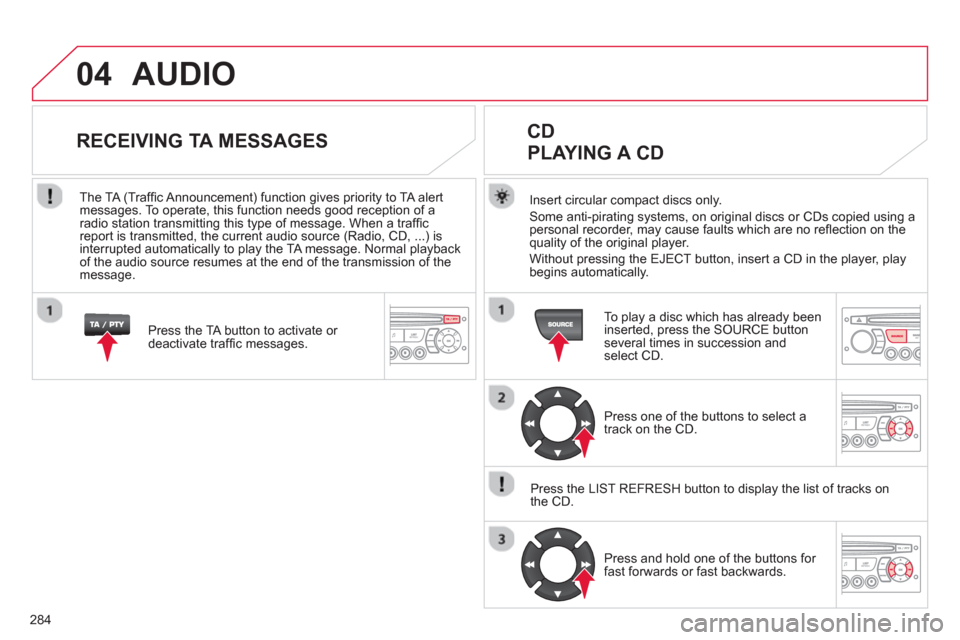
Insert circular compact discs only.
Some anti-pirating systems, on original discs or CDs copied using a
personal recorder, may cause faults which are no refl ection on the quality of the original player.
Without pressin
g the EJECT button, insert a CD in the player, playbegins automatically.
CD
PLAYING A CD
To play a disc which has already been
inserted, press the SOURCE buttonseveral times in succession andselect CD.
Pr
ess one of the buttons to select a
track on the CD.
Press the LI
ST REFRESH button to display the list of tracks on
the CD.
Pr
ess and hold one of the buttons for
fast forwards or fast backwards.
RECEIVING TA MESSAGES
Press the TA button to activate or
deactivate traffi c messages.
The TA
(Traffi c Announcement) function gives priority to TA alert messages. To operate, this function needs good reception of a
radio station transmitting this type of message. When a traffi c
report is transmitted, the current audio source (Radio, CD, ...) is
interrupted automatically to play the TA message. Normal playbackof the audio source resumes at the end of the transmission of themessage.
Page 296 of 316

294
07SCREEN MENU MAP
Press the OK dial for access to short-cut menus according to the displayon the screen: MONOCHROME C
activate / deactivate RDS
activate / deactivate REG mode
activate / deactivate radiotext
RADIO
activate / deactivate Intro
CD / MP3 CD
activate / deactivate track repeat (the entire current CD for CD, the entire current folder for MP3 CD)
activate / deactivate random play (the entire current CD for CD, the entire current folder for MP3 CD)
activate / deactivate track repeat (of the current folder / artist / genre / playlist)
USB
activate / deactivate random play(of thecurrent folder / artist / genre / playlist)
1
1
1
1
1
1
1
1
Page 297 of 316
295
07 SCREEN MENU MAP
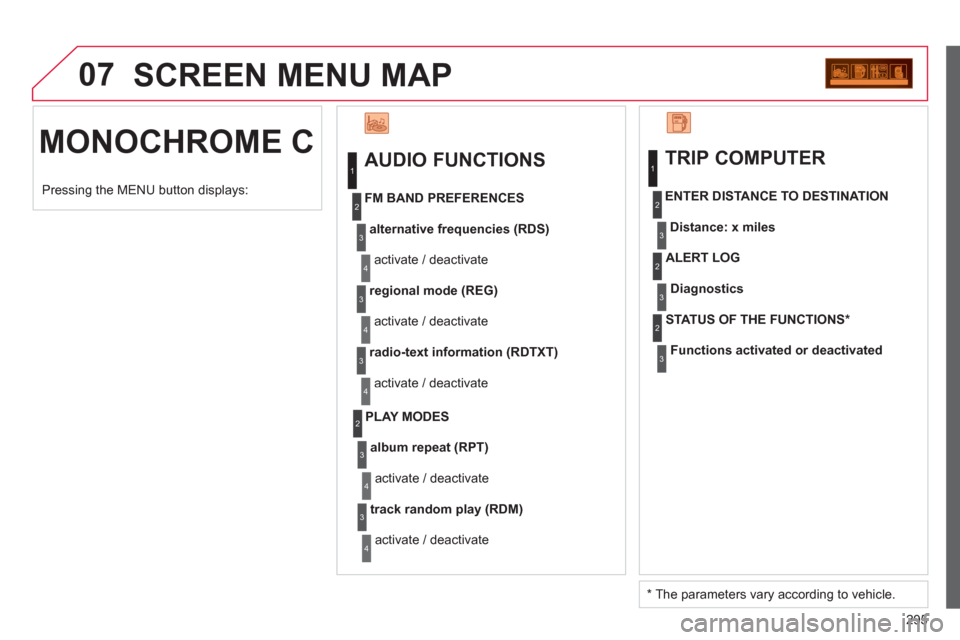
MONOCHROME C
AUDIO FUNCTIONS
alternative frequencies (RDS)
activate / deactivate
FM BAND PREFERENCES
regional mode (REG)
activate / deactivate
radio-text information (RDTXT)
activate / deactivate
1
2
3
4
3
4
3
4
PLAY MODES
album repeat (RPT)
activate / deactivate
track random pla
y (RDM)
activate / deactivate
2
3
4
3
4
TRIP COMPUTER
Distance: x miles ENTER DISTANCE TO DESTINATION
Dia
gnostic s
ALERT LOG
Functions activated or deactivated STATUS OF THE FUNCTIONS *
1
2
3
3
2
3
2
Pressing the MENU button displays:
*
The parameters vary according to vehicle.
Page 300 of 316
298
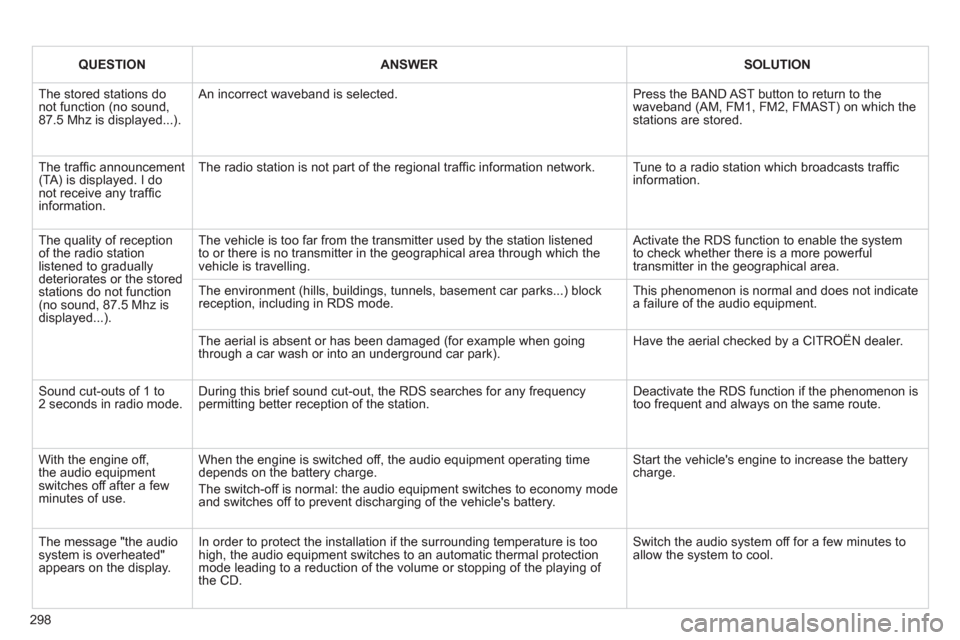
QUESTIONANSWERSOLUTION
The stored stations donot function (no sound, 87.5 Mhz is displayed...).
An incorrect waveband is selected.
Press the BAND AST button to return to the waveband (AM, FM1, FM2, FMAST) on which thestations are stored.
The traffi c announcement(TA) is displayed. I donot receive any traffi c information.
The radio station is not part of the regional traffi c information network.
Tune to a radio station which broadcasts traffi c information.
The quality of receptionof the radio station listened to graduallydeteriorates or the stored stations do not function(no sound, 87.5 Mhz is displayed...).
The vehicle is too far from the transmitter used by the station listenedto or there is no transmitter in the geographical area through which the vehicle is travelling.
Activate the RDS function to enable the system to check whether there is a more powerful transmitter in the geographical area.
The environment (hills, buildings, tunnels, basement car parks...) block reception, including in RDS mode. This phenomenon is normal and does not indicate a failure of the audio equipment.
The aerial is absent or has been damaged (for example when goingthrough a car wash or into an underground car park).
Have the aerial checked by a CITROËN dealer.
Sound cut-outs of 1 to2 seconds in radio mode.During this brief sound cut-out, the RDS searches for any frequency permitting better reception of the station.
Deactivate the RDS function if the phenomenon is too frequent and always on the same route.
With the engine off, the audio equipment switches off after a few minutes of use.
When the engine is switched off, the audio equipment operating timedepends on the battery charge.
The switch-off is normal: the audio equipment switches to economy mode and switches off to prevent discharging of the vehicle's battery.
Start the vehicle's engine to increase the batterycharge.
The message "the audio system is overheated" appears on the display.
In order to protect the installation if the surrounding temperature is toohigh, the audio equipment switches to an automatic thermal protectionmode leading to a reduction of the volume or stopping of the playing of the CD.
Switch the audio system off for a few minutes toallow the system to cool.